
Learn English cheaply and effectively.
English can be learned cheaply, sometimes even for free. In this article I will talk about personal experience: what software and resources on the Internet turned out to be the most effective for me, and how to use them correctly.
If you are not ready to spend at least 2 hours a day in English, then you can not read further.
An ideal way to learn a language is to travel to an English-speaking country and study there for a year. If mom, dad and wife cannot allow you this, then this article is for you.
To study, you will need a computer with a browser and a phone (my examples will be for Android, but for iOS you will find analogues of applications). Part of the exercises can be done on the way to work, but not at the wheel.
Is free.
Starting level: taught English at school, remember the alphabet.
If you do not know how to translate the phrases “I have to go to school” and “I used to go to school”, then you need to start with the audio course “Pimsleur English for Russian Speakers”, 90 lessons of 20 minutes. The course is very effective, and this is not only my review.
How to use : the announcer speaks the phrase in Russian, your task is to quickly build the phrase in English and speak it. Just listening to this course is not enough, you must definitely speak, at least in a whisper. I did this without any problems on the way to work, including in the subway.
Where to get:I doubt that these records can be legally purchased. The course is quite old, apparently it was transferred to MP3 from audio tapes, the quality is usually 32kbps (this is enough). You can easily find the full course on the Internet.
In parallel, we begin to learn words.
Free first 3000 words, then $ 30 per year.
Starting level: taught English at school, remember the alphabet.
To communicate reasonably well and read technical documentation fluently, it’s enough to know about 3,000 words. For an interview for a programmer somewhere in Germany or England, 5,000 is enough. For free communication, 8-12 thousand are already required.
On this site you can roughly estimate how many words you know now (mark familiar words and press Continue, the test takes about 10 minutes). About 10 words can be learned per day, so do not expect to raise the level from 1000 to 12000 even in a year.
To replenish my vocabulary, I use the Memrise resource .
How to start:register on the site, then you need to add Courses to your personal account. On this resource, tons of pre-prepared courses, some even from the developers of the site, but who needs these tons?
I recommend the following courses:
How to learn: every day we “Learn” new words in the course, preferably 50-100 words each. Then we spend another hour on the “Repetition” of previously learned words in the course (about 300 words).
You know some words ironically, and you don’t want to meet them at the “Repetition”, they must be blocked for viewing. To do this, open the page with the course in the browser version , then proceed to viewing the Lesson , and find the small “Ignore” button. After that, we mark all the unwanted words and at the very bottom of the page click the big Save button.
Paid version:Memrise has a paid account, I’ll tell you about its only usefulness - “Difficult words”. When you “Repeat” the words, the most erroneous for you are marked as “Difficult”. In the paid version, you can open a lesson where only those same “Difficult” words will be issued for repetition. If you plan to learn no more than 3000 words, then the “Difficult Words” section is definitely not needed for you, just the usual “Repetition” + “Ignore” will be enough. If you learn words only from your phone, then you don’t have to buy a paid account at all, because in mobile versions of Memrise, the "Difficult Words" section is simply disgusting.
If you still decide to buy an annual subscription - do not rush with this. With the active use of the resource, over time, offers “Buy an annual subscription at a discount” will begin to come to your mail. First, the discount will be 25%, then 30. When it reaches 50% - you can agree.
UPD (02/06/2017): Attention! For a paid account, auto-renewal applies! If it is not disabled (account settings, “Not happy with Pro? Cancel”), then a year later the amount will be automatically debited without any discounts. You can return the money within 30 days, but you will have to be confused, especially if you bought a subscription through the Apple Store.
UPD (02/06/2017): Update by zartarn: In Google Play and the Apple Store, the cost of a paid subscription may differ, at the time of publication of these lines it is $ 22 versus $ 30 We
optimize the browser version: when learning and repeating words on a PC, you will be asked:
The only effective way to learn words is to see the Russian word and type in the English version. Only this will make your lazy brain really remember the word. Let's customize the browser version. For this:
UPD 02/06/2017:
Words can also be learned using the Anki application. Read about Anki herself below. The “17000+ words” cards were prepared by a respected GEnergetik user , they can be downloaded here:
In parallel, we begin to learn to build phrases.
Is free.
Starting level: you know 1000 words, you can build simple sentences.
Vocabulary is fine, but catastrophically small. What pretext should I use in the phrase “I'm on the bus”: on, in, at or something else? And there are thousands of such nuances, there are uniform rules, but mostly exceptions. Only constant practice will help you here.
You can try reading English books, for 2 years I mastered all parts of Harry Potter.
There was little sense, but it was interesting.
The most effective way for me was - Anki + Tatoeba.
What it is:you are given a phrase in Russian, you must quickly translate it into English and speak it. After that, press the button “Show answer” and see the original English version, and also hear its pronunciation. We realize whether we have translated ourselves correctly and give ourselves a rating:
How to start: install the AnkiDroid application on Android. For iOS, there is also an analogue (AnkiApp), but unfortunately I have no experience in using it, you will have to figure it out on your own.
Now you need to download the cards. I downloaded Tatoeba source files, converted them to Anki format, and even fixed some of the translation errors. You can take the result here .
Download the file and place it in the phone’s memory: “Internal storage” - “AnkiDroid”, we throw it right to the root. Now the most unpleasant thing: you need to import cards. It is done with a couple of clicks of the finger on the screen (Menu button - Import), but the operation itself can drag on for a couple of hours, and if the screen goes blank, the operation will freeze.
Therefore, we connect the phone to charging, set it to “do not turn off the screen for 30 minutes” (Settings - Display - Hibernation), and sit every 20 minutes poking on the screen. AnkiDroid is not adapted to such large volumes (pathetic 170 thousand cards).
If you have iOS, the import process will be different, unfortunately I have not tried it.
How to setup:(only for Android, for iOS did not try) we launch the application, do a long tap at the rate of "Russian-English Tatoeba", the settings menu for the "deck" opens. We select "Deck Options" in it, then select "New cards" and set the value to "New cards per day", I recommend setting 75.
Go back, select the "Repeats" item and set the value to the item "Maximum number of views per day", I also recommend 75.
The last setting is for Anki to read phrases for you: the main menu - Settings - Advanced - Text to speech, put a checkmark here. Now we start the course itself and Anki will ask you what language to use to read Russian phrases: choose from the long list "None." Then, when an English answer appears, Anki will ask you about English phrases, and already indicate English US or UK.
How to teach: finally you became friends with Anki and you can teach. Everything is simple here, Russian phrases appear, you translate them into English, check with the English original. It is highly advisable to spend about an hour a day on this, going through 75 new words and repeating 75 old ones. The better you manage to translate a phrase, the less often it will appear in repetitions.
There are many phrases, there is no purpose to remember each of them. It’s just a phrase building exercise.
Sometimes you will come across phrases whose grammar you do not understand. Write them down separately, and later seek clarification on the Internet or from teachers.
Is free.
Starting level: you know 3000 words.
So, you know 3,000+ words, but watch the movie in English dubbing and don’t understand anything. I understand you.
We begin the training of the Listening skill. To do this, people came up with the so-called podcasts: short audio recordings about the English language. Often there they explain the grammar, or offer to memorize words - all these are side effects, the main thing is to learn to listen to other people's voices and understand the language.
What podcasts are best to listen to? Various! The more new voices you hear, the better.
Useful resources that I use:
Paid resource I used: EnglishPod . This is more than 300 podcasts for 10-15 minutes, very easy to listen to, everything is fun and with humor. The disadvantage is that there are not enough votes there; for 300 lessons, 15 people will be typed. The resource is currently closed. You can buy their recordings or simply download them in other sources - this is on everyone’s conscience.
Expensive, from $ 10 per hour.
Starting level: you know 3000 words, you can build phrases of medium complexity.
Why do we need a teacher if we already use a bunch of programs and listen to podcasts? For at least two things:
No group activities, this is a waste of time. Personal lessons are more expensive, but 100% of the time will be devoted to you, and you will deal only with those questions that are not clear to you. 2 lessons per week is more than enough.
I practice with a native speaker on Skype at a time convenient for me. I select teachers at Italki , everything is simple and convenient there.
If you have free time after everything that I have listed above - read books, watch movies, look for yourself English-speaking friends on PenPal world and correspond with them (for free).
You stay here, you all the best, good mood and health.
The article was updated on 02/06/2017:
Update as of February 17, 2017:
If you have broken Greasemonkey scripts for Memrise, then you must do the following:
If you are not ready to spend at least 2 hours a day in English, then you can not read further.
An ideal way to learn a language is to travel to an English-speaking country and study there for a year. If mom, dad and wife cannot allow you this, then this article is for you.
To study, you will need a computer with a browser and a phone (my examples will be for Android, but for iOS you will find analogues of applications). Part of the exercises can be done on the way to work, but not at the wheel.
For beginners
Is free.
Starting level: taught English at school, remember the alphabet.
If you do not know how to translate the phrases “I have to go to school” and “I used to go to school”, then you need to start with the audio course “Pimsleur English for Russian Speakers”, 90 lessons of 20 minutes. The course is very effective, and this is not only my review.
How to use : the announcer speaks the phrase in Russian, your task is to quickly build the phrase in English and speak it. Just listening to this course is not enough, you must definitely speak, at least in a whisper. I did this without any problems on the way to work, including in the subway.
Where to get:I doubt that these records can be legally purchased. The course is quite old, apparently it was transferred to MP3 from audio tapes, the quality is usually 32kbps (this is enough). You can easily find the full course on the Internet.
In parallel, we begin to learn words.
Learning the words
Free first 3000 words, then $ 30 per year.
Starting level: taught English at school, remember the alphabet.
To communicate reasonably well and read technical documentation fluently, it’s enough to know about 3,000 words. For an interview for a programmer somewhere in Germany or England, 5,000 is enough. For free communication, 8-12 thousand are already required.
On this site you can roughly estimate how many words you know now (mark familiar words and press Continue, the test takes about 10 minutes). About 10 words can be learned per day, so do not expect to raise the level from 1000 to 12000 even in a year.
To replenish my vocabulary, I use the Memrise resource .
How to start:register on the site, then you need to add Courses to your personal account. On this resource, tons of pre-prepared courses, some even from the developers of the site, but who needs these tons?
I recommend the following courses:
- Frequency dictionary of 12,527 words (English-Russian) , I started with it. The course was created long ago, it has many users and few errors.
- 17,000+ modern popular words is an alternative that I myself created. Words are sorted in order of frequency of use according to Google , i.e. you can study this course no matter how few words you know now.
How to learn: every day we “Learn” new words in the course, preferably 50-100 words each. Then we spend another hour on the “Repetition” of previously learned words in the course (about 300 words).
You know some words ironically, and you don’t want to meet them at the “Repetition”, they must be blocked for viewing. To do this, open the page with the course in the browser version , then proceed to viewing the Lesson , and find the small “Ignore” button. After that, we mark all the unwanted words and at the very bottom of the page click the big Save button.
Paid version:Memrise has a paid account, I’ll tell you about its only usefulness - “Difficult words”. When you “Repeat” the words, the most erroneous for you are marked as “Difficult”. In the paid version, you can open a lesson where only those same “Difficult” words will be issued for repetition. If you plan to learn no more than 3000 words, then the “Difficult Words” section is definitely not needed for you, just the usual “Repetition” + “Ignore” will be enough. If you learn words only from your phone, then you don’t have to buy a paid account at all, because in mobile versions of Memrise, the "Difficult Words" section is simply disgusting.
If you still decide to buy an annual subscription - do not rush with this. With the active use of the resource, over time, offers “Buy an annual subscription at a discount” will begin to come to your mail. First, the discount will be 25%, then 30. When it reaches 50% - you can agree.
UPD (02/06/2017): Attention! For a paid account, auto-renewal applies! If it is not disabled (account settings, “Not happy with Pro? Cancel”), then a year later the amount will be automatically debited without any discounts. You can return the money within 30 days, but you will have to be confused, especially if you bought a subscription through the Apple Store.
UPD (02/06/2017): Update by zartarn: In Google Play and the Apple Store, the cost of a paid subscription may differ, at the time of publication of these lines it is $ 22 versus $ 30 We
optimize the browser version: when learning and repeating words on a PC, you will be asked:
- see the English word and in the multi select select the correct Russian version
- see the Russian word and in the multi select select the correct English version
- hear the English word and type the English version
- see the Russian word and type the English version
The only effective way to learn words is to see the Russian word and type in the English version. Only this will make your lazy brain really remember the word. Let's customize the browser version. For this:
install and configure user scripts
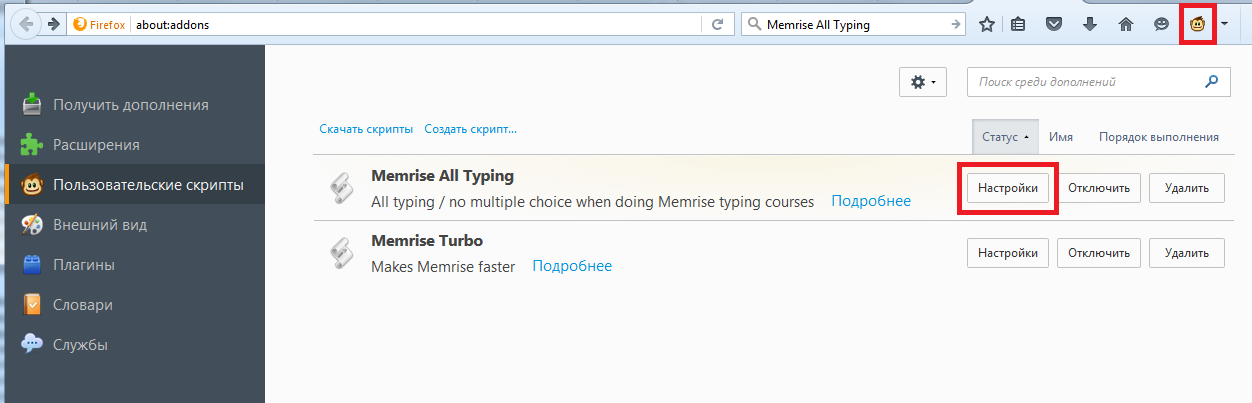
The settings dialog will open, at the very bottom we click the big button “Edit this script”.
A scary window opens with a bunch of code. We need to find three lines:
And replace all false with true:
At the top of the editing window, click the small Save button, and close everything.
UPD from 02/06/2017:
When running the Memrise turbo script, you will most likely be annoyed by the voice acting that will overlap each other with a quick transition between words. To get rid of this effect, you need to edit the Memrise turbo script (the editing process is similar to that described above):
you need to find and delete / comment out the following line:
MEMRISE.audioPlayer.stop = $ .noop;
The script can be turned on / off, an icon with a monkey face at the top of the screen is designed for this.
With this optimization, the speed of learning and repetition increases 3-4 times. - We put the Firefox browser (Chrome is also possible, but I did not use it and I will not describe it)
- Install the add-on - Greasemonkey
- We install a script that turns on the "Just Print" mode, for this we go to the GitHub developer page , there we find the inscription "Then add the script using the following link:" and actually click on the link. Almost immediately, a Greasemonkey window appears that prompts you to Install a script
- We install another script that accelerates learning and repetition: as soon as you type the word correctly, it will automatically move on to the next, without having to press Enter or the “Next” button. I really love this script, I recommend it. We install in the same way, go to the developer's page and click on the link after the text “Installation link:”
- Last edit. In Firefox, open in the main menu “Tools” - “Add-ons”, in the left menu we find the face of the monkey with the inscription “User scripts”. Now in the center of the screen we see two of our installed scripts: Memrise all typing and Memrise turbo. To the right of Memrise all typing, click the "Configure" button
The settings dialog will open, at the very bottom we click the big button “Edit this script”.
A scary window opens with a bunch of code. We need to find three lines:
    var INCLUDE_REVIEWS = true;
    var INCLUDE_MISTAKE_REVIEWS = false;
    var INCLUDE_LEARNING = false;
And replace all false with true:
    var INCLUDE_REVIEWS = true;
    var INCLUDE_MISTAKE_REVIEWS = true;
    var INCLUDE_LEARNING = true;
At the top of the editing window, click the small Save button, and close everything.
UPD from 02/06/2017:
When running the Memrise turbo script, you will most likely be annoyed by the voice acting that will overlap each other with a quick transition between words. To get rid of this effect, you need to edit the Memrise turbo script (the editing process is similar to that described above):
you need to find and delete / comment out the following line:
MEMRISE.audioPlayer.stop = $ .noop;
The script can be turned on / off, an icon with a monkey face at the top of the screen is designed for this.
UPD 02/06/2017:
Words can also be learned using the Anki application. Read about Anki herself below. The “17000+ words” cards were prepared by a respected GEnergetik user , they can be downloaded here:
- 17k + English words for Russian Speakers UK - only British English, i.e. words found in American English are excluded. There are two types of cards in the deck: with the input of a word in the text field for translation and with the input of the word in the text field by sound.
- 17k + English words for Russian Speakers US - same as previous only with American English
- Cards with input and pairs in one deck without voice acting US + UK;
- Only pairs without sound US + UK;
- Only input without sound US + UK.
In parallel, we begin to learn to build phrases.
Learning to build phrases
Is free.
Starting level: you know 1000 words, you can build simple sentences.
Vocabulary is fine, but catastrophically small. What pretext should I use in the phrase “I'm on the bus”: on, in, at or something else? And there are thousands of such nuances, there are uniform rules, but mostly exceptions. Only constant practice will help you here.
You can try reading English books, for 2 years I mastered all parts of Harry Potter.
There was little sense, but it was interesting.
The most effective way for me was - Anki + Tatoeba.
What it is:you are given a phrase in Russian, you must quickly translate it into English and speak it. After that, press the button “Show answer” and see the original English version, and also hear its pronunciation. We realize whether we have translated ourselves correctly and give ourselves a rating:
Picture
And so more than 100 thousand phrases of varying complexity. Is free. Many thanks to the developers of the Tatoeba project . Unfortunately, in some places you will find incorrect translation of phrases, or outdated phrases, but 90% of the material is of excellent quality. The vocabulary there is small, if you know at least 1000 words, you can safely proceed to Anki. How to start: install the AnkiDroid application on Android. For iOS, there is also an analogue (AnkiApp), but unfortunately I have no experience in using it, you will have to figure it out on your own.
Now you need to download the cards. I downloaded Tatoeba source files, converted them to Anki format, and even fixed some of the translation errors. You can take the result here .
Download the file and place it in the phone’s memory: “Internal storage” - “AnkiDroid”, we throw it right to the root. Now the most unpleasant thing: you need to import cards. It is done with a couple of clicks of the finger on the screen (Menu button - Import), but the operation itself can drag on for a couple of hours, and if the screen goes blank, the operation will freeze.
Therefore, we connect the phone to charging, set it to “do not turn off the screen for 30 minutes” (Settings - Display - Hibernation), and sit every 20 minutes poking on the screen. AnkiDroid is not adapted to such large volumes (pathetic 170 thousand cards).
If you have iOS, the import process will be different, unfortunately I have not tried it.
How to setup:(only for Android, for iOS did not try) we launch the application, do a long tap at the rate of "Russian-English Tatoeba", the settings menu for the "deck" opens. We select "Deck Options" in it, then select "New cards" and set the value to "New cards per day", I recommend setting 75.
Go back, select the "Repeats" item and set the value to the item "Maximum number of views per day", I also recommend 75.
The last setting is for Anki to read phrases for you: the main menu - Settings - Advanced - Text to speech, put a checkmark here. Now we start the course itself and Anki will ask you what language to use to read Russian phrases: choose from the long list "None." Then, when an English answer appears, Anki will ask you about English phrases, and already indicate English US or UK.
How to teach: finally you became friends with Anki and you can teach. Everything is simple here, Russian phrases appear, you translate them into English, check with the English original. It is highly advisable to spend about an hour a day on this, going through 75 new words and repeating 75 old ones. The better you manage to translate a phrase, the less often it will appear in repetitions.
There are many phrases, there is no purpose to remember each of them. It’s just a phrase building exercise.
Sometimes you will come across phrases whose grammar you do not understand. Write them down separately, and later seek clarification on the Internet or from teachers.
Learning to listen
Is free.
Starting level: you know 3000 words.
So, you know 3,000+ words, but watch the movie in English dubbing and don’t understand anything. I understand you.
We begin the training of the Listening skill. To do this, people came up with the so-called podcasts: short audio recordings about the English language. Often there they explain the grammar, or offer to memorize words - all these are side effects, the main thing is to learn to listen to other people's voices and understand the language.
What podcasts are best to listen to? Various! The more new voices you hear, the better.
Useful resources that I use:
- BBC , a lot of audio recordings that are accompanied by text. You can do it on the site, you can download the whole set of records from torrents
- TED is an excellent resource. For each entry there are subtitles in English, and often in Russian. The only drawback is the video; you cannot listen to it while holding the phone in your pocket. TED has applications for Android and iOS, you can upload video to the phone’s memory.
Paid resource I used: EnglishPod . This is more than 300 podcasts for 10-15 minutes, very easy to listen to, everything is fun and with humor. The disadvantage is that there are not enough votes there; for 300 lessons, 15 people will be typed. The resource is currently closed. You can buy their recordings or simply download them in other sources - this is on everyone’s conscience.
We are engaged with the teacher
Expensive, from $ 10 per hour.
Starting level: you know 3000 words, you can build phrases of medium complexity.
Why do we need a teacher if we already use a bunch of programs and listen to podcasts? For at least two things:
- Remove the barrier of communication. It is very difficult to overpower yourself and start speaking English, even if you already know how to read and write. About 8 lessons solve this problem (1 astronomical hour each)
- Explain the grammar. As you walk through lessons in Anki, you will come across strange phrases, the teacher will explain how to translate them and give other examples. This is much more effective than trying to find them on the Internet yourself.
No group activities, this is a waste of time. Personal lessons are more expensive, but 100% of the time will be devoted to you, and you will deal only with those questions that are not clear to you. 2 lessons per week is more than enough.
I practice with a native speaker on Skype at a time convenient for me. I select teachers at Italki , everything is simple and convenient there.
If you have free time after everything that I have listed above - read books, watch movies, look for yourself English-speaking friends on PenPal world and correspond with them (for free).
You stay here, you all the best, good mood and health.
The article was updated on 02/06/2017:
- Features of paying account in Memrise
- Cards for Anki by GEnergetik
- Optimization for a script in Memrise
Update as of February 17, 2017:
If you have broken Greasemonkey scripts for Memrise, then you must do the following:
- Open both scripts for editing
- Find at the very beginning of each script lines like
// match http: ... - Replace http with https in them