The whole truth about dead pixels
Dead pixels are one of the most pressing issues, often becoming the reason for a stormy showdown with suppliers of LCD monitors, tablets and smartphones. Managers of fashionable stores are often in a hurry to disown this problem, referring to the regulations of official manufacturers. On what are “broken” pixels, and how to deal with them “one on one”, we will stop in this article.
Check and treat broken pixels
We do not buy a monitor, like a personal computer, for more than one year. But, unlike a PC, which can always be upgraded if desired, there is no possibility to improve the qualitative characteristics of the image with hardware. That is why, evaluating the functionality and quality of the picture of a potential candidate for the position of a home monitor, we approach the issue of model selection extremely responsibly, investing in the new product to the maximum and for a long time.
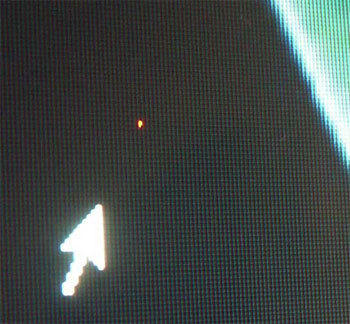
And now, all the accents are finally set, a brand new monitor is bought and connected, shows all the signs of life, pleases the eye with image quality and color depth. Of course, you are happy with the purchase and everything would be fine, but something confuses, distracts your attention and does not allow you to perceive the picture in its entirety and entertainment. Glance now and then slides to a dark, light or colored dot that retains its color, regardless of the broadcast picture. Well, get acquainted, gentlemen, you are extremely lucky: before you is His Majesty “Broken Pixel”!
Problem
The image that we see and perceive on the LCD monitor as a whole, in fact, is formed of many points-clusters, called "pixels". In turn, the full completeness of the color gamut can be achieved by only three subpixels - red, blue and green. In models of LCD monitors with an active matrix, each pixel is assigned an individual thin-film transistor (Thin Film Transistor - TFT), the damage of which will appear on the screen as a black inactive dot, which is called a “broken” pixel. And in this case, the problem can only be solved by replacing the transistor in a laboratory environment and, alas, an alternative is not supposed here.
If you observe a bright spot on a dark background - do not rush to despair! Quite often, the cause of the appearance of broken subpixels is their “freezing” in a certain intermediate position, which externally manifests itself in the absence of their reaction to a changing picture. You can solve the problem at home, without fear of harming the monitor programmatically, or by performing some physical manipulation.
What is amateur performance if the monitor is under warranty?
Absolutely normal question asked by everyone who has already managed to get acquainted with our problem, but is not yet familiar with the likely reaction of the store. It turns out here, even despite the warranty obligations of the service, the nuances and differences are very likely.
Defective pixels? - Complain to the Stockholm arbitration!

The real cause of the dispute is the manufacturers themselves, which have officially established tolerance for a certain number of “allowed” broken pixels on monitors of the corresponding standards - the ISO-13406 regulation.
In accordance with the accepted tolerances, monitors are divided into 4 classes:
1st class - dead pixels are practically excluded, warranty repair and replacement in case of detection is required and is carried out immediately;
2nd class - the most common option, allowing the presence of 2 defects of types I and II;
3rd class - budget models that allow the presence of 5 broken pixels of type I, 15 of them are of type II, 50 are of type III.
4th class - low-quality monitors that allow the presence of 50, 150 and up to 500 (!) Defects of type I, II and III, respectively.
Note:
I-th type - a white pixel viewed on a black background;
II type - black pixel on a white background;
III type - red, blue, green pixels.
It becomes clear that despite the guarantee, the only white pixel in the center of the screen of the 2nd class monitor that annoys you remains your problem, and the best way to prevent this situation is to connect and test the display before calculating or during the period available for exchange in accordance with consumer protection law.
Monitor check
Visual assessment of the quality of the picture in the cabin often does not allow an unambiguous conclusion about the presence of broken subpixels, and even more so - to determine the presence of moire, to evaluate the readability of moving text, the reaction speed of the matrix and other significant parameters. And why, if it is much more reliable, easier and more efficient to check the monitor using specialized utilities that will allow you to get all the data in full, and most importantly, on time. Fortunately, the choice of free programs that allow us to achieve our goal without spending any money is going off scale today.
IsMyLcdOK
IsMyLcdOK is a portable universal utility with a simple intuitive interface that allows you to check a TFT LCD monitor or LED LCD monitor for dead pixels in a few minutes.
The program does not require installation, runs on any portable devices and computers running Microsoft Windows: Servers 2000/2003/2005 Win 98 / XP / Vista / 7/8 / 8.1 / 10 x64 / x86 from removable media. This will allow you to avoid unnecessary disputes with the store manager, who is not always interested in the test results.
The working menu is available immediately after the test run of the program. Switching between test modes is carried out by selecting the corresponding numeric keys.
Program window
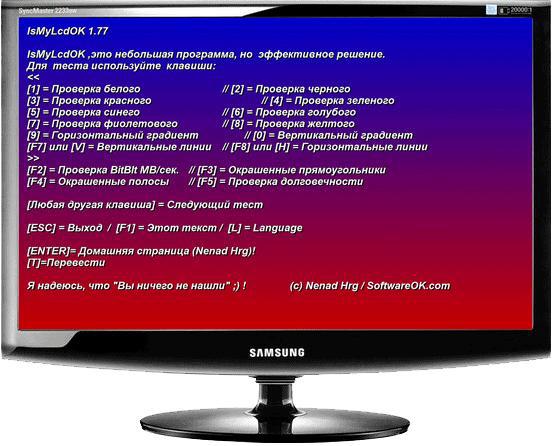
The program allows you to evaluate the image processing speed, the refresh rate of the screen and the rectangles painted in different colors of the strip. By tracking alternately changing color and monochrome images and following the simplest instructions, you can accurately and easily detect broken pixels on the reference colors, determine their type and number.
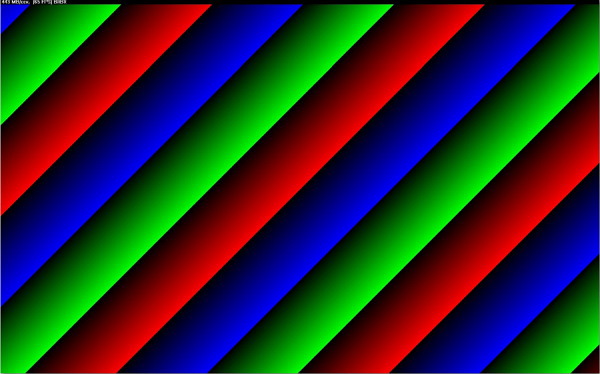
Available colors allow you to easily find broken pixels or make sure they are missing
NOKIA MONITOR TEST 2.0
One of the most popular utilities in this category, which has advanced features for checking the quality of the LCD monitor, including a test for the problem of dead pixels we are interested in, as well as templates that allow you to evaluate parameters such as resolution, moire, contrast, focus, brightness, readability text, geometry accuracy, color reproduction and much more.
Program window
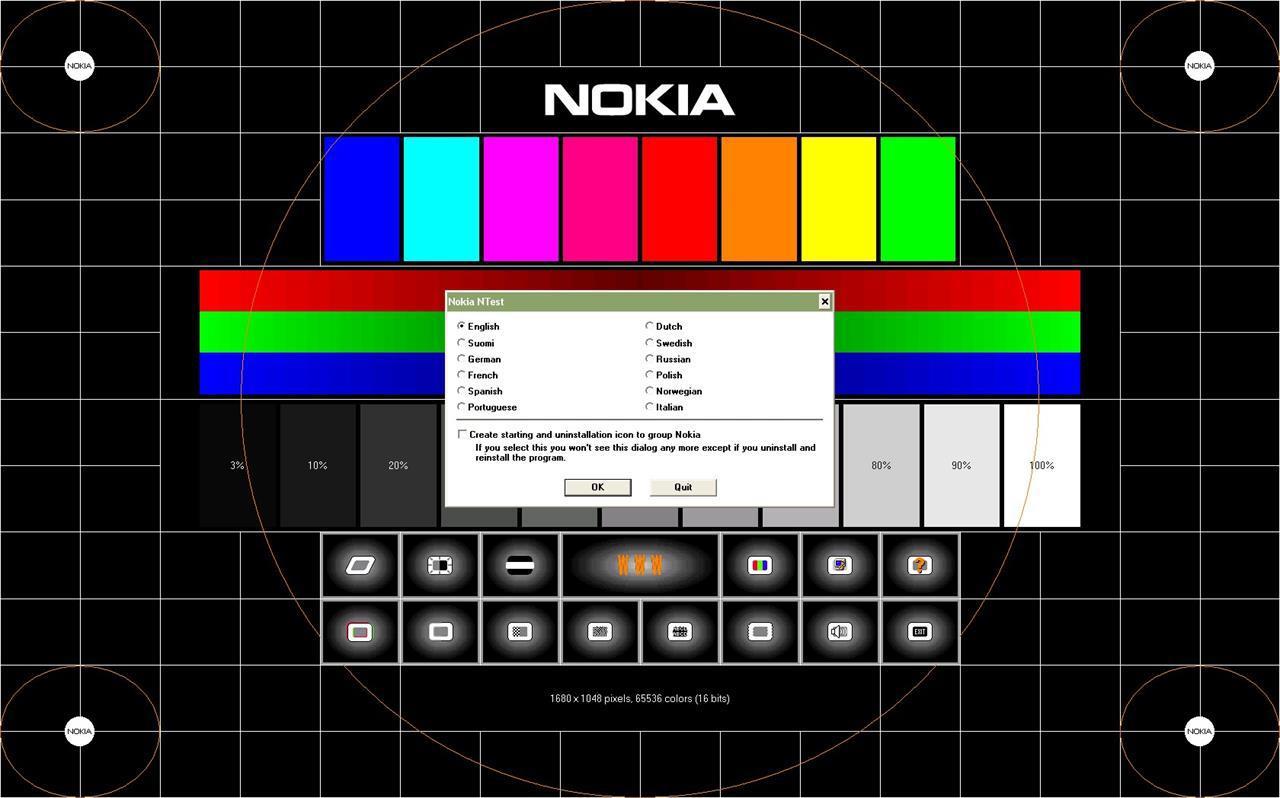
Using Nokia Monitor Test, you can test not only the image quality of monitors, but also the latest generation video cards. The advantages of the program are the power of functionality, the simplicity of the interface, the miniature size of the distribution kit, the ability to run from removable media. To get all the data necessary for the analysis, you just need to move the left mouse button on the active menu buttons on the main screen.
System requirements: Servers 2000/2003/2005 Win 98 / XP / Vista Windows7 Windows8 x64 / x86. No installation required. The size of the distribution is 1.15 Mb. The Russian version is present.
PixPerAn 1.011e
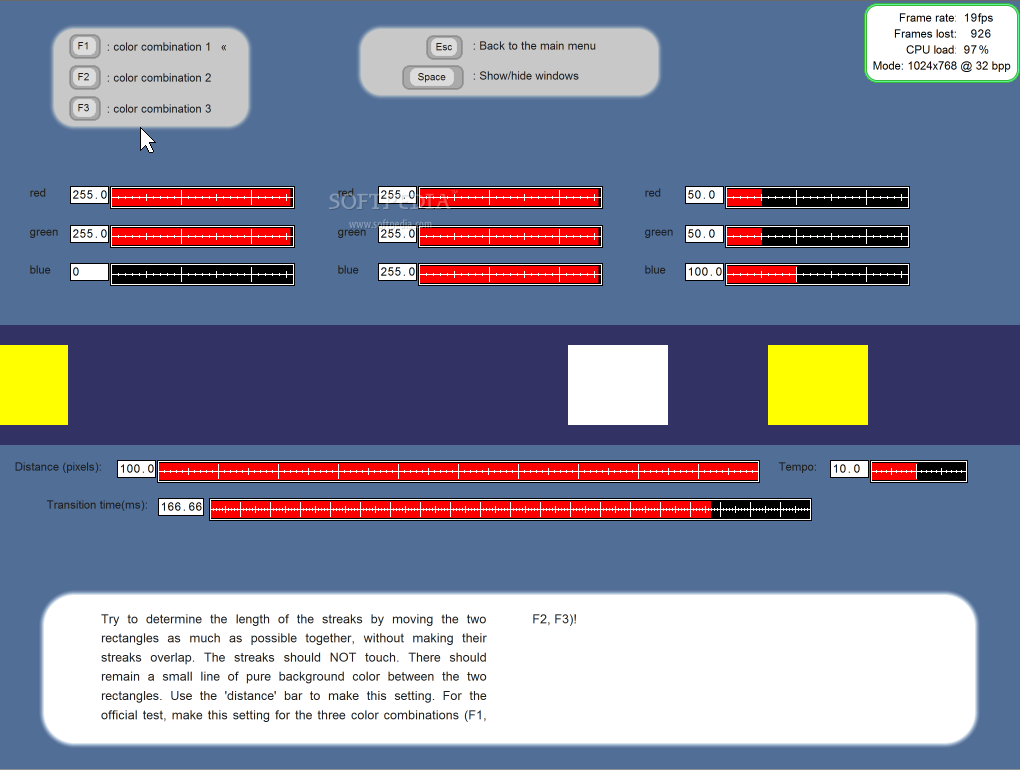
The developers of this program cannot be denied originality. Unlike more or less ascetic or, on the contrary, colorful static interfaces, here the key parameters of the quality of the monitor are checked on a dynamically changing picture. The utility contains a series of unique tests to identify problems associated with the inertia of the LCD matrix. Among them, such a common one as multi-colored loops that occur when viewing a dynamic picture.
Program window
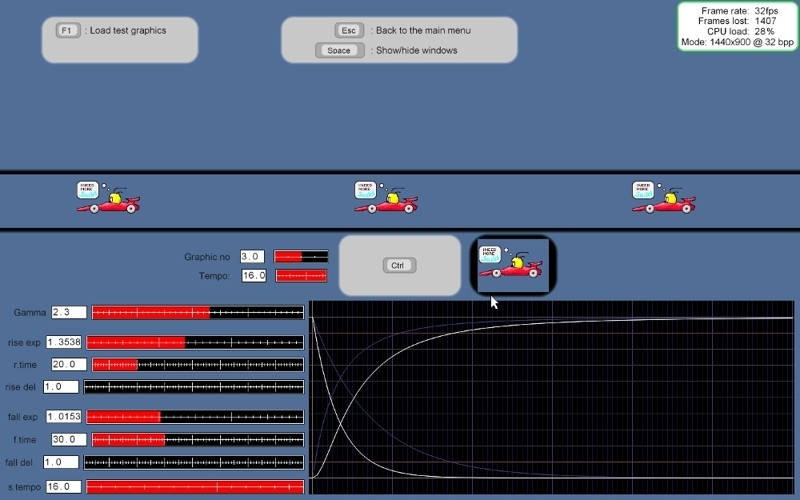
PixPerAn tests allow you to adjust the color palette, size and speed of objects, while tracking the reaction of the matrix, the speed of drawing and the number of frames skipped, processor load and screen settings. The "game" test will allow you to play a fun simple game with little cars and identify imperfections in the rapidly changing dynamics.
An original game test that allows you to assess the quality of images in dynamic scenes.
Thus, by installing this miniature (68kb) utility, you get the opportunity to simulate on the display the conditions under which hidden monitor problems will manifest themselves explicitly.
Platform: Windows. The interface is English.
All listed programs are absolutely free and do not require registration in the registry.
The patient is more likely alive ...
So, software diagnostics allowed us to accurately determine the presence, location and type of broken pixels. We assume that we are lucky, and the pixels that we observe on our screen are among the "stuck", that is, bright.
It is not paradoxical, but it is often possible to carry out an operation to “reposition” a pixel in its place by massaging the injured area in circular motions. This should be done not with a finger and not with hard and sharp objects, but with a cotton tip, gently, slowly, with the monitor turned off. And in order not to “miss”, mark the dead pixels detected by the program until the moment you turn off the monitor.
Manual therapy or how to get rid of stuck pixels surgically

Repeat rotational movements for two to three minutes, then start the monitor and evaluate the fruits of your labors. If there are none, try again. The method does not guarantee 100%, but it increases the chances of getting rid of the problem many times.
The “civilized” method
Unlike the first method, which involves some caution on your part, the alternative — the software method is completely safe. The easiest way is to use a specialized program that deals with stuck pixels in a few minutes. You can launch it directly from the site, following the link: www.jscreenfix.com/basic.php and clicking on the Launch ScreenFix button at the bottom of the page.
After starting the program, you will see a window with flickering pixels, which must be combined with the problem area. In the process of “shaking,” the colors of individual pixels change at an increased speed, which at some stage allows the crashed culprit to “detach” and return to working condition.
Jscreenfix program in work

As practice shows, in 20 minutes of work the program deals with the vast majority of problem points. If the result is not achieved, the developers recommend leaving the computer in this mode for 5-10 hours. Note that the cured pixels do not acquire immunity and, with the onset of summer heat, have every chance of sticking again. In this case, the treatment is recommended to be repeated.
Well, now you are armed with knowledge, and if necessary you can cope with hanging pixels without the help of computer gurus and intractable managers. Better yet, use the acquired knowledge when buying by testing the monitor of one of the programs at the store counter, then the problems of “frozen” and fatal black pixels can be avoided!
Afterword from the iCover company:
Dear readers, we remind you that you are reading the iCover company blog , a place where you can get good advice or expertise in the world of gadgets. And, of course, do not forget to subscribe to us and we promise - it won’t be boring!
Also read:
- Remote control for SmartTV - through thorns to the stars
-Wireless drives and flash drives - it’s the most for summer time Edit
- The choice of smart watches today and what is happening with this market
Check and treat broken pixels
We do not buy a monitor, like a personal computer, for more than one year. But, unlike a PC, which can always be upgraded if desired, there is no possibility to improve the qualitative characteristics of the image with hardware. That is why, evaluating the functionality and quality of the picture of a potential candidate for the position of a home monitor, we approach the issue of model selection extremely responsibly, investing in the new product to the maximum and for a long time.
And now, all the accents are finally set, a brand new monitor is bought and connected, shows all the signs of life, pleases the eye with image quality and color depth. Of course, you are happy with the purchase and everything would be fine, but something confuses, distracts your attention and does not allow you to perceive the picture in its entirety and entertainment. Glance now and then slides to a dark, light or colored dot that retains its color, regardless of the broadcast picture. Well, get acquainted, gentlemen, you are extremely lucky: before you is His Majesty “Broken Pixel”!
Problem
The image that we see and perceive on the LCD monitor as a whole, in fact, is formed of many points-clusters, called "pixels". In turn, the full completeness of the color gamut can be achieved by only three subpixels - red, blue and green. In models of LCD monitors with an active matrix, each pixel is assigned an individual thin-film transistor (Thin Film Transistor - TFT), the damage of which will appear on the screen as a black inactive dot, which is called a “broken” pixel. And in this case, the problem can only be solved by replacing the transistor in a laboratory environment and, alas, an alternative is not supposed here.
If you observe a bright spot on a dark background - do not rush to despair! Quite often, the cause of the appearance of broken subpixels is their “freezing” in a certain intermediate position, which externally manifests itself in the absence of their reaction to a changing picture. You can solve the problem at home, without fear of harming the monitor programmatically, or by performing some physical manipulation.
What is amateur performance if the monitor is under warranty?
Absolutely normal question asked by everyone who has already managed to get acquainted with our problem, but is not yet familiar with the likely reaction of the store. It turns out here, even despite the warranty obligations of the service, the nuances and differences are very likely.
Defective pixels? - Complain to the Stockholm arbitration!
The real cause of the dispute is the manufacturers themselves, which have officially established tolerance for a certain number of “allowed” broken pixels on monitors of the corresponding standards - the ISO-13406 regulation.
In accordance with the accepted tolerances, monitors are divided into 4 classes:
1st class - dead pixels are practically excluded, warranty repair and replacement in case of detection is required and is carried out immediately;
2nd class - the most common option, allowing the presence of 2 defects of types I and II;
3rd class - budget models that allow the presence of 5 broken pixels of type I, 15 of them are of type II, 50 are of type III.
4th class - low-quality monitors that allow the presence of 50, 150 and up to 500 (!) Defects of type I, II and III, respectively.
Note:
I-th type - a white pixel viewed on a black background;
II type - black pixel on a white background;
III type - red, blue, green pixels.
It becomes clear that despite the guarantee, the only white pixel in the center of the screen of the 2nd class monitor that annoys you remains your problem, and the best way to prevent this situation is to connect and test the display before calculating or during the period available for exchange in accordance with consumer protection law.
Monitor check
Visual assessment of the quality of the picture in the cabin often does not allow an unambiguous conclusion about the presence of broken subpixels, and even more so - to determine the presence of moire, to evaluate the readability of moving text, the reaction speed of the matrix and other significant parameters. And why, if it is much more reliable, easier and more efficient to check the monitor using specialized utilities that will allow you to get all the data in full, and most importantly, on time. Fortunately, the choice of free programs that allow us to achieve our goal without spending any money is going off scale today.
IsMyLcdOK
IsMyLcdOK is a portable universal utility with a simple intuitive interface that allows you to check a TFT LCD monitor or LED LCD monitor for dead pixels in a few minutes.
The program does not require installation, runs on any portable devices and computers running Microsoft Windows: Servers 2000/2003/2005 Win 98 / XP / Vista / 7/8 / 8.1 / 10 x64 / x86 from removable media. This will allow you to avoid unnecessary disputes with the store manager, who is not always interested in the test results.
The working menu is available immediately after the test run of the program. Switching between test modes is carried out by selecting the corresponding numeric keys.
Program window
The program allows you to evaluate the image processing speed, the refresh rate of the screen and the rectangles painted in different colors of the strip. By tracking alternately changing color and monochrome images and following the simplest instructions, you can accurately and easily detect broken pixels on the reference colors, determine their type and number.
Available colors allow you to easily find broken pixels or make sure they are missing
NOKIA MONITOR TEST 2.0
One of the most popular utilities in this category, which has advanced features for checking the quality of the LCD monitor, including a test for the problem of dead pixels we are interested in, as well as templates that allow you to evaluate parameters such as resolution, moire, contrast, focus, brightness, readability text, geometry accuracy, color reproduction and much more.
Program window
Using Nokia Monitor Test, you can test not only the image quality of monitors, but also the latest generation video cards. The advantages of the program are the power of functionality, the simplicity of the interface, the miniature size of the distribution kit, the ability to run from removable media. To get all the data necessary for the analysis, you just need to move the left mouse button on the active menu buttons on the main screen.
System requirements: Servers 2000/2003/2005 Win 98 / XP / Vista Windows7 Windows8 x64 / x86. No installation required. The size of the distribution is 1.15 Mb. The Russian version is present.
PixPerAn 1.011e
The developers of this program cannot be denied originality. Unlike more or less ascetic or, on the contrary, colorful static interfaces, here the key parameters of the quality of the monitor are checked on a dynamically changing picture. The utility contains a series of unique tests to identify problems associated with the inertia of the LCD matrix. Among them, such a common one as multi-colored loops that occur when viewing a dynamic picture.
Program window
PixPerAn tests allow you to adjust the color palette, size and speed of objects, while tracking the reaction of the matrix, the speed of drawing and the number of frames skipped, processor load and screen settings. The "game" test will allow you to play a fun simple game with little cars and identify imperfections in the rapidly changing dynamics.
An original game test that allows you to assess the quality of images in dynamic scenes.
Thus, by installing this miniature (68kb) utility, you get the opportunity to simulate on the display the conditions under which hidden monitor problems will manifest themselves explicitly.
Platform: Windows. The interface is English.
All listed programs are absolutely free and do not require registration in the registry.
The patient is more likely alive ...
So, software diagnostics allowed us to accurately determine the presence, location and type of broken pixels. We assume that we are lucky, and the pixels that we observe on our screen are among the "stuck", that is, bright.
It is not paradoxical, but it is often possible to carry out an operation to “reposition” a pixel in its place by massaging the injured area in circular motions. This should be done not with a finger and not with hard and sharp objects, but with a cotton tip, gently, slowly, with the monitor turned off. And in order not to “miss”, mark the dead pixels detected by the program until the moment you turn off the monitor.
Manual therapy or how to get rid of stuck pixels surgically
Repeat rotational movements for two to three minutes, then start the monitor and evaluate the fruits of your labors. If there are none, try again. The method does not guarantee 100%, but it increases the chances of getting rid of the problem many times.
The “civilized” method
Unlike the first method, which involves some caution on your part, the alternative — the software method is completely safe. The easiest way is to use a specialized program that deals with stuck pixels in a few minutes. You can launch it directly from the site, following the link: www.jscreenfix.com/basic.php and clicking on the Launch ScreenFix button at the bottom of the page.
After starting the program, you will see a window with flickering pixels, which must be combined with the problem area. In the process of “shaking,” the colors of individual pixels change at an increased speed, which at some stage allows the crashed culprit to “detach” and return to working condition.
Jscreenfix program in work
As practice shows, in 20 minutes of work the program deals with the vast majority of problem points. If the result is not achieved, the developers recommend leaving the computer in this mode for 5-10 hours. Note that the cured pixels do not acquire immunity and, with the onset of summer heat, have every chance of sticking again. In this case, the treatment is recommended to be repeated.
Well, now you are armed with knowledge, and if necessary you can cope with hanging pixels without the help of computer gurus and intractable managers. Better yet, use the acquired knowledge when buying by testing the monitor of one of the programs at the store counter, then the problems of “frozen” and fatal black pixels can be avoided!
Afterword from the iCover company:
Dear readers, we remind you that you are reading the iCover company blog , a place where you can get good advice or expertise in the world of gadgets. And, of course, do not forget to subscribe to us and we promise - it won’t be boring!
Also read:
- Remote control for SmartTV - through thorns to the stars
-Wireless drives and flash drives - it’s the most for summer time Edit
- The choice of smart watches today and what is happening with this market









