May 19, 2018 at 14:43
CRM integration with Outlook in the free version of 3CX
- Tutorial
- Recovery mode
In this article, we will tell you how to launch a free 3CX IP-PBX in your company , combined with a mini-CRM system based on the very popular Microsoft Outlook mail client. 3CX offers integration with Microsoft Outlook right out of the box. And, pay attention, not only in the Pro edition, but also in the Standard edition . Considering that this edition is offered free of charge for small companies, you get a very attractive offer for starting your business!
After installing CRM integration, a window with information about the calling client will open in Outlook. If no contact is found, Outlook will offer to create a new card. At the end of the conversation, a new entry for this call will be created in the Contact Activity Log. Also, the integration extension adds a contact call button to the top and context menus of Outlook.
Integration will work under the following conditions:
To install Outlook integration with 3CX in the 3CX management console, go to Settings - CRM Integration - On the client side, select Outlook and click Download Selected.

To assign integration to a user, open his properties, go to the Integration tab, select Enable integration and select Outlook.zip from the list.

Complete these steps for all users who need integration with Outlook.
After that, the integration module will be transmitted over the network to the 3CX client for Windows. To do this, restart the client - it will download the integration module and register the extension for Outlook. After restarting Outlook, you will see the extension installation window.
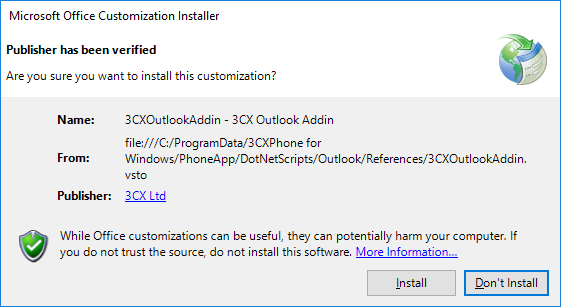
Install the extension. On this, the installation of CRM 3CX integration with Outlook is completed.
To open the settings of the 3CX integration module with Outlook, in the 3CX client for Windows, go to Settings - Extras. Options - Integration.

The General section indicates at what point to open the contact card in Outlook: when making a call, when answering, or not at all. It also indicates the minimum number length for opening a card. This is done so that integration does not open cards for extension subscribers with short numbers.

To automatically record a call in the Outlook contact activity log, enable the Enable Journaling option. At the end of the conversation, a log with the call data will be created in the log. To create a new contact if Caller ID is not found, set the Create new contact if not found option.
In the Behavior section, it is recommended to set the maximum number length for matching. The number coming from the operator may have a different format and include a long-distance or international prefix. On the other hand, contacts with some additional prefixes that are not in the incoming Caller ID may be entered in your Outlook. In any case, it is recommended to check the match by at least the last 7 digits (i.e., by the local number, if your local number does not use fewer digits). If you make a comparison using too many digits from the end of the number, the accuracy of determining the contact will increase, but the determination itself may not always occur. Reducing the number of digits, you reduce the accuracy of the determination, but the match will be more often.
Before moving to the Microsoft Outlook section, make sure that the extension for Outlook is already installed and that Outlook is running. Otherwise, such a message will appear on the screen.

This section indicates the personal contacts folder or public folder in which the CRM integration module will look for matches. You can select several sources of contacts (directories), however, keep in mind that the search will slow down.
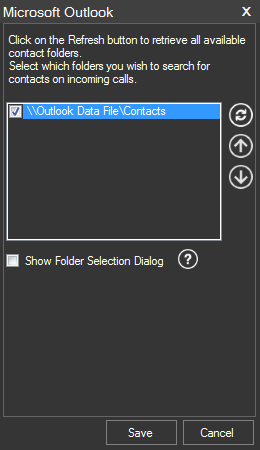
Set the Show Folder Selection Dialog option to show the folder selection for saving a new contact if the contact was not found during a call.
When you receive a call, an Outlook window with a contact card will appear. If no match is found and the Create new contacts if not found option was previously set, a contact will be created, which you can then add with other information.
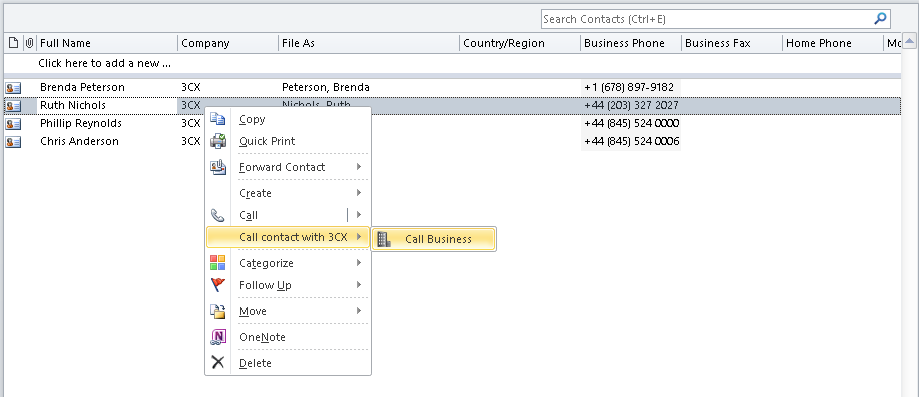
To make a call from Outlook, use the contact’s context menu or the button in the top menu, which the 3CX extension adds. The call will be made from your 3CX client or desk phone.
Please note: call logging works only in Outlook 2010. In newer versions of Outlook, the log is absent and, therefore, is not supported in integration. The Enable Journaling option in the integration settings enables logging of incoming, outgoing and missed calls in the activity ribbon of this contact.

To search for a contact, the integration module sequentially “scans” all selected Outlook contact folders. As a rule, this happens almost instantly, but in large organizations, especially when using the Exchange server, this process can drag on and seriously load the PC processor. Outlook at the same time “freezes”. In most cases, the contact folder is located directly in the root of the folder tree, so the integration module by default searches for it there. But if the contacts folder in your configuration is deeper, the module will not be able to detect it, and the folder will not be visible in the selection window in the 3CX client. However, you can change this behavior by editing the Windows3CXCRMUser.ini configuration file in the% AppData% 3CXPhone folder.
For example, if you have two contact folders:
And the parameter is set to ContactFolderLookupMaxDeepLevel = 1 (the default value), in the integration settings in the 3CX client for Windows you will see only the folder:
\ ExchangeFolderB
But if you set the ContactFolderLookupMaxDeepLevel = 3 parameter, both folders will be shown.
Keep in mind that the contact search path should be as short as possible, since a long path will cause long iterations of the search and may “suspend” Outlook for a long time. But still this option is the only way out if your contacts are located in a non-standard place.
After installing CRM integration, a window with information about the calling client will open in Outlook. If no contact is found, Outlook will offer to create a new card. At the end of the conversation, a new entry for this call will be created in the Contact Activity Log. Also, the integration extension adds a contact call button to the top and context menus of Outlook.
Integration will work under the following conditions:
- 3CX v15 and above - for the Standard version, you need to download the 3CXPlugins integration installation . For the Pro version, integration is launched from the 3CX management console.
- Installed and running 3CX client for Windows
- Microsoft Outlook versions 2010, 2013, 2016 (only these versions)
Install CRM 3CX Integration with Outlook
To install Outlook integration with 3CX in the 3CX management console, go to Settings - CRM Integration - On the client side, select Outlook and click Download Selected.
To assign integration to a user, open his properties, go to the Integration tab, select Enable integration and select Outlook.zip from the list.
Complete these steps for all users who need integration with Outlook.
After that, the integration module will be transmitted over the network to the 3CX client for Windows. To do this, restart the client - it will download the integration module and register the extension for Outlook. After restarting Outlook, you will see the extension installation window.
Install the extension. On this, the installation of CRM 3CX integration with Outlook is completed.
Configuring 3CX CRM Integration with Outlook
To open the settings of the 3CX integration module with Outlook, in the 3CX client for Windows, go to Settings - Extras. Options - Integration.
General Section
The General section indicates at what point to open the contact card in Outlook: when making a call, when answering, or not at all. It also indicates the minimum number length for opening a card. This is done so that integration does not open cards for extension subscribers with short numbers.
To automatically record a call in the Outlook contact activity log, enable the Enable Journaling option. At the end of the conversation, a log with the call data will be created in the log. To create a new contact if Caller ID is not found, set the Create new contact if not found option.
In the Behavior section, it is recommended to set the maximum number length for matching. The number coming from the operator may have a different format and include a long-distance or international prefix. On the other hand, contacts with some additional prefixes that are not in the incoming Caller ID may be entered in your Outlook. In any case, it is recommended to check the match by at least the last 7 digits (i.e., by the local number, if your local number does not use fewer digits). If you make a comparison using too many digits from the end of the number, the accuracy of determining the contact will increase, but the determination itself may not always occur. Reducing the number of digits, you reduce the accuracy of the determination, but the match will be more often.
Microsoft Outlook Section
Before moving to the Microsoft Outlook section, make sure that the extension for Outlook is already installed and that Outlook is running. Otherwise, such a message will appear on the screen.
This section indicates the personal contacts folder or public folder in which the CRM integration module will look for matches. You can select several sources of contacts (directories), however, keep in mind that the search will slow down.
Set the Show Folder Selection Dialog option to show the folder selection for saving a new contact if the contact was not found during a call.
Work 3MX CRM integration with Outlook
When you receive a call, an Outlook window with a contact card will appear. If no match is found and the Create new contacts if not found option was previously set, a contact will be created, which you can then add with other information.
To make a call from Outlook, use the contact’s context menu or the button in the top menu, which the 3CX extension adds. The call will be made from your 3CX client or desk phone.
Problems and features of integration
Call Log in Outlook
Please note: call logging works only in Outlook 2010. In newer versions of Outlook, the log is absent and, therefore, is not supported in integration. The Enable Journaling option in the integration settings enables logging of incoming, outgoing and missed calls in the activity ribbon of this contact.
Search for contacts in Outlook folders
To search for a contact, the integration module sequentially “scans” all selected Outlook contact folders. As a rule, this happens almost instantly, but in large organizations, especially when using the Exchange server, this process can drag on and seriously load the PC processor. Outlook at the same time “freezes”. In most cases, the contact folder is located directly in the root of the folder tree, so the integration module by default searches for it there. But if the contacts folder in your configuration is deeper, the module will not be able to detect it, and the folder will not be visible in the selection window in the 3CX client. However, you can change this behavior by editing the Windows3CXCRMUser.ini configuration file in the% AppData% 3CXPhone folder.
[Microsoft Outlook Add-in]
ContactFolderLookupMaxDeepLevel=1
For example, if you have two contact folders:
- \ Exchange \ FolderA \ FolderA1 \ FolderA11
- \ Exchange \ FolderB
And the parameter is set to ContactFolderLookupMaxDeepLevel = 1 (the default value), in the integration settings in the 3CX client for Windows you will see only the folder:
\ ExchangeFolderB
But if you set the ContactFolderLookupMaxDeepLevel = 3 parameter, both folders will be shown.
Keep in mind that the contact search path should be as short as possible, since a long path will cause long iterations of the search and may “suspend” Outlook for a long time. But still this option is the only way out if your contacts are located in a non-standard place.