 June 27, 2017 at 12:26
Getting Instagram users by city
Hello. We are developing the InstaRocket project , which helps to automate the operation of your account on Instagram (massfollowing, masslinking, commenting, unsubscribing).
Starting the creation of the project, we wanted to make the service very easy to configure. They added their instagram account, indicated which city to act in and everything =) There were no difficulties with the simple addition of the account, but the addition of the city is a completely different story, which I will tell about here.
As we know, Instagram does not provide the ability to search for users by city. This is neither in the mobile application, nor on the site, and even in the Instagram API).
And we must do the following. To enable the user to choose the country and city by which InstaRocket will like, subscribe, comment on posts.

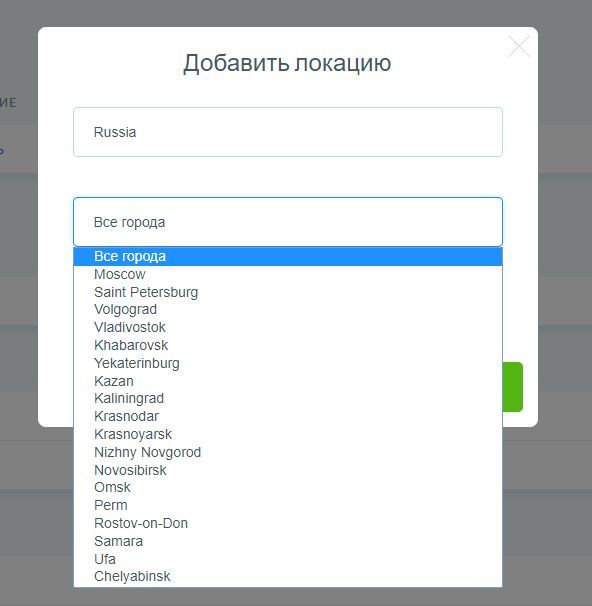
And so, what does Instagram give us. Search by location. Not by city, but only by location (the label that users created). Instagram API Location
To implement our plan, we need:
1. Choose a city
2. Find out its central coordinates
3. Find out its extreme coordinates (sizes)
4. Call https://api.instagram.com/v1/locations/search by coordinates
5. Go through the locations and collect all users.
Item 1. To get a list of all countries and cities, I used the open VK API .
Point 2. I used the Gooogle API to get the coordinates of the city . To my joy, Google gave out not only the central coordinates of the city, but also the extreme ones (rectangle). We need this to scan each section of the city, as the Instagram API only provides data in the range of 500 meters. Otherwise, we would have to calculate the extreme coordinates of the city ourselves (I use the data that 1 minute of latitude is 1.851 km, and 1 minute of longitude is 1.092 km from knowledge of geography). Then we would only need to know the central coordinates of the city and its radius in kilometers). But for us it is counted by Google and we move on.

We make the request maps.googleapis.com/maps/api/geocode/json?address=Kyiv&key= {token} and get
We got the central coordinates of location and bounds (northeast, southwest).
Now using this data, we make a request through the Instagram API, where we substitute the received coordinates using a step of 1 minute (latitude, longitude). That is, we go through the search, from the coordinates from the south-west, to the north-east, since the instagram itself only gives locations of 500 meters, a maximum of 750.
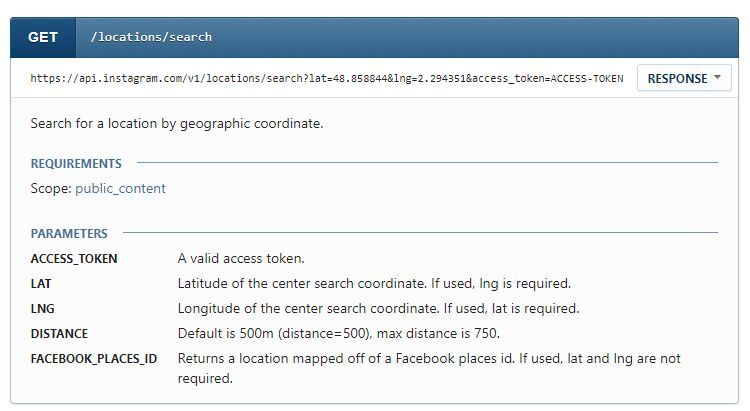
To call this api method, we need a token with permission pubic_content. You can get it if you created and confirmed the client on Instagram. I did not do this, and went the other way. Just created an application .
Pay attention to the settings. Make the fields the same.

And to get the token, I used the InstagramToken website .
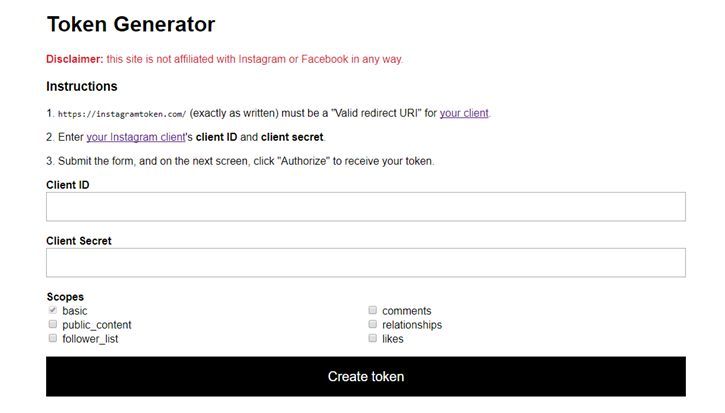
And so, the token is received. We make an Instagram API call with data obtained from Google and our received token.
api.instagram.com/v1/locations/search?lat=50.4501&lng=30.5234&access_token=ACCESS-TOKEN
We get :
And so, we have locations of the city and their Id.
Now berm any Id, for example 558008714386619 and call the site method (not api)
https://www.instagram.com/explore/locations/558008714386619
Here we will get posts of this location

In order to get the same posts in json format. we need to add to the query line? __ a = 1 and get https://www.instagram.com/explore/locations/558008714386619/?__a=1
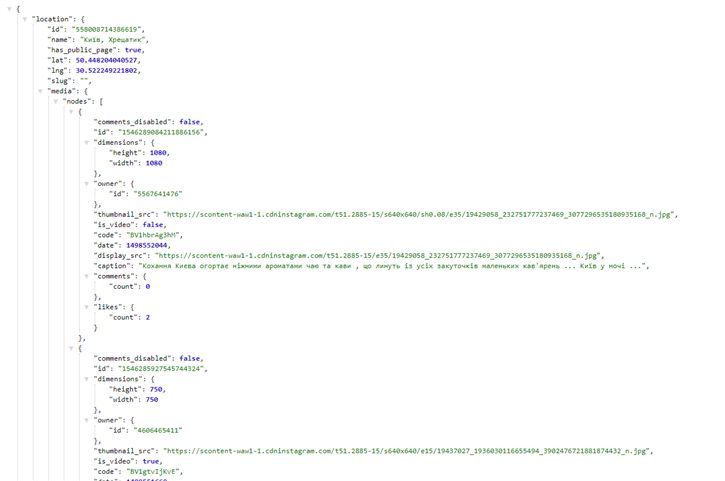
That yes! We got what we wanted! And so we go through all the coordinates, locations, and pull out the posts and their creators.
PS: The Instagram API call is limited to 30 requests per hour (sandbox). In order to get around this ban, create a lot of clients, and invite up to 10 test users there each. So you can get 10, 20, 100 tokens. And accordingly 100 * 30 = 3000 requests per hour. 3000 requests is * 20 = 60 000 locations per hour.
Starting the creation of the project, we wanted to make the service very easy to configure. They added their instagram account, indicated which city to act in and everything =) There were no difficulties with the simple addition of the account, but the addition of the city is a completely different story, which I will tell about here.
As we know, Instagram does not provide the ability to search for users by city. This is neither in the mobile application, nor on the site, and even in the Instagram API).
And we must do the following. To enable the user to choose the country and city by which InstaRocket will like, subscribe, comment on posts.
And so, what does Instagram give us. Search by location. Not by city, but only by location (the label that users created). Instagram API Location
To implement our plan, we need:
1. Choose a city
2. Find out its central coordinates
3. Find out its extreme coordinates (sizes)
4. Call https://api.instagram.com/v1/locations/search by coordinates
5. Go through the locations and collect all users.
Item 1. To get a list of all countries and cities, I used the open VK API .
Point 2. I used the Gooogle API to get the coordinates of the city . To my joy, Google gave out not only the central coordinates of the city, but also the extreme ones (rectangle). We need this to scan each section of the city, as the Instagram API only provides data in the range of 500 meters. Otherwise, we would have to calculate the extreme coordinates of the city ourselves (I use the data that 1 minute of latitude is 1.851 km, and 1 minute of longitude is 1.092 km from knowledge of geography). Then we would only need to know the central coordinates of the city and its radius in kilometers). But for us it is counted by Google and we move on.
We make the request maps.googleapis.com/maps/api/geocode/json?address=Kyiv&key= {token} and get
{
   "results" : [
      {
         "address_components" : [
            {
               "long_name" : "Kiev",
               "short_name" : "Kiev",
               "types" : [ "locality", "political" ]
            },
            {
               "long_name" : "Kyiv City",
               "short_name" : "Kyiv City",
               "types" : [ "administrative_area_level_2", "political" ]
            },
            {
               "long_name" : "Ukraine",
               "short_name" : "UA",
               "types" : [ "country", "political" ]
            }
         ],
         "formatted_address" : "Kiev, Ukraine",
         "geometry" : {
            "bounds" : {
               "northeast" : {
                  "lat" : 50.590798,
                  "lng" : 30.825941
               },
               "southwest" : {
                  "lat" : 50.213273,
                  "lng" : 30.2394401
               }
            },
            "location" : {
               "lat" : 50.4501,
               "lng" : 30.5234
            },
            "location_type" : "APPROXIMATE",
            "viewport" : {
               "northeast" : {
                  "lat" : 50.590798,
                  "lng" : 30.825941
               },
               "southwest" : {
                  "lat" : 50.213273,
                  "lng" : 30.2394401
               }
            }
         },
         "place_id" : "ChIJBUVa4U7P1EAR_kYBF9IxSXY",
         "types" : [ "locality", "political" ]
      }
   ],
   "status" : "OK"
}
We got the central coordinates of location and bounds (northeast, southwest).
Now using this data, we make a request through the Instagram API, where we substitute the received coordinates using a step of 1 minute (latitude, longitude). That is, we go through the search, from the coordinates from the south-west, to the north-east, since the instagram itself only gives locations of 500 meters, a maximum of 750.
To call this api method, we need a token with permission pubic_content. You can get it if you created and confirmed the client on Instagram. I did not do this, and went the other way. Just created an application .
Pay attention to the settings. Make the fields the same.
And to get the token, I used the InstagramToken website .
And so, the token is received. We make an Instagram API call with data obtained from Google and our received token.
   "location" : {
               "lat" : 50.4501,
               "lng" : 30.5234
            }
api.instagram.com/v1/locations/search?lat=50.4501&lng=30.5234&access_token=ACCESS-TOKEN
We get :
{
"data": [
{
"id": "1306173892829806",
"name": "КМДА",
"latitude": 50.45,
"longitude": 30.5233
},
{
"id": "256713358069834",
"name": "РічПорт",
"latitude": 50.45,
"longitude": 30.5233
},
{
"id": "212898659",
"name": "Kyiv, Ukraine",
"latitude": 50.45,
"longitude": 30.5233
},
{
"id": "314058888",
"name": "Majdan Nesaleschnosti - Майдан Незалежності",
"latitude": 50.450867715234,
"longitude": 30.522571971669
},
{
"id": "213130700",
"name": "Maidan Nezalezhnosti",
"latitude": 50.45025,
"longitude": 30.523888888889
},
{
"id": "1024728484",
"name": "Новоконстантиновская 1а",
"latitude": 50.45,
"longitude": 30.5233
},
{
"id": "1743159665991390",
"name": "Китаевская Пустынь",
"latitude": 50.45,
"longitude": 30.5233
},
{
"id": "1016048608",
"name": "Segway-Ukraine.com.ua",
"latitude": 50.45,
"longitude": 30.5233
},
{
"id": "314940785",
"name": "Украина Вознесенск",
"latitude": 50.45,
"longitude": 30.523333
},
{
"id": "287123992",
"name": "Харьковское Шоссе",
"latitude": 50.4219988675,
"longitude": 30.65024651
},
{
"id": "174800369700733",
"name": "Інститут Журналістики КНУ Ім.тараса Шевченка",
"latitude": 50.45,
"longitude": 30.5233
},
{
"id": "558008714386619",
"name": "Київ, Хрещатик",
"latitude": 50.448204040527,
"longitude": 30.522249221802
},
{
"id": "204034720096508",
"name": "Свято-Троицкий Китаевский Монастырь",
"latitude": 50.45,
"longitude": 30.5233
},
{
"id": "739258147",
"name": "Оазис",
"latitude": 50.45,
"longitude": 30.5233
},
{
"id": "969326616532082",
"name": "Queen Fitness Club",
"latitude": 50.45,
"longitude": 30.5233
},
{
"id": "1205613646216647",
"name": "Оболонская Набережная киев",
"latitude": 50.507633647411,
"longitude": 30.512814705418
},
{
"id": "1929322543966368",
"name": "Київ Михайлівський Собор",
"latitude": 50.45,
"longitude": 30.5233
},
{
"id": "235432733514719",
"name": "Украина Киев",
"latitude": 50.4488,
"longitude": 30.52267
},
{
"id": "1552263428413882",
"name": "Київ , Готель Дніпро",
"latitude": 50.45,
"longitude": 30.5233
},
{
"id": "1537041273239858",
"name": "TYME",
"latitude": 50.45,
"longitude": 30.5233
}
],
"meta": {
"code": 200
}
}
And so, we have locations of the city and their Id.
{
"id": "558008714386619",
"name": "Київ, Хрещатик",
"latitude": 50.448204040527,
"longitude": 30.522249221802
}
Now berm any Id, for example 558008714386619 and call the site method (not api)
https://www.instagram.com/explore/locations/558008714386619
Here we will get posts of this location
In order to get the same posts in json format. we need to add to the query line? __ a = 1 and get https://www.instagram.com/explore/locations/558008714386619/?__a=1
That yes! We got what we wanted! And so we go through all the coordinates, locations, and pull out the posts and their creators.
PS: The Instagram API call is limited to 30 requests per hour (sandbox). In order to get around this ban, create a lot of clients, and invite up to 10 test users there each. So you can get 10, 20, 100 tokens. And accordingly 100 * 30 = 3000 requests per hour. 3000 requests is * 20 = 60 000 locations per hour.









