
 March 8, 2018 at 15:38
As I wrote my VNC, and then not
0. Background
It so happened that several times I tried to write something to replace teamviwer for myself, each time I raised this issue in the internal forum of my head, with the next need to buy an additional channel for my “engineers”.
What is vnc and what is teamviwer / rms / ammyy for a long time no one needs to explain to anyone what options to “raise” its analogue have been raised here more than once, in the simplest version it is a script for reconnecting to a forwarded port, I don’t know why this option is not suitable for many, including and to me, but it always seemed to me that writing something of my own was not very difficult. With this in mind, I spent a whole year in my free time working on my “implementation”. Called her "Visit" .
Many who wrote to me in the mail and in PM on several resources were worried about the question of what was my “interest”, “how is it like” and the like ... In general, I answered honestly to everyone that this was pure enthusiasm and the solution to several of my tasks , the first, it’s still the creation of some kind of budget analogue, the second - I dreamed of becoming a programmer (at least somehow), but I need to get some practice.
In the process of solving this big problem, I got general ideas about multithreading, synchronization objects, the network subsystem from the side of the program, and many other interesting and not very interesting ones. If this part is interesting, I can throw out pieces of code describing the problems that I solved.
In the end, I got something more or less working, but since “c builder 6” was chosen as the development environmentThere was a problem of support and error detection. What is the reason for such an original choice? Human laziness, we studied at the university on it, I wrote a term paper on it - a messenger, so I took my messenger and “finished it”, even the internal name slipped somewhere - vaim (initials and Instant Messenger).
Time passed, errors accumulated, I finally moved to another country, got a job as a programmer and everything seems to be fine. But there was a need to “learn” golang, and of course the experimental rabbit chose my “favorite” project, fortunately, in my own homeland the need for this never disappeared.
But this time it was decided to revise the principle of operation dramatically: there are already a dozen ready-made VNC implementations, why will we take away their bread (why didn’t I think so right away ...)? Let's just make a “switch”, it’s enough to close our task and help others.
So reVisit appeared . Here I want to tell you how you can work with it and possibly start your server. This, of course, is not the final implementation, and I'm sure that I missed something somewhere. I know that people around have more experience, so maybe a little criticism will be appropriate.
1. Quick Support
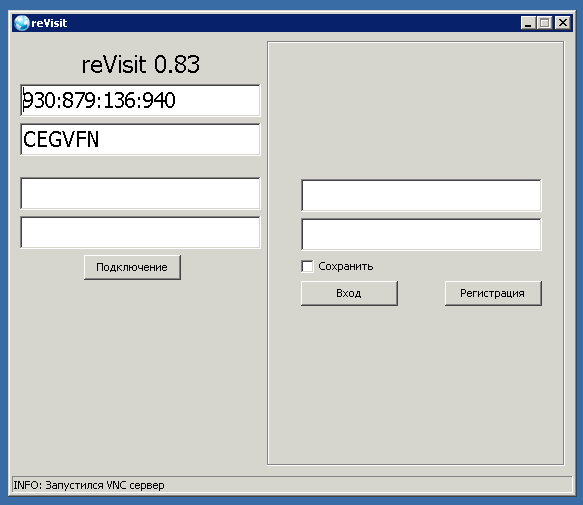
So, to work in qs mode it is enough to start the client, it will download vnc by default, unpack it in temp and start the server in listening mode from localhost . Next, we use id and password to connect. The password is verified on the client side, the server does not store such data.
2. Create an account

This is convenient if you need to periodically connect to the same computers. To create, indicate your e-mail in the upper field above the registration button and in a moment a password will come to your inbox. Now using this combination, we can enter.
2.1 Creation, editing, deletion, management

The creation and editing of your list from the rest of the programs for the windows system is no different, they right-clicked and from the pop-up menu we selected what interests us, and you can create not only groups, but also subgroups (I don’t understand why it’s still not implemented in other managers). There is a search line above the contact list.
2.2 VNC Version Change
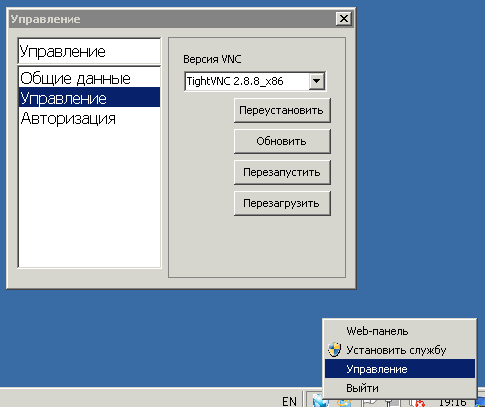
At the same time, in the contact list, in addition to editing the data of the contact itself, you can change vnc on the remote system from those available on our server, this item is called "Management". To change your version, you can get this panel from the "Management" in the traybar.
3. Starting your server
You can use the sources on github and compile under linux , remove / fix / add and get your version, but you will also need to add information about vnc there (you can also get it from the finished assembly). And you can use the ready-made bundle , changing only the settings for the smtp server, it is through this account that passwords for new profiles will be sent. And start the client with the argument -server 1.2.3.4 , after the first start, a settings file is created and the address is saved.
That's all, thank you all!