Non-HTTP Load Testing Part 2 Gatling
In the first part of the article, we conducted a comparative analysis of Java load tools for JMeter , moved away from XML test plans and reached 30K RPS from one machine, loading a non-HTTP service using the example of Apache Thrift .
In this article, we will consider another tool for load testing - Gatling and, as promised earlier, we will try to increase its performance by tens of times.

Gatling is an opensource tool for creating load scripts on Scala. It can easily be connected to your project with your favorite build tool. Under the hood, the Akka actor model, known for its excellent performance, is spinning there.
Before we dive deeper into writing a load script for the "non-HTTP" protocol, we will analyze the simplest example for HTTP:
In the protocol builder, specify the address. In the script builder, we describe the name of the script, the name of a specific request, and the HTTP method. In the load profile settings block, add a load scenario and define a protocol. For more information, see the documentation .
This was a small digression - after all, we were going to test non-HTTP. As in the case of JMeter, we still want to have an easily modifiable plug-in, on the frame of which it is possible to load various protocols, replacing only the client. Therefore, standard extensions are not suitable for us.
Based on a rather ancient, but understandable code from Github . He already conflicted with the current version of Gatling (2.3.1), but worked with the old one. His main advantage was in working with actors.
A simple move to the new version was overshadowed by the breakdown of backward compatibility by Gatling developers in minor versions and global refactoring of internals. In particular, this commit gets rid of actors where it is not particularly needed:

A huge incomprehensible Wikipedia article and a slightly more understandable excerpt from an article on Habré are written about what an actor and actor model are :

The repair customer (you and I) asks the construction company to repair several rooms for him. The foreman manages the queue and loading of the builder, makes sure that he does not overwork and is not idle. We do not communicate directly with the builder, but work with his representative (company). Knowing how we are slowly building, we surrender the task and do not even hope for its quick execution (we are not waiting for the result, but we are going to go about our business).
By analogy with the HTTP example, and taking the old script for describing the custom protocol as a basis, we will write our own builder. It takes some client action for the load and works with the actors:
The run result handler is not part of the standard implementation of load scripts. The code from the old example didn’t work anymore, so after the migration I had to dig a bit into the Gatling source code, studying the HTTP implementation:
We already wrote the client for Thrift in the first part of article. The machine with which we will be loaded is set up. Microservice also remained the same and holds 50K RPS.
It's time to ship. Let's try to shoot with a linearly increasing load from 1 to 2K RPS for 60 seconds:
We see a lack of productivity growth from 1100 RPS and an avalanche-like graph of Gatling users - request handlers. The strangeness is added by the increased test run time. So far more questions than answers.
The simplest and most correct solution was to add sleep instead of calling the client, after which the requests got into a long queue. Looks like we created a single-actor load facility. We need more actors! Let's create a pool with them by adding just one line to ActionBuilder:
Run the test again and see that we have reached 2K RPS:

Let's try 10K:

Not bad, but if 18K:

Again, similar problems at 15K, but nowhere to inflate the pool. Having rummaged through the Gatling repository, we discovered that the developers added the ability to reconfigure the configuration of the Akka actor model itself. This is done using the gatling-akka-defaults.conf file, which by default looks like this:
Let's offer Gatling our option:
How we will work with the dispatcher is determined by the strategy in the executor. Settings with the parallelism prefix are responsible for the number of threads (we finally remembered them) and depend on the capabilities of the machine and the number of CPUs. Throughput defines the maximum of messages processed by one actor before the stream sends messages to another actor. You should also correctly approach the selection of coefficients for these parameters.
Run with the new settings and pool:
Cope with 18K, but began to notice periodic subsidence associated with the GC and the strategy of adding Gatling users.
Remembering that the machine gave out 30K RPS with JMeter, let's try to give a similar load on Gatling, and we get 32K:

JMeter makes it faster and easier to get results, but it has slightly worse performance. Gatling allows you to ship in large volumes (which you may not need), but it’s more difficult to work with. The choice is yours.
In this article, we will consider another tool for load testing - Gatling and, as promised earlier, we will try to increase its performance by tens of times.
Gatling
Gatling is an opensource tool for creating load scripts on Scala. It can easily be connected to your project with your favorite build tool. Under the hood, the Akka actor model, known for its excellent performance, is spinning there.
Before we dive deeper into writing a load script for the "non-HTTP" protocol, we will analyze the simplest example for HTTP:
class BasicSimulation extends Simulation {
  val httpConf: HttpProtocolBuilder = http
    .baseURL("http://123.random.com")
  val scn: ScenarioBuilder = scenario("BasicSimulation")
    .exec(http("request_1")
      .get("/"))
  setUp(
    scn.inject(atOnceUsers(1))
  ).protocols(httpConf)
}
In the protocol builder, specify the address. In the script builder, we describe the name of the script, the name of a specific request, and the HTTP method. In the load profile settings block, add a load scenario and define a protocol. For more information, see the documentation .
The choice of means of loading
This was a small digression - after all, we were going to test non-HTTP. As in the case of JMeter, we still want to have an easily modifiable plug-in, on the frame of which it is possible to load various protocols, replacing only the client. Therefore, standard extensions are not suitable for us.
Based on a rather ancient, but understandable code from Github . He already conflicted with the current version of Gatling (2.3.1), but worked with the old one. His main advantage was in working with actors.
Old implementation
class PerfCustomProtocolSimulation extends Simulation {
  val mine = new ActionBuilder {
    def build(next: ActorRef, protocols: Protocols) = {
      system.actorOf(Props(new MyAction(next)))
    }
  }
  val userLog = csv("user_credentials.csv").circular
  val scn = scenario("My custom protocol test")
    .feed(userLog) {
    exec(mine)
  }
  setUp(
    scn.inject(
      atOnceUsers(10)
    )
  )
}
class MyAction(val next: ActorRef) extends Chainable {
  def greet(session: Session) {
  // Call any custom code you wish, say an API call
  }
  def execute(session: Session) {
    var start: Long = 0L
    var end: Long = 0L
    var status: Status = OK
    var errorMessage: Option[String] = None
    try {
      start = System.currentTimeMillis;
      greet(session)
      end = System.currentTimeMillis;
    } catch {
      case e: Exception =>
        errorMessage = Some(e.getMessage)
        logger.error("FOO FAILED", e)
        status = KO
    } finally {
      val requestStartDate, requestEndDate = start
      val responseStartDate, responseEndDate = end
      val requestName = "Test Scenario"
      val message = errorMessage
      val extraInfo = Nil
      DataWriter.dispatch(RequestMessage(
        session.scenarioName,
        session.userId,
        session.groupHierarchy,
        requestName,
        requestStartDate,
        requestEndDate,
        responseStartDate,
        responseEndDate,
        status,
        message,
        extraInfo))
      next ! session
    }
  }
}
A simple move to the new version was overshadowed by the breakdown of backward compatibility by Gatling developers in minor versions and global refactoring of internals. In particular, this commit gets rid of actors where it is not particularly needed:
Akka Actors Model
A huge incomprehensible Wikipedia article and a slightly more understandable excerpt from an article on Habré are written about what an actor and actor model are :
The Akka actor consists of several interacting components. ActorRef - this is the logical address of the actor, allowing you to send messages to the actor asynchronously on the principle of "sent and forgot." The dispatcher is responsible for placing messages in the queue leading to the actor’s mailbox, and also orders this mailbox to remove one or more messages from the queue, but only one at a time — and send them to the actor for processing. Akka does not allow direct access to the actor and therefore ensures that the only way to interact with the actor is asynchronous messages. Unable to call a method in an actor.Difficult. Let's try to explain on the example of construction:
In addition, it should be noted that sending a message to an actor and processing of this message by an actor are two separate operations that most likely occur in different threads. Of course, Akka provides the necessary synchronization to ensure that any state changes are visible to all threads.
The repair customer (you and I) asks the construction company to repair several rooms for him. The foreman manages the queue and loading of the builder, makes sure that he does not overwork and is not idle. We do not communicate directly with the builder, but work with his representative (company). Knowing how we are slowly building, we surrender the task and do not even hope for its quick execution (we are not waiting for the result, but we are going to go about our business).
Load scenario
By analogy with the HTTP example, and taking the old script for describing the custom protocol as a basis, we will write our own builder. It takes some client action for the load and works with the actors:
  val mine = new ActionBuilder {
    def build(ctx: ScenarioContext, next: Action): Action = {
      new ActorDelegatingAction(name,
        ctx.system.actorOf(
             Props(new MyAction(next, сlient, ctx))))
    }
  }
The run result handler is not part of the standard implementation of load scripts. The code from the old example didn’t work anymore, so after the migration I had to dig a bit into the Gatling source code, studying the HTTP implementation:
  val engine: StatsEngine = ctx.coreComponents.statsEngine
  engine.logResponse(
    session,
    requestName,
    ResponseTimings(start, end),
    status,
    None,
    message,
    Nil)
First run script
We already wrote the client for Thrift in the first part of article. The machine with which we will be loaded is set up. Microservice also remained the same and holds 50K RPS.
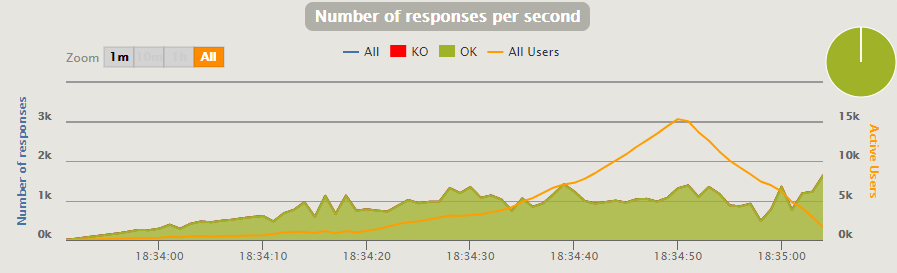
It's time to ship. Let's try to shoot with a linearly increasing load from 1 to 2K RPS for 60 seconds:
We see a lack of productivity growth from 1100 RPS and an avalanche-like graph of Gatling users - request handlers. The strangeness is added by the increased test run time. So far more questions than answers.
The simplest and most correct solution was to add sleep instead of calling the client, after which the requests got into a long queue. Looks like we created a single-actor load facility. We need more actors! Let's create a pool with them by adding just one line to ActionBuilder:
ctx.system.actorOf(RoundRobinPool(POOL_SIZE).props(
     Props(new MyAction(next, сlient, ctx)))))
The script with the pool
Run the test again and see that we have reached 2K RPS:
Let's try 10K:
Not bad, but if 18K:
Again, similar problems at 15K, but nowhere to inflate the pool. Having rummaged through the Gatling repository, we discovered that the developers added the ability to reconfigure the configuration of the Akka actor model itself. This is done using the gatling-akka-defaults.conf file, which by default looks like this:
actor {
  default-dispatcher {
    throughput = 20
  }
}
Let's offer Gatling our option:
actor {
  default-dispatcher {
    type = Dispatcher
    executor = "fork-join-executor"
    fork-join-executor {
      parallelism-min = 10
      parallelism-factor = 2.0
      parallelism-max = 30
    }
    throughput = 100
  }
}
How we will work with the dispatcher is determined by the strategy in the executor. Settings with the parallelism prefix are responsible for the number of threads (we finally remembered them) and depend on the capabilities of the machine and the number of CPUs. Throughput defines the maximum of messages processed by one actor before the stream sends messages to another actor. You should also correctly approach the selection of coefficients for these parameters.
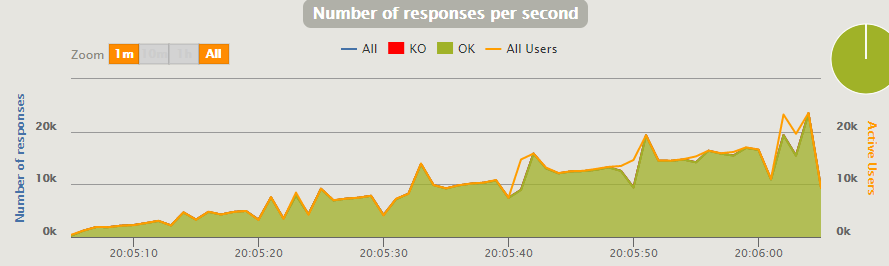
Run with the new settings and pool:
Cope with 18K, but began to notice periodic subsidence associated with the GC and the strategy of adding Gatling users.
Ultimate load
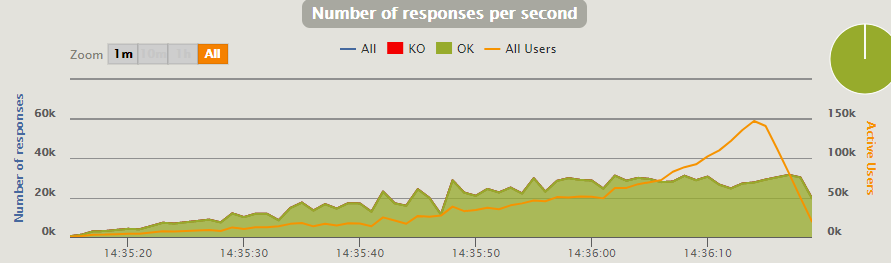
Remembering that the machine gave out 30K RPS with JMeter, let's try to give a similar load on Gatling, and we get 32K:
conclusions
JMeter makes it faster and easier to get results, but it has slightly worse performance. Gatling allows you to ship in large volumes (which you may not need), but it’s more difficult to work with. The choice is yours.