
 December 19, 2017 at 12:36
IP PBX Zeon. Configuring Bitrix24 integration
Last week we talked about our PBX. We mentioned that we have integration with various CRMs. Today I want to talk about Bitrix24 CRM - how to connect it and how it works.
We are a telecom operator, integrator and developer. Our arsenal includes such services as: Virtual Hive PBX, Zeon box IP-PBX , IP-SIM cards (FMC service), numbers all over Russia.
Friends, we live in a wonderful time when the services begin to actively interact with each other, forming a single digital environment. But we are at the beginning of the road. I am convinced that in 5 years there will no longer be a single service that does not have an API.
Bitrix24 is a ready-made and convenient service for organizing the work of the company. Who does not know Bitrix - everyone knows Bitrix! These guys did a tremendous job. They created an amazing product. And what is important to us - they made a great API. (The Bitrix24 API is large, I will mention it in the context of telephony and CRM).
So, what opportunities are opening up before us:
A new client calls your company, the call ends up in the queue (the same Asterisk line that everyone loves, with different strategies and pauses). At this moment, the Asterisk generates an event (and the telephone core of Zeon's IP-PBX is Asterisk), which the handler catches, adds the missing information and sends it to B24 (short for Bitrix24). A new call is registered in B24 and returns a unique identifier. All subsequent events are accompanied by this identifier.
It looks like this: the call came to the operator - the card surfaced. And it does not depend on whether the call came to one operator or several at once - everyone will have a card.
I have to say, there was one difficulty. Show a card is only half the story. If the call goes further, the card needs to be hidden. And here the dog rummaged. There is no method in B24 that allows everyone to hide the card and we had to cut a crutch (I hope colleagues from B24 will pay attention to this and correct this defect).
When the call is clicked, everything is simple, B24 sends a request to the script on the side of Zeon, he verifies the authenticity of the sender (verifies the key) and generates a call. The handset rings, the operator picks it up - a connection is made with the client. In this case, the card pops up, as with an incoming call.
It is enough to create one outgoing and one incoming webhook . Activate IP PBX integration. You do not need to do anything else - the card pops up, leads are created.
A webhook is a call to an external system at the time of the occurrence of an event, using the http protocol.
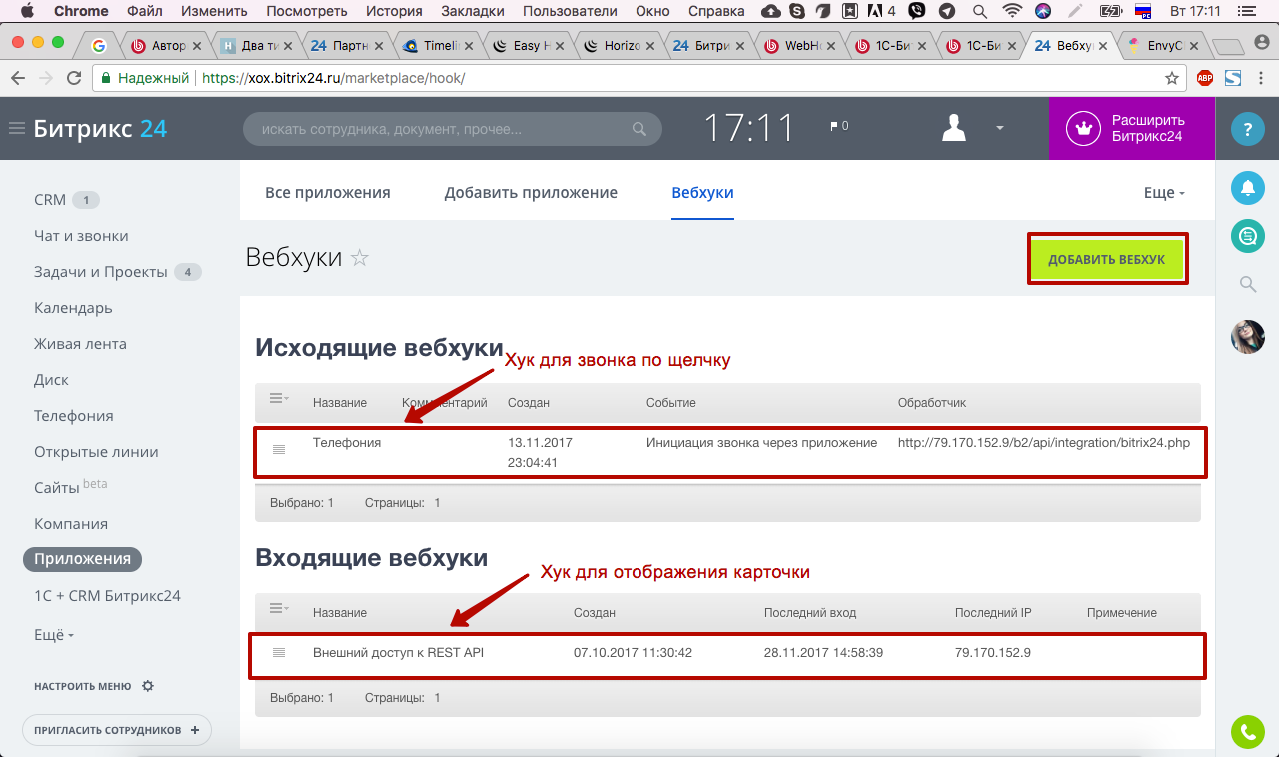
When adding an incoming webhook, you will need to set permissions that determine the integration capabilities. You must name the hook. If you only have one hook, leave the default name.
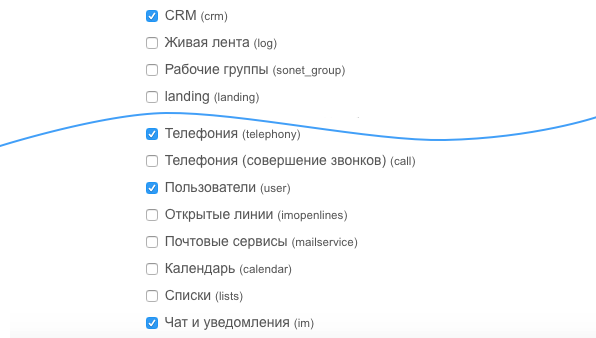
After saving the hook, important information will appear for us:
1. A secret key and a link to the portal will be required .
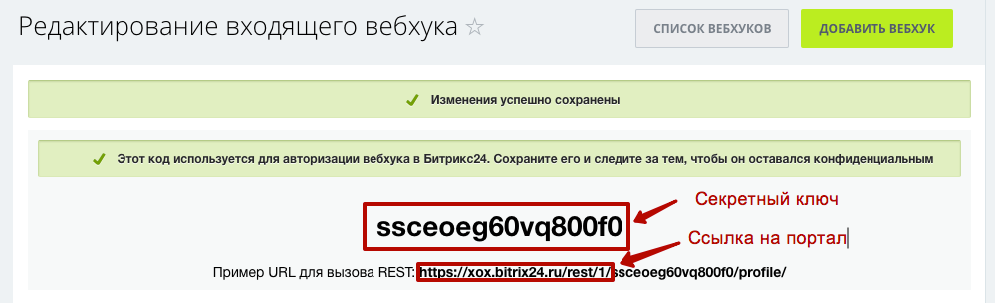
They will need to be driven into the IP-PBX, section Integration with Bitrix24.
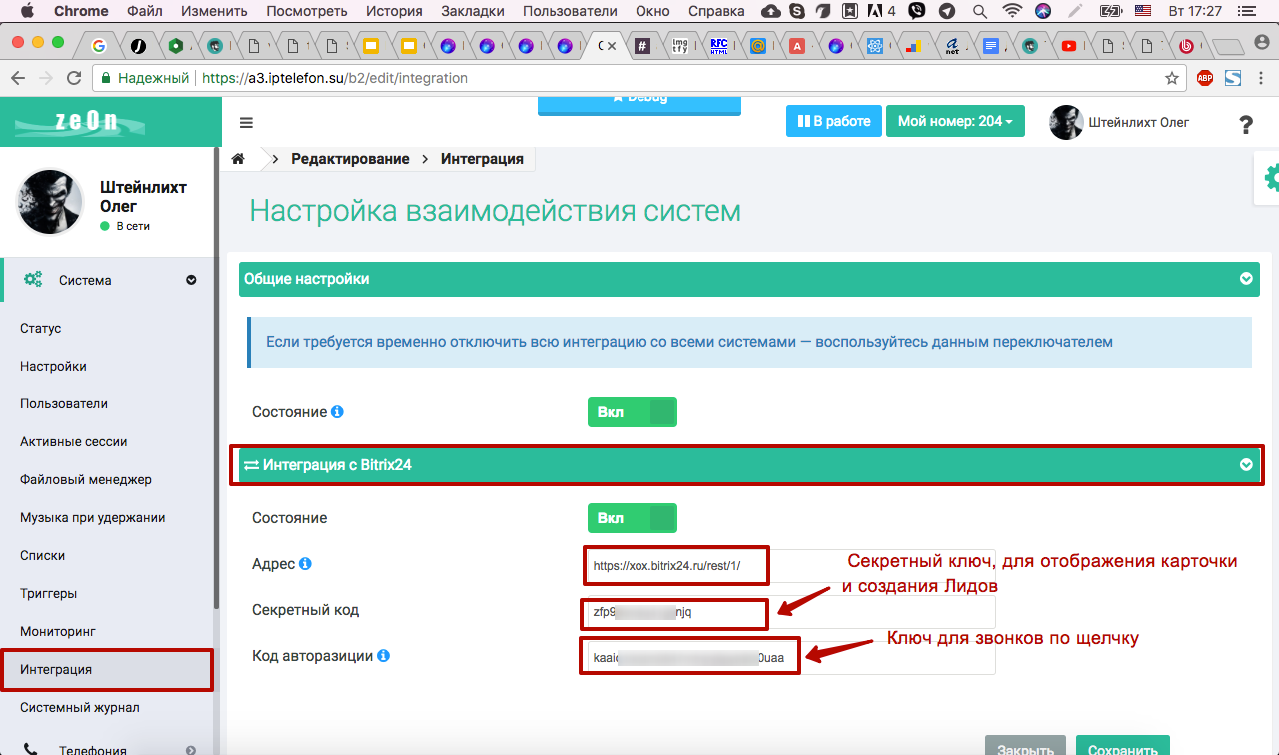
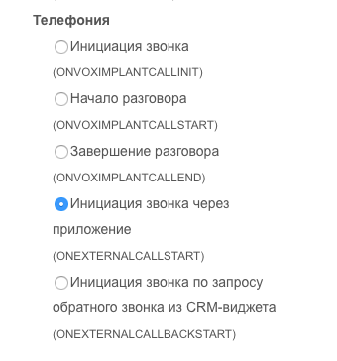
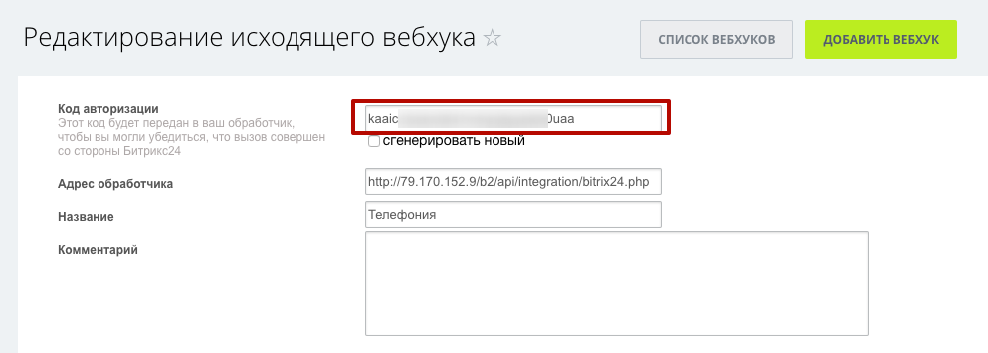
2. You need a key for “Click-to-click”, it is taken from the outgoing hook. When you create it, you need to determine the event that triggers it. Select "Initiate a call through the application."
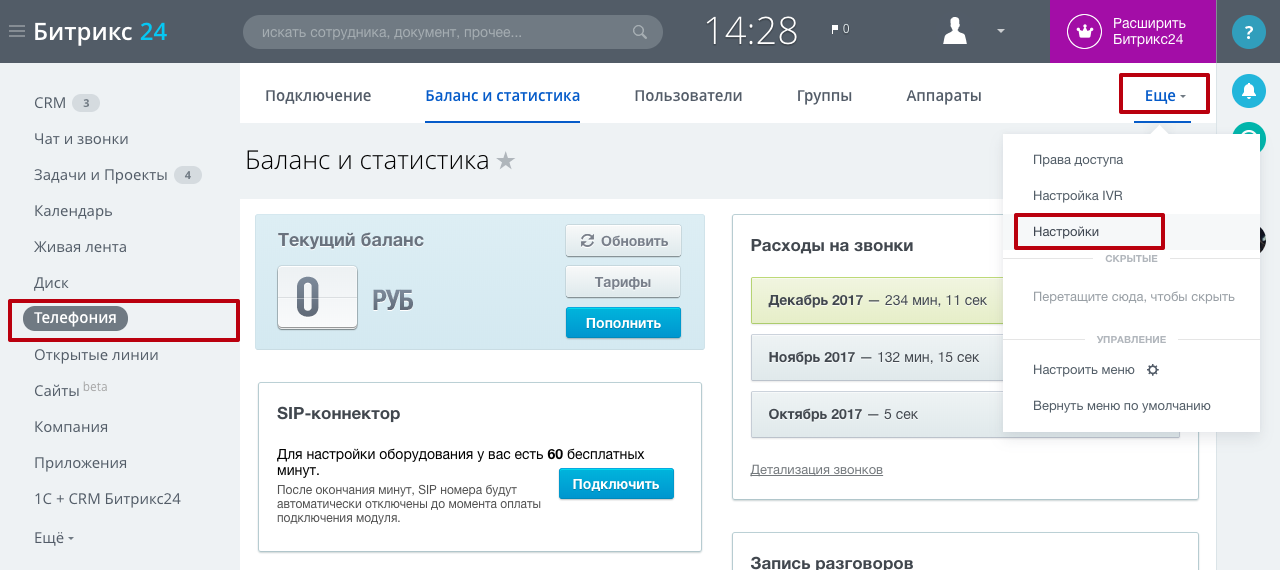
There is one more small nuance. In order for hooks to click to go specifically to your PBX, you need to set one more fad in the B24 settings. Go to the telephony settings:
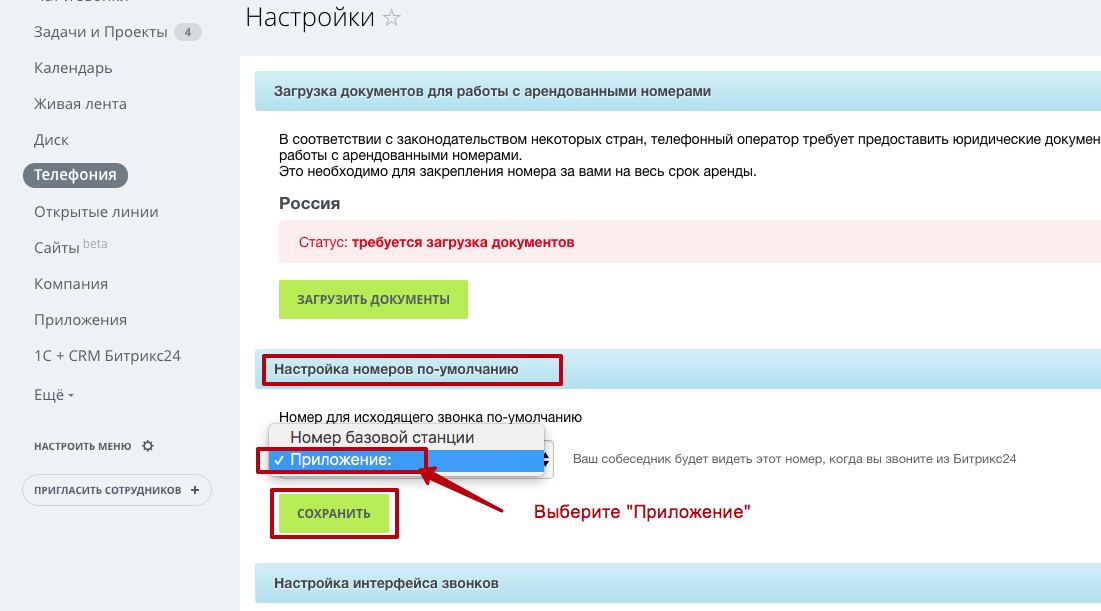
And select "Application" in the "Number for outgoing call" list.
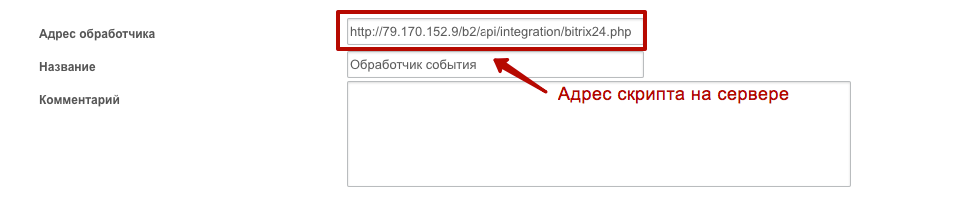
3. The script address on the server is defined as follows: {address of your PBX} / working folder} /integration/bitrix24.php, where "address of your PBX" can be an IP address or domain, the working folder is usually zeon (all this information will be to you provided during server allocation);
4. After saving, a key will appear for outgoing hooks (for click-to-click calls).
I would like to note that Zeon can be rented in the "Private Cloud", at the price of a cloud service or in the form of a "Box". Zeon works with Bitrix24 with both Cloud and the Boxed Version of Bitrix24.
We are a telecom operator, integrator and developer. Our arsenal includes such services as: Virtual Hive PBX, Zeon box IP-PBX , IP-SIM cards (FMC service), numbers all over Russia.
Friends, we live in a wonderful time when the services begin to actively interact with each other, forming a single digital environment. But we are at the beginning of the road. I am convinced that in 5 years there will no longer be a single service that does not have an API.
Bitrix24 is a ready-made and convenient service for organizing the work of the company. Who does not know Bitrix - everyone knows Bitrix! These guys did a tremendous job. They created an amazing product. And what is important to us - they made a great API. (The Bitrix24 API is large, I will mention it in the context of telephony and CRM).
So, what opportunities are opening up before us:
- Client card (for incoming and outgoing calls, and even when transferring a call)
- Auto create Lida
- Click-to-call (also called click2call)
- Attaching a call to Lead (in Bitrix they say attaching to an Object, since this can be not only Lead)
- Attaching conversation recording and listening in the Bitrix24 interface
- Call to the responsible
How it works?
A new client calls your company, the call ends up in the queue (the same Asterisk line that everyone loves, with different strategies and pauses). At this moment, the Asterisk generates an event (and the telephone core of Zeon's IP-PBX is Asterisk), which the handler catches, adds the missing information and sends it to B24 (short for Bitrix24). A new call is registered in B24 and returns a unique identifier. All subsequent events are accompanied by this identifier.
It looks like this: the call came to the operator - the card surfaced. And it does not depend on whether the call came to one operator or several at once - everyone will have a card.
I have to say, there was one difficulty. Show a card is only half the story. If the call goes further, the card needs to be hidden. And here the dog rummaged. There is no method in B24 that allows everyone to hide the card and we had to cut a crutch (I hope colleagues from B24 will pay attention to this and correct this defect).
When the call is clicked, everything is simple, B24 sends a request to the script on the side of Zeon, he verifies the authenticity of the sender (verifies the key) and generates a call. The handset rings, the operator picks it up - a connection is made with the client. In this case, the card pops up, as with an incoming call.
How to set it up?
It is enough to create one outgoing and one incoming webhook . Activate IP PBX integration. You do not need to do anything else - the card pops up, leads are created.
Adding Webhooks
A webhook is a call to an external system at the time of the occurrence of an event, using the http protocol.
When adding an incoming webhook, you will need to set permissions that determine the integration capabilities. You must name the hook. If you only have one hook, leave the default name.
After saving the hook, important information will appear for us:
1. A secret key and a link to the portal will be required .
They will need to be driven into the IP-PBX, section Integration with Bitrix24.
2. You need a key for “Click-to-click”, it is taken from the outgoing hook. When you create it, you need to determine the event that triggers it. Select "Initiate a call through the application."
There is one more small nuance. In order for hooks to click to go specifically to your PBX, you need to set one more fad in the B24 settings. Go to the telephony settings:
And select "Application" in the "Number for outgoing call" list.
3. The script address on the server is defined as follows: {address of your PBX} / working folder} /integration/bitrix24.php, where "address of your PBX" can be an IP address or domain, the working folder is usually zeon (all this information will be to you provided during server allocation);
4. After saving, a key will appear for outgoing hooks (for click-to-click calls).
Total
- You can send a call to any queue, with any strategy (“All at once”, “Earliest”, “Random”) and the card will pop up as participants call, unlike other exchanges where the choice of strategy is limited (this restriction is connected with because the queue in the asterisk is a black box and it’s difficult to make a webhook out of it);
- A call can arrive in one queue, stay there for a while, and if no one accepts it there, leave it and go to another queue or go further through the voice menu;
- “Correct” strategy “Earliest” - a call is received by an operator who has not talked for the longest. And if he misses, the call will go further to the next operator. Why do we focus on this - in the usual asterisk, this function works like this: there is a participant who has not talked for the longest, if he misses a call, the call comes back to him and so on to infinity. This usually leads to a denial of service for the entire KC if one of the participants in the queue forgot to pause himself or, without leaving the system, left for lunch;
- The record is converted to mp3 and attached to the call to B24;
- If a call comes from an unknown number, Lead will be created.
I would like to note that Zeon can be rented in the "Private Cloud", at the price of a cloud service or in the form of a "Box". Zeon works with Bitrix24 with both Cloud and the Boxed Version of Bitrix24.