 December 20, 2017 at 06:54
Smart IDReader SDK - how to write a Telegram bot in Python to recognize documents in 5 minutes
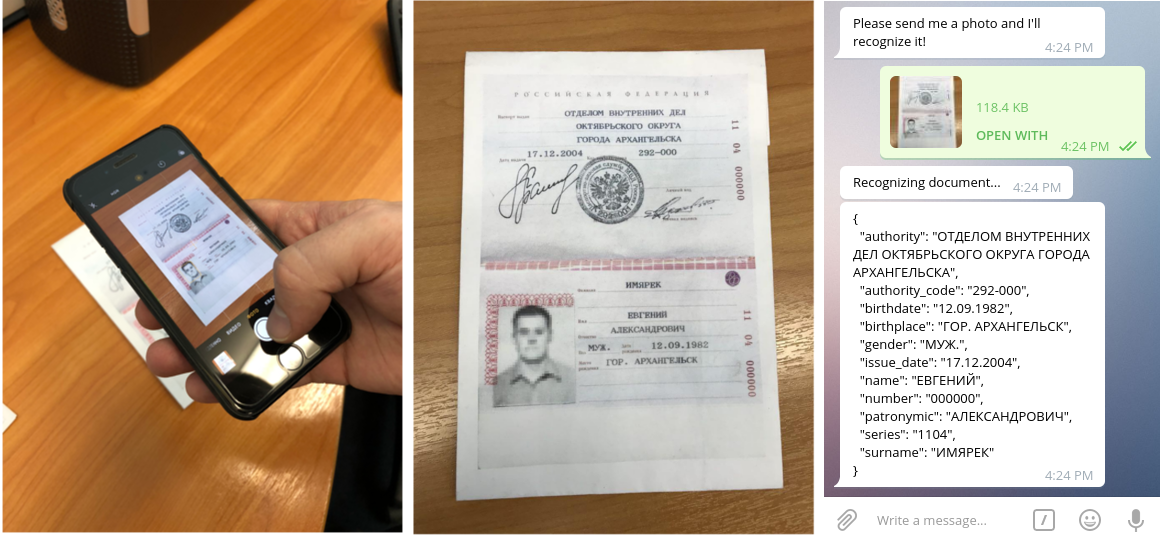
We, Smart Engines , continue the series of articles on how to integrate our recognition technologies ( passports , bank cards and others) into your applications. Earlier we wrote about embedding on iOS and Android , and today we will talk about how to work with the Python interface of the Smart IDReader recognition library and write a simple Telegram bot.
By the way, the list of programming languages supported by us has expanded and now includes C ++, C, C #, Objective-C, Swift, Java, Python, as well as such esoteric languages as Visual Basic and, of course, PHP. As before, we support all popular and many unpopular operating systems and architectures, and our free applications are available for download from the App Store and Google Play .
By tradition, the demo version of the Smart IDReader SDK for Python along with the source code for the implementation of the Telegram bot is posted on Github and is available here .
What do we need
From the SDK we need several files:
- Python recognition library interface (
pySmartIdEngine.py) - Dynamic C ++ recognition core library (in case of Linux -
_pySmartIdEngine.so) - Configuration Archive (
*.zip)
To write the Telegram bot, we chose telepot .
Recognition core interaction
Detailed information about the library can be found in the documentation , but now we will consider only the most necessary.
We’ll connect the library and configure the recognition engine:
# Подключаем python-интерфейс библиотеки распознавания
import pySmartIdEngine as se
# Путь к файлу конфигурации
smartid_config_path = 'bundle_mock_smart_idreader.zip'
# Создаем движок распознавания, лучше сделать один раз и держать в памяти
smartid_engine = se.RecognitionEngine(smartid_config_path)
Now you can write an image recognition function:
def recognize_image_file(smartid_engine, image_file_path):
    # Получаем настройки по умолчанию и включаем нужные типы документов
    session_settings = smartid_engine.CreateSessionSettings()
    session_settings.AddEnabledDocumentTypes('rus.passport.national')
    # Создаем сессию распознавания
    session = smartid_engine.SpawnSession(session_settings)
    # Распознаем изображение
    result = session.ProcessImageFile(image_file_path)
    # Конвертируем распознанные строковые поля в dict
    recognized_fields = {}
    for field_name in result.GetStringFieldNames():
        field = result.GetStringField(field_name)
        recognized_fields[field_name] = field.GetValue().GetUtf8String()
    # Возвращаем строковое JSON-представление распознанных полей
    return json.dumps(recognized_fields, ensure_ascii=False, indent=2)
Implementing a bot to recognize images sent to it
We will follow a simple path and use the example from the telepot documentation. We need to write a class whose object will be created for each chat, and implement a function in it on_chat_message. Also, we will transfer the previously created recognition engine to the constructor so that each time we do not waste time creating it:
import telepot
from telepot.delegate import per_chat_id, create_open, pave_event_space
from telepot.loop import MessageLoop
class SmartIDReaderBot(telepot.helper.ChatHandler):
    def __init__(self, seed_tuple, smartid_engine, **kwargs):
        self.smartid_engine = smartid_engine
        super(SmartIDReaderBot, self).__init__(seed_tuple, **kwargs)
    def on_chat_message(self, msg):
        try:
            content_type, chat_type, chat_id = telepot.glance(msg)
            if content_type in ['document', 'photo']:
                content = msg[content_type] if content_type == 'document' \
                     else msg[content_type][-1]
                if 'file_id' in content:
                    # Скачиваем файл изображения
                    downloads_dir = 'downloaded_images'
                    os.makedirs(downloads_dir, exist_ok=True)
                    temp_path = os.path.join(downloads_dir,
                        'chat_%d_id_%d_temp.png' % (chat_id, msg['message_id']))
                    self.bot.download_file(content['file_id'], temp_path)
                    # Распознаем изображение
                    recognition_result_str = recognize_image_file(
                        self.smartid_engine, temp_path)
                    # Посылаем сообщение с результатом распознавания
                    self.send_message(recognition_result_str)
            else:
                self.send_message("Send me a photo and I'll recognize it!")
        except Exception as e:
            self.send_message('Exception: %s' % e.message)
    def send_message(self, message):
        self.sender.sendMessage(message)
        print(message)
Finally, create and run the bot:
# Создаем бота
bot = telepot.DelegatorBot(args.token, [
    pave_event_space()(
        per_chat_id(), create_open,
        SmartIDReaderBot, smartid_engine, timeout=1000000
    )
])
# Запускаем бота
MessageLoop(bot).run_as_thread()
while 1:
    time.sleep(10)
Instead args.token, substitute your unique token bot, obtained after its registration. If you have never created a bot, then the official Telegram website has detailed instructions .
Conclusion
That's all! We told how to write your Telegram bot for document recognition using the Python interface of Smart IDReader SDK.
Note that a feature of our products is their complete autonomy - they do not need the Internet. But if you really want to, then using Telegram you can very easily recognize documents remotely. However, under Russian law, only your documents can be recognized remotely. In order to work with other people's document data, it is necessary not only to become an operator for processing and storing personal data, to have the necessary infrastructure to protect this data, but also to protect all phones and computers on which recognition is performed. Therefore, our colleagues from Sum & Substance, using our libraries, have developed a platform for remote recognition and verification of these documents, while taking care of the legal side of the issue.









