November 13, 2017 at 02:22
Scarless Face or First Steps in Multicad.NET API 7 (for Nanocad 8.1)
- Tutorial
By the will of fate, it so happened that for one of my hobbies, I needed to poke around in the API for the domestic CAD Nanocad , while not having any practical skills in developing for CAD.
And if a couple of years ago in a similar situation, when, purely for the sake of curiosity, I decided to look at the API for Revit, there were no problems at all, then with Nanocad it was not so simple.
In memory and with all due respect to Mikhail Nikolayevich, one can say: “Get some air into your chest ...” these Americans posted on their site in the public domain ... instructions for getting started ! What are they all there ... in general, you understand, this is not for you to "keep the bow in tights."
But we, as decent people, will not scold people who gave us a completely sane product and access to development tools for free, just try to help them a little, especially since the latest publication on MultiCad. NET API was in the blog of Nanosoft on Habré, almost two years ago and it is necessary to fill a vacuum a little.
Unfortunately, as a complete beginner in this matter, I will not be able to give you really decent quality material, but at least we will consider those issues on which I immediately had a “gag”. It will turn out, as in the last cycle on Data Science, an article from a beginner to newcomers.
The plan is something like this: a few words about Nanocad, a little bit about programming for Nanocad and at the end writing a primitive command using MultiCAD .NET API 7 (for Nanocad 8.X).
So, we hide the drawings in a tube, remove the pouches, put the patterns on the mezzanine, and I beg you under cat.

Dear reader, if you see these lines, know - you are in GREAT danger! Those who happened to read my past articles know that lately, for the sake of greater artistic expressiveness, I have supplemented the headings with something stylized, then I play movies, then proverbs.
I don’t know why, but when I started writing this article, I realized that I simply had to add it to the excerpts from the monologues of the golden age of the programs “Full House” and “Smehopanorama”. So, this article is only for people with a strong spirit.
Contents:
Part I: “I don’t get paid for it! (Introduction).
Part II: Import Substitution
Part III: Access to the API, documentation, where to start.
Part IV: We set up the development environment and write a simple command
Part V: It's a shame! (Conclusion)

To begin with, it will be appropriate to say that I have nothing to do with Nanosoft, they don’t pay me money, so all that will be in the article is my private opinion.
By the way, this opinion will be quite positive. My full acquaintance with Nanocad began many years ago, when Drzugrik and my colleague were still young interns and fate brought us to a good company for which the use of "pirated" software was unacceptable. Naturally, the AutoCAD license was not found for the two “students”, and here Nanocad helped us out.
True, it should be noted that all free versions of the 3.X family cost me a lot of torn hair and foul language, but then version 5.1 ( Nanocad Free), which is a very convenient "electronic kulman." I still use it when I need to sketch out some simple “scheme”, for example, this one:

As you can see, the interface is similar to the old-mode - “pre-elevated” AutoCAD, and the functionality is similar to AutoCAD LT “zero end”. True, unlike the LT version of AutoCAD, in the free Nanocade there is some opportunity to work with 3D, there is not much benefit from it except for students doing assignments in descriptive geometry (I drew my views and isometry, looked, and then draw it).
And in terms of two-dimensional design for the construction industry, the functionality of the free version may well be enough for freelancers or small design bureaus and SMR organizations.
There is certainly a paid version, at the moment Nanocad 8.5, to be honest, I have not tasted all the delights of automation that it gives. But if you believe the book “The Path to Nanocad” (about it later), then it seems to be really convenient to work, but I have not come across it in practice, I can only imagine how much time the automation of some fields in the drawing and the automated normative control could save with NormaCS.
Unlike the free version in the paid version with 3D, things seem to be better, however, for 2D parameterization and 3D modeling, you will have to pay extra separately (in addition to the license for Nanocad Plus), for foreigners this version was simply dubbed NanoCAD PRO
The whole trouble is that, as I understand it, in our country, companies where the design process has been set “wisely” is probably still less than offices where everything “should be done yesterday” and “on the knee”, but for people, Implementing automation look like holy fools. This is true my private opinion and at the same time lagging behind reality, maybe a bright future has come, a “garden city” and all that, then I will be extremely happy for my homeland =)
But back to Nanocad, in the light of the current world situation, one chip for Russian companies (including state-owned companies), namely ...

Life doesn’t get any calmer, sanctions are expanding, and you’ll see that we’ll push the sanctioned distributions on DVD discs with a bulldozer, so what then?
It should be noted that it so happened historically that in the construction engineering industry, the overwhelming advantage of Autodesk products and its twin brothers, Ascon (Compass) products, somehow didn’t take root, although sometimes the projects carried out in Compass also found. It should be noted that this is again my private opinion, I hope it does not provoke a “holivar”.
Well, returning to AutoCAD and Company, what do we have? Autodesk products are high-quality but expensive and have a central office in the United States. There are BricsCAD and ZWCAD, they are certainly cheaper, and for example the same BricsCAD will tell you a lot of advantages about yourselfin comparison with others , but still despite the presence of domestic offices, they can also be considered foreign. These programs have their fans, but I can’t say anything about them - I didn’t use it.
There is also DRAFTSIGHT, which has a free version for Linux for private use, I can’t say anything good or bad about it, I used it for about 30 minutes, probably, and even for a long time.
Well, of course there is also ArchiCAD, but it seems to me there is a slightly different concept and we will not compare them now.
There are other CAD systems, including domestic ones, I know very little or nothing about them.
The main thing is that apart from the dependence on the Open Design Alliance, then Nanocad is probably the first candidate for the “import substitution” of some Autodesk products in the field of construction design.
Note that the platform has a vertical solution and you can find various specializations from mechanics to the now fashionable BIM, to be honest, I have not come across them in practice and can’t say whether, for example, Nanocad Engineering BIM can replace solutions based on Revit.
By the way, it would be appropriate to say thanks to Autodesk, because according to the forum, updating the free version of Nanocad was tied to updating the DWG format to DWG 2018. The exact timing of updating the free version is still unknown .
Well, in addition to paid products, we recall that of course there is also open source solutions: FreeCad, LibreCAD, QCAD - I sincerely wish them success, but I think few dare to build a project business based on them, at least for now.
Well, in order to smoothly move on to API issues, I will say that the MultiCAD .NET API theoretically allows you to write universal applications that run in Nanocad, AutoCAD, ZWCAD . In the case of a non-native platform, libraries are launched through the software layer. True, in practice I could not verify it now, but why? And because I only have AutoCAD 2017 installed on my PC, and the “layer” is available on the developer portal, it does not support it (the region is AutoCAD 2016). So, let's leave the evidence to the conscience of the developers.
Now, we finally began to smoothly approach the problems that a novice developer who is determined to master the Nanocad API will encounter.

Perhaps the most rational way would be to register with the Nanocad Developer Club . Fill out a simple questionnaire, wait for approval (I think if it is adequately filled out, then there should be no problems), after which you get access to development resources.
What are these resources:
Well, in words everything looks very good, in practice, of course, it is also good, but still with a fly in the ointment.
I think since this area is non-core and non-monetizable, they deal with it on a residual basis, for example, on the developer portal now only beta version 8.5 is available, although a full version has already been posted on the company's portal. The problem is that a full version with of. the site, in my opinion, goes without an SDK, so sit think the SDK from the beta is very different from the final or not.
Well, as I mentioned above, the MultiCAD_AC_ZC_Enabler_2209_RU package (a set of “layers” for working with the API in other CADs) has probably also been updated, but there is no newer version (for AutoCAD 2017) on the portal.
But once again, and for this - thanks!These are trifles, the main thing is that you can get licenses for new and old versions of the program, and start sawing your application (licenses are given only for development).
The second problem is the documentation for the API, it should be noted that there are APIs for many languages: pure .NET API (not Multicad), C ++, Lisp, but today we will talk only about MultiCAD API .NET. So if you are used to a detailed description of classes, methods, properties in native libraries from Microsoft, you will certainly be disappointed. Most of the descriptions in the help seem to be generated automatically, but sometimes classes still come up with explanations. It turns out that if you are "not anyhow a programmer" (like me) and at the same time you are not a brilliant detective in order to immediately unravel the logic of the API, then you can’t do without outside help.
Where can we get help? And almost nowhere except the developer forum. But about the forum a bit later, and for a start about literature.
With educational literature, everything is simple - there is almost none! The API documentation itself has a small explanation of how to create a project (more on that in the next chapter), a couple more short notes, and a few examples.
There is a book “The Path to nanoCAD”, since I was "very locked up", I even bought it (by the way, I found it cheaper than on the official website). The book itself is good, you can scroll through it in a day, and thus find out what you can (and cannot) do in Nanocad 8.X and how quickly to transfer to it with AutoCAD. The book has a 13th chapter, which summarizes the basic programming concepts for Nanocad. But there is not much information and you won’t cook much porridge from it, in fact this is a summary of the help from the SDK + a few good tricks and explanations.
What else is there? There are articles in the company’s blog on Habré, or, in my opinion more conveniently, the same articles in the English version of the blog by API(there they do not mix with articles not related to the development). Articles are good, but they are frankly few and rarely come out, as I mentioned at the beginning, the last one was published almost 2 years ago.
The community of Nanocad is small, therefore, it seems that all that remains is a forum for developers. On the one hand, it’s obviously impossible to say that the forum lives a lively vibrant life, that there is a boom in motion, and so on. On the other hand, company specialists try to answer normal questions during the day, for which I thank them. But with "abnormal" (stupid) questions, things are worse, there is no one to answer them (so I sometimes communicate with myself there).
I think the main trouble is that there are few enthusiasts on the forum. And in order to fix this, I am writing now, and you are reading this article.
Another important point is licensing.
Firstly, when you join a development club, you sign an agreement (well, in the sense of pressing the "I agree" button), which says in a heavy legal language that it is possible, that it is impossible.
The question of the interpretation of this agreement regarding the rights to your applications (libraries) was asked to developers by different people, including me . The meaning of the answers is approximately the following: Nanosoft does not limit the free use and distribution of your best practices based on the Nanocad development tools.
Moreover, in order to find out it is not necessary to join the club, just read the license agreement for any version of the program (at least starting with version 5). So, for example, the SDK for the free version 5.1 is available inside the distribution kit (at least it used to be), that is, in principle, it looks like a club and you don’t have to join, but if you want to use the latest API versions (and we want to, because in NC5 .1 it is kutsee), you still need to enter.
But enough to say, it’s time to do something useful, let's move on to the part for which the whole article was conceived.
Before starting, I’ll say that we chose the MultiCAD .NET API not only for its “cross-platformness”, but also for the ability to create custom primitives (but we will not create them in this example). So, we will write a team that draws a face, the one on the left, and then you will independently draw the one on the right (just kidding). We will focus on Nanocad 8.1, but the code is simple and I think that it will work in any version of the 8.X family. We will write and collect code in MS Visual Studio. Ok, and which version to choose? It all depends on our goals. So the examples that are part of the SDK for NC 8 were collected in MS Visual studio 2012. And when you try to open them in later versions, a solution update wizard may appear.
Unfortunately, since the whole package from the SDK was not built up with me, I can’t say whether the conversion to a newer version of the project somehow affects its performance. But I can say for sure that if you download the free VS Express Desktop 2012, then the projects in the SDK will not swear and, in principle, they can be assembled calmly.
By the way, if you want to download VS Express Desktop 2012 from the Microsoft website , it’s not a fact that you will succeed, in my case, MS apparently thinks I'm crazy and, with an persistent attempt to download it, blocks me, but fortunately this version can also be found on the network , the truth again, the registration service seems to have died, so you have to look for the code as well.
One way or another, the example that we will write now, you can build in a later version of Visual Studio. For example, I use the VS 2015 Community edition, but I think in 2013 and in 2017, too, should go.
The first thing to start with is to create a project (this information is also in the SDK).

Attention, select the .NET Framework 4.0, this version is used in the API for NC8 (for NC 5.1, for example, .NET Framework 3.5). Next, select the class library, the name you can choose what you want.
Next, you need to connect the libraries from the MultiCAD .NET API (mapimgd.dll and mapibasetypes.dll), as in the picture:
Be sure to remove the copy locally option in the properties:
Configure the debugger so that our assembly immediately opens in Nanocad. First, in the project properties, specify nCad.exe (as in the picture) as the launched application.
We will include our library in the list of startup (so that each time we do not call the netload command). To do this, in our case (for NC 8.1), go to C: \ ProgramData \ Nanosoft \ nanoCAD x64 Plus 8.1 \ DataRW and find or create the load.config file with the following contents.
Instead of three dots, the full address to your project folder is naturally. It is not necessary to be limited to one record in the future, it will be possible to add another 1 section if you still have your own libraries.
Now, when you press F5, our project will immediately be loaded into Nanocad and all that remains is to type the team that we will write.
As usual, we will now parse it into pieces, and the full text is available on GitHub (only a. * Cs file is available at this address, create the project yourself if necessary)
So, for a start, we will write down the necessary namespaces:
Next, create a team.
Attribute [CommandMethod ("Dface", CommandFlags.NoCheck | CommandFlags.NoPrefix)]
Defines the name of the command that we will enter in the NC command line (in our case, Dface), and then there are flags, I’m not ready to say about the meaning of the flags yet. Then immediately comes the name of the class in which we implement our "business logic", any class name - at your discretion, I have public void DrawFace ()
In the next section, we will draw the left half of the face.
So let's get it right. In the MultiCAD .NET API there are classes that are responsible for defining geometric objects and displaying them in the drawing, create an eye: DbCircle eye = new DbCircle (); - creates a circle object (similar to the CIRCLE command on the command line or clicking on the circle in the toolbar), then we adjust the radius of the circle and the coordinates of the center, I think it’s so clear. eye.DbEntity.AddToCurrentDocument (); - Adds an object to the drawing.
With a simple line, I think everything is so clear (it will be our nose).
Then draw a mouth. Define a polyline DbPolyline mouth = new DbPolyline (); We form points on which it will be built (oblique and straight lines).
mouth.Polyline = new Polyline3d (mouthPoints); - create the geometry in our database object at our points.
mouth.Polyline.SetClosed (false); if you want the line to close, change the value.
- I borrowed this line on the developers forum, I don’t know whether it is necessary to precisely change the user coordinate system to world or not =)
We draw the second part of the face
We simply create the second eye by analogy. But the second half of the mouth for the sake of diversity mirror. In fact, we are making an analogue of the MIRROR command (mirror)
this command creates a new mirror copy of the line reflected from the base point and the plane (it is as if you poked a mouse into the screen and drew a line along which the object is reflected).
Add some interactivity.
The first section simply sends the text to the console (a window where you enter commands). The second section creates an object for entering data into the console and receives the value entered by the user. In this case, we ask the user to introduce himself and save his name.
We create a text object, this is a small fraction of the humor in our team.
We draw the user's attention to the created record, and at the same time demonstrate that a design, for example, typical of windows.forms, can be built into your application, that is, you could make a call of your own form and then process the data. We simply display the username obtained earlier.
It seems that our face is dissatisfied with its being, let's remove it.
In the last section, we do two things: show the user a tooltip that the “delete” command has turned on automatically and run another command from our team.
We press F5 and if everything is fine we can check our team in action, do not forget to enter the team name as in the screenshot.
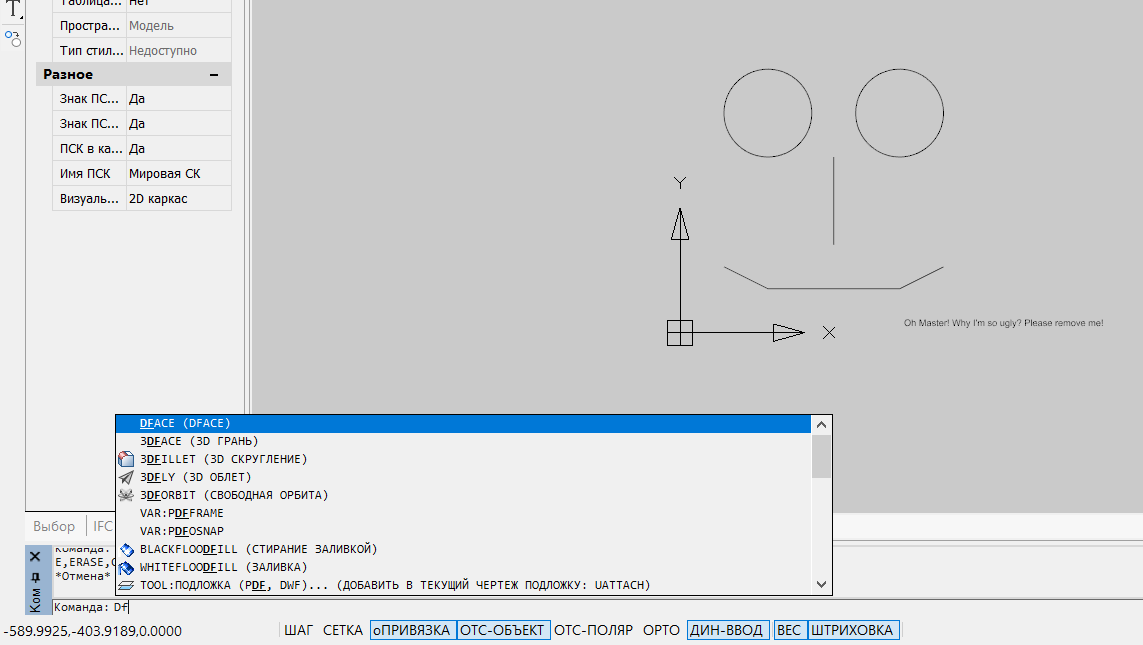
And to intercept some debugging information, you can use a special monitoring utility .
If suddenly you don’t want to join the development club, and you really want to see the result of your work, you can download the NC 8.5 demo version, it seems it comes without the SDK bundled, but we won’t be upset, of course the mapimgd.dll and mapibasetypes.dll libraries should be included in the delivery package of the program itself, so that they can be found in the bin folder.
I don’t know if this is possible from the point of view of the law, but I think that there should be no problems.
So, I shared with you almost everything that I knew at the moment, it remains only to draw a conclusion.

Well, what did Viktor Koklyushkin say: “It's a shame”, for what a shame? Because a promising project - a product of quite acceptable quality, did not unfold, as it could deploy. This is strange, of course, it seemed that there were some kind of government support measures, it seems like in the free version you can actually draw something simple without wanting to throw a brick in the monitor, but still somehow the environment created around the product is worse than it could be. I’m thinking that if more people get involved in the development for Nanocad even if it’s just “just for fun”, as you and I are now, then you look and Nanosoft will feel its demand, maybe the forum will heal, the API will start to document better and files will be laid out more often. In principle, if you consider that it is still possible it makes sense to wait for the update of the free version, then maybe it will be so in the future.
In the meantime, I will say thank you and wish good luck to the developers of Nanocad and everyone who has mastered this article to the end, despite the jokes from the "Full House".
Have a good start to your work week!
And if a couple of years ago in a similar situation, when, purely for the sake of curiosity, I decided to look at the API for Revit, there were no problems at all, then with Nanocad it was not so simple.
In memory and with all due respect to Mikhail Nikolayevich, one can say: “Get some air into your chest ...” these Americans posted on their site in the public domain ... instructions for getting started ! What are they all there ... in general, you understand, this is not for you to "keep the bow in tights."
But we, as decent people, will not scold people who gave us a completely sane product and access to development tools for free, just try to help them a little, especially since the latest publication on MultiCad. NET API was in the blog of Nanosoft on Habré, almost two years ago and it is necessary to fill a vacuum a little.
Unfortunately, as a complete beginner in this matter, I will not be able to give you really decent quality material, but at least we will consider those issues on which I immediately had a “gag”. It will turn out, as in the last cycle on Data Science, an article from a beginner to newcomers.
The plan is something like this: a few words about Nanocad, a little bit about programming for Nanocad and at the end writing a primitive command using MultiCAD .NET API 7 (for Nanocad 8.X).
So, we hide the drawings in a tube, remove the pouches, put the patterns on the mezzanine, and I beg you under cat.
Dear reader, if you see these lines, know - you are in GREAT danger! Those who happened to read my past articles know that lately, for the sake of greater artistic expressiveness, I have supplemented the headings with something stylized, then I play movies, then proverbs.
I don’t know why, but when I started writing this article, I realized that I simply had to add it to the excerpts from the monologues of the golden age of the programs “Full House” and “Smehopanorama”. So, this article is only for people with a strong spirit.
Contents:
Part I: “I don’t get paid for it! (Introduction).
Part II: Import Substitution
Part III: Access to the API, documentation, where to start.
Part IV: We set up the development environment and write a simple command
Part V: It's a shame! (Conclusion)
1. I don’t get paid for it! (Introduction)
To begin with, it will be appropriate to say that I have nothing to do with Nanosoft, they don’t pay me money, so all that will be in the article is my private opinion.
By the way, this opinion will be quite positive. My full acquaintance with Nanocad began many years ago, when Drzugrik and my colleague were still young interns and fate brought us to a good company for which the use of "pirated" software was unacceptable. Naturally, the AutoCAD license was not found for the two “students”, and here Nanocad helped us out.
True, it should be noted that all free versions of the 3.X family cost me a lot of torn hair and foul language, but then version 5.1 ( Nanocad Free), which is a very convenient "electronic kulman." I still use it when I need to sketch out some simple “scheme”, for example, this one:
As you can see, the interface is similar to the old-mode - “pre-elevated” AutoCAD, and the functionality is similar to AutoCAD LT “zero end”. True, unlike the LT version of AutoCAD, in the free Nanocade there is some opportunity to work with 3D, there is not much benefit from it except for students doing assignments in descriptive geometry (I drew my views and isometry, looked, and then draw it).
And in terms of two-dimensional design for the construction industry, the functionality of the free version may well be enough for freelancers or small design bureaus and SMR organizations.
There is certainly a paid version, at the moment Nanocad 8.5, to be honest, I have not tasted all the delights of automation that it gives. But if you believe the book “The Path to Nanocad” (about it later), then it seems to be really convenient to work, but I have not come across it in practice, I can only imagine how much time the automation of some fields in the drawing and the automated normative control could save with NormaCS.
Unlike the free version in the paid version with 3D, things seem to be better, however, for 2D parameterization and 3D modeling, you will have to pay extra separately (in addition to the license for Nanocad Plus), for foreigners this version was simply dubbed NanoCAD PRO
The whole trouble is that, as I understand it, in our country, companies where the design process has been set “wisely” is probably still less than offices where everything “should be done yesterday” and “on the knee”, but for people, Implementing automation look like holy fools. This is true my private opinion and at the same time lagging behind reality, maybe a bright future has come, a “garden city” and all that, then I will be extremely happy for my homeland =)
But back to Nanocad, in the light of the current world situation, one chip for Russian companies (including state-owned companies), namely ...
2. Import substitution
Life doesn’t get any calmer, sanctions are expanding, and you’ll see that we’ll push the sanctioned distributions on DVD discs with a bulldozer, so what then?
It should be noted that it so happened historically that in the construction engineering industry, the overwhelming advantage of Autodesk products and its twin brothers, Ascon (Compass) products, somehow didn’t take root, although sometimes the projects carried out in Compass also found. It should be noted that this is again my private opinion, I hope it does not provoke a “holivar”.
Well, returning to AutoCAD and Company, what do we have? Autodesk products are high-quality but expensive and have a central office in the United States. There are BricsCAD and ZWCAD, they are certainly cheaper, and for example the same BricsCAD will tell you a lot of advantages about yourselfin comparison with others , but still despite the presence of domestic offices, they can also be considered foreign. These programs have their fans, but I can’t say anything about them - I didn’t use it.
There is also DRAFTSIGHT, which has a free version for Linux for private use, I can’t say anything good or bad about it, I used it for about 30 minutes, probably, and even for a long time.
Well, of course there is also ArchiCAD, but it seems to me there is a slightly different concept and we will not compare them now.
There are other CAD systems, including domestic ones, I know very little or nothing about them.
The main thing is that apart from the dependence on the Open Design Alliance, then Nanocad is probably the first candidate for the “import substitution” of some Autodesk products in the field of construction design.
Note that the platform has a vertical solution and you can find various specializations from mechanics to the now fashionable BIM, to be honest, I have not come across them in practice and can’t say whether, for example, Nanocad Engineering BIM can replace solutions based on Revit.
By the way, it would be appropriate to say thanks to Autodesk, because according to the forum, updating the free version of Nanocad was tied to updating the DWG format to DWG 2018. The exact timing of updating the free version is still unknown .
Well, in addition to paid products, we recall that of course there is also open source solutions: FreeCad, LibreCAD, QCAD - I sincerely wish them success, but I think few dare to build a project business based on them, at least for now.
Well, in order to smoothly move on to API issues, I will say that the MultiCAD .NET API theoretically allows you to write universal applications that run in Nanocad, AutoCAD, ZWCAD . In the case of a non-native platform, libraries are launched through the software layer. True, in practice I could not verify it now, but why? And because I only have AutoCAD 2017 installed on my PC, and the “layer” is available on the developer portal, it does not support it (the region is AutoCAD 2016). So, let's leave the evidence to the conscience of the developers.
Now, we finally began to smoothly approach the problems that a novice developer who is determined to master the Nanocad API will encounter.
3. Access to the API, documentation, where to start.
Perhaps the most rational way would be to register with the Nanocad Developer Club . Fill out a simple questionnaire, wait for approval (I think if it is adequately filled out, then there should be no problems), after which you get access to development resources.
What are these resources:
- Access to licenses and distributions of the released versions of Nanocad, including some beta versions, as well as directly to the API itself (SDK).
- Access to a private forum for developers (not to be confused with a regular forum )
- Communication with developers, the ability to point to a “bug” or request a “feature”.
Well, in words everything looks very good, in practice, of course, it is also good, but still with a fly in the ointment.
I think since this area is non-core and non-monetizable, they deal with it on a residual basis, for example, on the developer portal now only beta version 8.5 is available, although a full version has already been posted on the company's portal. The problem is that a full version with of. the site, in my opinion, goes without an SDK, so sit think the SDK from the beta is very different from the final or not.
Well, as I mentioned above, the MultiCAD_AC_ZC_Enabler_2209_RU package (a set of “layers” for working with the API in other CADs) has probably also been updated, but there is no newer version (for AutoCAD 2017) on the portal.
But once again, and for this - thanks!These are trifles, the main thing is that you can get licenses for new and old versions of the program, and start sawing your application (licenses are given only for development).
The second problem is the documentation for the API, it should be noted that there are APIs for many languages: pure .NET API (not Multicad), C ++, Lisp, but today we will talk only about MultiCAD API .NET. So if you are used to a detailed description of classes, methods, properties in native libraries from Microsoft, you will certainly be disappointed. Most of the descriptions in the help seem to be generated automatically, but sometimes classes still come up with explanations. It turns out that if you are "not anyhow a programmer" (like me) and at the same time you are not a brilliant detective in order to immediately unravel the logic of the API, then you can’t do without outside help.
Where can we get help? And almost nowhere except the developer forum. But about the forum a bit later, and for a start about literature.
With educational literature, everything is simple - there is almost none! The API documentation itself has a small explanation of how to create a project (more on that in the next chapter), a couple more short notes, and a few examples.
There is a book “The Path to nanoCAD”, since I was "very locked up", I even bought it (by the way, I found it cheaper than on the official website). The book itself is good, you can scroll through it in a day, and thus find out what you can (and cannot) do in Nanocad 8.X and how quickly to transfer to it with AutoCAD. The book has a 13th chapter, which summarizes the basic programming concepts for Nanocad. But there is not much information and you won’t cook much porridge from it, in fact this is a summary of the help from the SDK + a few good tricks and explanations.
What else is there? There are articles in the company’s blog on Habré, or, in my opinion more conveniently, the same articles in the English version of the blog by API(there they do not mix with articles not related to the development). Articles are good, but they are frankly few and rarely come out, as I mentioned at the beginning, the last one was published almost 2 years ago.
The community of Nanocad is small, therefore, it seems that all that remains is a forum for developers. On the one hand, it’s obviously impossible to say that the forum lives a lively vibrant life, that there is a boom in motion, and so on. On the other hand, company specialists try to answer normal questions during the day, for which I thank them. But with "abnormal" (stupid) questions, things are worse, there is no one to answer them (so I sometimes communicate with myself there).
I think the main trouble is that there are few enthusiasts on the forum. And in order to fix this, I am writing now, and you are reading this article.
Another important point is licensing.
Firstly, when you join a development club, you sign an agreement (well, in the sense of pressing the "I agree" button), which says in a heavy legal language that it is possible, that it is impossible.
The question of the interpretation of this agreement regarding the rights to your applications (libraries) was asked to developers by different people, including me . The meaning of the answers is approximately the following: Nanosoft does not limit the free use and distribution of your best practices based on the Nanocad development tools.
Moreover, in order to find out it is not necessary to join the club, just read the license agreement for any version of the program (at least starting with version 5). So, for example, the SDK for the free version 5.1 is available inside the distribution kit (at least it used to be), that is, in principle, it looks like a club and you don’t have to join, but if you want to use the latest API versions (and we want to, because in NC5 .1 it is kutsee), you still need to enter.
But enough to say, it’s time to do something useful, let's move on to the part for which the whole article was conceived.
4. Set up the development environment and write a simple command
Before starting, I’ll say that we chose the MultiCAD .NET API not only for its “cross-platformness”, but also for the ability to create custom primitives (but we will not create them in this example). So, we will write a team that draws a face, the one on the left, and then you will independently draw the one on the right (just kidding). We will focus on Nanocad 8.1, but the code is simple and I think that it will work in any version of the 8.X family. We will write and collect code in MS Visual Studio. Ok, and which version to choose? It all depends on our goals. So the examples that are part of the SDK for NC 8 were collected in MS Visual studio 2012. And when you try to open them in later versions, a solution update wizard may appear.
Unfortunately, since the whole package from the SDK was not built up with me, I can’t say whether the conversion to a newer version of the project somehow affects its performance. But I can say for sure that if you download the free VS Express Desktop 2012, then the projects in the SDK will not swear and, in principle, they can be assembled calmly.
By the way, if you want to download VS Express Desktop 2012 from the Microsoft website , it’s not a fact that you will succeed, in my case, MS apparently thinks I'm crazy and, with an persistent attempt to download it, blocks me, but fortunately this version can also be found on the network , the truth again, the registration service seems to have died, so you have to look for the code as well.
One way or another, the example that we will write now, you can build in a later version of Visual Studio. For example, I use the VS 2015 Community edition, but I think in 2013 and in 2017, too, should go.
The first thing to start with is to create a project (this information is also in the SDK).
Attention, select the .NET Framework 4.0, this version is used in the API for NC8 (for NC 5.1, for example, .NET Framework 3.5). Next, select the class library, the name you can choose what you want.
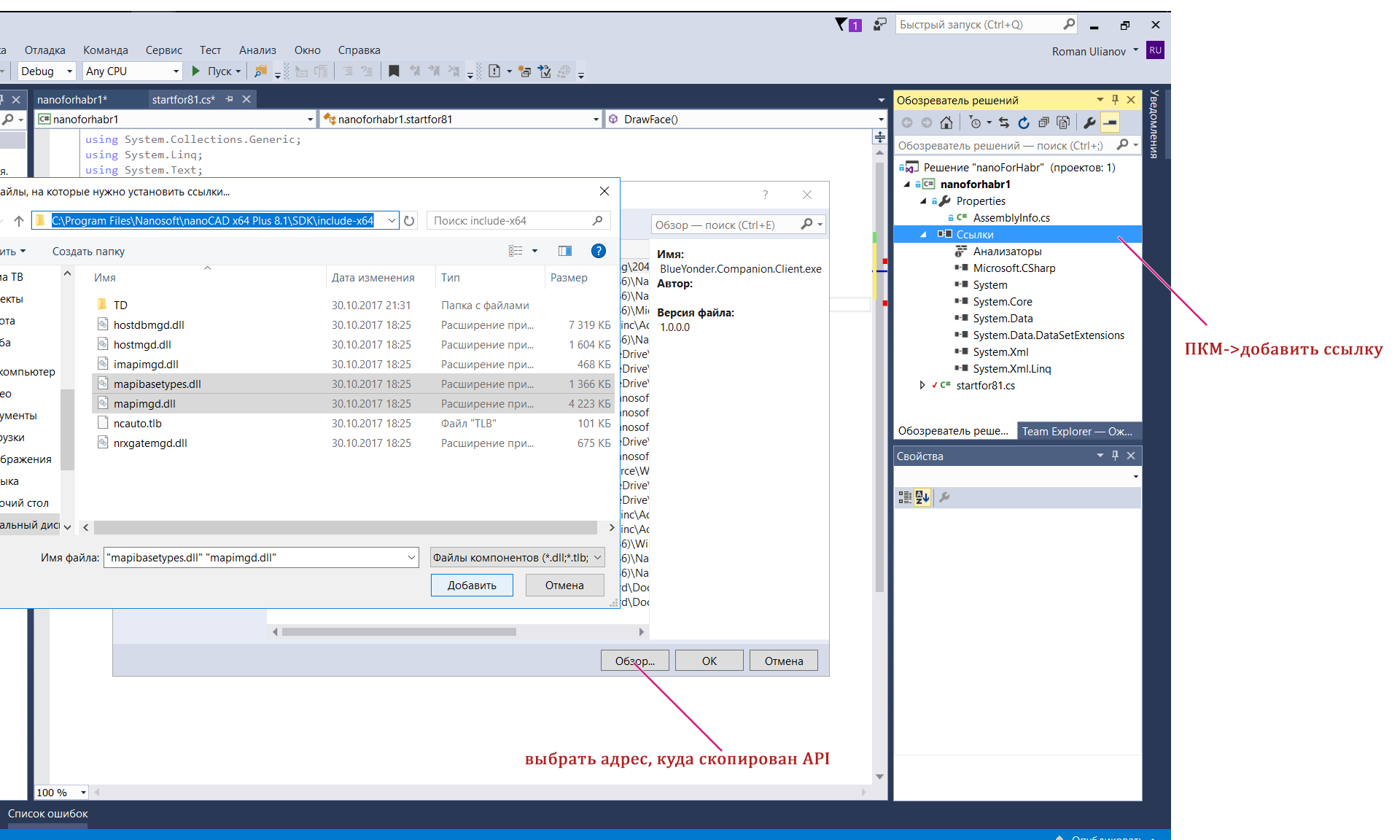
Next, you need to connect the libraries from the MultiCAD .NET API (mapimgd.dll and mapibasetypes.dll), as in the picture:
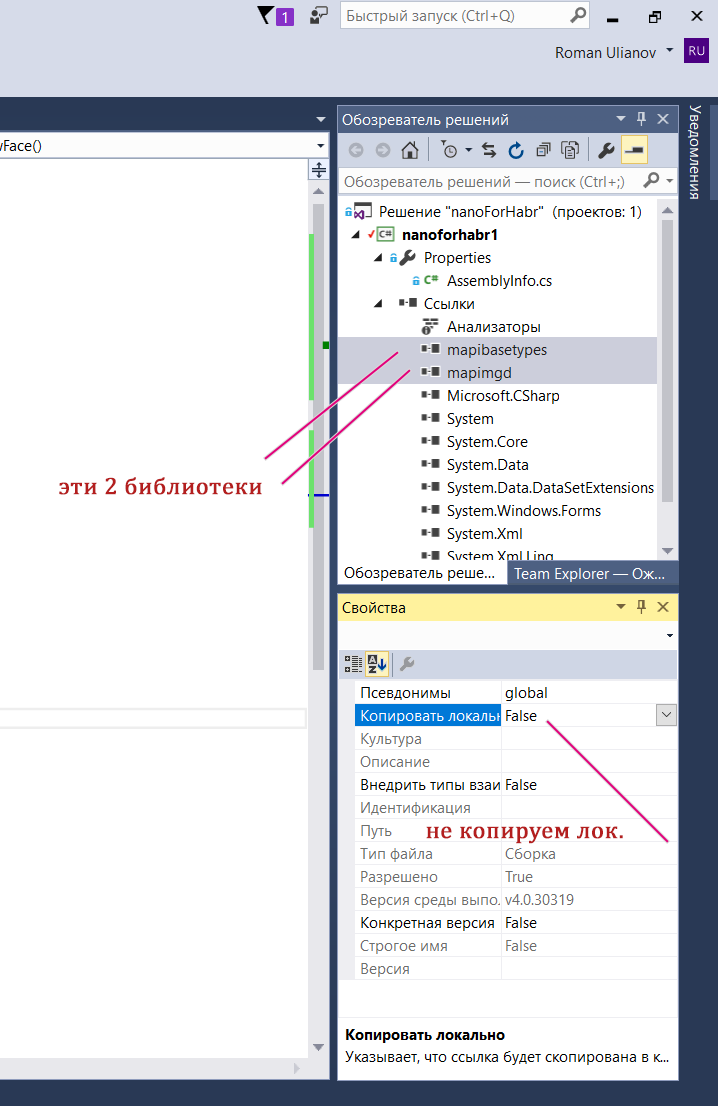
Be sure to remove the copy locally option in the properties:
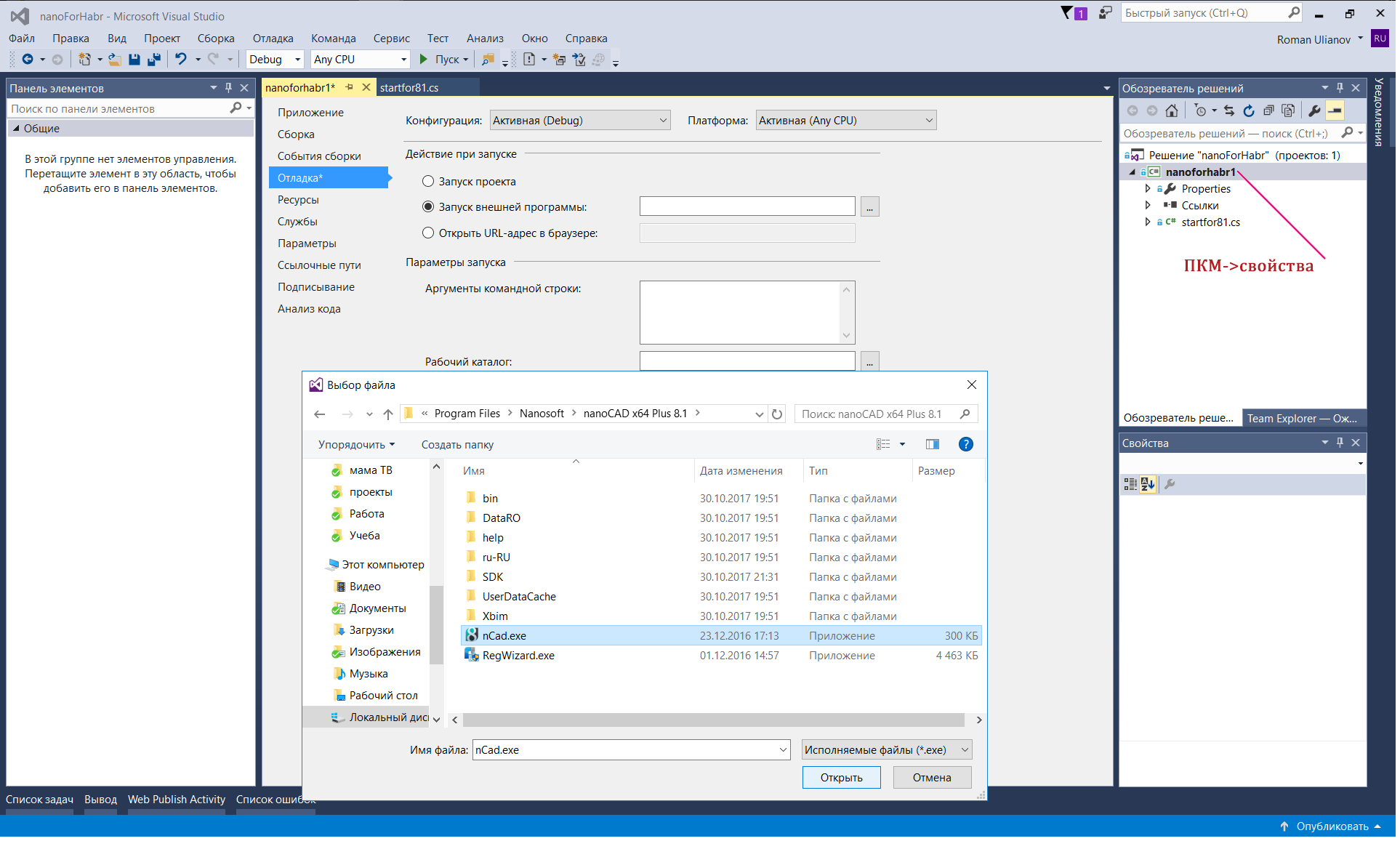
Configure the debugger so that our assembly immediately opens in Nanocad. First, in the project properties, specify nCad.exe (as in the picture) as the launched application.
We will include our library in the list of startup (so that each time we do not call the netload command). To do this, in our case (for NC 8.1), go to C: \ ProgramData \ Nanosoft \ nanoCAD x64 Plus 8.1 \ DataRW and find or create the load.config file with the following contents.
Instead of three dots, the full address to your project folder is naturally. It is not necessary to be limited to one record in the future, it will be possible to add another 1 section if you still have your own libraries.
Now, when you press F5, our project will immediately be loaded into Nanocad and all that remains is to type the team that we will write.
As usual, we will now parse it into pieces, and the full text is available on GitHub (only a. * Cs file is available at this address, create the project yourself if necessary)
So, for a start, we will write down the necessary namespaces:
using System;
using System.Collections.Generic;
using Multicad.AplicationServices;
using Multicad.Runtime;
using Multicad.DatabaseServices;
using Multicad.Geometry;
using Multicad.DatabaseServices.StandardObjects;
using System.Windows.Forms;
Next, create a team.
namespace nanoforhabr1
{
    public class startfor81
    {
        [CommandMethod("Dface", CommandFlags.NoCheck | CommandFlags.NoPrefix )]
        public void DrawFace()
        {
Attribute [CommandMethod ("Dface", CommandFlags.NoCheck | CommandFlags.NoPrefix)]
Defines the name of the command that we will enter in the NC command line (in our case, Dface), and then there are flags, I’m not ready to say about the meaning of the flags yet. Then immediately comes the name of the class in which we implement our "business logic", any class name - at your discretion, I have public void DrawFace ()
In the next section, we will draw the left half of the face.
//We draw half of face
            // Draw eye
            DbCircle eye = new DbCircle();
            eye.Radius = 100;
            eye.Center = new Point3d(200, 500,0);
            eye.DbEntity.AddToCurrentDocument();
            //Draw nose
            DbLine nose = new DbLine();
            nose.StartPoint= new Point3d(350, 400, 0);
            nose.EndPoint = new Point3d(350, 200, 0);
            nose.DbEntity.AddToCurrentDocument();
            //Draw mouth
            DbPolyline mouth = new DbPolyline();
            List mouthPoints = new List() {
                new Point3d(100, 150, 0), new Point3d(200, 100, 0), new Point3d(350, 100, 0) };
            mouth.Polyline=  new Polyline3d(mouthPoints);
            mouth.Polyline.SetClosed(false);
            mouth.DbEntity.Transform(McDocumentsManager.GetActiveDoc().UCS); //change coordinates from UCS to WCS for BD
            mouth.DbEntity.AddToCurrentDocument();
So let's get it right. In the MultiCAD .NET API there are classes that are responsible for defining geometric objects and displaying them in the drawing, create an eye: DbCircle eye = new DbCircle (); - creates a circle object (similar to the CIRCLE command on the command line or clicking on the circle in the toolbar), then we adjust the radius of the circle and the coordinates of the center, I think it’s so clear. eye.DbEntity.AddToCurrentDocument (); - Adds an object to the drawing.
With a simple line, I think everything is so clear (it will be our nose).
Then draw a mouth. Define a polyline DbPolyline mouth = new DbPolyline (); We form points on which it will be built (oblique and straight lines).
List mouthPoints = new List() {
                new Point3d(100, 150, 0), new Point3d(200, 100, 0), new Point3d(350, 100, 0) };
mouth.Polyline = new Polyline3d (mouthPoints); - create the geometry in our database object at our points.
mouth.Polyline.SetClosed (false); if you want the line to close, change the value.
mouth.DbEntity.Transform(McDocumentsManager.GetActiveDoc().UCS); //change coordinates from UCS to WCS for BD - I borrowed this line on the developers forum, I don’t know whether it is necessary to precisely change the user coordinate system to world or not =)
We draw the second part of the face
//draw mirror half the face (2nd half)
            DbCircle eye2 = new DbCircle();
            eye2.Radius = 100;
            eye2.Center = new Point3d(500, 500, 0);
            eye2.DbEntity.AddToCurrentDocument();
            DbPolyline mouth2 = new DbPolyline();
            mouth2.Polyline= mouth.Polyline.Mirror(new Plane3d(new Point3d(350, 100, 0), new Vector3d(200, 0, 0))) as Polyline3d;
            mouth2.DbEntity.AddToCurrentDocument();
We simply create the second eye by analogy. But the second half of the mouth for the sake of diversity mirror. In fact, we are making an analogue of the MIRROR command (mirror)
mouth2.Polyline= mouth.Polyline.Mirror(new Plane3d(new Point3d(350, 100, 0), new Vector3d(200, 0, 0))) as Polyline3d;this command creates a new mirror copy of the line reflected from the base point and the plane (it is as if you poked a mouse into the screen and drew a line along which the object is reflected).
Add some interactivity.
//Get notification in command line
            McContext.ShowNotification("You need to enter data into the console");
            //Get uaser input
            InputJig editorInput = new InputJig();
            string name = editorInput.GetText("Input your name and press Enter");
The first section simply sends the text to the console (a window where you enter commands). The second section creates an object for entering data into the console and receives the value entered by the user. In this case, we ask the user to introduce himself and save his name.
We create a text object, this is a small fraction of the humor in our team.
            //Drawing face's text
            DbText spech = new DbText();
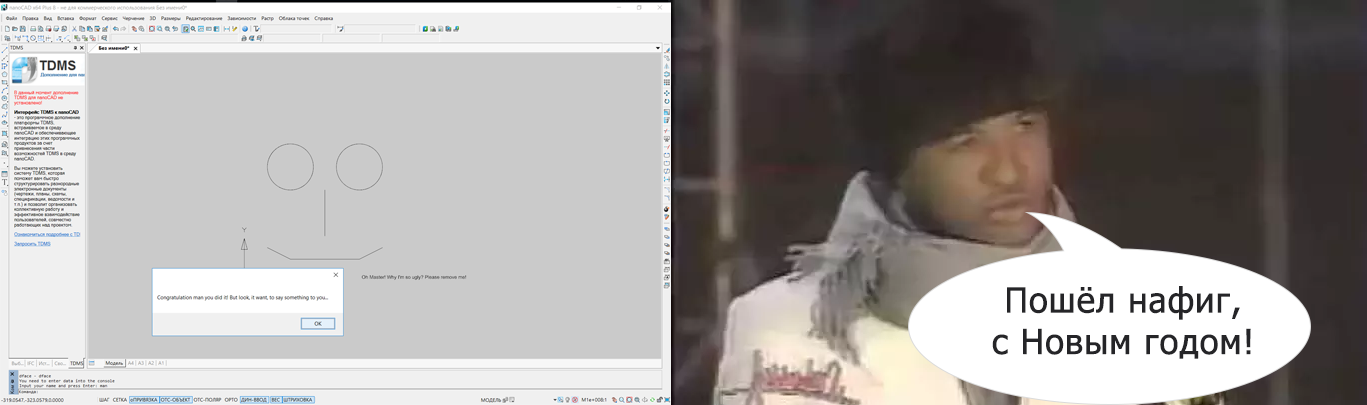
            spech.Text = new TextGeom("Oh Master! Why I'm so ugly? Please remove me!", new Point3d(510, 15, 0), Vector3d.XAxis, "Standard", 15);
            spech.DbEntity.AddToCurrentDocument();
We draw the user's attention to the created record, and at the same time demonstrate that a design, for example, typical of windows.forms, can be built into your application, that is, you could make a call of your own form and then process the data. We simply display the username obtained earlier.
            //Get windows message box
            MessageBox.Show("Congratulation " + name +" you did it! But look, it want, to say something to you...");
It seems that our face is dissatisfied with its being, let's remove it.
In the last section, we do two things: show the user a tooltip that the “delete” command has turned on automatically and run another command from our team.
            //Get popup help
            McContext.PopupNotification("Delete command has activated");
            //Activate another command (Delete)
            McContext.ExecuteCommand("Delete");
        }
    }
}
We press F5 and if everything is fine we can check our team in action, do not forget to enter the team name as in the screenshot.
And to intercept some debugging information, you can use a special monitoring utility .
If suddenly you don’t want to join the development club, and you really want to see the result of your work, you can download the NC 8.5 demo version, it seems it comes without the SDK bundled, but we won’t be upset, of course the mapimgd.dll and mapibasetypes.dll libraries should be included in the delivery package of the program itself, so that they can be found in the bin folder.
I don’t know if this is possible from the point of view of the law, but I think that there should be no problems.
So, I shared with you almost everything that I knew at the moment, it remains only to draw a conclusion.
5. It's a shame (Conclusion)
Well, what did Viktor Koklyushkin say: “It's a shame”, for what a shame? Because a promising project - a product of quite acceptable quality, did not unfold, as it could deploy. This is strange, of course, it seemed that there were some kind of government support measures, it seems like in the free version you can actually draw something simple without wanting to throw a brick in the monitor, but still somehow the environment created around the product is worse than it could be. I’m thinking that if more people get involved in the development for Nanocad even if it’s just “just for fun”, as you and I are now, then you look and Nanosoft will feel its demand, maybe the forum will heal, the API will start to document better and files will be laid out more often. In principle, if you consider that it is still possible it makes sense to wait for the update of the free version, then maybe it will be so in the future.
In the meantime, I will say thank you and wish good luck to the developers of Nanocad and everyone who has mastered this article to the end, despite the jokes from the "Full House".
Have a good start to your work week!