October 3, 2017 at 13:37
CIS Benchmarks: Best Practices and Recommendations for Information Security
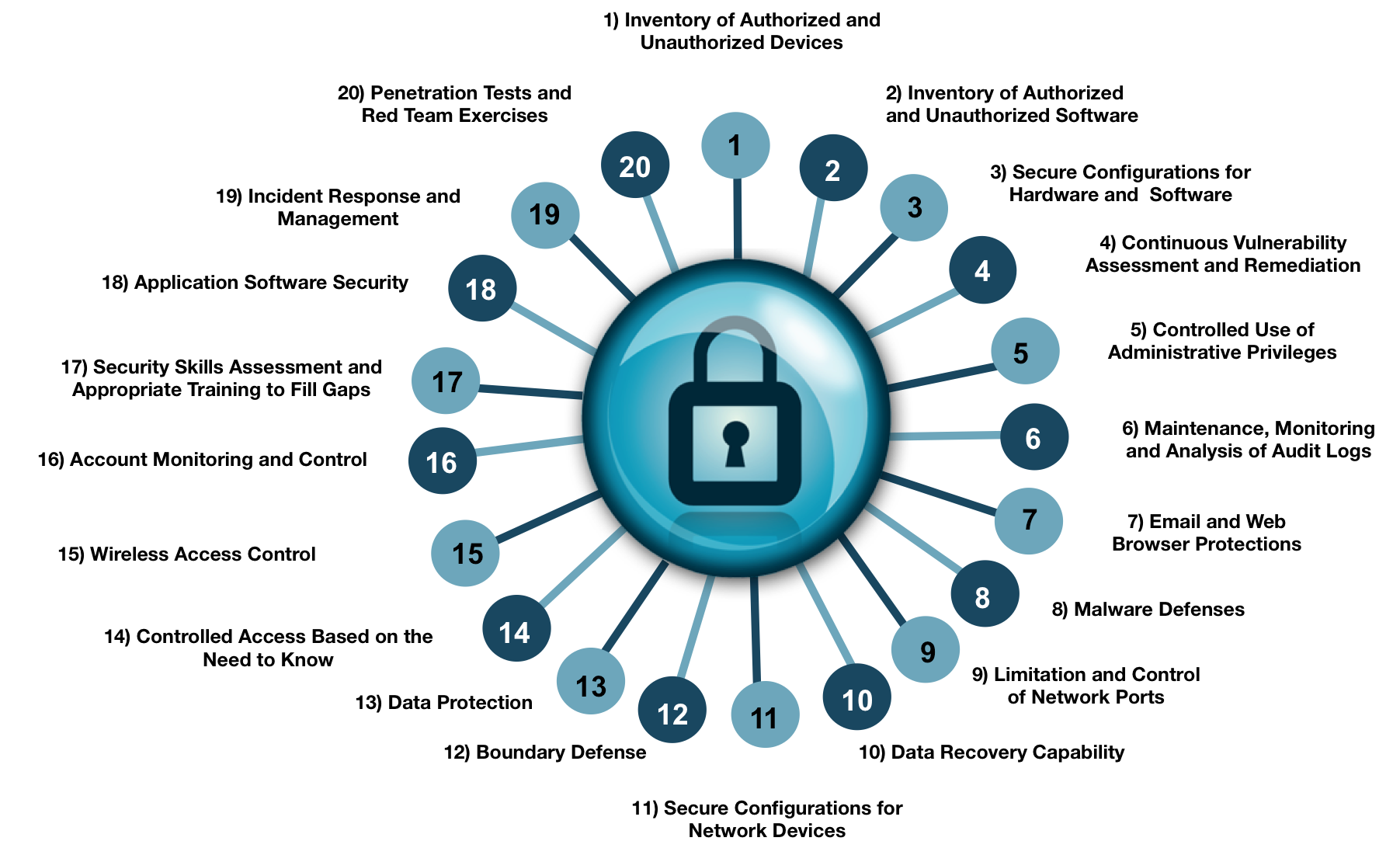
The Internet Security Center (CIS) is a non-profit organization that develops its own benchmarks and recommendations that enable organizations to improve their security and compliance programs. This initiative aims to create basic levels of system security configuration that are commonly found in all organizations. In this article, I will continue to publish best practices and tips for organizing information security.
The first part: https://habr.com/post/338532/
Critical Security Controls
Access control
Segment your networks based on user roles, access level, or classification of information stored on servers. Store confidential information about shared VLANs with a configured firewall; make sure that only authorized persons gain access to the information necessary to carry out their specific duties.
All means of communication of confidential information must use encryption.
All information stored in the systems should be protected at the level of the file system, network access, application or access control lists. Only authorized persons should have access to information based on the need to access information as part of their duties.
Sensitive information stored in systems must be encrypted and use a secondary authentication mechanism that is not integrated into the operating system.
It is necessary to keep a detailed audit log of access to non-public information and special authentication for confidential data.
Backup storage systems should be used as standalone systems.
Wireless Access Control
Ensure that each wireless device connected to the network matches the allowed configuration and security profile. Your organization must restrict access to these wireless devices.
Configure network vulnerability detection tools to detect wireless access points connected to a wired network. The identified devices must be consistent with the list of authorized wireless access points.
Use Intrusion Detection Systems (WIDS) to identify unauthorized wireless devices and detect attack attempts.
Ensure that you use at least Advanced Encryption Standard (AES) encryption and at least Wi-Fi Protected Access 2 (WPA2) security level.
Verify that wireless networks use authentication protocols such as Extensible Authentication Protocol-Transport Layer Security (EAP / TLS) that provide credential protection.
Create separate virtual local area networks (VLANs) for BYOD systems or other untrusted devices. Access to this VLAN should be considered unreliable.
User Account Control
View all system accounts and disable accounts that are not related to business processes.
Make sure that all accounts have an expiration date that is monitored and applied.
Block accounts of laid-off employees immediately. Disabling instead of deleting accounts allows you to save audit data.
Regularly monitor the use of all accounts, automatic logout after a standard period of inactivity.
Configure an unattended workstation access lock screen.
Monitor the use of accounts to identify inactive accounts. Disable accounts that are not assigned to existing employees.
Use and configure account lock so that after a certain number of failed login attempts, the account will be locked.
Monitor attempts to access deactivated accounts.
Configure access for all accounts using a central authentication point, such as Active Directory or LDAP.
Use multi-factor authentication for all user accounts that have access to sensitive data or systems.
If multi-factor authentication is not supported, accounts must have cryptographic passwords in the system (more than 14 characters).
Ensure that all accounts and authentication credentials are transmitted over the network using encrypted channels.
Make sure that all authentication files are encrypted or hashed and that these files cannot be accessed by anyone other than administrators.
Monitoring staff awareness
To analyze the skills of employees in the field of practical information security.
Provide proper training for missing skills.
Implement a program to improve security, conduct regular training.
Testing and raising awareness through periodic checks, including the sociotechnical vectors of attacks and mailings.
Use competitive events to achieve greater results in the field of practical information security.
Application Control
For all purchased versions of application software, make sure that the version you are using is still supported by the provider. If not, upgrade to the latest version and install all the necessary patches and security recommendations.
Protect your web applications with web application firewalls.
Do not show system error messages to end users, not the system administrator.
Enter separate conditions for production and non-production systems. Developers should not have uncontrolled access to the production environment.
Ensure that all software development personnel know and apply safe code writing techniques for a particular development environment.
Use testing tools (including automated ones) of developed applications, document and keep a history of releases and bug fixing.
Incident response
Make sure that there are written incident response procedures that include identifying staff roles and determining the steps involved in handling the incident.
Describe the job responsibilities and the circle of people for handling incidents, as well as making decisions on them.
Develop organizational standards for reporting abnormal events, mechanisms for reporting, and information that should be included in the incident notification. This reporting should also include notices to those in charge.
Publish information on identified incidents within your organization.
Run periodic training alarms to identify speed and control incident handling.
Penetration Testing
Regularly conduct external and internal penetration tests to identify vulnerabilities and attack vectors that can be successfully used to operate corporate systems. Penetration testing should take place outside the perimeter of the network), as well as inside its borders (i.e., on the internal network) in order to simulate insider attacks.
Perform periodic teamwork when conducting penetration testing - Red Team to verify the organization’s readiness for a quick and effective response.
Use automatic vulnerability scanning and penetration testing tools. Scan vulnerability assessment results should be used as a starting point for penetration testing.
Introduce a point system for assessing system security and carefully document the results of each test.
Create test benches to test supercritical infrastructure elements.
Completion
The above material can be adapted to one degree or another for use in your organization.