 August 18, 2017 at 14:04
Mountebank: flexible web API hiding
 When it comes to the development of modern IT systems, the issue of hiding external dependencies always goes somewhere nearby. An external service may not be available at the development stage, or its functionality is developed in parallel and cannot be relied on. This question is especially acute at the stage of writing autotests, because you need to check not only the regular behavior of your system, but also exceptional cases: inaccessibility of an external service, cases when an external service answers with an error, and so on.
Even if you are lucky and your product has a minimum of dependencies on external services, most likely inside it is divided into components (classic of the genre - backend / frontend), which can and should be tested separately. This means that the external dependency is already the api of a neighboring component, the development team of which is not at all eager to provide you with tools to manage its state.
According to my observations, testing teams prefer to limit themselves to the most basic cases of autotests, explaining this by the impossibility of redefining the behavior of an external system.
Mocking the API of external systems can solve this problem.
Usually at this point, testers begin to feel sad because the previous sentence means that in addition to the automatic tests themselves, they need to write a service that duplicates the external system in functionality, and in addition to this, it is necessary to somehow manage its state so that it can respond to the same requests differently depending on the test case.
In this article, I will describe Mountebank : a tool that allows you to quickly and very flexibly wrap API directly from autotests without having to write your own web service.
Mountebank features:
- hiding API on tcp, http, https, smtp protocols;
- wetting an unlimited number of APIs simultaneously;
- flexible redefinition of mock-API logic directly during tests using mountebank’s configuration API;
- proxying requests to the external service API, storing responses and the possibility of their subsequent use in the mock-API;
- client libraries for most programming languages (JS, Python, Ruby, Java, and many others).
Concept
The idea underlying mountebank is simple and ingenious: you do not need to write one universal mock-API for all test cases at once, it is more efficient to redefine the mock-API behavior before each test exactly to the extent that a particular test case requires it.
Mountebank is a web service that is deployed on your test site and which has its own web API. We call this API configuration. The configuration API serves to tell mountebank about what logic you want to put into your mock-API. After that mountebank picks up imposter - a web service that implements your mock-API. At the same time, mountebank does not limit you in how often you will redefine the behavior of imposter.
This means that you can redefine it literally before each test and describe exactly the logic that is needed for a particular test. And nothing more!
Installation and first wet method
Familiarity with mountebank should begin with the installation. Since this is a node.js application, it is most logical to do this through npm (a pre-installed node.js is required ):
>npm install -g mountebankIf you don’t want to install node.js separately, there are alternative ways for different platforms .
Next, run mountebank from the console:
>mbBy default, mountebank occupies port 2525, and if everything is fine, then we see a greeting:

It is on localhost: 2525 that the mountebank’s configuration API itself is now hanging.
To train, create a simple imposter that implements the POST / test method and if the request body contains JSON with an object
{
    “message”: “ping”
}
then JSON should be sent in response:
{
    “message”: “pong”
}
In all other cases, we want us to return 400 status (Bad Request).
We will communicate with mountebank and imposter through Postman .
To create our imposter, we send the following request to the mountebank configuration API:
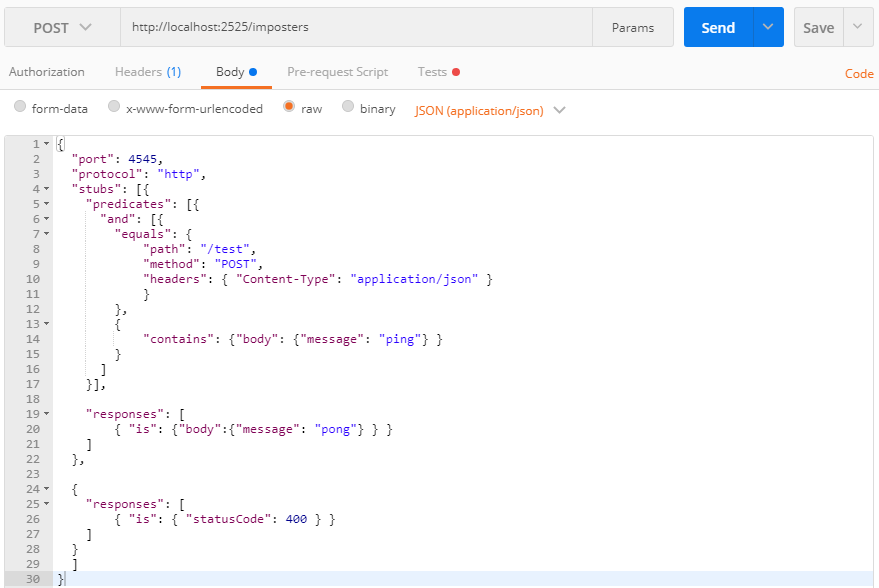
A few words about what the request for creating an imposter consists of.
First, we indicate the protocol by which the imposter will work and the port that it will listen to. This will be the port on which our mock-API will rise. Next is an array of stubs: the rules for imposter'a how to respond to a particular incoming request.
Each rule consists of predicates and responses:
- predicates describes the parameters that an incoming request must match in order for an imposter to respond to it
- responses describes the response that will be sent by the imposter if the incoming request matches the predicate.
Each time a request arrives to an imposter, it runs according to its own rules to determine if the request matches. If the request satisfies the rule predicate, the corresponding response is generated on it and the further rule bypass ends.
Now that we know how the imposter works, it's time to test it.
We send an imposter request that matches the first rule:

And we get the answer:

Now let's try to send a request that does not match the first rule, which means it falls under the second:
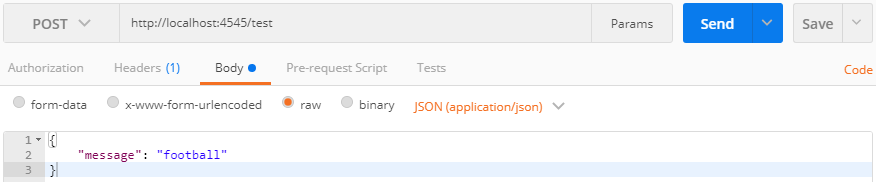
In response, we get 400 Bad Request as expected:

Everything works!
Each imposter can contain an unlimited number of rules, which means that you can lay in it a fairly complex logic of behavior for various requests.
At the same time, mountebank can hold many imposter'ov on different ports and protocols at the same time, this makes it possible to wet several external APIs at once.
Application in autotests
Now that the mechanics of mountebank’s work has become more or less clear, let’s try to apply it where the concept laid down in it is fully revealed: autotests.
Imagine that we are testing a bank’s website, the function of displaying ATMs on a card. To implement this function, front sends a request to the server to obtain the coordinates of the ATMs and, having received a response, displays them on the map.
The test of this function implies two scenarios:
- front received a list of ATMs with valid coordinates: we expect that they all displayed correctly on the map;
- front received a list of ATMs, but the coordinates of some are invalid: we expect that front displayed only ATMs with valid coordinates.
In both cases, the tested page sends the same request to the backend: GET / api / points.
It is impossible to verify both cases without locking the backend API: in both cases, the backend will return the same set of points that does not satisfy any of the cases.
Even if we write our own service, which will give a certain set of data, this will allow us to automatically check only one of the cases.
Now let's see how these test cases can be automated using mountebank.
For demonstration, I will use the python + pytest bundle (a test framework with a powerful fixture subsystem).
import pytest
import requests
import json
from page_objects import MapPage
# точки с валидными координатами
valid_points = {
        "point_1": (55.999653, 37.206002),
        "point_2": (55.996767, 37.184545),
        "point_3": (55.984932, 37.208749),
    }
# только третья точка имеет валидные координаты
invalid_points = {
        "point_1": (255.999653, 37.206002),
        "point_2": (55.996767, 237.184545),
        "point_3": (55.984932, 37.208749),
    }
# параметризованная фикстура
@pytest.fixture(
    scope='module',
    params=[valid_points, invalid_points],
    ids=['Valid points case', 'Invalid points case']
)
def fxtr_map(request):
    points = request.param
    # формируем конфигурацию imposter'a
    imposter_cfg = {
        "port": 1987,
        "protocol": "http",
        "stubs": [
            {
                "predicates": [
                    {
                        "equals": {
                            "method": "GET",
                            "path": "/api/points"
                        }
                    }
                ],
                "responses": [
                    {
                        "is": {
                            "statusCode": 200,
                            "headers": {"Content-Type": "application/json"},
                            "body": points
                        }
                    }
                ]
            }
        ]
    }
    # отправляем в mountebank запрос на создание imposter'a
    requests.request('POST',
                     'http://localhost:2525/imposters',
                     data=json.dumps(imposter_cfg),
                     headers={"content-type": "application/json"})
    # запрашиваем страницу с тестируемой функциональностью (карта банкоматов)
    browser = webdriver.Chrome()
    browser.implicitly_wait(10)
    browser.get(MAP_PAGE_URL)
    map_page = MapPage(browser)
    # отбираем точки которые должны отображаться на карте
    points_to_check = {k: points[k] for k in points if points[k] == valid_points[k]}
    # передаем в тест экземпляр тестируемой страницы
    #и точки которые должны отобразиться
    yield map_page, points_to_check
    browser.close()
# собственно, сам тест
def test_points_on_map(fxtr_map):
    map_page, points_to_check = fxtr_map
    # проверяем что на карте отобразились только валидные точки из переданных
    assert map_page.check_points(points_to_check)
We start.
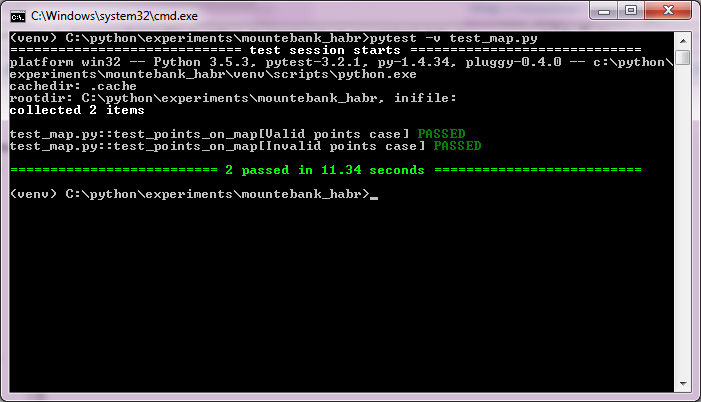
Voila!
Thanks to the mountebank, we directly configured the mock-API from the fixture so that it would give a certain set of points, pulled the test page which turned to the method being mocked and got the points we set. Well, in the test function, we just checked that only valid points were displayed on the user's screen. Due to the ability of pytest to parameterize the fixture, we did not even have to write two tests: both test cases are covered by one fixture and one test.
In the above example, the mock-API was configured directly through the mountebank web API. In real projects, I recommend working with mountebank at a higher level of abstraction, for which a lot of client libraries have been written. For python alone, there are already three of them, I'm surethere are for your favorite language .
In this article, I showed only a small part of mountebank's capabilities. In addition to other basic requests for working with imposters, such powerful things as proxying requests to the API of external systems, moking at the tcp protocol level , and js-injection also remained unsolved .
So, if you are interested in this tool - welcome to the documentation , which, by the way, is written in a very witty language, to match the name of the tool (mountebank - (from English) a trickster).









