August 1, 2017 at 21:45
Thematic modeling with BigARTM tools
Introduction
He drew attention to the translation of the publication entitled "Thematic modeling of repositories on GitHub" [1]. The publication has a lot of theoretical data and very well described topics, concepts, the use of natural languages and many other applications of the BigARTM model.
However, for an ordinary user without knowledge in the field of thematic modeling, for practical use, knowledge of the interface and a clear sequence of actions when preparing text source data is enough. This publication is devoted to the development of software for preparing text data and choosing a development environment.
Installing BigARTM on Windows and preparing the source data
The BigARTM installation is well stated in the video presentation [2], so I won’t dwell on it, I’ll note the programs just listed in the documentation are designed for a specific version and may not work on the downloaded version. This article uses version_v 0.8.1.
BigARTM only works on Python 2.7. Therefore, to create a single software package, all auxiliary programs and examples are written in Python 2.7, which led to some complication of the code.
Textual data for thematic modeling should be processed in accordance with the following steps [4].
- Lemmatization or stemming;
- Removing stop words and too rare words;
- Highlighting terms and phrases.
Consider how you can implement these requirements in Python.
What is better to apply: lemmatization or stemming?
We will get the answer to this question from the following listing, which uses the first paragraph of the text from the article [5] as an example. Hereinafter, the listing parts and the result of their work will be presented as they are displayed in the format of the jupyter notebook environment.
Lemmatization listing with lemmatize
# In[1]:
#!/usr/bin/env python
# coding: utf-8
# In[2]:
text=u' На практике очень часто возникают задачи для решения\
которых используются методы оптимизации в обычной жизни при \
множественном выборе  например подарков к новому году мы интуитивно \
решаем задачу минимальных затрат при заданном качестве покупок '
# In[3]:
import time
start = time.time()
import pymystem3
mystem = pymystem3 . Mystem ( )
z=text.split()
lem=""
for i in range(0,len(z)):
         lem =lem + " "+ mystem. lemmatize (z[i])[0]
stop = time.time()
print u"Время, затраченное lemmatize- %f на обработку %i слов "%(stop - start,len(z))
The result of a robotic lemmatization listing.
In practice, a task often arises for solving which method to optimize for everyday life when using multiple choices, for example, a gift for the New Year, we intuitively solve the problem of the minimum cost when setting quality purchase
Time spent lemmatize - 56.763000 to process 33 words
Stemming listing with stemmer NLTK
#In [4]:
start = time.time()
import nltk
from nltk.stem import  SnowballStemmer
stemmer = SnowballStemmer('russian')
stem=[stemmer.stem(w) for w in text.split()]
stem= ' '.join(stem)
stop = time.time()
print u"Время, затраченное stemmer NLTK- %f на обработку %i слов "%(stop - start,len(z))
Result of robotic listing:
in practice, very often problems arise, for which it is solved using the optimization method in ordinary life with multiple choices, for example, a New Year’s gift we intuitively solve the minimum cost problems when setting the quality of purchases
Time spent stemmer NLTK- 0.627000 on processing 33 words
Stemming listing with Stemmer module
#In [5]:
start = time.time()
from Stemmer import Stemmer
stemmer = Stemmer('russian')
text = ' '.join( stemmer.stemWords( text.split() ) )
stop = time.time()
print u"Время, затраченное Stemmer- %f на обработку %i слов"%(stop - start,len(z))
Result of robotic listing:
in practice, very often problems arise, for which it is solved using the optimization method in ordinary life with multiple choices, for example, a New Year’s gift we intuitively solve the minimum cost problems when setting the quality of purchases
Time spent by Stemmer- 0.093000 on processing 33 words
Conclusion
When time for preparing data for thematic modeling is not critical, lemmatization should be applied using the pymystem3 and mystem modules, otherwise, stamming should be used using the Stemmer module.
Where can I get a list of stop words for their subsequent removal?
Stop words, by definition, words that do not carry a semantic load. A list of such words should be made taking into account the specifics of the text, but there should be a basis. The base can be obtained using the brown housing.
Listing get stop-words
#In [6]:
import nltk
from nltk.corpus import brown
stop_words= nltk.corpus.stopwords.words('russian')
stop_word=" "
for i in stop_words:
        stop_word=  stop_word+" "+i
print stop_word
Result of robotic listing:
and in that he’s not talking about how it’s all like that, but yes, you would like to have only me, now I don’t have any of him now, even if it’s all of a sudden there was it for you someday again, because then you don’t have anything for herself there, maybe they need it where we are for us than we were ourselves so that it would be like something to ourselves then then who is this one because of which one almost mine so that now she was where why should everyone ever be at last two about the other though after over more that through these of us about all of them to What a lot, maybe three of this mine, however, it’s good that this one is in front of you sometimes it’s better if you can’t do it anymore, of course always
You can also get a list of stop words in the network service [6] for a given text.
Conclusion It is
rational to first use the basis of stop words, for example, from the brown case, and after analyzing the processing results, change or supplement the list of stop words.
How to highlight terms and ngram from text?
In publication [7] for thematic modeling using the BigARTM program, they recommend: “After lemmatization in a collection, n-grams can be collected. Bigrams can be added to the main dictionary, separating the words with a special character that is not in your data:
- Russian_message
- Ukrainian_native;
- send_catch;
- Russian_Hospital.
Here is a listing to highlight bigrams, trigrams, fourgrams, fivegrams from the text.
The listing is adapted for Python 2.7.10 and is configured to extract bigrams, trigrams, fourgrams, fivegrams from the text. The "_" is used as a special character.
Listing for getting bigrams, trigrams, fourgrams, fivegrams
#In [6]:
#!/usr/bin/env python
# -*- coding: utf-8 -*
from __future__ import unicode_literals
import nltk
from nltk import word_tokenize
from nltk.util import ngrams
from collections import Counter
text = "На практике очень часто возникают задачи для решения которых используются методы\ оптимизации в обычной жизни при множественном выборе  например подарков к новому\
году мы интуитивно решаем задачу минимальных затрат при заданном качестве покупок"
#In [7]:
token = nltk.word_tokenize(text)
bigrams = ngrams(token,2)
trigrams = ngrams(token,3)
fourgrams = ngrams(token,4)
fivegrams = ngrams(token,5)
#In [8]:
for k1, k2 in Counter(bigrams):
         print (k1+"_"+k2)
#In [9]:
for k1, k2,k3 in Counter(trigrams):
         print (k1+"_"+k2+"_"+k3)
#In [10]:
for k1, k2,k3,k4 in Counter(fourgrams):
         print (k1+"_"+k2+"_"+k3+"_"+k4)
#In [11]:
for k1, k2,k3,k4,k5 in Counter(fivegrams):
         print (k1+"_"+k2+"_"+k3+"_"+k4+"_"+k5)
Result of robotic listing. For reduction, I give only one value from each ngram.
bigrams - new_near
trigrams -
given_quality_purchase fourgrams - which_are used_options_optimization
fivegrams- costs_with_defined_quality_quality_purchases
Conclusion
The above program can be used to highlight consistently repeating NGram texts given each as one word.
What should the program contain for preparing textual data for thematic modeling?
More often copies of documents are placed one in a separate text file. In this case, the source data for thematic modeling is the so-called “word bag”, in which words related to a specific document begin with a new line after the tag - | text.
It should be noted that even with the full implementation of the above requirements, it is highly likely that the most frequently used words do not reflect the content of the document.
Such words may be removed from a copy of the original document. In this case, it is necessary to control the distribution of words in documents.
To speed up the simulation, after each word, the frequency of its use in this document is indicated through a colon.
The initial data for testing the program were 10 Wikipedia articles. The titles of the articles are as follows.
- Geography
- Maths
- Biology
- Astronomy
- Physics
- Chemistry
- Botany
- History
- Physiology
- Computer science
Listing for ready-made text modeling
#In [12]:
#!/usr/bin/env python
# -*- coding: utf-8 -*-
import matplotlib.pyplot as plt
import codecs
import os
import nltk
import numpy as np
from nltk.corpus import brown
stop_words= nltk.corpus.stopwords.words('russian')
import pymystem3
mystem = pymystem3.Mystem()
path='Texts_habrahabr'
f=open('habrahabr.txt','a')
x=[];y=[]; s=[]
for i in range(1,len(os.listdir(path))+1): #перебор файлов с документами по номерам i
      filename=path+'/'+str(i)+".txt"
      text=" "
      with codecs.open(filename, encoding = 'UTF-8') as file_object:# сбор текста из файла i-го документа
            for line in file_object:
                  if len(line)!=0:
                        text=text+" "+line
      word=nltk.word_tokenize(text)# токинезация текста i-го документа
      word_ws=[w.lower()  for w in   word if w.isalpha() ]#исключение слов и символов
      word_w=[w for w in word_ws if w not in stop_words ]#нижний регистр
      lem = mystem . lemmatize ((" ").join(word_w))# лемматизация i -го документа
      lema=[w for w in lem if w.isalpha() and len(w)>1]
      freq=nltk.FreqDist(lema)# распределение слов в i -м документе по частоте
      z=[]# обновление списка для нового документа
      z=[(key+":"+str(val)) for key,val in freq.items() if val>1] # частота упоминания через : от слова
      f.write("|text" +" "+(" ").join(z).encode('utf-8')+'\n')# запись в мешок слов с меткой |text
      c=[];d=[]
      for key,val in freq.items():#подготовка к сортировке слов по убыванию частоты в i -м документе
            if val>1:
                  c.append(val); d.append(key)
      a=[];b=[]
      for k in np.arange(0,len(c),1):#сортировка слов по убыванию частоты в i -м документе
            ind=c.index(max(c));  a.append(c[ind])
            b.append(d[ind]); del c[ind]; del d[ind]
      x.append(i)#список номеров документов
      y.append(len(a))#список количества слов в документах
      a=a[0:10];b=b[0:10]# TOP-10 для частот a  и слов b в i -м документе
      y_pos = np.arange(1,len(a)+1,1)#построение TOP-10 диаграмм
      performance =a
      plt.barh(y_pos, a)
      plt.yticks(y_pos, b)
      plt.xlabel(u'Количество слов')
      plt.title(u'Частоты слов в документе № %i'%i, size=12)
      plt.grid(True)
      plt.show()
plt.title(u'Количество слов в документах', size=12)
plt.xlabel(u'Номера документов', size=12)
plt.ylabel(u'Количество слов', size=12)
plt.bar(x,y, 1)
plt.grid(True)
plt.show()
f.close()
The result of the listing operation for generating auxiliary diagrams. To reduce, I bring only one diagram for TOP-10 words from one document and one diagram of the distribution of words across documents.

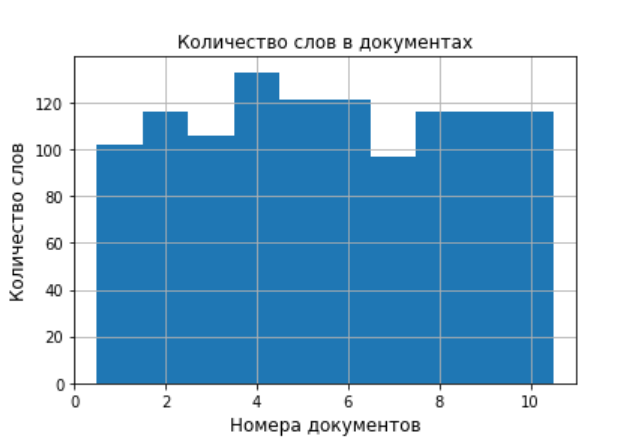
As a result of the program, we got ten diagrams on which 10 words were selected according to the frequency of use. In addition, the program builds a diagram of the distribution of the number of words across the documents. This is convenient for preliminary analysis of the source data. With a large number of documents, frequency diagrams can be saved in a separate folder.
The result of the listing operation for generating a “word bag.” To reduce, I cite the data from the created text file habrahabr.txt only on the first document.
| text earthly: 3 around: 2 country: 4 overbought: 2 people: 2 tradition: 2 building: 2 appearance: 2 some: 2 name: 2 first: 4 create: 2 find: 2 Greek: 3 have: 4 form: 2 ii: 2 inhabited: 4 contain: 3 river: 4 eastern: 2 sea: 6 place: 2 eratosthenes: 3 information: 2 look: 3 herodotus: 3 meaning: 4 cartography: 2 known: 2 whole: 2 imagine: 2 quite a lot: 2 science: 4 modern: 2 achievement: 2 period: 2 sphere: 3 definition: 2 assumption: 2 lay: 2 representation: 7 make up: 3 depict: 2 strabometer: 3 term: 2 round: 7 used: 2 coast: 2 south : 2 coordinate: 2 land: 16 dedicate: 2 reach: 2 map: 7 discipline: 2 meridian: 2 disk: 2 aristotle: 4 proper: 2 description: 6 separate: 2 geographical: 12 it: 2 surround: 3 anaximander: 2 name: 8 that: 2 author: 2 composition: 3 ancient: 8 late: 4 experience: 2 Ptolemy: 2 geography: 10 time: 3 work: 2 also: 6 detour: 3 your: 2 approach: 2 circle:
One text modality was used, indicated at the beginning of each document as | text. After each word, the number of its use in the text is entered through a colon. The latter speeds up the process of creating a batch as well as filling out a dictionary.
How can I simplify working with BigARTM to create and analyze topic?
To do this, firstly, prepare text documents and analyze them using proposed software solutions, and secondly, use the jupyter notebook development environment.
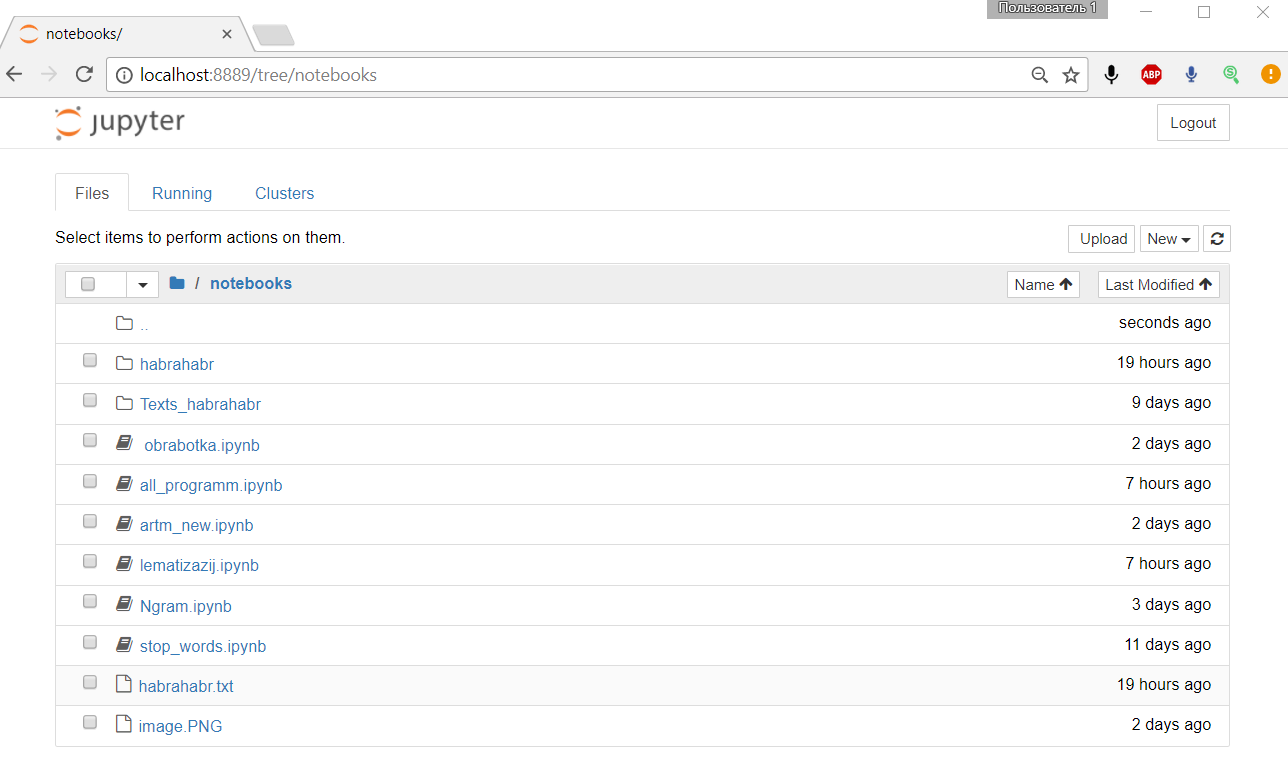
The notebooks directory contains all the folders and files necessary for the program to work.
Parts of the program code are debugged in separate files and, after debugging, are collected in a common file.
The proposed preparation of text documents allows thematic modeling on a simplified version of BigARTM without regularizers and filters.
Listing for creating batch
#In [1]:
#!/usr/bin/env python
# -*- coding: utf-8 -*
import artm
# создание частотной матрицы из batch
batch_vectorizer = artm.BatchVectorizer(data_path='habrahabr.txt',# путь к "мешку слов"
                                        data_format='vowpal_wabbit',# формат данных
                                       target_folder='habrahabr', #папка с частотной матрицей из batch
                                        batch_size=10)# количество документов в одном batch
From the habrahabr.txt file, the program in the habrahab folder creates one batch of ten documents, the number of which is given in the variable batch_size = 10. If the data does not change and the frequency matrix has already been created, then the above part of the program can be skipped.
Listing to populate a dictionary and create a model
#In [2]:
batch_vectorizer = artm.BatchVectorizer(data_path='habrahabr',data_format='batches')
dictionary = artm.Dictionary(data_path='habrahabr')# загрузка данных в словарь
model = artm.ARTM(num_topics=10,
                  num_document_passes=10,#10 проходов по документу
                  dictionary=dictionary,
                  scores=[artm.TopTokensScore(name='top_tokens_score')])
model.fit_offline(batch_vectorizer=batch_vectorizer, num_collection_passes=10)#10 проходов по коллекции
top_tokens = model.score_tracker['top_tokens_score']
After loading data into the dictionary dictionary, BigARTM generates 10 topics (by the number of documents), the number of which is given in the variable num_topics = 10. The number of passes through the document and the collection are indicated in the variables num_document_passes = 10, num_collection_passes = 10.
Listing for creating and analyzing topics
#In [3]:
for topic_name in model.topic_names:
    print (topic_name)
    for (token, weight) in zip(top_tokens.last_tokens[topic_name],
                               top_tokens.last_weights[topic_name]):
         print token, '-', round(weight,3)
The result of the BigARTM program robots:
topic_0
plant - 0.088
botany - 0.032
age - 0.022
world - 0.022
Linnaeus - 0.022
year - 0.019
which - 0.019
Development - 0.019
Aristotle - 0.019
nature - 0.019
TOPIC_1
astronomy - 0.064
heavenly - 0.051
body - 0.046
challenge - 0.022
Movement - 0.018
studying - 0.016
method - 0.015
star - 0.015
system - 0.015
which - 0.014
topic_2
earth - 0.049
geographic - 0.037
geography - 0.031
ancient - 0.025
which - 0.025
name - 0.025
representation - 0.022
round - 0.022
map - 0.022
also -
0.019 topic_3
physics - 0.037
physical - 0.036
phenomenon - 0.027
theory - 0.022
which - 0.022
law - 0.022
general - 0.019
new - 0.017
basis - 0.017
science - 0.017
topic_4
study - 0.071
general - 0.068
section - 0.065
theoretical - 0.062
substance - 0.047
visible - 0.047
physical - 0.044
movement - 0.035
hypothesis - 0.034
pattern - 0.031
topic_5
physiology - 0.069
thyroid - 0.037
people - 0.034
organism - 0.032
armor - 0.03
artery - 0.025
iron - 0.023
cell - 0.021
study - 0.021
vital activity - 0.018
topic_6
mathematics - 0.038
cell - 0.022
science - 0.021
organism - 0.02
general - 0.02
which - 0.018
mathematical - 0.017
live - 0.017
object - 0.016
gene - 0.015
topic_7
history - 0.079
historical - 0.041
word - 0.033
event - 0.03
science - 0.023
which - 0.023
source - 0.018
historiography - 0.018
research - 0.015
philosophy - 0.015
topic_8
term - 0.055
computer science - 0.05
scientific - 0.031
language - 0.029
year - 0.029
science - 0.024
information - 0.022
computational - 0.017
name - 0.017
science - 0.014
topic_9
century - 0.022
which - 0.022
science - 0.019
chemical - 0.019
substance - 0.019
chemistry - 0.019
also - 0.017
development - 0.017
time - 0.017
element - 0.017
The results obtained generally correspond to the topics and the simulation result can be considered satisfactory. If necessary, regularizers and filters can be added to the program.
Conclusions on the results of work
We examined all the stages of preparing text documents for thematic modeling. Using specific examples, we conducted a simple comparative analysis of the modules for lemmatization and stemming. We considered the possibility of using NLTK to get a list of stop words and search for phrases for the Russian language. The listings are written in Python 2.7.10 and adapted for the Russian language, which allows them to be integrated into a single program complex. An example of thematic modeling in the jupyter-notebook environment, which provides additional features for working with BigARTM, is analyzed.
Used links
1. Thematic modeling of repositories on GitHub .
2. Lecture 49 - Installing BigARTM on Windows
3. bigartm / bigartm
4. Basics of word processing.
5. Solving linear programming problems using Python.
6. We are testing a new verification algorithm. Questions and suggestions.
7. Using the library for thematic modeling BigARTM.
2. Lecture 49 - Installing BigARTM on Windows
3. bigartm / bigartm
4. Basics of word processing.
5. Solving linear programming problems using Python.
6. We are testing a new verification algorithm. Questions and suggestions.
7. Using the library for thematic modeling BigARTM.