How to comply with Federal Law-152 “On Personal Data” with “Bitrix24” and “1C-Bitrix”
From July 1, 2017, administrative liability for violations when working with personal data of individuals will be greatly tightened. This also applies to site owners who collect such information about visitors. What about those Bitrix24 users who collected personal data automatically using CRM forms or Open Lines ? We decided to help our customers comply with the law and avoid fines. Automate this too!
We have prepared a universal “Consent to the processing of personal data” for and placed it in CRM forms and Open Lines.
What should be done:
What do you get:
In the end, the agreement will look like this:

First, in the settings of the open line, you need to enable the sending of a warning about the collection of personal data.

When the conversation begins with the client, two messages will appear immediately warning of the need for consent to the processing of personal data.
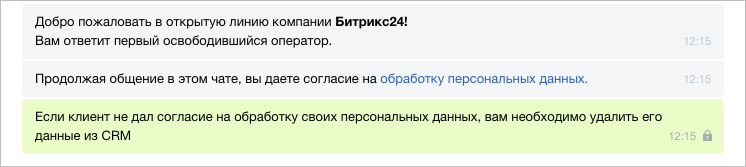
If a person continues to write in an open line, then this will be considered consent. And if he keeps silent or directly answers that he does not agree, then his data must be deleted.
We have prepared a universal “Consent to the processing of personal data” for and placed it in CRM forms and Open Lines.
In CRM Forms
What should be done:
- Fill in the details of your company in the CRM settings. You can also do this when setting up consent in a CRM form.
- Indicate the e-mail address to which customers will be able to send requests to delete personal information. According to the law, such requests must be addressed. Now only an example of an e-mail address is indicated, you can leave it or change it in the form settings.
- Check in the settings of the active forms that the consent is connected and correctly displayed for the client.
What do you get:
- Two confirmation options:
- there is a checkmark under the form - corresponds to the consent "By clicking the" Send "button, I give my consent ..."
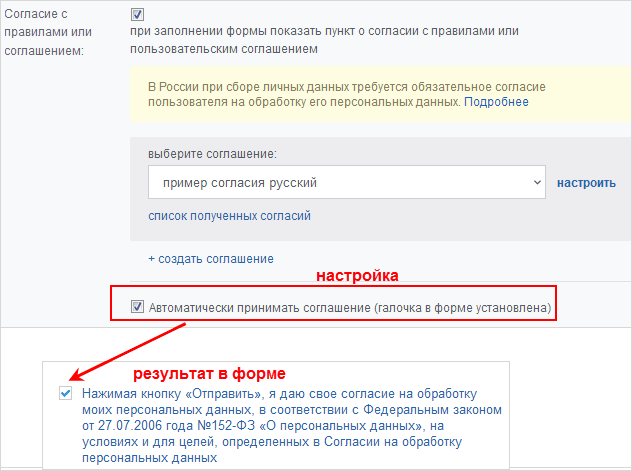
- there is no checkmark under the form - it will need to be put before sending the completed form.
- there is a checkmark under the form - corresponds to the consent "By clicking the" Send "button, I give my consent ..."
- The fields of the CRM form will be automatically included in the consent text as related to personal data, even if it is just a comment.
- In the default settings of the form there is a checkmark on the consent of the transfer of personal data to third parties. These persons can be indicated there (for example, Russian Post LLC or courier service) - they will also be included in the consent text.
- You can select or add your own options for the use and storage periods of personal data.
- The consent text also includes the specified e-mail address to delete data. If the portal has less than 20 users, the portal administrator’s e-mail will be automatically entered.
In the end, the agreement will look like this:
In open lines
First, in the settings of the open line, you need to enable the sending of a warning about the collection of personal data.
When the conversation begins with the client, two messages will appear immediately warning of the need for consent to the processing of personal data.
If a person continues to write in an open line, then this will be considered consent. And if he keeps silent or directly answers that he does not agree, then his data must be deleted.