
 July 3, 2017 at 12:10
Digital TSic temperature sensor: addresses, passwords, appearances
We continue a series of materials on the features of the use of various sensors and sensitive elements.
 The hero of today's article, at first glance, is nothing special - you never know how many digital temperature sensors. However, the TSic series has two unusual properties: a really high accuracy (up to ± 0.07 ° C for the older model) and a little-known ZACwire single-wire interface.
Under the cat, we describe in detail the nomenclature of standard TSic sensors and custom solutions, understand the features of the communication protocol, and see examples of programs for MK. In short, we are doing everything to convince a respected reader that TSic sensors are worth the money.
TSic is a series of digital temperature sensors, which in the past were manufactured under the ZMDI brand, and now belong to the Swiss company IST AG.
The sensor element is a high-precision reference voltage source with a temperature proportional output (bandgap reference with a PTAT (proportional-to-absolute-temperature). Like other integrated temperature sensors, TSic also contains an ADC, a signal processing circuit, an EEPROM with calibration data and output interface:
Standard TSic sensors differ among themselves in operating temperature range, accuracy, type of output signal and housing.
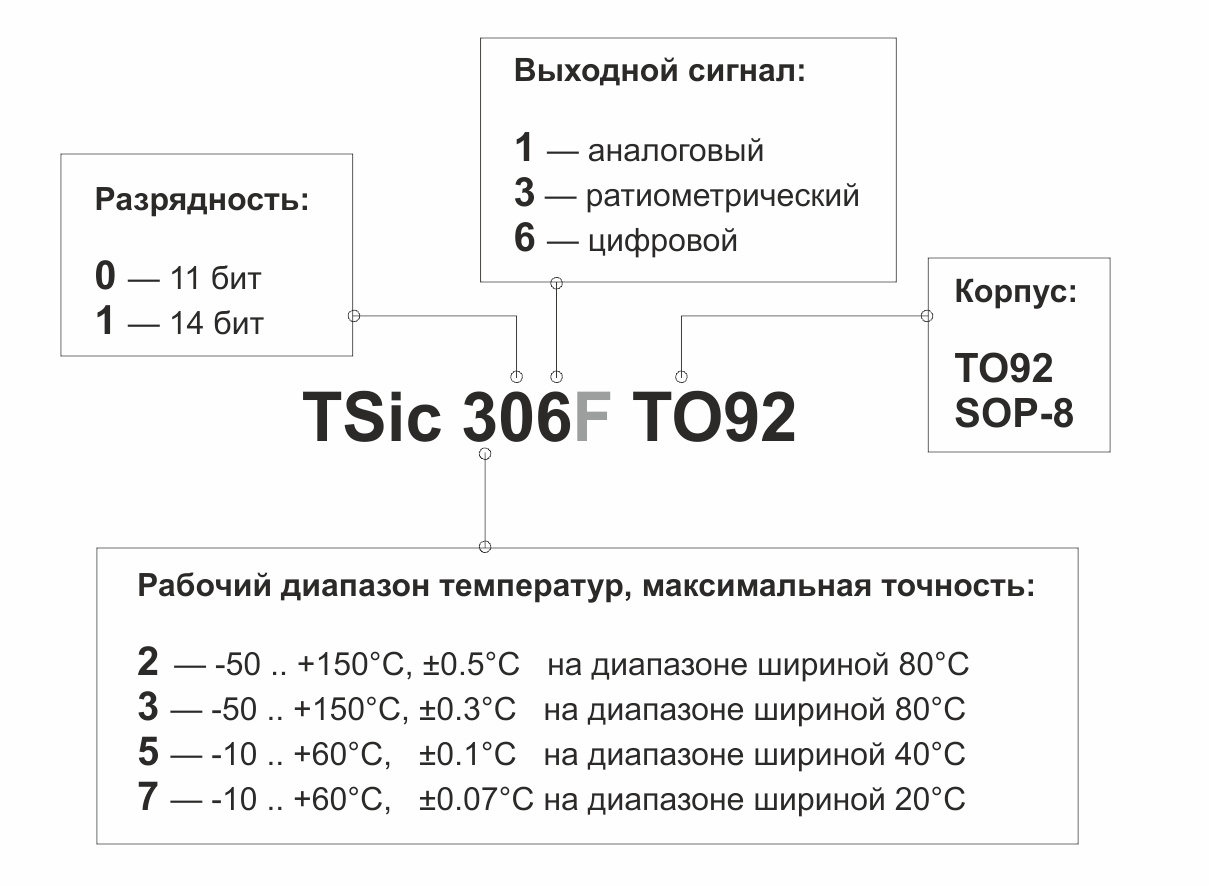
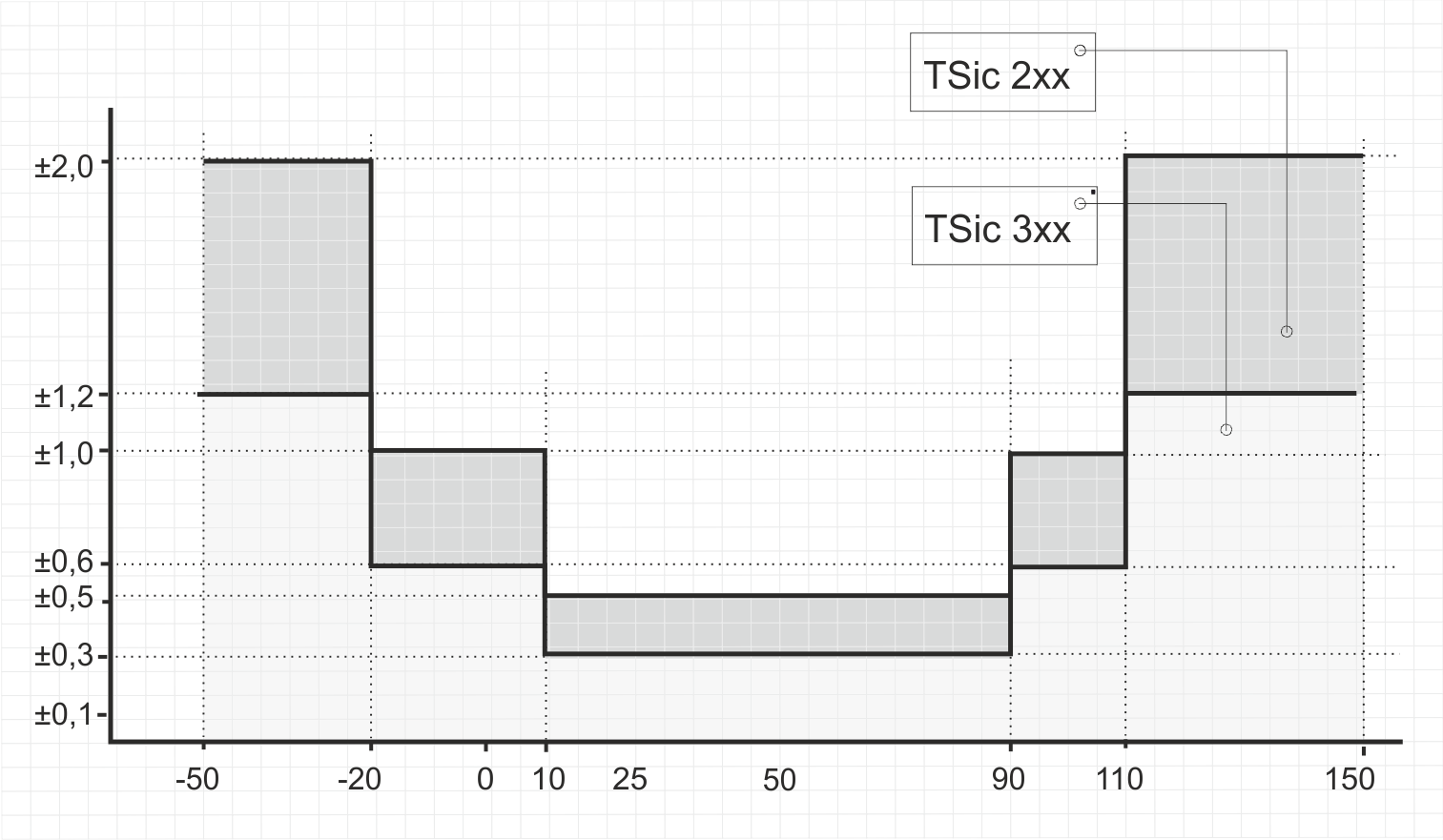
The TSic 20x and TSic 30x sensors have an operating temperature range of -50 to + 150 ° C and three “accuracy zones”. The graph shows the maximum error of the sensors at different temperature ranges.
TSic 50x sensors are designed for a narrower temperature range - from -10 to + 60 ° C. In a 40-degree wide precision section, TSic 50x sensors provide an accuracy of ± 0.1 ° C, and in the rest of the range ± 0.2 ° C.

The mostexpensive high-precision TSic sensor is the TSic 716. In a narrow 20-degree section, this element provides ± 0.07 ° C.

The difference between the TSic 716 sensor is also a higher resolution (resolution). If the TSic 206, TSic 306, and TSic 506 sensors have an 11-bit ADC, the TSic 716 has a 14-bit converter.
Thus, the resolution of the TSic 206 and TSic 306 sensors is![$ \ frac {(50 + 150) [° C]} {2 ^ {11}} ≈ 0.1 [° C] $](https://habrastorage.org/getpro/habr/formulas/f34/0b8/c33/f340b8c33b57718e5edc39b015381d78.svg) the
the
resolution of TSic 506 is![$ \ frac {(10 + 50) [° C]} {2 ^ {11}} ≈ 0.034 [° C] $](https://habrastorage.org/getpro/habr/formulas/c56/fc3/dde/c56fc3ddee4b0782d76c749bec1c25ea.svg) the
the
resolution of TSic 716 is![$ \ frac {(10 + 50) [° C]} {2 ^ {14}} ≈ 0.004 [° C] $](https://habrastorage.org/getpro/habr/formulas/ff4/afc/46a/ff4afc46ad56fc80b5cc684913756268.svg) .
.
Standard versions of TSic sensors are described above, however, the range of increased accuracy of any of the TSic sensors can be “shifted” during element production. So, for example, TSic 50x sensors are available on request with increased accuracy in the range from -10 to 30 ° C or from 13 to 53 ° C. Similarly for other TSic models.

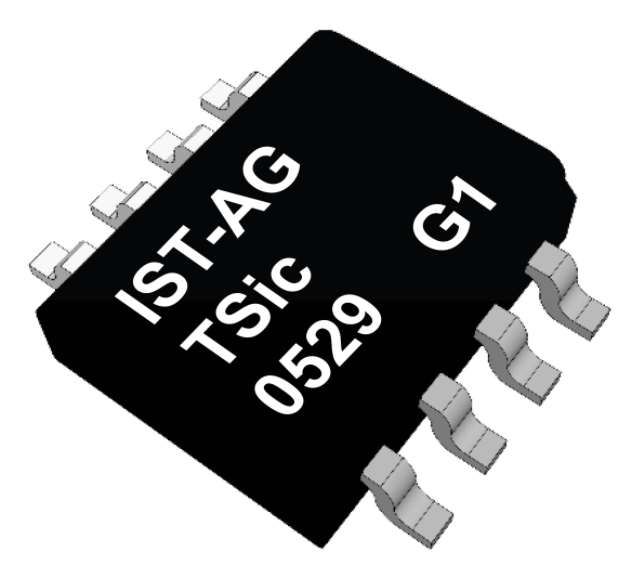
Sensors of the TSic series are available in SOP-8 and TO92 housings, pinout is available in the documentation .
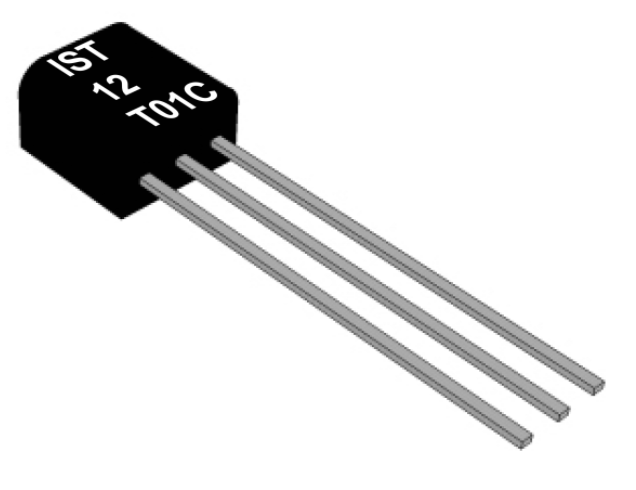
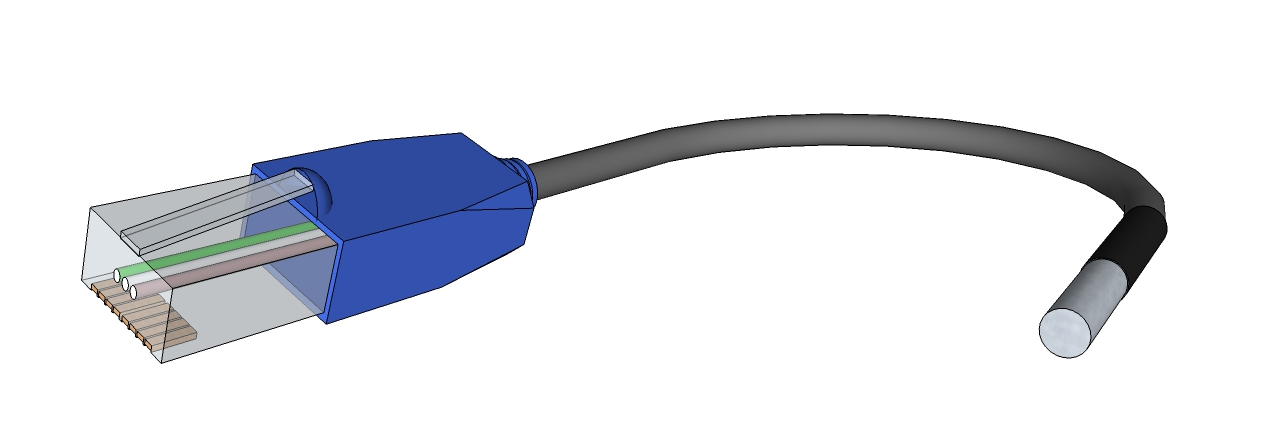
In addition, it is possible to supply TSic sensors in non-standard cases, with all sorts of cables, connectors, pads and so on. Everything is discussed individually here, but I’ll say right away that to use this feature it is absolutely not necessary to have a project for hundreds of sensors per year.
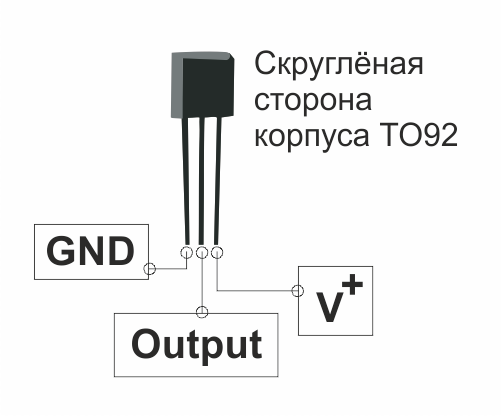
To connect any TSic model, you will need power and ground connections, as well as one signal line.
The operating voltage of the sensor is from 3 to 5.5V. Often it is more convenient to power the sensor from one of the GPIO controllers. Firstly, this makes it possible to reduce the energy consumption of the sensor to zero outside the measurement cycle, and secondly, it is easier to detect the start of a package if a TSic sensor with a digital output is used.
In the case of powering the sensor from the controller foot, the manufacturer recommends taking care of eliminating the influence of noise and adding an RC chain to the power line.
The TSic 20x, TSic 30x, and TSic 50x sensors can have analog, ratiometric, or digital output. In the first case, the output voltage varies from 0 to 1 V in proportion to the temperature of the medium, in the second case, from 10 to 90% of the supply voltage. Sensors with digital output use the ZACWire protocol, which we will discuss in detail below.
In all three cases, the output signal is proportional to temperature, i.e. simple formulas are used to calculate temperature.
For TSic sensors with analog output:
For TSic sensors with ratiometric output:
For TSic sensors with digital output:
Where
Examples of signals at the output of TSic sensors are given in the table.
Most often, however, they choose sensors with a digital output, this allows you not to think about the influence of analog signal processing circuits on the measurement accuracy. At the same time, the TSic digital sensor uses as many MK legs as the analog sensor, plus it is slightly cheaper.
An obvious minus of the TSic sensor with digital output is its non-standard interface, for which your MK does not yet have a ready-made library. An obvious plus - this interface is very simple.
ZACWire is a single-wire protocol that uses an encoding reminiscent of Manchester.
A sensor with a predetermined frequency transmits temperature data - two eight-bit data packets. Each of the packets begins with a start bit and ends with a parity bit. Depending on the sensor model, in each parcel there are either 11 or 14 significant bits, the most significant bit goes first.

The passive state of the data line is a high level. Each bit of the TSic sending begins with the decay of the signal and takes 125 microseconds. The state of the data line is fixed in the middle of this interval - if after 62.5 µs from the signal drop to the line there is a high level, then we write a logical “1”, if low, then a logical “0”. The fill factor in the first case is 75%, in the second - 25%.

The ZACWire communication interface does not use a separate clock signal, so the clock is counted on the side of the microcontroller.
The start bit also begins with the decline of the signal, but has a duty cycle of 50%. The start bit can be used both for detecting the start of a send and for measuring the duration of a beat if it is not known in advance: the time period between the falloff and the edge of the start bit is T strobe - the time after which it is necessary to check the state of the line when reading the next bit.
On the other hand, for standard TSic sensors, the T strobe value is known in advance
and is equal to 125/2 = 62.5 μs, therefore, in practice, the start bit is simply detected and passed.

Parity bits are decoded in the same way as data bits. In the absence of external interference and a short connection length (up to 2 meters), integrity monitoring is usually not required. Between the end of the first packet and the second start bit, a high level is set on the line.
To bring final clarity, we will consider the TSic 306 sensor data packet waveform.

Sending starts with a start bit, then there are insignificant data bits that are always “0”, then there are high data bits - “011”, then a parity bit corresponding to “0 ". The second packet starts after one period (T strobe * 2) and contains the start bit, the eight least significant data bits “00011000” and the parity bit, respectively equal to “0”.

As a result, we obtain at the output 01100011000bin = 792dec and according to the above formula we calculate the temperature value.

If we talk about the frequency with which the TSic sensor transmits such data packages, then it is installed during the production of the component and cannot be changed during the use of the sensor. For models TSic 206, TSic 306, TSic 506, the frequency is 10 Hz, for TSic 716 - 1 Hz. Sensors with a non-standard measurement frequency of 250, 10, 1 and 0.1 Hz are available on request.
If the task does not involve polling the sensor with the highest possible frequency and there is a free line on the microcontroller, then it makes sense to use this line to power the sensor. Thus, every time you need to get data from the sensor, you can supply power to the sensor and expect a decline on the data line - the start bit of the first packet. Less than 85 microseconds will elapse between applying power to the TSic and sending the package, and after receiving two data packets, the sensor power can be turned off.
This is the way the sensor was used by your humble servant.
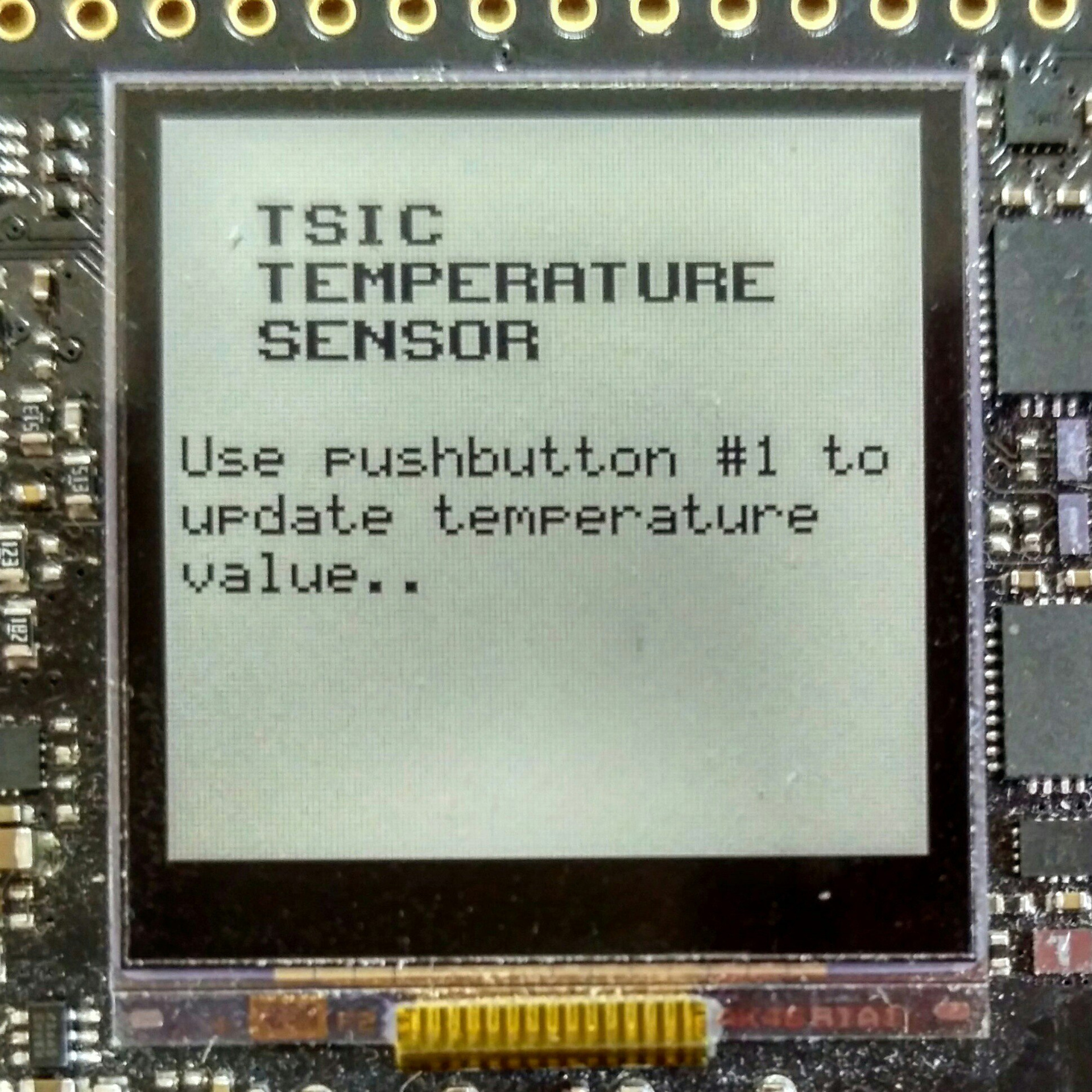
As an experiment, I connect two standard models TSic 306 TO92 and TSic 506 TO92 to the EFM32ZG-STK3200 debug board. By pressing the button, the sensor is energized, one package with temperature data is received, the data is processed, the result is displayed on the LCD display installed on the board, after which the sensor is disconnected from the power.
Today we will not touch on specific software and hardware components of EFM32, designed to control and reduce energy consumption. Instead, we will use the most basic components and their modes of operation, so that the resulting algorithm is easierto transfer to the godless STM to port to other microcontroller platforms.
So, from MK we need
On the debug board, respectively, we use
So, by interruption from the button, we supply power to the sensor, accept the package and turn off the power. If an error occurred while receiving data, we issue a corresponding message, otherwise we calculate the temperature in degrees Celsius and show the result on the LCD.
So, the receiveTSicData () function of receiving data is the reception of two data packets, the isolation of the parity bits from each of them, and the integrity check for both packets.
The readTSicPacket () function that returns currentTSicPacket may look like this.
The settings of the microcontroller itself and the timer depend too much on the platform used to bring them in the text of the article about the sensor.
The functions of checking the integrity and calculating the temperature in degrees Celsius also do not represent absolutely nothing remarkable.
The entire code is available here .
In conclusion, I traditionally thank the reader for his attention and remind you that questions about the use of the products that we write about on the Habré can also be sent to the email address specified in my profile.
The hero of today's article, at first glance, is nothing special - you never know how many digital temperature sensors. However, the TSic series has two unusual properties: a really high accuracy (up to ± 0.07 ° C for the older model) and a little-known ZACwire single-wire interface. Under the cat, we describe in detail the nomenclature of standard TSic sensors and custom solutions, understand the features of the communication protocol, and see examples of programs for MK. In short, we are doing everything to convince a respected reader that TSic sensors are worth the money.
TSic is a series of digital temperature sensors, which in the past were manufactured under the ZMDI brand, and now belong to the Swiss company IST AG.
The sensor element is a high-precision reference voltage source with a temperature proportional output (bandgap reference with a PTAT (proportional-to-absolute-temperature). Like other integrated temperature sensors, TSic also contains an ADC, a signal processing circuit, an EEPROM with calibration data and output interface:
Standard TSic sensors differ among themselves in operating temperature range, accuracy, type of output signal and housing.
Operating temperature range and accuracy
The TSic 20x and TSic 30x sensors have an operating temperature range of -50 to + 150 ° C and three “accuracy zones”. The graph shows the maximum error of the sensors at different temperature ranges.
TSic 50x sensors are designed for a narrower temperature range - from -10 to + 60 ° C. In a 40-degree wide precision section, TSic 50x sensors provide an accuracy of ± 0.1 ° C, and in the rest of the range ± 0.2 ° C.
The most
The difference between the TSic 716 sensor is also a higher resolution (resolution). If the TSic 206, TSic 306, and TSic 506 sensors have an 11-bit ADC, the TSic 716 has a 14-bit converter.
Thus, the resolution of the TSic 206 and TSic 306 sensors is
the resolution of TSic 506 is
the resolution of TSic 716 is
.Custom calibration
Standard versions of TSic sensors are described above, however, the range of increased accuracy of any of the TSic sensors can be “shifted” during element production. So, for example, TSic 50x sensors are available on request with increased accuracy in the range from -10 to 30 ° C or from 13 to 53 ° C. Similarly for other TSic models.
Housing
Sensors of the TSic series are available in SOP-8 and TO92 housings, pinout is available in the documentation .
In addition, it is possible to supply TSic sensors in non-standard cases, with all sorts of cables, connectors, pads and so on. Everything is discussed individually here, but I’ll say right away that to use this feature it is absolutely not necessary to have a project for hundreds of sensors per year.
Sensor Connection
To connect any TSic model, you will need power and ground connections, as well as one signal line.
The operating voltage of the sensor is from 3 to 5.5V. Often it is more convenient to power the sensor from one of the GPIO controllers. Firstly, this makes it possible to reduce the energy consumption of the sensor to zero outside the measurement cycle, and secondly, it is easier to detect the start of a package if a TSic sensor with a digital output is used.
In the case of powering the sensor from the controller foot, the manufacturer recommends taking care of eliminating the influence of noise and adding an RC chain to the power line.
Output signal
The TSic 20x, TSic 30x, and TSic 50x sensors can have analog, ratiometric, or digital output. In the first case, the output voltage varies from 0 to 1 V in proportion to the temperature of the medium, in the second case, from 10 to 90% of the supply voltage. Sensors with digital output use the ZACWire protocol, which we will discuss in detail below.
In all three cases, the output signal is proportional to temperature, i.e. simple formulas are used to calculate temperature.
For TSic sensors with analog output:

For TSic sensors with ratiometric output:

For TSic sensors with digital output:


Where
 - temperature, ° C
 - sensor output voltage, V
 - supply voltage, V
 - digital output
 - upper limit of the operating temperature range, ° C = + 150 ° C for TSic 20x and TSic 30x, = + 60 ° C for TSic 50xF and TSic 716
 - lower limit of the operating temperature range, ° C = -50 ° C for TSic 20x and TSic 30x, = -10 ° C for TSic 50xF and TSic 716
Examples of signals at the output of TSic sensors are given in the table.
| For TSic 20x / TSic 30x sensors | ||||
| The measured temperature, ° C | Analog output | Ratiometric output | Digital output | |
| -fifty | 0.000V | 10% V + (0.5V at V + = 5V) | 0x000 | |
| -10 | 0.200V | 26% V + (1.3V at V + = 5V) | 0x199 | |
| 0 | 0.250V | 30% V + (1.5V at V + = 5V) | 0x200 | |
| +25 | 0.375V | 40% V + (2.0V at V + = 5V) | 0x2FF | |
| +60 | 0.550V | 54% V + (2.7V at V + = 5V) | 0x465 | |
| +125 | 0.875V | 80% V + (4.0V at V + = 5V) | 0x6FE | |
| +150 | 1.000V | 90% V + (4.5V at V + = 5V) | 0x7FF | |
| For TSic 50xF / TSic 716 sensors | ||||
| 11-bit (TSic 506F) | 14-bit (TSic 716) | |||
| -10 | 0.000V | 10% V + (0.5V at V + = 5V) | 0x000 | 0x0000 |
| 0 | 0.143V | 21.4% V + (1.07V at V + = 5V) | 0x124 | 0x0924 |
| +25 | 0.500V | 50% V + (2.5V at V + = 5V) | 0x3FF | 0x01FF |
| +60 | 1.000V | 90% V + (4.5V at V + = 5V) | 0x7FF | 0x3FFF |
Most often, however, they choose sensors with a digital output, this allows you not to think about the influence of analog signal processing circuits on the measurement accuracy. At the same time, the TSic digital sensor uses as many MK legs as the analog sensor, plus it is slightly cheaper.
An obvious minus of the TSic sensor with digital output is its non-standard interface, for which your MK does not yet have a ready-made library. An obvious plus - this interface is very simple.
ZACWire Protocol
ZACWire is a single-wire protocol that uses an encoding reminiscent of Manchester.
A sensor with a predetermined frequency transmits temperature data - two eight-bit data packets. Each of the packets begins with a start bit and ends with a parity bit. Depending on the sensor model, in each parcel there are either 11 or 14 significant bits, the most significant bit goes first.
The passive state of the data line is a high level. Each bit of the TSic sending begins with the decay of the signal and takes 125 microseconds. The state of the data line is fixed in the middle of this interval - if after 62.5 µs from the signal drop to the line there is a high level, then we write a logical “1”, if low, then a logical “0”. The fill factor in the first case is 75%, in the second - 25%.
The ZACWire communication interface does not use a separate clock signal, so the clock is counted on the side of the microcontroller.
The start bit also begins with the decline of the signal, but has a duty cycle of 50%. The start bit can be used both for detecting the start of a send and for measuring the duration of a beat if it is not known in advance: the time period between the falloff and the edge of the start bit is T strobe - the time after which it is necessary to check the state of the line when reading the next bit.
On the other hand, for standard TSic sensors, the T strobe value is known in advance
and is equal to 125/2 = 62.5 μs, therefore, in practice, the start bit is simply detected and passed.
Parity bits are decoded in the same way as data bits. In the absence of external interference and a short connection length (up to 2 meters), integrity monitoring is usually not required. Between the end of the first packet and the second start bit, a high level is set on the line.
To bring final clarity, we will consider the TSic 306 sensor data packet waveform.
Sending starts with a start bit, then there are insignificant data bits that are always “0”, then there are high data bits - “011”, then a parity bit corresponding to “0 ". The second packet starts after one period (T strobe * 2) and contains the start bit, the eight least significant data bits “00011000” and the parity bit, respectively equal to “0”.
As a result, we obtain at the output 01100011000bin = 792dec and according to the above formula we calculate the temperature value.
If we talk about the frequency with which the TSic sensor transmits such data packages, then it is installed during the production of the component and cannot be changed during the use of the sensor. For models TSic 206, TSic 306, TSic 506, the frequency is 10 Hz, for TSic 716 - 1 Hz. Sensors with a non-standard measurement frequency of 250, 10, 1 and 0.1 Hz are available on request.
If the task does not involve polling the sensor with the highest possible frequency and there is a free line on the microcontroller, then it makes sense to use this line to power the sensor. Thus, every time you need to get data from the sensor, you can supply power to the sensor and expect a decline on the data line - the start bit of the first packet. Less than 85 microseconds will elapse between applying power to the TSic and sending the package, and after receiving two data packets, the sensor power can be turned off.
This is the way the sensor was used by your humble servant.
As an experiment, I connect two standard models TSic 306 TO92 and TSic 506 TO92 to the EFM32ZG-STK3200 debug board. By pressing the button, the sensor is energized, one package with temperature data is received, the data is processed, the result is displayed on the LCD display installed on the board, after which the sensor is disconnected from the power.
The EFM32ZG-STK3200 debug board is manufactured by Silicon Labs (SiLabs)
for working with EFM32 Zero Gecko microcontrollers.
EFM32 Zero Gecko - the youngest series of the EFM32 family. These microcontrollers are based on the ARM Cortex-M0 + core, have a standard set of built-in peripherals and various interesting modules to reduce the power consumption of the controller. We already published on a habr a detailed article about features of this platform and debugging tools for EFM32 Zero Gecko.
Today we will not touch on specific software and hardware components of EFM32, designed to control and reduce energy consumption. Instead, we will use the most basic components and their modes of operation, so that the resulting algorithm is easier
So, from MK we need
- Three GPIOs: connected to the PC9 button and free PC0 and PC1 for power lines and TSic data
- TSic Data Line Timer
- SPI for working with the integrated display. I mention SPI just for order, as all work with data output is carried out using the SiLabs library glib, the contents of which are not very interesting to me
On the debug board, respectively, we use
- Microcontroller EFM32ZG222F32
- USB debugger SEGGER J-Link USB
- Mechanical Button PB1
- Expansion header connector on which the required GPIO and ground are available
- 128x128 pixel display - exceptionally cute LCD
So, by interruption from the button, we supply power to the sensor, accept the package and turn off the power. If an error occurred while receiving data, we issue a corresponding message, otherwise we calculate the temperature in degrees Celsius and show the result on the LCD.
void ReceiveTempAndShowIt(void) {
	GPIO_PinOutSet(TSIC_VDD_PORT, TSIC_VDD_PIN);
	int8_t TSic_result = receiveTSicData();
	GPIO_PinOutClear(TSIC_VDD_PORT, TSIC_VDD_PIN);
	if (TSic_result == TSIC_IS_OK) {
		float temperatureCelsius = calculateCelsius(fullTSicTransmission);
		Display_ShowTemperature(temperatureCelsius);
	} else if (TSic_result == TSIC_PARITY_ERROR) {
		Display_ShowParityError();
	} else if (TSic_result == TSIC_TIMING_ERROR) {
		Display_ShowTimingError();
	}
}
Important!
Here it is time to note that the code considered in this article is completely not optimal. That is, absolutely, completely not optimal. Below you will see how the edges and edges of the signal are detected using while, how time intervals are counted without using interrupts, etc.
The reason for this approach is the desire to consider the simplest and most understandable example in which no functions specific to a particular microcontroller will be used at all.
So, the receiveTSicData () function of receiving data is the reception of two data packets, the isolation of the parity bits from each of them, and the integrity check for both packets.
int8_t receiveTSicData(void) {
	uint16_t firstTSicPacket = 0;
	uint16_t secondTSicPacket = 0;
	bool firstParityBit = 0;
	bool secondParityBit = 0;
	/* Time critical section [all interrupts disable]:
	 * Receive two data packets from TSic sensor
	 */
	INT_Disable();
	if (readTSicPacket(1) == PACKAGE_READING_OK) {
		firstTSicPacket = currentTSicPacket;
	} else {
		INT_Enable();
		return TSIC_TIMING_ERROR;
	}
	if (readTSicPacket(0) == PACKAGE_READING_OK) {
		secondTSicPacket = currentTSicPacket;
	} else {
		INT_Enable();
		return TSIC_TIMING_ERROR;
	}
	INT_Enable();
	/* Decode received packets */
	/* Get parity bit from first packet */
	firstParityBit = firstTSicPacket & 0x01;
	/* Get 3 data bits from first packet */
	firstTSicPacket = firstTSicPacket & 0x0007;
	/* Delete first parity bit */
	firstTSicPacket >>= 1;
	/* Get parity bit from second packet */
	secondParityBit = secondTSicPacket & 0x01;
	/* Delete second parity bit */
	secondTSicPacket >>= 1;
	/* Check parity errors and assemble full temperature transmission from TSic */
	if (checkParity(firstTSicPacket, firstParityBit) == PARITY_OK
			&& checkParity(secondTSicPacket, secondParityBit) == PARITY_OK) {
		fullTSicTransmission = (firstTSicPacket << 8) + secondTSicPacket;
		return TSIC_IS_OK;
	} else {
		return TSIC_PARITY_ERROR;
	}
}
The readTSicPacket () function that returns currentTSicPacket may look like this.
int8_t readTSicPacket(bool isTheFirstPacket) {
	currentTSicPacket = 0;
	/* Wait until start bit occurs, return error if it takes too long
	 */
	if (isTheFirstPacket) {
		/* If we are waiting after powering up the sensor */
		myTIMER_Start(PRESCALER_1024);
		while (TSIC_DATA_HIGH) {
			if (TIMER_COUNTER >= WAITING90MS_TICKS) {
				return NO_SIGNAL_OCCURS;
			}
		}
		myTIMER_Stop();
	} else {
		/* If we are waiting just for time between first and second packet */
		myTIMER_Start(NO_PRESCALER);
		while (TSIC_DATA_HIGH) {
			if (TIMER_COUNTER >= TSTROBE_TICKS * 4) {
				return NO_SECOND_PACKAGE;
			}
		}
		myTIMER_Stop();
	}
	/* Check if start bit has occurred:
	 *
	 * As Tstrobe = 125 us / 2 = 62.5 us,  we need to check if the signal is
	 * low for about Tstrobe time and then goes high for about Tstrobe time.
	 */
	myTIMER_Start(NO_PRESCALER);
	while (TSIC_DATA_LOW) {
		if (TIMER_COUNTER >= TSTROBE_TICKS * 1,1) {
			return START_BIT_ERROR;
		}
	}
	while (TSIC_DATA_HIGH) {
		if (TIMER_COUNTER >= TSTROBE_TICKS * 2,2) {
			return START_BIT_ERROR;
		}
	}
	if (TIMER_COUNTER <= TSTROBE_TICKS * 1,8) {
		return START_BIT_ERROR;
	}
	myTIMER_Stop();
	/*
	 * Receive 8 data bits + 1 parity bit
	 */
	for (uint8_t i = 0; i <= 8; i++) {
		/* Wait for exact Tstrobe time to check the line state */
		myTIMER_Start(NO_PRESCALER);
		while (TIMER_COUNTER < TSTROBE_TICKS) {
		}
		myTIMER_Stop();
		/* Read bit */
		currentTSicPacket <<= 1;
		if (TSIC_DATA_HIGH) {
			currentTSicPacket |= 1;
		}
		/* Wait until the end of one-bit-timeframe.
		 */
		if (TSIC_DATA_LOW) {
			myTIMER_Start(NO_PRESCALER);
			while (TSIC_DATA_LOW) {
				if (TIMER_COUNTER >= TSTROBE_TICKS * 0,6) {
					return PACKAGE_TIMING_ERROR;
				}
			}
			myTIMER_Stop();
		}
		/* Last bit (parity bit) doesn't end up with falling edge so we should
		 * wait for the next falling edge just for data bits.
		 */
		if (i != 8) {
			myTIMER_Start(NO_PRESCALER);
			while (TSIC_DATA_HIGH) {
				if (TIMER_COUNTER >= TSTROBE_TICKS * 1,1) {
					return PACKAGE_TIMING_ERROR;
				}
			}
			myTIMER_Stop();
		}
	}
	return PACKAGE_READING_OK;
}
The settings of the microcontroller itself and the timer depend too much on the platform used to bring them in the text of the article about the sensor.
The functions of checking the integrity and calculating the temperature in degrees Celsius also do not represent absolutely nothing remarkable.
TSic Package Integrity Checker
int8_t checkParity(uint16_t package, bool parity) {
	uint8_t parityCounter = 0;
	for (uint8_t i = 0; i <= 7; i++) {
		if (package & (1 << i)) {
			parityCounter++;
		}
	}
	if (parityCounter % 2 == parity) {
		return PARITY_OK;
	} else {
		return PARITY_ERROR;
	}
}
Temperature calculation function in degrees Celsius for TSic 206, TSic 306 and TSic 506 sensors
float calculateCelsius(uint16_t transmissionData) {
	/* TSic20x / 30x sensors: LT = -50, HT = 150, Digital output 11 bit */
	//float celsius = ((float) transmissionData * 200 / 2047) - 50;
	/* TSic50x sensors: LT = -10, HT = 60, Digital output 11 bit */
	float celsius = ((float) transmissionData * 70 / 2047) - 10;
	return celsius;
}
The entire code is available here .
References
- Application Note on the manufacturer’s website.
- Information about TSic sensors on our website efo-sensor.ru - here are the prices for samples and a button for their purchase.
- TSic sensor survey project for microcontrollers EFM32ZGxxx on github.
Conclusion
In conclusion, I traditionally thank the reader for his attention and remind you that questions about the use of the products that we write about on the Habré can also be sent to the email address specified in my profile.