 May 18, 2017 at 19:23
SSO implementation through SAML with an example
Introduction
Good day, dear reader. I have long wanted to write an article on Habré and now finally this moment has come. Of the last topics that I dealt with and which I have something to tell about - it was the implementation of SSO for the realtimeboard.com service - a wonderful product for collaboration of a remote team in one place, which I want to constantly develop and improve. I want to immediately clarify here that, in principle, SSO through Facebook and Google was already in the service before I arrived. My task was to implement it through the SAML protocol.
SSO ( Single Sign-On ), is a technology of single sign-on of users, thanks to which, having only one account, a user can visit many different services.
SAML is a popular XML protocol for implementing SSO. As a rule, large organizations (enterprise) use it as a proven and reliable option.
In our service, the appearance of this feature was precisely due to the frequent requests of enterprise customers for its implementation. Such customers centrally maintain an up-to-date user base, introduce their own security policies, etc. Accordingly, access to content in the service becomes more secure and controlled, which is what they ultimately want.
Technical details
At the time of writing, the latest version of the standard is SAML 2.0 . The standard is based on XML, which means that all the requirements of the w3c standards for XML are also applicable to it, do not forget about it. So, for example, at the time of implementation, I caught one mistake. At the time of the creation of AuthnRequest, I generated a unique string identifier for the ID attribute , so according to requirements it should not start with a digit, but from time to time it happened to me.
There are three parties involved in authentication through SAML SSO:
- SAML identity provider (IdP)
- SAML Service Provider (SP)
- user browser
The interaction scheme itself is presented in the figure below.
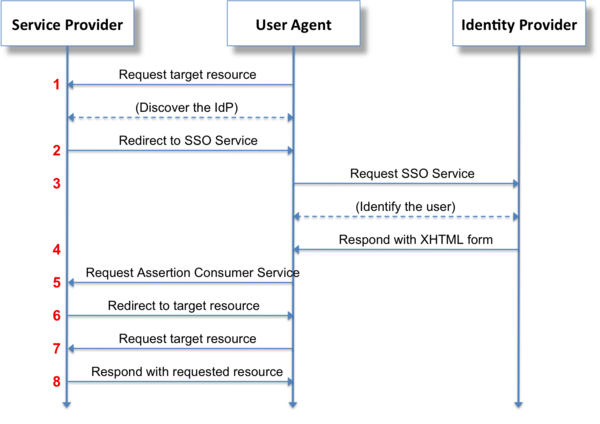
Two main cases of interaction are obtained from it, one of which contains the other.
Option 1. The user accesses the service. The service generates an AuthnRequest message , puts it in the SAMLRequest parameter and makes a redirect through the browser to the provider on the Login URL where the authentication takes place, then the provider generates a Response message , puts it in the SamlResponse parameter and redirects it back to the service on the ACS URL .
Option 2. The user is already authenticated and is in the provider's personal account, from where he can go to the service by clicking on his shortcut. In this situation, the provider immediately generates a Response message , puts it in the SamlResponse parameter and sends it to the service on the ACS URL .
ACS URL (Assertion Consumer Service URL) - url on the side of our application that accepts requests with the SamlResponse parameter , processes it (pulls out the Response message , verifies the signature on the certificate, various rules) and if everything is fine, it creates a working session for the user in the application.
IdP Login URL - URL on the side of the provider, which accepts requests with the SAMLRequest parameter and also properly validates this parameter, and if everything is fine, it sends it to the authentication form.
One of the online services such as OneLogin, LastPass, Okta and others can act as an IdP provider. You can also deploy your IdP using Shibboleth or raise AD.
Settings
All parameters for this interaction should be configured and stored on both sides (IdP, SP), that is, trust relationships should be built.
The SP must store the certificate that IdP will issue, as well as the Saml Login URL to which SAMLRequest will send .
IdP must have the ACS URL hosted for the hosted application ...

... must generate a certificate , select an encryption algorithm , provide Saml Login URL for the service ...
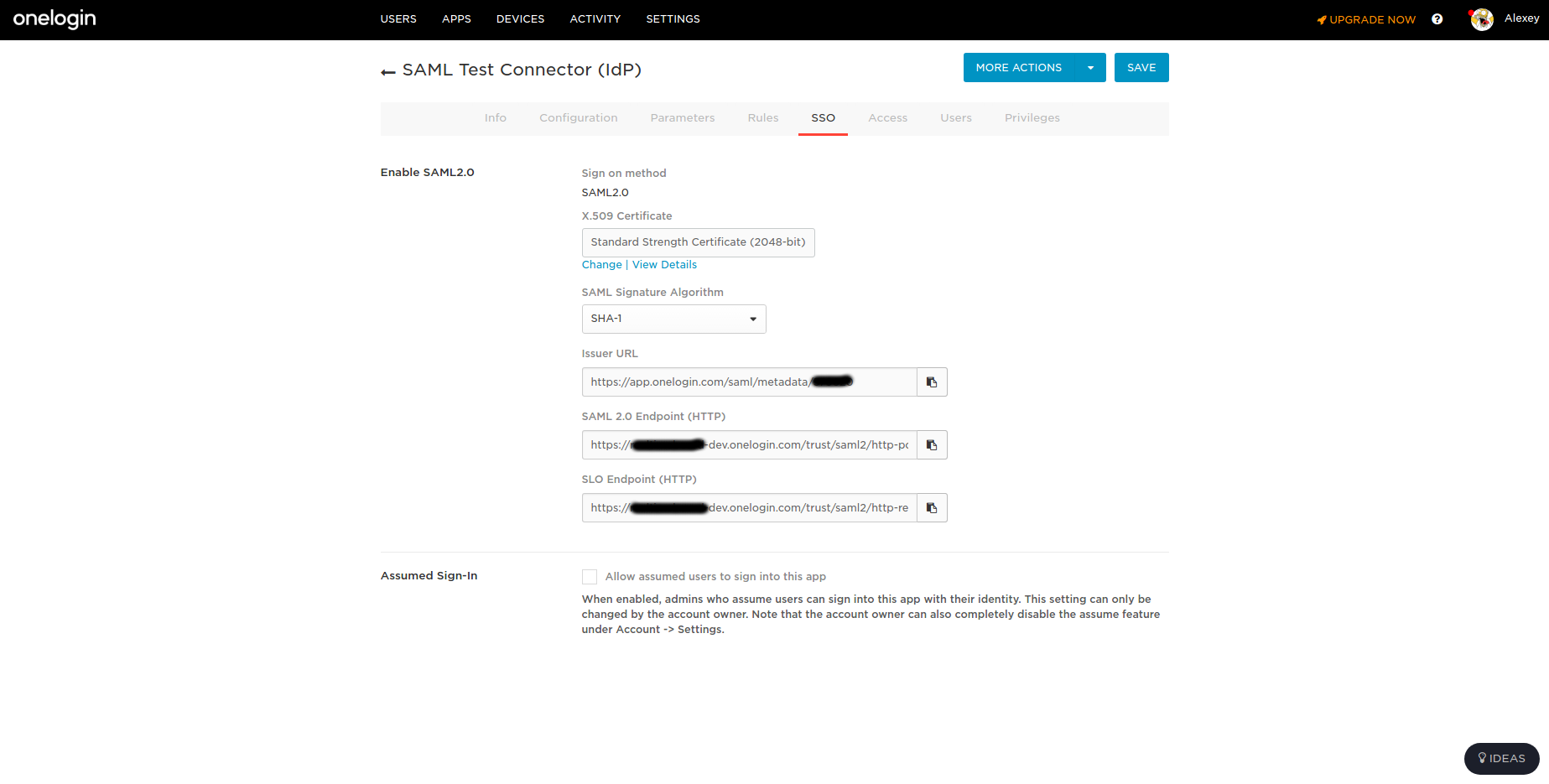
... must configure (if necessary) user attributes or some other custom fields for a particular service. The service provider must also agree on the Subject NameID format . This is essentially the identifier of the user, information about which will be transmitted in the messages. In our case, this is email.
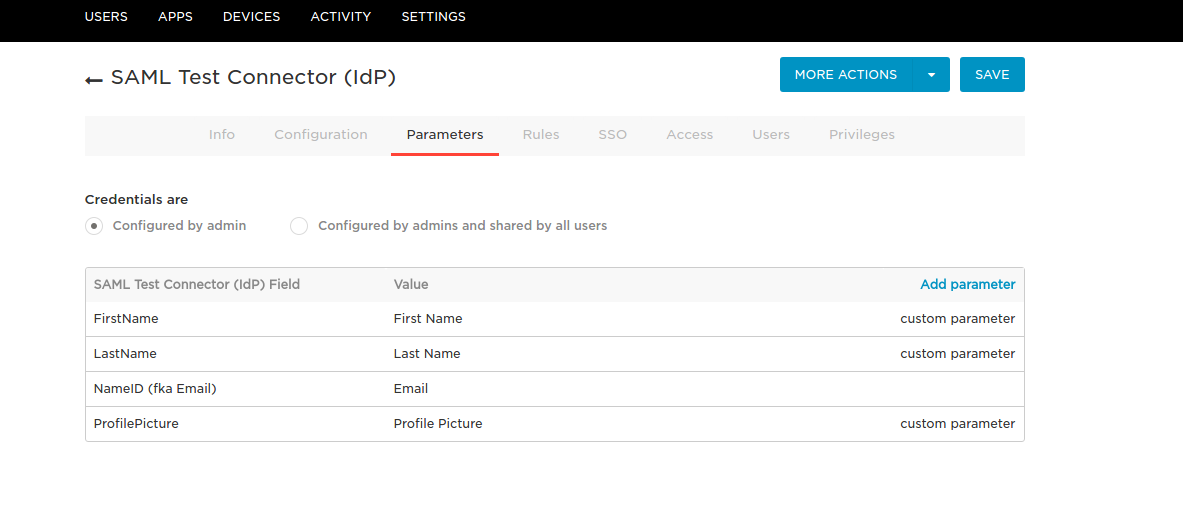
In addition to manual configuration, SP and IdP should be able to generate a metadata file containing all the necessary parameters for the “colleague”, so that he can load and set the settings himself. We didn’t have such a task.
In addition, I’ll say that in addition to SSO, providers optionally also provide the SLO (Single Logout) service , a mechanism that involves the exit from all services at once. Two entry points are also possible:
- Log out of the service, the request to exit to the provider will leave, and then for the rest of the services configured by the provider;
- Log out in the provider's dashboard, then a request for logout to all configured services will go away.
To do this, you need to support the processing of SP SLO URL requests and sending requests to the IdP SLO URL on the service side . I also did not have such a task.
Research
And so, the task is set, I got acquainted with the theory, it's time to start. First of all I got acquainted with the list of available libraries. The backend of our service is written in Java, I was looking for libraries specifically for it. The most complete list of SAML related products can be seen here . I chose the most obvious solutions for myself: Okta SAML Toolkit for Java, SpringSecurity SAML, OIOSAML 2.0 Toolkit, lastpass / saml-sdk-java, OneLogin 2.0, OneLogin 1.1.2, OpenSAML 2.0. Next, it was necessary to determine the criteria by which this or that solution will be chosen. So the following table was compiled .
To be honest, the source code of the proposed solutions was simply horrifying - well-known providers decided to write their high-level application libraries (it didn’t work out very well), most of the (thank God) solutions were based on a low-level library for working with SAML OpenSaml 2.0 . Given that all these libraries would have to be edited one way or another, honing the needs of our logic and embedded in our main code with all unit tests, it was decided to also use the existing basis in the form of OpenSaml 2.0 and write our high-level logic on it. Perhaps if we had Spring , I would use SpringSecurity SAML , but we don’t have it.
In general, I set forth all my thoughts and solution options in our service for further discussion by the team, you can look at the screen below or go to the “live” board , not only I took part in filling it.
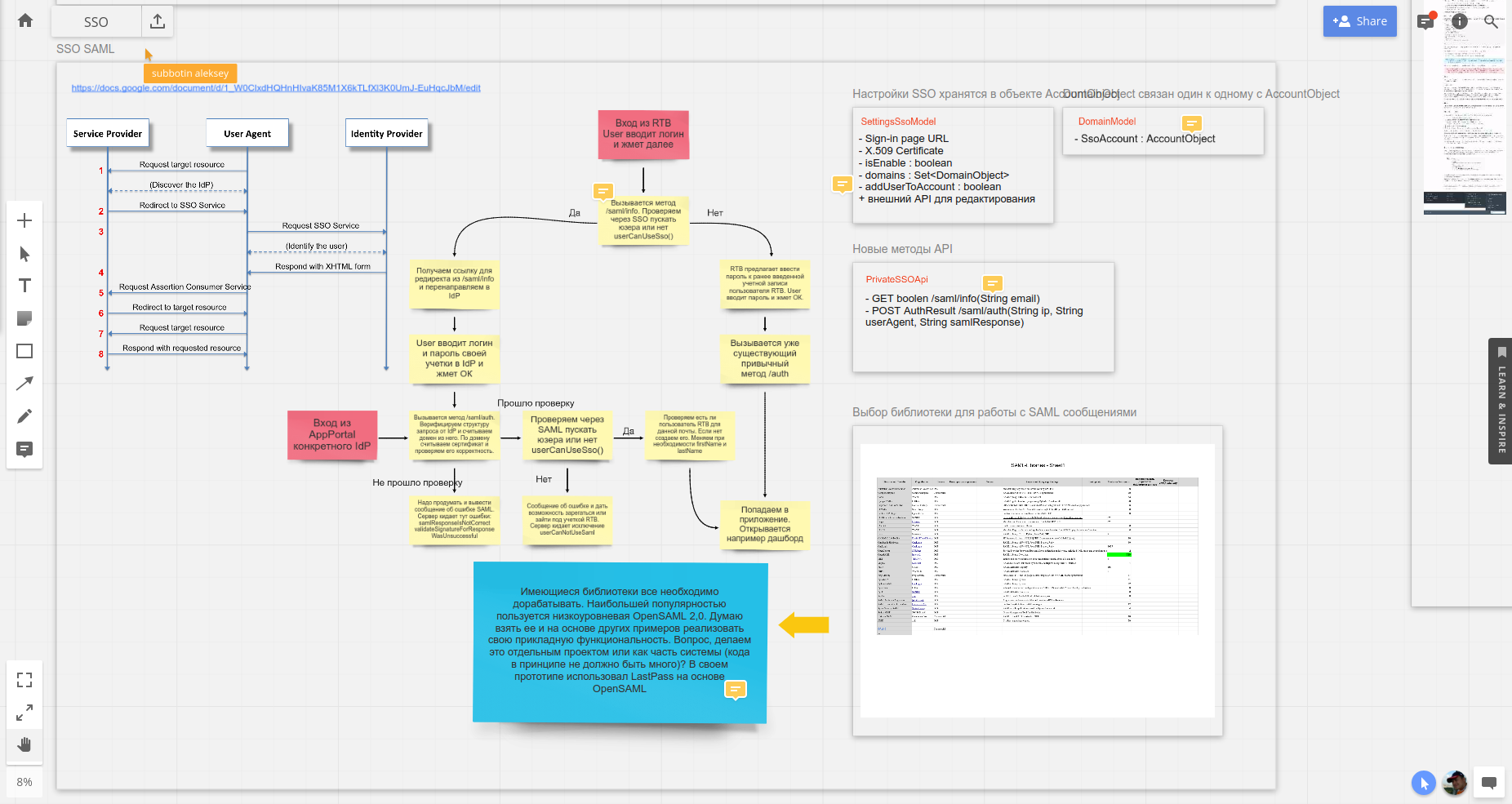
Total, the solution is chosen, the behavior is defined.
Implementation
As an IdP for testing, I chose as you can see by the screenshot above, OneLogin . It provides a free developer account , it was easiest to set up a test application with it, and it also contains a set of utilities for working with SAML that can facilitate your work. If you do not need any fully configurable IdP, then you can use this simple utility or its analogue from Okta . I also used them.
First, I wrote my test local application to test this technology in principle, I’ll show you its sources . Then he transferred this solution to the industrial code base. The application logic is simple and applicable for any service. The application prompts the user to enter an email, if SAML SSO is not configured for this domain, then the application asks for the user’s internal password (in the example, he swears that the user cannot SSO). If it is configured, then we look at which IdP this domain is configured, we form a message and redirect the request there. After successful authentication, we get the generated message to our ACS URL from IdP, we take the email from the message, we take the certificate for this domain and we validate the message. In case of successful verification, we take the attributes from the FirstName message, LastName . If the user already exists, we change the values of these attributes in our service. If the user is not yet, then create it.
This is the so-called Just-in-Time Provisioning . This is the easiest implementation of provisioning (synchronization) of users that can be done. The disadvantage of such synchronization is the delay in execution until the next user login. Plus, the inability to delete a user on the service side when removing a user from IdP. In order to fully launch provisioning in a service, it is necessary to implement the SCIM standard , but I have not done this yet - perhaps this will be the next story.
I hope this article has been helpful to you.









