
 April 18, 2017 at 10:41
Lync SDK 2013. Rethinking the experience of developing your own instant messenger based on Lync (Skype for Business)
We continue to make products based on (and for) Skype for Business. This is not an easy task - you have to face many obstacles that need to be creatively overcome. Today I will talk about how the development of one of our latest applications was going on, where the idea came from and what technological problems we solved.
Our company uses the Lync server and Skype for Business clients for communication between employees as a corporate connection. They have their own advantages and disadvantages (for example, problems with maintaining the history of correspondence), but today is not about that.
We already had the idea of creating our own client based on the Lync SDK , which would completely replace the Skype for Business client. We spent a lot of time and effort, created our own messenger, which covers all the inconveniences and complements the Lync functionality, but several “ShowStoppers” could not be overcome. Also, a considerable number of bugs in the Lync SDK itself did not add optimism.
The main thing that we got in the process of creating our own client is a huge experience in using technology and knowledge, which are, in fact, unique. Therefore, we decided not to stop and create several separate applications for Skype for Business, each of which should solve only one large task, unlike the previous project, which was an all-in-one application.
So two ideas were born - this is an application for managing contacts, which will be discussed in this article, and an application for saving the history of messages, which we will discuss separately.
The application was developed using the technologies .NET Framework 4.6.1, Unity Framework, Prism.
One of the drawbacks in developing the previous application was the use of the Lync SDK throughout the code, which greatly impeded the introduction of new features and modularity of the application. Therefore, the main conclusion that we made is independence from third-party solutions. All integration dependencies must be abstracted, and our solution should use abstractions instead of specific libraries and frameworks.
If you look at the component diagram of the architectural solution, you can distinguish three groups of components.
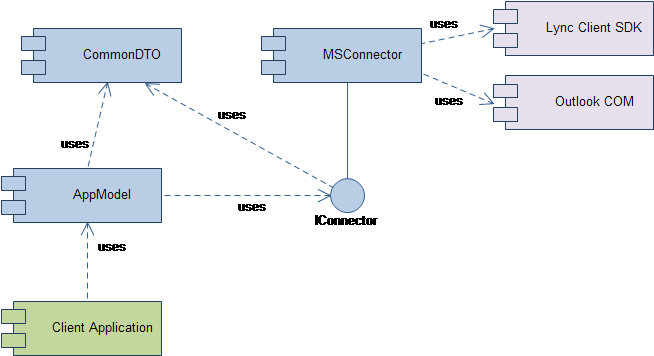
- Third-party components that do not belong to us (Lync Client SDK);
- service components that implement the logic of connection and decoupling of layers (MSConnector, IConnector, CommonDTO, AppModel);
- application components representing client applications.
If everything is more or less clear with the first and third groups, then the second should be discussed in more detail.
AppModel is a domain model. It is a pure object model that describes this subject area. Its main feature is that it does not contain any links to third-party libraries (for example, Lync and Outlook).
To communicate with the lower level, the model uses the IConnector interface, which covers a specific implementation and all the rough work of connecting to transport and service libraries. It is convenient to consider this interface as a general one - during development it was divided into functional parts (ICommunication, ICalendar, ITask, etc.)
One of the options for implementing this interface is the MSConnector , which can communicate with the Lync Client SDK and Outlook, as well as serve requests coming in as part of the interface.
In order for the model and connector to support effective interaction, the CommonDTO component is selected in the system, which describes all the general classes necessary for data exchange.
Client applications interact with the domain model directly, invoking its objects and subscribing to its events. In fact, in this architecture, the model is a caching proxy for external services.
Thus, we ensured the decoupling of the application from Lync (Skype for Business) and Outlook, and we came to the conclusion that, within the framework of this architecture, we can potentially switch to other services. For example, use Telegram or regular Skype as a messenger and Google Apps as a mail application and calendar.
Based on this solution, we created interlayer libraries between Lync and our application and started developing the client part directly.
The essence of the application is the advanced management of your Lync contacts. Among the main features are the following:
• creating contacts (single or multiple);
• creation of groups;
• Search by Lync and Outlook Address Book;
• View your own calendar.

Moreover, each contact has an expanded list of features:
• Opening a dialogue with a contact (with the ability to send short messages);
• Call to Lync, to any phone from the contact phone list, video call;
• View contact calendar;
• Notifications of changes in contact status to “Online” with message memorization;
• Change the default action when you click on a contact (call, video call, or open a chat);
• Sending e-mail with a blank or predefined header;
• Planning a meeting with a contact;
• Search for all letters from the contact;
• View contact card (with the display of the entire calendar of the user).

Additional features of the application include:
• Drag & Drop contacts between groups from the search window;
• Scaling of contacts of all groups at once, and contact groups separately;
• Adding shortcuts to files or applications to the taskbar of the program;
• Change your own status in Skype for Business.
It was decided that the application should be distributed in two forms - the usual installer (exe or msi, through the site) and through the Microsoft store as an appx package.
Having the experience of converting classic applications to appx package on the previous application, in this case we went the same way, but moved much faster.
The only thing that we added compared to the publication of the previous application is multilingualism. Now the application is available for users in three languages - Russian, English and German. In order to see the list of languages supported by the application in the Microsoft store, you need to slightly correct AppxManifest.xml, in our case it looks like this:
As a result, now we have received, like the contact management application itself, which does not repeat the Lync functionality, but extends it and works with it in tandem, as well as the set of necessary libraries for the “quick” implementation of our further ideas.
I will be glad to feedback in the comments, grateful for the ideas.
Vyacheslav Nesterov
Idea
Our company uses the Lync server and Skype for Business clients for communication between employees as a corporate connection. They have their own advantages and disadvantages (for example, problems with maintaining the history of correspondence), but today is not about that.
We already had the idea of creating our own client based on the Lync SDK , which would completely replace the Skype for Business client. We spent a lot of time and effort, created our own messenger, which covers all the inconveniences and complements the Lync functionality, but several “ShowStoppers” could not be overcome. Also, a considerable number of bugs in the Lync SDK itself did not add optimism.
The main thing that we got in the process of creating our own client is a huge experience in using technology and knowledge, which are, in fact, unique. Therefore, we decided not to stop and create several separate applications for Skype for Business, each of which should solve only one large task, unlike the previous project, which was an all-in-one application.
So two ideas were born - this is an application for managing contacts, which will be discussed in this article, and an application for saving the history of messages, which we will discuss separately.
Technology stack, architecture, development
The application was developed using the technologies .NET Framework 4.6.1, Unity Framework, Prism.
One of the drawbacks in developing the previous application was the use of the Lync SDK throughout the code, which greatly impeded the introduction of new features and modularity of the application. Therefore, the main conclusion that we made is independence from third-party solutions. All integration dependencies must be abstracted, and our solution should use abstractions instead of specific libraries and frameworks.
If you look at the component diagram of the architectural solution, you can distinguish three groups of components.
- Third-party components that do not belong to us (Lync Client SDK);
- service components that implement the logic of connection and decoupling of layers (MSConnector, IConnector, CommonDTO, AppModel);
- application components representing client applications.
If everything is more or less clear with the first and third groups, then the second should be discussed in more detail.
AppModel is a domain model. It is a pure object model that describes this subject area. Its main feature is that it does not contain any links to third-party libraries (for example, Lync and Outlook).
To communicate with the lower level, the model uses the IConnector interface, which covers a specific implementation and all the rough work of connecting to transport and service libraries. It is convenient to consider this interface as a general one - during development it was divided into functional parts (ICommunication, ICalendar, ITask, etc.)
One of the options for implementing this interface is the MSConnector , which can communicate with the Lync Client SDK and Outlook, as well as serve requests coming in as part of the interface.
In order for the model and connector to support effective interaction, the CommonDTO component is selected in the system, which describes all the general classes necessary for data exchange.
Client applications interact with the domain model directly, invoking its objects and subscribing to its events. In fact, in this architecture, the model is a caching proxy for external services.
Thus, we ensured the decoupling of the application from Lync (Skype for Business) and Outlook, and we came to the conclusion that, within the framework of this architecture, we can potentially switch to other services. For example, use Telegram or regular Skype as a messenger and Google Apps as a mail application and calendar.
Based on this solution, we created interlayer libraries between Lync and our application and started developing the client part directly.
The essence of the application is the advanced management of your Lync contacts. Among the main features are the following:
• creating contacts (single or multiple);
• creation of groups;
• Search by Lync and Outlook Address Book;
• View your own calendar.
Moreover, each contact has an expanded list of features:
• Opening a dialogue with a contact (with the ability to send short messages);
• Call to Lync, to any phone from the contact phone list, video call;
• View contact calendar;
• Notifications of changes in contact status to “Online” with message memorization;
• Change the default action when you click on a contact (call, video call, or open a chat);
• Sending e-mail with a blank or predefined header;
• Planning a meeting with a contact;
• Search for all letters from the contact;
• View contact card (with the display of the entire calendar of the user).
Additional features of the application include:
• Drag & Drop contacts between groups from the search window;
• Scaling of contacts of all groups at once, and contact groups separately;
• Adding shortcuts to files or applications to the taskbar of the program;
• Change your own status in Skype for Business.
Publish to Windows Store
It was decided that the application should be distributed in two forms - the usual installer (exe or msi, through the site) and through the Microsoft store as an appx package.
Having the experience of converting classic applications to appx package on the previous application, in this case we went the same way, but moved much faster.
The only thing that we added compared to the publication of the previous application is multilingualism. Now the application is available for users in three languages - Russian, English and German. In order to see the list of languages supported by the application in the Microsoft store, you need to slightly correct AppxManifest.xml, in our case it looks like this:
Conclusion
As a result, now we have received, like the contact management application itself, which does not repeat the Lync functionality, but extends it and works with it in tandem, as well as the set of necessary libraries for the “quick” implementation of our further ideas.
I will be glad to feedback in the comments, grateful for the ideas.
Vyacheslav Nesterov