 February 8, 2017 at 15:44
Reading Google spreadsheets from a web application
Google has several versions of the API for accessing its spreadsheets. We will figure out how to read data from a spreadsheet table in a java web application using API version 4.
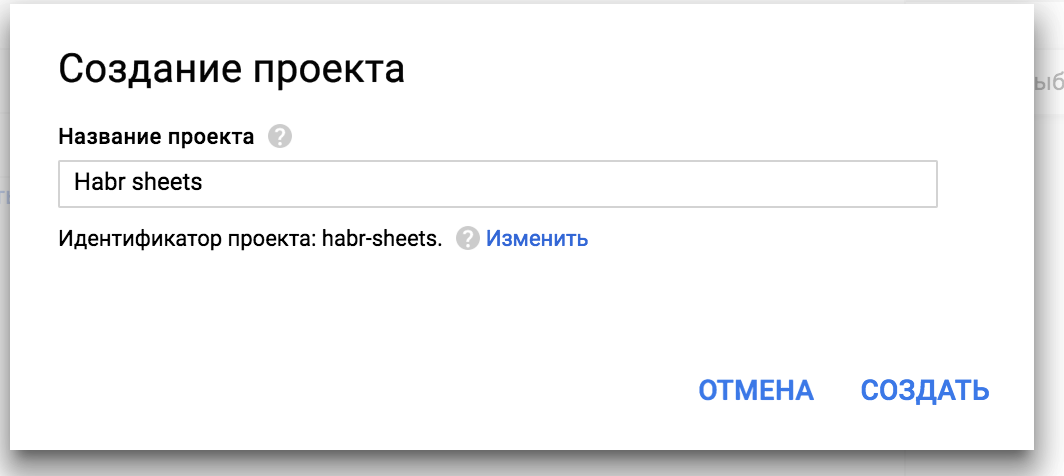
Create a new project through the google console .
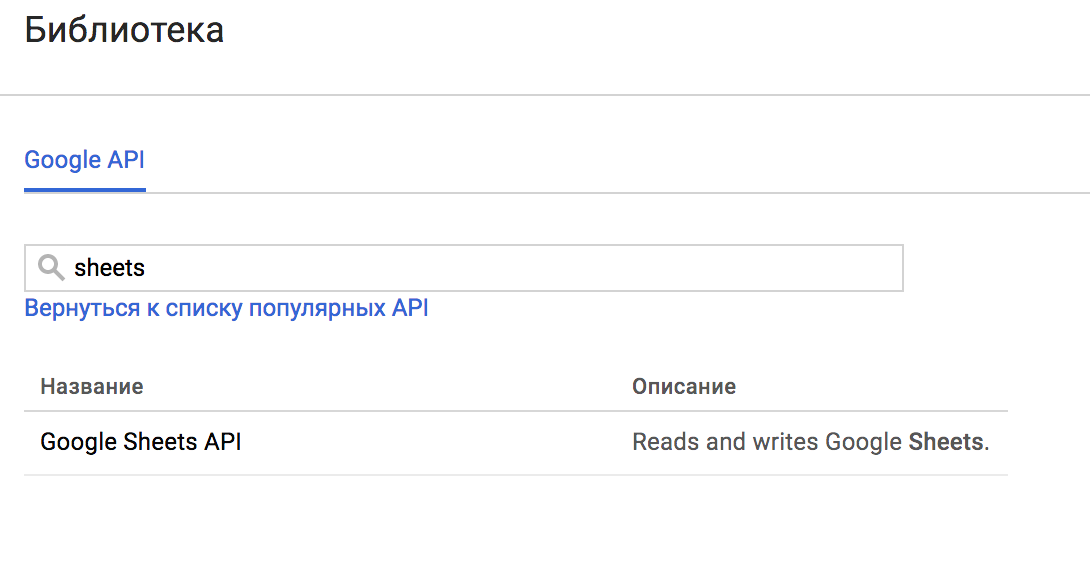
We activate the Sheets API.
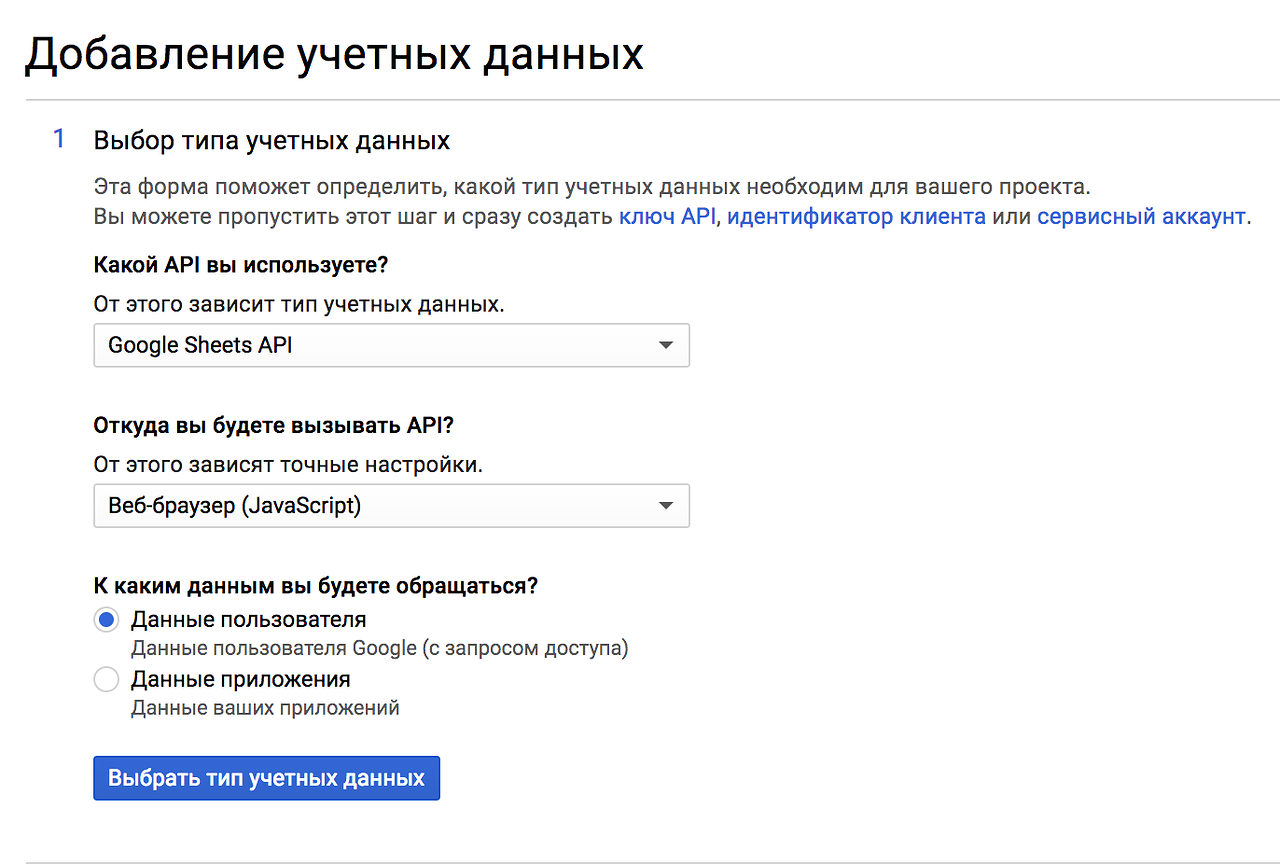
To use the selected API, you need to create credentials. We will call the API from the browser.
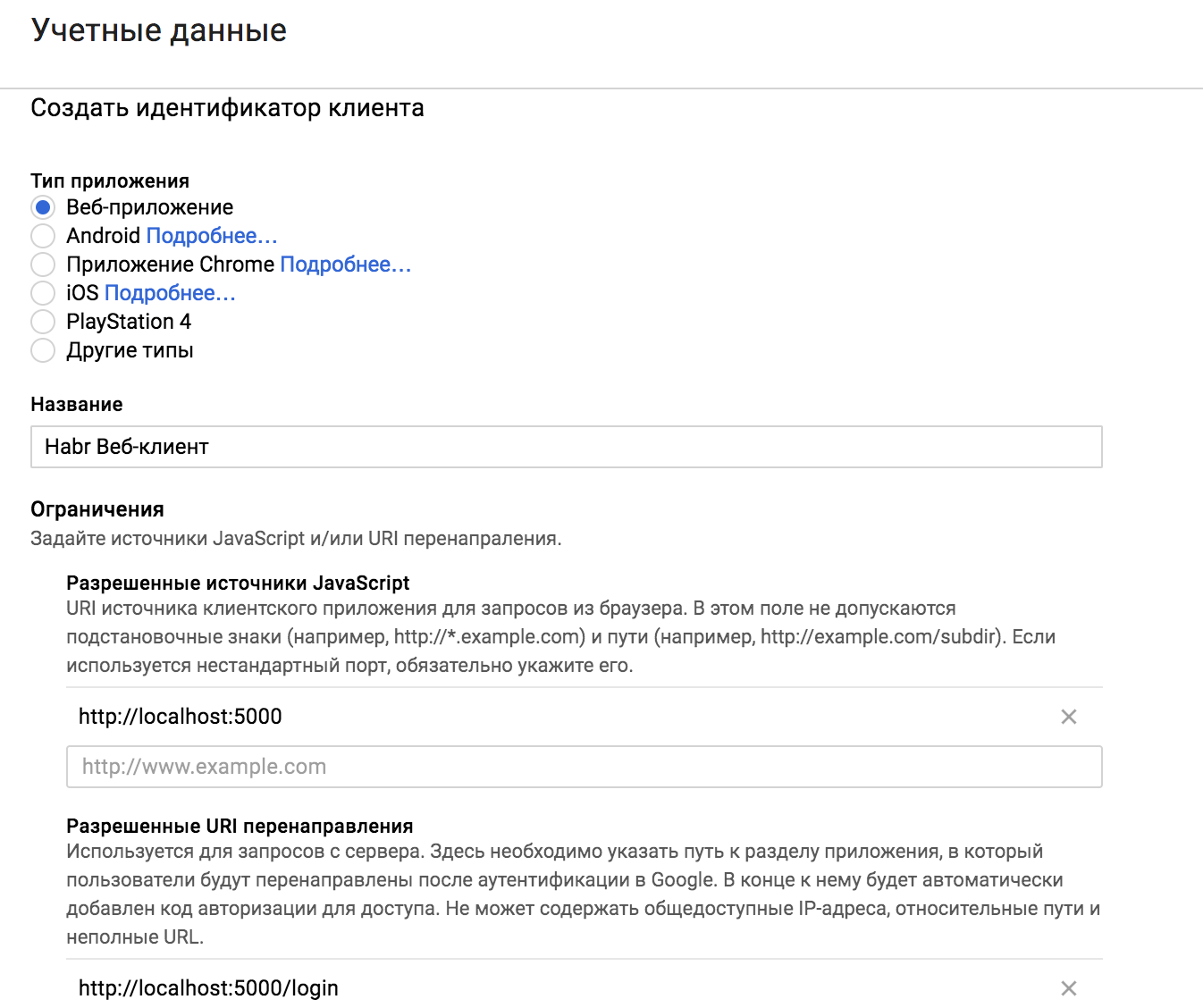
Create an OAuth 2 client identifier and set URL restrictions. You must specify both productive and development url.
The access request window can also be customized by specifying the display name, logo and license.
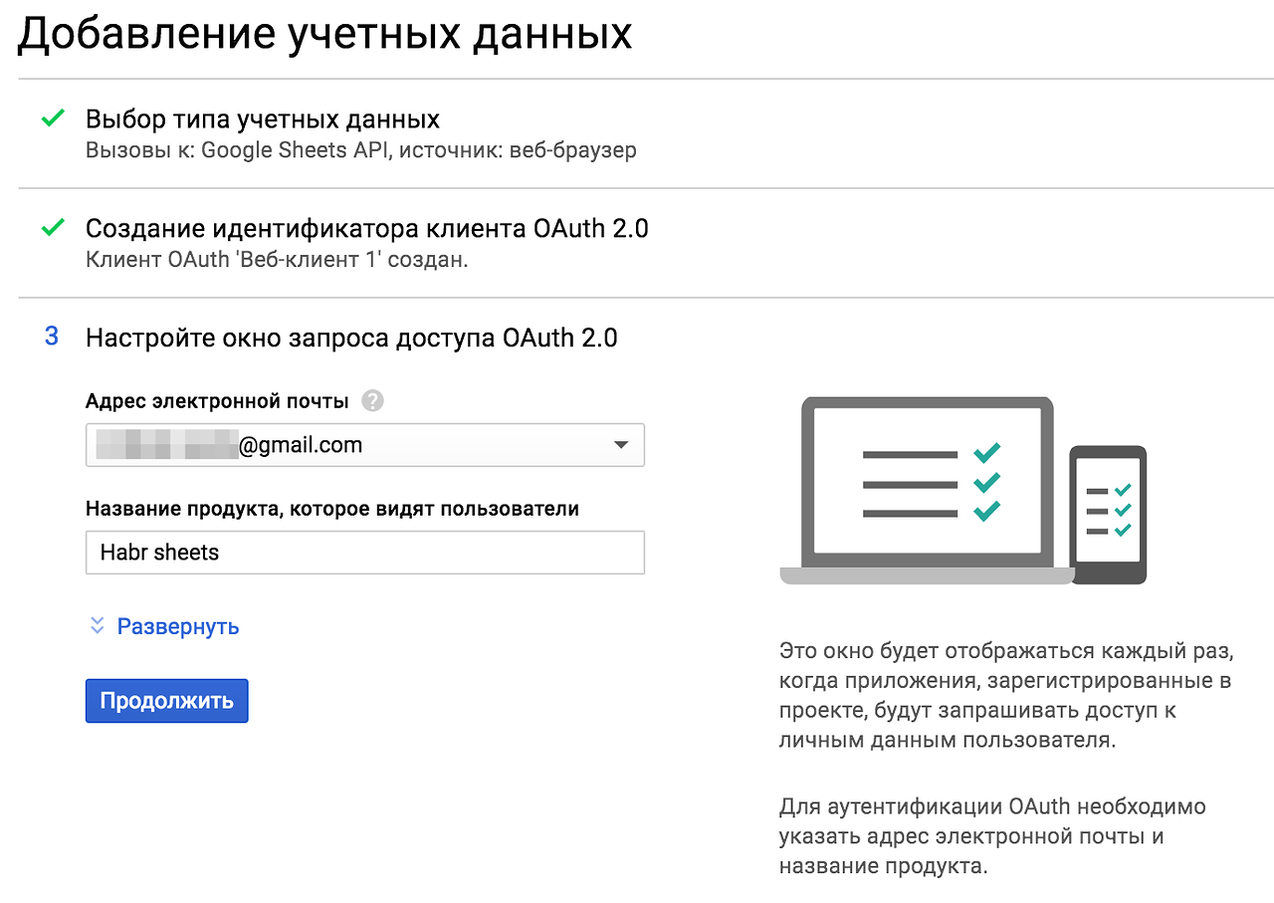
The output should be a client_secrets.json credential file. The finished file must subsequently be placed in the resources of your project.
Move on. The Google Sheets API v4 supports various scenarios for authorization using an authorization code:
Scripts for web and client applications are suitable for us. The work scheme for them is common:

The first step is to request an authorization key in google. The user will be shown the access form. Having received the authorization code, it must be exchanged for an access token, without which you cannot communicate with the Google API. The sequence of actions can be seen in the OAuth 2.0 sandbox .
We will use spring boot as the basis of the web application . The dependencies are as follows:
Let's create two services. GoogleConnection will download client data from a local file and store credentials after receiving them.
And GoogleSheets will do the basic job of reading tabular data.
We distribute the entire sequence of operations between the three controllers. Controller for authorization.
The result of his work will be a redirect to google for login.
Then a request for google application access to user tables:
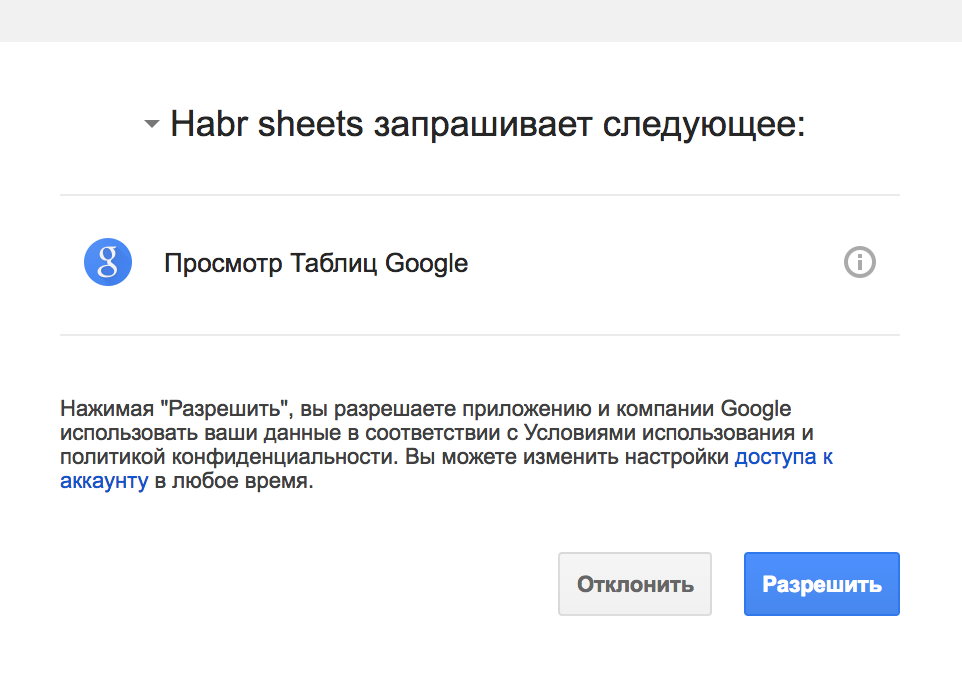
In case of successful authorization, the feedback controller will exchange the code for tokens and redirect it to the source url. The exchange itself is responsible for the GoogleAuthorizationCodeTokenRequest class .
And, in fact, a working controller that implements reading table data.
We also need an interceptor, so that it would be impossible to access the working controller without authentication.
Compared to API v3, each line is a list of objects.
Using the A1 notation, we read page by page, not blocks. To do this, add the page id parameter and the tab name to the application settings.
We start. We check.
As a result, you should get an idea of what Google API classes are used to connect to their services using OAuth 2.0 and how they can be used from a web application.
The application code responsible for working with OAuth2 can be simplified by spring. To do this, connect Spring Security OAuth .
This will allow us to hide the routine operations of OAuth2 under the hood and protect our application.
Transfer user secrets to application.properties.
By connecting security to the project, we have already activated basic authentication . Replace it with something more suitable.
Since we are reading data from Google, even if it is engaged in user authentication for our application. To do this, add just one annotation @ EnableOAuth2Sso.
An SSO authentication point will be created and configured. There is no need to override WebSecurityConfigurerAdapter. We can only set a couple of parameters in the configuration.
In this case, the login-path must match the URI for the redirect specified in the google project. And the scope parameter should contain the value of profile as well.
Additional controllers and interceptors are no longer needed. Now their work will be done by spring.
Change the GoogleConnection class. We will create Credential's using the authorization code stored after authentication in the OAuth2 context. And we will take client data from the application config.
The display of data in the browser, error handling, use of the session, logout and other things will be left without consideration. Their availability and customization will depend on the specific requirements.
That's all. There are working sources on github . Different approaches - on different branches.
Google app
Create a new project through the google console .
We activate the Sheets API.
To use the selected API, you need to create credentials. We will call the API from the browser.
Create an OAuth 2 client identifier and set URL restrictions. You must specify both productive and development url.
The access request window can also be customized by specifying the display name, logo and license.
The output should be a client_secrets.json credential file. The finished file must subsequently be placed in the resources of your project.
Scripts for authorization
Move on. The Google Sheets API v4 supports various scenarios for authorization using an authorization code:
- For web server applications. You need to implement a couple of specific servlets and add them to your web.xml
- Service accounts. Service accounts are created on google and provide customers with access to their resources, and not to the user's resources.
- For installed applications. An example of working with the API from a console application.
- For client applications. In the browser, we form a request for an access code, which can then be exchanged for tokens.
- For android.
Scripts for web and client applications are suitable for us. The work scheme for them is common:
The first step is to request an authorization key in google. The user will be shown the access form. Having received the authorization code, it must be exchanged for an access token, without which you cannot communicate with the Google API. The sequence of actions can be seen in the OAuth 2.0 sandbox .
Google oauth2 app
We will use spring boot as the basis of the web application . The dependencies are as follows:
com.google.oauth-client google-oauth-client-java6 ${google.oauth.client.version} com.google.apis google-api-services-oauth2 ${google.oauth2.version} com.google.apis google-api-services-sheets ${google.sheets.version} Let's create two services. GoogleConnection will download client data from a local file and store credentials after receiving them.
GoogleConnectionService.java
@Service
public class GoogleConnectionService implements GoogleConnection {
    private static final String CLIENT_SECRETS = "/client_secrets.json";
    // ..
    @Override
    public GoogleClientSecrets getClientSecrets() {
        if (clientSecrets == null) {
            try {
                // load client secrets
                InputStreamReader clientSecretsReader = new InputStreamReader(getSecretFile());
                clientSecrets = GoogleClientSecrets.load(Global.JSON_FACTORY, clientSecretsReader);
            } catch (IOException e) {
                e.printStackTrace();
            }
        }
        return clientSecrets;
    }
    @Override
    public Credential getCredentials() {
        return credential;
    }
  // ..
}
And GoogleSheets will do the basic job of reading tabular data.
GoogleSheetsService.java
@Service
public class GoogleSheetsService implements GoogleSheets {
    private Sheets sheetsService = null;
    @Override
    public List> readTable(GoogleConnection connection) throws IOException {
        Sheets service = getSheetsService(connection);
        return readTable(service, spreadsheetId, sheetName);
    }
    private Sheets getSheetsService(GoogleConnection gc) throws IOException {
        if (this.sheetsService == null) {
            this.sheetsService = new Sheets.Builder(Global.HTTP_TRANSPORT, Global.JSON_FACTORY, gc.getCredentials())
                    .setApplicationName(appName).build();
        }
        return this.sheetsService;
    }
}
We distribute the entire sequence of operations between the three controllers. Controller for authorization.
GoogleAuthorizationController.java
@RestController
public class GoogleAuthorizationController {
    @Autowired
    private GoogleConnectionService connection;
    @RequestMapping(value = "/ask", method = RequestMethod.GET)
    public void ask(HttpServletResponse response) throws IOException {
        // Step 1: Authorize --> ask for auth code
        String url = new GoogleAuthorizationCodeRequestUrl(connection.getClientSecrets(), connection.getRedirectUrl(), Global.SCOPES).setApprovalPrompt("force").build();
        response.sendRedirect(url);
    }
}
The result of his work will be a redirect to google for login.
Then a request for google application access to user tables:
In case of successful authorization, the feedback controller will exchange the code for tokens and redirect it to the source url. The exchange itself is responsible for the GoogleAuthorizationCodeTokenRequest class .
GoogleCallbackController.java
@RestController
public class GoogleCallbackController {
    @Autowired
    private GoogleConnectionService connection;
    @RequestMapping(value = "/oauth2callback", method = RequestMethod.GET)
    public void callback(@RequestParam("code") String code, HttpServletResponse response) throws IOException {
        // Step 2: Exchange code --> access tocken
        if (connection.exchangeCode(code)) {
            response.sendRedirect(connection.getSourceUrl());
        } else {
            response.sendRedirect("/error");
        }
    }
}
And, in fact, a working controller that implements reading table data.
GoogleSheetController.java
@RestController
public class GoogleSheetController {
    @Autowired
    private GoogleConnection connection;
    @Autowired
    private GoogleSheets sheetsService;
    @RequestMapping(value = "/api/sheet", method = RequestMethod.GET)
    public ResponseEntity>> read(HttpServletResponse response) throws IOException {
        List> responseBody = sheetsService.readTable(connection);
        return new ResponseEntity>>(responseBody, HttpStatus.OK);
    }
}
We also need an interceptor, so that it would be impossible to access the working controller without authentication.
GoogleSheetsInterceptor.java
public class GoogleSheetsInterceptor implements HandlerInterceptor {
        // ..
    @Override
    public boolean preHandle(HttpServletRequest request, HttpServletResponse response, Object obj) throws Exception {
        if (connection.getCredentials() == null) {
            connection.setSourceUrl(request.getRequestURI());
            response.sendRedirect("/ask");
            return false;
        }
        return true;
    }
}
Compared to API v3, each line is a list of objects.
    private List> readTable(Sheets service, String spreadsheetId, String sheetName) throws IOException {
        ValueRange table = service.spreadsheets().values().get(spreadsheetId, sheetName).execute();
        List> values = table.getValues();
        return values;
    }
Using the A1 notation, we read page by page, not blocks. To do this, add the page id parameter and the tab name to the application settings.
google.spreadsheet.id=..
google.spreadsheet.sheet.name=..
We start. We check.
As a result, you should get an idea of what Google API classes are used to connect to their services using OAuth 2.0 and how they can be used from a web application.
Spring sso application
The application code responsible for working with OAuth2 can be simplified by spring. To do this, connect Spring Security OAuth .
org.springframework.security.oauth spring-security-oauth2 This will allow us to hide the routine operations of OAuth2 under the hood and protect our application.
Transfer user secrets to application.properties.
security.oauth2.client.client-id=Enter Client Id
security.oauth2.client.client-secret=Enter Client Secret
security.oauth2.client.accessTokenUri=https://accounts.google.com/o/oauth2/token
security.oauth2.client.userAuthorizationUri=https://accounts.google.com/o/oauth2/auth
security.oauth2.client.scope=openid,profile,https://www.googleapis.com/auth/spreadsheets
security.oauth2.resource.user-info-uri=https://www.googleapis.com/oauth2/v3/userinfo
By connecting security to the project, we have already activated basic authentication . Replace it with something more suitable.
Since we are reading data from Google, even if it is engaged in user authentication for our application. To do this, add just one annotation @ EnableOAuth2Sso.
@EnableOAuth2Sso
@SpringBootApplication
public class Application  { //.. }
An SSO authentication point will be created and configured. There is no need to override WebSecurityConfigurerAdapter. We can only set a couple of parameters in the configuration.
security.ignored=/
security.basic.enabled=false
security.oauth2.sso.login-path=/oauth2callback
In this case, the login-path must match the URI for the redirect specified in the google project. And the scope parameter should contain the value of profile as well.
Additional controllers and interceptors are no longer needed. Now their work will be done by spring.
Change the GoogleConnection class. We will create Credential's using the authorization code stored after authentication in the OAuth2 context. And we will take client data from the application config.
GoogleConnectionService.java
@Service
public class GoogleConnectionService implements GoogleConnection {
    @Autowired
    private OAuth2ClientContext oAuth2ClientContext;
    private GoogleCredential googleCredentials = null;
        // ..
    @Override
    public Credential getCredentials() {
        if (googleCredentials == null) {
            googleCredentials = new GoogleCredential.Builder()
                    .setTransport(Global.HTTP_TRANSPORT)
                    .setJsonFactory(Global.JSON_FACTORY)
                    .setClientSecrets(clientId, clientSecret)
                    .build()
                    .setAccessToken(response.getAccessToken())
                    .setFromTokenResponse(oAuth2ClientContext
                        .getAccessToken().getValue());
        }
        return googleCredentials;
    }
}
The display of data in the browser, error handling, use of the session, logout and other things will be left without consideration. Their availability and customization will depend on the specific requirements.
That's all. There are working sources on github . Different approaches - on different branches.









