
 January 30, 2017 at 12:03
Huawei Agile Distributed Wi-Fi Solution: What is it? Part one
- Tutorial
Surely, many habrahabr users have seen an article on the blog of Huawei - Do you have Wi-Fi here? Which speaks about the difficult fate of corporate WiFi access, in the context of the widespread increase in the number of wireless devices and network infrastructure in general.
Here, for example, quotes from it:

The solution to this complex issue was the solution - Huawei Agile Distributed Wi-Fi, which is actually mentioned in the vendor's article. We, however, were lucky, as I understand it, one of the first in Russia to “feel” this decision live.
For a comprehensive study, we received, so to speak, a demo kit consisting of:
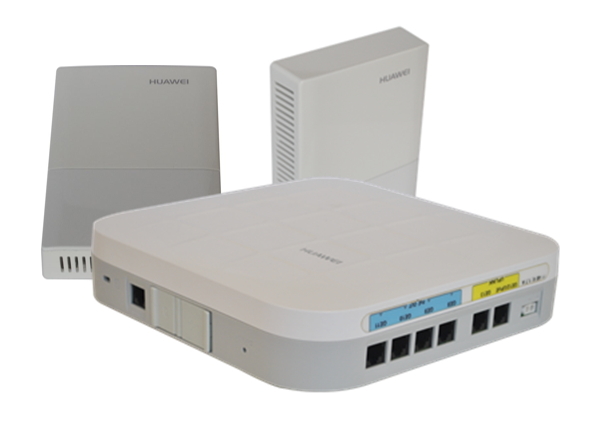
A typical application of Agile Distributed WLAN is a scenario with a high concentration of rooms, such as: hotels, dormitories, hospitals, that is, objects where walls or other structural elements of buildings can lead to a significant attenuation of the Wi-Fi signal. In other words, where the use of the traditional architecture of WLAN-networks is not efficient or excessively expensive, due to the need to install more access points, for better radio coverage.

As we already know, Agile Distributed WLAN consists of a central access point, and remote radio modules (RRU). RRUs receive and send “wireless” packets and transparently transmit them to the central access point for processing.
The central access point is connected to the RRU via a UTP cable. Compared to the antenna cable used for classic access points, with external antennas, copper provides a greater deployment distance for WLANs, allowing the RRU to be further spread from the central access point, thereby reaching dead zones.
The central access point provides RRU PoE power, while it can itself be powered via UPoE (applies to model ADP9430DN-12). RRUs can also be connected through a PoE switch, subject to IP reachability (Layer2) from the central AP.
And a little more theory on the topic.
After the radio modules (RRUs) are connected and receive IP addresses from the central access point, they begin to establish CAPWAP (Control And Provisioning of Wireless Access Points) tunnels with the central access point.
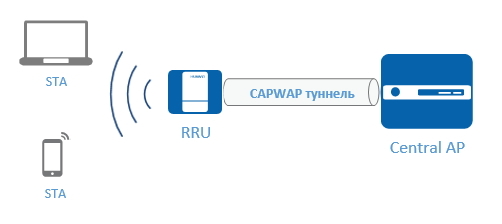
CAPWAP tunnels use the DTLS (Datagram Transport Layer Security) protocol encryption and the so-called "heartbeat detection" detection (which makes it possible to check and maintain active connections without constantly renewing them) to ensure security.
Central AP sends control packets and data packets to the radio modules (RRU) in a centralized manner through CAPWAP tunnels. To increase the reliability of the communication channel and to prevent losses when the volume of served traffic increases, a high priority is set for CAPWAP control packets.
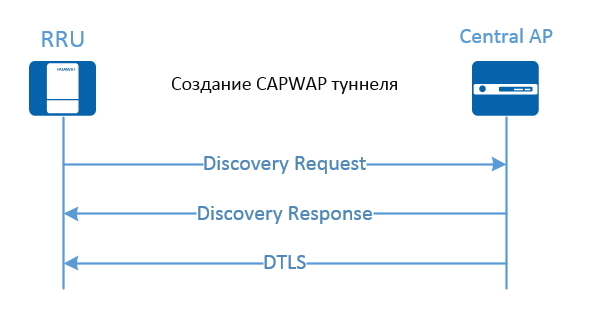
In addition, the radio modules (RRUs), in the course of their launch, are able to determine whether their version of the system software is the same as in the central access point, in accordance with the parameters in the accepted Authentication Response packet. If there is no such correspondence, then the radio modules go offline and do not participate in the work.
So, let's go directly to the initial setup of the Agile Distributed WLAN system.
What we want to do:
Since, for reasons that were not clear to us, there was no power supply for the central access point in the package, we decided to power it from the old HP ProCurve PoE switch, while, as already mentioned, the radio modules were powered by PoE from the AD9430DN- 12.

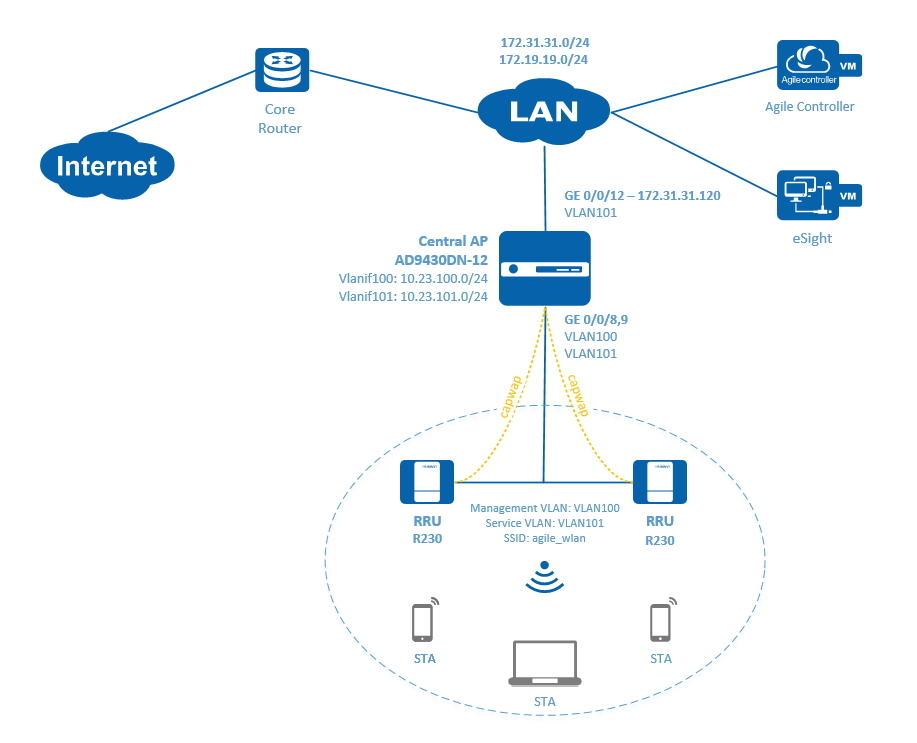
Thus, the communication organization scheme is as follows:
The default login / password for the console is admin / admin @ huawei. The

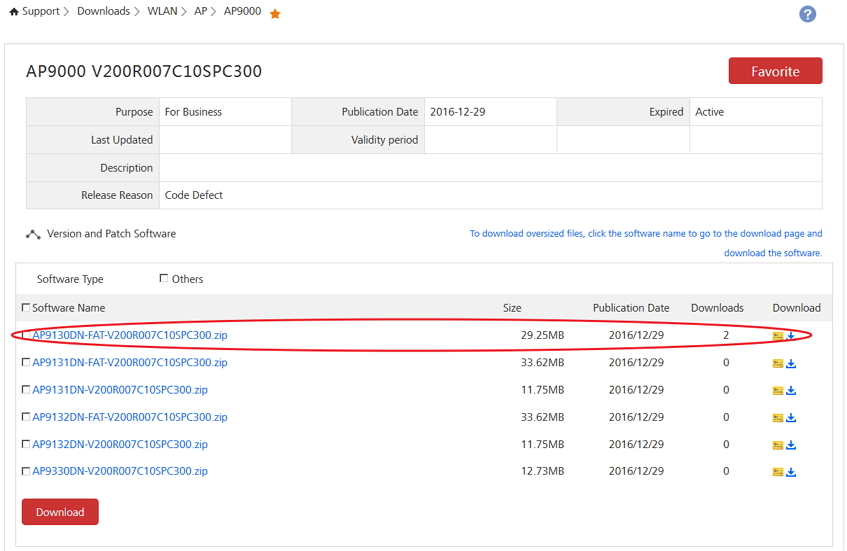
current version of the system software, at the time of writing, is V200R007C10SPC300:
# Write down the device name, management IP addresses, as well as the default route:
# Configure SSH access to the device by first creating a user and generating rsa keys:
# Add GE 0/0 / 8..9 interfaces to the control VLAN100:
# Add the uplink GE 0/0/12 interface to the service VLAN101:
# Configure the central access point as a DHCP server for RRU and STA:
# Create an AP group:
# Create a profile for the regulatory domain, country code and apply the profile for ap-group:
# Assign a management VLAN to RRU:
# Add the RRU radio modules to the configuration (use the method without authentication):
# Connect the radio modules and check their status:
# Configure WLAN parameters (security, ssid, vap):
# Check the configuration:
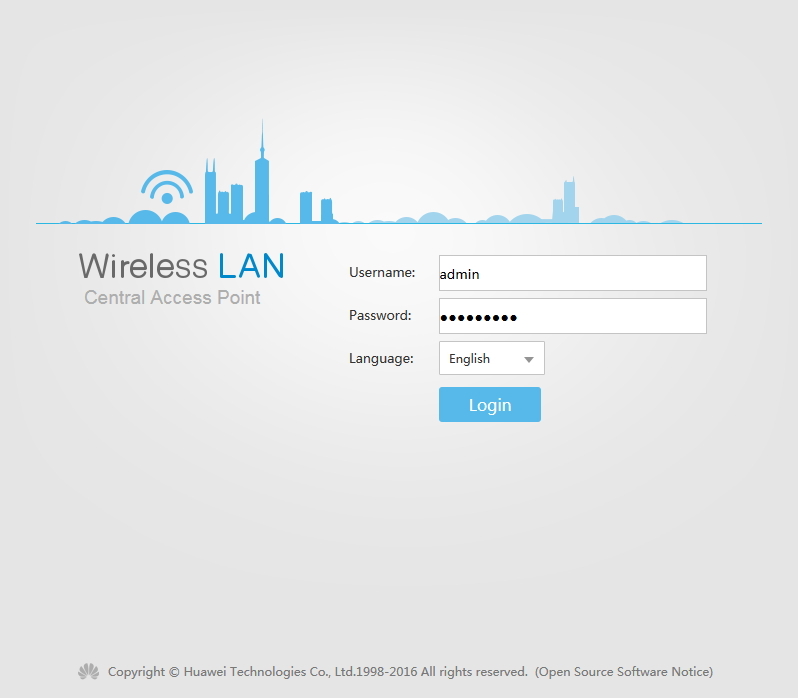
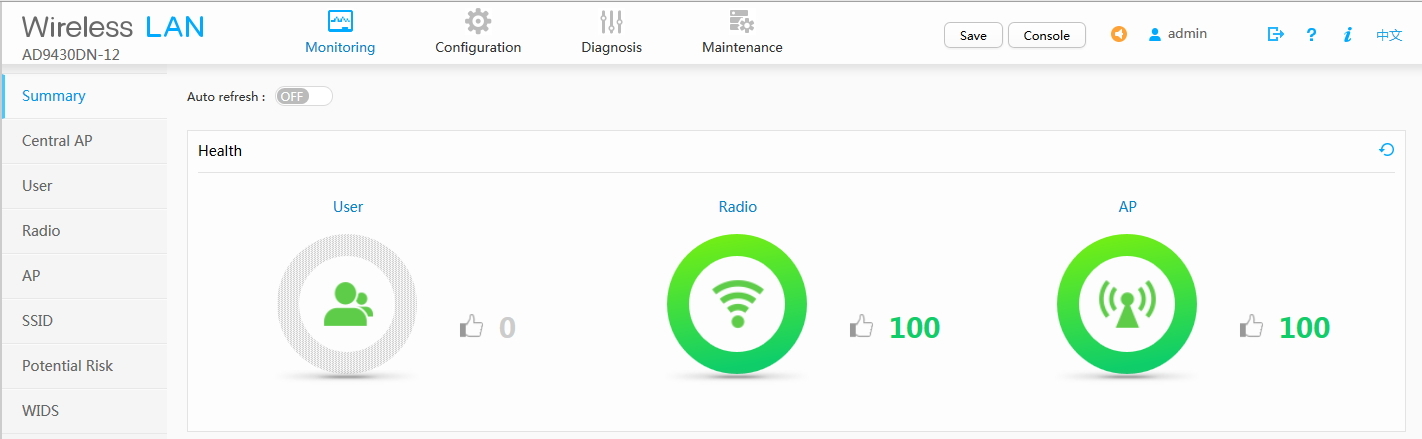
To configure the system, a Web interface is also available:
End of the first part.
Here, for example, quotes from it:
According to analysts, as early as 2019, the volume of user traffic transmitted via Wi-Fi networks will exceed the volume attributable to wired connections.
Obviously, if access to the corporate infrastructure via Wi-Fi becomes a priority method of connection, then more stringent requirements will be imposed on it in terms of security, quality of work, flexibility and scalability.
All this entails the need to modernize the WLAN infrastructure and implement modern Enterprise-level solutions. Here the first surprise arises: for the leadership of almost any enterprise or company, Wi-Fi simply works miraculously with the help of a “magic box”, which costs 3 thousand rubles. And "this is incomprehensible to the mind," as an access point can cost 30 or more thousand rubles! And "to you, IT specialists" give some kind of wireless controller!
The solution to this complex issue was the solution - Huawei Agile Distributed Wi-Fi, which is actually mentioned in the vendor's article. We, however, were lucky, as I understand it, one of the first in Russia to “feel” this decision live.
For a comprehensive study, we received, so to speak, a demo kit consisting of:
- Single Central Access Point (Central AP) - AD9430DN-12
- Two radio modules (RRU - Remote Radio Unit) - R230D.
Concept
A typical application of Agile Distributed WLAN is a scenario with a high concentration of rooms, such as: hotels, dormitories, hospitals, that is, objects where walls or other structural elements of buildings can lead to a significant attenuation of the Wi-Fi signal. In other words, where the use of the traditional architecture of WLAN-networks is not efficient or excessively expensive, due to the need to install more access points, for better radio coverage.
As we already know, Agile Distributed WLAN consists of a central access point, and remote radio modules (RRU). RRUs receive and send “wireless” packets and transparently transmit them to the central access point for processing.
The central access point is connected to the RRU via a UTP cable. Compared to the antenna cable used for classic access points, with external antennas, copper provides a greater deployment distance for WLANs, allowing the RRU to be further spread from the central access point, thereby reaching dead zones.
The central access point provides RRU PoE power, while it can itself be powered via UPoE (applies to model ADP9430DN-12). RRUs can also be connected through a PoE switch, subject to IP reachability (Layer2) from the central AP.
And a little more theory on the topic.
After the radio modules (RRUs) are connected and receive IP addresses from the central access point, they begin to establish CAPWAP (Control And Provisioning of Wireless Access Points) tunnels with the central access point.
CAPWAP tunnels use the DTLS (Datagram Transport Layer Security) protocol encryption and the so-called "heartbeat detection" detection (which makes it possible to check and maintain active connections without constantly renewing them) to ensure security.
Central AP sends control packets and data packets to the radio modules (RRU) in a centralized manner through CAPWAP tunnels. To increase the reliability of the communication channel and to prevent losses when the volume of served traffic increases, a high priority is set for CAPWAP control packets.
In addition, the radio modules (RRUs), in the course of their launch, are able to determine whether their version of the system software is the same as in the central access point, in accordance with the parameters in the accepted Authentication Response packet. If there is no such correspondence, then the radio modules go offline and do not participate in the work.
Initial setup
So, let's go directly to the initial setup of the Agile Distributed WLAN system.
What we want to do:
- Assemble a stand from the AD9430DN-12 and 2xR230D and check its performance
- Assign IP addresses from our LAN network
- Configure WLAN services, using the Small-Scale Network WLAN as an example
- Provide STA Internet Access
Since, for reasons that were not clear to us, there was no power supply for the central access point in the package, we decided to power it from the old HP ProCurve PoE switch, while, as already mentioned, the radio modules were powered by PoE from the AD9430DN- 12.
Thus, the communication organization scheme is as follows:
- The central access point ADP9430DN-12 with the GE uplink interface 0/0/12 looks at the LAN network (Vlanif1, 172.31.31.120)
- R230D radio modules are connected to the GE 0/0 / 8..9 downlink interfaces (Vlanif100, address allocation dynamically via DHCP: 10.23.100.0/24)
- Clients connected to a Wi-Fi network (STA) receive addresses through DHCP: 10.23.101.0/24 (Vlanif101)
- SSID: agile_wlan
The default login / password for the console is admin / admin @ huawei. The
current version of the system software, at the time of writing, is V200R007C10SPC300:
display version
Huawei Versatile Routing Platform Software
VRP (R) software, Version 5.160 (AD9430DN-12 FAT V200R007C10SPC300)
Copyright (C) 2011-2016 HUAWEI TECH CO., LTD
Huawei AD9430DN-12 Router uptime is 1 week, 0 day, 1 hour, 8 minutes
CLI
# Write down the device name, management IP addresses, as well as the default route:
 system-view
[Huawei] sysname Agile_Wlan
[AGILE_WLAN] vlan 1
[AGILE_WLAN-vlan1] quit
[AGILE_WLAN] interface gigabitethernet 0/0/12
[AGILE_WLAN-GigabitEthernet0/0/12] port link-type trunk
[AGILE_WLAN-GigabitEthernet0/0/12] port trunk allow-pass vlan 1
[AGILE_WLAN-GigabitEthernet0/0/12] port trunk pvid vlan 1
[AGILE_WLAN-GigabitEthernet0/0/12] quit
[AGILE_WLAN] interface vlanif 1
[AGILE_WLAN-Vlanif1] ip address 172.31.31.120 255.255.255.0
[AGILE_WLAN-Vlanif1] ip route-static 0.0.0.0 0.0.0.0 172.31.31.120
[AGILE_WLAN-Vlanif1] quit
# Configure SSH access to the device by first creating a user and generating rsa keys:
[AGILE_WLAN]rsa local-key-pair create
The key name will be: Host
RSA keys defined for Host already exist.
Confirm to replace them? (y/n):y
The range of public key size is (512 ~ 2048).
NOTES: If the key modulus is less than 2048,
       It will introduce potential security risks.
Input the bits in the modulus[default = 2048]:
Generating keys...
...........................................................................................................................................+++
....................+++
..............................................++++++++
................++++++++
[AGILE_WLAN]user-interface vty 0 4
[AGILE_WLAN-ui-vty0-4]authentication-mode aaa
[AGILE_WLAN-ui-vty0-4]protocol inbound ssh
[AGILE_WLAN-ui-vty0-4]quit
[AGILE_WLAN]aaa
[AGILE_WLAN-aaa]local-user user1 password irreversible-cipher Pa$$w0rd
[AGILE_WLAN-aaa]local-user user1 privilege level 15
[AGILE_WLAN-aaa]local-user user1 service-type ssh http terminal
[AGILE_WLAN]ssh user user1 authentication-type password
# Add GE 0/0 / 8..9 interfaces to the control VLAN100:
[AGILE_WLAN] vlan batch 100 101
[AGILE_WLAN] interface gigabitethernet 0/0/8
[AGILE_WLAN-GigabitEthernet0/0/8] port link-type trunk
[AGILE_WLAN-GigabitEthernet0/0/8] port trunk pvid vlan 100
[AGILE_WLAN-GigabitEthernet0/0/8] port trunk allow-pass vlan 100
[AGILE_WLAN-GigabitEthernet0/0/8] quit
# Add the uplink GE 0/0/12 interface to the service VLAN101:
[AGILE_WLAN] interface gigabitethernet 0/0/12
[AGILE_WLAN-GigabitEthernet0/0/12] port link-type trunk
[AGILE_WLAN-GigabitEthernet0/0/12] port trunk allow-pass vlan 101
[AGILE_WLAN-GigabitEthernet0/0/12] quit
# Configure the central access point as a DHCP server for RRU and STA:
[AGILE_WLAN] dhcp enable
[AGILE_WLAN] interface vlanif 100
[AGILE_WLAN-Vlanif100] ip address 10.23.100.1 24
[AGILE_WLAN-Vlanif100] dhcp select interface
[AGILE_WLAN-Vlanif100] quit
[AGILE_WLAN] interface vlanif 101
[AGILE_WLAN-Vlanif101] ip address 10.23.101.1 24
[AGILE_WLAN-Vlanif101] dhcp select interface
[AGILE_WLAN-Vlanif101] quit
# Create an AP group:
[AGILE_WLAN] wlan
[AGILE_WLAN-wlan-view] ap-group name ap-group1
[AGILE_WLAN-wlan-ap-group-ap-group1] quit
# Create a profile for the regulatory domain, country code and apply the profile for ap-group:
[AGILE_WLAN-wlan-view] regulatory-domain-profile name domain1
[AGILE_WLAN-wlan-regulate-domain-domain1] country-code ru
[AGILE_WLAN-wlan-regulate-domain-domain1] quit
[AGILE_WLAN-wlan-view] ap-group name ap-group1
[AGILE_WLAN-wlan-ap-group-ap-group1] regulatory-domain-profile domain1
Warning: Modifying the country code will clear channel, power and antenna gain configurations of the radio and reset the AP. Continu
e?[Y/N]:y
[AGILE_WLAN-wlan-ap-group-ap-group1] quit
[AGILE_WLAN-wlan-view] quit
# Assign a management VLAN to RRU:
[AGILE_WLAN] management-vlan 100# Add the RRU radio modules to the configuration (use the method without authentication):
[AGILE_WLAN] wlan
[AGILE_WLAN-wlan-view] ap auth-mode no-auth
[AGILE_WLAN-wlan-view] ap-id 1
[AGILE_WLAN-wlan-view] ap-id 2
[AGILE_WLAN-wlan-ap-1] ap-name area_1
[AGILE_WLAN-wlan-ap-1] ap-group ap-group1
Warning: This operation may cause AP reset. If the country code changes, it will clear channel, power and antenna gain configuration
s of the radio, Whether to continue? [Y/N]:y
[AGILE_WLAN-wlan-ap-1] quit
# Connect the radio modules and check their status:
[Agile_Wlan-wlan-view]display ap all
Info: This operation may take a few seconds. Please wait for a moment.done.
Total AP information:
nor  : normal          [2]
-------------------------------------------------------------------------------------------------------------
ID   MAC            Name           Group     IP            Type            State STA Uptime
-------------------------------------------------------------------------------------------------------------
1    9c50-ee25-2240 9c50-ee25-2240 ap-group1 10.23.100.215 R230D           nor   0   4D:0H:25M:16S
2    9c50-ee25-1c00 9c50-ee25-1c00 ap-group1 10.23.100.225 R230D           nor   0   4D:0H:25M:53S
-------------------------------------------------------------------------------------------------------------
Total: 2
# Configure WLAN parameters (security, ssid, vap):
[AGILE_WLAN-wlan-view] security-profile name wlan-security
[AGILE_WLAN-wlan-sec-prof-wlan-security] security wpa2 psk pass-phrase 12345678 aes
[AGILE_WLAN-wlan-sec-prof-wlan-security] quit
[AGILE_WLAN-wlan-view] ssid-profile name wlan-ssid
[AGILE_WLAN-wlan-ssid-prof-wlan-ssid] ssid agile_wlan
[AGILE_WLAN-wlan-ssid-prof-wlan-ssid] quit[AGILE_WLAN-wlan-view] vap-profile name wlan-vap
[AGILE_WLAN-wlan-vap-prof-wlan-vap] service-vlan vlan-id 101
[AGILE_WLAN-wlan-vap-prof-wlan-vap] security-profile wlan-security
[AGILE_WLAN-wlan-vap-prof-wlan-vap] ssid-profile wlan-ssid
[AGILE_WLAN-wlan-vap-prof-wlan-vap] quit[AGILE_WLAN-wlan-view] ap-group name ap-group1
[AGILE_WLAN-wlan-ap-group-ap-group1] vap-profile wlan-vap wlan 1 radio 0
[AGILE_WLAN-wlan-ap-group-ap-group1] vap-profile wlan-vap wlan 1 radio 1
[AGILE_WLAN-wlan-ap-group-ap-group1] quit# Check the configuration:
[Agile_Wlan]display vap ssid agile_wlan
Info: This operation may take a few seconds, please wait.
WID : WLAN ID
-------------------------------------------------------------------------------------
AP ID AP name        RfID WID  BSSID          Status  Auth type    STA   SSID
-------------------------------------------------------------------------------------
1     9c50-ee25-2240 0    1    9C50-EE25-2240 ON      Open+Portal  0     agile_wlan
1     9c50-ee25-2240 1    1    9C50-EE25-2250 ON      Open+Portal  0     agile_wlan
2     9c50-ee25-1c00 0    1    9C50-EE25-1C00 ON      Open+Portal  1     agile_wlan
2     9c50-ee25-1c00 1    1    9C50-EE25-1C10 ON      Open+Portal  0     agile_wlan
-------------------------------------------------------------------------------------
Total: 4
[Agile_Wlan]display station ssid agile_wlan
Rf/WLAN: Radio ID/WLAN ID
Rx/Tx: link receive rate/link transmit rate(Mbps)
-------------------------------------------------------------------------------------------------
STA MAC AP ID Ap name Rf/WLAN Band Type Rx/Tx RSSI VLAN IP address
-------------------------------------------------------------------------------------------------
a8c8-3a05-e343 2 9c50-ee25-1c00 0/1 2.4G 11n 5/2 -83 101 10.23.101.248
-------------------------------------------------------------------------------------------------
Total: 1 2.4G: 1 5G: 0To configure the system, a Web interface is also available:
End of the first part.