 December 15, 2016 at 08:34
Gen Jam 2016: procedurally generated sprites
- Transfer
GenJam 2016
On November 19, 2016 in San Francisco, the first annual Gen Jam (procedural generation gamejam) was held. The idea was to create a graphics generator on Saturday, an “object that creates objects,” if you like.
I created a program that draws character sprites in the amazing style of Christopher's “Oryx” Barrett 16-bit sprite set from the Oryx Design Lab. Look at examples of what the program does:
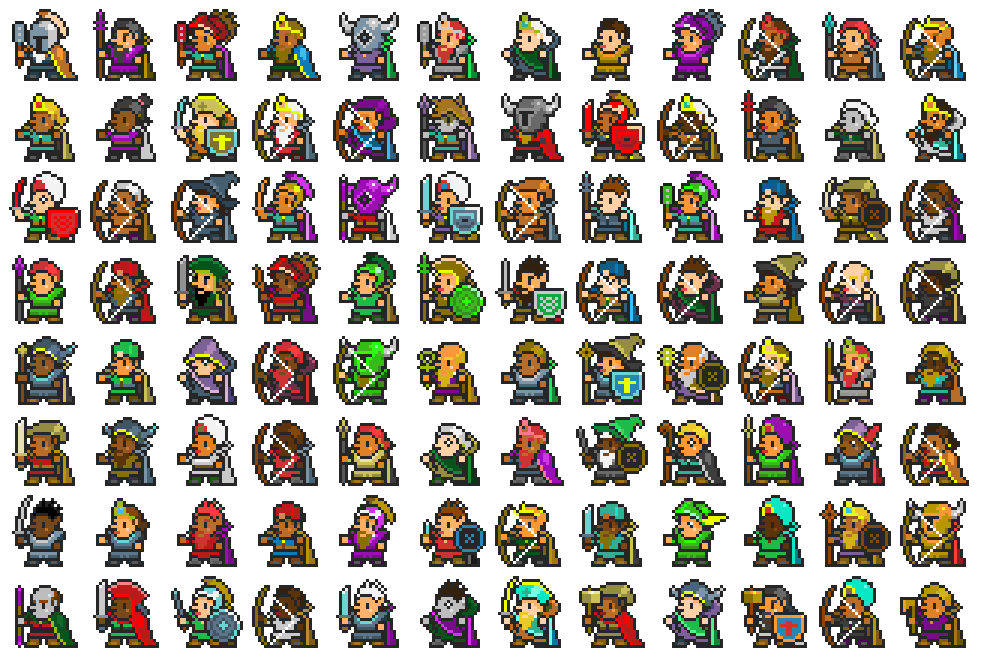
In essence, I took the sprites of the characters, divided them into parts, normalized the color palette and implemented an algorithm for their assembly to create new unique sprites.
So, I broke the original sprites into parts - helmets, hair, bodies, legs, weapons, etc. Then I randomly selected them and put them together. Then I changed colors. Here is the basic idea:

The original sprites from the set of 16-bit sprites that I used as the basis look like this (the initial set of sprites is HUGE, here are just 5 examples from it): The
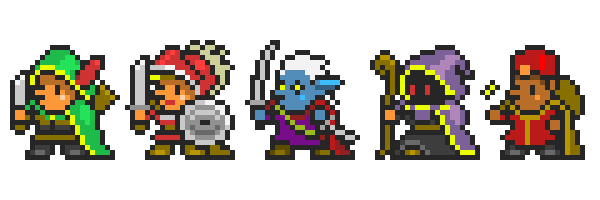
sprites were divided into eight groups: body, head, helmet, shield, legs, hair, knives and a bow. Then I used Photoshop to cut out the pieces and put them in separate files:
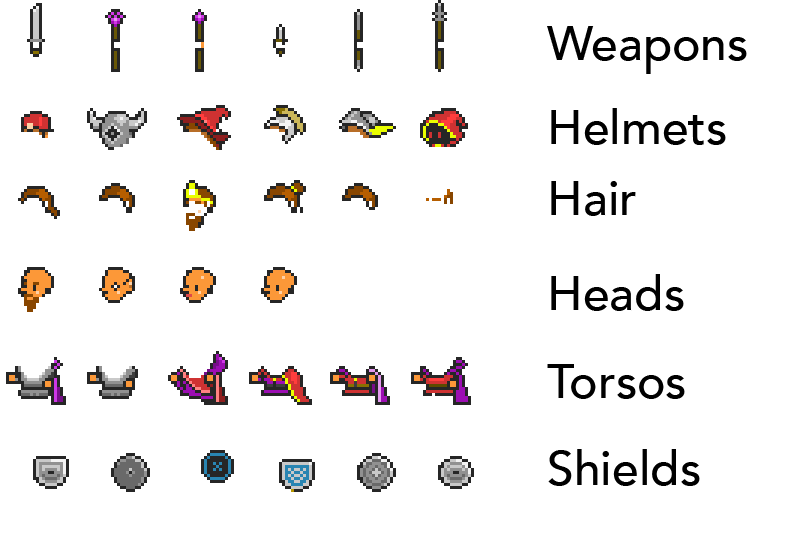
The idea was to get sets of different heads, different weapons, shields, etc., and then combine them randomly.
I wanted to vary the colors so that they corresponded to the original ones that are part of the color palette, but at the same time created more variability. The trick is to find out which colors were used in different sprites, group them together as a linear gradient and choose color gradients for randomly changing the colors of sprite fragments.
In other words, I went through all the files and collected all the colors used for skin tones, all shades of green, blue, etc. for clothes, all the colors of metal and other things, and then put them in a palette file. A set of linear gradients is as follows:
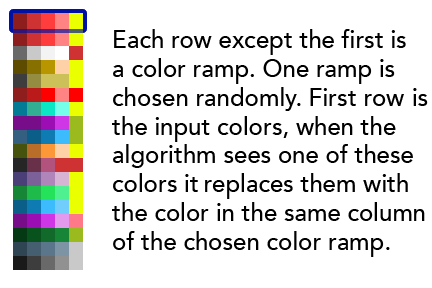
Each of the series except the first is a linear gradient. One gradient is selected randomly. The first row is the input colors. When an algorithm sees one of these colors, it replaces it with a color in the same column from the selected linear gradient.
Then I took the sprites themselves and repainted them to use the “input colors”, which can be replaced with colors from a linear gradient. For example, if I had 3 shirts of blue, green and red, I could make them all red, add linear gradients for blue, green and red to the palette file and force the algorithm to replace red with colors from a randomly selected linear gradient.
Here are sample results:

Materials are materials that are drawn, such as clothing, dressed leather, metal, body, precious stones, etc. I needed different color gradients for different materials, because only certain colors looked natural for specific types of materials. For example, colors that look good for metal are not suitable for skin tones, and vice versa.
In addition, the variations between the colors in the gradient for different materials are different. For example, metal gradients vary greatly from light to dark within the same gradient, and clothes do not differ so much.
The resulting palette contained sets of linear color gradients for the following materials: basic clothing, extra clothing, hair, character skin, metal, wood, dressed leather, precious stones and a dark accent color.
Here is the final palette:

Grouping is getting a set of input data and declaring some of them to be compatible and others to be incompatible. For example, there may be groups of sprites “magician sprites” and “warrior sprites” for different nations painted in different aesthetic styles, groups of good and bad characters, rich and poor, etc. The result is many options for generating sprites according to your aesthetic approach.
In short, I did the following:
That's all! So it turned out thousands of unique and interesting sprites.
It was a very interesting way to spend Saturday, and I want to thank Galaxy Kate (Kate Compton) and Ben Grue (Ben McGraw) for organizing the event, as well as GameNest coworking for the premises.
You can visit my personal blog http://davideyork.com , in which I write about procedural generation and indie game development.
My implementation code for this project can be downloaded on Github . I wrote it in C # and it must be compatible with Unity. Please note that I included the full palette and examples of images in it, but there are no source sprites and images obtained from a set of 16-bit sprites there . These sprites can be purchased fromChristopher Barrett aka Oryx from Oryx Design Lab . They are not divided into parts, I did it myself. This is a huge set of sprites, and it is almost free. Oryx spent a lot of time on him, I recommend evaluating it (no, I didn’t get paid for these words).
Have fun!
On November 19, 2016 in San Francisco, the first annual Gen Jam (procedural generation gamejam) was held. The idea was to create a graphics generator on Saturday, an “object that creates objects,” if you like.
I created a program that draws character sprites in the amazing style of Christopher's “Oryx” Barrett 16-bit sprite set from the Oryx Design Lab. Look at examples of what the program does:
Basic plan
In essence, I took the sprites of the characters, divided them into parts, normalized the color palette and implemented an algorithm for their assembly to create new unique sprites.
So, I broke the original sprites into parts - helmets, hair, bodies, legs, weapons, etc. Then I randomly selected them and put them together. Then I changed colors. Here is the basic idea:
Input data
The original sprites from the set of 16-bit sprites that I used as the basis look like this (the initial set of sprites is HUGE, here are just 5 examples from it): The
sprites were divided into eight groups: body, head, helmet, shield, legs, hair, knives and a bow. Then I used Photoshop to cut out the pieces and put them in separate files:
The idea was to get sets of different heads, different weapons, shields, etc., and then combine them randomly.
Palette
I wanted to vary the colors so that they corresponded to the original ones that are part of the color palette, but at the same time created more variability. The trick is to find out which colors were used in different sprites, group them together as a linear gradient and choose color gradients for randomly changing the colors of sprite fragments.
In other words, I went through all the files and collected all the colors used for skin tones, all shades of green, blue, etc. for clothes, all the colors of metal and other things, and then put them in a palette file. A set of linear gradients is as follows:
Each of the series except the first is a linear gradient. One gradient is selected randomly. The first row is the input colors. When an algorithm sees one of these colors, it replaces it with a color in the same column from the selected linear gradient.
Then I took the sprites themselves and repainted them to use the “input colors”, which can be replaced with colors from a linear gradient. For example, if I had 3 shirts of blue, green and red, I could make them all red, add linear gradients for blue, green and red to the palette file and force the algorithm to replace red with colors from a randomly selected linear gradient.
Here are sample results:
Materials
Materials are materials that are drawn, such as clothing, dressed leather, metal, body, precious stones, etc. I needed different color gradients for different materials, because only certain colors looked natural for specific types of materials. For example, colors that look good for metal are not suitable for skin tones, and vice versa.
In addition, the variations between the colors in the gradient for different materials are different. For example, metal gradients vary greatly from light to dark within the same gradient, and clothes do not differ so much.
The resulting palette contained sets of linear color gradients for the following materials: basic clothing, extra clothing, hair, character skin, metal, wood, dressed leather, precious stones and a dark accent color.
Here is the final palette:
Grouping objects
Grouping is getting a set of input data and declaring some of them to be compatible and others to be incompatible. For example, there may be groups of sprites “magician sprites” and “warrior sprites” for different nations painted in different aesthetic styles, groups of good and bad characters, rich and poor, etc. The result is many options for generating sprites according to your aesthetic approach.
Process as a whole
In short, I did the following:
- Broke a large collection of sprites into parts: weapons, heads, bodies, etc.
- Changed the input colors to the “standard” colors of the materials (5 shades of clothing, 5 shades of metal, 4 shades of leather, etc.).
- I wrote an algorithm for selecting one part from each set and rendering them one on top of the other.
- I wrote an algorithm for changing “standard” colors to one of several sets of colors (called “linear gradients”) from the palette.
That's all! So it turned out thousands of unique and interesting sprites.
Github, conclusion and thanks
It was a very interesting way to spend Saturday, and I want to thank Galaxy Kate (Kate Compton) and Ben Grue (Ben McGraw) for organizing the event, as well as GameNest coworking for the premises.
You can visit my personal blog http://davideyork.com , in which I write about procedural generation and indie game development.
My implementation code for this project can be downloaded on Github . I wrote it in C # and it must be compatible with Unity. Please note that I included the full palette and examples of images in it, but there are no source sprites and images obtained from a set of 16-bit sprites there . These sprites can be purchased fromChristopher Barrett aka Oryx from Oryx Design Lab . They are not divided into parts, I did it myself. This is a huge set of sprites, and it is almost free. Oryx spent a lot of time on him, I recommend evaluating it (no, I didn’t get paid for these words).
Have fun!









