 November 25, 2016 at 11:09
Boring one-line sed calculator
Writing boring manuals, as I used to believe, negatively affects the character’s warehouse and therefore my body sometimes resists discipline as it can. So recently, being impressed by the stories I heard by Zoshchenko, I decided to convey the style, and most importantly, a spirit that is very close to me and which, it seems to me, does not detract from the value of the essence, but acts as a catalyst and guarantees a connoisseur the presence of intelligence. I changed the subject accordingly and that's what I got out of it.
Sed, according to some adherents, is unpredictable, with a muddy, Old Testament syntax, a language with edits in the fields made by Cyril and Methodius personally. I always respect the opinions of my opponents, but I absolutely do not have to separate them, so I decided for myself that sed is what you need to fill up corns quickly and not be a black sheep in discussions when mysterious characters differ from regular literals appear in lines of sed code expressions.
What tools do I have? The first is bash (version 4.3.42). The second is sed (4.2.2). Judging by the versions, if you fantasize a little, we can assume that our horses started in about the same era and go, though not head to head, with a difference of no more than half the body. All this stuff is located in the operating system fedora 24 on my computer.
Refreshed in memory and running through the tips of the tutorial from emulek, I found that sed has a modifier that allows you to embed shell commands and replace the template with the value returned by this command. My first line in this field looked pretty encouraging.
Everything turned out and a solid four was waiting for me at the exit! The " s " (substitution) command looks for a match by the pattern / ([0-9] +) ([- +]) ([0-9] +) / and replaces it with the output of the command / expr ([0-9] +) ([- +]) ([0-9] +) / e . The parameters in this command are defined in the template. The first block in parentheses corresponds to \ 1 second \ 2 and third \ 3 . Let's go ahead and expand the functionality by adding the arithmetic signs " *% / ".
And immediately we get the syntax error in the " expr " command at the output . We begin to analyze and understand that in the expression \ 2 when substituting, the asterisk has a special meaning and sed replaces its value with its own, that is, void. You will have to shield this symbol before the Bashov team takes it into circulation. We write one more command of substitution and we change a template a little.
Four again! A masterpiece asks for the picture "again deuce"! Here we introduced another substitution command. We precede the asterisk in the first template with the backslash icon to deprive the villain of super abilities, and in the replaceable line, do not forget to escape the backslash icon itself. As a result, this part grows to such a terrible look / \\\ * / .
Also in the second pattern, namely in the second parentheses, a backslash is added and in order not to fence the garden to the character class defined by square brackets [- + *% / \] we substitute the quantifier " + ", which gives us a pattern match for a line of two characters " \ * ". It was certainly possible to more accurately determine the pattern, but in the context of this is quite enough.
Bash is good in that almost any thing available in it can be done in several different ways. By the way, this is his apparent confusion. To perform arithmetic operations with integers, a more modern form of notation is provided, and no offense to bearded administrators, I, as the age of the Pepsi generation, will arm myself with the alternative construction " echo $ (()) ", and leave " expr " only in the lines for example. The new design allows us to get rid of part of the code and thoroughly simplify the program. There is no need to shield the sprocket. Since we simplify the code, you can also introduce additional functionality, maintaining the level of complexity at an acceptable level for a beginner.
I sent only one line to the editor and the program stopped working on this. Sed provides for the possibility of conditional and unconditional jumps. Those familiar with assembler will immediately discover the perfect similarity between jumps or label jumps. The principle is the same. And this is already becoming interesting because the work in the editor begins to seem like working
with a real program.
There is an established opinion that html is a markup language, I agree with this. So I think without transitions and some built-in functions, the sed editor language could also be brought into this definition. But there are transitions and functions in the editor, which means we can fully engage in programming its work with text.
The next release of our program with the introduction of transitions takes on the shape of this code.
By launching such a code in the terminal, we can only type in arithmetic expressions with two numbers and press enter . The " again " labels immediately show the beginning and end of the cycle. The conditional jump command " t " with the label " again " will return us to the beginning of the next cycle defined by this label after the colon and the editor will wait for the next line to be entered.
Keep in mind, the output from the program is well-known to all the interrupt signal triggered by pressing a combination of keys the Ctrl + the C .
But let's take a look at the work of conditional branching. The t command is used in conjunction with the s command"(substitution) and according to the result of the latter, a transition is made or not performed. If the first (if there are several) command" s "performs a substitution in the buffer, then the conditional transition is executed.
There is also a" T " command which is executed if the first (if there are several) team " s " failed.
We have examined the program work with the transition of the condition. Stop you might say. And why we are here jump to the condition when it is quite enough to be unconditional jump. Let's replace the command " t " on an unconditional transition " b ". testing .
We enter the data as it should be, but the output does not have any result! Where are we wrong, because by logic everything should work the same way? Let’s go back and analyze the program’s work again. As always, everything turned out to be elementary. We did not take into account one moment, the conditional branch command " t " is triggered and transfers the program execution to the label in case there is a substitution in the command " s ".
Apparently the design with the extension " e " works a little differently. As I dare to assume in our case there is not any substitution, Our line is fully consistent with the template and appears unchanged, in the form of the parameters of the bash utility. And here, most likely, the mystery of substitution is taking place, but alas, our editor believes that the team "“this is no longer relevant, but the extension command“ e ”is involved . And since we know that if the label is missing or the transition condition is not fulfilled, the program will go to the end of the command line, and not to the beginning of the label. the code.
The situation requires explanation. We additionally introduce two more commands and one option that correct the situation. After recording the result of the calculation with the " p " command, we will print the contents of the buffer forcibly, and before returning to the beginning of the program, we clear it with the " d " command . The " -n " option usually works in tandem with the " p " command and suppresses automatic printing of the buffer. I feel that I have matured after such misadventures for several years and if this goes on then I will quickly grow old and remain an old maid. I didn’t even imagine that it would be so boring!
Our program works again, but it is still largely redundant. For example, labels that I introduced to a greater extent to demonstrate the capabilities of sed and which unexpectedly added detective pepper, are superfluous. They would make sense if we had several commands in the line separated by a semicolon and a label would allow us to bypass one of the commands or command blocks. We'll have to roll back the mastered bells and whistles with such difficulty. In fact, the editor is already waiting for the next line to be entered and begins to enter it from the very beginning, where we had the label. Without any damage, I can rewrite the line like this:
Or even like this:
This main cycle, which we modeled earlier in manual mode, is already built into the editor program and we will continue to use it in the future. Let's get back to the functionality. If you recall the work of this calculator, then we find an additional buffer for storing intermediate results. But what about sed? It turns out that the sed also has an additional buffer and several commands for working with it. All we did before this was working with the main buffer into which the line is loaded and actions are performed with it. We use an additional buffer to store the result of the calculations, as well as add functionality when subsequent operations with the intermediate result of the calculation could be carried out simply by typing in the line the sign of the arithmetic action and the second operand. And also provide work with negative numbers. Also, we will not cut back on the functionality of the bash itself and add a little entropy to the algorithm of the “Not boring” calculator, we will build the raising of the number to a power. Let me remind you that in the bash, exponentiation looks like NUMBER** DEGREE. The sign is clear, a double asterisk is noted. At the same time, we will immediately carry out all the optimization available to my understanding.
Although at first I poked my nose like a blind kitten looking for development for a code, in conclusion it nevertheless acquired the following form.
I considered it unnecessarily wasteful to define a full-fledged template, which essentially does nothing but provide an opportunity to enter a shell command with this design and reduced the template to a minimum of /.*/ , which essentially matches any line. I found this acceptable and even imagined that I was insured for a million bucks from typing errors. If you are not so confident in yourself as I can insert here such a pattern s / ^ -? [0-9] + [- +% / *] \ *? -? [0-9] + $ /. I advise everyone else to blondes that look like me not to bother, because even with an input error, the extra buffer is updated with the loss of intermediate results and the cycle is called very simply - “start over”. Restarting the program is not necessary at all, just start entering the correct data.
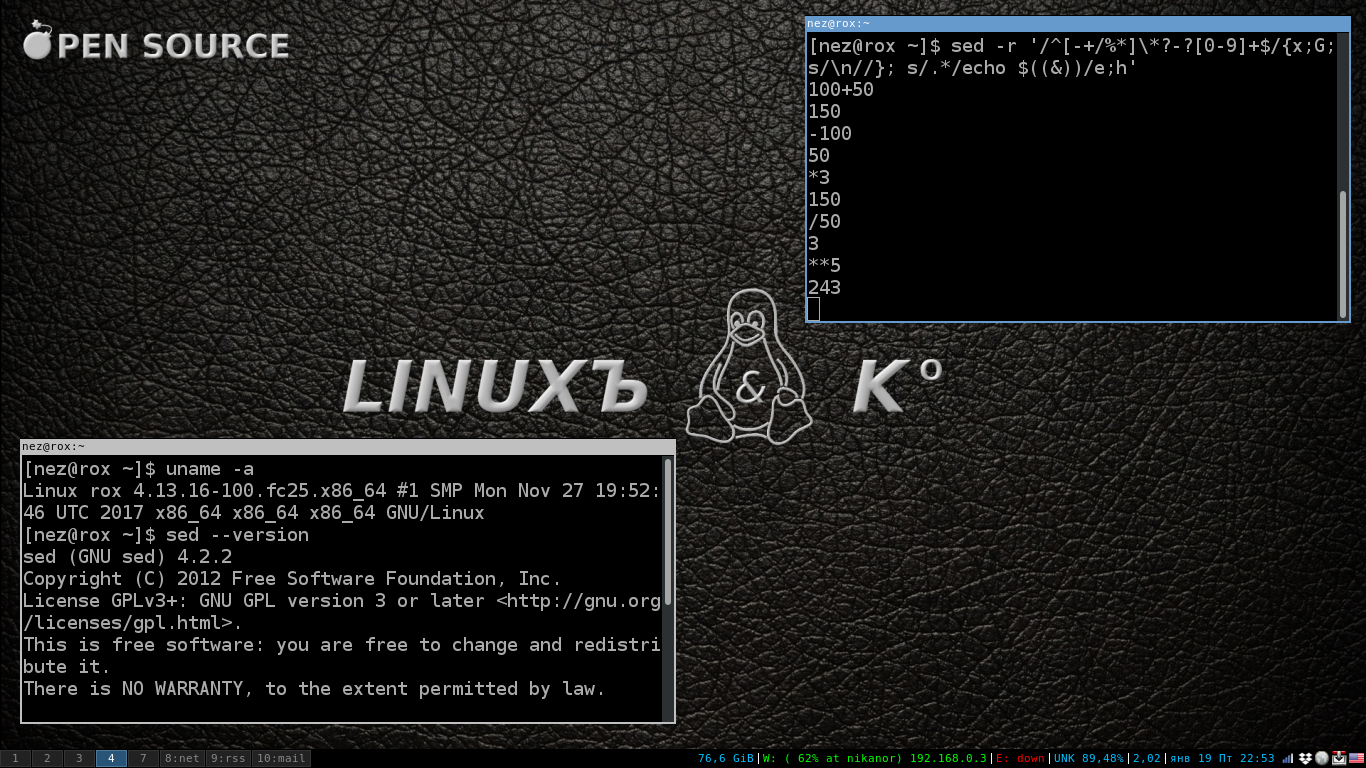
Well, let's take a look at what we have piled in the last line of code and start with the algorithm of the program. After starting the editor, it is in standby mode for input. The first line we enter consists of two operands and an arithmetic sign in the middle. At the very beginning of the program code there is a template that “does not notice” all operations consisting of two operands, which means this filter will skip our first line and the action will go immediately to the already familiar command calling the shell utility to get the final result.
In this part of the program, I not only simplified the template, but also simplified the very formula for writing operands. Now we insert the operands not individually, but as one line, one data block denoted as &. Ampersand, the synonym for this character denoting the entire string is \ 0 . In this block of code ending with a semicolon, we change the values of the main buffer to the calculated value by the shell command. After the semicolon, we have the command " h " which copies everything that is in the main buffer into an additional buffer. After that, the program displays the contents of the main buffer and goes to the beginning of the loop with the expectation of entering a new line.
Now we know that we have the first operand in the buffer and enter only the sign of the arithmetic action and the second operand. The first s command detects that there is a line in the main buffer matching the pattern / ^ [- + /% *] \ *? -? [0-9] + $ /after which the action is passed to the block of commands enclosed in braces. The second command in the block is " G ", adds the line break character " \ n " to the end of the main buffer and after it copies the line from the additional buffer. As a result, we have two lines at once in the main buffer, separated by a line feed character. The first is just that the entered operation sign and the second operand.
Immediately noteworthy is the incorrect arrangement of the operands. To correct this small misunderstanding before adding a line from the additional buffer to the main one, we will use the knee in the form of the " x " command , which will swap the main buffer with the additional one and then after the " G " command is executed"everything will be in the correct order. As a result, after executing the two" x; G " commands , we will have a similar line 1operand \ n SIGN 2operand in the main buffer. The line feed in the middle of the expression turns out to be superfluous. Delete it with the next substitution command s / \ n // . Well, further on, the control goes to the “counting machine.”
Those who were previously not familiar with the sed stream editor will be able to independently flip through the textbook from emulek and see what the buffers in sed are actually called, and they will be able to detect still a bunch of utilities.
For dessert, I’ll inform all homeSEDs that there is such a Super-sed utility in nature. In the repository, debian-testing is called the ssed package. This is a stream editor capable of understanding Perl regular expressions. Fedora 24 does not have this utility in the rpmfusion repository. But this is a completely different boring story.
Sed, according to some adherents, is unpredictable, with a muddy, Old Testament syntax, a language with edits in the fields made by Cyril and Methodius personally. I always respect the opinions of my opponents, but I absolutely do not have to separate them, so I decided for myself that sed is what you need to fill up corns quickly and not be a black sheep in discussions when mysterious characters differ from regular literals appear in lines of sed code expressions.
What tools do I have? The first is bash (version 4.3.42). The second is sed (4.2.2). Judging by the versions, if you fantasize a little, we can assume that our horses started in about the same era and go, though not head to head, with a difference of no more than half the body. All this stuff is located in the operating system fedora 24 on my computer.
Refreshed in memory and running through the tips of the tutorial from emulek, I found that sed has a modifier that allows you to embed shell commands and replace the template with the value returned by this command. My first line in this field looked pretty encouraging.
sed -r 's/([0-9]+)([-+])([0-9]+)/expr \1 \2 \3/e' <<<"2+2"Everything turned out and a solid four was waiting for me at the exit! The " s " (substitution) command looks for a match by the pattern / ([0-9] +) ([- +]) ([0-9] +) / and replaces it with the output of the command / expr ([0-9] +) ([- +]) ([0-9] +) / e . The parameters in this command are defined in the template. The first block in parentheses corresponds to \ 1 second \ 2 and third \ 3 . Let's go ahead and expand the functionality by adding the arithmetic signs " *% / ".
sed -r 's/([0-9]+)([-+*%/])([0-9]+)/expr \1 \2 \3/e' <<<"2*2"And immediately we get the syntax error in the " expr " command at the output . We begin to analyze and understand that in the expression \ 2 when substituting, the asterisk has a special meaning and sed replaces its value with its own, that is, void. You will have to shield this symbol before the Bashov team takes it into circulation. We write one more command of substitution and we change a template a little.
sed -r 's/\*/\\\*/; s/([0-9]+)([-+*%/\]+)([0-9]+)/expr \1 \2 \3/e' <<<"2*2"Four again! A masterpiece asks for the picture "again deuce"! Here we introduced another substitution command. We precede the asterisk in the first template with the backslash icon to deprive the villain of super abilities, and in the replaceable line, do not forget to escape the backslash icon itself. As a result, this part grows to such a terrible look / \\\ * / .
Also in the second pattern, namely in the second parentheses, a backslash is added and in order not to fence the garden to the character class defined by square brackets [- + *% / \] we substitute the quantifier " + ", which gives us a pattern match for a line of two characters " \ * ". It was certainly possible to more accurately determine the pattern, but in the context of this is quite enough.
Bash is good in that almost any thing available in it can be done in several different ways. By the way, this is his apparent confusion. To perform arithmetic operations with integers, a more modern form of notation is provided, and no offense to bearded administrators, I, as the age of the Pepsi generation, will arm myself with the alternative construction " echo $ (()) ", and leave " expr " only in the lines for example. The new design allows us to get rid of part of the code and thoroughly simplify the program. There is no need to shield the sprocket. Since we simplify the code, you can also introduce additional functionality, maintaining the level of complexity at an acceptable level for a beginner.
I sent only one line to the editor and the program stopped working on this. Sed provides for the possibility of conditional and unconditional jumps. Those familiar with assembler will immediately discover the perfect similarity between jumps or label jumps. The principle is the same. And this is already becoming interesting because the work in the editor begins to seem like working
with a real program.
There is an established opinion that html is a markup language, I agree with this. So I think without transitions and some built-in functions, the sed editor language could also be brought into this definition. But there are transitions and functions in the editor, which means we can fully engage in programming its work with text.
The next release of our program with the introduction of transitions takes on the shape of this code.
sed -r ':again s/([0-9]+)([-+%/*])([0-9]+)/echo $((\1 \2 \3))/e; t again'By launching such a code in the terminal, we can only type in arithmetic expressions with two numbers and press enter . The " again " labels immediately show the beginning and end of the cycle. The conditional jump command " t " with the label " again " will return us to the beginning of the next cycle defined by this label after the colon and the editor will wait for the next line to be entered.
Keep in mind, the output from the program is well-known to all the interrupt signal triggered by pressing a combination of keys the Ctrl + the C .
But let's take a look at the work of conditional branching. The t command is used in conjunction with the s command"(substitution) and according to the result of the latter, a transition is made or not performed. If the first (if there are several) command" s "performs a substitution in the buffer, then the conditional transition is executed.
There is also a" T " command which is executed if the first (if there are several) team " s " failed.
We have examined the program work with the transition of the condition. Stop you might say. And why we are here jump to the condition when it is quite enough to be unconditional jump. Let's replace the command " t " on an unconditional transition " b ". testing .
sed -r ':again s/([0-9]+)([-+%/*])([0-9]+)/echo $((\1 \2 \3))/e; b again'We enter the data as it should be, but the output does not have any result! Where are we wrong, because by logic everything should work the same way? Let’s go back and analyze the program’s work again. As always, everything turned out to be elementary. We did not take into account one moment, the conditional branch command " t " is triggered and transfers the program execution to the label in case there is a substitution in the command " s ".
Apparently the design with the extension " e " works a little differently. As I dare to assume in our case there is not any substitution, Our line is fully consistent with the template and appears unchanged, in the form of the parameters of the bash utility. And here, most likely, the mystery of substitution is taking place, but alas, our editor believes that the team "“this is no longer relevant, but the extension command“ e ”is involved . And since we know that if the label is missing or the transition condition is not fulfilled, the program will go to the end of the command line, and not to the beginning of the label. the code.
sed -rn ':again s/([0-9]+)([-+%/*])([0-9]+)/echo $((\1 \2 \3))/e;p;d; b again'The situation requires explanation. We additionally introduce two more commands and one option that correct the situation. After recording the result of the calculation with the " p " command, we will print the contents of the buffer forcibly, and before returning to the beginning of the program, we clear it with the " d " command . The " -n " option usually works in tandem with the " p " command and suppresses automatic printing of the buffer. I feel that I have matured after such misadventures for several years and if this goes on then I will quickly grow old and remain an old maid. I didn’t even imagine that it would be so boring!
Our program works again, but it is still largely redundant. For example, labels that I introduced to a greater extent to demonstrate the capabilities of sed and which unexpectedly added detective pepper, are superfluous. They would make sense if we had several commands in the line separated by a semicolon and a label would allow us to bypass one of the commands or command blocks. We'll have to roll back the mastered bells and whistles with such difficulty. In fact, the editor is already waiting for the next line to be entered and begins to enter it from the very beginning, where we had the label. Without any damage, I can rewrite the line like this:
sed -r 's/([0-9]+)([-+%/*])([0-9]+)/echo $((\1 \2 \3))/e' -Or even like this:
sed -r 's/([0-9]+)([-+%/*])([0-9]+)/echo $((\1 \2 \3))/e'This main cycle, which we modeled earlier in manual mode, is already built into the editor program and we will continue to use it in the future. Let's get back to the functionality. If you recall the work of this calculator, then we find an additional buffer for storing intermediate results. But what about sed? It turns out that the sed also has an additional buffer and several commands for working with it. All we did before this was working with the main buffer into which the line is loaded and actions are performed with it. We use an additional buffer to store the result of the calculations, as well as add functionality when subsequent operations with the intermediate result of the calculation could be carried out simply by typing in the line the sign of the arithmetic action and the second operand. And also provide work with negative numbers. Also, we will not cut back on the functionality of the bash itself and add a little entropy to the algorithm of the “Not boring” calculator, we will build the raising of the number to a power. Let me remind you that in the bash, exponentiation looks like NUMBER** DEGREE. The sign is clear, a double asterisk is noted. At the same time, we will immediately carry out all the optimization available to my understanding.
Although at first I poked my nose like a blind kitten looking for development for a code, in conclusion it nevertheless acquired the following form.
sed -r '/^[-+/%*]\*?-?[0-9]+$/{x;G;s/\n//}; s/.*/echo $((&))/e;h'I considered it unnecessarily wasteful to define a full-fledged template, which essentially does nothing but provide an opportunity to enter a shell command with this design and reduced the template to a minimum of /.*/ , which essentially matches any line. I found this acceptable and even imagined that I was insured for a million bucks from typing errors. If you are not so confident in yourself as I can insert here such a pattern s / ^ -? [0-9] + [- +% / *] \ *? -? [0-9] + $ /. I advise everyone else to blondes that look like me not to bother, because even with an input error, the extra buffer is updated with the loss of intermediate results and the cycle is called very simply - “start over”. Restarting the program is not necessary at all, just start entering the correct data.
Well, let's take a look at what we have piled in the last line of code and start with the algorithm of the program. After starting the editor, it is in standby mode for input. The first line we enter consists of two operands and an arithmetic sign in the middle. At the very beginning of the program code there is a template that “does not notice” all operations consisting of two operands, which means this filter will skip our first line and the action will go immediately to the already familiar command calling the shell utility to get the final result.
In this part of the program, I not only simplified the template, but also simplified the very formula for writing operands. Now we insert the operands not individually, but as one line, one data block denoted as &. Ampersand, the synonym for this character denoting the entire string is \ 0 . In this block of code ending with a semicolon, we change the values of the main buffer to the calculated value by the shell command. After the semicolon, we have the command " h " which copies everything that is in the main buffer into an additional buffer. After that, the program displays the contents of the main buffer and goes to the beginning of the loop with the expectation of entering a new line.
Now we know that we have the first operand in the buffer and enter only the sign of the arithmetic action and the second operand. The first s command detects that there is a line in the main buffer matching the pattern / ^ [- + /% *] \ *? -? [0-9] + $ /after which the action is passed to the block of commands enclosed in braces. The second command in the block is " G ", adds the line break character " \ n " to the end of the main buffer and after it copies the line from the additional buffer. As a result, we have two lines at once in the main buffer, separated by a line feed character. The first is just that the entered operation sign and the second operand.
Immediately noteworthy is the incorrect arrangement of the operands. To correct this small misunderstanding before adding a line from the additional buffer to the main one, we will use the knee in the form of the " x " command , which will swap the main buffer with the additional one and then after the " G " command is executed"everything will be in the correct order. As a result, after executing the two" x; G " commands , we will have a similar line 1operand \ n SIGN 2operand in the main buffer. The line feed in the middle of the expression turns out to be superfluous. Delete it with the next substitution command s / \ n // . Well, further on, the control goes to the “counting machine.”
Those who were previously not familiar with the sed stream editor will be able to independently flip through the textbook from emulek and see what the buffers in sed are actually called, and they will be able to detect still a bunch of utilities.
For dessert, I’ll inform all homeSEDs that there is such a Super-sed utility in nature. In the repository, debian-testing is called the ssed package. This is a stream editor capable of understanding Perl regular expressions. Fedora 24 does not have this utility in the rpmfusion repository. But this is a completely different boring story.









