Creating and testing Firewall on Linux, Part 1.2. Simple traffic interception with Netfilter
The content of the first part: 1.1 - Creation of a virtual laboratory (so that we have a place to work, I will show how to create a virtual network on your computer. The network will consist of 3 Linux ubuntu machines). 1.2 - Writing a simple module in Linux. Introduction to Netfilter and intercepting traffic with it. Putting it all together, testing. 1.3 - Writing a simple char device. Adding a virtual file system - sysfs. Writing user interface. Putting it all together, testing. The content of the second part:
A very brief introduction to Operating Systems
For those who are not familiar with the basics of operating systems in general and linux systems in particular, we VERY briefly need basic concepts so that we can move on. On Linux, like many other operating systems, there are two address spaces - kernel space and user space . Kernel space- the operating system works here, it mainly deals with distributing computer resources between programs (for example, which program is currently running on the processor (scheduling), which program should send output from the keyboard, what to do with packets from the network card, IO operations, and many all else). The OS is in very intimate relationships with the hardware (mouse, monitor, printer ...). Since her work is very important, a separate part in memory is allocated for her that is not associated with user space- the place where most user programs work, such as: editors, calculators, browsers, etc. On Linux, there are several ways to change or add new features to the OS. One of them is to change the kernel source code and compile it again. But this method is long and difficult, especially when you need to expand the functionality minimally or dynamically. Therefore, there is another way - modules. Modules - roughly speaking - this is a program that can be dynamically and quickly added to kernel space, after which the module will become part of the operating system and gain more functionality and access to resources than regular programs.
There are many articles on this subject, for example this one is very good. I hope that I was able to convey my intuition.
To begin with, we will very briefly consider an example of a simple module from here - then we will consider what Netfilter is and are compatible all together in one source code. Below, there will be pictures, at the end of the article, links to all source texts. So:
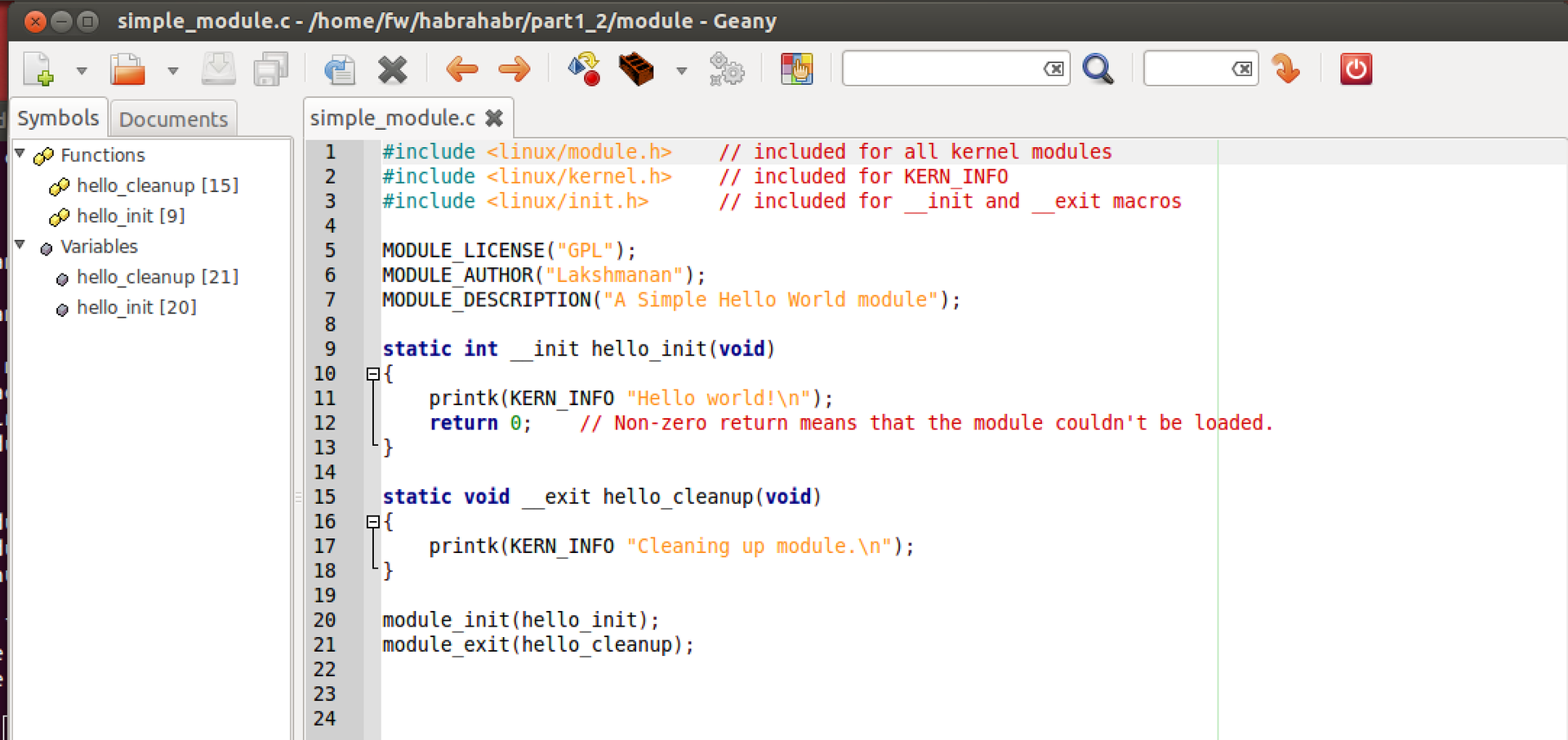
This is the source code of a very simple module. A few things:
1 - I work in the Geany editor, since Eclpise-like in this case will not work. I compile through the terminal, but it seems possible through Geany.
2 - there is no printf in kernel, but there is its counterpart printk, which works in the same way. By the way, kernel has analogues of all necessary libraries and functions (and there are no standard libraries like stdlib).
3 - printk, does not write to the console, but writes to a special file, the contents of which can be read using the dmesg command. With us, this will be the main way to debug the program (there are other ways to see how printk works, for example, if you go to the console without the X interface Ctrl + Shift + F1). It will also be useful dmesg –c, to clear everything that has accumulated in this file.
4 - MODULE_LICENSE, MODULE_AUTHOR, MODULE_DESCRIPTION - these are macros that “give” linux information about the module, which can then be obtained using special commands (see the link for more details).
5 - The kernel uses the C89 syntax to write when in C. For example (and most importantly) - unlike the usual C99, all variables must be declared at the very beginning of functions and cannot be declared in its other part. If you DO NOT abide by this rule, the code will compile, but with warnings (which is bad and not for us).
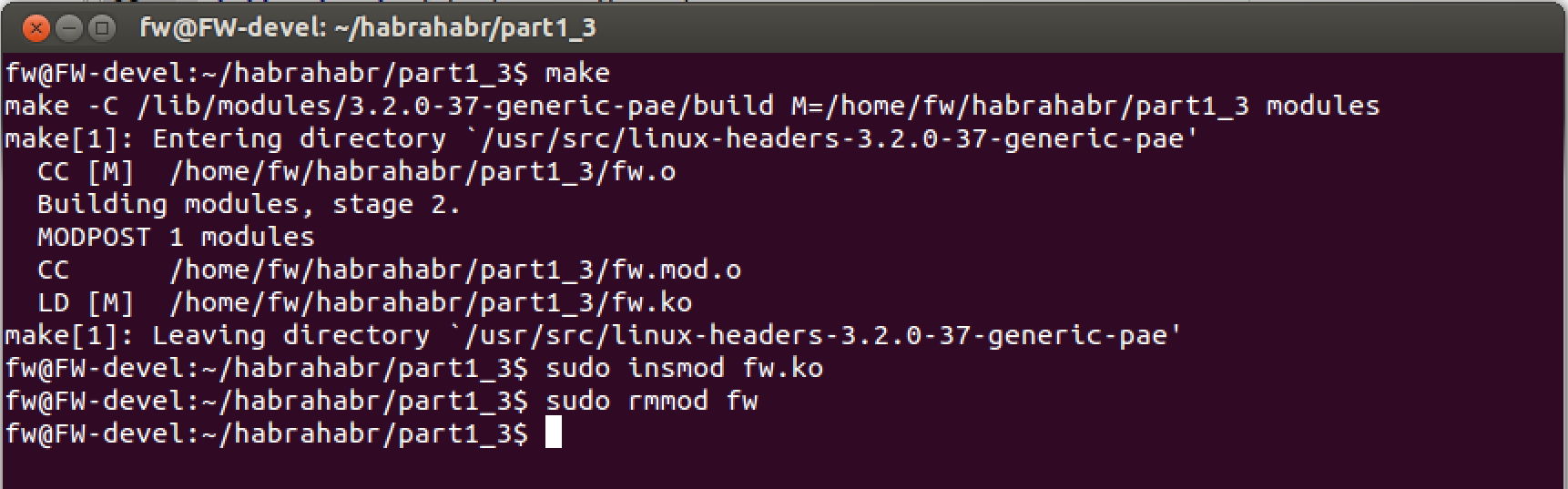
Note (below in the picture) the Makefile. It differs from regular programs in user space. This is how the whole process looks:
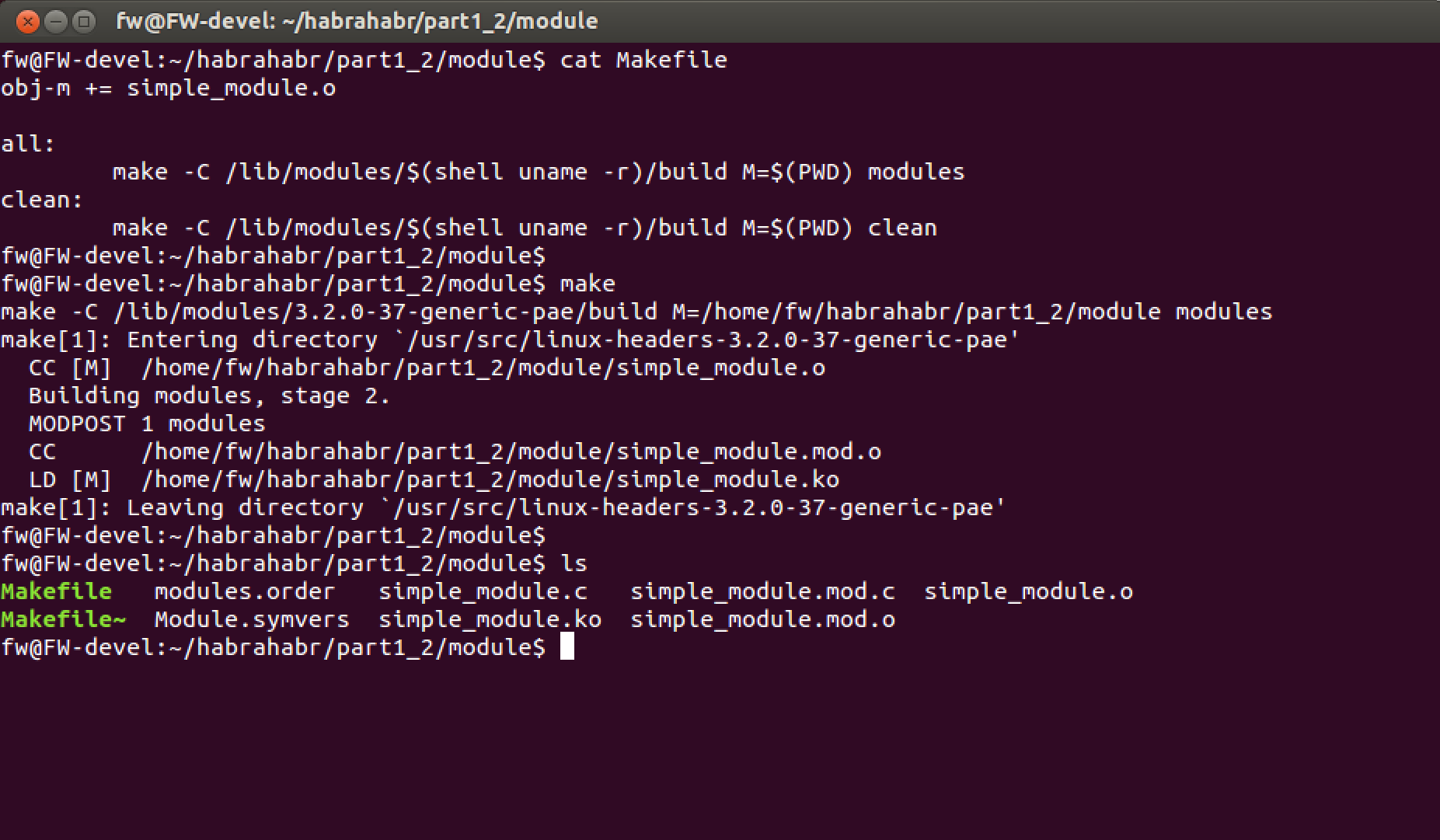
The module is loaded with the special command “insmod ./module_name.ko” and then the module_init macro is run . The module is deleted from the computer’s memory using the command “rmmod module_name” .
We check. Just load the module, and then unload and look at dmesg
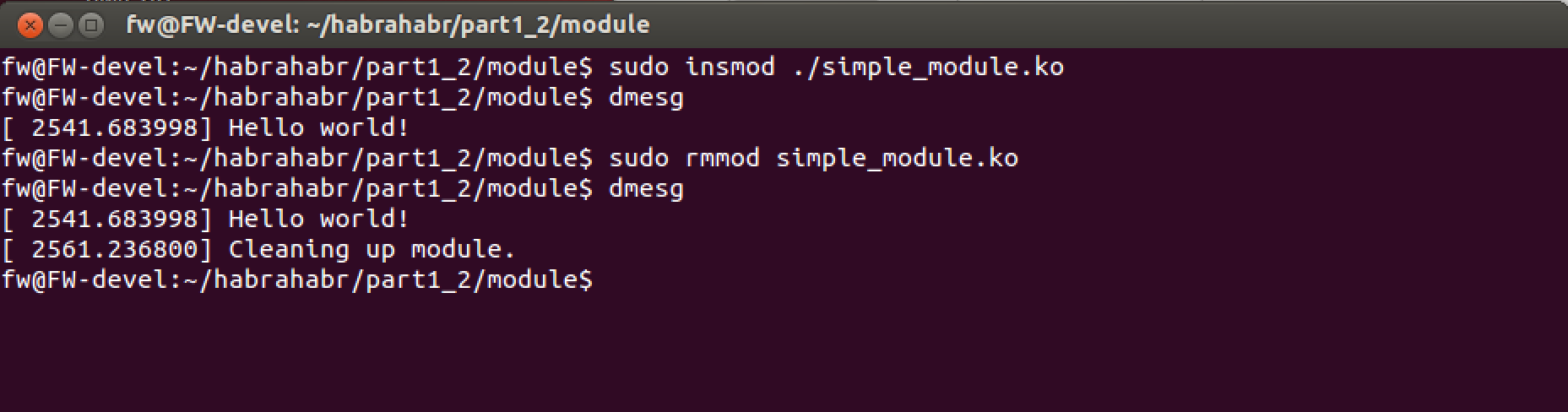
Done. This completes the introduction to the modules.
Netfilter is a framework built into the linux kernel that allows you to perform various network operations. We will be interested in intercepting incoming and outgoing traffic.
By the way, the most frequently associated program with this framework is iptables , which allows you to dynamically set traffic filtering rules (that is, it is nothing more than a simple firewall) built into Linux. In the Russian version of Wikipedia, almost did not distinguish between the two terms, which I think is not correct, so I give the link to the English version. Wikipedia - Netfilter
and the official website. It has all the necessary information. www.netfilter.org
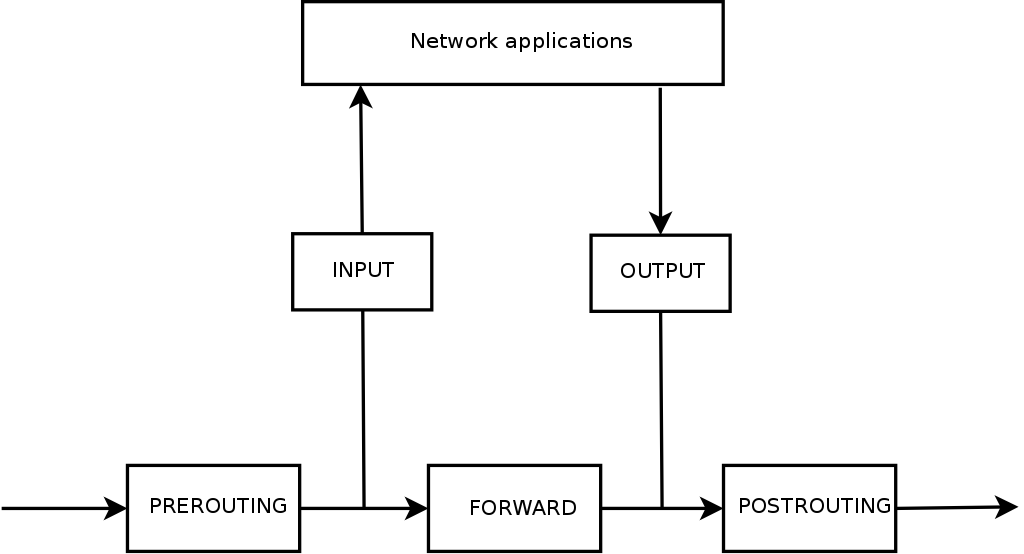
The architecture of hooking traffic in Netfilter is as follows:
Photo
The diagram shows the stages that packets go through after they hit the phy network card. Let's take a closer look:
Mathematically:
Input data = Prerouting = Forward + Input
Output data = Postrouting = Output + Forward
Of course, usually input! = Output (if you do not understand for some reason, you should re-read the topic again or look additionally on the Internet).
For example, after we enter www.site.com in the browser line, the package will go through two “stops” before it gets to the network - Output and Postrouting .
When site.com answers us, the package will go through two “stations” before getting to the browser - Input data and Prerouting .
Other packets, for example, from host1 -> host2, will go through Input, Forward, Output.
At each “stop” we can make a decision about the “caught packet” - whether we want to skip it further or not (or something else).
For fun, we will come up with a rule - all packets that are designed for the FW_dev computer (the one where we will install the firewall), or which FW_dev sends on its behalf to other computers - we will allow (accept). All other traffic, we will close (deny). The ultimate goal is to calculate how many packets have passed, how many we have banned and transfer data to the user (in user space).
To do this, at the beginning of the module, we define several global variables.
Now set the hook functions to the desired traffic interception points. To start, we will write the functions themselves. All functions must have a predefined type:
Feature Code:
The next step is to register them in the system, so it is logical to do this when loading the module. It looks like this:
Here it is worth paying attention to the hooknum field , to which we assign a value that determines the location of packet capture and corresponds to the diagram above. The last step will be to remove them (deregistration) before removing the module from the OS.
It remains to verify the operation, as well as add a user interface so that any user can read data from our module. Check first.
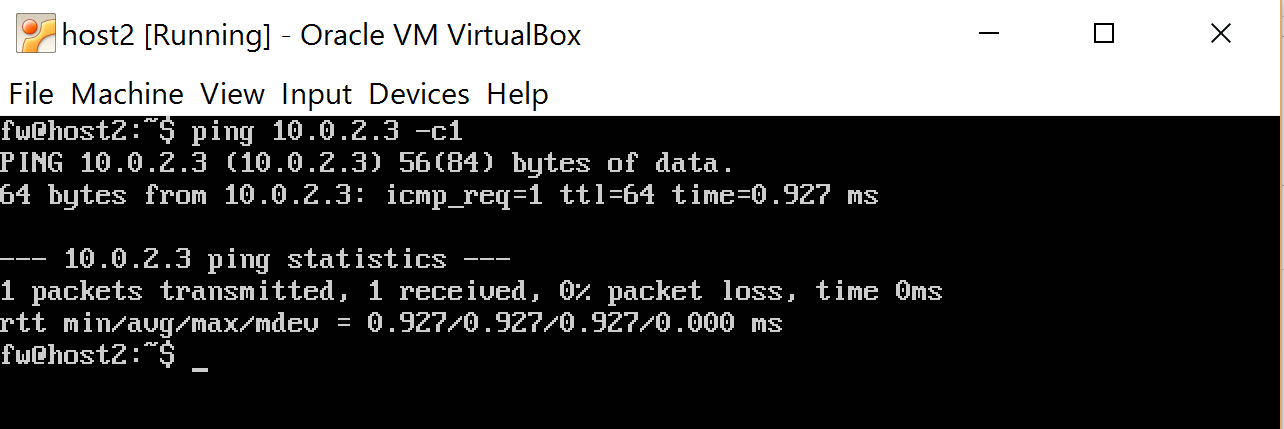
Helmet with host2 one ping message to 10.0.2.3 (we expect that the module will miss him because, 10.0.2.3 - internal interface if the message was for. Host1 - 10.0.1.1 , then we would not have missed)
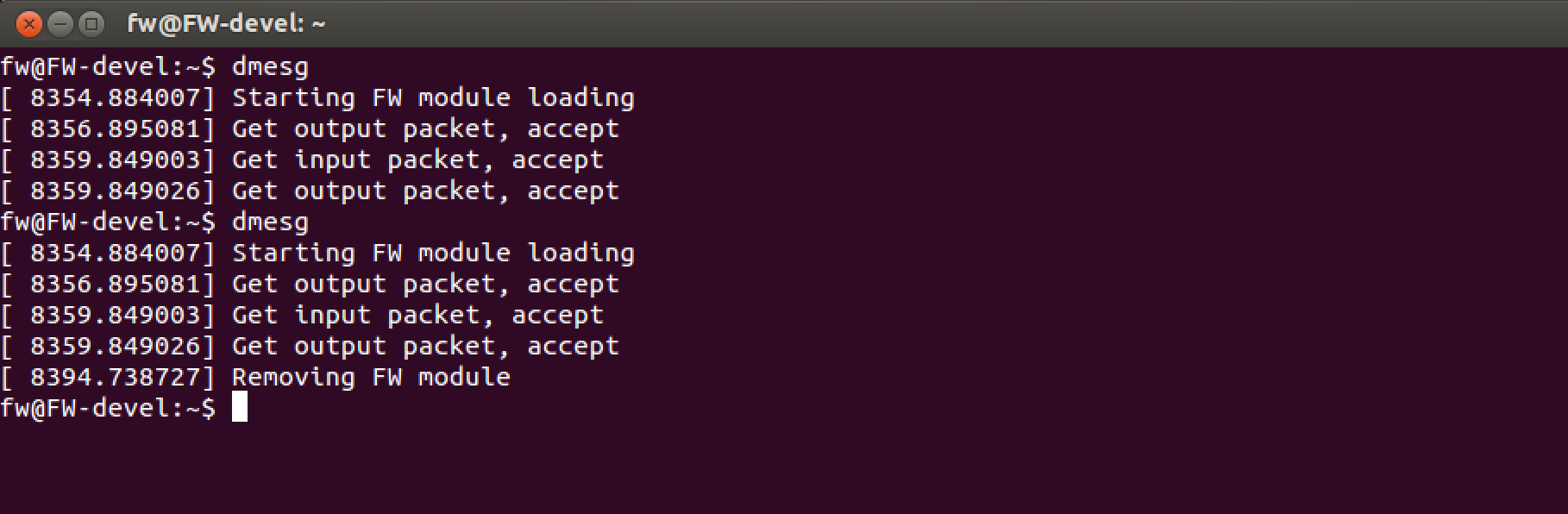
look at the "logs", unload the module
At this stage, you can play around with the system and make sure that traffic from host1 -> host2 does not pass.
That’s all for now, a list of links:
» The Linux Kernel Module Programming Guide
» How to Write Your Own Linux Kernel Module with a Simple Example
» https://en.wikipedia.org/wiki/Netfilter
www.netfilter.org
» Firewall or Packet Filtering - here I took a picture :)
Hidden text
2.1 - Introduction to the second part. We look at the network and protocols. Wireshark
2.2 - Firewall Tables. Transport Layer Structures TCP, UDP. Extend Firewall.
2.3 - Extend functionality. We process data in user space. libnetfilter_queue.
2.4 - (* Optional) We study the real Buffer Overflow attack and prevent it with the help of our Firewall.
2.2 - Firewall Tables. Transport Layer Structures TCP, UDP. Extend Firewall.
2.3 - Extend functionality. We process data in user space. libnetfilter_queue.
2.4 - (* Optional) We study the real Buffer Overflow attack and prevent it with the help of our Firewall.
A very brief introduction to Operating Systems
For those who are not familiar with the basics of operating systems in general and linux systems in particular, we VERY briefly need basic concepts so that we can move on. On Linux, like many other operating systems, there are two address spaces - kernel space and user space . Kernel space- the operating system works here, it mainly deals with distributing computer resources between programs (for example, which program is currently running on the processor (scheduling), which program should send output from the keyboard, what to do with packets from the network card, IO operations, and many all else). The OS is in very intimate relationships with the hardware (mouse, monitor, printer ...). Since her work is very important, a separate part in memory is allocated for her that is not associated with user space- the place where most user programs work, such as: editors, calculators, browsers, etc. On Linux, there are several ways to change or add new features to the OS. One of them is to change the kernel source code and compile it again. But this method is long and difficult, especially when you need to expand the functionality minimally or dynamically. Therefore, there is another way - modules. Modules - roughly speaking - this is a program that can be dynamically and quickly added to kernel space, after which the module will become part of the operating system and gain more functionality and access to resources than regular programs.
There are many articles on this subject, for example this one is very good. I hope that I was able to convey my intuition.
Writing a simple module in Linux. Practice
To begin with, we will very briefly consider an example of a simple module from here - then we will consider what Netfilter is and are compatible all together in one source code. Below, there will be pictures, at the end of the article, links to all source texts. So:
This is the source code of a very simple module. A few things:
1 - I work in the Geany editor, since Eclpise-like in this case will not work. I compile through the terminal, but it seems possible through Geany.
2 - there is no printf in kernel, but there is its counterpart printk, which works in the same way. By the way, kernel has analogues of all necessary libraries and functions (and there are no standard libraries like stdlib).
3 - printk, does not write to the console, but writes to a special file, the contents of which can be read using the dmesg command. With us, this will be the main way to debug the program (there are other ways to see how printk works, for example, if you go to the console without the X interface Ctrl + Shift + F1). It will also be useful dmesg –c, to clear everything that has accumulated in this file.
4 - MODULE_LICENSE, MODULE_AUTHOR, MODULE_DESCRIPTION - these are macros that “give” linux information about the module, which can then be obtained using special commands (see the link for more details).
5 - The kernel uses the C89 syntax to write when in C. For example (and most importantly) - unlike the usual C99, all variables must be declared at the very beginning of functions and cannot be declared in its other part. If you DO NOT abide by this rule, the code will compile, but with warnings (which is bad and not for us).
Module compilation
Note (below in the picture) the Makefile. It differs from regular programs in user space. This is how the whole process looks:
The module is loaded with the special command “insmod ./module_name.ko” and then the module_init macro is run . The module is deleted from the computer’s memory using the command “rmmod module_name” .
We check. Just load the module, and then unload and look at dmesg
Done. This completes the introduction to the modules.
Introduction to Netfilter. Theory
Netfilter is a framework built into the linux kernel that allows you to perform various network operations. We will be interested in intercepting incoming and outgoing traffic.
By the way, the most frequently associated program with this framework is iptables , which allows you to dynamically set traffic filtering rules (that is, it is nothing more than a simple firewall) built into Linux. In the Russian version of Wikipedia, almost did not distinguish between the two terms, which I think is not correct, so I give the link to the English version. Wikipedia - Netfilter
and the official website. It has all the necessary information. www.netfilter.org
Architecture for hooking traffic. Theory
The architecture of hooking traffic in Netfilter is as follows:
Photo
The diagram shows the stages that packets go through after they hit the phy network card. Let's take a closer look:
Prerouting - all packets that came to the device’s network card from the outside (for example, someone from the network, is trying to send us mail, or are we on the route of the packet and must pass it on) get here.
Forward - if the received packet is not intended for a given IP address, the operating system will forward it further (remember forward enable from the previous part?) Or throw it out if it considers it unnecessary.
Input - here all packages that are intended for any application will get here. For example, it may be packages for the browser, after requesting a page.
Output- here all the packages appear that the computer applications send to the network (that is, not the ones we do forwarding with). For example, the very same browser request to get a page from the Internet. Or ping.
Postrouting - combines all outgoing packets.
Mathematically:
Input data = Prerouting = Forward + Input
Output data = Postrouting = Output + Forward
Of course, usually input! = Output (if you do not understand for some reason, you should re-read the topic again or look additionally on the Internet).
For example, after we enter www.site.com in the browser line, the package will go through two “stops” before it gets to the network - Output and Postrouting .
When site.com answers us, the package will go through two “stations” before getting to the browser - Input data and Prerouting .
Other packets, for example, from host1 -> host2, will go through Input, Forward, Output.
At each “stop” we can make a decision about the “caught packet” - whether we want to skip it further or not (or something else).
Architecture for hooking traffic. Practice
For fun, we will come up with a rule - all packets that are designed for the FW_dev computer (the one where we will install the firewall), or which FW_dev sends on its behalf to other computers - we will allow (accept). All other traffic, we will close (deny). The ultimate goal is to calculate how many packets have passed, how many we have banned and transfer data to the user (in user space).
To do this, at the beginning of the module, we define several global variables.
static unsigned int accepted_num = 0;
static unsigned int dropped_num = 0;
Now set the hook functions to the desired traffic interception points. To start, we will write the functions themselves. All functions must have a predefined type:
unsigned int hook_func(unsigned int hooknum, struct sk_buff *skb,
		const struct net_device *in, const struct net_device *out,
		int (*okfn)(struct sk_buff *)) {}
Feature Code:
// hook out packets, accept packet
unsigned int hook_func_out(unsigned int hooknum, struct sk_buff *skb,
		const struct net_device *in, const struct net_device *out,
		int (*okfn)(struct sk_buff *)) {
	accepted_num++;
	return NF_ACCEPT;
}
// hook in packets, accept packet
unsigned int hook_func_in(unsigned int hooknum, struct sk_buff *skb,
		const struct net_device *in, const struct net_device *out,
		int (*okfn)(struct sk_buff *)) {
	accepted_num ++;
	return NF_ACCEPT;
}
// hook forward packets, drop packet
unsigned int hook_func_forward(unsigned int hooknum, struct sk_buff *skb,
		const struct net_device *in, const struct net_device *out,
		int (*okfn)(struct sk_buff *)) {
	dropped_num++;
	return NF_DROP;
}
The next step is to register them in the system, so it is logical to do this when loading the module. It looks like this:
// hook functions structs for registration usage
static struct nf_hook_ops nfho_forward;
static struct nf_hook_ops nfho_out;
static struct nf_hook_ops nfho_in;
static int __init fw_module_init(void)
{
.....
// netfilter functions
printk("initialize kernel module\n");
	nfho_in.hook = hook_func_in;
	nfho_in.hooknum = NF_INET_LOCAL_IN;
	nfho_in.pf = PF_INET;
	nfho_in.priority = NF_IP_PRI_FIRST;
	nf_register_hook(&nfho_in); // Register the hook
	nfho_out.hook = hook_func_out;
	nfho_out.hooknum = NF_INET_LOCAL_OUT;
	nfho_out.pf = PF_INET;
	nfho_out.priority = NF_IP_PRI_FIRST;
	nf_register_hook(&nfho_out); // Register the hook
	nfho_forward.hook = hook_func_forward;
	nfho_forward.hooknum = NF_INET_FORWARD;
	nfho_forward.pf = PF_INET;
	nfho_forward.priority = NF_IP_PRI_FIRST;
	nf_register_hook(&nfho_forward); // Register the hook
…
}
Here it is worth paying attention to the hooknum field , to which we assign a value that determines the location of packet capture and corresponds to the diagram above. The last step will be to remove them (deregistration) before removing the module from the OS.
static void __exit fw_module_exit(void)
{
…
// net filter functions
	nf_unregister_hook(&nfho_in);
	nf_unregister_hook(&nfho_out);
	nf_unregister_hook(&nfho_forward);
// end netfilter functions
…
}
It remains to verify the operation, as well as add a user interface so that any user can read data from our module. Check first.
Prefinal code
#include
#include
#include "fw.h"
MODULE_AUTHOR( AUTHOR);
MODULE_DESCRIPTION( DESCRIPTION);
MODULE_VERSION( VERSION);
MODULE_LICENSE("GPL");
static unsigned int accepted_num;
static unsigned int dropped_num;
// hook functions
static struct nf_hook_ops nfho_forward;
static struct nf_hook_ops nfho_out;
static struct nf_hook_ops nfho_in;
// hook out packets
unsigned int hook_func_out(unsigned int hooknum, struct sk_buff *skb, const struct net_device *in, const struct net_device *out, 		int (*okfn)(struct sk_buff *)) {
 	printk("Get output packet, accept\n");
 	accepted_num++;
 	return NF_ACCEPT;
}
// hook in packets
unsigned int hook_func_in(unsigned int hooknum, struct sk_buff *skb, const struct net_device *in, const struct net_device *out, int (*okfn)(struct sk_buff *)) {
 	printk("Get input packet, accept\n");
 	accepted_num++;
 	return NF_ACCEPT;
 }
// hook forward packets
unsigned int hook_func_forward(unsigned int hooknum, struct sk_buff *skb, const struct net_device *in, const struct net_device *out, int (*okfn)(struct sk_buff *)) {
 	printk("Get forward packet, drop\n");
 	dropped_num++;
 	return NF_DROP;
}
static int __init fw_module_init(void) {
 	printk("Starting FW module loading\n");
 	accepted_num = 0;
 	dropped_num = 0;
	nfho_in.hook = hook_func_in;
 	nfho_in.hooknum = NF_INET_LOCAL_IN;
 	nfho_in.pf = PF_INET;
 	nfho_in.priority = NF_IP_PRI_FIRST;
 	nf_register_hook(&nfho_in); // Register the hook
	nfho_out.hook = hook_func_out;
 	nfho_out.hooknum = NF_INET_LOCAL_OUT;
 	nfho_out.pf = PF_INET;
 	nfho_out.priority = NF_IP_PRI_FIRST;
 	nf_register_hook(&nfho_out); // Register the hook
	nfho_forward.hook = hook_func_forward;
 	nfho_forward.hooknum = NF_INET_FORWARD;
 	nfho_forward.pf = PF_INET;
 	nfho_forward.priority = NF_IP_PRI_FIRST;
 	nf_register_hook(&nfho_forward);  // Register the hook
	return 0;
}
static void __exit fw_module_exit(void)
{
 	printk("Removing FW module\n");
	nf_unregister_hook(&nfho_in);
 	nf_unregister_hook(&nfho_out);
 	nf_unregister_hook(&nfho_forward);
}
module_init( fw_module_init);
module_exit( fw_module_exit);
Compile, load the module
Helmet with host2 one ping message to 10.0.2.3 (we expect that the module will miss him because, 10.0.2.3 - internal interface if the message was for. Host1 - 10.0.1.1 , then we would not have missed)
look at the "logs", unload the module
What happened
In 8354 - I downloaded the module.
In 8356 - we found some outgoing packet. At this stage, we cannot know what it is, but most likely one of the packages of the DHCP interface that we configured.
At 8359 - we discovered an incoming packet - that was our ping. After we received it, we immediately sent an answer which we see further.
In 8359 - the answer to ping.
In 8394 - they unloaded the module.
At this stage, you can play around with the system and make sure that traffic from host1 -> host2 does not pass.
That’s all for now, a list of links:
» The Linux Kernel Module Programming Guide
» How to Write Your Own Linux Kernel Module with a Simple Example
» https://en.wikipedia.org/wiki/Netfilter
www.netfilter.org
» Firewall or Packet Filtering - here I took a picture :)