NooLite + Raspberry Pi + Telegram = smart home
2 years ago, I faced the task of realizing the remote control of heating devices in my country house. In this article I want to share my version of automation and remote control, which I eventually came to. I will try to cover the whole process and the details of creating this hobby project and share all the difficulties that I had to face. In the process of implementation, as the name of the article shows, I used Noolite (I'll talk about it in the article), Telegram, and quite a bit of Python.
Introduction
This project originates in 2014, when I faced the task of providing remote control of heating appliances in my country house. The fact is that almost every weekend my family and I spend in the country. And if in the summer we, having lingered for one reason or another in the city, arrived at the house and could immediately go to bed, then in the winter, when the temperature drops to -30 degrees, I had to spend 3-4 hours to fire the house. I saw the following solutions to this problem:
"Foolish decision" - you can leave the heaters on with built-in thermostats at the minimum temperature to maintain heat. Actually, there is nothing “smart” in this decision, but 24/7 operating heating appliances in a wooden country house do not inspire confidence. I wanted at least minimal control over their condition, automation and some kind of feedback;
GSM sockets - this solution is used by my neighbors in their summer cottage. If someone is not familiar with them, then this is simply an adapter controlled by SMS commands, which is plugged into the outlet, and the heater itself is plugged into it. Not the most budgetary solution, if you need to provide heating for the whole house - a link to the market . I see it as the simplest and less labor-intensive to implement, but having disadvantages in the process of operation, such as: a whole bunch of SIM cards and work to maintain their positive balance, since each room needs at least one heater, the limitations and inconvenience of controlling them for SMS facilities;
- "Smart home" - actually solutions built on the implementation of "smart home".
As the most promising solution, I chose the third option and the next question on the agenda was - "Which platform to implement to choose?".
I don’t remember how much I spent time searching for suitable options, but as a result of the budget and affordable solutions in stores I found the systems: NooLite and CoCo (now renamed to Trust). When comparing them, the decisive role for me was played by the fact that NooLite has an open and documented API for managing any of its blocks. At that time, there was no need for it, but I immediately noted what flexibility this could give in the future. And the price of NooLite was significantly lower. In the end, I chose NooLite.
Implementation 1 - NooLite Automation
The NooLite system consists of power modules (for different types of loads), sensors (temperature, humidity, movement) and the equipment that controls them: radio remotes, wall switches, USB adapters for a computer or PR1132 Ethernet gateway. All this can be used in various combinations, connected them directly or controlled via usb adapters or a gateway, you can read more about this on the manufacturer’s official website.
For my task, I chose the PR1132 Ethernet gateway, which will control power units and receive information from sensors, as the central element of a smart home. For the Ethernet gateway to work, you must connect it to the network with a cable, it does not have Wi-Fi support. At that time, a network consisting of a Asus rt-n16 WiFi router and a USB modem for accessing the Internet was already organized in my house. Therefore, the entire installation of NooLite for me was only to connect the gateway with a cable to the router, position the temperature sensors in the house and mount the power units in the central electrical panel.
NooLite has a number of power units for different load capacities. The most “powerful” unit can manage loads up to 5000 watts. If you need to manage a larger load, as in my case, then you can connect the load through a controlled relay, which, in turn, will be controlled by the NooLite power unit.
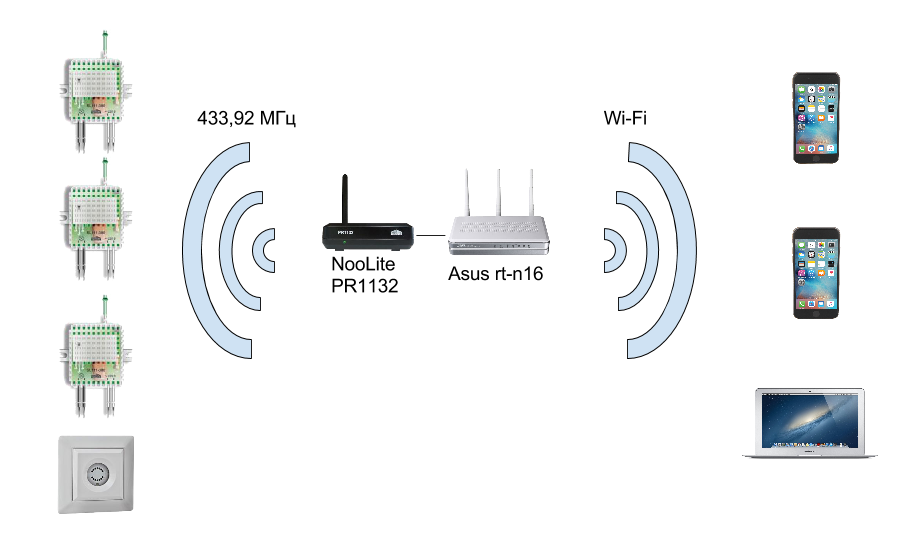
Wiring diagram
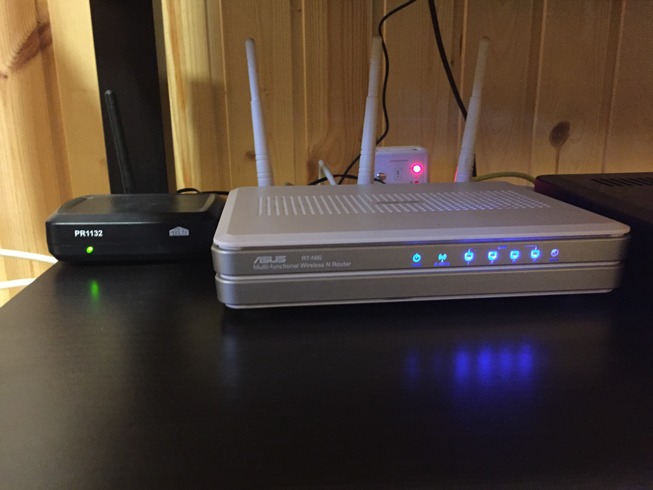
PR1132 Ethernet Gateway and Asus RT-N16 Router
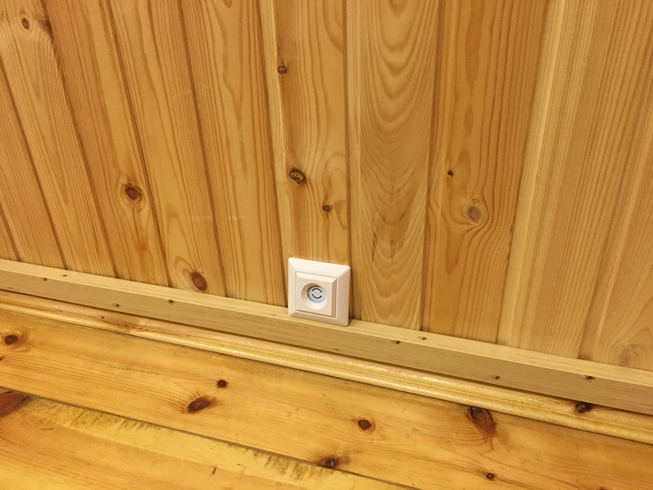
Wireless temperature and humidity sensor PT111
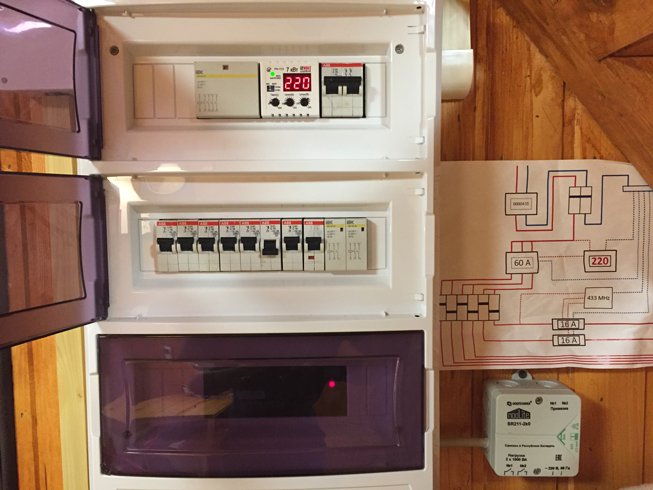
Electrical panel and power unit for outdoor mounting SR211 - later on instead of this unit I used the unit for internal installation and placed it directly in the electrical panel
The PR1132 Ethernet gateway has a web interface through which the power units, sensors and sensors are linked / untied and controlled. The interface itself is made in a rather "clumsy" minimalist style, but this is enough to access all the necessary functionality of the system:
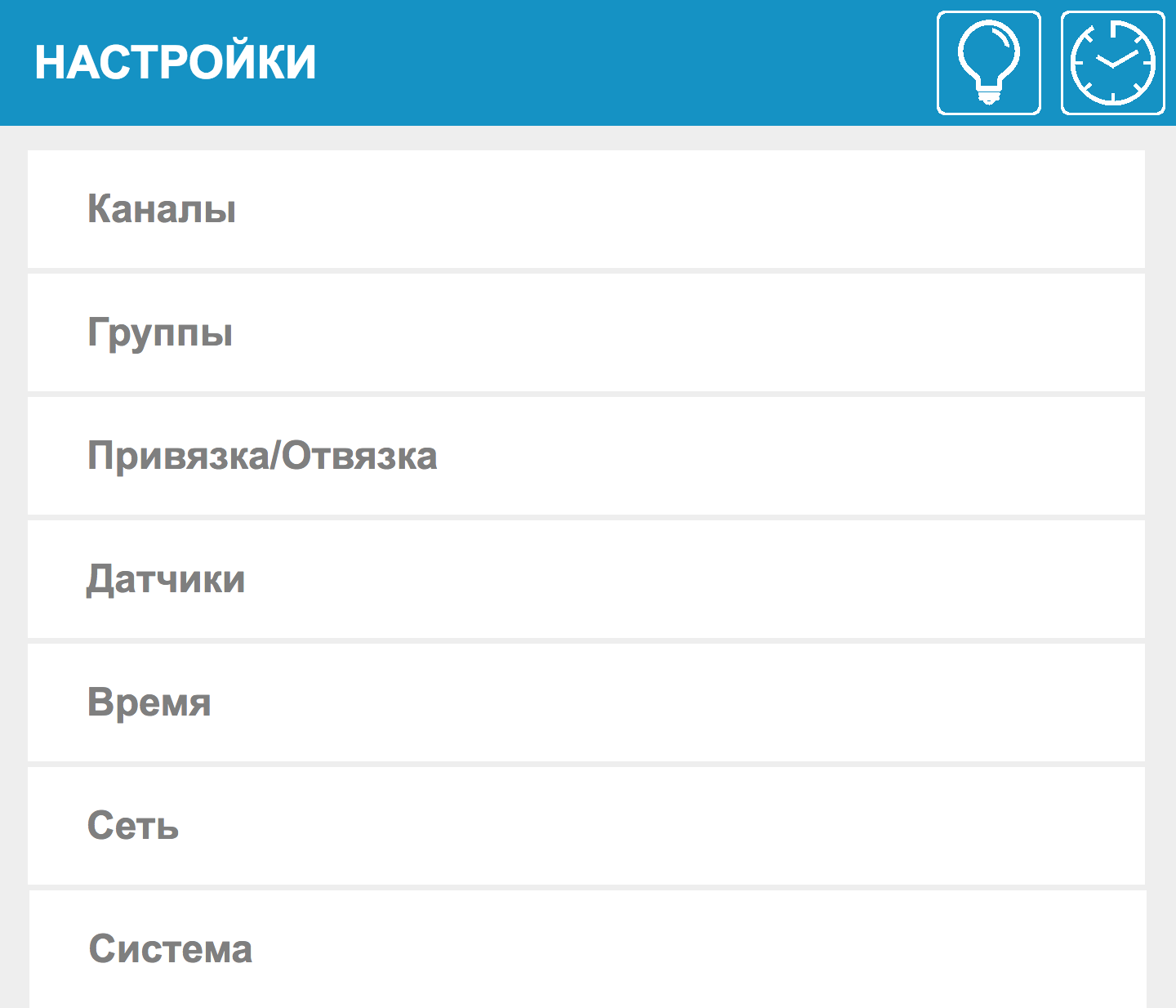
Settings

Control

Page of one switch group
Details about the binding and configuration of all this - again on the official website.
At that moment I could:
- manage heaters while in the local network of a country house, which was not very useful, based on the initial task;
- create on / off timers by time and day of the week.
Just automation timers for some time solved my initial task. On Friday morning and afternoon, the heaters turned on, and by evening we arrived at the warm house. In case our plans change, a second timer was set, which turned off the batteries closer to the night.
Implementation 2 - Remote Access to a Smart Home
The first implementation allowed me to partially solve my problem, but still I wanted online control of the house and the presence of feedback. I began to look for options for organizing access to the country network from outside.
As I mentioned in the previous section, the suburban network has access to the Internet via the usb modem of one of the mobile operators. By default, mobile modems have a gray ip address and you can’t get a white fixed ip without additional monthly expenses. With such a gray IP, various no-ip services will not help either.
The only option that I managed to come up with at that time was VPN. On the city router, I had a VPN server configured, which I used from time to time. I needed to configure a VPN client on a country router and register static routes to the country network.
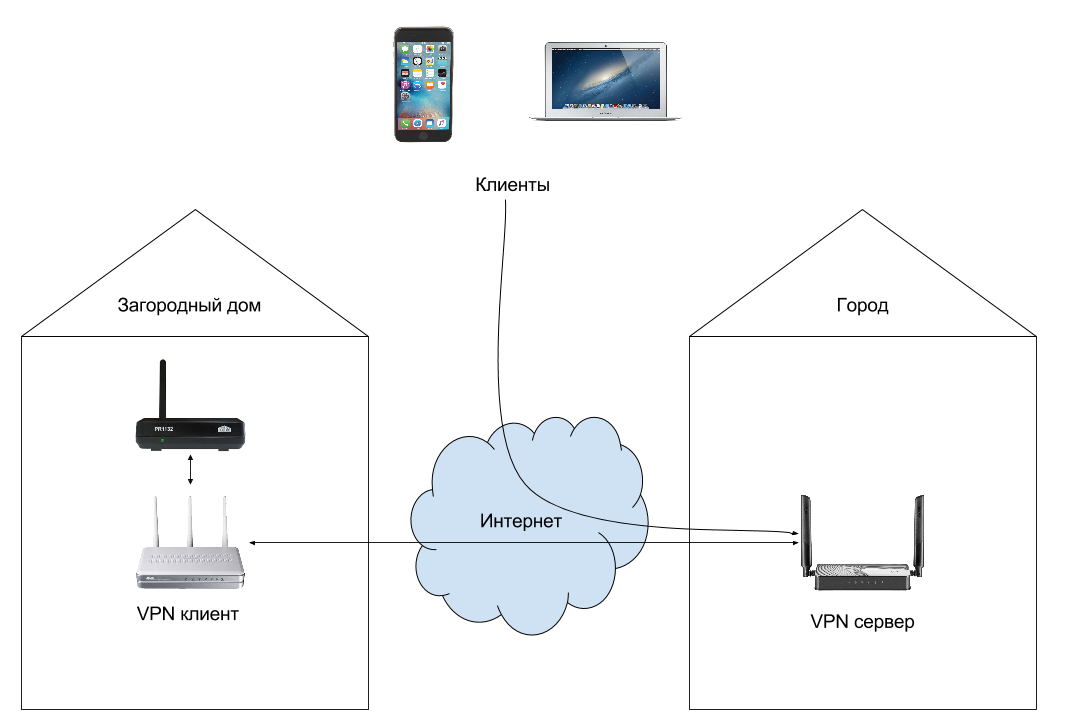
Wiring diagram
As a result, the country router constantly kept a VPN connection with the city router, and to access the NooLite gateway I needed to connect from the client device (laptop, phone) via VPN to the city router.
At this point I could:
- access your smart home from anywhere;
In general, this almost 100% covered the original task. However, I realized that this implementation was far from optimal and convenient to use, since each time I had to perform a number of additional steps to connect to the VPN. For me, this was not a particular problem, but for the rest of the family it was not very convenient. Also in this implementation there were a lot of intermediaries, which affected the fault tolerance of the entire system as a whole. However, for some time I settled on this option.
Implementation 3 - Telegram bot
With the advent of bots in Telegram, I took note that this could become a fairly convenient interface for managing a smart home, and as soon as I had enough free time, I started developing in Python 3.
The bot had to be located somewhere and, as the most energy-efficient solution, I chose the Raspberry Pi. Although this was my first experience with him, there were no particular difficulties in setting it up. The image to the memory card, ethernet cable to the port and ssh - full Linux.
As I said before, NooLite has a documented API, which is useful to me at this stage. To start, I wrote a simple wrapper for more convenient interaction with the API:
"""
NooLite API wrapper
"""import requests
from requests.auth import HTTPBasicAuth
from requests.exceptions import ConnectTimeout, ConnectionError
import xml.etree.ElementTree as ET
classNooLiteSens:"""Класс хранения и обработки информации, полученной с датчиков
    Пока как таковой обработки нет
    """def__init__(self, temperature, humidity, state):
        self.temperature = float(temperature.replace(',', '.')) if temperature != '-'elseNone
        self.humidity = int(humidity) if humidity != '-'elseNone
        self.state = state
classNooLiteApi:"""Базовый враппер для общения с NooLite"""def__init__(self, login, password, base_api_url, request_timeout=10):
        self.login = login
        self.password = password
        self.base_api_url = base_api_url
        self.request_timeout = request_timeout
    defget_sens_data(self):"""Получение и прасинг xml данных с датчиков
        :return: список NooLiteSens объектов для каждого датчика
        :rtype: list
        """
        response = self._send_request('{}/sens.xml'.format(self.base_api_url))
        sens_states = {
            0: 'Датчик привязан, ожидается обновление информации',
            1: 'Датчик не привязан',
            2: 'Нет сигнала с датчика',
            3: 'Необходимо заменить элемент питания в датчике'
        }
        response_xml_root = ET.fromstring(response.text)
        sens_list = []
        for sens_number in range(4):
            sens_list.append(NooLiteSens(
                response_xml_root.find('snst{}'.format(sens_number)).text,
                response_xml_root.find('snsh{}'.format(sens_number)).text,
                sens_states.get(int(response_xml_root.find('snt{}'.format(sens_number)).text))
            ))
        return sens_list
    defsend_command_to_channel(self, data):"""Отправка запроса к NooLite
        Отправляем запрос к NooLite с url параметрами из data
        :param data: url параметры
        :type data: dict
        :return: response
        """return self._send_request('{}/api.htm'.format(self.base_api_url), params=data)
    def_send_request(self, url, **kwargs):"""Отправка запроса к NooLite и обработка возвращаемого ответа
        Отправка запроса к url с параметрами из kwargs
        :param url: url для запроса
        :type url: str
        :return: response от NooLite или исключение
        """try:
            response = requests.get(url, auth=HTTPBasicAuth(self.login, self.password),
                                    timeout=self.request_timeout, **kwargs)
        except ConnectTimeout as e:
            print(e)
            raise NooLiteConnectionTimeout('Connection timeout: {}'.format(self.request_timeout))
        except ConnectionError as e:
            print(e)
            raise NooLiteConnectionError('Connection timeout: {}'.format(self.request_timeout))
        if response.status_code != 200:
            raise NooLiteBadResponse('Bad response: {}'.format(response))
        else:
            return response
# Кастомные исключения
NooLiteConnectionTimeout = type('NooLiteConnectionTimeout', (Exception,), {})
NooLiteConnectionError = type('NooLiteConnectionError', (Exception,), {})
NooLiteBadResponse = type('NooLiteBadResponse', (Exception,), {})
NooLiteBadRequestMethod = type('NooLiteBadRequestMethod', (Exception,), {})
And then, using the python-telegram-bot package , the bot itself was written:
import os
import logging
import functools
import yaml
import requests
import telnetlib
from requests.exceptions import ConnectionError
from telegram import ReplyKeyboardMarkup, ParseMode
from telegram.ext import Updater, CommandHandler, Filters, MessageHandler, Job
from noolite_api import NooLiteApi, NooLiteConnectionTimeout,\
    NooLiteConnectionError, NooLiteBadResponse
# Получаем конфигурационные данные из файла
config = yaml.load(open('conf.yaml'))
# Базовые настройка логирования
logger = logging.getLogger()
logger.setLevel(logging.INFO)
formatter = logging.Formatter(
    '%(asctime)s - %(filename)s:%(lineno)s - %(levelname)s - %(message)s'
)
stream_handler = logging.StreamHandler()
stream_handler.setFormatter(formatter)
logger.addHandler(stream_handler)
# Подключаемся к боту и NooLite
updater = Updater(config['telegtam']['token'])
noolite_api = NooLiteApi(
    config['noolite']['login'],
    config['noolite']['password'],
    config['noolite']['api_url']
)
job_queue = updater.job_queue
defauth_required(func):"""Декоратор аутентификации"""    @functools.wraps(func)defwrapped(bot, update):if update.message.chat_id notin config['telegtam']['authenticated_users']:
            bot.sendMessage(
                chat_id=update.message.chat_id,
                text="Вы неавторизованы.\nДля авторизации отправьте /auth password."
            )
        else:
            return func(bot, update)
    return wrapped
deflog(func):"""Декоратор логирования"""    @functools.wraps(func)defwrapped(bot, update):
        logger.info('Received message: {}'.format(
            update.message.text if update.message else update.callback_query.data)
        )
        func(bot, update)
        logger.info('Response was sent')
    return wrapped
defstart(bot, update):"""Команда начала взаимодействия с ботом"""
    bot.sendMessage(
        chat_id=update.message.chat_id,
        text="Для начала работы нужно авторизоваться.\n""Для авторизации отправьте /auth password."
    )
defauth(bot, update):"""Аутентификация
    Если пароль указан верно, то в ответ приходит клавиатура управления умным домом
    """if config['telegtam']['password'] in update.message.text:
        if update.message.chat_id notin config['telegtam']['authenticated_users']:
            config['telegtam']['authenticated_users'].append(update.message.chat_id)
        custom_keyboard = [
            ['/Включить_обогреватели', '/Выключить_обогреватели'],
            ['/Включить_прожектор', '/Выключить_прожектор'],
            ['/Температура']
        ]
        reply_markup = ReplyKeyboardMarkup(custom_keyboard)
        bot.sendMessage(
            chat_id=update.message.chat_id,
            text="Вы авторизованы.",
            reply_markup=reply_markup
        )
    else:
        bot.sendMessage(chat_id=update.message.chat_id, text="Неправильный пароль.")
defsend_command_to_noolite(command):"""Обработка запросов в NooLite.
    Отправляем запрос. Если возращается ошибка, то посылаем пользователю ответ об этом.
    """try:
        logger.info('Send command to noolite: {}'.format(command))
        response = noolite_api.send_command_to_channel(command)
    except NooLiteConnectionTimeout as e:
        logger.info(e)
        returnNone, "*Дача недоступна!*\n`{}`".format(e)
    except NooLiteConnectionError as e:
        logger.info(e)
        returnNone, "*Ошибка!*\n`{}`".format(e)
    except NooLiteBadResponse as e:
        logger.info(e)
        returnNone, "*Не удалось сделать запрос!*\n`{}`".format(e)
    return response.text, None# ========================== Commands ================================@log@auth_requireddefoutdoor_light_on(bot, update):"""Включения уличного прожектора"""
    response, error = send_command_to_noolite({'ch': 2, 'cmd': 2})
    logger.info('Send message: {}'.format(response or error))
    bot.sendMessage(chat_id=update.message.chat_id, text="{}".format(response or error))
@log@auth_requireddefoutdoor_light_off(bot, update):"""Выключения уличного прожектора"""
    response, error = send_command_to_noolite({'ch': 2, 'cmd': 0})
    logger.info('Send message: {}'.format(response or error))
    bot.sendMessage(chat_id=update.message.chat_id, text="{}".format(response or error))
@log@auth_requireddefheaters_on(bot, update):"""Включения обогревателей"""
    response, error = send_command_to_noolite({'ch': 0, 'cmd': 2})
    logger.info('Send message: {}'.format(response or error))
    bot.sendMessage(chat_id=update.message.chat_id, text="{}".format(response or error))
@log@auth_requireddefheaters_off(bot, update):"""Выключения обогревателей"""
    response, error = send_command_to_noolite({'ch': 0, 'cmd': 0})
    logger.info('Send message: {}'.format(response or error))
    bot.sendMessage(chat_id=update.message.chat_id, text="{}".format(response or error))
@log@auth_requireddefsend_temperature(bot, update):"""Получаем информацию с датчиков"""try:
        sens_list = noolite_api.get_sens_data()
    except NooLiteConnectionTimeout as e:
        logger.info(e)
        bot.sendMessage(
            chat_id=update.message.chat_id,
            text="*Дача недоступна!*\n`{}`".format(e),
            parse_mode=ParseMode.MARKDOWN
        )
        returnexcept NooLiteBadResponse as e:
        logger.info(e)
        bot.sendMessage(
            chat_id=update.message.chat_id,
            text="*Не удалось получить данные!*\n`{}`".format(e),
            parse_mode=ParseMode.MARKDOWN
        )
        returnexcept NooLiteConnectionError as e:
        logger.info(e)
        bot.sendMessage(
            chat_id=update.message.chat_id,
            text="*Ошибка подключения к noolite!*\n`{}`".format(e),
            parse_mode=ParseMode.MARKDOWN
        )
        returnif sens_list[0].temperature and sens_list[0].humidity:
        message = "Температура: *{}C*\nВлажность: *{}%*".format(
            sens_list[0].temperature, sens_list[0].humidity
        )
    else:
        message = "Не удалось получить данные: {}".format(sens_list[0].state)
    logger.info('Send message: {}'.format(message))
    bot.sendMessage(chat_id=update.message.chat_id,
                    text=message,
                    parse_mode=ParseMode.MARKDOWN)
@log@auth_requireddefsend_log(bot, update):"""Получение лога для отладки"""
    bot.sendDocument(
        chat_id=update.message.chat_id,
        document=open('/var/log/telegram_bot/err.log', 'rb')
    )
@logdefunknown(bot, update):"""Неизвестная команда"""
    bot.sendMessage(chat_id=update.message.chat_id, text="Я не знаю такой команды")
defpower_restore(bot, job):"""Выполняется один раз при запуске бота"""for user_chat in config['telegtam']['authenticated_users']:
        bot.sendMessage(user_chat, 'Включение после перезагрузки')
defcheck_temperature(bot, job):"""Периодическая проверка температуры с датчиков
    Eсли температура ниже, чем установленный минимум -
    посылаем уведомление зарегистрированным пользователям
    """try:
        sens_list = noolite_api.get_sens_data()
    except NooLiteConnectionTimeout as e:
        print(e)
        returnexcept NooLiteConnectionError as e:
        print(e)
        returnexcept NooLiteBadResponse as e:
        print(e)
        returnif sens_list[0].temperature and \
                    sens_list[0].temperature < config['noolite']['temperature_alert']:
        for user_chat in config['telegtam']['authenticated_users']:
            bot.sendMessage(
                chat_id=user_chat,
                parse_mode=ParseMode.MARKDOWN,
                text='*Температура ниже {} градусов: {}!*'.format(
                    config['noolite']['temperature_alert'],
                    sens_list[0].temperature
                )
            )
defcheck_internet_connection(bot, job):"""Периодическая проверка доступа в интернет
    Если доступа в интрнет нет и попытки его проверки исчерпаны -
    то посылаем по telnet команду роутеру для его перезапуска.
    Если доступ в интернет после этого не появился - перезагружаем Raspberry Pi
    """try:
        requests.get('http://ya.ru')
        config['noolite']['internet_connection_counter'] = 0except ConnectionError:
        if config['noolite']['internet_connection_counter'] == 2:
            tn = telnetlib.Telnet(config['router']['ip'])
            tn.read_until(b"login: ")
            tn.write(config['router']['login'].encode('ascii') + b"\n")
            tn.read_until(b"Password: ")
            tn.write(config['router']['password'].encode('ascii') + b"\n")
            tn.write(b"reboot\n")
        elif config['noolite']['internet_connection_counter'] == 4:
            os.system("sudo reboot")
        else:
            config['noolite']['internet_connection_counter'] += 1
dispatcher = updater.dispatcher
dispatcher.add_handler(CommandHandler('start', start))
dispatcher.add_handler(CommandHandler('auth', auth))
dispatcher.add_handler(CommandHandler('Температура', send_temperature))
dispatcher.add_handler(CommandHandler('Включить_обогреватели', heaters_on))
dispatcher.add_handler(CommandHandler('Выключить_обогреватели', heaters_off))
dispatcher.add_handler(CommandHandler('Включить_прожектор', outdoor_light_on))
dispatcher.add_handler(CommandHandler('Выключить_прожектор', outdoor_light_off))
dispatcher.add_handler(CommandHandler('log', send_log))
dispatcher.add_handler(MessageHandler([Filters.command], unknown))
job_queue.put(Job(check_internet_connection, 60*5), next_t=60*5)
job_queue.put(Job(check_temperature, 60*30), next_t=60*6)
job_queue.put(Job(power_restore, 60, repeat=False))
updater.start_polling(bootstrap_retries=-1)
This bot is launched on the Raspberry Pi under Supervisor, which monitors its status and launches it upon reboot.
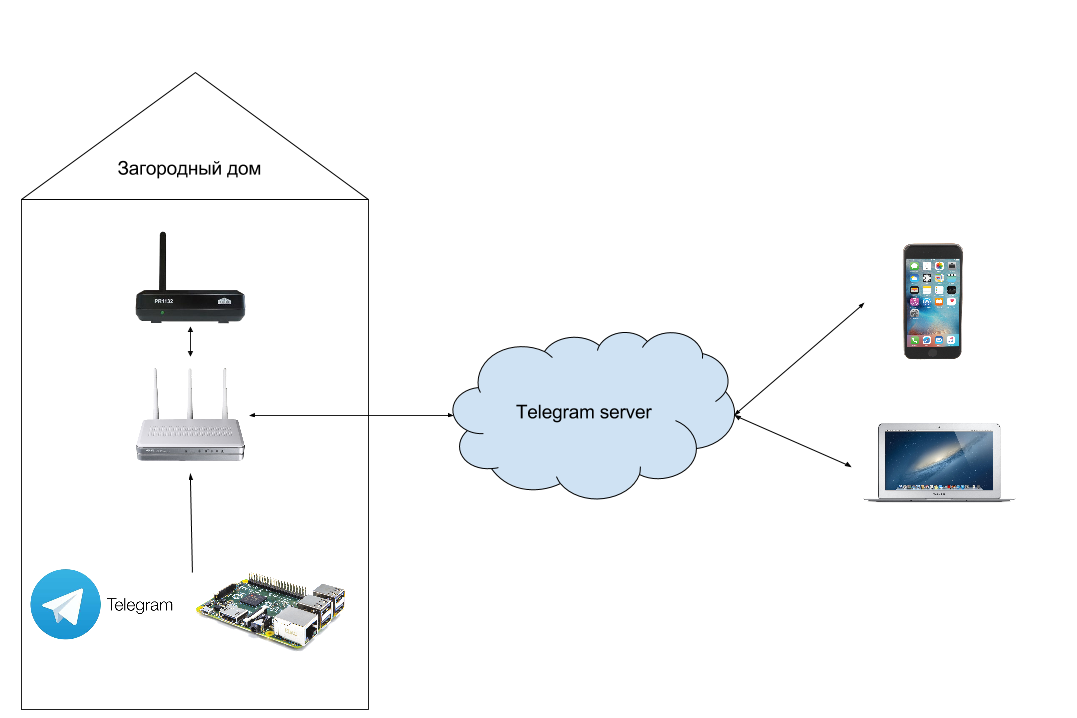
The scheme of the bot
When the bot starts:
- sends a message to registered users that it has turned on and is ready to work;
- monitors internet connection. In the condition of working through the mobile Internet there were cases when it disappeared. Therefore, a periodic check of connection availability has been added. If the specified number of checks fails, then the script first reboots the telnet router, and then, if this does not help, the Raspberry Pi itself;
- monitors the temperature inside the room and sends a notification to the user if it drops below a predetermined threshold;
- executes commands from registered users.
Commands are hardcoded in the code and include:
- turning on / off heaters;
- turn on / off the street spotlight;
- receiving temperature from sensors;
- getting log file for debug.
An example of communication with the bot:
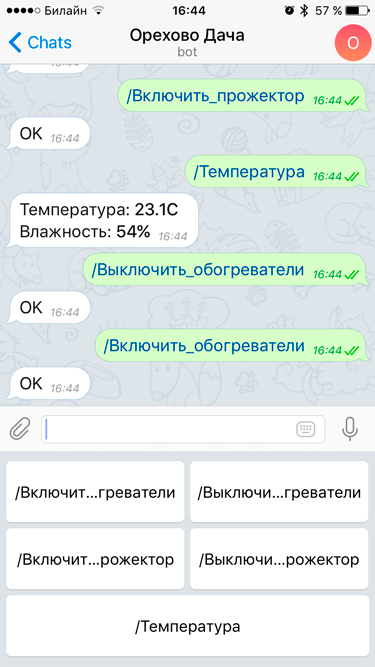
As a result, I and all family members got a fairly convenient interface for managing a smart home via Telegram. All you need to do is install the telegram client on your device and know the password to start communicating with the bot.
As a result, I can:
- manage your smart home from anywhere from any device with your Telegram account;
- receive information from sensors located in the house.
This implementation has 100% solved the initial problem, it was convenient and intuitive to use.
Conclusion
Budget (at current prices):
- NooLite Ethernet-gateway - 6.000 rubles
- NooLite power sensor for load control - 1,500 rubles
- NooLite temperature and humidity sensor - 3.000 rubles (without humidity cheaper)
- Raspberry Pi - 4.000 rubles
At the output, I got a rather flexible budget system that can be easily expanded as needed (NooLite gateway supports up to 32 channels). My family and I can easily use it without having to perform any additional actions: I went into a telegram - checked the temperature - turned on the heaters.
In fact, this implementation is not the last. Just a week ago, I connected this entire system to Apple HomeKit, which allowed me to add control via the iOS app for Home and the corresponding integration with Siri for voice control. But the implementation process draws on a separate article. If the community is interested in this topic, then I am ready to prepare another article in the near future.
UPD: second article about integration with HomeKit
Related links:
- github repository
- NooLite API (at the very bottom of the manual)
- telegram bot API
- python-telegram-bot