All About Cisco FastLocation
The further I dive into the topic of Wi-Fi positioning, the more obvious it becomes that the main task is not to achieve the necessary accuracy, but to obtain the required number of measurements! Why do I think so?
The requirements for the density of access points are increasing every year, which positively affects the accuracy of positioning, but the frequency of measurements according to Probe Request does not get higher, rather the opposite.
In this regard, many manufacturers have developed their own tools to increase the frequency of measurements. Traditionally, one of the innovators in this area is Cisco, which launched a tool called Cisco FastLocation.
Let's try to understand all the nuances of this tool.
For starters, what is meant by the marketing words for Cisco FastLocate? Briefly, this is signal strength measurement (RSSI) not by management Probe Request packets, but by data packets. This metering mode is called “Data RSSI” (in addition to “Probe RSSI”). Later in the article I will use both terms depending on the context.
Cisco FastLocation technology appeared in 2014 when the Cisco positioning system began to evolve.
At that time, it had rather limited functionality, was supported only on specially installed WSM (Wireless Security Module) monitoring modules, which were installed in modular, that is, top-end office access points. This was the so-called FastLocate MSE Release 8.0 .
We will not consider this technology, since now a new, completely redesigned version of FastLocate CMX Release 10.2 is relevant .
We will test it using the Cisco WLC 2504 controller with software version 8.1.131.20 and the Cisco Aironet 3602 series of points.
The first question that came to my mind: is it possible to do Data RSSI without using additional modules? The Cisco arsenal already has the ability to put the access point in the monitoring (scanning) mode of all channels, there is a hybrid mode of operation when the point serves both users and scans adjacent channels. Can we use these modes for Data RSSI?
If in the 8th version of CMX this was not possible, then by the 10th version of CMX such an option appeared. Cisco access points have a special Enhanced Local Mode (ELM), in which, in addition to customer service, the access point performs so-called Off-Channel Scanning, that is, scans adjacent channels. This does not happen without a loss of productivity, which is about 15%.
Off-Channel Scanning takes place in a very leisurely manner and was originally designed to detect foreign access points on adjacent channels. How it works can be seen here and here .
For example, by default, in the 2.4 GHz band, scanning of all channels and a full scan interval of 180 s are configured. In this mode, the access point is interrupted every 180/13 = 14 seconds for 50ms to scan an adjacent channel (10ms are also spent on switching to each side). The picture looks something like this:

The operation of this algorithm can be checked directly on the access point using the debug dot11 do0 trace print channel command
From this conclusion, you can see that the scanning frequency is about 13 seconds, which is consistent with the documentation. Using Data RSSI in this mode would not be very effective (looking ahead, I will say that it is not used).
If FastLocate is activated on the wireless controller, then Off-Channel Scanning starts to work a little differently.
Time slots are reduced to three seconds. I did not find technical documentation regarding how Off-Channel Scanning works when FastLocate is activated, but based on the above conclusion, we can conclude that the scan time is also about 50 ms (967-887 = 80 ms, this is 50-60 ms scan + 10 ms to switch between channels).
Obviously, reducing the time intervals was done to improve the operation of the FastLocation mechanism.
The access point can work with local or centralized wIPS (intrusion detection and prevention system), which is regulated by the settings on the access point. When testing Off-Channel Scanning in different wIPS operating modes, I did not see any differences.
Even before the advent of FastLocate technology, access points were able to work in Monitor mode AP mode. This mode was used for a centralized intrusion detection system. Upon transition to this mode, both radio modules cease to serve clients and sequentially scan channels with a duration of 1.2 seconds.
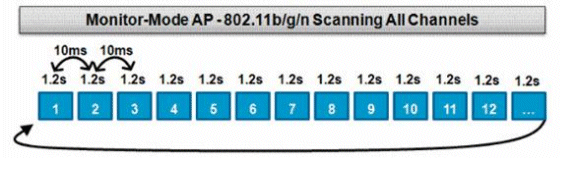
This algorithm of work is confirmed by the conclusion from the access point:
In the case of Monitor mode AP, the operation algorithm did not change when FastLocate was turned on / off.
When using Monitor mode, there is a nuance: FastLocate works only for clients connected to the infrastructure, and when the access point is switched to Monitor mode, the point ceases to serve clients. That is, it is understood that the infrastructure will have other access points serving customers.
Access points in Monitor mode are proposed to be placed in the ratio of 1: 5 to conventional access points.
This is the main FastLocate mode of operation, which provides for the installation of WSM modules in access points in the ratio of 2: 5 (that is, at least 2: 5 access points must be modular, that is, the most top-notch).
WSM has its own working algorithm. The WSM module, unlike the radio in monitoring mode, scans the channel not for 1.2 seconds, but for 250 ms. But he does this not sequentially, but in accordance with certain rules:
We can say that infrastructure channels (which have their own access points) are given high priority, which is understandable because FastLocation works only for connected clients and scanning adjacent channels is not so important.
How this algorithm looks when outputting to an access point:
The scanning interval is not as smooth as in other modes, and is within 50-250ms.
Indeed, non-infrastructure channels (in my case, channels 36, 40) were quite rare, with a frequency of more than 3 seconds, which can also be seen in the logs.
When FastLocation mode is activated, the sampling frequency directly depended on the activity of the client. If the client (smartphone, phone, laptop) was in sleep mode, that is, the Wi-Fi adapter was not actively used, the measurement frequency was comparable to the Probe RSSI method. If the device actively used a Wi-Fi adapter, then the sampling frequency increased sharply.
I did not test all possible schemes of Cisco FastLocation operation, since there are a lot of factors affecting the frequency of measurements, both from the infrastructure side and from the client side, so the tests were carried out only in WSM mode.
Three types of devices were used: smartphone, tablet and laptop. For all tested devices, the interval between measurements was comparable and amounted to about 2-6 seconds with the active use of the Wi-Fi adapter.
1. FastLocate (Data RSSI) in comparison with Probe RSSI in the general case for personal devices can significantly increase the frequency of measurements, especially when using a Wi-Fi module.
2. But if the client device is in sleep mode and does not use a Wi-Fi adapter, the sampling rate drops to standard when using Probe RSSI.
3.It is very difficult to talk about any specific value of the measurement frequency in the case of using Wi-Fi positioning for personal devices. There are many factors, both from the infrastructure side and from the client side, affecting this characteristic. To obtain specific values, I believe, it is necessary to act by analogy with a radio survey, that is, carry out field tests of the entire system and with the required client devices.
The requirements for the density of access points are increasing every year, which positively affects the accuracy of positioning, but the frequency of measurements according to Probe Request does not get higher, rather the opposite.
In this regard, many manufacturers have developed their own tools to increase the frequency of measurements. Traditionally, one of the innovators in this area is Cisco, which launched a tool called Cisco FastLocation.
Let's try to understand all the nuances of this tool.
FastLocate = Data RSSI
For starters, what is meant by the marketing words for Cisco FastLocate? Briefly, this is signal strength measurement (RSSI) not by management Probe Request packets, but by data packets. This metering mode is called “Data RSSI” (in addition to “Probe RSSI”). Later in the article I will use both terms depending on the context.
FastLocate Release 8.0 vs FastLocate Release 10.2
Cisco FastLocation technology appeared in 2014 when the Cisco positioning system began to evolve.
At that time, it had rather limited functionality, was supported only on specially installed WSM (Wireless Security Module) monitoring modules, which were installed in modular, that is, top-end office access points. This was the so-called FastLocate MSE Release 8.0 .
We will not consider this technology, since now a new, completely redesigned version of FastLocate CMX Release 10.2 is relevant .
We will test it using the Cisco WLC 2504 controller with software version 8.1.131.20 and the Cisco Aironet 3602 series of points.
FastLocate without using additional modules
The first question that came to my mind: is it possible to do Data RSSI without using additional modules? The Cisco arsenal already has the ability to put the access point in the monitoring (scanning) mode of all channels, there is a hybrid mode of operation when the point serves both users and scans adjacent channels. Can we use these modes for Data RSSI?
FastLocate in ELM hybrid mode
If in the 8th version of CMX this was not possible, then by the 10th version of CMX such an option appeared. Cisco access points have a special Enhanced Local Mode (ELM), in which, in addition to customer service, the access point performs so-called Off-Channel Scanning, that is, scans adjacent channels. This does not happen without a loss of productivity, which is about 15%.
Off-Channel Scanning with FastLocate Off
Off-Channel Scanning takes place in a very leisurely manner and was originally designed to detect foreign access points on adjacent channels. How it works can be seen here and here .
For example, by default, in the 2.4 GHz band, scanning of all channels and a full scan interval of 180 s are configured. In this mode, the access point is interrupted every 180/13 = 14 seconds for 50ms to scan an adjacent channel (10ms are also spent on switching to each side). The picture looks something like this:
The operation of this algorithm can be checked directly on the access point using the debug dot11 do0 trace print channel command
Hyperlocation_2#debug dot11 do0 trace print channel
Oct  4 10:09:37.909: CC0CDA4C-0 Channel 8 (2447) promiscuous  20MHz
Oct  4 10:09:37.957: CC0D772F-0 Channel 11 (2462)  20MHz
Oct  4 10:09:50.753: CCD0DEF8-0 Channel 9 (2452) promiscuous  20MHz
Oct  4 10:09:50.801: CCD17BD3-0 Channel 11 (2462)  20MHz
Oct  4 10:09:53.955: CD948399-0 Channel 10 (2457) promiscuous  20MHz
Oct  4 10:09:53.999: CD951CFD-0 Channel 11 (2462)  20MHz
Oct  4 10:10:06.763: CE57FEC4-0 Channel 11 (2462) promiscuous  20MHz
Oct  4 10:10:06.811: CE589BA7-0 Channel 11 (2462)  20MHz
From this conclusion, you can see that the scanning frequency is about 13 seconds, which is consistent with the documentation. Using Data RSSI in this mode would not be very effective (looking ahead, I will say that it is not used).
Off-Channel Scanning with FastLocate On
If FastLocate is activated on the wireless controller, then Off-Channel Scanning starts to work a little differently.
Hyperlocation_2#debug dot11 do0 trace print channel
Oct  4 10:05:40.887: BDEC139E-0 Channel 12 (2467) promiscuous  20MHz
Oct  4 10:05:40.967: BDED365C-0 Channel 11 (2462)  20MHz
Oct  4 10:05:43.691: BE16D8E7-0 Channel 13 (2472) promiscuous  20MHz
Oct  4 10:05:43.771: BE17FBC2-0 Channel 11 (2462)  20MHz
Oct  4 10:05:46.775: BE45D2A0-0 Channel 11 (2462)  20MHz
Oct  4 10:05:46.983: BE4919C1-0 Channel 14 (2484) promiscuous listen_only 20MHz
Oct  4 10:05:47.063: BE4A3D27-0 Channel 11 (2462)  20MHz
Oct  4 10:05:49.795: BE7407C6-0 Channel 1 (2412) promiscuous  20MHz
Oct  4 10:05:49.879: BE75291D-0 Channel 11 (2462)  20MHz
Time slots are reduced to three seconds. I did not find technical documentation regarding how Off-Channel Scanning works when FastLocate is activated, but based on the above conclusion, we can conclude that the scan time is also about 50 ms (967-887 = 80 ms, this is 50-60 ms scan + 10 ms to switch between channels).
Obviously, reducing the time intervals was done to improve the operation of the FastLocation mechanism.
Dependence of Off-Channel Scanning on wIPS Operation Mode
The access point can work with local or centralized wIPS (intrusion detection and prevention system), which is regulated by the settings on the access point. When testing Off-Channel Scanning in different wIPS operating modes, I did not see any differences.
FastLocate in Monitor mode
Even before the advent of FastLocate technology, access points were able to work in Monitor mode AP mode. This mode was used for a centralized intrusion detection system. Upon transition to this mode, both radio modules cease to serve clients and sequentially scan channels with a duration of 1.2 seconds.
This algorithm of work is confirmed by the conclusion from the access point:
pod1-1140#debug dot11 do0 trace print channel
*Oct  4 10:51:22.031: 1FB01CC6-0 Channel 12 (2467) promiscuous  20MHz
*Oct  4 10:51:23.246: 1FC2A970-0 Channel 13 (2472) promiscuous  20MHz
*Oct  4 10:51:24.458: 1FD5283F-0 Channel 14 (2484) promiscuous listen_only 20MHz
*Oct  4 10:51:25.670: 1FE7A716-0 Channel 1 (2412) promiscuous  20MHz
In the case of Monitor mode AP, the operation algorithm did not change when FastLocate was turned on / off.
FastLocate only works for connected clients
When using Monitor mode, there is a nuance: FastLocate works only for clients connected to the infrastructure, and when the access point is switched to Monitor mode, the point ceases to serve clients. That is, it is understood that the infrastructure will have other access points serving customers.
Access points in Monitor mode are proposed to be placed in the ratio of 1: 5 to conventional access points.
FastLocate using the optional WSM module
This is the main FastLocate mode of operation, which provides for the installation of WSM modules in access points in the ratio of 2: 5 (that is, at least 2: 5 access points must be modular, that is, the most top-notch).
WSM has its own working algorithm. The WSM module, unlike the radio in monitoring mode, scans the channel not for 1.2 seconds, but for 250 ms. But he does this not sequentially, but in accordance with certain rules:
<L1, L1, L1, L1, L1, CA, L2>
It will scan 5 slots of L1(serving channel of the APs) followed by a cleanAir slot (if enabled), followed by one slot of L2 (channels in the country/DCA list). If there are less than 5 channels in the L1 list, the same channels will be scanned repeatedly till the 5 L1 slots are filled up.
We can say that infrastructure channels (which have their own access points) are given high priority, which is understandable because FastLocation works only for connected clients and scanning adjacent channels is not so important.
How this algorithm looks when outputting to an access point:
Sep 20 16:24:17.824: 2EC10B2D-2 Channel 1 (2412) promiscuous  20MHz
Sep 20 16:24:17.903: 2EC24019-2 Channel 48 (5240) promiscuous  20MHz
Sep 20 16:24:18.151: 2EC60A5D-2 Channel 6 (2437) promiscuous  20MHz
Sep 20 16:24:18.383: 2EC99BD3-2 Channel 11 (2462) promiscuous  20MHz
Sep 20 16:24:18.627: 2ECD54AC-2 Channel 1 (2412) promiscuous  20MHz
Sep 20 16:24:18.895: 2ED16A1E-2 Channel 161 (5805) promiscuous  20MHz
Sep 20 16:24:19.435: 2ED99B31-2 Channel 6 (2437) promiscuous  20MHz
Sep 20 16:24:19.555: 2EDB7010-2 Channel 60 (5300) promiscuous  20MHz
Sep 20 16:24:19.807: 2EDF53C5-2 Channel 48 (5240) promiscuous  20MHz
Sep 20 16:24:20.046: 2EE2EF52-2 Channel 6 (2437) promiscuous  20MHz
Sep 20 16:24:20.282: 2EE695CB-2 Channel 11 (2462) promiscuous  20MHz
Sep 20 16:24:20.514: 2EEA16E6-2 Channel 1 (2412) promiscuous  20MHz
Sep 20 16:24:21.010: 2EF1B48A-2 Channel 11 (2462) promiscuous  20MHz
Sep 20 16:24:21.166: 2EF40C9B-2 Channel 161 (5805) promiscuous  20MHz
Sep 20 16:24:21.454: 2EF86DA9-2 Channel 60 (5300) promiscuous  20MHz
Sep 20 16:24:21.710: 2EFC5A8F-2 Channel 48 (5240) promiscuous  20MHz
Sep 20 16:24:21.929: 2EFFBC42-2 Channel 6 (2437) promiscuous  20MHz
Sep 20 16:24:22.161: 2F033F09-2 Channel 11 (2462) promiscuous  20MHz
Sep 20 16:24:22.645: 2F0AA07D-2 Channel 36 (5180) promiscuous  20MHz
Sep 20 16:24:22.785: 2F0CCDC0-2 Channel 1 (2412) promiscuous  20MHz
Sep 20 16:24:23.061: 2F10F3CB-2 Channel 161 (5805) promiscuous  20MHz
Sep 20 16:24:23.337: 2F1539E8-2 Channel 60 (5300) promiscuous  20MHz
Sep 20 16:24:23.593: 2F192133-2 Channel 48 (5240) promiscuous  20MHz
Sep 20 16:24:23.813: 2F1C798A-2 Channel 6 (2437) promiscuous  20MHz
Sep 20 16:24:24.297: 2F23E056-2 Channel 48 (5240) promiscuous  20MHz
Sep 20 16:24:24.433: 2F25EE6C-2 Channel 11 (2462) promiscuous  20MHz
Sep 20 16:24:24.673: 2F299DFA-2 Channel 1 (2412) promiscuous  20MHz
Sep 20 16:24:24.937: 2F2D9ABB-2 Channel 161 (5805) promiscuous  20MHz
Sep 20 16:24:25.221: 2F31F49A-2 Channel 60 (5300) promiscuous  20MHz
Sep 20 16:24:25.473: 2F35CF9A-2 Channel 48 (5240) promiscuous  20MHz
Sep 20 16:24:25.977: 2F3D7AA1-2 Channel 40 (5200) promiscuous  20MHz
Sep 20 16:24:26.097: 2F3F532D-2 Channel 6 (2437) promiscuous  20MHz
Sep 20 16:24:26.329: 2F42D521-2 Channel 11 (2462) promiscuous  20MHz
The scanning interval is not as smooth as in other modes, and is within 50-250ms.
Indeed, non-infrastructure channels (in my case, channels 36, 40) were quite rare, with a frequency of more than 3 seconds, which can also be seen in the logs.
Estimation of sampling frequency
When FastLocation mode is activated, the sampling frequency directly depended on the activity of the client. If the client (smartphone, phone, laptop) was in sleep mode, that is, the Wi-Fi adapter was not actively used, the measurement frequency was comparable to the Probe RSSI method. If the device actively used a Wi-Fi adapter, then the sampling frequency increased sharply.
I did not test all possible schemes of Cisco FastLocation operation, since there are a lot of factors affecting the frequency of measurements, both from the infrastructure side and from the client side, so the tests were carried out only in WSM mode.
Three types of devices were used: smartphone, tablet and laptop. For all tested devices, the interval between measurements was comparable and amounted to about 2-6 seconds with the active use of the Wi-Fi adapter.
General conclusions
1. FastLocate (Data RSSI) in comparison with Probe RSSI in the general case for personal devices can significantly increase the frequency of measurements, especially when using a Wi-Fi module.
2. But if the client device is in sleep mode and does not use a Wi-Fi adapter, the sampling rate drops to standard when using Probe RSSI.
3.It is very difficult to talk about any specific value of the measurement frequency in the case of using Wi-Fi positioning for personal devices. There are many factors, both from the infrastructure side and from the client side, affecting this characteristic. To obtain specific values, I believe, it is necessary to act by analogy with a radio survey, that is, carry out field tests of the entire system and with the required client devices.









