 September 8, 2016 at 13:05
ASP.NET MVC + VM: splitting complex views into simple ones using view models using the calendar of events as an example
I decided to write on this topic, because I constantly use view models in web applications on ASP.NET MVC, and often I have to explain the essence of this approach to my colleagues, and we use the appropriate material to refer to it not found. This article is primarily for beginners.
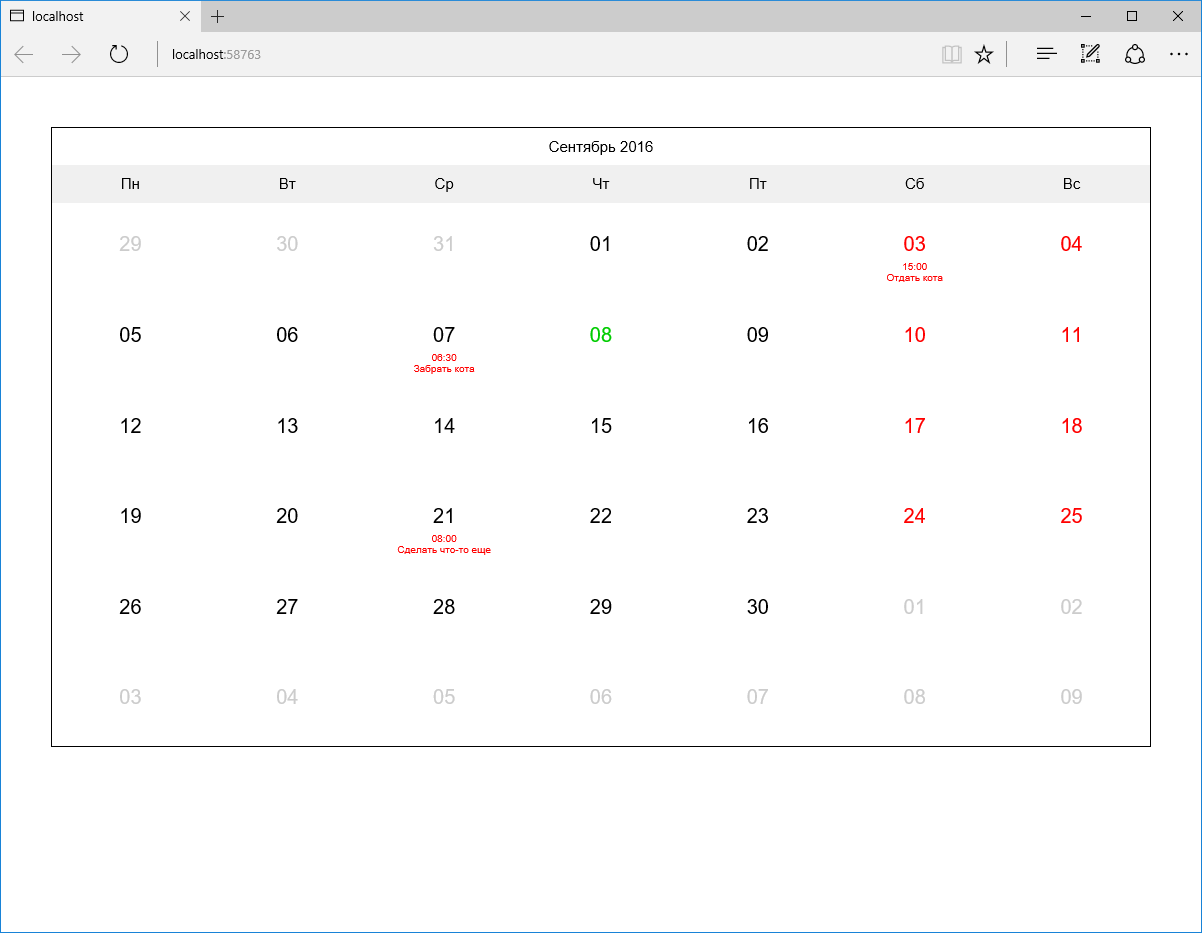
Imagine that we need to display a calendar of some events for the current month. This is a rather complicated design. The calendar should contain a heading with the name of the current month and year, a line with the names of the days and, in fact, the days themselves (6 rows of 7 days each), each of which has a date and, optionally, a certain set of events whose names must be displayed by first downloading them from the database. Also suppose that weekends and holidays should be marked in a special way. That is, in the end, something like this should turn out:
The MVC design pattern and its concept of dividing an application into 3 parts (model, view, and controller) are probably familiar to every developer.
A model can be understood as just just data (objects of the subject area, which are often called models), as well as data in conjunction with a certain logic of their processing. (The storage of data should be separated into a separate, independent layer.) That is, ideally, we will have a model that exists and functions regardless of how its data is displayed and stored.
For example, consider online shopping. Often in such projects, the front-end occupies only a small part of the entire functionality, the bulk of which is concentrated in various administrative subsystems, such as order accounting and customer interaction, warehouse accounting, analytics, APIs and so on. Obviously, the functioning of such subsystems (which, incidentally, can easily be executed as separate applications) in the context of a single and general model is very important. The implementation of such functions as calculating the value of a particular position (taking into account current promotions and discounts) or the total amount of the order should be the same for the entire project.
Let's present now the main page of a typical online store. It probably has a place for a list of categories, several popular products, news and more. That is, transferring the representation of any one model object here is definitely not enough. But in order to form a set of objects necessary for displaying such a representation, a certain logic will be required. Yes, and these sets of objects can be similar for different representations, so it would be wrong to put such logic directly into the controller. (The two most common problems of bad code are duplication and long, inaudible methods.) But this logic cannot be part of the model either, because it refers to a specific representation. This is where species models come to the rescue.
In fact, a view model (it would be more correct, perhaps, to call it a presentation model) encapsulates the set of all the data necessary for a particular view (or even several views). Just as views can consist of other views, so view models can consist of other view models. In the case of the main page of the online store, we could define a model for the appearance of this page, which would include sets of models of the types of categories, products and news. In turn, a product type model can consist of models of photo types, comments, and so on. It is noteworthy that all these view models (except, perhaps, the view page model) can be reused. However, this does not solve the question of the need to have the logic of forming the entire graph of these objects,
View model builders are ideally suited for isolating and reusing initialization code for view models — a parallel hierarchy of classes that generate view model objects of the corresponding types. Builders of parent view models can use builders of child view models to build all the necessary hierarchy, calling each other along the chain, from top to bottom. Note that for simple view models, where initialization is only a matter of setting the values received from the controller, the use of the builder is unnecessary and cumbersome - in this case, the usual constructor is enough.
At this, I think, it's time to move on to practice.
Let us now return to our calendar of events as a simpler example. To begin with, we will prepare an empty web application on ASP.NET MVC (I will use ASP.NET Core to at the same time demonstrate the capabilities of the new platform, but this does not matter in the context of our example). Add to it the only DefaultController controller with the only Calendar action in it - it will be responsible for displaying the calendar. Add the corresponding view (so far without any content). If we run our application now, we should get a blank page. (At the end of the article, you will find a link to the finished test project posted on GitHub.)
As we have seen above, in order to transfer all the necessary data to our view, we need an appropriate view model. Let's call it CalendarViewModel. (It is very convenient to place view models in the ViewModels folder of the project, repeating the structure of the Views folder; I will give a corresponding screenshot later.) Immediately add the obvious Date property of the DateTime type to it. We need it to display the current month and year. This should result in a class like this:
Now we’ll add a builder for our view model (now it’s not really needed, but later it will appear - we’ll do it in advance):
As you can see, the builder’s Build method does not accept parameters and returns a new object of the CalendarViewModel class - a finished view model.
Now we’ll specify our CalendarViewModel class as the view model for the Calendar view and add the month and year display from this view model:
Next, we use the CalendarViewModelBuilder builder to pass the view model to the view. Our controller should take the following form:
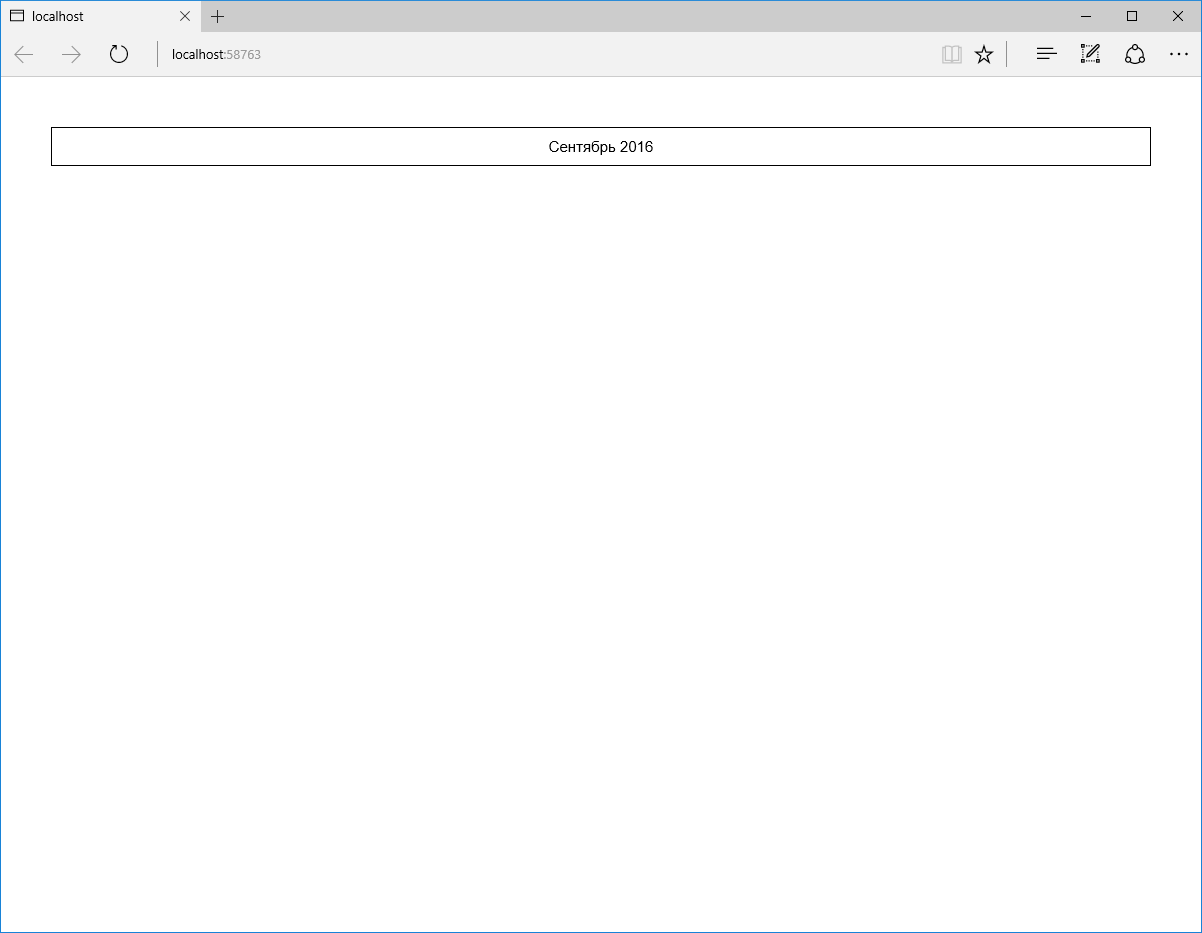
Now we can start the application again, and this time something will already be displayed (I messed with the styles a bit, so the future calendar already has some design):
Now let's print a line with the names of the days. Since this is static information and will not be used anywhere separately, just add the appropriate markup directly to the view. It should be like this:
In the browser, it looks like this:

Now it’s the turn of the most interesting thing - the display of days. To do this, add a separate partial view of _Day and a model of the form DayViewModel for it. (It is also quite possible that in the future in our project we might want to display days with planned events regardless of the calendar. For example, as a separate block of events for today. We will keep this in mind.)
For now, add a DateTime Date property to the DayViewModel class. and 3 more properties of the bool type - IsNotCurrentMonth, IsWeekendOrHoliday and IsToday:
The builder Build method this time takes one parameter - the date:
As you can see, the builder initializes all the properties of the view model. The IsNotCurrentMonth flag determines whether the day is outside the current month (to be able to highlight it in gray). The set IsWeekendOrHoliday means that the day is a weekend or holiday, and IsToday is today (accordingly, we will highlight such days in red or green).
A partial _Day view may look like this (note, we do not specifically use the td tag here so that this partial view can be used separately from the calendar):
The appropriate CSS classes are set depending on the value of the IsNotCurrentMonth, IsWeekendOrHoliday, and IsToday properties.
It remains to add a set of models of day view types to the calendar view model and make the calendar view model builder initialize this set.
When thinking about which logic is best implemented in the view model builder and which is directly in the view, one should proceed from the results of a simple test: will this logic have to be duplicated again if the view needs to be replaced? If so, then the logic should be placed in the view model builder. If not, directly in the view (this means that the code is too specific and applies only to a specific display method). Although if logic means something really voluminous, then perhaps the best solution would be to make an additional view model for a specific representation and transfer this logic to the Build method of its builder. In our case, we could represent the days as an array of 42 elements (6 rows of 7 days), but in this case, in the Calendar view, we need logic to split this array into strings. Therefore, perhaps it would be more appropriate to immediately make the array two-dimensional (unless we assume that in the future it will be necessary to display days somehow differently than a table):
The Build method of the builder of this view model can now be supplemented with approximately the following logic:
Run the application and see what happened:

Almost done. Now let's deal with the events. First, we need to add the Event class to our model:
Secondly, we will add some fake data access layer, which in fact will simply return predefined objects for given dates. I will not dwell on this in detail, its implementation (using the Unit of Work and Repository templates in its simplest form + using the built-in ASP.NET Core DI) can be viewed in a test project.
Immediately add a model of the EventViewModel view, a builder for it and a partial view of _Event.
EventViewModel Class:
Build method of EventViewModelBuilder class:
As you can see, in this case, the set of properties of the view model is almost identical to the set of model properties, therefore, in order not to manually project each property of one class onto the property of another class, we should use something like AutoMapper .
Partial view of _Event:
Obviously, all of this can be reused, regardless of the days or calendar.
To finish our application, we need to add the Events property of type IEnumerable to the DayViewModel class and initialize it in the builder of the day view model. To do this, we need the day view model builder to access the data access layer, which is represented by the implementation of the Unit of work template. I would not like to touch on this in detail now, so as not to enlarge an already large article. In short, all accesses to the data access layer within a single request to the controller must occur in the context of a single instance of the class of our unit of work. That is, such an instance must be created when the controller object is created (for example, using DI) and transferred to all view model builders in a chain. So I added another abstract class ViewModelBuilderBase, whose constructor takes one storage argument of type IStorage and stores it in a protected variable so that all descendants have access to it. Now the Build method of the DayViewModelBuilder class can be supplemented by initializing the Events property:
As you can see, we turn to the EventRepository repository and use its FilteredByDate method to select all events for a given date, and then use the LINQ Select method and the EventViewModelBuilder builder to project each Event model object onto an object of the EventViewModel model.
If now we add the output of events to the partial _Day view, then our application will be ready and by launching it we will get what was shown in the first screenshot:
That's all. The final structure of the project:

I posted this project on GitHub so that you can watch it live. I repeat, it is implemented on ASP.NET Core. Here you can find everything you need to run it.
I hope I managed to explain the essence of this approach and demonstrate a simple way to implement it. I didn’t mention anything at all about using view models to display forms, although this is no less common use case. If it is interesting, I can describe it in the next article. Perhaps due to the use of the "database" the example seemed too confusing, but I would certainly like to touch on this aspect. In general, thank you for your attention and I will be glad to hear criticism!
Imagine that we need to display a calendar of some events for the current month. This is a rather complicated design. The calendar should contain a heading with the name of the current month and year, a line with the names of the days and, in fact, the days themselves (6 rows of 7 days each), each of which has a date and, optionally, a certain set of events whose names must be displayed by first downloading them from the database. Also suppose that weekends and holidays should be marked in a special way. That is, in the end, something like this should turn out:
Bit of theory
The MVC design pattern and its concept of dividing an application into 3 parts (model, view, and controller) are probably familiar to every developer.
A model can be understood as just just data (objects of the subject area, which are often called models), as well as data in conjunction with a certain logic of their processing. (The storage of data should be separated into a separate, independent layer.) That is, ideally, we will have a model that exists and functions regardless of how its data is displayed and stored.
For example, consider online shopping. Often in such projects, the front-end occupies only a small part of the entire functionality, the bulk of which is concentrated in various administrative subsystems, such as order accounting and customer interaction, warehouse accounting, analytics, APIs and so on. Obviously, the functioning of such subsystems (which, incidentally, can easily be executed as separate applications) in the context of a single and general model is very important. The implementation of such functions as calculating the value of a particular position (taking into account current promotions and discounts) or the total amount of the order should be the same for the entire project.
Let's present now the main page of a typical online store. It probably has a place for a list of categories, several popular products, news and more. That is, transferring the representation of any one model object here is definitely not enough. But in order to form a set of objects necessary for displaying such a representation, a certain logic will be required. Yes, and these sets of objects can be similar for different representations, so it would be wrong to put such logic directly into the controller. (The two most common problems of bad code are duplication and long, inaudible methods.) But this logic cannot be part of the model either, because it refers to a specific representation. This is where species models come to the rescue.
In fact, a view model (it would be more correct, perhaps, to call it a presentation model) encapsulates the set of all the data necessary for a particular view (or even several views). Just as views can consist of other views, so view models can consist of other view models. In the case of the main page of the online store, we could define a model for the appearance of this page, which would include sets of models of the types of categories, products and news. In turn, a product type model can consist of models of photo types, comments, and so on. It is noteworthy that all these view models (except, perhaps, the view page model) can be reused. However, this does not solve the question of the need to have the logic of forming the entire graph of these objects,
View model builders are ideally suited for isolating and reusing initialization code for view models — a parallel hierarchy of classes that generate view model objects of the corresponding types. Builders of parent view models can use builders of child view models to build all the necessary hierarchy, calling each other along the chain, from top to bottom. Note that for simple view models, where initialization is only a matter of setting the values received from the controller, the use of the builder is unnecessary and cumbersome - in this case, the usual constructor is enough.
At this, I think, it's time to move on to practice.
Practice
Let us now return to our calendar of events as a simpler example. To begin with, we will prepare an empty web application on ASP.NET MVC (I will use ASP.NET Core to at the same time demonstrate the capabilities of the new platform, but this does not matter in the context of our example). Add to it the only DefaultController controller with the only Calendar action in it - it will be responsible for displaying the calendar. Add the corresponding view (so far without any content). If we run our application now, we should get a blank page. (At the end of the article, you will find a link to the finished test project posted on GitHub.)
As we have seen above, in order to transfer all the necessary data to our view, we need an appropriate view model. Let's call it CalendarViewModel. (It is very convenient to place view models in the ViewModels folder of the project, repeating the structure of the Views folder; I will give a corresponding screenshot later.) Immediately add the obvious Date property of the DateTime type to it. We need it to display the current month and year. This should result in a class like this:
public class CalendarViewModel
{
  public DateTime Date { get; set; }
}
Now we’ll add a builder for our view model (now it’s not really needed, but later it will appear - we’ll do it in advance):
public class CalendarViewModelBuilder
{
  public CalendarViewModel Build()
  {
    return new CalendarViewModel()
    {
      Date = DateTime.Now
    };
  }
}
As you can see, the builder’s Build method does not accept parameters and returns a new object of the CalendarViewModel class - a finished view model.
Now we’ll specify our CalendarViewModel class as the view model for the Calendar view and add the month and year display from this view model:
@model AspNetCoreViewModels.ViewModels.Default.Calendar.CalendarViewModel

    @Model.Date.ToString("MMMM yyyy")
Next, we use the CalendarViewModelBuilder builder to pass the view model to the view. Our controller should take the following form:
public class DefaultController : Controller
{
  public ActionResult Calendar()
  {
    return this.View(new CalendarViewModelBuilder().Build());
  }
}
Now we can start the application again, and this time something will already be displayed (I messed with the styles a bit, so the future calendar already has some design):
Now let's print a line with the names of the days. Since this is static information and will not be used anywhere separately, just add the appropriate markup directly to the view. It should be like this:
@model AspNetCoreViewModels.ViewModels.Default.Calendar.CalendarViewModel
@Model.Date.ToString("MMMM yyyy")
Пн Вт Ср Чт Пт Сб Вс
In the browser, it looks like this:
Now it’s the turn of the most interesting thing - the display of days. To do this, add a separate partial view of _Day and a model of the form DayViewModel for it. (It is also quite possible that in the future in our project we might want to display days with planned events regardless of the calendar. For example, as a separate block of events for today. We will keep this in mind.)
For now, add a DateTime Date property to the DayViewModel class. and 3 more properties of the bool type - IsNotCurrentMonth, IsWeekendOrHoliday and IsToday:
public class DayViewModel
{
  public DateTime Date { get; set; }
  public bool IsNotCurrentMonth { get; set; }
  public bool IsWeekendOrHoliday { get; set; }
  public bool IsToday { get; set; }
}
The builder Build method this time takes one parameter - the date:
public class DayViewModelBuilder
{
  public DayViewModel Build(DateTime date)
  {
    return new DayViewModel()
    {
      Date = date,
      IsNotCurrentMonth = date.Month != DateTime.Now.Month,
      IsWeekendOrHoliday = date.DayOfWeek == DayOfWeek.Saturday || date.DayOfWeek == DayOfWeek.Sunday,
      IsToday = date.Date == DateTime.Now.Date
    };
  }
}
As you can see, the builder initializes all the properties of the view model. The IsNotCurrentMonth flag determines whether the day is outside the current month (to be able to highlight it in gray). The set IsWeekendOrHoliday means that the day is a weekend or holiday, and IsToday is today (accordingly, we will highlight such days in red or green).
A partial _Day view may look like this (note, we do not specifically use the td tag here so that this partial view can be used separately from the calendar):
@Model.Date.Day.ToString("00")
The appropriate CSS classes are set depending on the value of the IsNotCurrentMonth, IsWeekendOrHoliday, and IsToday properties.
It remains to add a set of models of day view types to the calendar view model and make the calendar view model builder initialize this set.
When thinking about which logic is best implemented in the view model builder and which is directly in the view, one should proceed from the results of a simple test: will this logic have to be duplicated again if the view needs to be replaced? If so, then the logic should be placed in the view model builder. If not, directly in the view (this means that the code is too specific and applies only to a specific display method). Although if logic means something really voluminous, then perhaps the best solution would be to make an additional view model for a specific representation and transfer this logic to the Build method of its builder. In our case, we could represent the days as an array of 42 elements (6 rows of 7 days), but in this case, in the Calendar view, we need logic to split this array into strings. Therefore, perhaps it would be more appropriate to immediately make the array two-dimensional (unless we assume that in the future it will be necessary to display days somehow differently than a table):
public class CalendarViewModel
{
  public DateTime Date { get; set; }
  public DayViewModel[,] Days { get; set; }
}
The Build method of the builder of this view model can now be supplemented with approximately the following logic:
DayViewModel[,] days = new DayViewModel[6,7];
DateTime date = new DateTime(DateTime.Now.Year, DateTime.Now.Month, 1);
int offset = (int)date.DayOfWeek;
if (offset == 0)
  offset = 7;
offset--;
date = date.AddDays(offset * -1);
for (int i = 0; i != 6; i++)
{
  for (int j = 0; j != 7; j++)
  {
    days[i, j] = new DayViewModelBuilder().Build(date);
    date = date.AddDays(1);
  }
}
Run the application and see what happened:
Almost done. Now let's deal with the events. First, we need to add the Event class to our model:
public class Event
{
  public int Id { get; set; }
  public DateTime Date { get; set; }
  public string Name { get; set; }
}
Secondly, we will add some fake data access layer, which in fact will simply return predefined objects for given dates. I will not dwell on this in detail, its implementation (using the Unit of Work and Repository templates in its simplest form + using the built-in ASP.NET Core DI) can be viewed in a test project.
Immediately add a model of the EventViewModel view, a builder for it and a partial view of _Event.
EventViewModel Class:
public class EventViewModel
{
  public DateTime Date { get; set; }
  public string Name { get; set; }
}
Build method of EventViewModelBuilder class:
public EventViewModel Build(Event @event)
{
  return new EventViewModel()
  {
    Date = @event.Date,
    Name = @event.Name
  };
}
As you can see, in this case, the set of properties of the view model is almost identical to the set of model properties, therefore, in order not to manually project each property of one class onto the property of another class, we should use something like AutoMapper .
Partial view of _Event:
@model AspNetCoreViewModels.ViewModels.Shared.EventViewModel

  @Model.Date.ToString("HH:mm")

  @Model.Name
Obviously, all of this can be reused, regardless of the days or calendar.
To finish our application, we need to add the Events property of type IEnumerable to the DayViewModel class and initialize it in the builder of the day view model. To do this, we need the day view model builder to access the data access layer, which is represented by the implementation of the Unit of work template. I would not like to touch on this in detail now, so as not to enlarge an already large article. In short, all accesses to the data access layer within a single request to the controller must occur in the context of a single instance of the class of our unit of work. That is, such an instance must be created when the controller object is created (for example, using DI) and transferred to all view model builders in a chain. So I added another abstract class ViewModelBuilderBase, whose constructor takes one storage argument of type IStorage and stores it in a protected variable so that all descendants have access to it. Now the Build method of the DayViewModelBuilder class can be supplemented by initializing the Events property:
Events = this.Storage.EventRepository.FilteredByDate(date).Select(
  e => new EventViewModelBuilder(this.Storage).Build(e)
)
As you can see, we turn to the EventRepository repository and use its FilteredByDate method to select all events for a given date, and then use the LINQ Select method and the EventViewModelBuilder builder to project each Event model object onto an object of the EventViewModel model.
If now we add the output of events to the partial _Day view, then our application will be ready and by launching it we will get what was shown in the first screenshot:
  @foreach (var @event in this.Model.Events)
  {
    @Html.Partial("_Event", @event)
  }
That's all. The final structure of the project:
Conclusion
I posted this project on GitHub so that you can watch it live. I repeat, it is implemented on ASP.NET Core. Here you can find everything you need to run it.
I hope I managed to explain the essence of this approach and demonstrate a simple way to implement it. I didn’t mention anything at all about using view models to display forms, although this is no less common use case. If it is interesting, I can describe it in the next article. Perhaps due to the use of the "database" the example seemed too confusing, but I would certainly like to touch on this aspect. In general, thank you for your attention and I will be glad to hear criticism!









