 July 24, 2016 at 11:15
Using custom functions in OSSIM parsers
Good day, dear!
In continuation of my article, I want to review and share my experience with the “custom functions” functionality used in OSSIM. These are functions that are designed to process information received as a result of parsing of event logs. Processing can consist in resolving the name by IP address, determining the geolocation and all that is enough for imagination. In the example below, I will analyze the option of using “custom functions” for additional parsing of the received information.
Suppose that you are extracting event logs from a database (hereinafter referred to as the DB), as I described in the article . And it so happened that in one of the DB fields you have not one single value, for example, “username” or “IP address”, but a whole line of message from which you need to select keywords (for example, a line of the form “issued command: ls / root; result: ACCEPT "). And you need to get the command text (ls / root) and the result of its execution (ACCEPT) from this line.
Obviously, the standard functionality available for event log sources such as “mysql” cannot be done. This is where the "custom functions" functionality comes to the rescue. With its help, we can select the pieces of information of interest to us from the resulting string. So let's get started.
Based on the example from the article, it is necessary to extract information about the given command (everything that follows after “command:”) and the result of its execution (everything that follows after “result:”) from the log line stored in the database in the “message” field . Write the text of the command in the "userdata3" field, and the result of the command in the "userdata4" field.
Example table from the database:
To solve the problem will be performed:
In order to use your own function in the OSSIM parser, you need to create a new file, for example:
And add functions to the file as:
Functions are written in python.
I wrote the following function to extract information about the given command from the event text:
As you can see, this function with the help of a regular expression receives the necessary information (everything that is after “command:” and to the last “;”. I say the last one because the body of the command may also contain “;”) and returns it to the OSSIM for further processing by the parser.
Similarly, we write the second function and add it to the file:
As a result, the file “/usr/share/alienvault/ossim-agent/plugins/db_logs_func.cfg” has the form:
I will not dwell on the explanation of the entire configuration of the parser, because this has already been done earlier in the example .
To inform the parser about the need to use the file with the created functions, you need to add the following line to the [config] section of the parser configuration file:
To use the created functions in the OSSIM parser, a configuration line of the form is used:
<OSSIM field> = {<function name> (<parameter>)}
By this line we tell the OSSIM agent in which field of the OSSIM event description schema you need to put the information obtained by applying the function to the parameter . And the parameter in our case is the information received from the database from the "message" field, ie event text of the form "issued command: show arp; result: ACCEPT ".
The OSSIM fields in our example will be: userdata3, userdata4
Functions, respectively: "def parse_command" and "def parse_result"
The parameter will be "$ 4"
As a result, the lines that need to be added to the parser configuration file look like this:
The following is the summary fragment (query section) of the OSSIM parser configuration file:
After performing these manipulations, you must restart the OSSIM agent:
After the restart, it will not be superfluous to follow the messages in the log file for errors (suddenly crept in somewhere):
If everything is done correctly, then in the graphical interface of OSSIM you can see the parsing of the event. Approximately the same as in Figure 1.
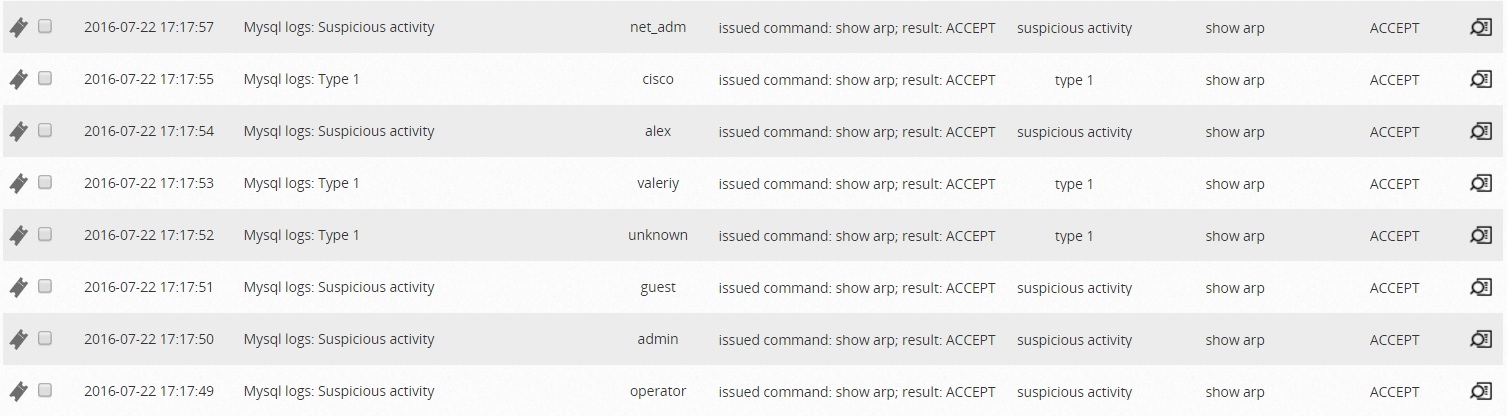
Figure 1 - Parsed events in the OSSIM interface
Here I would like to say that my first thought was to try to pass two parameters to a function, so that in the fields userdata3 and userdata4 write different parts from the source text.
For example, transmitting (text, 1) to receive a command, and (text, 2) - respectively, the result. Such a decision seems to me the most elegant.
I even wrote a function for this, which works if you run it on the server command line. But the OSSIM agent does not want to accept two parameters, only one.
I contacted alienvault with this question, but so far I have not received an answer. If anyone has any thoughts on this subject, please write in a personal message or comments.
Thanks in advance!
In continuation of my article, I want to review and share my experience with the “custom functions” functionality used in OSSIM. These are functions that are designed to process information received as a result of parsing of event logs. Processing can consist in resolving the name by IP address, determining the geolocation and all that is enough for imagination. In the example below, I will analyze the option of using “custom functions” for additional parsing of the received information.
1. What is it for?
Suppose that you are extracting event logs from a database (hereinafter referred to as the DB), as I described in the article . And it so happened that in one of the DB fields you have not one single value, for example, “username” or “IP address”, but a whole line of message from which you need to select keywords (for example, a line of the form “issued command: ls / root; result: ACCEPT "). And you need to get the command text (ls / root) and the result of its execution (ACCEPT) from this line.
Obviously, the standard functionality available for event log sources such as “mysql” cannot be done. This is where the "custom functions" functionality comes to the rescue. With its help, we can select the pieces of information of interest to us from the resulting string. So let's get started.
2. Statement of the problem
Based on the example from the article, it is necessary to extract information about the given command (everything that follows after “command:”) and the result of its execution (everything that follows after “result:”) from the log line stored in the database in the “message” field . Write the text of the command in the "userdata3" field, and the result of the command in the "userdata4" field.
Example table from the database:
+---------------------+----------+----------------------+----------+--------------------------------------------+
| date                | event_id | event_type           | username | message                                    |
+---------------------+----------+----------------------+----------+--------------------------------------------+
| 2016-07-22 17:17:05 |      283 | type 1               | net_adm  | issued command: show arp; result: ACCEPT   |
| 2016-07-22 17:17:49 |      284 | suspicious activity  | operator | issued command: show arp; result: ACCEPT   |
| 2016-07-22 17:17:50 |      285 | suspicious activity  | admin    | issued command: show arp; result: ACCEPT   |
| 2016-07-22 17:17:51 |      286 | suspicious activity  | guest    | issued command: show arp; result: ACCEPT   |
| 2016-07-22 17:17:52 |      287 | type 1               | unknown  | issued command: show arp; result: ACCEPT   |
| 2016-07-22 17:17:53 |      288 | type 1               | valeriy  | issued command: show arp; result: ACCEPT   |
| 2016-07-22 17:17:54 |      289 | suspicious activity  | alex     | issued command: show arp; result: ACCEPT   |
| 2016-07-22 17:17:55 |      290 | type 1               | cisco    | issued command: show arp; result: ACCEPT   |
| 2016-07-22 17:17:57 |      291 | suspicious activity  | net_adm  | issued command: show arp; result: ACCEPT   |
+---------------------+----------+----------------------+----------+--------------------------------------------+
3. Decision
To solve the problem will be performed:
- creating a function to highlight information about the team;
- creating a function to highlight information about the result of the command;
- additional configuration of the parser (previously created in the example ).
In order to use your own function in the OSSIM parser, you need to create a new file, for example:
/usr/share/alienvault/ossim-agent/plugins/db_logs_func.cfgAnd add functions to the file as:
Start Function  <имя функции>
    <тело функции>
End Function
Functions are written in python.
3.1. Creating a function to highlight team information
I wrote the following function to extract information about the given command from the event text:
def parse_command(input):
   res = re.search(r'command:.*;', input)
   return (res.group(0).split(": ")[1].strip(";"))
As you can see, this function with the help of a regular expression receives the necessary information (everything that is after “command:” and to the last “;”. I say the last one because the body of the command may also contain “;”) and returns it to the OSSIM for further processing by the parser.
3.2. Creating a function to highlight information about the result of a command
Similarly, we write the second function and add it to the file:
def parse_result(input):
   res = re.search(r'result:\s+\S+', input)
   return (res.group(0).split(": ")[1])
As a result, the file “/usr/share/alienvault/ossim-agent/plugins/db_logs_func.cfg” has the form:
Start Function parse_command
   def parse_command(input):
      res = re.search(r'command:.*;', input)
      return (res.group(0).split(": ")[1].strip(";"))
End Function
Start Function parse_result
   def parse_result(input):
      res = re.search(r'result:\s+\S+', input)
      return (res.group(0).split(": ")[1])
End Function
3.3. Additional parser configuration
I will not dwell on the explanation of the entire configuration of the parser, because this has already been done earlier in the example .
To inform the parser about the need to use the file with the created functions, you need to add the following line to the [config] section of the parser configuration file:
custom_functions_file=/etc/ossim/agent/plugin/db_logs_func.cfgTo use the created functions in the OSSIM parser, a configuration line of the form is used:
<OSSIM field> = {<function name> (<parameter>)}
By this line we tell the OSSIM agent in which field of the OSSIM event description schema you need to put the information obtained by applying the function to the parameter . And the parameter in our case is the information received from the database from the "message" field, ie event text of the form "issued command: show arp; result: ACCEPT ".
The OSSIM fields in our example will be: userdata3, userdata4
Functions, respectively: "def parse_command" and "def parse_result"
The parameter will be "$ 4"
As a result, the lines that need to be added to the parser configuration file look like this:
userdata3={parse_command($4)}
userdata4={parse_result($4)}
The following is the summary fragment (query section) of the OSSIM parser configuration file:
[query]
query="select event_id, date, event_type, username, message from data_table where event_id > $1;"
#order by event_id desc limit 1
regexp=
ref=0
date={normalize_date($1)}
plugin_sid={translate($2)}
username={$3}
userdata1={$4}
userdata2={$2}
userdata3={parse_command($4)}
userdata4={parse_result($4)}
After performing these manipulations, you must restart the OSSIM agent:
/etc/init.d/ossim-agent restartAfter the restart, it will not be superfluous to follow the messages in the log file for errors (suddenly crept in somewhere):
tail -f /var/log/alienvault/agent/agent.log|grep ERRORIf everything is done correctly, then in the graphical interface of OSSIM you can see the parsing of the event. Approximately the same as in Figure 1.
Figure 1 - Parsed events in the OSSIM interface
4. Improvement
Here I would like to say that my first thought was to try to pass two parameters to a function, so that in the fields userdata3 and userdata4 write different parts from the source text.
For example, transmitting (text, 1) to receive a command, and (text, 2) - respectively, the result. Such a decision seems to me the most elegant.
I even wrote a function for this, which works if you run it on the server command line. But the OSSIM agent does not want to accept two parameters, only one.
I contacted alienvault with this question, but so far I have not received an answer. If anyone has any thoughts on this subject, please write in a personal message or comments.
Thanks in advance!









