June 20, 2016 at 11:43
Introduction to ReactiveUI: pumping properties in ViewModel
In my C # projects, when implementing a GUI, I often use the ReactiveUI framework.
ReactiveUI is a full-fledged MVVM framework: bindings, routing, message bus, commands, and other words that are in the description of almost any MVVM framework, are here. It can be applied practically everywhere where there is .NET: WPF, Windows Forms, UWP, Windows Phone 8, Windows Store, Xamarin.
Of course, if you already have experience with it, then you are unlikely to find something new for yourself here. In this article we will get acquainted with its basic capabilities regarding working with properties in ViewModel, and in the future, I hope, we will get to other, more interesting and complex features.
ReactiveUI is built around a reactive programming model and uses Reactive Extensions (Rx). However, I do not set myself the goal of writing a reactive programming guide, only if necessary I will explain how it works. Soon you will see for yourself that to use the basic capabilities you don’t even need to delve into what kind of beast it is: reactive programming. Although you are already familiar with him, events are just that. Usually, even in places where "reactivity" is manifested, the code can be read quite easily and understand what will happen. Of course, if you use the library (and Reactive Extensions) to the fullest, you will have to seriously familiarize yourself with the reactive model, but for now we will go through the basics.
Personally, in addition to the direct capabilities of ReactiveUI, I like its unobtrusiveness: you can use only some subset of its features, not paying attention to others and not adjusting your application to the framework. Even, for example, apply it side-by-side with other frameworks without running across incompatibilities. Pretty comfortable.
There is a fly in the ointment. Her name is documentation. Everything is very bad with her. Something is here , but many pages are just stubs, and everything is very dry. There is documentation here, but the problem is the same: stubs, some copy-paste from the developers chat, links to sample applications in different sources, descriptions of features of the future version, etc. The developers are quite active in answering questions on StackOverflow, but there wouldn’t be many questions if there was normal documentation. However, what is not is not.
Let's move on to the specifics. In this article, we will talk about a typical problem with properties in ViewModels, and how it is solved in ReactiveUI. Of course, this problem is the INotifyPropertyChanged interface; a problem that is somehow solved in different ways.
Let's see the classic implementation:
What problems? Yes, like no. Well, three lines in the setter, it does not matter. In general, I usually write car properties and do auto-refactoring with a resolver in the reduced form, a minimum of body movements.
But there are still problems. What if I need to synchronize the FullName property when changing FirstName? There are two options: either this is a computed property and you just need to generate an event about its change, or it should be implemented similarly to FirstName, and you need to change it. In the first version, the FirstName property setter will generate the necessary notification:
In the second, a property update is called, and it will generate a notification itself:
It still looks relatively simple, but it's the road to hell. There is also LastName, which should also change FullName. Then fasten the search by the entered name, and everything will become even more complicated. And then another, and another ... And we find ourselves in a situation where in the code continuous generation of events, many actions are launched from the setters, some errors arise due to the fact that not all possible execution paths are taken into account or something is not called in that order, and other nightmares.
And in general, why does the FirstName property know that somewhere there is FullName, and that it is necessary to run a search by name? This is not his concern. It should change and report this. Yes, you can do it this way, and to invoke additional actions, hook onto your own PropertyChanged event, but there is not much joy in this - just take apart these events with the name of the changed property coming in the line.
And the simple implementation given at the very beginning all the same starts to annoy: almost the same code, which you still have to read, into which the error may creep in ...
Declarative and putting dependencies in order.
Install it from Nuget. We are looking for "reactiveui", I put the current version 6.5.0. Now, let's go to the list of available updates and update the Splat that appeared there to the latest version (now 1.6.2). Without this, at some point, everything fell down.
Now that we have installed the framework, let's try to improve our first example a bit. First, we inherit from ReactiveObject and rewrite the property setters:
Not yet thick. Such a RaiseAndSetIfChanged could be written by hand. But it’s worth saying right away that ReactiveObject implements not only INPC:
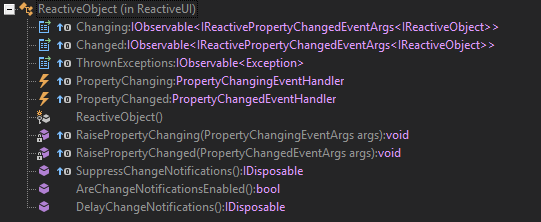
Here we see, in particular, the implementation of INotifyPropertyChanged, INotifyPropertyChanging and some three IObservable <>.
Here it is worth saying a few words about what kind of IObservable it is. These are push-based notification providers. The principle is quite simple: in the classical model (pull-based) we run to the data providers ourselves and poll them for updates. In reactive - we subscribe to such a notification channel and don’t worry about the survey, all updates will come to us themselves:
We act as an IObserver <> - observer:
OnNext is called when the next notification appears. OnError - if an error occurs. OnCompleted - when notifications are over.
You can unsubscribe from new notifications at any time: for this, the Subscribe method returns an IDisposable. Call Dispose - and there will be no new notifications.
Now, if we subscribe to Changed and change FirstName, the OnNext method will be called and the parameters will have the same information as in the event PropertyChanged (i.e. reference to the sender and the name of the property).
And also here we have many methods at our disposal, some of which came from LINQ. Select we have already tried. What more can be done? Filter the stream of notifications using Where, make Distinct repeated notifications or DistinctUntilChanged to avoid the same consecutive notifications, use Take, Skip and other LINQ methods.
Here it is possible to move all the time notice and see that how it works.
It turned out pretty briefly, but I think so far this is enough. You can read more, for example, here or here .
Let's get back to improving our problematic code. Let's put in order the dependencies:
Look, the properties no longer contain anything superfluous, all the dependencies are described in one place: in the constructor. Here we say subscribe to the FirstName and LastName changes, and when something changes - call UpdateFullName (). By the way, it’s possible in a slightly different way:
The notification parameter is the tuple that contains the current property values. We can pass them into our full name update method. Although the update method can generally be removed and done like this:
Now let's look at FullName again:
Why do we need a supposedly mutable property when in fact it should completely depend on the parts of the name and be read-only? Let's fix this:
ObservableAsPropertyHelper <> helps implement output properties. Inside is IObservable, the property becomes read-only, but notifications are generated when changes are made.
By the way, in addition to what came from LINQ, there are other interesting methods for IObservable <>, for example, Throttle:
Notifications are discarded here, within a second after which the following follows. That is, as long as the user types something in the name input field, FullName will not change. When he stops for at least a second, the full name will be updated.
We got a ViewModel, in which relationships between properties are described declaratively, in one place. This seems like a cool opportunity to me: you don’t need to shovel the whole code trying to figure out what will happen when these or those properties change. No side effects - everything is pretty obvious. Of course, the result of all these manipulations is some performance degradation. Although seriously this problem should not arise: this is not the core of the system, which should be as productive as possible, but the ViewModel layer.
I hope someone will find this article useful and interesting, and you will try to use the described technologies in your projects. In the future, I hope to describe things like reactive collections and commands, and then get to more complex examples that show the interaction between the View and ViewModel layers, routing, and user interaction.
Thanks for attention!
ReactiveUI is a full-fledged MVVM framework: bindings, routing, message bus, commands, and other words that are in the description of almost any MVVM framework, are here. It can be applied practically everywhere where there is .NET: WPF, Windows Forms, UWP, Windows Phone 8, Windows Store, Xamarin.
Of course, if you already have experience with it, then you are unlikely to find something new for yourself here. In this article we will get acquainted with its basic capabilities regarding working with properties in ViewModel, and in the future, I hope, we will get to other, more interesting and complex features.
Introduction
ReactiveUI is built around a reactive programming model and uses Reactive Extensions (Rx). However, I do not set myself the goal of writing a reactive programming guide, only if necessary I will explain how it works. Soon you will see for yourself that to use the basic capabilities you don’t even need to delve into what kind of beast it is: reactive programming. Although you are already familiar with him, events are just that. Usually, even in places where "reactivity" is manifested, the code can be read quite easily and understand what will happen. Of course, if you use the library (and Reactive Extensions) to the fullest, you will have to seriously familiarize yourself with the reactive model, but for now we will go through the basics.
Personally, in addition to the direct capabilities of ReactiveUI, I like its unobtrusiveness: you can use only some subset of its features, not paying attention to others and not adjusting your application to the framework. Even, for example, apply it side-by-side with other frameworks without running across incompatibilities. Pretty comfortable.
There is a fly in the ointment. Her name is documentation. Everything is very bad with her. Something is here , but many pages are just stubs, and everything is very dry. There is documentation here, but the problem is the same: stubs, some copy-paste from the developers chat, links to sample applications in different sources, descriptions of features of the future version, etc. The developers are quite active in answering questions on StackOverflow, but there wouldn’t be many questions if there was normal documentation. However, what is not is not.
What will be discussed
Let's move on to the specifics. In this article, we will talk about a typical problem with properties in ViewModels, and how it is solved in ReactiveUI. Of course, this problem is the INotifyPropertyChanged interface; a problem that is somehow solved in different ways.
Let's see the classic implementation:
private string _firstName;
public string FirstName
{
    get { return _firstName; }
    set
    {
        if (value == _firstName) return;
        _firstName = value;
        OnPropertyChanged();
    }
}
public event PropertyChangedEventHandler PropertyChanged;
protected virtual void OnPropertyChanged([CallerMemberName] string propertyName = null)
{
    PropertyChanged?.Invoke(this, new PropertyChangedEventArgs(propertyName));
}
What problems? Yes, like no. Well, three lines in the setter, it does not matter. In general, I usually write car properties and do auto-refactoring with a resolver in the reduced form, a minimum of body movements.
But there are still problems. What if I need to synchronize the FullName property when changing FirstName? There are two options: either this is a computed property and you just need to generate an event about its change, or it should be implemented similarly to FirstName, and you need to change it. In the first version, the FirstName property setter will generate the necessary notification:
set
{
    if (value == _firstName) return;
    _firstName = value;
    OnPropertyChanged();
    OnPropertyChanged(nameof(FullName));
}
In the second, a property update is called, and it will generate a notification itself:
set
{
    if (value == _firstName) return;
    _firstName = value;
    OnPropertyChanged();
    UpdateFullName();
}
private void UpdateFullName()
{
    FullName = $"{FirstName} {LastName}";
}
It still looks relatively simple, but it's the road to hell. There is also LastName, which should also change FullName. Then fasten the search by the entered name, and everything will become even more complicated. And then another, and another ... And we find ourselves in a situation where in the code continuous generation of events, many actions are launched from the setters, some errors arise due to the fact that not all possible execution paths are taken into account or something is not called in that order, and other nightmares.
And in general, why does the FirstName property know that somewhere there is FullName, and that it is necessary to run a search by name? This is not his concern. It should change and report this. Yes, you can do it this way, and to invoke additional actions, hook onto your own PropertyChanged event, but there is not much joy in this - just take apart these events with the name of the changed property coming in the line.
And the simple implementation given at the very beginning all the same starts to annoy: almost the same code, which you still have to read, into which the error may creep in ...
What does ReactiveUI offer us?
Declarative and putting dependencies in order.
Install it from Nuget. We are looking for "reactiveui", I put the current version 6.5.0. Now, let's go to the list of available updates and update the Splat that appeared there to the latest version (now 1.6.2). Without this, at some point, everything fell down.
Now that we have installed the framework, let's try to improve our first example a bit. First, we inherit from ReactiveObject and rewrite the property setters:
 public class PersonViewModel : ReactiveObject
{
    private string _firstName;
    public string FirstName
    {
        get { return _firstName; }
        set
        {
            this.RaiseAndSetIfChanged(ref _firstName, value);
            UpdateFullName();
        }
    }
    private string _lastName;
    public string LastName
    {
        get { return _lastName; }
        set
        {
            this.RaiseAndSetIfChanged(ref _lastName, value);
            UpdateFullName();
        }
    }
    private string _fullName;
    public string FullName
    {
        get { return _fullName; }
        private set
        {
            this.RaiseAndSetIfChanged(ref _fullName, value);
        }
    }
    private void UpdateFullName()
    {
        FullName = $"{FirstName} {LastName}";
    }
}
Not yet thick. Such a RaiseAndSetIfChanged could be written by hand. But it’s worth saying right away that ReactiveObject implements not only INPC:
Here we see, in particular, the implementation of INotifyPropertyChanged, INotifyPropertyChanging and some three IObservable <>.
Read more about the reactive model
Here it is worth saying a few words about what kind of IObservable it is. These are push-based notification providers. The principle is quite simple: in the classical model (pull-based) we run to the data providers ourselves and poll them for updates. In reactive - we subscribe to such a notification channel and don’t worry about the survey, all updates will come to us themselves:
public interface IObservable
{
    IDisposable Subscribe(IObserver observer);
}
We act as an IObserver <> - observer:
 public interface IObserver
{
    void OnNext(T value);
    void OnError(Exception error);
    void OnCompleted();
}
OnNext is called when the next notification appears. OnError - if an error occurs. OnCompleted - when notifications are over.
You can unsubscribe from new notifications at any time: for this, the Subscribe method returns an IDisposable. Call Dispose - and there will be no new notifications.
Now, if we subscribe to Changed and change FirstName, the OnNext method will be called and the parameters will have the same information as in the event PropertyChanged (i.e. reference to the sender and the name of the property).
And also here we have many methods at our disposal, some of which came from LINQ. Select we have already tried. What more can be done? Filter the stream of notifications using Where, make Distinct repeated notifications or DistinctUntilChanged to avoid the same consecutive notifications, use Take, Skip and other LINQ methods.
Let's look at an example of using Rx
var observable = Enumerable.Range(1, 4).ToObservable();
observable.Subscribe(Observer.Create(
    i => Console.WriteLine(i),
    e => Console.WriteLine(e),
    () => Console.WriteLine("Taking numbers: complete")
));
//1
//2
//3
//4
//Taking numbers: complete
observable.Select(i => i*i).Subscribe(Observer.Create(
    i => Console.WriteLine(i),
    e => Console.WriteLine(e),
    () => Console.WriteLine("Taking squares: complete")
));
//1
//4
//9
//16
//Taking squares: complete
observable.Take(2).Subscribe(Observer.Create(
    i => Console.WriteLine(i),
    e => Console.WriteLine(e),
    () => Console.WriteLine("Taking two items: complete")
));
//1
//2
//Taking two items: complete
observable.Where(i => i % 2 != 0).Subscribe(Observer.Create(
    i => Console.WriteLine(i),
    e => Console.WriteLine(e),
    () => Console.WriteLine("Taking odd numbers: complete")
));
//1
//3
//Taking odd numbers: complete
Here it is possible to move all the time notice and see that how it works.
It turned out pretty briefly, but I think so far this is enough. You can read more, for example, here or here .
Bind properties using ReactiveUI
Let's get back to improving our problematic code. Let's put in order the dependencies:
public class PersonViewModel : ReactiveObject
{
    private string _firstName;
    public string FirstName
    {
        get { return _firstName; }
        set { this.RaiseAndSetIfChanged(ref _firstName, value); }
    }
    private string _lastName;
    public string LastName
    {
        get { return _lastName; }
        set { this.RaiseAndSetIfChanged(ref _lastName, value); }
    }
    private string _fullName;
    public string FullName
    {
        get { return _fullName; }
        private set { this.RaiseAndSetIfChanged(ref _fullName, value); }
    }
    public PersonViewModel(string firstName, string lastName)
    {
        _firstName = firstName;
        _lastName = lastName;
        this.WhenAnyValue(vm => vm.FirstName, vm => vm.LastName).Subscribe(_ => UpdateFullName());
    }
    private void UpdateFullName()
    {
        FullName = $"{FirstName} {LastName}";
    }
}
Look, the properties no longer contain anything superfluous, all the dependencies are described in one place: in the constructor. Here we say subscribe to the FirstName and LastName changes, and when something changes - call UpdateFullName (). By the way, it’s possible in a slightly different way:
public PersonViewModel(...)
{
    ...
    this.WhenAnyValue(vm => vm.FirstName, vm => vm.LastName).Subscribe(t => UpdateFullName(t));
}
private void UpdateFullName(Tuple tuple)
{
    FullName = $"{tuple.Item1} {tuple.Item2}";
}
The notification parameter is the tuple that contains the current property values. We can pass them into our full name update method. Although the update method can generally be removed and done like this:
this.WhenAnyValue(vm => vm.FirstName, vm => vm.LastName).Subscribe(t => { FullName = $"{t.Item1} {t.Item2}"; });
Now let's look at FullName again:
private string _fullName;
public string FullName
{
    get { return _fullName; }
    private set { this.RaiseAndSetIfChanged(ref _fullName, value); }
}
Why do we need a supposedly mutable property when in fact it should completely depend on the parts of the name and be read-only? Let's fix this:
private readonly ObservableAsPropertyHelper _fullName;
public string FullName => _fullName.Value;
public PersonViewModel(...)
{
    ...
    _fullName = this.WhenAnyValue(vm => vm.FirstName, vm => vm.LastName)
                    .Select(t => $"{t.Item1} {t.Item2}")
                    .ToProperty(this, vm => vm.FullName);
}
ObservableAsPropertyHelper <> helps implement output properties. Inside is IObservable, the property becomes read-only, but notifications are generated when changes are made.
By the way, in addition to what came from LINQ, there are other interesting methods for IObservable <>, for example, Throttle:
_fullName = this.WhenAnyValue(vm => vm.FirstName, vm => vm.LastName)
                .Select(t => $"{t.Item1} {t.Item2}")
                .Throttle(TimeSpan.FromSeconds(1))
                .ToProperty(this, vm => vm.FullName);
Notifications are discarded here, within a second after which the following follows. That is, as long as the user types something in the name input field, FullName will not change. When he stops for at least a second, the full name will be updated.
Result
Final code
using System.Reactive.Linq;
namespace ReactiveUI.Guide.ViewModel
{
    public class PersonViewModel : ReactiveObject
    {
        private string _firstName;
        public string FirstName
        {
            get { return _firstName; }
            set { this.RaiseAndSetIfChanged(ref _firstName, value); }
        }
        private string _lastName;
        public string LastName
        {
            get { return _lastName; }
            set { this.RaiseAndSetIfChanged(ref _lastName, value); }
        }
        private readonly ObservableAsPropertyHelper _fullName;
        public string FullName => _fullName.Value;
        public PersonViewModel(string firstName, string lastName)
        {
            _firstName = firstName;
            _lastName = lastName;
            _fullName = this.WhenAnyValue(vm => vm.FirstName, vm => vm.LastName)
                            .Select(t => $"{t.Item1} {t.Item2}")
                            .ToProperty(this, vm => vm.FullName);
        }
    }
}
We got a ViewModel, in which relationships between properties are described declaratively, in one place. This seems like a cool opportunity to me: you don’t need to shovel the whole code trying to figure out what will happen when these or those properties change. No side effects - everything is pretty obvious. Of course, the result of all these manipulations is some performance degradation. Although seriously this problem should not arise: this is not the core of the system, which should be as productive as possible, but the ViewModel layer.
I hope someone will find this article useful and interesting, and you will try to use the described technologies in your projects. In the future, I hope to describe things like reactive collections and commands, and then get to more complex examples that show the interaction between the View and ViewModel layers, routing, and user interaction.
Thanks for attention!