June 21, 2016 at 10:50
NetApp ONTAP with Veeam Backup & Replication
NetApp was the first to implement and patent the snapshot technology in the world in 1993. Since then, the technology has naturally developed and debugged. After 23 years, we can safely say that NetApp snapshoting works fine without affecting performance, regardless of the protocol: block or file. With the advent of Flash technology, the IT industry has turned its eyes to the use of snapshots and subtle cloning because Flash is still an expensive technology and its resources must be saved. NetApp has been single-handedly developing and carrying the backup paradigm for many years., built on whispers, where snapshots were not a temporary necessity, but the basis of this idea, and finally it was recognized that this is an effective and correct approach for backup and development. And with the advent of Thing Propositioning and UNMAP, snapshots have become really convenient to use and store as backups directly to the main, productive storage system, which allows you to extremely quickly recover data after a logical error. And for backup and protection against failure of the main storage system, use data replication technologies based on snapshots to replicate only changes, and not a complete data set.
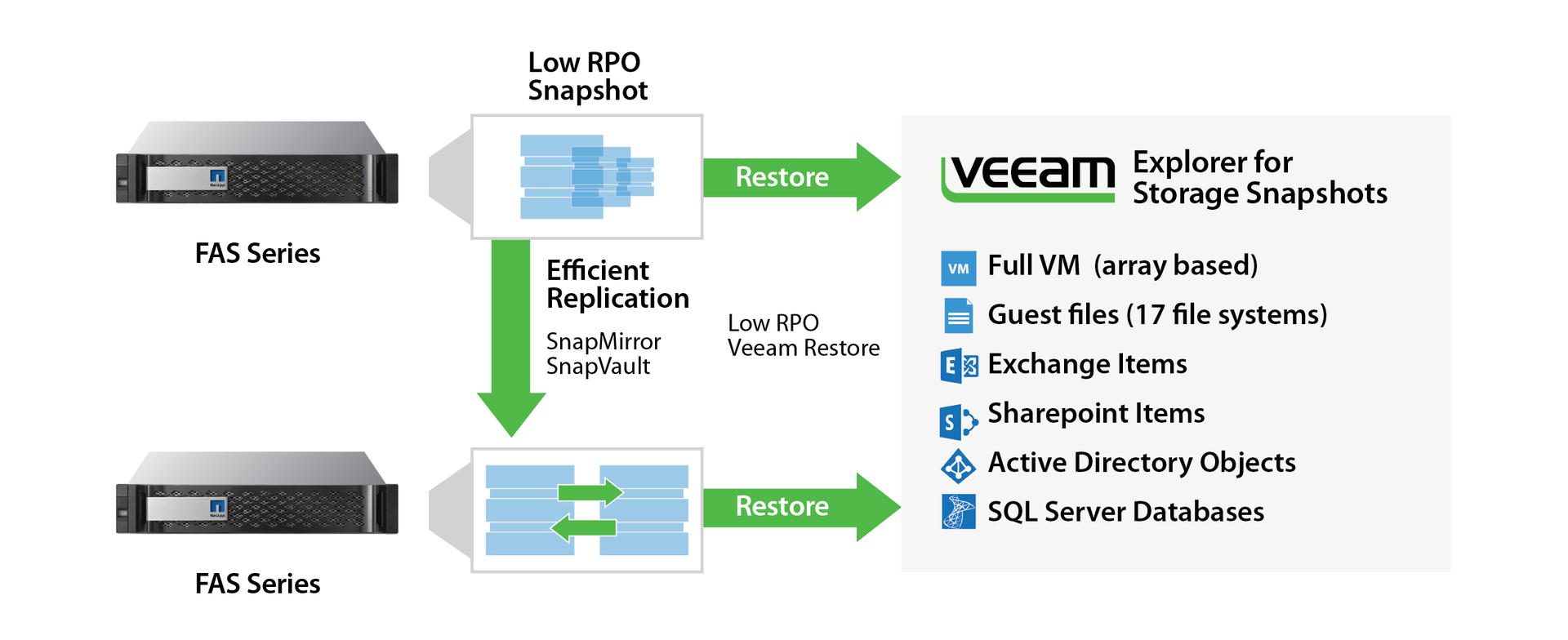
An important advantage of snapshots is their ability to quickly remove and restore without the need to drive traffic through the host and media server (proxy server). Neither the host CPU nor network adapters suffer from overloads, the disk subsystem does not load at all in case of recovery from a snapshot, and in case of recovery from a replica it loads much less than with Full Backup / Restore. This dramatically improves the backup picture: it becomes possible to take backups together with hardware snapshots more often, and right in the middle of the work day.
But this whole picture is not complete without backup software. Since the captured and replicated data itself is not consistent from the point of view of the application, and without cataloging all the information, their use is greatly complicated. NetApp has partnered with many well-known backup software companies to integrate their products with storage capabilities.
In this article I want to talk about possible NetApp and Veeam Backup & Replication interaction schemes for performing and storing backups of a virtualized infrastructure.
This scheme provides for product launch and data storage on ONTAP. In order for the cataloging function to work on the LUN, you must have a SnapRestore or FlexClone license . For the NFS protocol, no license is needed for content cataloging, and SnapRestore is desirable for data recovery on ONTAP, but if it is not, the built-in NDMP client will be used (only for 7-Mode). In case of data recovery, it is highly desirable to have a SnapRestore or FlexClone license to instantly recover any amount of data from a snapshot. Without a license, recovery will be performed using the copy operation from the storage system to (possibly the same) storage system, through a media agent, which will take some time.
It is important to note that the bulk of data corruption is closed by this particular scheme, since there are much more “logical damages” compared to accidents or catastrophes that occur, but much, much less often.
The configuration of this scheme is described in more detail in the article Veeam Backup & Replication + NetApp ONTAP 8/9
The schemes described below provide for the launch of a product and storage of data on ONTAP and their subsequent replication to the second (third, etc.) ONTAP. As a rule, it is used in conjunction with the “Storage backups on the main system in the form of snapshots” scheme. This allows you to quickly restore data in the event of a "logical damage" (hackers, viruses, etc.), since such damage is the bulk in comparison with disasters and accidents. The difference between Archiving and DR is that in the first case, restoration, as, for example, in the case of tape media, always occurs on the main system, to where the data was before (or to a new location, but you won’t start the database from tape for example, the same here). In the second case with SnapMirror, you can switch from the first (primary) to the backup (secondary) system, in case of an accident at the site, and continue to work already with her. Archiving or DR requires a replication license, SnapVault or SnapMirror, respectively.
To perform LUN cataloging on the primary or backup storage, you must have a SnapRestore or FlexClone license on the corresponding site .
After the data is replicated to the backup system, it is very convenient to run cataloging and testing there, so that these operations do not load the productive. Again, from the second system, you can pull the reserved data to put it on a tertiary system (NetApp or a third-party manufacturer). As in the case of NFS and LUNs (SAN requires FlexClone or SnapRestore license), the data will be pulled from the backup system through the media agent. In the case of the LUN, it will be copied using thin cloning, automatically connected to the media agent. In the case of NFS, nothing will be cloned, since Veeam, as mentioned earlier, can climb and read snapshots using the NFS protocol using the built-in agent.
Data can be replicated both to the NetApp FAS physical platform with ONTAP, and to Data ONTAP Edge , ONTAP Select, or ONTAP for Cloud , located inside the public cloud.
When using this type of replication, if you perform recovery using the storage means, recovery must be performed on the primary system. If it is not, then you have to buy it. In extreme cases, it is possible to convert SnapVault to SnapMirror, and only then restore the data.

As a rule, it is used in conjunction with the “Storage backups on the main system in the form of snapshots” scheme. This allows you to quickly restore data in case of "logical damage" (hackers, viruses, etc.). In the event of a disaster at the main site, the spare site can be converted into the main storage. It is logical to be able to do this, so that the primary and secondary systems are more or less the same in performance. Otherwise, you should ask yourself in advance which critical services will need to be launched and which will not be launched. SnapMirror for SVM can be used for this scenario.with one of the Identity Preserve or Identity Discard recovery modes. Identity Preserve saves network address settings when moving, which imposes the need to stretch the L2 domain between sites and requires appropriate network equipment and channels. Identity Discard allows you to pre-set new network addresses (which will arise at the time of switching to the secondary storage system) at which data will be available on the secondary storage system, this does not eliminate the need for specialized equipment, but requires reconfiguration of hosts manually or using scripts.

Data replicated using SnapMirror to the secondary (backup storage) can then be replicated to the tertiary NetApp Data ONTAP system using SnapVault.
In order for the hardware dedup to work most efficiently, on the Veeam side, it is necessary to configure the Dedup-friendly compression policy in the advanced Job settings so that the data blocks lie on the border of the WAFL file system block ( block misalignment ) or disable the program dedup in Veeam.

Starting with Availability Suite v9, Direct NFS is supported, built right into the Veeam application (not to be confused with NFS Client for Windows), it was developed specifically for ONTAP. This allows Veeam to communicate directly with NetApp storage, allowing you to backup and restore data directly, bypassing the hypervisor, which speeds up such operations. An important useful feature is the ability to read existing snapshots from storage.
By the way, did you know that NFS in VMware appeared exactly the same, thanks to NetApp?
Starting with v9, the On-Demand Sandbox for Storage Snapshots product is supported, which allows you to make thin Hardware-Assistant copies of virtual machines for testing and development. For this functionality to work, you need a license that launches FlexClone technology .
VVOL technology will radically change the backup approach of a virtual environment. One of the reasons for this is a fundamentally different approach to snapshoting and backup, since VVOL uses hardware snapshoting, the issue of consolidating and removing VMware snapshots is no longer needed. Due to the elimination of the problem with consolidation of VMware snapshots, removing application-aware backups is no longer a headache for administrators. NetApp is a technology and VVOL design partner, and has supported this technology since ONTAP version 8.2.1 and later.. DR functionality for VP is also supported, which allows the use of hardware-based SnapMirror replication. Veeam also supports SnapMirror and VVOL hardware replication management (individually). So far, Veeam B&R does not support VVOL together with SnapMirror, but due to the prospects of the technology, it will appear there. Veeam: VMware Virtual Volumes - Can't Deploy? .
Veeam is perfectly able to interact with AlataVault , performing backup backups for long-term storage on this system with all of the above examples, i.e. act as a secondary or tertiary repository of archival copies. Since AlataVault acts as a file sphere, Veeam always performs data upload there through a media agent.
Backing up data with Veeam Backup & Replication, together with hardware snapshots and thin replication, allows you to take backups more often, protecting against logical data damage (viruses, hackers, etc.) and physical destruction, without loading the CPU and host network interfaces, bypassing them completely.
Veeam specifically developed the NFS agent NetApp ONTAP for the ability to read snapshot content “directly”, both for cataloging and for backup, which, in turn, indicates a deep integration of these products and the most optimal use of resources.
There are many replication and backup schemes, once again confirming the effectiveness and optimality of using the snapshot-based backup paradigm.
To get the most effect from both manufacturers, it is worth using the Disaster Recovery (SnapMirror) scheme - we are recovering to a spare site with the possibility of testing and cataloging on a backup site.
Translation into English:
ONTAP with Veeam Backup & Replication
This may contain links to Habra articles that will be published later.
Please send messages about errors in the text to the LAN .
Comments, additions and questions on the opposite article, please comment .
An important advantage of snapshots is their ability to quickly remove and restore without the need to drive traffic through the host and media server (proxy server). Neither the host CPU nor network adapters suffer from overloads, the disk subsystem does not load at all in case of recovery from a snapshot, and in case of recovery from a replica it loads much less than with Full Backup / Restore. This dramatically improves the backup picture: it becomes possible to take backups together with hardware snapshots more often, and right in the middle of the work day.
But this whole picture is not complete without backup software. Since the captured and replicated data itself is not consistent from the point of view of the application, and without cataloging all the information, their use is greatly complicated. NetApp has partnered with many well-known backup software companies to integrate their products with storage capabilities.
In this article I want to talk about possible NetApp and Veeam Backup & Replication interaction schemes for performing and storing backups of a virtualized infrastructure.
Schematic: Storage of backups on the main system in the form of snapshots
This scheme provides for product launch and data storage on ONTAP. In order for the cataloging function to work on the LUN, you must have a SnapRestore or FlexClone license . For the NFS protocol, no license is needed for content cataloging, and SnapRestore is desirable for data recovery on ONTAP, but if it is not, the built-in NDMP client will be used (only for 7-Mode). In case of data recovery, it is highly desirable to have a SnapRestore or FlexClone license to instantly recover any amount of data from a snapshot. Without a license, recovery will be performed using the copy operation from the storage system to (possibly the same) storage system, through a media agent, which will take some time.
It is important to note that the bulk of data corruption is closed by this particular scheme, since there are much more “logical damages” compared to accidents or catastrophes that occur, but much, much less often.
The configuration of this scheme is described in more detail in the article Veeam Backup & Replication + NetApp ONTAP 8/9
Backup and restore on a secondary NetApp ONTAP system
The schemes described below provide for the launch of a product and storage of data on ONTAP and their subsequent replication to the second (third, etc.) ONTAP. As a rule, it is used in conjunction with the “Storage backups on the main system in the form of snapshots” scheme. This allows you to quickly restore data in the event of a "logical damage" (hackers, viruses, etc.), since such damage is the bulk in comparison with disasters and accidents. The difference between Archiving and DR is that in the first case, restoration, as, for example, in the case of tape media, always occurs on the main system, to where the data was before (or to a new location, but you won’t start the database from tape for example, the same here). In the second case with SnapMirror, you can switch from the first (primary) to the backup (secondary) system, in case of an accident at the site, and continue to work already with her. Archiving or DR requires a replication license, SnapVault or SnapMirror, respectively.
To perform LUN cataloging on the primary or backup storage, you must have a SnapRestore or FlexClone license on the corresponding site .
After the data is replicated to the backup system, it is very convenient to run cataloging and testing there, so that these operations do not load the productive. Again, from the second system, you can pull the reserved data to put it on a tertiary system (NetApp or a third-party manufacturer). As in the case of NFS and LUNs (SAN requires FlexClone or SnapRestore license), the data will be pulled from the backup system through the media agent. In the case of the LUN, it will be copied using thin cloning, automatically connected to the media agent. In the case of NFS, nothing will be cloned, since Veeam, as mentioned earlier, can climb and read snapshots using the NFS protocol using the built-in agent.
VSA / Public Cloud
Data can be replicated both to the NetApp FAS physical platform with ONTAP, and to Data ONTAP Edge , ONTAP Select, or ONTAP for Cloud , located inside the public cloud.
Scheme: Archiving (SnapVault) - restore to the main site
When using this type of replication, if you perform recovery using the storage means, recovery must be performed on the primary system. If it is not, then you have to buy it. In extreme cases, it is possible to convert SnapVault to SnapMirror, and only then restore the data.
Scheme: Disaster Recovery (SnapMirror) - recovering to a spare site
As a rule, it is used in conjunction with the “Storage backups on the main system in the form of snapshots” scheme. This allows you to quickly restore data in case of "logical damage" (hackers, viruses, etc.). In the event of a disaster at the main site, the spare site can be converted into the main storage. It is logical to be able to do this, so that the primary and secondary systems are more or less the same in performance. Otherwise, you should ask yourself in advance which critical services will need to be launched and which will not be launched. SnapMirror for SVM can be used for this scenario.with one of the Identity Preserve or Identity Discard recovery modes. Identity Preserve saves network address settings when moving, which imposes the need to stretch the L2 domain between sites and requires appropriate network equipment and channels. Identity Discard allows you to pre-set new network addresses (which will arise at the time of switching to the secondary storage system) at which data will be available on the secondary storage system, this does not eliminate the need for specialized equipment, but requires reconfiguration of hosts manually or using scripts.
Data replicated using SnapMirror to the secondary (backup storage) can then be replicated to the tertiary NetApp Data ONTAP system using SnapVault.
Scheme: Filling backups on ONTAP - target archive repository with hardware dedup
In order for the hardware dedup to work most efficiently, on the Veeam side, it is necessary to configure the Dedup-friendly compression policy in the advanced Job settings so that the data blocks lie on the border of the WAFL file system block ( block misalignment ) or disable the program dedup in Veeam.
Veeam Direct NFS Client
Starting with Availability Suite v9, Direct NFS is supported, built right into the Veeam application (not to be confused with NFS Client for Windows), it was developed specifically for ONTAP. This allows Veeam to communicate directly with NetApp storage, allowing you to backup and restore data directly, bypassing the hypervisor, which speeds up such operations. An important useful feature is the ability to read existing snapshots from storage.
By the way, did you know that NFS in VMware appeared exactly the same, thanks to NetApp?
On-demand sandbox
Starting with v9, the On-Demand Sandbox for Storage Snapshots product is supported, which allows you to make thin Hardware-Assistant copies of virtual machines for testing and development. For this functionality to work, you need a license that launches FlexClone technology .
Vvol
VVOL technology will radically change the backup approach of a virtual environment. One of the reasons for this is a fundamentally different approach to snapshoting and backup, since VVOL uses hardware snapshoting, the issue of consolidating and removing VMware snapshots is no longer needed. Due to the elimination of the problem with consolidation of VMware snapshots, removing application-aware backups is no longer a headache for administrators. NetApp is a technology and VVOL design partner, and has supported this technology since ONTAP version 8.2.1 and later.. DR functionality for VP is also supported, which allows the use of hardware-based SnapMirror replication. Veeam also supports SnapMirror and VVOL hardware replication management (individually). So far, Veeam B&R does not support VVOL together with SnapMirror, but due to the prospects of the technology, it will appear there. Veeam: VMware Virtual Volumes - Can't Deploy? .
NetApp AltaVault
Veeam is perfectly able to interact with AlataVault , performing backup backups for long-term storage on this system with all of the above examples, i.e. act as a secondary or tertiary repository of archival copies. Since AlataVault acts as a file sphere, Veeam always performs data upload there through a media agent.
conclusions
Backing up data with Veeam Backup & Replication, together with hardware snapshots and thin replication, allows you to take backups more often, protecting against logical data damage (viruses, hackers, etc.) and physical destruction, without loading the CPU and host network interfaces, bypassing them completely.
Veeam specifically developed the NFS agent NetApp ONTAP for the ability to read snapshot content “directly”, both for cataloging and for backup, which, in turn, indicates a deep integration of these products and the most optimal use of resources.
There are many replication and backup schemes, once again confirming the effectiveness and optimality of using the snapshot-based backup paradigm.
To get the most effect from both manufacturers, it is worth using the Disaster Recovery (SnapMirror) scheme - we are recovering to a spare site with the possibility of testing and cataloging on a backup site.
Translation into English:
ONTAP with Veeam Backup & Replication
This may contain links to Habra articles that will be published later.
Please send messages about errors in the text to the LAN .
Comments, additions and questions on the opposite article, please comment .