 March 4, 2016 at 11:39
An overview of physics in Sonic games. Parts 3 and 4: jumping and spinning
- Transfer
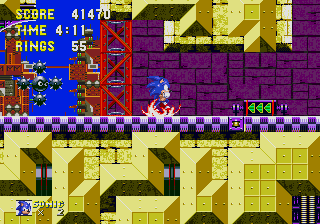
From a translator: parts of the review are small, so I decided to translate two parts at once.
Links to other parts of the series:
Part 1: solid tiles
Part 2: running
Parts 5 and 6: losing rings and being under water
Parts 7 and 8: springs and gizmos, super speeds
Part 3: jumping
- 1 Acceleration in the air
- 2 Gravity
- 3 Maximum vertical speed
- 4 air resistance
- 5 Jump speed
Acceleration in the air
When Sonic is in the air, he can accelerate faster than on earth. Twice as fast, to be precise: 0.09375. We call this value air .
There is no friction in the air (but there is a complex resistance effect that will be discussed below), and almost always, when Sonic has a certain horizontal speed in the air, he will keep it until the player changes it or Sonic hits the wall.
In addition to slowing down and there is no difference, when you press the "left" of the horizontal velocity will always be subtracted air , and when you press the "right" air will be added to it.
Sonic's maximum speed in air is the same as on earth, and is 6.
Gravity
Gravity has a value of 0.21875 ( grv ). This value is added to the vertical speed at each step in which Sonic is not on the ground. It makes him fall down when sliding off a cliff and does not allow him to endlessly move up when jumping.
Maximum vertical speed
It seems that in Sonic 1 the vertical speed of Sonic is not limited in any way. When falling, grv continues to add to the vertical speed, increasing it infinitely.
In Sonic CDa restriction is introduced, in it Sonic can not fall faster than 16 pixels per step. This restriction is important so that Sonic never overtakes the camera and does not fly through the ground, because he could move so fast that he did not even collide with it. I think this restriction was introduced due to the increased level height, for example in Collision Chaos, and the endless vertical shaft in Tidal Tempest. Without this limitation, Sonic could accelerate to huge speeds in some areas, which could lead to disruption of the gameplay.
{
 Y speed = Y speed + grv
 if Y speed > 16 then Y speed = 16
 }
Air resistance
At each step in which Sonic is in the air, a special formula is applied to the horizontal speed of Sonic, but only under certain conditions. First, the vertical speed should be negative. Secondly, the vertical speed should be greater than -4 (for example, -3 or -3.5 greater than -4). Thirdly, the absolute value of the horizontal velocity should be greater than 0.125. If these conditions are met, the horizontal speed is multiplied by a factor of 0.96875.
 {
 if Y speed < 0 and Y speed is > -4
   {
   if absolute(X speed) >= 0.125 then X speed = X speed * 0.96875
   }
 }
Actually, this is only an approximate calculation, and this is why: since the original games use 2 bytes to store the Sonic speed value, where the first is pixels and the second are subpixels, the speed of 6.5 pixels per step will be expressed in hexadecimal value of $ 0680. In decimal it is 1664. Of course, Sonic does not move at a speed of more than a thousand pixels per step! 1 pixel = $ 100 (256), half a pixel = $ 80 (128). Therefore, in the original game, air resistance should be calculated something like this:
 {
 if Y speed < 0 and Y speed is > -$0400
   {
   X speed = X speed - ( X speed div $0020 ) ; "div" - это целочисленное деление
   }
 }
If we performed these calculations for relatively low values of horizontal velocity, which would always be less than $ 20 (32), this would hardly affect the horizontal velocity. Why? Because with an integer division of any number less than 32 by 32, the result would be 0. Therefore, in the original game, before calculating the air resistance, you do not need to check whether the horizontal speed of a certain value is greater - if the horizontal speed is equal to or less than $ 001F, then in any case, nothing will happen.
Therefore, air resistance can be more accurately emulated as follows:
 {
 if Y speed < 0 and Y speed is > -4
   {
   X speed = X speed - ( ( X speed div 0.125 ) / 256 )
   }
 }
In any case, the difference between the two methods is quite insignificant, just the second one is technically more accurate.
Air resistance is calculated at each step before adding grv to the vertical speed.
Jump speed
Now we are used to it, but at the time of the release of the game Sonic the Hedgehog there were a lot of games that used a fixed jump height. It doesn’t matter how quickly the player releases the jump button - the character still goes up by the same number of pixels. Games such as Mario and Sonic were among the first to have more flexible and responsive controls, providing an improved sense of character control, which means a much more interesting and sparing gameplay.
How is a variable jump height arranged?
When you press the up button when Sonic is on the ground, the vertical speed becomes -6.5 ( jmp) In a game without a variable jump height, no further calculations would be performed after that, except for the addition of gravity, and the character’s speed would gradually decrease under its influence. The result would be a jump lasting exactly 1 second to a height of 100 pixels. This type of jump is obtained if the player presses the jump button and holds it until Sonic reaches the top of his trajectory. But the trick that creates a variable jump height is to release the button.
When a player releases the jump button in the air after the jump, the computer checks if Sonic is moving up (i.e., the vertical speed is negative). If so, then it checks to see if the vertical speed is less than -4 (for example, -5 is less than -4). If so, then -4 is assigned to the vertical speed. Thus, you can complete the jump at any time by releasing the jump button. If the player releases the button in the next step after the jump, Sonic takes the shortest jump.
In the step where the computer detects the click of a jump button, Sonic does not actually move up. Therefore, in the next step, he can recognize the release of the jump button and Sonic will start to move up at a speed of -4, without moving up at a speed of jmp .
Checking for the release of the jump button is performed before moving Sonic to a new position and adding grv to the vertical speed.
Unfortunately, the computer checks the click of the jump button before moving Sonic. If the player presses the jump button, he leaves the rest of the cycle, so Sonic does not move during the step at which the player jumps, neither in the vertical nor in the horizontal position. This is wrong, because the horizontal speed is not lost, and he must continue to move. This drawback can be eliminated in the new engine.
Tails jumps like Sonic does, and Knuckles jumps a little lower because it has a slightly lower jmp value , -6.
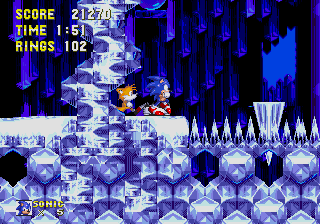
Part 4: rotation
- 1 Friction
- 2 Slowdown
- 3 Maximum speed
- 4 Terms
- 5 Jump in rotation
Friction
When Sonic begins to rotate when pressed
 on the crosspiece, but can no longer accelerate. No matter how the player presses the button for a long time and in the direction of movement, he will behave as if the player is not pressing anything. The only thing involved in this case is friction, here it has a value of 0.0234375 (half of normal), so it seems that Sonic rolls smoothly, like a wheel or a ball. In fact, Mega Drive calculates friction during rotation, halving the value of normal friction. If you use Game Genie to change the value of friction, then the friction of rotation will always be half as much.
Slowdown
However, Sonic can still slow down while spinning. When the button is pressed in the opposite direction to its movement, the horizontal speed will decrease by 0.125. In addition, unlike walking behavior, friction during rotation continues to operate even if the player presses a button in the direction of travel. Therefore, in reality, when decelerating, the horizontal speed decreases in each step by 0.125 + 0.0234375, or by 0.1484375.
It is strange that the same anomaly of deceleration, as when running, occurs during rotation. If the absolute value of the horizontal velocity is less than 0.1484375, then this value is subtracted, instead of equating the horizontal velocity to zero, and becomes equal to 0.5 in the opposite direction. Therefore, Sonic can unexpectedly turn during rotation, even if he can not accelerate! This bug was fixed in Sonic 3 and Knuckles , probably the programmers themselves found this behavior undesirable.
Maximum speed
(Note: at the moment this is tested for Sonic 1 and 2. It is not yet known whether this is true for Sonic 3K or Sonic CD.)
Despite the fact that Sonic cannot roll faster on its own, this does not mean which -Never a hill can give it a little extra boost. Hills and slopes can be used to rotate at very high speeds. As in the case of running, during rotation Sonic has a maximum speed limit, although it is much higher and reaches 16 pixels per step. However, unlike running, Sonic cannot overcome this speed limit in any way. If its gsp reaches a value of 16 and tries to increase further, it will automatically be set to 16.
Conditions
In Sonic 1 and 2 games, Sonic cannot start spinning if its absolute horizontal speed is greater than 0.53125.
In Sonic 3 and Knuckles, this value is increased to 1.03125. This is very convenient because you can hold down the down button to rotate. If Sonic needed to stop before bending down, the player would have difficulty with the quick start of rotation.
In Sonic 3 and Knuckles, Sonic stops spinning if its absolute horizontal speed drops below 0.5. Perhaps this way they wanted to eliminate the anomaly associated with turning in the opposite direction when spinning in previous games.
Leap in rotation
In Sonic 1, 2, 3 and Knuckles, the player cannot control the path of Sonic in the air using the direction buttons when jumping in rotation. Therefore, it is difficult to start the rotation to gain speed, and then make an exact jump. In Sonic 3 and Sonic & Knuckles, a player can regain control of the direction buttons by completing the W Kaiten Attack.
W kaiten attack
He is Insta-Shield , aka W Spin Attack (W 回 転 ア タ ッ ク) (in Japan), aka Twin-Spin Attack in Sonic Generations - this is a special movement, first used by Sonic in Sonic the Hedgehog 3 . Jumping and then pressing the jump button in the air again creates a short flash that increases Sonic's radius of attack and makes him temporarily invulnerable. This technique is useful for attacking bosses that are slightly outside the radius of attack, and covered with spiked enemies, such as Orbinaut. None of the characters, except Sonic, can use this technique.

Orbinaut
Orbinaut
However, in a Sonic CD, a player can control a jump made in rotation, as if it were a normal jump. It seems that this is more honest with the player.









