December 31, 2015 at 06:00
Working with a database in the Google App Engine / Google Cloud Endpoints in Java: Objectify framework
- Tutorial
In previous articles ( “Google Cloud Endpoints in Java: A Guide. Part 1 , ” “Google Cloud Endpoints in Java: A Guide. Part 2 (Frontend) , ” “Google Cloud Endpoints in Java: A Guide. Part 3” ), we We analyzed the creation of APIs on Google Cloud Endpoints and the frontend to it on AngularJS .
However, guidance on creating an API would be incomplete without working with a database.
In this article, we will look at the Objectify framework for working with the GA Engine's App Engine Datastore database .
App Engine Datastore is a non-relational NoSQL-database (schemaless NoSQL datastore) of the type “Key-value database”.
The key is the unique identifier of the “object” (in the App Engine datastore this is called “Entity”) in the database.
The key consists of three components:
Kind (type): which corresponds to the type of the object in the database (using Objectify we model kind as a Java class, i.e., relatively speaking, in our case, kind means the class of the object located in the database)
Identifier ( identifier): the unique identifier of the object, which can be either a string (String), in which case it is called name , or a number (Long) in this case it is called Id . Those. view id
Parent (group of objects): objects in the database can be combined into "groups of objects", for this, either the key of the "parent" object is specified in parent, or null (by default) for objects not included in groups.
An object (Entity) in the database has properties that can contain values (Value type), their correspondence to Java data types (Java types) is given in the table:
Objectify performs three basic operations:
save () : save the object in the database
delete () : delete the object from the database
load () : load the object or list (List) of objects from the database.
In order to combine objects into a group, the “parent” object does not have to exist in the database, just specify the object key. Deleting the “parent” does not delete the “children”; they will continue to refer to its key.
Using this mechanism, objects in the database can be organized in the form of hierarchical structures.
The relations “parent object” - “child object” (parent – child relationship) can be established both between objects of the same type (for example, great-grandfather -> grandfather -> father -> I -> son) and objects of different types (for example, for objects of the type “car” child objects can be objects of the type “wheel”, “engine”)
Moreover, each "child" object can have only one "parent" object. And, since the key of the parent object is part of the key of the object, we cannot add or remove it after the object is created - the key is not changed. Therefore, the use of the "parent key" should be approached with caution.
As a rule, within a single transaction, we can access data from only one group of objects (but there is a way to use several groups in one transaction)
When any object in a group changes for a group, the timestamp changes. The time stamp is set for the whole group, and is updated when any object in the group changes.
When we make a transaction, then each group of objects that the transaction affects is marked as enlisted in this transaction. When a transaction is committed, all timestamps of the groups involved in the transaction are checked. If any of the timestamps has changed (because another transaction changed the object (s) in the group at that time), then the whole transaction is canceled and a ConcurrentModificationException is thrown. For more details, see github.com/objectify/objectify/wiki/Concepts#optimistic-concurrency
Objectify handles this kind of exception and repeats the transaction. Therefore, transactions must be idempotent , i.e. we must be able to repeat the transaction any number of times and get the same result.
For more information on transactions in Objectify, see: github.com/objectify/objectify/wiki/Transactions
To use the framework, we need to add objectify.jar and guava.jar to the project .
Objectify is in the Maven repository , we just need to add to pom.xml:
- objectify.jar and guava.jar will be added to the project.
Objectify uses a filter that must be written in WEB-INF / web.xml:
Let's create the UserData class that will model the entity (Entity) in the database:
Next, we need to create a class in which we register the classes created to describe objects in the database, and which will contain the method issuing the Objectify service object (Objectify service object), the methods of which we will use to interact with the database. Let's call it OfyService:
Now create the API (let's call the file UserDataAPI.java):
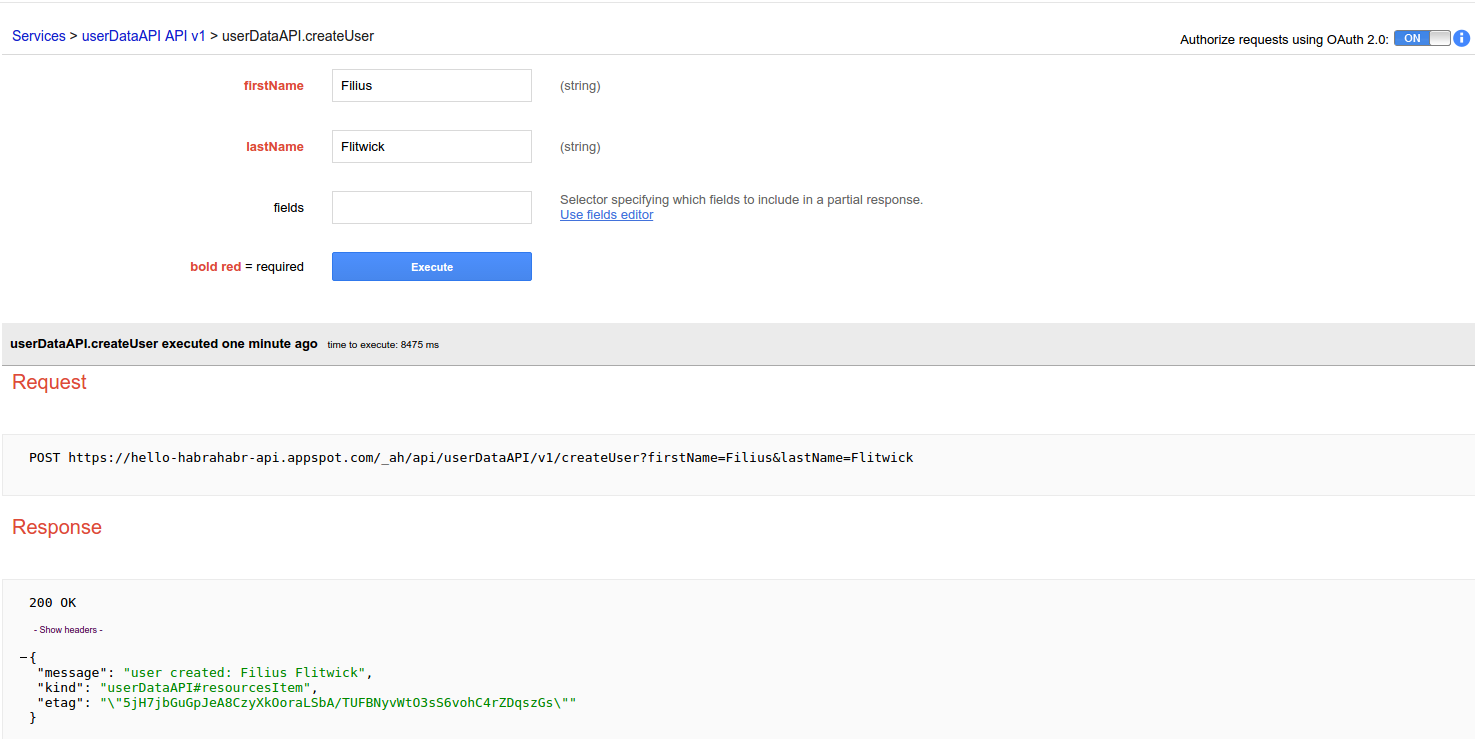
Now at {project ID} .appspot.com / _ah / api / explorer we can use the web interface to test the API by adding, deleting and loading objects from the database.
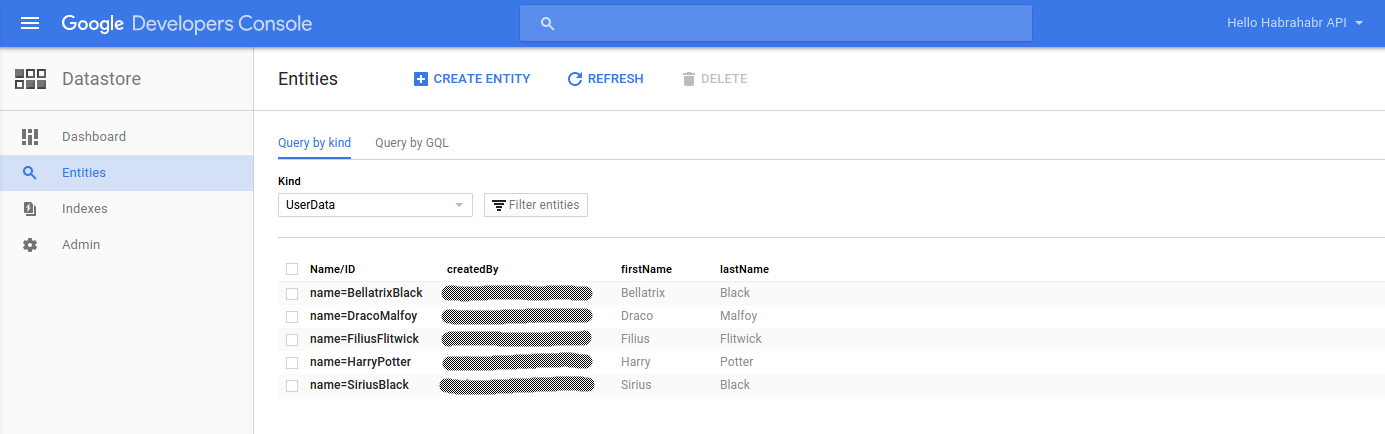
In the developer’s console at console.developers.google.com/datastore/entities/query , selecting the appropriate project, we get access to the web interface that allows you to work with the database, including creating, deleting, sorting objects:
Objectify wiki
Objectify JavaDoc
Java Datastore API
Storing Data in Datastore (Google Tutorial)
A brief presentation of the framework from its creator Jeff Schnitzer ( @jeffschnitzer ) on Google I / O 2011: youtu.be/imiquTOLl64?t=3m40s
Google Cloud Storage with Java: Images and Other Files in the Cloud
However, guidance on creating an API would be incomplete without working with a database.
In this article, we will look at the Objectify framework for working with the GA Engine's App Engine Datastore database .
App Engine Datastore
App Engine Datastore is a non-relational NoSQL-database (schemaless NoSQL datastore) of the type “Key-value database”.
Key
The key is the unique identifier of the “object” (in the App Engine datastore this is called “Entity”) in the database.
The key consists of three components:
Kind (type): which corresponds to the type of the object in the database (using Objectify we model kind as a Java class, i.e., relatively speaking, in our case, kind means the class of the object located in the database)
Identifier ( identifier): the unique identifier of the object, which can be either a string (String), in which case it is called name , or a number (Long) in this case it is called Id . Those. view id
"01234"is name and view id01234 is id. The identifier must be unique among objects of the same type, objects of different types can have the same identifier, i.e. we can have an object of type “row” with identifier “01”, and an object of type “column” with identifier “01”. For a newly created object in the database, an identifier, if it is not specified explicitly, is automatically generated. Parent (group of objects): objects in the database can be combined into "groups of objects", for this, either the key of the "parent" object is specified in parent, or null (by default) for objects not included in groups.
Entity
An object (Entity) in the database has properties that can contain values (Value type), their correspondence to Java data types (Java types) is given in the table:
| Value type | Java type (s) | Sort order | Notes |
|---|---|---|---|
| Integer | shortintlongjava.lang.Shortjava.lang.Integerjava.lang.Long | Numeric | |
| Floating point point | floatdoublejava.lang.Floatjava.lang.Double | Numeric | 64-bit double precision, IEEE 754 |
| Boolean | booleanjava.lang.Boolean | false or true | |
| Text string (short) | java.lang.String | Unicode | Up to 1500 bytes values greater than 1500 bytes throws an exception IllegalArgumentException |
| Text string (long) | com.google.appengine.api.datastore.Text | None | Up to 1 megabyte Not indexed |
| Byte string (short) | com.google.appengine.api.datastore.ShortBlob | Byte order | Up to 1500 bytes Values greater than 1500 bytes throw an exception IllegalArgumentException |
| Byte string (long) | com.google.appengine.api.datastore.Blob | None | Up to 1 megabyte Not indexed |
| Date and time | java.util.Date | Chronological | |
| Geographical point | com.google.appengine.api.datastore.GeoPt | By latitude, then longitude | |
| Postal address | com.google.appengine.api.datastore.PostalAddress | Unicode | |
| Telephone number | com.google.appengine.api.datastore.PhoneNumber | Unicode | |
| Email address | com.google.appengine.api.datastore.Email | Unicode | |
| Google accounts user | com.google.appengine.api.users.User | Email address in Unicode order | |
| Instant messaging handle | com.google.appengine.api.datastore.IMHandle | Unicode | |
| Link | com.google.appengine.api.datastore.Link | Unicode | |
| Category | com.google.appengine.api.datastore.Category | Unicode | |
| Rating | com.google.appengine.api.datastore.Rating | Numeric | |
| Datastore key | com.google.appengine.api.datastore.Keyor the referenced object (as a child) | By path elements (kind, identifier, kind, identifier ...) | Up to 1500 bytes Values greater than 1500 bytes throw an exception IllegalArgumentException |
| Blobstore key | com.google.appengine.api.blobstore.BlobKey | Byte order | |
| Embedded entity | com.google.appengine.api.datastore.EmbeddedEntity | None | not indexed |
| Null | null | None |
Database Operations
Objectify performs three basic operations:
save () : save the object in the database
delete () : delete the object from the database
load () : load the object or list (List) of objects from the database.
Transactions and Entity Groups
In order to combine objects into a group, the “parent” object does not have to exist in the database, just specify the object key. Deleting the “parent” does not delete the “children”; they will continue to refer to its key.
Using this mechanism, objects in the database can be organized in the form of hierarchical structures.
The relations “parent object” - “child object” (parent – child relationship) can be established both between objects of the same type (for example, great-grandfather -> grandfather -> father -> I -> son) and objects of different types (for example, for objects of the type “car” child objects can be objects of the type “wheel”, “engine”)
Moreover, each "child" object can have only one "parent" object. And, since the key of the parent object is part of the key of the object, we cannot add or remove it after the object is created - the key is not changed. Therefore, the use of the "parent key" should be approached with caution.
As a rule, within a single transaction, we can access data from only one group of objects (but there is a way to use several groups in one transaction)
When any object in a group changes for a group, the timestamp changes. The time stamp is set for the whole group, and is updated when any object in the group changes.
When we make a transaction, then each group of objects that the transaction affects is marked as enlisted in this transaction. When a transaction is committed, all timestamps of the groups involved in the transaction are checked. If any of the timestamps has changed (because another transaction changed the object (s) in the group at that time), then the whole transaction is canceled and a ConcurrentModificationException is thrown. For more details, see github.com/objectify/objectify/wiki/Concepts#optimistic-concurrency
Objectify handles this kind of exception and repeats the transaction. Therefore, transactions must be idempotent , i.e. we must be able to repeat the transaction any number of times and get the same result.
For more information on transactions in Objectify, see: github.com/objectify/objectify/wiki/Transactions
Connect Objectify to the project
To use the framework, we need to add objectify.jar and guava.jar to the project .
Objectify is in the Maven repository , we just need to add to pom.xml:
com.googlecode.objectify objectify 5.1.9 - objectify.jar and guava.jar will be added to the project.
Objectify uses a filter that must be written in WEB-INF / web.xml:
ObjectifyFilter com.googlecode.objectify.ObjectifyFilter ObjectifyFilter /* Let's create the UserData class that will model the entity (Entity) in the database:
package com.appspot.hello_habrahabr_api;
import com.googlecode.objectify.annotation.Entity;
import com.googlecode.objectify.annotation.Id;
import com.googlecode.objectify.annotation.Index;
import com.googlecode.objectify.annotation.Cache;
import java.io.Serializable;
@Entity // indicates that this is an Entity
@Cache  // Annotate your entity classes with @Cache to make them cacheable.
        // The cache is shared by all running instances of your application
        // and can both improve the speed and reduce the cost of your application.
        // Memcache requests are free and typically complete in a couple milliseconds.
        // Datastore requests are metered and typically complete in tens of milliseconds.
public class UserData implements Serializable {
    @Id     // indicates that the userId is to be used in the Entity's key
            // @Id field can be of type Long, long, or String
            // Entities must have have at least one field annotated with @Id
    String userId;
    @Index // this field will be indexed in database
    private String  createdBy; // email
    @Index
    private String  firstName;
    @Index
    private String  lastName;
    private UserData() {
    } // There must be a no-arg constructor
    // (or no constructors - Java creates a default no-arg constructor).
    // The no-arg constructor can have any protection level (private, public, etc).
    public UserData(String createdBy, String firstName, String lastName) {
        this.userId = firstName + lastName;
        this.createdBy = createdBy;
        this.firstName = firstName;
        this.lastName = lastName;
    }
    /* Getters and setters */
    // You need getters and setters to have a serializable class if you need to send it from backend to frontend,
    // to avoid exception:
    // java.io.IOException: com.google.appengine.repackaged.org.codehaus.jackson.map.JsonMappingException: No serializer found for class ...
    //
    public String getUserId() {
        return userId;
    }
    public void setUserId(String userId) {
        this.userId = userId;
    }
    public String getCreatedBy() {
        return createdBy;
    }
    public void setCreatedBy(String createdBy) {
        this.createdBy = createdBy;
    }
    public String getFirstName() {
        return firstName;
    }
    public void setFirstName(String firstName) {
        this.firstName = firstName;
    }
    public String getLastName() {
        return lastName;
    }
    public void setLastName(String lastName) {
        this.lastName = lastName;
    }
}
Next, we need to create a class in which we register the classes created to describe objects in the database, and which will contain the method issuing the Objectify service object (Objectify service object), the methods of which we will use to interact with the database. Let's call it OfyService:
package com.appspot.hello_habrahabr_api;
import com.googlecode.objectify.Objectify;
import com.googlecode.objectify.ObjectifyFactory;
import com.googlecode.objectify.ObjectifyService;
/**
 * Custom Objectify Service that this application should use.
 */
public class OfyService {
    // This static block ensure the entity registration.
    static {
        factory().register(UserData.class);
    }
    // Use this static method for getting the Objectify service factory.
    public static ObjectifyFactory factory() {
        return ObjectifyService.factory();
    }
    /**
     * Use this static method for getting the Objectify service object in order
     * to make sure the above static block is executed before using Objectify.
     *
     * @return Objectify service object.
     */
    @SuppressWarnings("unused")
    public static Objectify ofy() {
        return ObjectifyService.ofy();
    }
}
Now create the API (let's call the file UserDataAPI.java):
package com.appspot.hello_habrahabr_api;
import com.google.api.server.spi.config.Api;
import com.google.api.server.spi.config.ApiMethod;
import com.google.api.server.spi.config.ApiMethod.HttpMethod;
import com.google.api.server.spi.config.Named;
import com.google.api.server.spi.response.NotFoundException;
import com.google.api.server.spi.response.UnauthorizedException;
import com.google.appengine.api.users.User;
import com.googlecode.objectify.Key;
import com.googlecode.objectify.Objectify;
import java.io.Serializable;
import java.util.List;
import java.util.logging.Logger;
/**
 * explore this API on:
 * hello-habrahabr-api.appspot.com/_ah/api/explorer
 * {project ID}.appspot.com/_ah/api/explorer
 */
@Api(
        name = "userDataAPI", // The api name must match '[a-z]+[A-Za-z0-9]*'
        version = "v1",
        scopes = {Constants.EMAIL_SCOPE},
        clientIds = {Constants.WEB_CLIENT_ID, Constants.API_EXPLORER_CLIENT_ID},
        description = "UserData API using OAuth2")
public class UserDataAPI {
    private static final Logger LOG = Logger.getLogger(UserDataAPI.class.getName());
    // Primitives and enums are not allowed as return type in @ApiMethod
    // So we create inner class (which should be a JavaBean) to serve as wrapper for String
    private class MessageToUser implements Serializable {
        private String message;
        public MessageToUser() {
        }
        public MessageToUser(String message) {
            this.message = message;
        }
        public String getMessage() {
            return message;
        }
        public void setMessage(String message) {
            this.message = message;
        }
    }
    @ApiMethod(
            name = "createUser",
            path = "createUser",
            httpMethod = HttpMethod.POST)
    @SuppressWarnings("unused")
    public MessageToUser createUser(final User gUser,
                                    @Named("firstName") final String firstName,
                                    @Named("lastName") final String lastName
                                    // instead of @Named arguments, we could also use
                                    // another JavaBean for modelling data received from frontend
    ) throws UnauthorizedException {
        if (gUser == null) {
            LOG.warning("User not logged in");
            throw new UnauthorizedException("Authorization required");
        }
        Objectify ofy = OfyService.ofy();
        UserData user = new UserData(gUser.getEmail(), firstName, lastName);
        ofy.save().entity(user).now();
        return new MessageToUser("user created: " + firstName + " " + lastName);
    }
    @ApiMethod(
            name = "deleteUser",
            path = "deleteUser",
            httpMethod = HttpMethod.DELETE)
    @SuppressWarnings("unused")
    public MessageToUser deleteUser(final User gUser,
                                    @Named("firstName") final String firstName,
                                    @Named("lastName") final String lastName
    ) throws UnauthorizedException {
        if (gUser == null) {
            LOG.warning("User not logged in");
            throw new UnauthorizedException("Authorization required");
        }
        Objectify ofy = OfyService.ofy();
        String userId = firstName + lastName;
        Key userDataKey = Key.create(UserData.class, userId);
        ofy.delete().key(userDataKey);
        return new MessageToUser("User deleted: " + firstName + " " + lastName);
    }
    @ApiMethod(
            name = "findUsersByLastName",
            path = "findUsersByLastName",
            httpMethod = HttpMethod.GET)
    @SuppressWarnings("unused")
    public List findUsers(final User gUser,
                                    @Named("query") final String query
    ) throws UnauthorizedException, NotFoundException {
        if (gUser == null) {
            LOG.warning("User not logged in");
            throw new UnauthorizedException("Authorization required");
        }
        Objectify ofy = OfyService.ofy();
        List result = ofy.load().type(UserData.class).filter("lastName ==", query).list();
        // for queries see:
        // https://github.com/objectify/objectify/wiki/Queries#executing-queries
        if (result.isEmpty()) {
            throw new NotFoundException("no results found");
        }
        return result; // we need to return a serializable object
    }
}
Now at {project ID} .appspot.com / _ah / api / explorer we can use the web interface to test the API by adding, deleting and loading objects from the database.
In the developer’s console at console.developers.google.com/datastore/entities/query , selecting the appropriate project, we get access to the web interface that allows you to work with the database, including creating, deleting, sorting objects:
References:
Objectify wiki
Objectify JavaDoc
Java Datastore API
Storing Data in Datastore (Google Tutorial)
A brief presentation of the framework from its creator Jeff Schnitzer ( @jeffschnitzer ) on Google I / O 2011: youtu.be/imiquTOLl64?t=3m40s
UPD:
Google Cloud Storage with Java: Images and Other Files in the Cloud