 November 14, 2015 at 18:46
Project Naptha - select, copy and translate texts from any image
On hh / gt, I did not find a single mention of this wonderful extension for Google Chrome. I want to share it with the community, because recently it helps me save 10 minutes every day - there are so many screenshots from social networks in different languages that can be converted in two clicks using this plugin.
Meet - Project Naptha ( Chrome webstore ).
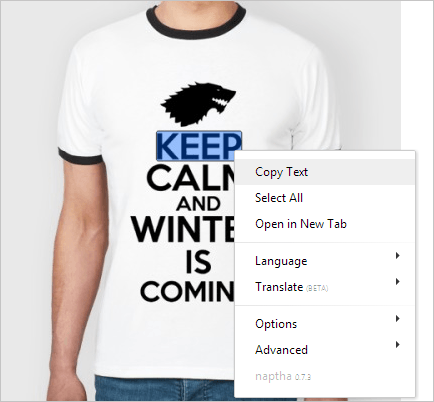
Feature List:
The project was created by Kevin Kwok and is an OCR (Optical Character Recognition) system implemented in JavaScript as a browser extension.
Project Naptha, despite the simplicity for the end user, is quite complicated inside.
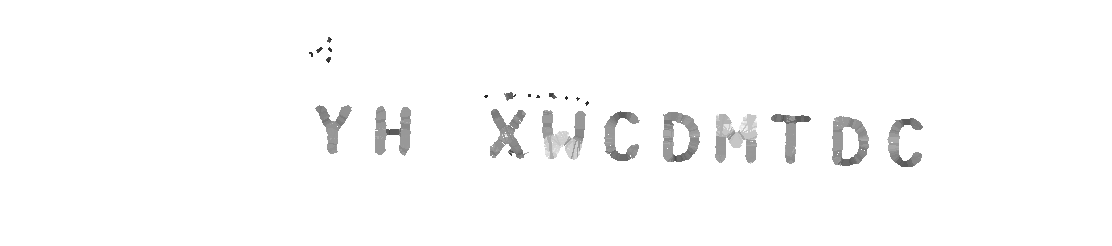
First of all, before the text recognition itself has begun, you need to determine where the blocks with the text in the picture are actually located. Quite a nontrivial task, given that the text can be placed on top of completely different backgrounds and in itself have different colors. Naptha uses the Microsoft Stroke Width Transform (SWT) project to implement this mechanism.- an effective algorithm that starts from the fact that fonts usually have approximately uniform thickness of lines (font-weight) and, therefore, it is easy to separate blocks of text from the rest of the noise in the picture.
Original:

After SWT:
Naptha, of course, does not recognize every image on an open page - this would be extremely wasteful in relation to resources. Instead, it starts recognizing the location of blocks of text only after ... no, not hovering the mouse over the picture (mouseover) as you might think, but assuming that the cursor will be above the picture based on its movement. Further Web Workers (multi-threading in the background) work on recognizing the location of text in the picture without any noticeable slowdown of the browser.
When you select a block of text and clicks “Copy Text” (Ctrl + C), it is sent to the server with Ocrad OCR , an open source engine for recognizing text. Ocrad will try to recognize a piece of the bitmap image in the text, which may take a couple of seconds, and after completion will return the recognized text, which can be inserted in the usual way anywhere (Ctrl + V).
The translation function is still in beta, in order to try it, you need to send a request to their email address. It is assumed that it will work similarly to the already working counterpart in Google Translate on mobile devices:
The project is still in the testing phase, but even at the moment it is good enough to use it in work. You can of course find fault with details and possible brakes, but this product, as far as I know, is one of a kind and it already saves my time.
Meet - Project Naptha ( Chrome webstore ).
Feature List:
- copy text from image
- select all text
- google selected text
- translate selected (beta)
- Speak (TTS) highlighted
The project was created by Kevin Kwok and is an OCR (Optical Character Recognition) system implemented in JavaScript as a browser extension.
Project Naptha, despite the simplicity for the end user, is quite complicated inside.
First of all, before the text recognition itself has begun, you need to determine where the blocks with the text in the picture are actually located. Quite a nontrivial task, given that the text can be placed on top of completely different backgrounds and in itself have different colors. Naptha uses the Microsoft Stroke Width Transform (SWT) project to implement this mechanism.- an effective algorithm that starts from the fact that fonts usually have approximately uniform thickness of lines (font-weight) and, therefore, it is easy to separate blocks of text from the rest of the noise in the picture.
Original:
After SWT:
Naptha, of course, does not recognize every image on an open page - this would be extremely wasteful in relation to resources. Instead, it starts recognizing the location of blocks of text only after ... no, not hovering the mouse over the picture (mouseover) as you might think, but assuming that the cursor will be above the picture based on its movement. Further Web Workers (multi-threading in the background) work on recognizing the location of text in the picture without any noticeable slowdown of the browser.
When you select a block of text and clicks “Copy Text” (Ctrl + C), it is sent to the server with Ocrad OCR , an open source engine for recognizing text. Ocrad will try to recognize a piece of the bitmap image in the text, which may take a couple of seconds, and after completion will return the recognized text, which can be inserted in the usual way anywhere (Ctrl + V).
The translation function is still in beta, in order to try it, you need to send a request to their email address. It is assumed that it will work similarly to the already working counterpart in Google Translate on mobile devices:
The project is still in the testing phase, but even at the moment it is good enough to use it in work. You can of course find fault with details and possible brakes, but this product, as far as I know, is one of a kind and it already saves my time.









