November 11, 2015 at 20:21
Instant file initialization
- Tutorial
When SQL Server reserves a new disk space, it initializes it with zeros. This behavior can be disabled and as a result, reduce the execution time of some operations and reduce the load on the disk subsystem.
The ability to reserve disk space without initialization is called Instant File Initialization .
This feature is not well known, although its use has been possible since SQL Server 2005 .
What are the benefits of Instant File Initialization :
1. Accelerate the creation of a new database
2. Reduce delays and reduce the time required to increase data files
3. Reduce start timeSQL Server , since tempdb initialization will be faster
4. Reduce the time when restoring from a backup, since SQL Server reserves space for files before restoring , and then transfers information from backup to them.
It is important to note that Instant File Initialization only works for data files (MDF and NDF). Log files (LDF) are always initialized to zeros.
How to use Instant File Initialization ?
Everything is very easy to turn on. We open SQL Server Configuration Manager and we learn from what name the instance of our SQL Server is launched .

Next in Local Security Policy(Local Security Policy) are looking for the User Rights Assignment (name of user rights) - the Perform volume maintenance tasks (Performing maintenance tasks volumes)
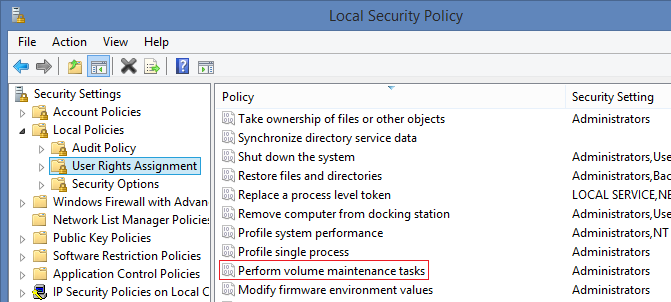
to add the necessary us the identity of the setting, as shown in the picture.
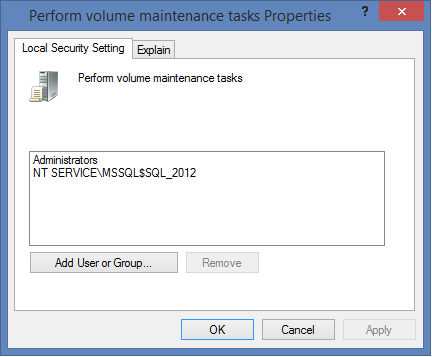
The rights that are required for Instant File Initialization to work , an instance of SQL Server checks only once - at startup. That is why you need to restart SQL Server to apply our settings.
Now we will conduct experiments ...
First, let's check ... is Instant File Initialization enabled ?
If it is turned off, then when executing the request:
in the log you can see zeros filling data files:
But if Instant File Initialization is enabled, then only the log file is filled with zeros:
If you are too lazy to look at the log, then you can use the following script:
In case you need to temporarily disable Instant File Initialization , you can enable the trace flag 1806. But, as practice shows, the ability to use this functionality greatly saves time and reduces disk load.
Here are a couple of test cases and the time to run them with and without Instant File Initialization :
In general, using Instant File Initialization is a terrific way to reduce downtime when recovering from a failure. Creating files will not take long to initiate them with zeros before the recovery operation itself begins. So take it into service ... that there is such a thing in the world as Instant File Initialization .
By the way, for SQL Server 2016 CTP3.0 you can enable Instant File Initialization at the installation stage:

If you want to share this article with an English audience:
Instant File Initialization - Killer Feature for SQL Server
The ability to reserve disk space without initialization is called Instant File Initialization .
This feature is not well known, although its use has been possible since SQL Server 2005 .
What are the benefits of Instant File Initialization :
1. Accelerate the creation of a new database
2. Reduce delays and reduce the time required to increase data files
3. Reduce start timeSQL Server , since tempdb initialization will be faster
4. Reduce the time when restoring from a backup, since SQL Server reserves space for files before restoring , and then transfers information from backup to them.
It is important to note that Instant File Initialization only works for data files (MDF and NDF). Log files (LDF) are always initialized to zeros.
How to use Instant File Initialization ?
Everything is very easy to turn on. We open SQL Server Configuration Manager and we learn from what name the instance of our SQL Server is launched .
Next in Local Security Policy(Local Security Policy) are looking for the User Rights Assignment (name of user rights) - the Perform volume maintenance tasks (Performing maintenance tasks volumes)
to add the necessary us the identity of the setting, as shown in the picture.
The rights that are required for Instant File Initialization to work , an instance of SQL Server checks only once - at startup. That is why you need to restart SQL Server to apply our settings.
Now we will conduct experiments ...
First, let's check ... is Instant File Initialization enabled ?
If it is turned off, then when executing the request:
USE [master]
GO
IF DB_ID('IFI_DB') IS NOT NULL
    DROP DATABASE IFI_DB
GO
DBCC TRACEON(3004, 3605, -1) WITH NO_INFOMSGS
CREATE DATABASE IFI_DB
DBCC TRACEOFF(3004, 3605, -1) WITH NO_INFOMSGS
GO
IF DB_ID('IFI_DB') IS NOT NULL
    DROP DATABASE IFI_DB
GO
EXEC sp_readerrorlog 0, 1
in the log you can see zeros filling data files:
Zeroing D:\DATABASES\SQL_2012\DATA\IFI_DB.mdf from page 0 to 520 (0x0 to 0x410000)
Zeroing completed on D:\DATABASES\SQL_2012\DATA\IFI_DB.mdf
Zeroing D:\DATABASES\SQL_2012\LOG\IFI_DB_log.ldf from page 0 to 130 (0x0 to 0x104000)
Zeroing completed on D:\DATABASES\SQL_2012\LOG\IFI_DB_log.ldf
Starting up database 'IFI_DB'.
FixupLogTail(progress) zeroing D:\DATABASES\SQL_2012\LOG\IFI_DB_log.ldf from 0x5000 to 0x6000.
Zeroing D:\DATABASES\SQL_2012\LOG\IFI_DB_log.ldf from page 3 to 33 (0x6000 to 0x42000)
Zeroing completed on D:\DATABASES\SQL_2012\LOG\IFI_DB_log.ldf
But if Instant File Initialization is enabled, then only the log file is filled with zeros:
Zeroing D:\DATABASES\SQL_2012\LOG\IFI_DB_log.ldf from page 0 to 130 (0x0 to 0x104000)
Zeroing completed on D:\DATABASES\SQL_2012\LOG\IFI_DB_log.ldf
Starting up database 'IFI_DB'.
FixupLogTail(progress) zeroing D:\DATABASES\SQL_2012\LOG\IFI_DB_log.ldf from 0x5000 to 0x6000.
Zeroing D:\DATABASES\SQL_2012\LOG\IFI_DB_log.ldf from page 3 to 33 (0x6000 to 0x42000)
Zeroing completed on D:\DATABASES\SQL_2012\LOG\IFI_DB_log.ldf
If you are too lazy to look at the log, then you can use the following script:
USE [master]
GO
SET NOCOUNT ON;
IF DB_ID('IFI_DB') IS NOT NULL
    DROP DATABASE IFI_DB
GO
IF OBJECT_ID('tempdb.dbo.#IFI') IS NOT NULL
    DROP TABLE #IFI
GO
CREATE TABLE #IFI (dt DATETIME, info VARCHAR(50), txt VARCHAR(MAX))
GO
DBCC TRACEON(3004, 3605, -1) WITH NO_INFOMSGS
CREATE DATABASE IFI_DB
DBCC TRACEOFF(3004, 3605, -1) WITH NO_INFOMSGS
GO
IF DB_ID('IFI_DB') IS NOT NULL
    DROP DATABASE IFI_DB
GO
INSERT INTO #IFI
EXEC sp_readerrorlog 0, 1, 'Zeroing'
IF EXISTS(
    SELECT 1
    FROM #IFI
    WHERE txt LIKE 'Zeroing completed%'
        AND txt LIKE '%IFI_DB.mdf%'
        AND dt > DATEADD(HOUR, -1, dt)
)
    PRINT 'Instant File Initialization = OFF'
ELSE
    PRINT 'Instant File Initialization = ON'
In case you need to temporarily disable Instant File Initialization , you can enable the trace flag 1806. But, as practice shows, the ability to use this functionality greatly saves time and reduces disk load.
Here are a couple of test cases and the time to run them with and without Instant File Initialization :
USE [master]
GO
IF DB_ID('IFI_DB') IS NOT NULL
	DROP DATABASE [IFI_DB]
GO
CREATE DATABASE [IFI_DB]
    CONTAINMENT = NONE
    ON PRIMARY (NAME = N'IFI_DB', FILENAME = N'D:\DATABASES\SQL_2012\DATA\IFI_DB.mdf', SIZE = 102400MB
    LOG ON (NAME = N'IFI_DB_log', FILENAME = N'D:\DATABASES\SQL_2012\LOG\IFI_DB_log.ldf', SIZE = 2048KB)
GO
-- OFF: 00:16:04
-- ON:  00:00:12
ALTER DATABASE [IFI_DB] MODIFY FILE (NAME = N'IFI_DB', SIZE = 204800MB)
GO
-- OFF: 00:14:32
-- ON:  00:00:11
BACKUP DATABASE [IFI_DB]
    TO DISK = N'D:\DATABASES\SQL_2012\BACKUP\IFI_DB.bak'
    WITH NOFORMAT, NOINIT, SKIP, NOREWIND, NOUNLOAD, COMPRESSION
GO
IF DB_ID('IFI_DB') IS NOT NULL
    DROP DATABASE [IFI_DB]
GO
-- OFF: 00:00:59
-- ON:  00:00:58
USE [master]
GO
RESTORE DATABASE [IFI_DB]
    FROM DISK = N'D:\DATABASES\SQL_2012\BACKUP\IFI_DB.bak'
    WITH FILE = 1, NOUNLOAD
-- OFF: 00:28:03
-- ON:  00:00:16
In general, using Instant File Initialization is a terrific way to reduce downtime when recovering from a failure. Creating files will not take long to initiate them with zeros before the recovery operation itself begins. So take it into service ... that there is such a thing in the world as Instant File Initialization .
By the way, for SQL Server 2016 CTP3.0 you can enable Instant File Initialization at the installation stage:
If you want to share this article with an English audience:
Instant File Initialization - Killer Feature for SQL Server