 October 6, 2015 at 13:43
Insecure permissions in Android applications
- Transfer

Today, Android is one of the most popular mobile platforms used in smartphones, tablets, smart watches, televisions, and even cars. The openness of the platform, the widest variety of versions and implementations used brings the security issue to the forefront when creating Android applications.
As you know, security is provided by a system of access permissions on each specific Android device. This system is designed to protect important data and prevent unauthorized access to information or communication channels.
By default, no Android application has permission to conduct operations that may affect the OS, personal data, or other applications. However, without such permission, any application will become useless.
Permissions are a kind of filter for application functionality, and it depends only on the user whether to give access to data during installation. The problem is that users usually don’t read what the application wants to access, and, without hesitation, they allow it. This behavior creates the prerequisites for the abuse of personal data or even modification of the kernel.
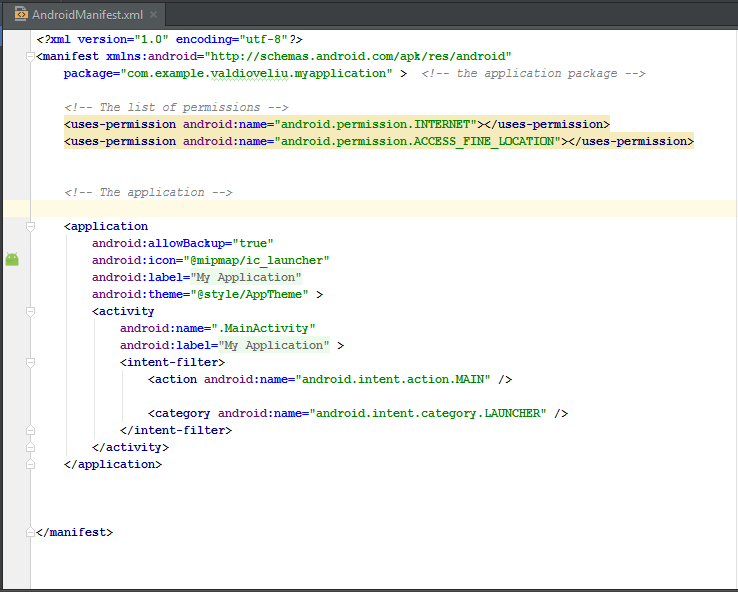
Here we look at the existing manifest system and permissions in Android. The manifest file contains information about the application package, including permissions, content providers, services, activities, and broadcast receivers.
An example of the general structure of a manifest file. Permission requests are highlighted in color:
The most dangerous permissions
To decide what data can be accessed, the user must remember the purpose of this application. For example, “Why did the game need access to my address book or permission to send SMS?” Obviously, games do not involve sending SMS. Such inconsistencies of the functional with access requests should be alarming in the first place.
Permissions you might want to review in the future
- Request root privileges. A user with root privileges can control the system without any restrictions. By default, Android does not give such rights, since inexperienced users can do mischief. Root rights are granted by a process called “Rooting the Android device”. And if a malicious application receives them, then it will be able to do whatever it pleases.
Here is a small example of how an application runs a shell script as a privileged user to reboot the device:try { String[] reboot = new String[] { "su", "-c", "reboot" }; //-c will cause the next argument to be treated as a command Process process = Runtime.getRuntime().exec(reboot); process.waitFor(); //wait for the native process to finish executing. } catch (Exception e) { Toast.makeText(getApplicationContext()," Device not rooted.\n Could not reboot...",Toast.LENGTH_SHORT).show(); }
With the help of the command, thesuapplication starts with privileged privileges, and if the device is rooted, then it reboots. If not, a message appears: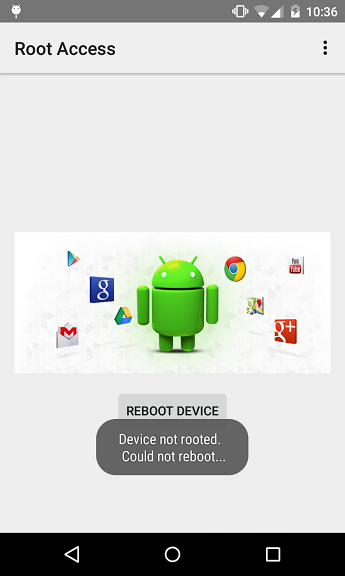
To request root access: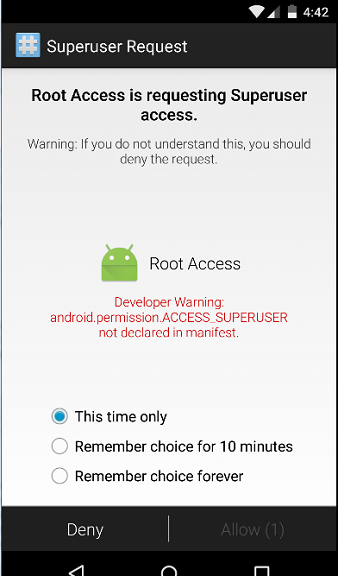
you need to add the line to the manifest file:
Request permission to read and write personal data. If you want users not to worry about their personal data, then do not use such requests in the manifest:
Permissions related to financial expenses. Some permissions thoughtlessly granted by users can cost them money. Most often it is sending SMS / MMS and making voice calls. Moreover, this can happen in the background, without calling a standard telephone application.
Request for sending messages:
Request for making calls:
A simple example of sending SMS:
	String message = "Hello Android fans! ";
  		String number = "xxxxxxxxxxxx";
  		//it is preferable to use a complete international number
SmsManager.getDefault().sendTextMessage(number, null, message, null, null);
Please note that this code will only work if the corresponding request is contained in the manifest file:
Access to geolocation data. If the user allows, the application will be able to receive information at any time about:
- approximate location of the user according to the data of base stations and Wi-Fi points;
- the exact location of the user according to GPS, base stations and Wi-Fi.
Request access to approximate location data: Request access to exact location data: Here is how to obtain exact location data:
public class MainActivity extends Activity implements LocationListener {
     private LocationManager locationManager;
     @Override
     protected void onCreate(Bundle savedInstanceState) {
         super.onCreate(savedInstanceState);
         setContentView(R.layout.activity_main);
         locationManager = (LocationManager) getSystemService(Context.LOCATION_SERVICE);
         locationManager.requestLocationUpdates(LocationManager.GPS_PROVIDER,
                 3000, 10, this);
     }
  @Override
     public void onLocationChanged(Location location) {
         String myLocation ="Location changed...\n\nYou are located at: " + "\nLatitude: " + location.getLatitude()
                 + "\nLongitude: " + location.getLongitude();
         Toast.makeText(getApplicationContext(), myLocation, Toast.LENGTH_LONG).show();
     }
     @Override
     public void onProviderDisabled(String provider) {
         Intent intent = new Intent(Settings.ACTION_LOCATION_SOURCE_SETTINGS);
         startActivity(intent);
         Toast.makeText(getApplicationContext(), "Gps is turned off... ",
                 Toast.LENGTH_SHORT).show();
     }
     @Override
     public void onProviderEnabled(String provider) {
         Toast.makeText(getApplicationContext(), "Gps is turned on... ",
                 Toast.LENGTH_SHORT).show();
     }
     @Override
     public void onStatusChanged(String provider, int status, Bundle extras) {
     }
  }
Do not forget that the performance of this code depends on the availability of the corresponding request in the manifest file.
The Java class
MainActivityimplements LocationListenerto obtain the necessary data from the device. A request for the current location is made by a call requestLocationUpdates()in the method onCreate(). When the location changes, it is called to obtain new data onLocationChanged(). If GPS data is not available, then the onProviderDisabled () method is called, passing the location information to the application. 
Access to audio and video. If the user gives such permissions, then he risks that they will listen to him or use the smartphone’s camera for surveillance. Access requests in the manifest file:
Install packages. If you give this permission, the application will be able to install additional packages without the knowledge of the user.
Stop background processes. This permission allows the application to call killBackgroundProcesses (String), with which it can stop any processes running in the background.
Android Marshmallow
The sixth version of Android, announced in May 2015, implements a new permission mechanism. Now they will be requested not during the installation of the application, but at the first attempt to use any function. Hopefully this will make life easier for both developers and users.









