Guide to the implementation of 2D platformer (end)
- Transfer
The end of the translation of the article "Guide for the implementation of 2D platformers."
Start
It is similar to a tile (smooth) method, but instead of using large tiles, a picture is used to check for collisions for each pixel. This allows you to better work out the game, but it also significantly increases complexity, uses more memory and requires something similar to a graphical editor to create levels. Such a mask is usually not used directly for visualization, so additional tools are needed - for example, a large graphic image (substrate), individually for each level. Due to such problems, this technique is quite rare in use, but allows you to achieve better results than options based on tiles. This method is convenient for creating a dynamic environment - destruction can simply be "painted" in a bit mask to change the level. A good example is the Worms games.
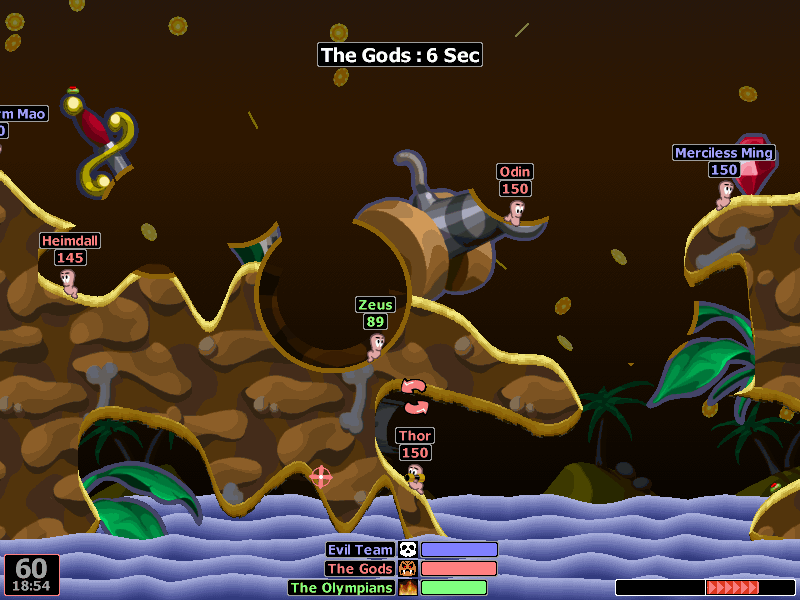
Destructive Topography Worms World Party
Examples: Worms, Talbot's Odyssey
How it works
The main idea is very close to the tile (smooth) algorithm - we just decide that each pixel is a tile, and implement the exact same algorithm. Everything will work with one small exception - biases. Since slopes are now completely determined by the relativity of the position of the two nearest tiles, the previous technique will not work and you will have to use a much more complex algorithm instead. Other elements, like stairs, also become trickier.
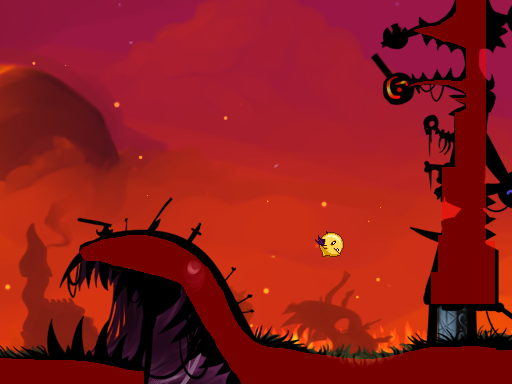
Talbot's Odyssey, with a collision mask overlaid on top of the game.
Biases are the main reason why this implementation is extremely difficult to do right. Unfortunately, they are usually binding, since there is no point in using this implementation without biases. Smoothly changing the level geometry is the main reason you are forced to use this system.
Here is the crude algorithm used by Talbot's Odyssey:
Since this system has no differences in movement - the character moves downward or falls, you will most likely have to count the number of frames that the character does not touch the floor to determine whether he can jump and change the animation. In a Talbot game, this value is 10 frames.
Another trick here is to efficiently calculate how many pixels you can shift before colliding with anything. Other possible complicating factors arise, such as one-sided platforms (working in exactly the same way as in the tile approach) and steep inclines, along which the player slides down, but cannot climb onto them (which are quite complex and beyond the scope of this article) . In general, this technique requires a large amount of fine-tuning of values and is actually less stable than tile approaches with a grid. I would recommend it only if you need to have a very detailed area.
This technique uses vector data (lines or polygons) to determine the faces of the collision zone. Despite the very great difficulty in the correct development, it is becoming more common due to the abundance of physical engines, such as Box2D, which are suitable for implementing this technique. It gives all the charms of the technology of bit masks, but without a huge memory overload and uses a completely different level editing method.
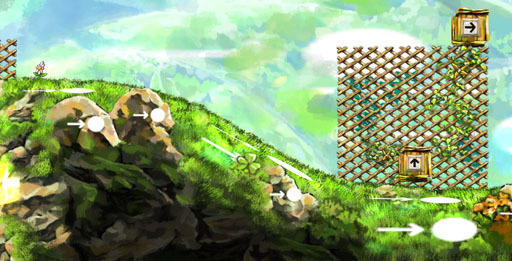
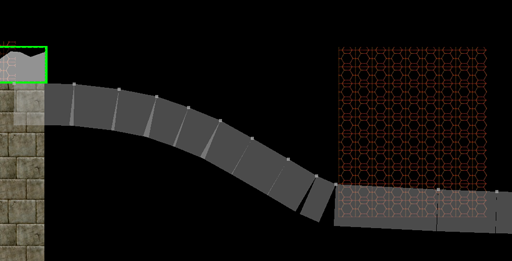
Braid (level editor), with visible layers (top) and collision polygons (bottom)
Examples: Braid, Limbo
How it works
Here are two main approaches to implementation:
Obviously, the second option is much more popular (although I suspect that the creator of Braid went the first way) - it is much simpler and allows you to do many other interesting things with the physics in the game. But in my opinion, you need to be very careful when going this way, because you can make the game too ordinary, uninteresting physical platformer (meaning the similarity of games in behavior on this engine. Approx. Per.).
This approach also has its own unique problems. For example, sometimes it can be difficult to say whether a player is standing on the floor (due to rounding errors), rests against a wall or slides downhill. When using a physical engine, friction can be a big problem, because you want the friction to be large on the floor, but small on the sides of the tile.
They solve it in different ways, but the most popular solution is to divide the character into several different polygons, each with a different role: this is how the main body turns out (optional), then a thin rectangle for the legs and two thin rectangles for the sides, as well as another one for the head. Sometimes they are narrowed so as not to get stuck in obstacles. They can be with different physics settings, and response reactions (callbacks) to a collision can serve to determine the character's state. For more information, sensors are used (non-colliding objects, which are used to check the intersection). Basic cases include determining whether the character is close enough to the floor to make a jump or whether he pushes the wall, etc.
Depending on the type of movement that you have chosen (perhaps excluding type number 1), several considerations can be made.
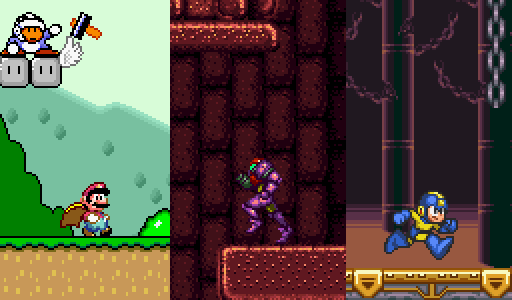
Super Mario World (low acceleration), Super Metroid (medium acceleration), Mega Man 7 (high acceleration)
One of the factors that affects the feel of the platformer is the acceleration of the character. Acceleration is a measure of speed change. When it is low, the character needs a lot of time to reach maximum speed, or stop if the player releases the controller. If implemented incorrectly, it causes a feeling that the character is “slippery” and does not give good control. This movement is often associated with Super Mario games. When the acceleration is high, the character needs very little (or not at all) time to accelerate from zero to maximum speed or vice versa, which causes a very quick response, “twitching” control, as can be seen in the Mega Man series (I believe that Mega Man actually applies infinite acceleration, since it even stops at full speed).
Even if the game does not have the concept of acceleration in the horizontal plane, it most likely uses it for jumping in an arc. Otherwise, the shape of the jump would be triangular.
How it works
Implementing acceleration is actually very simple, but there are a few pitfalls.
Two acceleration methods:
It is important to add acceleration to speed before moving the character, otherwise you will create a delay of one frame in control (lag).
When a character crashes into an obstacle, it is a good idea to reset his speed along this axis, but this may not be enough. The speed may be greater than the distance to the object. In some implementations, as a result of a collision at high speed, a character can penetrate an obstacle. In this case, it is necessary to find the correction value (the depth of intersection) and move the character to this value, or find another speed per frame before the intersection. (approx. per.)
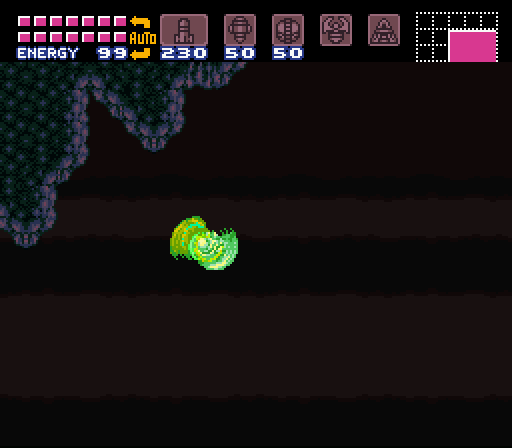
Super Metroid, Samus performs “Space Jump” (with the “Screw Attack” bonus).
Jumping in the game is as simple as checking if the player is on the ground (or if he has been on the ground more often in the last n frames) and if so, give him a starting negative speed along the y axis (in physical terms, momentum). And let gravity do the rest.
Here are four options that allow the player to control the jump:
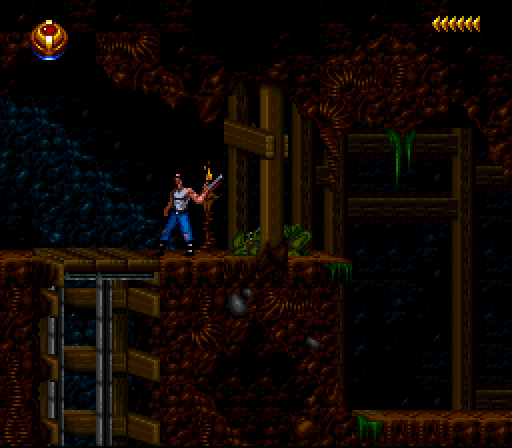
Black Thorne, the character performs a long animation before firing back
In many games, your character will play the animation before actually performing the action. However, in twitchy action games this will upset the player - “DON'T DO IT!” For smoothness, you still need to have proactive animations for jumping and running, but you need to take care of how the game responds. Such animations can be made purely cosmetic, and the action itself can be worked out immediately.
Start
Type 3: Bit Masks
It is similar to a tile (smooth) method, but instead of using large tiles, a picture is used to check for collisions for each pixel. This allows you to better work out the game, but it also significantly increases complexity, uses more memory and requires something similar to a graphical editor to create levels. Such a mask is usually not used directly for visualization, so additional tools are needed - for example, a large graphic image (substrate), individually for each level. Due to such problems, this technique is quite rare in use, but allows you to achieve better results than options based on tiles. This method is convenient for creating a dynamic environment - destruction can simply be "painted" in a bit mask to change the level. A good example is the Worms games.
Destructive Topography Worms World Party
Examples: Worms, Talbot's Odyssey
How it works
The main idea is very close to the tile (smooth) algorithm - we just decide that each pixel is a tile, and implement the exact same algorithm. Everything will work with one small exception - biases. Since slopes are now completely determined by the relativity of the position of the two nearest tiles, the previous technique will not work and you will have to use a much more complex algorithm instead. Other elements, like stairs, also become trickier.
Biases
Talbot's Odyssey, with a collision mask overlaid on top of the game.
Biases are the main reason why this implementation is extremely difficult to do right. Unfortunately, they are usually binding, since there is no point in using this implementation without biases. Smoothly changing the level geometry is the main reason you are forced to use this system.
Here is the crude algorithm used by Talbot's Odyssey:
- Combine the acceleration and direction of movement to calculate the position change vector (how much to move along each axis)
- We process each axis separately, starting with the one with the largest difference.
- For horizontal movement, we shift the AABB rectangle of the player 3 pixels up so that he can climb the slopes.
- Scan further by checking all obstacles and the bit mask itself to determine how many pixels you can move before colliding with an obstacle. Digging for a new position.
- If it was a horizontal movement, we move as many pixels up as necessary (in general, it should be no more than three) to climb a slope.
- If at the end of the movement any pixel of the character intersects with any obstacle, we remove the movement along this axis.
- According to the result of the last condition, we do the same for the other axis.
Since this system has no differences in movement - the character moves downward or falls, you will most likely have to count the number of frames that the character does not touch the floor to determine whether he can jump and change the animation. In a Talbot game, this value is 10 frames.
Another trick here is to efficiently calculate how many pixels you can shift before colliding with anything. Other possible complicating factors arise, such as one-sided platforms (working in exactly the same way as in the tile approach) and steep inclines, along which the player slides down, but cannot climb onto them (which are quite complex and beyond the scope of this article) . In general, this technique requires a large amount of fine-tuning of values and is actually less stable than tile approaches with a grid. I would recommend it only if you need to have a very detailed area.
Type 4: Vector
This technique uses vector data (lines or polygons) to determine the faces of the collision zone. Despite the very great difficulty in the correct development, it is becoming more common due to the abundance of physical engines, such as Box2D, which are suitable for implementing this technique. It gives all the charms of the technology of bit masks, but without a huge memory overload and uses a completely different level editing method.
Braid (level editor), with visible layers (top) and collision polygons (bottom)
Examples: Braid, Limbo
How it works
Here are two main approaches to implementation:
- Handle motion and collisions on your own, similar to bit masks, but using polygons to calculate intersections of objects and motion.
- Use a physical engine (e.g. Box2D)
Obviously, the second option is much more popular (although I suspect that the creator of Braid went the first way) - it is much simpler and allows you to do many other interesting things with the physics in the game. But in my opinion, you need to be very careful when going this way, because you can make the game too ordinary, uninteresting physical platformer (meaning the similarity of games in behavior on this engine. Approx. Per.).
Complex objects
This approach also has its own unique problems. For example, sometimes it can be difficult to say whether a player is standing on the floor (due to rounding errors), rests against a wall or slides downhill. When using a physical engine, friction can be a big problem, because you want the friction to be large on the floor, but small on the sides of the tile.
They solve it in different ways, but the most popular solution is to divide the character into several different polygons, each with a different role: this is how the main body turns out (optional), then a thin rectangle for the legs and two thin rectangles for the sides, as well as another one for the head. Sometimes they are narrowed so as not to get stuck in obstacles. They can be with different physics settings, and response reactions (callbacks) to a collision can serve to determine the character's state. For more information, sensors are used (non-colliding objects, which are used to check the intersection). Basic cases include determining whether the character is close enough to the floor to make a jump or whether he pushes the wall, etc.
Key considerations
Depending on the type of movement that you have chosen (perhaps excluding type number 1), several considerations can be made.
Acceleration
Super Mario World (low acceleration), Super Metroid (medium acceleration), Mega Man 7 (high acceleration)
One of the factors that affects the feel of the platformer is the acceleration of the character. Acceleration is a measure of speed change. When it is low, the character needs a lot of time to reach maximum speed, or stop if the player releases the controller. If implemented incorrectly, it causes a feeling that the character is “slippery” and does not give good control. This movement is often associated with Super Mario games. When the acceleration is high, the character needs very little (or not at all) time to accelerate from zero to maximum speed or vice versa, which causes a very quick response, “twitching” control, as can be seen in the Mega Man series (I believe that Mega Man actually applies infinite acceleration, since it even stops at full speed).
Even if the game does not have the concept of acceleration in the horizontal plane, it most likely uses it for jumping in an arc. Otherwise, the shape of the jump would be triangular.
How it works
Implementing acceleration is actually very simple, but there are a few pitfalls.
- Define xTargetSpeed. It should be 0 if the player does not touch the control, -maxSpeed if he presses left or + maxSpeed if he presses right.
- Define yTargetSpeed. It should be 0 if the player is standing on the platform or + terminalSpeed otherwise.
- For each axis, increase the current speed in the direction of the target speed using a weighted average or incremental acceleration.
Two acceleration methods:
- Weighted average: acceleration is a number (“a”) from 0 (unchanged) to 1 (instantaneous acceleration). Use this value for linear interpolation between the target and the current speed and set the result as the current speed.
vector2f curSpeed = a * targetSpeed + (1-a) * curSpeed; if (fabs(curSpeed.x) < threshold) curSpeed.x = 0; if (fabs(curSpeed.y) < threshold) curSpeed.y = 0; - Extra acceleration: we determine the direction to add acceleration (using a function that returns 1 for numbers greater than 0 and -1 for numbers less than zero), then check to see if they missed.
vector2f direction = vector2f(sign(targetSpeed.x - curSpeed.x),
                              sign(targetSpeed.y - curSpeed.y));
curSpeed += acceleration * direction;
if (sign(targetSpeed.x - curSpeed.x) != direction.x)
    curSpeed.x = targetSpeed.x;
if (sign(targetSpeed.y - curSpeed.y) != direction.y)
    curSpeed.y = targetSpeed.y;
It is important to add acceleration to speed before moving the character, otherwise you will create a delay of one frame in control (lag).
When a character crashes into an obstacle, it is a good idea to reset his speed along this axis, but this may not be enough. The speed may be greater than the distance to the object. In some implementations, as a result of a collision at high speed, a character can penetrate an obstacle. In this case, it is necessary to find the correction value (the depth of intersection) and move the character to this value, or find another speed per frame before the intersection. (approx. per.)
Jump control
Super Metroid, Samus performs “Space Jump” (with the “Screw Attack” bonus).
Jumping in the game is as simple as checking if the player is on the ground (or if he has been on the ground more often in the last n frames) and if so, give him a starting negative speed along the y axis (in physical terms, momentum). And let gravity do the rest.
Here are four options that allow the player to control the jump:
- Impulse: can be seen in games like Super Mario World and Sonic the Hedgehog. The jump retains the inertia (in terms of speed), which the character had before the jump. In some games, this is the only option to influence the jump arc, as in real life. There is really nothing to do here, it will be so until you do something to stop it.
- Acceleration in the air: that is, gaining control of horizontal movement when you are in the air. Despite the physical impossibility, this is a very popular feature, as it makes the character more manageable. Almost every platformer has this feature, excluding games similar to Prince of Persia. Basically, the acceleration obtained in air is greatly reduced, so the momentum is still important. However, some games (like Mega Man) give you complete control in the air.
- Lift control: another physically impossible action, but also popular, as it gives you even more control over the character. The longer you press the jump button, the higher the character flies. This is usually done by suppressing gravity or continuing to add momentum to the character (but reducing the added momentum) while the button is pressed. The action is subject to a time limit if you do not want the character to be able to jump endlessly. You can imagine this implementation as a very short work of a jetpack - it was delayed longer, flew higher (approx. Per.).
- Multiple jumps: already in the air, some games allow the player to jump again, sometimes an infinite number of times (like Space Jump in Super Metroid or flying in Talbot's Odyssey), or a limited number of jumps before touching the ground (“double jump” is the most common choice). This can be achieved by maintaining the counter, which increases with each jump and decreases when on the ground (be careful to update this value, otherwise you can reset it immediately after the first jump) and allow further jumps if the counter has a small value. Sometimes the second jump is shorter than the first, or only works when climbing - if you started to fall, you cannot make the second jump. You can enable other restrictions - Space Jump only works if you are already making a spinning jump and just started to fall.
Animations
Black Thorne, the character performs a long animation before firing back
In many games, your character will play the animation before actually performing the action. However, in twitchy action games this will upset the player - “DON'T DO IT!” For smoothness, you still need to have proactive animations for jumping and running, but you need to take care of how the game responds. Such animations can be made purely cosmetic, and the action itself can be worked out immediately.









