Results of the “Want ThinkServer” promotion, first report
Hello friends! Remember, in early February, right in this very blog, we promised to temporarily provide Lenovo ThinkServer servers to Habr users? Those, of course, who will write a short story about themselves and explain for what purpose the devices are needed.
We immediately cut off all the options with already completed projects, which simply required “another box” to increase power. Priority was given to people who are developing something on their own, and they are looking for iron in order to test their projects on a serious machine, the rental or purchase of which does not yet fit into the budget. Since then, the expected period of testing has passed (in personal correspondence with volunteers we stated a maximum of 4-5 months), and now we are in a hurry to share reports on what came of it all.
The hero of the first report on the results of the “I Want ThinkServer” project was Andrey sleepwalkerone Ganyushkin. He is engaged in the web development of educational services in the Russian office of a large international company specializing in the production of academic publications. However, the server Andrei asked us to test his own application and did everything in his spare time.

So one of our Think Server was to become a platform for launching a program for complex mathematical calculations and running in the functions of a manager managing a task queue and a resource system. Previously, this software has never been tested under severe load, since it was run on a regular home computer with an Intel Core i7 processor and 16 GB RAM.
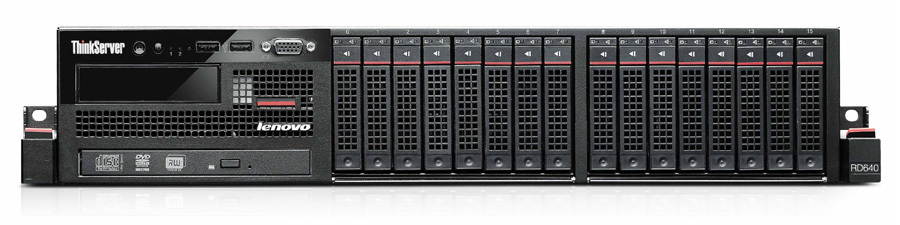
Andrey asked us ThinkServer RD640. The configuration was as follows: 2xXeon E5-2650v2, 128Gb DDR3, 2x 100Gb, 2x 300Gb 15K SAS 6Gbps, 4x 600Gb 10K 6Gbps, 2x 500Gb 7.2K 6Gbps, LSI 9270CV-8i Controller, 2x 800W PSU Hot Swap.

The moment the server was brought to Andrey, the development of a manager for task management was almost completed. The essence of his work boils down to forming a queue for calculation, obtaining resources, configuring, sending tasks for execution and further collecting ready-made results. The resources in this case were three types of computing nodes: a virtual machine, a physical server, or a virtual machine in the Google cloud. The first item involves virtualization using OpenStack, or using scripts of our own design. Based on these tasks, everything was tested for 3 months.
Accordingly, OpenStack and scripts managed virtual machines that were loaded with computing. It turned out that performance was a bit sagging, but it was decided that this was an acceptable virtualization fee. And while checking the process of creating a VM, Andrei encountered limitations in the speed of deployment of images, even on fast disks.
Why did you need virtualization? This is due to the features of the computing complex. One of the structures where it is supposed to be used is Moscow State Forest University (MGUL). The computing complex provides resources for students to work in the laboratory. And this, in turn, imposes certain security requirements and, most importantly, the speed of allocation of resources for use. Thanks to the tests, this speed was successfully increased by launching software in “combat” conditions and finalizing it based on the collected data.
As one of the bonuses when providing the server for the test, we announced technical and warranty support - exactly the same as the customers of our ThinkServer receive for three years.
As a result, with the help of our equipment, Andrei managed to achieve his goal: he tested his application on server hardware with a serious load. As a result, bugs were fixed, the dependence of computing power on the number of students working in the system was calculated.
With the help of the Lenovo server, Andrei was able to better evaluate the work of his application and understand that something much larger and more interesting can be made from it than it is now. It's no secret that this could be done with other solutions, but we are really glad that our equipment helped a good and inventive person. For this, by the way, many thanks to the entire HabraCommunity.
When the servers from other participants of the “Want ThinkServer” project come back to us, we will definitely continue to publish reports. And this material, so to speak, is “the first pancake”, so we will be glad to your advice on how to make them more interesting and more detailed. By a good tradition, Lenovo experts will answer all questions on ThinkServer in the comments, and Andrei will be able to tell more about his application if you want to know more about it.
The hero of the first report on the results of the “I Want ThinkServer” project was Andrey sleepwalkerone Ganyushkin. He is engaged in the web development of educational services in the Russian office of a large international company specializing in the production of academic publications. However, the server Andrei asked us to test his own application and did everything in his spare time.
So one of our Think Server was to become a platform for launching a program for complex mathematical calculations and running in the functions of a manager managing a task queue and a resource system. Previously, this software has never been tested under severe load, since it was run on a regular home computer with an Intel Core i7 processor and 16 GB RAM.
Andrey asked us ThinkServer RD640. The configuration was as follows: 2xXeon E5-2650v2, 128Gb DDR3, 2x 100Gb, 2x 300Gb 15K SAS 6Gbps, 4x 600Gb 10K 6Gbps, 2x 500Gb 7.2K 6Gbps, LSI 9270CV-8i Controller, 2x 800W PSU Hot Swap.
Andrew: After confirming the application, they just brought me a server and gave it to me. Without 100500 pieces of paper, directly with delivery to the porch by a friendly person. To be honest, I expected a much more complicated procedure.
The moment the server was brought to Andrey, the development of a manager for task management was almost completed. The essence of his work boils down to forming a queue for calculation, obtaining resources, configuring, sending tasks for execution and further collecting ready-made results. The resources in this case were three types of computing nodes: a virtual machine, a physical server, or a virtual machine in the Google cloud. The first item involves virtualization using OpenStack, or using scripts of our own design. Based on these tasks, everything was tested for 3 months.
Accordingly, OpenStack and scripts managed virtual machines that were loaded with computing. It turned out that performance was a bit sagging, but it was decided that this was an acceptable virtualization fee. And while checking the process of creating a VM, Andrei encountered limitations in the speed of deployment of images, even on fast disks.
Andrew: I had to rewrite the scripts almost completely, but now you can get resources from our system almost instantly.
Why did you need virtualization? This is due to the features of the computing complex. One of the structures where it is supposed to be used is Moscow State Forest University (MGUL). The computing complex provides resources for students to work in the laboratory. And this, in turn, imposes certain security requirements and, most importantly, the speed of allocation of resources for use. Thanks to the tests, this speed was successfully increased by launching software in “combat” conditions and finalizing it based on the collected data.
Andrei: With the help of the Lenovo server, we were able to finalize the product and, moreover, now it became absolutely clear what to expect from the software when launched on the server hardware.
As one of the bonuses when providing the server for the test, we announced technical and warranty support - exactly the same as the customers of our ThinkServer receive for three years.
Andrew: I failed to verify these advantages. But I was seriously going to use technical support when I started installing Ubuntu Server on the RD640, whose support is not stated in the specifications. But it worked without problems.
As a result, with the help of our equipment, Andrei managed to achieve his goal: he tested his application on server hardware with a serious load. As a result, bugs were fixed, the dependence of computing power on the number of students working in the system was calculated.
Andrew: I think everything went well. It seems that for three months of testing it turned out to collect all the necessary data. It is possible that I will use the RD640 as a base for small computing complexes - the ratio of price and available resources seemed quite attractive to me. But the model is not suitable as the main computing node - it became clear that more productive hardware is needed.
Some interesting statistics
Processing the “Allocate resources” request
At the beginning of testing: ~ 49 sec
At the end of testing: ~ 3 sec
Creating a virtual machine
At the beginning of testing: ~ 20 sec
At the end of testing: ~ 24 sec
Performance y-cruncher
Banchmark Options:
-> Benchmark Pi (all in ram)
-> Single-Threaded
-> 100,000,000 547 MiB
Out for host:
Reserving Working Memory ... 465 MiB
Constructing Twiddle Tables ... 82.9 MiB
Allocating I / O Buffers ... 0 bytes
Begin Computation:
Summing Series ... 7,051,370 terms
Time: 35.713 seconds ( 0.010 hours)
Division ...
Time: 2.083 seconds (0.001 hours)
InvSqrt ...
Time: 1.189 seconds (0.000 hours)
Final Multiply ...
Time: 1.076 seconds (0.000 hours)
Pi: 40.061 seconds (0.011 hours)
Base Converting:
Time: 3.697 seconds (0.001 hours)
Writing Decimal Digits: 100,000,000 digits written
Verifying Base Conversion ...
Time: 1.237 seconds (0.000 hours)
Total Computation Time: 43.758 seconds (0.012 hours)
Total Time (with output + verify): 45.364 seconds (0.013 hours)
CPU Utilization: 99.9357%
Multi-core Efficiency: 3.492%
Output for VM (with host load):
Reserving Working Memory ... 416 MiB
Constructing Twiddle Tables ... 3.00 MiB
Allocating I / O Buffers ... 0 bytes
Begin Computation:
Summing Series ... 7,051,370 terms
Time: 72.112 seconds (0.020 hours)
Division ...
Time: 4.116 seconds (0.001 hours)
InvSqrt ...
Time: 2.593 seconds (0.001 hours)
Final Multiply ...
Time: 1.795 seconds (0.000 hours)
Pi: 80.616 seconds (0.022 hours)
Base Converting:
Time: 7.828 seconds (0.002 hours)
Writing Decimal Digits: 100,000,000 digits written
Verifying Base Conversion ...
Time: 2.665 seconds (0.001 hours)
Total Computation Time: 88.445 seconds (0.025 hours)
Total Time (with output + verify): 91.819 seconds (0.026 hours)
CPU Utilization: 99.9181%
Multi-core Efficiency: 99.9181%
At the beginning of testing: ~ 49 sec
At the end of testing: ~ 3 sec
Creating a virtual machine
At the beginning of testing: ~ 20 sec
At the end of testing: ~ 24 sec
Performance y-cruncher
Banchmark Options:
-> Benchmark Pi (all in ram)
-> Single-Threaded
-> 100,000,000 547 MiB
Out for host:
Reserving Working Memory ... 465 MiB
Constructing Twiddle Tables ... 82.9 MiB
Allocating I / O Buffers ... 0 bytes
Begin Computation:
Summing Series ... 7,051,370 terms
Time: 35.713 seconds ( 0.010 hours)
Division ...
Time: 2.083 seconds (0.001 hours)
InvSqrt ...
Time: 1.189 seconds (0.000 hours)
Final Multiply ...
Time: 1.076 seconds (0.000 hours)
Pi: 40.061 seconds (0.011 hours)
Base Converting:
Time: 3.697 seconds (0.001 hours)
Writing Decimal Digits: 100,000,000 digits written
Verifying Base Conversion ...
Time: 1.237 seconds (0.000 hours)
Total Computation Time: 43.758 seconds (0.012 hours)
Total Time (with output + verify): 45.364 seconds (0.013 hours)
CPU Utilization: 99.9357%
Multi-core Efficiency: 3.492%
Output for VM (with host load):
Reserving Working Memory ... 416 MiB
Constructing Twiddle Tables ... 3.00 MiB
Allocating I / O Buffers ... 0 bytes
Begin Computation:
Summing Series ... 7,051,370 terms
Time: 72.112 seconds (0.020 hours)
Division ...
Time: 4.116 seconds (0.001 hours)
InvSqrt ...
Time: 2.593 seconds (0.001 hours)
Final Multiply ...
Time: 1.795 seconds (0.000 hours)
Pi: 80.616 seconds (0.022 hours)
Base Converting:
Time: 7.828 seconds (0.002 hours)
Writing Decimal Digits: 100,000,000 digits written
Verifying Base Conversion ...
Time: 2.665 seconds (0.001 hours)
Total Computation Time: 88.445 seconds (0.025 hours)
Total Time (with output + verify): 91.819 seconds (0.026 hours)
CPU Utilization: 99.9181%
Multi-core Efficiency: 99.9181%
Andrei: We considered two modes: work in the laboratory and computational tasks. For comfortable work with the application in the laboratory, the normal load is 2-2.5 virtual machines per thread. Obviously, the ideal case for computing is to use the entire server without virtualization. If you need virtualization - one virtual machine per thread.
With the help of the Lenovo server, Andrei was able to better evaluate the work of his application and understand that something much larger and more interesting can be made from it than it is now. It's no secret that this could be done with other solutions, but we are really glad that our equipment helped a good and inventive person. For this, by the way, many thanks to the entire HabraCommunity.
When the servers from other participants of the “Want ThinkServer” project come back to us, we will definitely continue to publish reports. And this material, so to speak, is “the first pancake”, so we will be glad to your advice on how to make them more interesting and more detailed. By a good tradition, Lenovo experts will answer all questions on ThinkServer in the comments, and Andrei will be able to tell more about his application if you want to know more about it.