 August 18, 2015 at 12:22
Introducing Hub 1.0 - JetBrains Team Connector
Hello, Habr!
Today we are pleased to introduce a completely new product in the JetBrains line - Hub 1.0. It serves as a single entry point for our team products: the YouTrack bug tracker , the Upsource code review tool , and soon our TeamCity continuous integration server . Hub is completely free and comes with a license for an unlimited number of users by default.
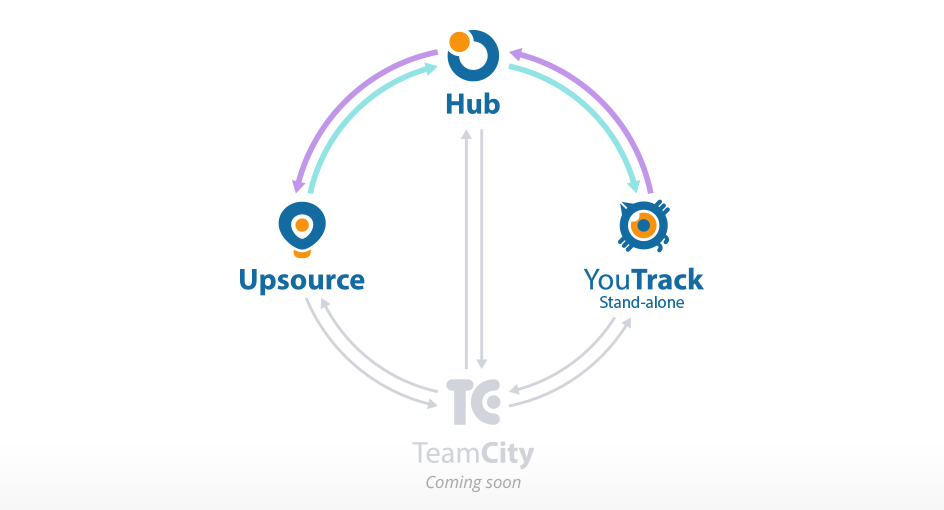
You can connect several YouTrack and Upsource installations to the Hub at once. In version 1.0, only YouTrack Stand-alone is supported, and we plan to support the cloud version later. TeamCity will also join the company soon. It can be connected to the Hub using a special plug-in that will allow users to synchronize TeamCity and Hub users, however, management of groups, roles and rights will remain on TeamCity's side so far. Also, through the plugin it will be possible to create projects in TeamCity through the project wizard in Hub and receive integration with the corresponding projects in YouTrack and Upsource automatically. You can also add widgets from TeamCity to a single dashboard in the Hub. The Hub plugin for TeamCity is scheduled for fall 2015.
Here you can see how the Hub works with connected YouTrack and Upsource:
Hub is a system for managing user accounts, groups and access rights in different services. In this case, by services we mean YouTrack, Upsource, TeamCity, as well as external products, for example VCS. If you already use our YouTrack bug tracker, then version 6.0 already comes with a built-in Hub for managing users and access rights, so you are already familiar with it in absentia.
The Hub will be useful to anyone who already uses several JetBrains team products or plans to use them. For example, Upsource, a code review tool, has recently been released, and you can now connect it to the Hub and use it with the YouTrack bug tracker.
By connecting Upsource and YouTrack to the Hub, you will get many advantages:
Hub gives your users the ability to log in only once and remain logged in to all products that are used by the team. Hub supports authentication methods LDAP, Google, GitHub and others.

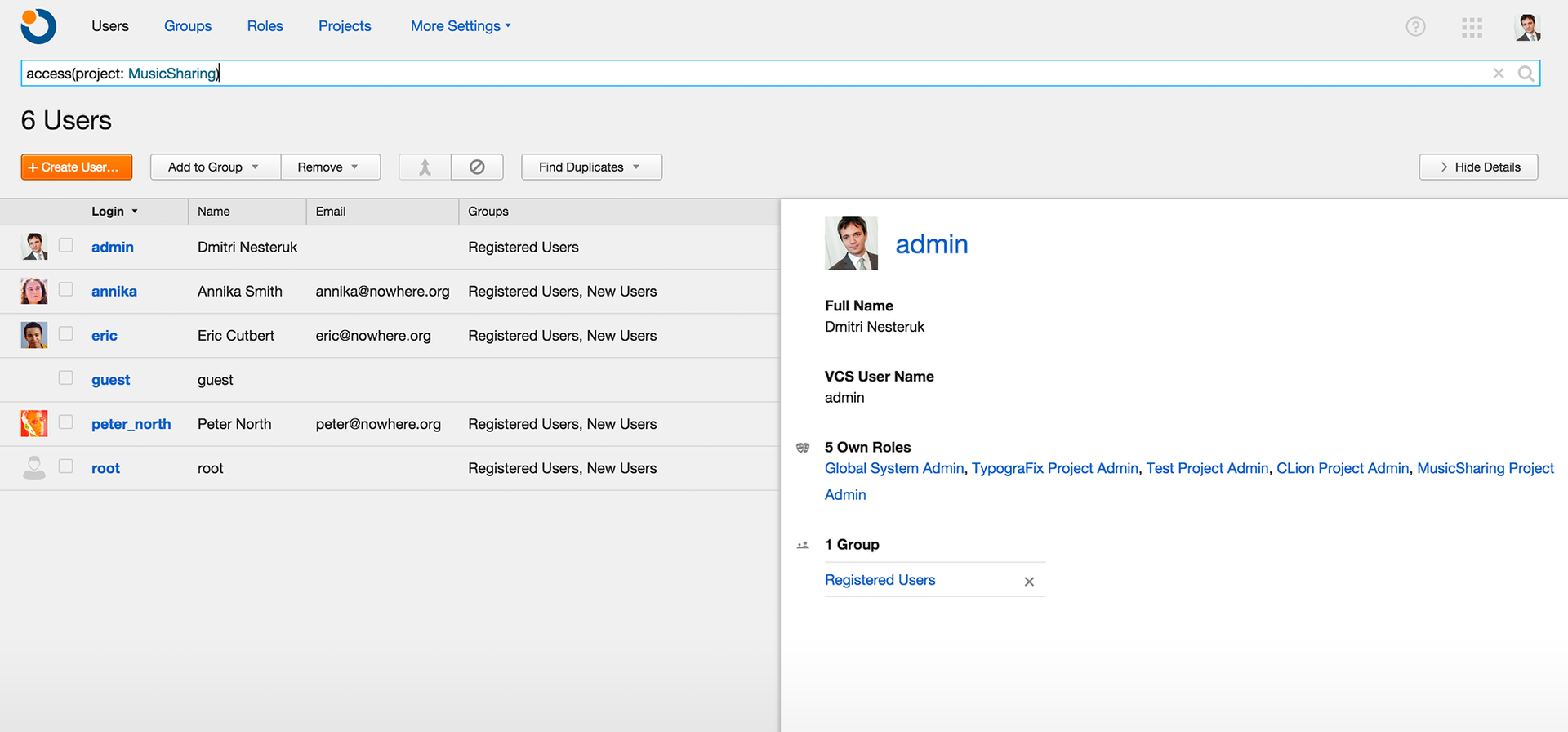
Hub serves as a single database of your users, groups, roles, access rights and projects that are used in all YouTrack and Upsource installations connected to the Hub, thus being an authentication and authorization server. By the way, you can connect multiple YouTrack and Upsource servers to one Hub server.
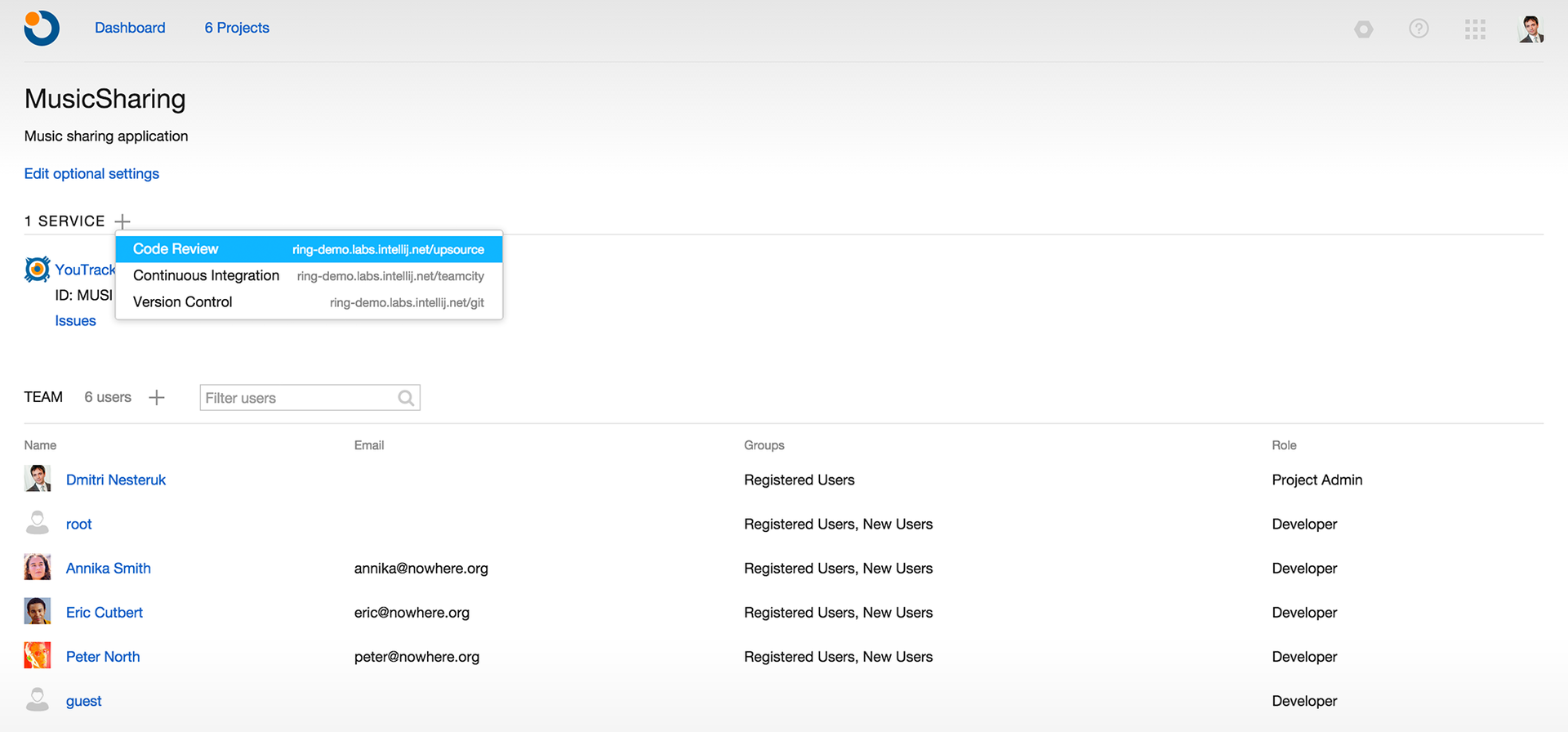
By creating a project in the Hub, you create the corresponding projects in all connected YouTrack and Upsource installations. These projects are already connected, they have a single team or several teams. In the future, it will also be possible to immediately create a Git repository and configure the assemblies in TeamCity.
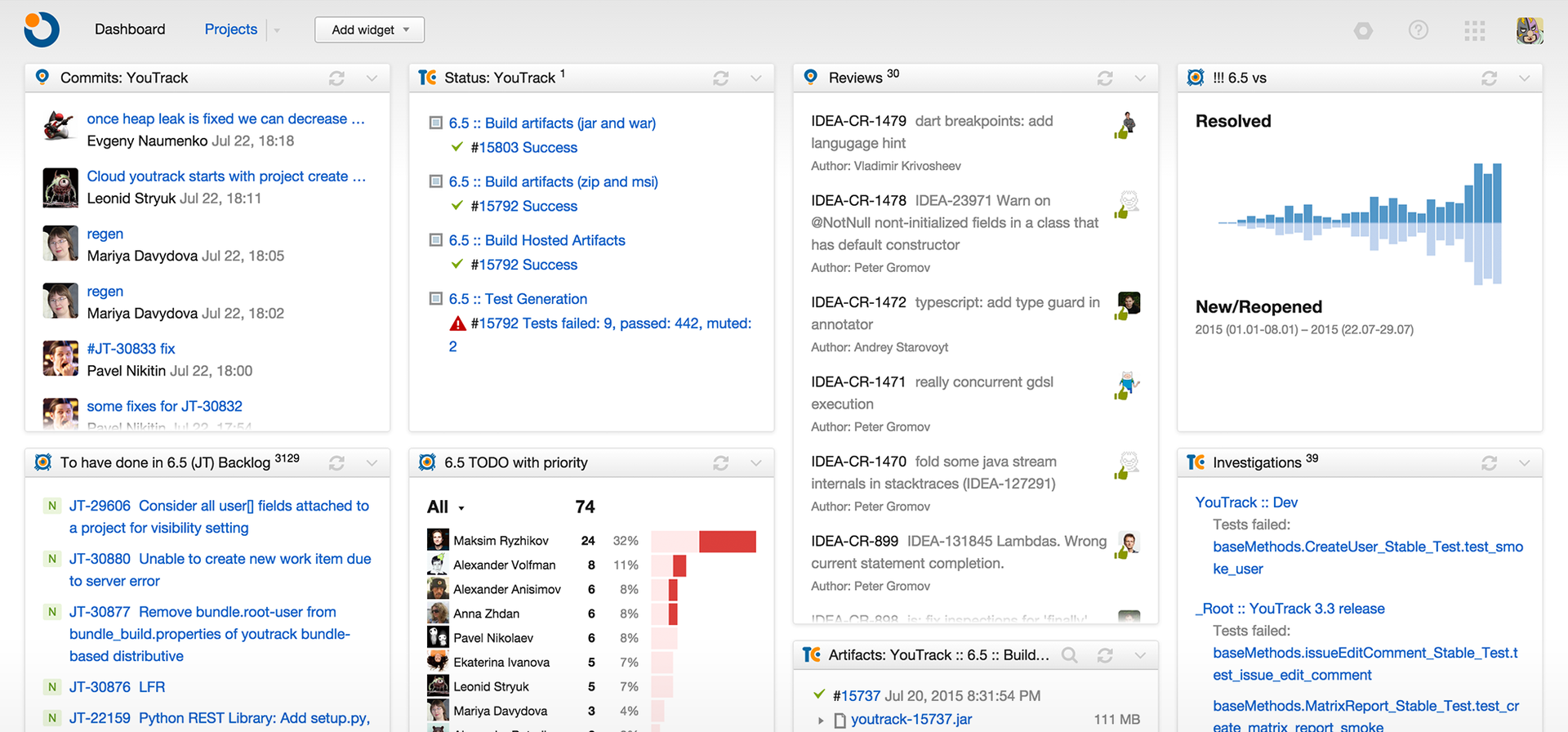
On the dashboard in the Hub, we can add various widgets with your reports from YouTrack, a code review from Upsource and more. Soon, it will be possible to add widgets with commits and assembly statuses from TeamCity. Thus, the panel contains up-to-date information from all your YouTrack, Upsource and (in the near future) TeamCity installations.
If one or more commits are associated with the task in YouTrack, that is, the task ID is mentioned in the comment to the commit, you get two-way synchronization between YouTrack and Upsource. You can go to the corresponding changes in the code or review directly from the task or see the related changes in the task.
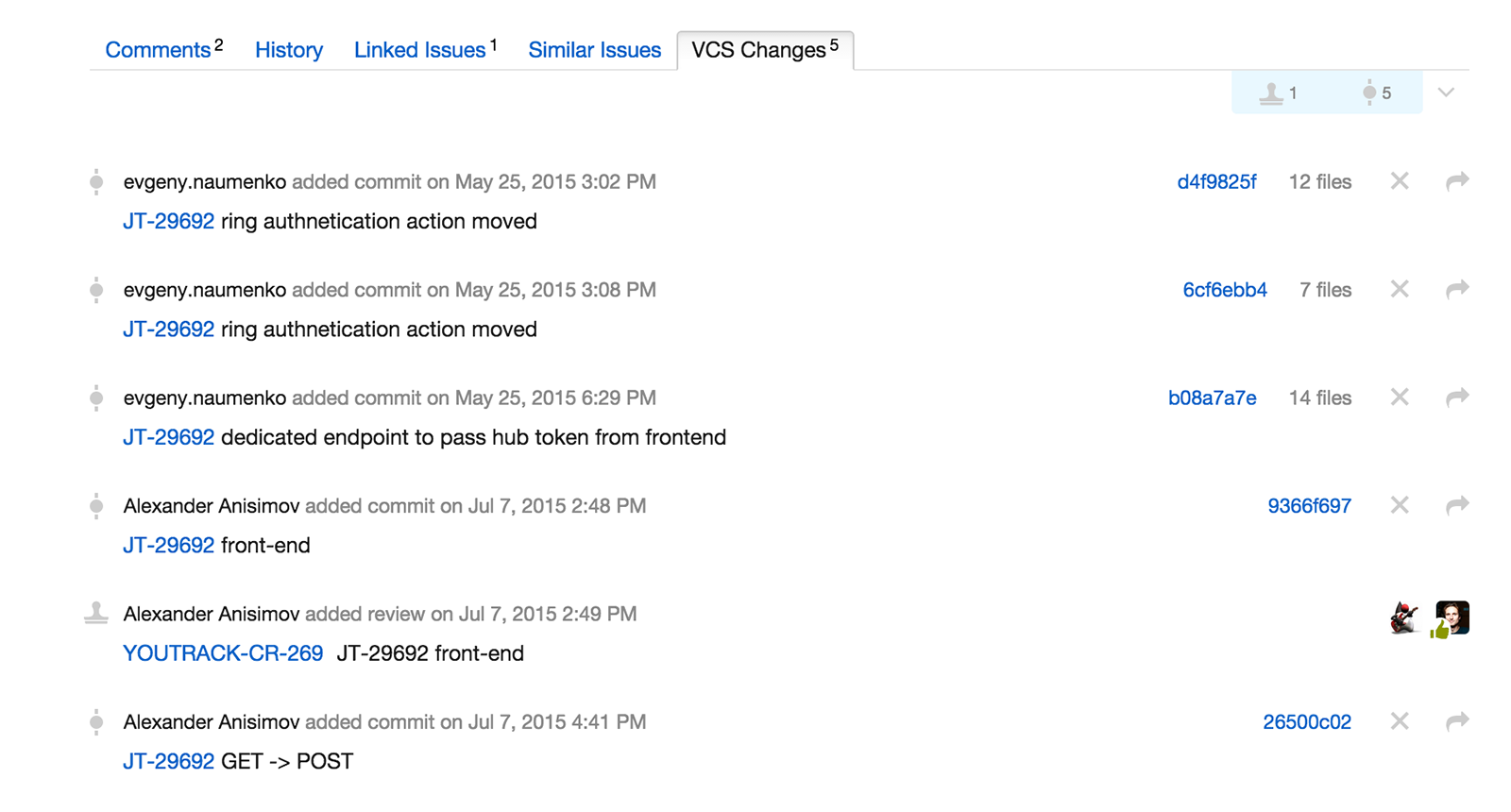
You can close or change the task directly in the comment to your commit by mentioning the task ID. Changes will be applied directly to the task on behalf of your user. For example, the command looks like this: # JT-34567 Fixed changes are documented. In this case, task # JT-34567 will be placed in the Fixed state and the comment “changes are documented” will be added.
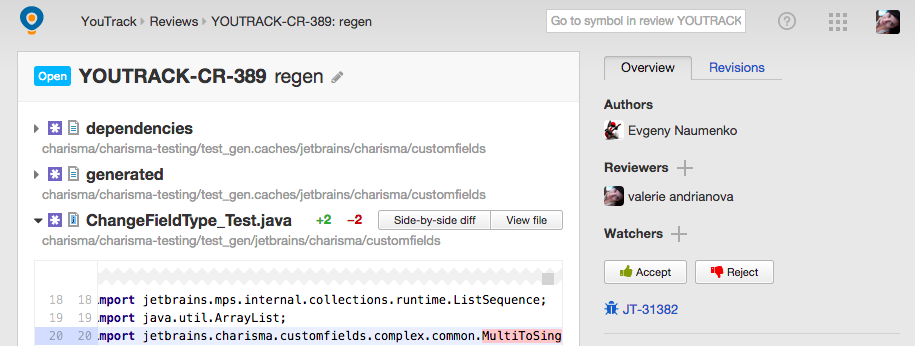
In a situation where during a code review or discussion of a code in Upsource a problem is found that cannot be resolved locally, you can create a task directly from Upsource. The description will be picked up automatically, you can immediately appoint a responsible person and determine the timing of its implementation.
1. You can automatically create a task from the code review:
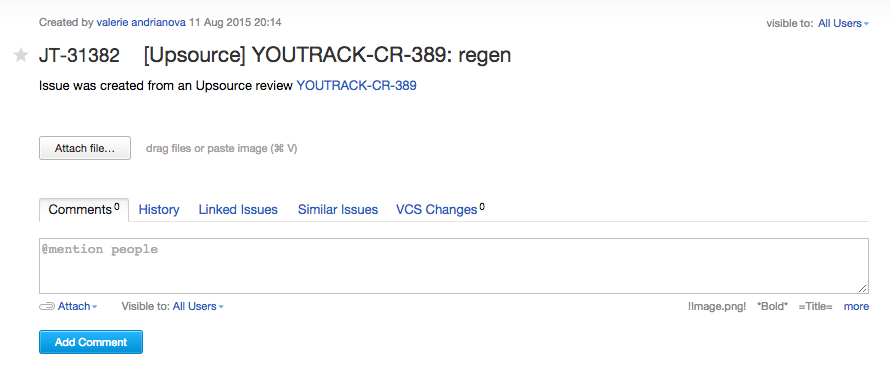
2. When you go to the task, you can see that it inherits the description and a link to the corresponding review is added to it:
More information on Hub 1.0 is available on the JetBrains website (in English).
1. Download Hub 1.0 .
2. Upgrade your YouTrack installation to version 6.5.
3. Upgrade Upsource to version 2.0.3.
4. Connect your YouTrack and Upsource installations to the Hub following these instructions .
That's all - now you can use the Hub as a single entry point into YouTrack and Upsource, as a common base for managing users, their rights and groups, as a single dashboard with data from all connected services, and also create new projects with default integration .
Our team of tech. Support is always happy to answer your questions and help. Just email us or create a bug report in our tracker.
Today we are pleased to introduce a completely new product in the JetBrains line - Hub 1.0. It serves as a single entry point for our team products: the YouTrack bug tracker , the Upsource code review tool , and soon our TeamCity continuous integration server . Hub is completely free and comes with a license for an unlimited number of users by default.
You can connect several YouTrack and Upsource installations to the Hub at once. In version 1.0, only YouTrack Stand-alone is supported, and we plan to support the cloud version later. TeamCity will also join the company soon. It can be connected to the Hub using a special plug-in that will allow users to synchronize TeamCity and Hub users, however, management of groups, roles and rights will remain on TeamCity's side so far. Also, through the plugin it will be possible to create projects in TeamCity through the project wizard in Hub and receive integration with the corresponding projects in YouTrack and Upsource automatically. You can also add widgets from TeamCity to a single dashboard in the Hub. The Hub plugin for TeamCity is scheduled for fall 2015.
Here you can see how the Hub works with connected YouTrack and Upsource:
What is a hub?
Hub is a system for managing user accounts, groups and access rights in different services. In this case, by services we mean YouTrack, Upsource, TeamCity, as well as external products, for example VCS. If you already use our YouTrack bug tracker, then version 6.0 already comes with a built-in Hub for managing users and access rights, so you are already familiar with it in absentia.
Who can use the Hub?
The Hub will be useful to anyone who already uses several JetBrains team products or plans to use them. For example, Upsource, a code review tool, has recently been released, and you can now connect it to the Hub and use it with the YouTrack bug tracker.
Why connect YouTrack and Upsource to the Hub?
By connecting Upsource and YouTrack to the Hub, you will get many advantages:
Single entry point
Hub gives your users the ability to log in only once and remain logged in to all products that are used by the team. Hub supports authentication methods LDAP, Google, GitHub and others.
Manage Accounts and Permissions
Hub serves as a single database of your users, groups, roles, access rights and projects that are used in all YouTrack and Upsource installations connected to the Hub, thus being an authentication and authorization server. By the way, you can connect multiple YouTrack and Upsource servers to one Hub server.
Project Wizard
By creating a project in the Hub, you create the corresponding projects in all connected YouTrack and Upsource installations. These projects are already connected, they have a single team or several teams. In the future, it will also be possible to immediately create a Git repository and configure the assemblies in TeamCity.
Single dashboard
On the dashboard in the Hub, we can add various widgets with your reports from YouTrack, a code review from Upsource and more. Soon, it will be possible to add widgets with commits and assembly statuses from TeamCity. Thus, the panel contains up-to-date information from all your YouTrack, Upsource and (in the near future) TeamCity installations.
How does multi-way integration through Hub work?
View commits and task review code
If one or more commits are associated with the task in YouTrack, that is, the task ID is mentioned in the comment to the commit, you get two-way synchronization between YouTrack and Upsource. You can go to the corresponding changes in the code or review directly from the task or see the related changes in the task.
Apply command to task directly from commit comment
You can close or change the task directly in the comment to your commit by mentioning the task ID. Changes will be applied directly to the task on behalf of your user. For example, the command looks like this: # JT-34567 Fixed changes are documented. In this case, task # JT-34567 will be placed in the Fixed state and the comment “changes are documented” will be added.
Create task from code review
In a situation where during a code review or discussion of a code in Upsource a problem is found that cannot be resolved locally, you can create a task directly from Upsource. The description will be picked up automatically, you can immediately appoint a responsible person and determine the timing of its implementation.
1. You can automatically create a task from the code review:
2. When you go to the task, you can see that it inherits the description and a link to the corresponding review is added to it:
Where to read more?
More information on Hub 1.0 is available on the JetBrains website (in English).
How to connect a Hub to an existing YouTrack and / or Upsource installation?
1. Download Hub 1.0 .
2. Upgrade your YouTrack installation to version 6.5.
3. Upgrade Upsource to version 2.0.3.
4. Connect your YouTrack and Upsource installations to the Hub following these instructions .
That's all - now you can use the Hub as a single entry point into YouTrack and Upsource, as a common base for managing users, their rights and groups, as a single dashboard with data from all connected services, and also create new projects with default integration .
Our team of tech. Support is always happy to answer your questions and help. Just email us or create a bug report in our tracker.









