Dirty solutions in reverse engineering
Developers quite often have the choice - to do everything right, spending a lot of time on solving the problem, or to make it work without really going into details about how exactly it turned out. On the part of the customer, of course, the golden mean is the most attractive, which in this case consists both in a good understanding by the programmer of the completed task and in as few man-hours spent as possible. It’s not so simple with developers either - on the one hand, understanding what is happening in your own code is a natural desire (especially if the support for this product will also lie on his shoulders), and on the other hand, if the application’s results are presented in in a visual form (graphics / sound or video fragments etc), one-time development,
Get to the point. In one of the previous articles, I already mentioned a program called "Talker". Despite the name, in itself, it does not say anything, but only serves as a connecting link between the user and speech engines, providing a more convenient interface and configuration option. One of the most popular engines in narrow circles is the “Digalo 2000 text-to-speech engine” (hereinafter referred to as “Digalo”), a link to which can be found on the Talkers website. As you probably already guessed from the topics of my previous articles, not everything is so good with him, and there were some bugs as well. This time, the problem manifested itself when voicing the text “aaaaaaaaaaaaaaaaaaaaaaaaaaaaaaaaaaaaaaaaaaaaaaaaaaaaaaaaaaaaaaaaaaaa. ' Having experimented a bit, I found that when a certain amount of “inextricable” characters is reached, Digalo starts to crash, offering to debug its process. Well, why not?
Read how the process went, and what came of it, read under the cut (before reading this article, I highly recommend that you familiarize yourself with the previous ones, which can be found, for example, here ).
I think it is unnecessary to say that the source code is not supplied with Digalo (moreover, even the binaries of the version of interest to me can no longer be downloaded from the official site), so our disassembler, debugger and hex editor will again become our best friends, which, in fact, can be reduced to OllyDbg alone . But before embarking on a study of disassembled listing, yes, you need to download the application and check if it is covered with a tread and if it is packed with some kind of packer.
Downloadand install Digalo, climb into the directory where it is installed, and examine the executable in DiE and PEiD :
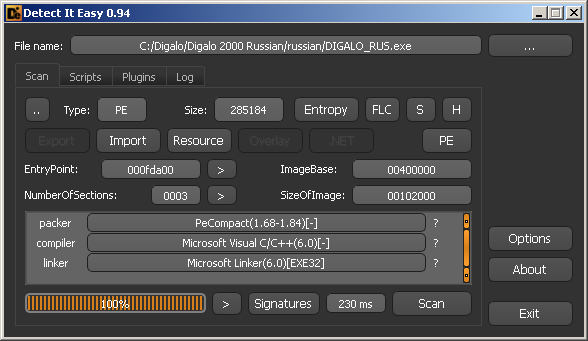

It is easy to notice that both analyzers decided that DIGALO_RUS.exe is packed with PECompact , and, in principle, we have no special reason do not believe them.
Despite the fact that PECompact and ASPack (which was already discussed in one of the previous articles ) are completely different packers, the principle of unpacking is the same for them. We load DIGALO_RUS.exe into OllyDbg, run up to the PUSHFD instruction , which is executed immediately after the first JMP , open the Command Line with Alt-F1, put the hardware breakpoint on ESP-4using the hr esp-4 command , press F9 until we are in place after executing the POPFD instruction , we reach the nearest RETN , press F8 and find ourselves at 0x0045B97B , which in this case is OEP:
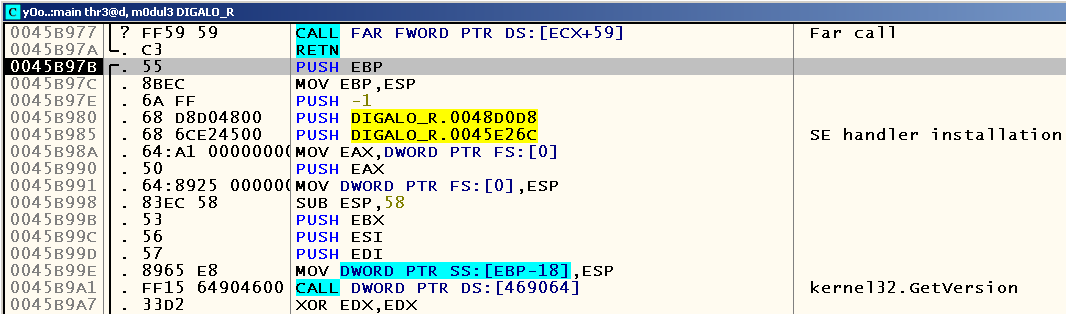
We remove the dump when using the OllyDump plugin , leaving a checkmark on the “Rebuild Import” checkbox, we check the operability of the application under study after unpacking and ... We see that it works (of course, on those lines that it correctly processed before).
Now an important question arises before us: how can this speech engine be debugged? The problem is that it crashes almost immediately after the start, cutting off the possibility of an attachment to an already running process. Well, there’s a little trick here - we can change the first byte located on OEP to the INT3 instruction , which in this case (due to the lack of a debugger connected to the process) will force the OS to display a standard dialog box offering to debug the process in the current JIT- debugger. Make OllyDbg as such (Options -> Just-in-time debugging -> Make OllyDbg just-in-time-debugger) and replace the first byte with OEP from 0x55 ( PUSH EBP ) to 0xCC ( INT3 ):
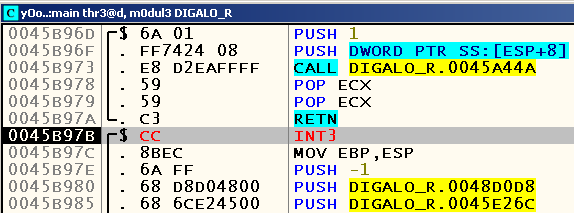
Сохраняем изменения (right-click по окну CPU -> Copy to executable -> All modifications -> Copy all -> right-click по открывшемуся окну -> Save file), заменяем оригинальный исполняемый файл и запускаем консольную версию «Говорилки» с аргументом «ааааааааааааааааааааааааааааааааааааааааааааааааааааааааааааааааааааааа»:

Нажимаем кнопку «Debug the program», заменяем INT3 обратно на PUSH EBP, нажимаем F9 и видим, что мы имеем дело с Access Violation:

Запускаем приложение ещё раз, ставим бряк по адресу, где происходит Access Violation (в моём случае это 0x00428B9D), and try to find out how often this place is called before the fall. It turns out that the breaker is triggered twice before falling (everything is fine after the first, but at the moment the second is triggered, the value of the ECX register just contains the address, access to which causes this exception). Let's start tracing from this place after the first breakpoint is triggered and see what appears in the “Run trace” window in case of successful application operation (for example, when you start talking with the argument “Hello”) and in case of crash:
In case of crash:
Address  Thread   Command                                   ; Registers and comments
    Flushing gathered information
00428B9D 00002410 MOV EDX,DWORD PTR DS:[ECX+64]             ; EDX=0051A820
00428BA0 00002410 LEA EAX,DWORD PTR DS:[EAX+EAX*2]          ; EAX=00000003
00428BA3 00002410 MOV CL,BYTE PTR DS:[ESI]                  ; ECX=03007BA0
[...]
004303FB 00002410 CMP EDX,ECX
004303FD 00002410 JL digalo_r.00430282
00430282 00002410 MOV EDI,1                                 ; EDI=00000001
00430287 00002410 MOV EAX,DWORD PTR SS:[ESP+1C]             ; EAX=00000028
0043028B 00002410 MOV EDX,DWORD PTR DS:[4A8BDC]             ; EDX=004A8DC8
00430291 00002410 MOVSX ECX,BYTE PTR SS:[ESP+EAX+113]       ; ECX=00000074
In case of correct operation
Address  Thread   Command                                   ; Registers and comments
    Flushing gathered information
00428B9D 000024D8 MOV EDX,DWORD PTR DS:[ECX+64]             ; EDX=0059A880
00428BA0 000024D8 LEA EAX,DWORD PTR DS:[EAX+EAX*2]          ; EAX=00000003
00428BA3 000024D8 MOV CL,BYTE PTR DS:[ESI]                  ; ECX=02F37BE5
[...]
004303FB 000024D8 CMP EDX,ECX
004303FD 000024D8 JL digalo_r.00430282
00430403 000024D8 MOV EDI,DWORD PTR SS:[ESP+28]             ; EDI=00000001
00430407 000024D8 MOV ESI,DWORD PTR SS:[ESP+244]            ; ESI=02F37B20
0043040E 000024D8 LEA EDX,DWORD PTR SS:[ESP+114]            ; EDX=024CF348
If you look at the conclusion from the end, we will see that the difference is at least that in the event of a fall, a conditional transition to the address 0x00430282 is triggered , which does not happen if it works correctly.
Well, let's try to stash the conditional jump instruction at this address and see what happens. Yes, Digalo now really pronounces that longest “a”! But another problem appeared - after reading the text, the engine again crashes with Access Violation, but in a completely different place:
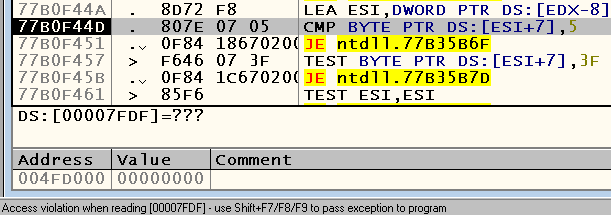
Already by addresses you should notice that this time we are talking about the bowels of system libraries. Take a look at the call stack using Alt-K and find out that the crash occurred inside the HeapFree WinAPI function :
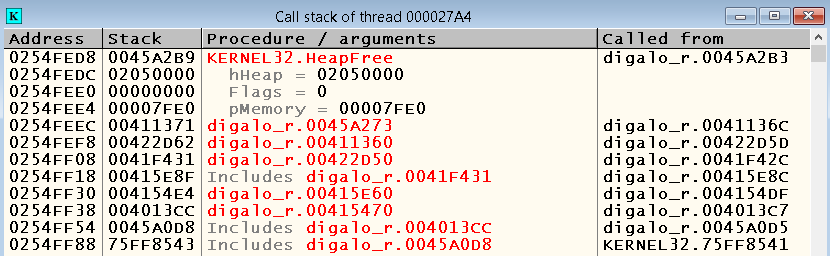
Of course, with a 99% probability, we did not find any bug in kernel32.dll, but just passed the wrong parameters. If you put a breakpoint on calls HeapFree , we see that in all other cases, the argument passed as a parameter pMemory , contains the address, much different from the one that was passed at the time of application fall:

Suspicious, is not it? But what can we do? There are two options - either for a long and tedious study of the reason for the given address getting here, or just hammering it to free memory. Most of you, probably, are already starting to cover me with obscene expressions, but, if you think about it, there can be practically nothing terrible in this. Yes, you heard right. Of course, I agree that remove all callsHeapFree from the code is, to put it mildly, wrong, because in the process the application can allocate an insane amount of memory (for example, when reading long text or something like that), the non-release of which may already lead to new problems. However, what's wrong with removing the free memory when the application shuts down? Because we are only talking about Windows, the OS will release resources anyway (for some platforms and systems this could be critical, I agree).
Let's look at the call stack, how we got here. Well, run the application again and put the breaks at the addresses 0x0045A2B3 and 0x0041136C . Bryak at the first address works many times, which tells us that this function is most likely a wrapper overHeapFree serves for the general release of the indicated memory, but the break at the second address only works after the speech engine has read the text transferred to it, which most likely means that this procedure is called only at the end of the application:
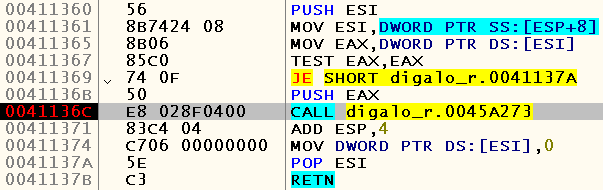
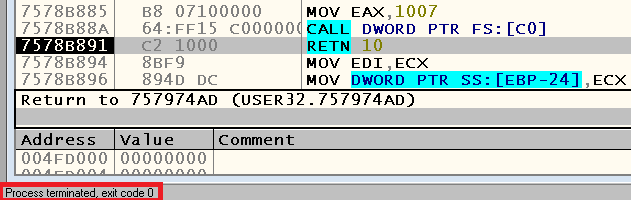
Let's call the procedure 0x0045A273 at the address 0x0041136C , and check to see if this fixed our problem. Yes, the problem has been fixed - the engine delivers a specified phrase and correctly concludes:
Since my goal was to obtain the possibility of pronouncing a specific lingering sound “a” using the Digalo speech engine, then, one might say, this was the end of the task. Yes, we did not delve into the causes of the application crash when calling the HeapFree function, and also they didn’t fully understand whether it is possible to simply fill in the conditional transition in order to avoid the initial problem, but, in the end, why spend too much time on solving such a problem? Sound uttered? They said it. For other phrases and sounds, you can continue to use the original version of the executable file Digalo, so as not to worry that we added some unforeseen consequences with our actions.
Afterword
With my article I wanted to show that achieving your goal right here and now may not be as difficult for you as you might think about it. If some program refuses to save the results of your work or, for example, does not do what is expected of it in certain situations, you can completely resolve this issue yourself, without waiting for an answer from those. support for the application used (which, incidentally, may not even exist). For better or worse, decide for yourself. After all, this is generally a rather strange question for reverse engineering, right?
Thank you for your attention, and again I hope that the article was useful to someone.