
 March 9, 2016 at 19:40
SQL Server 2016 RC0
- Tutorial

The second news on Habré that Microsoft " will soon make friends" SQL Server and Linux soon caught my eye . But not a word was said about SQL Server 2016 Release Candidate , which became available for download just the other day.
Next month, it is planned to release RTM , so further under the cat will analyze some of the innovations that will be available as part of the new version: differences in installation, default trace flags, new functions and a killer feature for analyzing the execution plan.
We start by installing an instance of SQL Server 2016 . The installer itself has undergone changes compared to the previous version:
- Only x64 version of SQL Server is available for installation (the last x86 build was cut back in CTP2.3 ). Officially, everything sounds more concise: “SQL Server 2016 Release Candidate (RC0) is a 64-bit application. 32-bit installation is discontinued, though some elements run as 32-bit components. ”
- Installing SQL Server 2016 on Windows 7 and Windows Server 2008 is not supported. The official list of systems where you can install SQL Server : all x64 editions of Windows 8 / 8.1 / 10 and Windows Server 2012
- SSMS is no longer shipped with SQL Server and is being developed separately. Download standalone SSMS edition at this link . The new edition of SSMS supports working with SQL Server 2005..2016 , so now you do not need to keep a whole fleet of studios for each version.
- Two new components have been added that implement R and PolyBase language support (the bridge between SQL Server and Hadoop ):

For PolyBase to work, you must first install JRE7 or a more recent version:

And do not forget to add the selected port range to Firewall exceptions :

Special thanks to Microsoft - now you don’t have to tinker with Group Policy to enable Instant File Initialization :

The dialog for choosing default paths has also changed a bit :
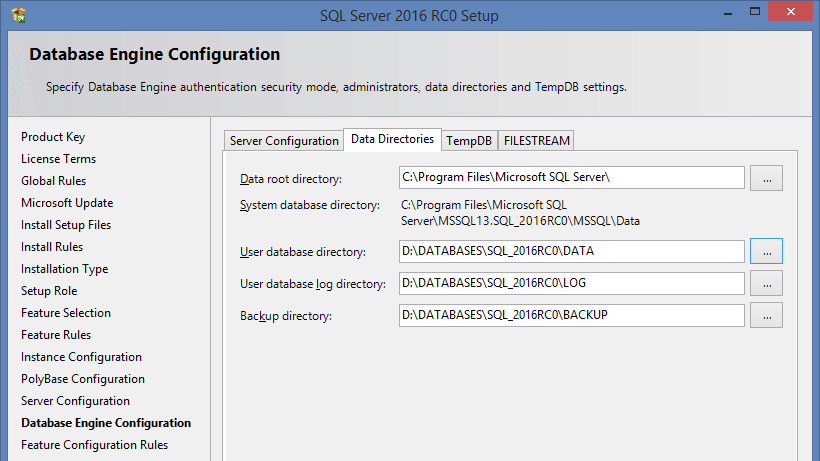
To configure tempdb, we made a separate bookmark on which you can automatically create the required number of files and distribute them, if necessary, to different disks. But even if this is not done, happy that under the default setting Autogrowth will not1Mb (as before), and 64Mb .

The maximum file size is limited to 256MB . You can ask more, but after installation:

This is where the differences in the installation compared to the previous version end.
Now let's look at what else has changed ...
The settings of the model system base have been changed to reduce the number of AutoGrow events:

You can read why this is bad here .
It is also important to mention that some Trace Flag gs on the new SQL Server will be enabled by default ...
-T1118
SQL Server reads data from disk in 64KB chunks (called extents). Extent is a group of eight physically consecutive pages ( 8Kb each) of database files.
There are two types of extents: mixed and homogeneous. Mixed extent can hold pages from different objects. This behavior allows very small tables to take up minimal space. But most often, tables are not limited to a size of 64KB and when more than 8 pages are required to store data for one object, it switches to highlighting homogeneous extents.
To initially allocate uniform extents for the object, TF 1118 was recommended , which was recommendedinclude. And it turned out that it worked globally for all databases on the server.
In 2016, this will no longer be the case. Now for each user base, you can set the MIXED_PAGE_ALLOCATION option :
ALTER DATABASE test SET MIXED_PAGE_ALLOCATION OFF
For system databases, this option is enabled by default, i.e. everything remains as before:
SELECT name, is_mixed_page_allocation_on
FROM sys.databases
An exception is made only for user databases and tempdb :
name              is_mixed_page_allocation_on
----------------- ---------------------------
master            1
tempdb            0
model             1
msdb              1
DWDiagnostics     0
DWConfiguration   0
DWQueue           0
test              0
Let me give you a small example:
IF OBJECT_ID('dbo.tbl') IS NOT NULL
    DROP TABLE dbo.tbl
GO
CREATE TABLE dbo.tbl (ID INT DEFAULT 1)
GO
CHECKPOINT
GO
INSERT dbo.tbl DEFAULT VALUES
GO
SELECT [Current LSN], Operation, Context, AllocUnitName, [Description]
FROM sys.fn_dblog(NULL, NULL)
MIXED_PAGE_ALLOCATION = ON :

MIXED_PAGE_ALLOCATION = OFF :

-T1117
Multiple files can be created within a single filegroup. For example, it is recommended that you create several files for the tempdb database , which may increase system performance in some scenarios. Now suppose the situation: all files in the filegroup are the same size. A large temporary table is created. There is not enough space in file # 1 and AutoGrow, of course, happens . After a while, the same table is recreated, but the insert occurs in file # 2 , because # 1 is temporarily locked. What will happen in that case? AutoGrow for # 2 ... and re-delayed queries. For such cases, TF 1117 was provided.
. It worked globally and, when there was not enough space in one file, it called AutoGrow for all files within the same file group.
Now this trace flag is enabled by default for tempdb and can be selectively configured for user bases:
ALTER DATABASE test
    MODIFY FILEGROUP [PRIMARY] AUTOGROW_ALL_FILES
GO
ALTER DATABASE test
    MODIFY FILEGROUP [PRIMARY] AUTOGROW_SINGLE_FILE
GO
Let's look at the file size:
USE tempdb
GO
SELECT
      name
    , physical_name
    , current_size_mb = ROUND(size * 8. / 1024, 0)
    , auto_grow =
        CASE WHEN is_percent_growth = 1
            THEN CAST(growth AS VARCHAR(10)) + '%'
            ELSE CAST(CAST(ROUND(growth * 8. / 1024, 0) AS INT) AS VARCHAR(10)) + 'MB'
        END
FROM sys.database_files
WHERE [type] = 0
name       physical_name                                       size_mb  auto_grow
---------- --------------------------------------------------- -------- ------------
tempdev    D:\DATABASES\SQL_2016RC0\TEMP\tempdb.mdf            8.000000 64MB
temp2      D:\DATABASES\SQL_2016RC0\TEMP\tempdb_mssql_2.ndf    8.000000 64MB
temp3      D:\DATABASES\SQL_2016RC0\TEMP\tempdb_mssql_3.ndf    8.000000 64MB
temp4      D:\DATABASES\SQL_2016RC0\TEMP\tempdb_mssql_4.ndf    8.000000 64MB
Create a temporary table:
IF OBJECT_ID('#t') IS NOT NULL
    DROP TABLE #t
GO
CREATE TABLE #t (
    ID INT DEFAULT 1,
    Value CHAR(8000) DEFAULT 'X'
)
GO
INSERT INTO #t
SELECT TOP(10000) 1, 'X'
FROM [master].dbo.spt_values c1
CROSS APPLY [master].dbo.spt_values c2
There is not enough space to insert data and AutoGrow will happen .
AUTOGROW_SINGLE_FILE :
name       physical_name                                       size_mb     auto_grow
---------- --------------------------------------------------- ----------- ------------
tempdev    D:\DATABASES\SQL_2016RC0\TEMP\tempdb.mdf            72.000000   64MB
temp2      D:\DATABASES\SQL_2016RC0\TEMP\tempdb_mssql_2.ndf    8.000000    64MB
temp3      D:\DATABASES\SQL_2016RC0\TEMP\tempdb_mssql_3.ndf    8.000000    64MB
temp4      D:\DATABASES\SQL_2016RC0\TEMP\tempdb_mssql_4.ndf    8.000000    64MB
AUTOGROW_ALL_FILES :
name       physical_name                                       size_mb     auto_grow
---------- --------------------------------------------------- ----------- ------------
tempdev    D:\DATABASES\SQL_2016RC0\TEMP\tempdb.mdf            72.000000   64MB
temp2      D:\DATABASES\SQL_2016RC0\TEMP\tempdb_mssql_2.ndf    72.000000   64MB
temp3      D:\DATABASES\SQL_2016RC0\TEMP\tempdb_mssql_3.ndf    72.000000   64MB
temp4      D:\DATABASES\SQL_2016RC0\TEMP\tempdb_mssql_4.ndf    72.000000   64MB
-T2371
Until the 2016 version, the magic number “20% + 500 lines” was used to automatically recount statistics. I'll just show you an example:
USE [master]
GO
SET NOCOUNT ON
IF DB_ID('test') IS NOT NULL BEGIN
    ALTER DATABASE [test] SET SINGLE_USER WITH ROLLBACK IMMEDIATE
    DROP DATABASE [test]
END
GO
CREATE DATABASE [test]
GO
USE [test]
GO
IF OBJECT_ID('dbo.tbl', 'U') IS NOT NULL
    DROP TABLE dbo.tbl
GO
CREATE TABLE dbo.tbl (
    ID INT IDENTITY(1,1) PRIMARY KEY,
    Value CHAR(1)
)
GO
CREATE NONCLUSTERED INDEX ix ON dbo.tbl (Value)
GO
INSERT INTO dbo.tbl
SELECT TOP(10000) 'x'
FROM [master].dbo.spt_values c1
CROSS APPLY [master].dbo.spt_values c2
To update statistics, you need to change:
SELECT [>=] = COUNT(1) * .20 + 500
FROM dbo.tbl
HAVING COUNT(1) >= 500
In our case, it is 2500 lines. At the same time, not at a time, but in general ... this value is cumulative. First we execute the request:
UPDATE dbo.tbl
SET Value = 'a'
WHERE ID <= 2000
We look:
DBCC SHOW_STATISTICS('dbo.tbl', 'ix') WITH HISTOGRAM
RANGE_HI_KEY RANGE_ROWS    EQ_ROWS       DISTINCT_RANGE_ROWS  AVG_RANGE_ROWS
------------ ------------- ------------- -------------------- --------------
x            0             10000         0                    1
The statistics are old ... We perform one more request:
UPDATE dbo.tbl
SET Value = 'b'
WHERE ID <= 500
Hurrah! Statistics updated:
RANGE_HI_KEY RANGE_ROWS    EQ_ROWS       DISTINCT_RANGE_ROWS  AVG_RANGE_ROWS
------------ ------------- ------------- -------------------- --------------
a            0             1500          0                    1
b            0             500           0                    1
x            0             8000          0                    1
Now suppose we have a huge table ... 10-20-30 million rows. For statistics to be recalculated, we need to change an impressive amount of data or manually monitor statistics updates.
Starting with SQL Server 2008R2 SP1 , TF 2371 appeared , which’s “magic” percentage underestimated dynamically depending on the total number of rows:
< 25k    = 20%
> 30k    = 18%
> 40k    = 15%
> 100k   = 10%
> 500k   = 5%
> 1000k  = 3.2%
In SQL Server 2016, this trace flag is enabled by default.
-T8048
If your system has more than 8 logical processors and a large number of CMEMTHREAD expectations and short-term locks are observed :
SELECT waiting_tasks_count
FROM sys.dm_os_wait_stats
WHERE wait_type = 'CMEMTHREAD'
    AND waiting_tasks_count > 0
SELECT spins
FROM sys.dm_os_spinlock_stats
WHERE name = 'SOS_SUSPEND_QUEUE'
    AND spins > 0
then using TF 8048 helped get rid of performance issues. In SQL Server 2016, this trace flag is enabled by default.
SCOPED CONFIGURATION
At the base level, a new group of settings has appeared :

You can get them from the new sys.database_scoped_configurations system view . Personally, I am very pleased that the degree of parallelism can be changed not globally as before, but configured individually for each database:
ALTER DATABASE SCOPED CONFIGURATION SET MAXDOP = 0
Turn on the old Cardinality Estimation (previously you had to turn on TF 9481 or lower the compatibility level to 2012):
ALTER DATABASE SCOPED CONFIGURATION SET LEGACY_CARDINALITY_ESTIMATION = ON
Disable the Parameter Sniffing (used for this included the TF 4136 or hardcoding the OPTIMIZE the FOR UNKNOWN )
ALTER DATABASE SCOPED CONFIGURATION SET PARAMETER_SNIFFING = OFF
Also added the ability to include TF 4199 , which combines an impressive list of a variety of optimizations.
ALTER DATABASE SCOPED CONFIGURATION SET QUERY_OPTIMIZER_HOTFIXES = ON
For those who like to call the DBCC command, FREEPROCCACHE has provided a command to clear the procedural cache:
ALTER DATABASE SCOPED CONFIGURATION CLEAR PROCEDURE_CACHE
Command analogue:
DECLARE @id INT = DB_ID()
DBCC FLUSHPROCINDB(@id)
I also think it will be useful to add a query by which you can track the volume of the procedural cache in the context of databases:
SELECT db = DB_NAME(t.[dbid]), plan_cache_kb = SUM(size_in_bytes / 1024)
FROM sys.dm_exec_cached_plans p
CROSS APPLY sys.dm_exec_sql_text(p.plan_handle) t
WHERE t.[dbid] < 32767
GROUP BY t.[dbid]
ORDER BY 2 DESC
Now consider the new features:
JSON_MODIFY
In RC0 added to modify JSON c function JSON_MODIFY :
DECLARE @js NVARCHAR(100) = '{
    "id": 1,
    "name": "JC",
    "skills": ["T-SQL"]
}'
SET @js = JSON_MODIFY(@js, '$.name', 'Paul') -- update
SET @js = JSON_MODIFY(@js, '$.surname', 'Denton') -- insert
SET @js = JSON_MODIFY(@js, '$.id', NULL) -- delete
SET @js = JSON_MODIFY(@js, 'append $.skills', 'JSON') -- append
PRINT @js
{
    "name": "Paul",
    "skills": ["T-SQL","JSON"],
    "surname":"Denton"
}
STRING_ESCAPE
The STRING_ESCAPE function also appeared , which escapes special characters in the text:
SELECT STRING_ESCAPE(N'JS/Denton "Deus Ex"', N'JSON')
------------------------
JS\/Denton \"Deus Ex\"
STRING_SPLIT
Urgently rejoice! Finally, the function STRING_SPLIT appeared , which saves us from previous perversions with XML and CTE :
SELECT * FROM STRING_SPLIT(N'1,2,3,,4', N',')
value
---------
1
2
3
4
But there is also a fly in the ointment, the function works only with a single character delimiter:
SELECT * FROM STRING_SPLIT(N'1--2--3--4', N'--')
Msg 214, Level 16, State 11, Line 3
Procedure expects parameter 'separator' of type 'nchar (1) / nvarchar (1)'.
In terms of performance, we compare the old split methods and the new ones:
SET STATISTICS TIME ON
DECLARE @x VARCHAR(MAX) = 'x' + REPLICATE(CAST(',x' AS VARCHAR(MAX)), 500000)
;WITH cte AS
(
    SELECT
        s = 1,
        e = COALESCE(NULLIF(CHARINDEX(',', @x, 1), 0), LEN(@x) + 1),
        v = SUBSTRING(@x, 1, COALESCE(NULLIF(CHARINDEX(',', @x, 1), 0), LEN(@x) + 1) - 1)
    UNION ALL
    SELECT
        s = CONVERT(INT, e) + 1,
        e = COALESCE(NULLIF(CHARINDEX(',', @x, e + 1), 0), LEN(@x) + 1),
        v = SUBSTRING(@x, e + 1, COALESCE(NULLIF(CHARINDEX(',',  @x, e + 1), 0), LEN(@x) + 1)- e - 1)
    FROM cte
    WHERE e < LEN(@x) + 1
)
SELECT v
FROM cte
WHERE LEN(v) > 0
OPTION (MAXRECURSION 0)
SELECT t.c.value('(./text())[1]', 'VARCHAR(100)')
FROM
(
    SELECT x = CONVERT(XML, '' + REPLACE(@x, ',', '') + '').query('.')
) a
CROSS APPLY x.nodes('i') t(c)
SELECT *
FROM STRING_SPLIT(@x, N',')
Execution Results:
(CTE)
 SQL Server Execution Times:
   CPU time = 18719 ms,  elapsed time = 19109 ms.
(XML)
 SQL Server Execution Times:
   CPU time = 4672 ms,  elapsed time = 4958 ms.
(STRING_SPLIT)
 SQL Server Execution Times:
   CPU time = 2828 ms,  elapsed time = 2941 ms.
Live query statistics
What else I liked ... In the new version of SSMS , it became possible to monitor how a query is executed in real time:

This functionality is supported, not only in SQL Server 2016 , but also for SQL Server 2014 . At the metadata level, this functionality is implemented by selecting from sys.dm_exec_query_profiles :
SELECT
      p.[sql_handle]
    , s.[text]
    , p.physical_operator_name
    , p.row_count
    , p.estimate_row_count
    , percent_complete = 100 * p.row_count / p.estimate_row_count
FROM sys.dm_exec_query_profiles p
CROSS APPLY sys.dm_exec_sql_text(p.[sql_handle]) s
To maintain readability, I left some new SQL Server features ( Temporal Tables , Dynamic Data Masking, and improvements in In-Memory ) that I plan to add after the RTM version is released.
If you want to share this article with an English-speaking audience:
SQL Server 2016 RC0