 May 29, 2015 at 08:38
Macros in InterSystems Caché
- Tutorial
Introduction
I want to talk about the use of macros in InterSystems Caché. A macro is a symbolic name that is replaced when compiling the source code with a sequence of program instructions. A macro can be “expanded” in different sequences of instructions for each call, depending on the triggered branches inside the macro and the arguments passed to it. This can be either static code or the result of COS execution. Consider how they can be used in your application.
Compilation
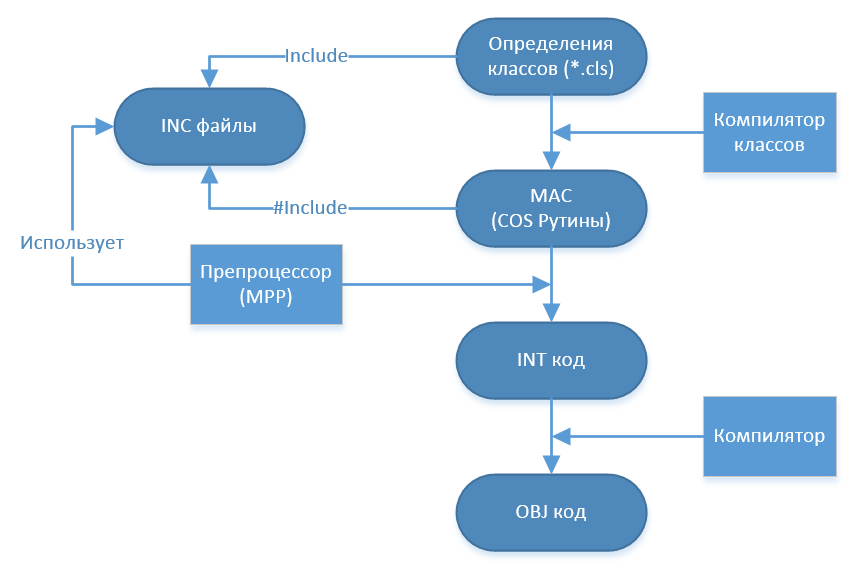
To get started, to understand where macros are used, a few words about how ObjectScript code is compiled:
- The class compiler uses the class definition to generate MAC code
- In some cases, the compiler uses classes as the basis for generating additional classes. You can look at these classes in the studio, but do not change them. This happens, for example, when compiling classes that define web services and web clients
- The class compiler also generates a class handle. Caché uses it at runtime.
- A preprocessor (sometimes called a macro preprocessor, MPP) uses INC files and replaces macros. In addition, it handles embedded SQL in ObjectScript routines.
- All these changes occur in memory, the user code itself does not change.
- Next, the compiler creates INT code for ObjectScript routines. This layer is known as intermediate code. All access to data at this level is done through globals.
- INT code is compact and human readable. To view it, press in the studio Ctrl + Shift + V or the button

- INT code is used to generate OBJ code
- The Caché virtual machine uses this code. After it is generated CLS / MAC / INT code is no longer required and can be deleted (for example, if we want to supply solutions without source code)
- If the class is stored , then the SQL compiler will create the appropriate SQL tables
Macros
As already mentioned, a macro is a symbolic name that is replaced during processing by a preprocessor with a sequence of program instructions. It is determined using the #Define command followed by the macro name first (possibly with a list of arguments) and then the macro value:
#Define Macro [(Args)] [Value]
Where can macros be defined? Either directly in the code, or in separate INC filescontaining only macros. Connect the necessary files to the classes with the Include MacroFileName command at the very beginning of the class definition - this is the main and preferred method for connecting macros to the class, thus attaching macros can be used in any part of the class definition. You can attach an INC macro file with the #Include MacroFileName command to the MAC routines or code of individual class methods.
Examples
Example 1
We will pass to examples of use, we will begin with an output of a line of "Hello World". COS code: Write "Hello, World!"
Now write an HW macro that displays this line: #define HW Write "Hello, World!"
Just write $$$ HW in the code ($$$ to invoke the macro, then the macro name):
ClassMethod Test ()
{
#define HW Write "Hello, World!"
$$$ HW
}
And when compiled, it is converted to the following INT code:
zTest1 () public {
Write "Hello, World!" }
In the terminal, when this method is launched, it will display:
Hello, World!Example 2
In the following example, we use variables:
ClassMethod Test2 ()
{
#define WriteLn (% str,% cnt) For ## Unique (new) = 1: 1:% cnt {## Continue
Write% str ,! ## Continue
}
$$$ WriteLn ("Hello, World!", 5)
}
Here, the string% str is displayed% cnt times. Variable names must begin with%. The ## Unique (new) command creates a new unique variable in the generated code, and the ## Continue command allows you to continue defining the macro on the next line. This code is converted to the following INT code:
zTest2 () public {
For% mmmu1 = 1: 1: 5 {
Write "Hello, World!" ,!
}}
In the terminal, when this method is launched, it will display:
Hello, World!
Hello, World!
Hello, World!
Hello, World!
Hello, World!
Example 3
Let's move on to more complex examples. The ForEach operator can be very useful when iterating over globals, add it:
ClassMethod Test3 ()
{
#define ForEach (% key,% gn) Set ## Unique (new) = $ name (% gn) ## Continue
Set% key = " "## Continue
For {## Continue
Set% key = $ o (@ ## Unique (old) @ (% key)) ## Continue
Quit:% key =" "
#define EndFor}
Set ^ test (1) = 111
Set ^ test (2) = 222
Set ^ test (3) = 333
$$$ ForEach (key, ^ test)
Write "key:", key ,!
Write "value:", ^ test (key) ,!
$$$ EndFor
}
Here's what it looks like in INT code:
zTest3 () public {
Set ^ test (1) = 111
Set ^ test (2) = 222
Set ^ test (3) = 333
Set% mmmu1 = $ name (^ test)
Set key = ""
For {
Set key = $ o (@% mmmu1 @ (key))
Quit: key = ""
Write "key:", key ,!
Write "value:", ^ test (key) ,!
}}
What happens in these macros?
- The input accepts the variable% key into which the current key (subscript) of the iterated global% gn will be written
- In the new variable we write the name of the global (function $ name )
- The key takes an initial, empty value
- Start the iteration loop
- Using the index and the $ order function, we assign the following value to the key
- Using the postcondition, check if the key has accepted the value "", if so, then the iteration is complete, exit the loop
- An arbitrary user code is executed, in this case, the output of the key and value
- The cycle is closing
In the terminal, when this method is launched, it will display:
key: 1
value: 111
key: 2
value: 222
key: 3
value: 333
If you use lists and arrays - descendants of the % Collection.AbstractIterator class, then you can write a similar iterator for it already.
Example 4
Another possibility of macros is to execute arbitrary COS code at the compilation stage and substitute the result of execution instead of a macro. Let's create a macro with compilation time:
ClassMethod Test4 ()
{
#Define CompTS ## Expression ("" "Compiled:" _ $ ZDATETIME ($ HOROLOG) _ "" ",!")
Write $$$ CompTS
}
Which will be converted to the next INT code:
zTest4 () public {
Write "Compiled: 05/19/2015 15:28:45" ,! }
In the terminal, when this method is launched, it will display:
Compiled: 05/19/2015 15:28:45The expression ## Expression executes the code and substitutes the result; the following COS language elements can be input:
- Lines: "abc"
- Routine : $$ Label ^ Routine
- Class methods : ## class (App.Test) .GetString ()
- COS functions : $ name (var)
- Any combination of the above items
Example 5
Preprocessor directives #If , #ElseIf , #Else , #EndIf are used to select the source code at compilation depending on the value of the expression after the directive, for example this method:
ClassMethod Test5 ()
{
#If $ SYSTEM.Version.GetNumber () = "2015.1 .1 "&& $ SYSTEM.Version.GetBuildNumber () =" 505 "
Write" You are using the latest released version of Caché "
#ElseIf $ SYSTEM.Version.GetNumber () =" 2015.2.0 "
Write" You are using the latest beta version of Caché "
#Else
Write" Please consider an upgrade "
#EndIf
}
In Caché version 2015.1.1.505, the following INT code is compiled:
zTest5 () public {
Write "You are using the latest released version of Caché"
}
And in the terminal it will output:
You are using the latest released version of CachéIn Caché, the code downloaded from the beta portal is compiled into another INT code:
zTest5 () public {
Write "You are using the latest beta version of Caché"
}
And in the terminal it will output:
You are using the latest beta version of CachéAnd previous versions of Caché will compile the following INT code with a proposal to upgrade:
zTest5 () public {
Write "Please consider an upgrade"
}
And in the terminal they will output:
Please consider an upgradeThis feature can be used, for example, to maintain client application compatibility between old versions and new ones, where the new Caché DBMS functionality can be used. Preprocessor directives #IfDef , #IfNDef which check the existence or absence of a macro, respectively, also serve this purpose .
conclusions
Macros can either just make your code easier to understand, simplifying constructions that are often repeated in the code, or implement part of the application logic at the compilation stage, thereby reducing the load in runtime.
What's next?
In the next article I will talk about a more applied example of using macros - the logging system.
References
About compilation
List of preprocessor directives
List of system macros
Class with examples
Part II. Logging system. The
author is grateful to habrayuzer Daimor , Greyder and another very competent engineer who wished to remain anonymous, for help in writing the code.









