 May 12, 2015 at 15:20
QR code generation in Tajima DST Machine Embroidery File Format
Introduction
To date, QR codes (quick-response) are widely used in various fields. The QR code structure was developed in Japan by Masahiro Hara .
I want to share with the readers of "Habrahabr" a way to generate a QR code in the machine embroidery format Tajima DST. This method eliminates manual operations for the formation of a QR code and the subsequent conversion of the resulting image into a machine embroidery design. If you or your acquaintances have an embroidery machine, then downloading the resulting file to the machine’s memory and performing embroidery, you can get the following:

Problem
None of the programs for working with machine embroidery has the function of generating a QR code. To get a QR code embroidery file, you must first get a QR code picture in any online service that allows this, then convert it into stitch blocks using the machine embroidery editor. For one or two QR codes, this approach is acceptable. To generate an unlimited number of QR codes, manual operations must be excluded.
Decision
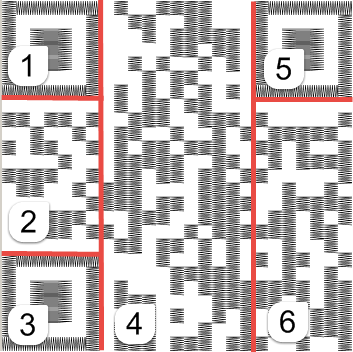
We will independently create a QR code using a third-party library, then, using the matrix obtained for each column, we will construct a set of stitches for continuously moving matrix cells. For the quality of the QR code, we form the supporting squares separately, for this we divide the matrix into six areas:
Embroidery is tested on an embroidery machine of the Brother NV 90E model.
Input Description
The input string may be in the format of an electronic business card (VCARD), may contain information about the geographical location (GEO). It can also be just text or a string of URLs.
Input data as VCARD:
BEGIN:VCARD
VERSION:3.0
FN:к.м.н., пр. Василий Иванович Квакин
N:Квакин;Василий;Иванович;пр.,к.м.н.
ORG:Рога и Копыта
URL:http://ru.wikipedia.org/Вася_Квакин
EMAIL;TYPE=INTERNET:[email protected]
END:VCARD
A full description of the VCARD format is here .
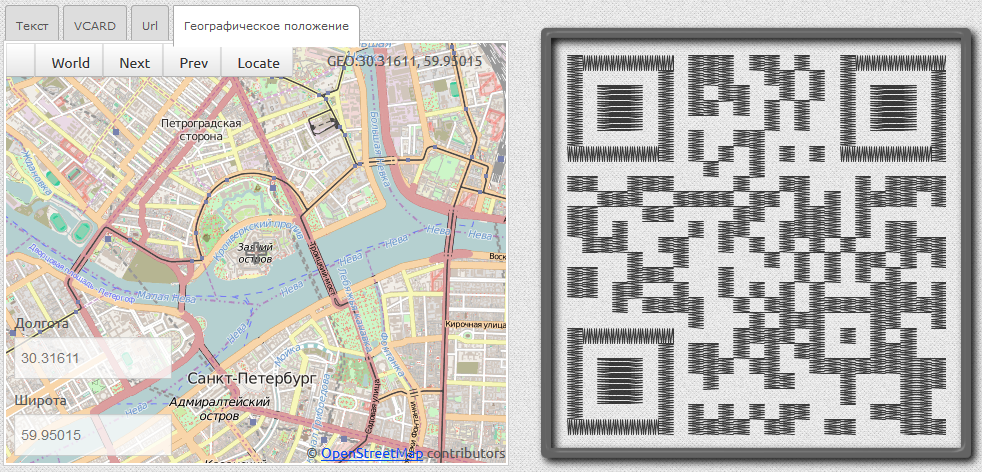
Input data in the form of geographical coordinates, the first coordinate is longitude, the second is latitude:
GEO:30.31616, 59.95015
Application description
The application is written in C #. The library uses the MessagingToolkit.QRCode, which allows you to create a QR code for the incoming information line. The library is installed by the package from nuget.org through the package manager console:
PM> Install-Package MessagingToolkit.QRCode
The matrix of the QR code is formed as a two-dimensional array of logical values.
Having received the matrix of the QR code, we will move on to the next step - the formation of a list of lines for the formation of stitch sequences from them.
We will consider the line as a set of consecutive cells of the QR code without gaps. The lines can be either vertical or horizontal in the case of the support frames of the QR code. A set of lines is used to form blocks of stitches.
Three reference rectangles are located at the corners of the QR-code. Divide the matrix into 6 areas. The first area is the upper left rectangle, the stitches of which are formed first. The stitches for the rectangle are formed sequentially for all its sides, and not vertical columns as in the general case. Then, stitches are formed for the lines between the upper left and lower left support rectangles. Stitches for odd columns are formed from top to bottom. For even columns, stitches are formed from bottom to top. This sequence of stitches eliminates long transitions of the thread from the bottom up and vice versa. The fourth region is the largest region, formed similarly to the second. The fifth area is the reference rectangle located in the upper right corner. The sixth region is the final one; the stitches for the columns in it are also formed:
QRCodeCreator Class
The class uses the MessagingToolkit.QRCode.Codec namespace to generate a QR code matrix in the following method:
using System.Text;
using MessagingToolkit.QRCode.Codec;
namespace EmbroideryFile.QRCode
{
    internal class QRCodeCreator
    {
        public bool[][] GetQRCodeMatrix(string DataToEncode)
        {
            if (string.IsNullOrEmpty(DataToEncode))   return new bool[1][];
            QRCodeEncoder qrCodeEncoder = new QRCodeEncoder();
            qrCodeEncoder.CharacterSet = "UTF8";
            qrCodeEncoder.QRCodeEncodeMode = QRCodeEncoder.ENCODE_MODE.BYTE;
            qrCodeEncoder.QRCodeScale = 1;
            qrCodeEncoder.QRCodeVersion = -1;
            qrCodeEncoder.QRCodeErrorCorrect = QRCodeEncoder.ERROR_CORRECTION.L;
            return qrCodeEncoder.CalQrcode(Encoding.UTF8.GetBytes(DataToEncode));
        }
    }
}
CharacterSet install UTF8, for the possibility of encoding Cyrillic characters.
We set the QRCodeErrorCorrect property to QRCodeEncoder.ERROR_CORRECTION.L - a low level of redundancy during encoding.
We believe that excessive data redundancy when reading is not needed.
If the input line contains Cyrillic characters, the file must be saved in UTF8 encoding.
An instance of this class is created in the constructor of the QRCodeStitcher class.
QRCodeStitcher Class
The formation of all types of stitch blocks is implemented in this class. This is ensured by the following steps:
- Creating a list of continuous lines for each of the 6 areas;
- Stitch generation for each area on a list of lines.
To create a list of vertical lines on the QR code matrix, we go through the cells of the vertical columns and add the current line to the resulting list with the current cell empty. The exception is the reference squares located at the edges of the QR code. Each element of the list contains data on the starting point, the end point of the line, its length, as well as a sign of the bottommost cell of the line getting into the last row of the QR code matrix.
When stitches are formed for vertical lines of movement along the axes of ordinates and abscissas, they have fixed values: dX = 25; dY = 2; The QR code cell size is also fixed: cellSize = 25 units. The units here are 0.1 mm.
The line data model is presented in the form of the following structure:
 public struct Line
{
    public Coords Dot1 { get; set; }
    public Coords Dot2 { get; set; }
    public int Length { get; set; }
    public bool Lowest { get; set; }
 }
The following method forms blocks of stitches for all 6 previously described areas of the QR code:
private List> GenerateQRCodeStitchesBoxed()
{
 var blocks = new List>();
 int rectSize = GetRectSize();
 // левый верхний прямоугольник
 blocks.AddRange(GetRectangleSatin(0, 0, rectSize - 1, rectSize - 1));
 // левый верхний квадрат
 blocks.Add(GenerateBoxStitchBlock(2, 2, rectSize - 4));
 // область между верхним и нижним прямоугольниками
 blocks.AddRange(GetSatinStitches(GetLaneList(0, rectSize + 1, rectSize, _dimension - rectSize - 1)));
 // левый нижний прямоугольник
 blocks.AddRange(GetRectangleSatin(0, _dimension - rectSize, rectSize - 1, _dimension - 1));
 // левый нижний внутренний квадрат
 blocks.Add(GenerateBoxStitchBlock(2, _dimension - rectSize + 2, rectSize - 4));
 // средняя область
 blocks.AddRange(GetSatinStitches(GetLaneList(rectSize + 1, 0, _dimension - rectSize - 1,
 _dimension - 1)));
 // правый верхний прямоугольник
 blocks.AddRange(GetRectangleSatin(_dimension - rectSize, 0, _dimension - 1, rectSize - 1));
 // правый верхний внутренний квадрат
 blocks.Add(GenerateBoxStitchBlock(_dimension - rectSize + 2, 2, rectSize - 4));
 // область под правым верхним прямоугольником
 blocks.AddRange(GetSatinStitches(GetLaneList(_dimension - rectSize, rectSize + 1, _dimension - 1,
 _dimension - 1)));
 return blocks;
}
The GetRectangleSatin () method creates blocks for squares of stitches in the coordinates of the outermost cells:
IEnumerable> GetRectangleSatin(int x1, int y1, int x2, int y2)
{
     int LeftX = (x1 > x2) ? x2 : x1;
     int TopY = (y1 > y2) ? y2 : y1;
     int RightX = (x1 < x2) ? x2 : x1;
     var BottomY = (y1 < y2) ? y2 : y1;
     int length = RightX - LeftX;
     var rect = new List>();
     rect.Add(GenerateVerticalColumnStitchBlock(LeftX, TopY, length));
     rect.Add(GenerateHorizonColumnStitchBlock(LeftX, BottomY, length));
     rect.Add(ReverseCoords(GenerateVerticalColumnStitchBlock(RightX, TopY + 1, length)));
     rect.Add(ReverseCoords(GenerateHorizonColumnStitchBlock(LeftX + 1, TopY, length)));
     return rect;
}
The following method creates a QR code for generating the inner square of the support areas of the QR code:
///
/// Создаёт список стежков для заполненного квадрата
///
/// Горизонтальная позиция верхней левой ячейки квадрата
/// Вертикальная позиция верхней левой ячейки квадрата
/// Размер квадрата
/// Список координат
private List GenerateBoxStitchBlock(int cellHorizonPos, int cellVerticalPos, int boxSize)
{
   var block = new List();
   int y = 0; int x = 0;
   int startX = cellHorizonPos * _cellSize;
   int startY = cellVerticalPos * _cellSize;
   block.Add(new Coords { X = startX, Y = startY });
   while (y < _cellSize * boxSize)
   {
        while (x < _cellSize * boxSize - _dX)
        {
           x = x + _dX;
           block.Add(new Coords{ X = startX + x, Y = startY + y });
        }
        x = boxSize * _cellSize;
        block.Add(new Coords { X = startX + x, Y = startY + y });
        y = y + _dY;
        while (x > _dX)
        {
            x = x - _dX;
            block.Add(new Coords { X = startX + x, Y = startY + y });
        }
        x = 0;
        block.Add(new Coords { X = startX + x, Y = startY + y });
        y = y + _dY;
   }
   return block;
}
Blocks of stitches for a sequence of vertical lines are formed in the following method:
///
/// Формирует список блоков стежков по списку непрерывных вертикальных линий
///
private List> GetSatinStitches(List lanes)
{
  List> blockList = new List>();
  foreach (var lane in lanes)
  {
      List satin = null;
      if (((lane.Length == 1) && ((lane.Dot1.X % 2) == 0)) ||
           ((lane.Length > 1) && (lane.Dot2.Y > lane.Dot1.Y)))
            satin = GenerateVerticalColumnStitchBlock(lane.Dot1.X, lane.Dot1.Y, lane.Length);
      else
        satin = ReverseCoords(GenerateVerticalColumnStitchBlock(lane.Dot2.X, lane.Dot2.Y, lane.Length));
       blockList.Add(satin);
  }
  return blockList;
}
A list of lines is generated for areas 2, 4, 6 in the following method. Line termination checking is performed in the ConsumeRelativeCellDown () and ConsumeRelativeCellUp () methods.
///
/// Возвращает список вертикальных линий для указанной по угловым ячейкам области
///
/// X координата крайней ячейки области
/// Y координата крайней ячейки области
/// X координата крайней ячейки области
/// Y координата крайней ячейки области
/// GetLaneList(int x1, int y1, int x2, int y2)
{
try
{
if (_lines != null) _lines.Clear();
if (y1 > y2)
{
_topY = y2;
_bottomY = y1;
}
else
{
_topY = y1;
_bottomY = y2;
}
if (x1 > x2)
{
_leftX = x2;
_rightX = x1;
}
else
{
_leftX = x1;
_rightX = x2;
}
for (int j = _leftX; j <= _rightX; j = j + 2) //X
{
_state = false;
for (int i = _topY; i <= _bottomY; i++) // Y
{
ConsumeRelativeCellDown(j, i);
}
if (j >= _rightX) break;
_state = false;
for (int i = _bottomY; i >= _topY; i--) // Y
{
ConsumeRelativeCellUp(j + 1, i);
}
}
return _lines;
}
catch (Exception ex)
{
Trace.WriteLine(string.Format("GetLineList(): {0}",ex));
throw;
}
}
The ConsumeRelativeCellDown () method is called when forming a list of lines for an even column of a QR code.
///
 /// Проверка прерывания текущей линии при проходе сверху вниз
 ///
 ///
 ///
 void ConsumeRelativeCellDown(int j, int i)
{
            if (_cells[j][i] == true)
            {
                // начало линии в верхней строке области
                if ((i == _topY))
                {
                    _dot1 = new Coords() { X = j, Y = i };
                    _curLane.Dot1 = _dot1;
                    _laneLen = 1;
                    _state = true;
                }
                else if ((_state == false))
                {
                    // одиночная ячейка внизу матрицы
                    if (i == _bottomY)
                    {
                        _dot1 = new Coords() { X = j, Y = i };
                        _curLane.Dot1 = _dot1;
                        _dot2 = new Coords() { X = j, Y = i };
                        _curLane.Dot2 = _dot2;
                        _curLane.Length = 1;
                        _curLane.Lowest = true;
                        _endLaneFlag = true;
                    }
                    // начало линии
                    else
                    {
                        _dot1 = new Coords() { X = j, Y = i };
                        _curLane.Dot1 = _dot1;
                        _laneLen = 1;
                        _state = true;
                    }
                }
                else if ((i == _bottomY))
                {
                    //   конец линии внизу
                    _dot2 = new Coords() { X = j, Y = i };
                    _curLane.Dot2 = _dot2;
                    _curLane.Length = ++_laneLen;
                    _curLane.Lowest = true;
                    _endLaneFlag = true;
                }  // линия продолжается
                else
                {
                    _laneLen++;
                }
            }
            // конец линии, не крайняя ячейка
            else if (_state == true)
            {
                _dot2 = new Coords() { X = j, Y = i - 1 };
                _curLane.Dot2 = _dot2;
                _curLane.Length = _laneLen;
                _state = false;
                _endLaneFlag = true;
            }
            if (_endLaneFlag == true)
            {
                _lines.Add(_curLane);
                _endLaneFlag = false;
            }
}
The ConsumeRelativeCellUp () method is called when forming a list of lines for the odd column of the QR code.
void ConsumeRelativeCellUp(int j, int i)
{
            if (_cells[j][i] == true)
            {
                // начало линии внизу
                if ((i == _bottomY))
                {
                    _dot1 = new Coords { X = j, Y = i };
                    _curLane.Dot1 = _dot1;
                    _laneLen = 1;
                    _state = true;
                }
                else if ((_state == false))
                {
                    // одинокая ячейка
                    if (i == _topY)
                    {
                        _dot1 = new Coords { X = j, Y = i };
                        _curLane.Dot1 = _dot1;
                        _dot2 = new Coords { X = j, Y = i };
                        _curLane.Dot2 = _dot2;
                        _curLane.Length = 1;
                        _curLane.Lowest = true;
                        _endLaneFlag = true;
                    }
                    // начало линии
                    else
                    {
                        _dot1 = new Coords { X = j, Y = i };
                        _curLane.Dot1 = _dot1;
                        _laneLen = 1;
                        _state = true;
                    }
                }
                else if ((i == _topY))
                {
                    //   end of lane at the top
                    _dot2 = new Coords { X = j, Y = i };
                    _curLane.Dot2 = _dot2;
                    _curLane.Length = ++_laneLen;
                    _curLane.Lowest = true;
                    _endLaneFlag = true;
                }  // линия продолжается
                else
                {
                    _laneLen++;
                }
            }
            // конец линии, не крайняя строка
            else if (_state)
            {
                _dot2 = new Coords { X = j, Y = i + 1 };
                _curLane.Dot2 = _dot2;
                _curLane.Length = _laneLen;
                _state = false;
                _endLaneFlag = true;
            }
            if (_endLaneFlag)
            {
                _lines.Add(_curLane);
                _endLaneFlag = false;
            }
}
Even columns are embroidered from top to bottom, odd columns from bottom to top, this eliminates the long stitches of thread movement when moving to the next column of QR code cells. The following code implements the logic for adding stitches to a line:
///
        /// Формирование стежков вертикальной линии из соответсвующей позиции
        ///
        /// абсцисса верхней ячейки линии
        /// ордината
        ///
        private List GenerateVerticalColumnStitchBlock(int cellHorizonPos, int cellVerticalPos, int length)
        {
            var block = new List();
            int curX, curY;
            int columnLength = _cellSize * length;
            int startX = cellHorizonPos * _cellSize;
            int startY = cellVerticalPos * _cellSize;
            block.Add(new Coords { X = startX + _cellSize, Y = startY });
            for (curY = 0; curY < columnLength; curY = curY + _dY)
            {
                for (curX = (curY == 0) ? 0 : _dX; (curX < _cellSize) && (curY < columnLength); curX = curX + _dX)
                {
                    block.Add(new Coords { X = startX + curX, Y = startY + curY });
                    curY = curY + _dY;
                }
                int edgedX = _cellSize - (curX - _dX);
                int edgedY = edgedX * _dY / _dX;
                curX = _cellSize;
                curY = curY + edgedY - _dY;
                block.Add(new Coords { X = startX + curX, Y = startY + curY });
                curY = curY + _dY;
                for (curX = _cellSize - _dX; (curX > 0) && (curY < columnLength); curX = curX - _dX)
                {
                    block.Add(new Coords { X = startX + curX, Y = startY + curY });
                    curY = curY + _dY;
                }
                edgedX = curX + _dX;
                edgedY = edgedX * _dY / _dX;
                curY = curY + edgedY - _dY;
                block.Add(new Coords { X = startX, Y = startY + curY });
            }
            curX = _cellSize;
            curY = columnLength;
            block.Add(new Coords { X = startX + curX, Y = startY + curY });
            return block;
        }
QrcodeDst Class
In the class constructor, instances of the DstFile and QrCodeStitcher classes are created.
public QrcodeDst()
 {
      _dst = new DstFile();
      _stitchGen = new QrCodeStitcher();
 }
The class has the following property setting method:
public QRCodeStitchInfo QrStitchInfo
{
   set { _stitchGen.Info = value; }
}
The QrcodeDst class implements the FillStreamWithDst (Stream stream) method that saves the QR code in the Tajima DST machine embroidery format. The GetQRCodeStitchBlocks () method provides the formation of stitch blocks for embroidery in the form of a list of coordinate lists with additional information whether the first stitch is a transition or stop stitch. The QrStitchInfo property of the QrcodeDst class is intended for receiving input information as a string, for storing a QR code matrix.
The class method DstFile WriteStitchesToDstStream () takes as a parameter a list of coordinate blocks and an instance of Stream to write stitch data to it in machine embroidery format.
The following code fragment reads the data for encoding from a file and uses an instance of QrcodeDst to save the sequences of QR code stitches to a machine embroidery file:
var  qrcodeGen = new QrcodeDst();
using (var inputStreamReader = new StreamReader(fileName))
{
    var text = inputStreamReader.ReadToEnd();
    using (Stream outStream = new FileStream(outputPath, FileMode.Create, FileAccess.Write))
    {
      if (qrcodeGen != null)
      {
          qrcodeGen.QrStitchInfo = new QRCodeStitchInfo {QrCodeText = text};
          qrcodeGen.FillStream(outStream);
      }
    }
}
The file format for saving embroidery is described in the next paragraph.
DST file format
To convert stitch coordinates to bytes, a description of the DST file format from here was used . The sequence of stitches is stored as encoded offsets relative to the previous stitch. That is, the file stores the instructions for moving the thread, indicating the type of stitch.
Possible stitch types:
• Normal
• Jump
• Stop The
stop stitch allows you to change the thread if done manually.
The DST file has a header, stitch data starts at 512th byte when numbering bytes
from zero.
The stitch is encoded in three bytes:
| Bit number | 7 | 6 | 5 | 4 | 3 | 2 | 1 | 0 |
| Byte 1 | y + 1 | y-1 | y + 9 | y-9 | x-9 | x + 9 | x-1 | x + 1 |
| Byte 2 | y + 3 | y-3 | y + 27 | y-27 | x-27 | x + 27 | x-3 | x + 3 |
| Byte 3 | transition | stop | y + 81 | y-81 | x-81 | x + 81 | Always installed | Always installed |
Jump and stop bits can be set at the same time. This is necessary for a long transition and a simultaneous change of thread.
A DST file must end with three bytes: 00 00 F3.
Below is the code that returns stitch bytes for the values of the thread movement relative to the previous position:
  byte[] encode_record(int x, int y, DstStitchType stitchType)
        {
            byte b0, b1, b2;
            b0 = b1 = b2 = 0;
            byte[] b = new byte[3];
            // следующие значение преобразовать невозможно >+121 or < -121.
            if (x >= +41) { b2 += setbit(2); x -= 81; };
            if (x <= -41) { b2 += setbit(3); x += 81; };
            if (x >= +14) { b1 += setbit(2); x -= 27; };
            if (x <= -14) { b1 += setbit(3); x += 27; };
            if (x >= +5) { b0 += setbit(2); x -= 9; };
            if (x <= -5) { b0 += setbit(3); x += 9; };
            if (x >= +2) { b1 += setbit(0); x -= 3; };
            if (x <= -2) { b1 += setbit(1); x += 3; };
            if (x >= +1) { b0 += setbit(0); x -= 1; };
            if (x <= -1) { b0 += setbit(1); x += 1; };
            if (x != 0)
            {
               throw;
            };
            if (y >= +41) { b2 += setbit(5); y -= 81; };
            if (y <= -41) { b2 += setbit(4); y += 81; };
            if (y >= +14) { b1 += setbit(5); y -= 27; };
            if (y <= -14) { b1 += setbit(4); y += 27; };
            if (y >= +5) { b0 += setbit(5); y -= 9; };
            if (y <= -5) { b0 += setbit(4); y += 9; };
            if (y >= +2) { b1 += setbit(7); y -= 3; };
            if (y <= -2) { b1 += setbit(6); y += 3; };
            if (y >= +1) { b0 += setbit(7); y -= 1; };
            if (y <= -1) { b0 += setbit(6); y += 1; };
            if (y != 0)
            {
               throw;
            };
            switch (stitchType)
            {
                case DstStitchType.NORMAL:
                    b2 += (byte)3;
                    break;
                case DstStitchType.END:
                    b2 = (byte)243;
                    b0 = b1 = (byte)0;
                    break;
                case DstStitchType.JUMP:
                    b2 += (byte)131;
                    break;
                case DstStitchType.STOP:
                    b2 += (byte)195;
                    break;
                default:
                    b2 += 3;
                    break;
            };
            b[0] = b0; b[1] = b1; b[2] = b2;
            return b;
        }
The formation of machine embroidery of the QR code can be viewed at the link . Download the source code of the machine embroidery of the QR code can be downloaded at the following link . You can download the console application forming the embroidery file by reference . In the folder with the application are the necessary libraries, an executable file and a text file containing information for encoding. To launch the application, type the following at a command prompt:
qrcodegen.exe test.asc
The application generates a file with the extension .DST in the folder with the application. It is possible to create a SVG vector file and a PNG raster file. The file can be opened in a machine embroidery editing program, for example http://florianisoftware.com .
Related Links
• Site of Nathan Crawford - The code from this site was used as the basis for the formation of a PNG file of machine embroidery.
• Rudolf´s Homepage Taijama DST format description
• Embroidermodder site - Embroidermodder a free tool for working on machine embroidery designs









