SSO on FreeIPA + Apache + Flask-Login + JWT
Hello.
This article describes the development and deployment of SSO authentication using Kerberos and JWT. The authentication module is developed using Flask, Flask-Login and PyJWT. Deployment was done using the Apache web server, the FreeIPA authentication server, and the mod_lookup_identity module on CentOS 6/7. The article has a lot of text, medium code and few pictures. In general, it will be interesting.

I will tell a little about SSO. Single Sign-On (SSO) is an authentication principle that allows the user to enter a password only once when starting work with the system and after that providing the user with password-less access to all domain applications. In practice, 100% SSO is very rare, because organizations often have legacy systems that simply do not know such an abbreviation or do not support modern methods. Possible SSO methods include the Kerberos protocol, SSL certificates, and more. Actually, the task of authentication / token verification can be assigned both to each application and to some central authentication server. Typically, the implementation of SSO implies the presence of a central database of user accounts and some software to manage this database.
For Windows environments, there is a standard solution that provides both SSO and a centralized user database - Active Directory. In the linux world, things are not so straightforward. NIS was also successfully dead (but not completely), there are a number of “standard” solutions for LDAP, many (and I, too) did some of their add-ons and web interfaces on OpenLDAP, tried to use winbind to communicate with AD, and so on. Further. In my humble opinion, Red Hat farthest than anyone else in the matter of the standard "domain controller" for Linux, having bought and added FreeIPA. The product is deployed by one team, works fine in the RHEL / OEL / CentOS / Fedora environment (they report that there is a client module for Debian as well), provides cross-domain authentication in AD, is controlled entirely through the web interface, centralizes DNS settings, automount, sudo ... in short
Then I want to repeat that I don’t really know how to write software and don’t really like it, but sometimes it happens. So I wrote the killer of Google Forms, and, of course, the task was to authenticate the user, whom I successfully solved by assigning the task of checking the kerberos ticket to Apache and requesting after that the data from LDAP (from FreeIPA) for uid from the variable REMOTE_USER. In the future, using mod_lookup_identity , he was even able to refuse to work with LDAP. But there was one weak point in this solution - windows users and I coming from devices that are not managed by FreeIPA and, accordingly, do not have a kerberos ticket (strictly speaking, win users could have a ticket through perversion with cmd or through the deployment of AD and cross -domain trust, but I didn’t want to deal with either of these perversions).
Once upon a time I read aboutJSON Web Tokens and always itchy hands to try them. So the opportunity presented itself. I decided to do this: those who have a krb ticket, let them authenticate through Kerberos, and those poor people who do not have a ticket, let them enter a login password and go to Basic authentication. Moreover, for Basic Auth there is mod_authnz_pam , which allows you to completely forget about checking passwords by hand. The authentication result will be recorded in the cookie as JWT, and the application that requested authentication will receive this data from the token. Accordingly, a need has developed for a central authentication service issuing JWT.
For development, Python and Flask were used (since this is the only way on which I can develop more or less complete applications). Flask-Login was taken to manage authentication in Flask, PyJWT to work with jwt . A link to the source, if anyone needs it, will be at the end.
At the request of my wife, the authentication service was called Hogwarts' Hat (hh) - that hat also knew everything about everyone.
Own virtualenv was created for hh, the code was copied to the root of this virtualenv, the application on mod_wsgi is launched. Below is the apache config:
The logic is this:
or:
In any other case, the user receives 401 from the server, which is not very nice, but easy to implement. An alternative would be mod_intercept_form_submit , but did not want to mess with forms.
The service wsgi file looks like this:
__init__.py is trivial for the app package, so I won't discuss it here. But views.py is more interesting - there Flask-Login helps facilitate work with user data:
The main idea is your request_loader, which creates an object of type HTTPDPoweredUser from the environment variables set by Apache. Further, in any function wrapped in the login_required decorator, you can access the information and the user through the current_user variable.
The service is written in such a way that when logging into the / authenticated user, a fresh jwt cookie is issued as follows:
As you can see, in addition to uid, the name of the user and his group are also recorded in the token, which eliminates the need for other applications to climb into the central database for user information.
The service also has a / status page where you can look at the state of your jwt:
I generated the keys like this:
Then I just copied the contents of the pem files to the config. Please note that PyJWT requires the cryptography module to work with asymmetric keys and elliptic curves. The radius of curvature of my hands was not enough to launch PyJWT with the alternative modules proposed in the documentation.
Well, actually, a piece of code responsible for authentication for third-party applications:
A few screenshots. Main page: The
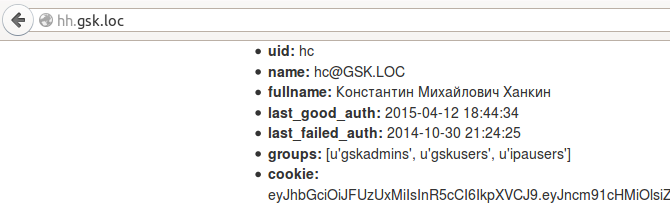
cookie is fresh, which can be seen on the / status:
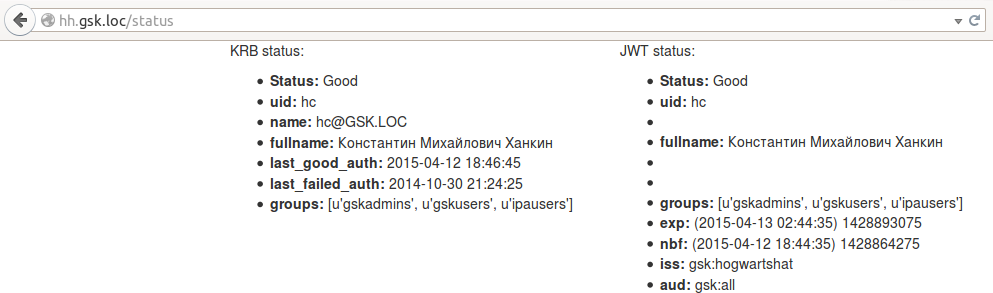
last_good_auth page from krb variables has been updated, since any transition between pages causes user authentication through a krb ticket. In jwt, the exp and nbf parameters were not updated, because no one updated the cookie. But what happens if the cookie is deleted:
Well, the most interesting thing is authentication in a third-party application. To demonstrate, a small and ugly application was written that can read cookies and show either a data page from the JWT or an error page. It is so small and so ugly that I just put all the code here:
The essence is the same - the custom request_loader checks the token, and if something is wrong with it, it returns None, which forces Flask-Login to execute unauthorized_handler, which is also custom.
Cookie-free demo:

After going for cookies:
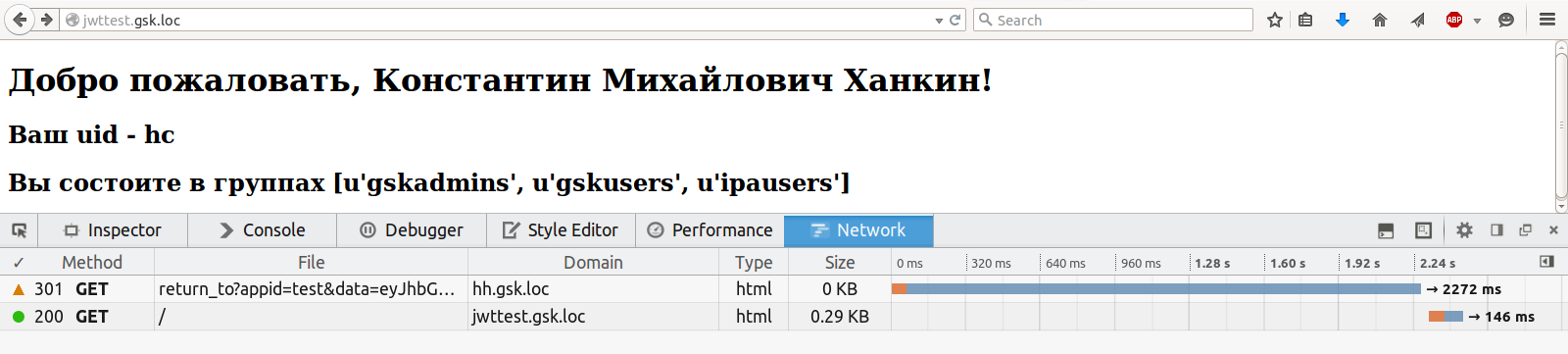
Naturally, no one forbids a redirect to be done automatically, instead of showing 403. Moreover, the demo application was originally written that way, but then a picture page was screwed for clarity.
You can still mock the authenticator by substituting any garbage in the data request parameter, including outdated and / or having incorrect iss / aud tokens - he chews and swears all the time. The last unresolved problem remains - how to report an error to the application that wants authentication? At the moment, the working thought is to pass the URL-callback in the request to which the error report will be sent. The only thought so far, so I’m not in a hurry to implement it.
The second unresolved issue is selinux. Since the cryptography module uses native libraries, they must all be marked with the lib_t type. Apparently, he still did not find it, so for now, he just turned off selinux. Add type definitions for files via semanage fcontext -a -t <type> ''.
If someone is interested in the full source code, you can download it here . License - do what you want; if the code is useful to you - that’s good.
Scold.
This article describes the development and deployment of SSO authentication using Kerberos and JWT. The authentication module is developed using Flask, Flask-Login and PyJWT. Deployment was done using the Apache web server, the FreeIPA authentication server, and the mod_lookup_identity module on CentOS 6/7. The article has a lot of text, medium code and few pictures. In general, it will be interesting.
I will tell a little about SSO. Single Sign-On (SSO) is an authentication principle that allows the user to enter a password only once when starting work with the system and after that providing the user with password-less access to all domain applications. In practice, 100% SSO is very rare, because organizations often have legacy systems that simply do not know such an abbreviation or do not support modern methods. Possible SSO methods include the Kerberos protocol, SSL certificates, and more. Actually, the task of authentication / token verification can be assigned both to each application and to some central authentication server. Typically, the implementation of SSO implies the presence of a central database of user accounts and some software to manage this database.
For Windows environments, there is a standard solution that provides both SSO and a centralized user database - Active Directory. In the linux world, things are not so straightforward. NIS was also successfully dead (but not completely), there are a number of “standard” solutions for LDAP, many (and I, too) did some of their add-ons and web interfaces on OpenLDAP, tried to use winbind to communicate with AD, and so on. Further. In my humble opinion, Red Hat farthest than anyone else in the matter of the standard "domain controller" for Linux, having bought and added FreeIPA. The product is deployed by one team, works fine in the RHEL / OEL / CentOS / Fedora environment (they report that there is a client module for Debian as well), provides cross-domain authentication in AD, is controlled entirely through the web interface, centralizes DNS settings, automount, sudo ... in short
Then I want to repeat that I don’t really know how to write software and don’t really like it, but sometimes it happens. So I wrote the killer of Google Forms, and, of course, the task was to authenticate the user, whom I successfully solved by assigning the task of checking the kerberos ticket to Apache and requesting after that the data from LDAP (from FreeIPA) for uid from the variable REMOTE_USER. In the future, using mod_lookup_identity , he was even able to refuse to work with LDAP. But there was one weak point in this solution - windows users and I coming from devices that are not managed by FreeIPA and, accordingly, do not have a kerberos ticket (strictly speaking, win users could have a ticket through perversion with cmd or through the deployment of AD and cross -domain trust, but I didn’t want to deal with either of these perversions).
Once upon a time I read aboutJSON Web Tokens and always itchy hands to try them. So the opportunity presented itself. I decided to do this: those who have a krb ticket, let them authenticate through Kerberos, and those poor people who do not have a ticket, let them enter a login password and go to Basic authentication. Moreover, for Basic Auth there is mod_authnz_pam , which allows you to completely forget about checking passwords by hand. The authentication result will be recorded in the cookie as JWT, and the application that requested authentication will receive this data from the token. Accordingly, a need has developed for a central authentication service issuing JWT.
For development, Python and Flask were used (since this is the only way on which I can develop more or less complete applications). Flask-Login was taken to manage authentication in Flask, PyJWT to work with jwt . A link to the source, if anyone needs it, will be at the end.
At the request of my wife, the authentication service was called Hogwarts' Hat (hh) - that hat also knew everything about everyone.
Own virtualenv was created for hh, the code was copied to the root of this virtualenv, the application on mod_wsgi is launched. Below is the apache config:
hogwartshat.conf
ServerName hh.gsk.loc # WSGI process parameters WSGIDaemonProcess hogwartshat user = hogwartshat group = hogwartshat threads = 10 WSGIScriptAlias / /var/www/flask/hogwartshat/hogwartshat.py WSGIScriptReloading On # authentication parameters AuthType Kerberos AuthName "HogwartsHat" # enable rollback to Basic Auth KrbDelegateBasic On KrbServiceName HTTP/[email protected] KrbMethodNegotiate On # if you disable the following directive - it stops working, why - did not understand KrbMethodK5Passwd On KrbAuthRealms GSK.LOC Krb5KeyTab / etc / httpd / conf / keytab AuthBasicProvider PAM # an indication of the PAM configuration file from /etc/pam.d AuthPAMService garage Require valid-user # The following directives write user information obtained from sssd via DBus to environment variables LookupUserGECOS REMOTE_USER_FULLNAME LookupUserAttr uid REMOTE_USER_ID LookupUserAttr krbLastSuccessfulAuth REMOTE_USER_LASTGOODAUTH LookupUserAttr krbLastFailedAuth REMOTE_USER_LASTBADAUTH LookupUserGroups REMOTE_USER_GROUPS ":" # A timeout of less than 1 s (1000 ms) does not make sense - DBus and LDAP just do not have time to work out in 20-30% of cases LookupDbusTimeout 2000 WSGIProcessGroup hogwartshat WSGIApplicationGroup% {GLOBAL} Loglevel warn ErrorLog logs / hogwartshat_error.log CustomLog logs / hogwartshat_access.log combined
The logic is this:
- The server answers 401 to the first user request and asks for Negotiate authentication
- The user provides a krb ticket
- The server requests sssd user information, sets environment variables and passes the request to the wsgi application
or:
- The server answers 401 to the first user request and asks for Negotiate authentication
- User does not provide krb ticket
- The server responds 401 and requests Basic Auth
- The user enters a login password and authenticates successfully.
- The server requests sssd user information, sets environment variables and passes the request to the wsgi application
In any other case, the user receives 401 from the server, which is not very nice, but easy to implement. An alternative would be mod_intercept_form_submit , but did not want to mess with forms.
The service wsgi file looks like this:
hogwartshat.py
#! / usr / bin / env python
# - * - coding: utf8 - * -
import os
import sys
PROJECT_DIR = '/ var / www / flask / hogwartshat'
# virtualenv activation (in fact, appending to the beginning of the PATH directory with virtualenv)
activate_this = os.path.join (PROJECT_DIR, 'bin', 'activate_this.py')
execfile (activate_this, dict (__ file __ = activate_this))
sys.path.append (PROJECT_DIR)
from app import app as application
# in instance.py - encryption keys
application.config.from_object ('app.config')
application.config.from_pyfile ('../ instance.py')
__init__.py is trivial for the app package, so I won't discuss it here. But views.py is more interesting - there Flask-Login helps facilitate work with user data:
views.py, load_user_from_request ()
@ login_manager.request_loader
def load_user_from_request (req):
    logging.debug ('req_loader env vars:% s'% str (req.environ))
    uid = req.environ.get ('REMOTE_USER')
    if uid is None:
        login_manager.login_message = 'User is not authenticated by HTTPD'
        return none
    try:
        return HTTPDPoweredUser (
            req.environ.get (app.config.get ('HTTPD_NAME_ATTR')),
            req.environ.get (app.config.get ('HTTPD_FULLNAME_ATTR')),
            req.environ.get (app.config.get ('HTTPD_UID_ATTR')),
            req.environ.get (app.config.get ('HTTPD_LAST_GOOD_AUTH_ATTR')),
            req.environ.get (app.config.get ('HTTPD_LAST_FAILED_AUTH_ATTR')),
            req.environ.get (app.config.get ('HTTPD_GROUPS_ATTR'))
        )
    except AttributeError:
        login_manager.login_message = 'One of the required HTTPD_ * attributes not found in request'
        return none
The main idea is your request_loader, which creates an object of type HTTPDPoweredUser from the environment variables set by Apache. Further, in any function wrapped in the login_required decorator, you can access the information and the user through the current_user variable.
The service is written in such a way that when logging into the / authenticated user, a fresh jwt cookie is issued as follows:
views.py, index ()
@ app.route ('/', methods = ['GET'])
@login_required
def index ():
    if current_user is not None:
        cookie = current_user.get_auth_token ()
        expire_date = datetime.utcnow () + timedelta (hours = app.config.get ('JWT_EXPIRE_TIME_HOURS'))
        response = make_response (render_template ('index.html', user = current_user, cookie = cookie))
        response.set_cookie (
            app.config.get ('JWT_COOKIE_NAME'),
            value = cookie,
            expires = expire_date,
            domain = app.config.get ('JWT_COOKIE_DOMAIN'),
            path = app.config.get ('JWT_COOKIE_PATH'),
            secure = app.config.get ('SESSION_COOKIE_SECURE')
        )
        logging.debug ('jwt response:% s'% str (response))
        return response
    else:
        abort (403)
users.py, get_auth_token ()
    def get_auth_token (self):
        tokens = {
            'exp': datetime.utcnow () + timedelta (hours = app.config.get ('JWT_EXPIRE_TIME_HOURS')),
            'nbf': datetime.utcnow (),
            'iss': app.config.get ('JWT_ISSUER_NAME'),
            'aud': app.config.get ('JWT_URN') + 'all',
            'uid': self.uid,
            'fullname': self.fullname,
            'groups': self.groups
        }
        logging.debug ('jwt tokens:% s'% str (tokens))
        cookie = jwt.encode (tokens, app.config.get ('JWT_PRIVATE_KEY'), algorithm = app.config.get ('JWT_ALG'))
        logging.debug ('jwt cookie:% s'% str (cookie))
        return cookie
As you can see, in addition to uid, the name of the user and his group are also recorded in the token, which eliminates the need for other applications to climb into the central database for user information.
The service also has a / status page where you can look at the state of your jwt:
views.py, status ()
@ app.route ('/ status', methods = ['GET'])
@login_required
def status ():
    auth_cookie = request.cookies.get (app.config.get ('JWT_COOKIE_NAME'))
    logging.debug ('cookie:% s'% str (auth_cookie))
    tokens = {}
    error_message = ''
    if auth_cookie is not None:
        try:
            tokens = jwt.decode (
                auth_cookie
                app.config.get ('JWT_PUBLIC_KEY'),
                audience = app.config.get ('JWT_URN') + 'all',
                issuer = app.config.get ('JWT_ISSUER_NAME')
            )
            nbf = datetime.utcfromtimestamp (tokens.get ('nbf'))
            tokens ['nbf'] = '(' + str (nbf) + ')' + str (tokens.get ('nbf'))
            exp = datetime.utcfromtimestamp (tokens.get ('exp'))
            tokens ['exp'] = '(' + str (exp) + ')' + str (tokens.get ('exp'))
            logging.debug ('cookie decoded successfully')
        except jwt.DecodeError:
            logging.debug ('status: jwt.DecodeError')
            error_message = 'Failed to decode provided JWT'
        except jwt.ExpiredSignatureError:
            logging.debug ('status: jwt.ExpiredSignatureError')
            error_message = 'JWT is expired'
        except jwt.InvalidIssuerError:
            logging.debug ('status: jwt.InvalidIssuerError')
            error_message = 'JWT is issued by a wrong issuer'
        except jwt.InvalidAudienceError:
            logging.debug ('status: jwt.InvalidAudienceError')
            error_message = 'JWT is issued for another audience'
    else:
        error_message = 'No JWT cookie received'
    logging.debug ('tokens:% s'% str (tokens))
    attr_error = False if current_user is not None else True
    return render_template (
        'status.html',
        error = False if error_message == '' else True,
        error_message = error_message,
        tokens = tokens,
        attr_error = attr_error,
        user = current_user
    )
I generated the keys like this:
openssl ecparam -genkey -name secp521r1 -noout -out hogwartshat_key.pem # p521 - not a typo
openssl ec -in hogwartshat_key.pem -pubout -out hogwartshat_pub.pem
Then I just copied the contents of the pem files to the config. Please note that PyJWT requires the cryptography module to work with asymmetric keys and elliptic curves. The radius of curvature of my hands was not enough to launch PyJWT with the alternative modules proposed in the documentation.
Well, actually, a piece of code responsible for authentication for third-party applications:
views.py, return_to ()
@ app.route ('/ return_to', methods = ['GET'])
@login_required
def return_to ():
    app_id = request.args.get ('appid')
    data = request.args.get ('data')
    if app_id is None:
        return make_error_page ('No application ID provided', str (request.url)), 400
    elif app_id not in app.config.get ('APPS_PUBLIC_KEYS'). keys ():
        return make_error_page ('Unknown application ID provided', str (request.url)), 403
    if data is None:
        return make_error_page ('Application provided empty request', str (request.url)), 400
    else:
        try:
            tokens = jwt.decode (
                data,
                app.config.get ('APPS_PUBLIC_KEYS') [app_id],
                audience = app.config.get ('JWT_ISSUER_NAME'),
                issuer = app.config.get ('JWT_URN') + app_id
            )
            return_url = tokens.get ('return_url')
            if current_user is not None:
                cookie = current_user.get_auth_token ()
                expire_date = datetime.utcnow () + timedelta (hours = app.config.get ('JWT_EXPIRE_TIME_HOURS'))
                response = make_response (redirect (str (return_url), code = 301))
                response.set_cookie (
                    app.config.get ('JWT_COOKIE_NAME'),
                    value = cookie,
                    expires = expire_date,
                    domain = app.config.get ('JWT_COOKIE_DOMAIN'),
                    path = app.config.get ('JWT_COOKIE_PATH'),
                    secure = app.config.get ('SESSION_COOKIE_SECURE')
                )
                logging.debug ('jwt response:% s'% str (response))
                return response
        except jwt.DecodeError:
            return make_error_page ('Failed to decode provided JWT', str (request.url)), 412
        except jwt.ExpiredSignatureError:
            return make_error_page ('JWT is expired', str (request.url)), 412
        except jwt.InvalidIssuerError:
            return make_error_page ('JWT is issued by a wrong issuer', str (request.url)), 412
        except jwt.InvalidAudienceError:
            return make_error_page ('JWT is issued for another audience', str (request.url)), 412
    return str (request.args)
A few screenshots. Main page: The
cookie is fresh, which can be seen on the / status:
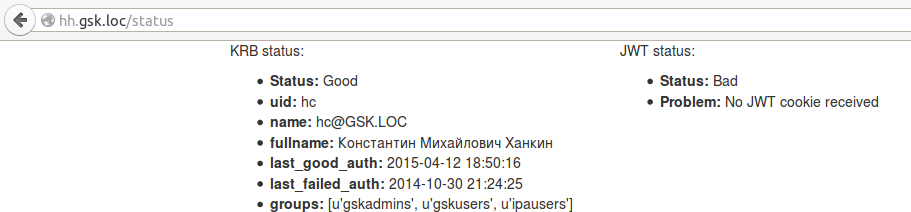
last_good_auth page from krb variables has been updated, since any transition between pages causes user authentication through a krb ticket. In jwt, the exp and nbf parameters were not updated, because no one updated the cookie. But what happens if the cookie is deleted:
Well, the most interesting thing is authentication in a third-party application. To demonstrate, a small and ugly application was written that can read cookies and show either a data page from the JWT or an error page. It is so small and so ugly that I just put all the code here:
demo, __init__.py
import jwt
import logging.config
from datetime import datetime, timedelta
from flask import Flask, redirect, render_template, get_flashed_messages
from flask_login import LoginManager, UserMixin, login_required, current_user
app = Flask (__ name__)
app.config ['SECRET_KEY'] = 'the session is unavailable because no secret key was set.'
login_manager = LoginManager ()
login_manager.init_app (app)
key = '' '----- BEGIN EC PRIVATE KEY -----
----- END EC PRIVATE KEY ----- '' '
hh_pubkey = '' '----- BEGIN PUBLIC KEY -----
----- END PUBLIC KEY ----- '' '
logging.config.fileConfig ('logging.conf')
class JWTPoweredUser (UserMixin):
    def __init __ (self, fullname, uid, groups):
        for attr in [fullname, uid, groups]:
            if attr is None:
                raise AttributeError ('% s cannot be None'% attr .__ name__)
        self.fullname = fullname
        self.uid = uid
        self.groups = groups
    def is_anonymous (self):
        return false
    def is_active (self):
        return true
    def is_authenticated (self):
        return true
    def get_id (self):
        return unicode (self.uid)
@ login_manager.request_loader
def load_user_from_request (req):
    cookie = req.cookies.get ('gsk_auth')
    if cookie is None:
        login_manager.login_message = 'no cookie'
        return none
    try:
        tokens = jwt.decode (cookie, hh_pubkey, issuer = 'gsk: hogwartshat', audience = 'gsk: all')
    except jwt.ExpiredSignatureError:
        login_manager.login_message = 'expired'
        return none
    except jwt.DecodeError:
        login_manager.login_message = 'decode error'
        return none
    except jwt.InvalidIssuerError:
        login_manager.login_message = 'invalid issuer'
        return none
    except jwt.InvalidAudienceError:
        login_manager.login_message = 'invalid audience'
        return none
    return JWTPoweredUser (tokens.get ('fullname'), tokens.get ('uid'), tokens.get ('groups'))
@ login_manager.unauthorized_handler
def unauthorized ():
    data = jwt.encode ({
        'iss': 'gsk: test',
        'aud': 'gsk: hogwartshat',
        'nbf': datetime.utcnow (),
        'exp': datetime.utcnow () + timedelta (minutes = 1),
        'return_url': 'http: //jwttest.gsk.loc'
    }, key, algorithm = 'ES512')
    logging.debug ('jwt request:% s'% data)
    url = 'http: //hh.gsk.loc/return_to? appid = test & data =% s'% data
    logging.debug ('jwt return_to:% s'% url)
    page = render_template (
        'error.html',
        error = login_manager.login_message,
        url = url
    )
    logging.debug ('jwt page:% s'% page)
    return page, 403
@ app.route ('/', methods = ['GET'])
@login_required
def index ():
    return render_template ('index.html', user = current_user)
The essence is the same - the custom request_loader checks the token, and if something is wrong with it, it returns None, which forces Flask-Login to execute unauthorized_handler, which is also custom.
Cookie-free demo:
After going for cookies:
Naturally, no one forbids a redirect to be done automatically, instead of showing 403. Moreover, the demo application was originally written that way, but then a picture page was screwed for clarity.
You can still mock the authenticator by substituting any garbage in the data request parameter, including outdated and / or having incorrect iss / aud tokens - he chews and swears all the time. The last unresolved problem remains - how to report an error to the application that wants authentication? At the moment, the working thought is to pass the URL-callback in the request to which the error report will be sent. The only thought so far, so I’m not in a hurry to implement it.
The second unresolved issue is selinux. Since the cryptography module uses native libraries, they must all be marked with the lib_t type. Apparently, he still did not find it, so for now, he just turned off selinux. Add type definitions for files via semanage fcontext -a -t <type> '
If someone is interested in the full source code, you can download it here . License - do what you want; if the code is useful to you - that’s good.
Scold.