 September 21, 2014 at 19:35
Semi-automatic increment of the project version when working with GIT in Visual Studio
A lot of articles have been written on the Internet about incrementing versions of their applications, and each uses its own method. For some, revisions are used as builds, for others it is the number of seconds of the current day (for example, Microsoft), for someone something else.
My project uses 4 defining versions.
For example, 1.2.34.56 , where:
1 - Major version: Critical changes to the project (new functionality was introduced, the existing one was fundamentally revised, etc.). It is installed manually;
2 - Minor version: Changing the functional parts of the application, a significant improvement in the code, etc. Installed manually;
24 - Build: release number entering the community. Assigned automatically;
56- Revision: revision number obtained from GIT. Assigned automatically.
I will not consider who uses what methods, so I will write how I achieved this result.
First we need to go into the project settings ( Project -> MyProject Properties ). Here, in the Application tab , we go to Assembly Information and check that all 4 fields of the Assembly version parameter are filled, and the first 2 digits are specified according to our release. In my case, this is version " 2.3 ", and put the rest of the numbers any.
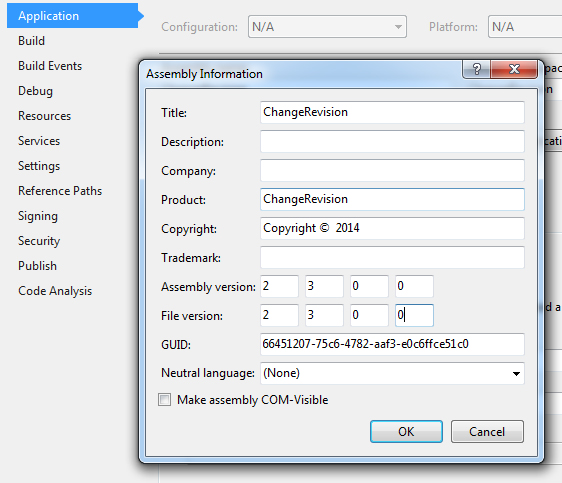
After making the changes, we need to go into the project folder and find the AssemblyInfo.cs file , which is usually located in the Properties folder .
We open the file for editing and at the very bottom we look for the lines:
Delete the commented line:
This is necessary because the new expression will use a regular expression that reads the key digits of the version (major, minor) from the first match found.
Deleted, saved, closed the file. We won’t need him anymore.
For convenience, I compiled a console application that reads the values of major, minor and build from the Properties \ AssemblyInfo.cs file , as well as the number of GIT commits .
So, the code of ChangeRevision.exe :
We put the compiled file into the Solution directory .
Below I will describe in more detail how this code works.
Since I need to change the build version before compiling, the code fits into the Pre-Build Event window .
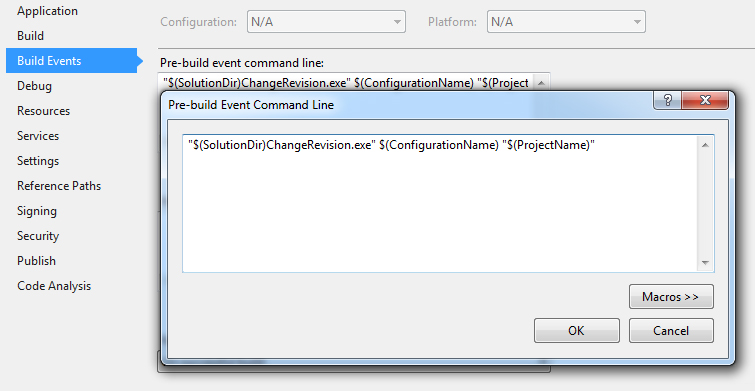
Where:
"$ (SolutionDir) ChangeRevision.exe" - Specifies the path to the solution indicating the launch of our compiled file, which is described above.
$ (ConfigurationName) - Type of configuration ( Debug or Release ).
If the Debug parameter was passed when the ChangeRevision.exe file was run , then in the project version only the revision value will be increased , that is, if it was 2.3.0.0, then it will become 2.3.0.x, where “x” is the number of project commits. If the Release parameter is passed , then the build number will be automatically incremented along with the change in the revision by the number of commits. For example, there was 2.3.0.0, it will become 2.3.1.x, where “x” is the number of project commits.
"$ (ProjectName)" - Project name
UPD: The parameter containing the project name was removed from the program code, because when compiling the project, the start directory of the file with the parameter was $ (ProjectDir) \ bin \ Debug / Release , as a result of which an error occurred. Thus, the transfer of the project name has disappeared as such, since the ChangeRevision.exe application uses the transition to the upper level relative to the startup directory, that is, by specifying the path ".. \ .. \ Properties \ AssemblyInfo.cs" the program goes to the project directory and from there to "Properties" , where he finds the necessary fileAssemblyInfo.cs "
UPD 2: As practice has shown, if there are several projects in Solution and you choose the one that is not the default for compilation, then the start directory will be, for some reason, the default project directory. In general, the code is still a bit finalized and changed at the top, namely, the parameter for transferring the project name was re-introduced, which is intercepted by the second one in ChangeRevision.exe . Thus, the path to AssemblyInfo.cs was changed to:
That is, when compiling any project, the start directory is shifted 3 steps up (the solution directory), and then it is moved to the project folder specified in the file launch parameter, proceeding to the desired file.
The number of commits can be found by passing the parameter
This is if you need to get the number of commits from the MASTER branch .
Upon completion of the application, the Properties \ AssemblyInfo.cs file passed in the first parameter of the project will be changed , after which the development environment will compile the project file with the version specified in the file.
PS: If you change the version AssemblyVersion also changes and the value of the parameter in the AssemblyFileVersion , and in some cases AssemblyFileVersionAttribute .
Thus, I achieved a semi-automatic increment of my application version.
PS: Of course, working as a team or performing regular merging of versions, this optiondoes not fitIn general, it doesn’t work, as the number of commits can suddenly decrease, thus we get the “new” “old” version of the software. And for one person, without using a combination of versions, this option is more than sufficient.
Thanks for attention!
UPD: Made changes to the code in Step 2. Corrected the description of
UPD 2: Everything at the same step again changes the code.
My project uses 4 defining versions.
For example, 1.2.34.56 , where:
1 - Major version: Critical changes to the project (new functionality was introduced, the existing one was fundamentally revised, etc.). It is installed manually;
2 - Minor version: Changing the functional parts of the application, a significant improvement in the code, etc. Installed manually;
24 - Build: release number entering the community. Assigned automatically;
56- Revision: revision number obtained from GIT. Assigned automatically.
I will not consider who uses what methods, so I will write how I achieved this result.
Step 1. Preparation
First we need to go into the project settings ( Project -> MyProject Properties ). Here, in the Application tab , we go to Assembly Information and check that all 4 fields of the Assembly version parameter are filled, and the first 2 digits are specified according to our release. In my case, this is version " 2.3 ", and put the rest of the numbers any.
After making the changes, we need to go into the project folder and find the AssemblyInfo.cs file , which is usually located in the Properties folder .
We open the file for editing and at the very bottom we look for the lines:
// You can specify all the values or you can default the Build and Revision Numbers
// by using the '*' as shown below:
// [assembly: AssemblyVersion("1.0.*")]
[assembly: AssemblyVersion("2.3.0.0")]
[assembly: AssemblyFileVersion("2.3.0.0")]
Delete the commented line:
// [assembly: AssemblyVersion("1.0.*")]
This is necessary because the new expression will use a regular expression that reads the key digits of the version (major, minor) from the first match found.
Deleted, saved, closed the file. We won’t need him anymore.
Step 2. “ChangeRevision”
For convenience, I compiled a console application that reads the values of major, minor and build from the Properties \ AssemblyInfo.cs file , as well as the number of GIT commits .
So, the code of ChangeRevision.exe :
using System;
using System.Collections.Generic;
using System.Linq;
using System.Text;
using System.Text.RegularExpressions;
using System.Threading;
using System.Threading.Tasks;
using System.IO;
using System.Diagnostics;
namespace ChangeRevision
{
    class Program
    {
        static void Main(string[] args)
        {
            try
            {
                Process process = new Process();
                process.StartInfo.WorkingDirectory = Environment.CurrentDirectory;
                process.StartInfo.FileName = "\"c:\\Program Files (x86)\\Git\\cmd\\git.exe\"";
                process.StartInfo.Arguments = @"rev-list master --count";
                process.StartInfo.UseShellExecute = false;
                process.StartInfo.RedirectStandardOutput = true;
                process.StartInfo.RedirectStandardError = true;
                StringBuilder output = new StringBuilder();
                int timeout = 10000;
                using (AutoResetEvent outputWaitHandle = new AutoResetEvent(false))
                using (AutoResetEvent errorWaitHandle = new AutoResetEvent(false))
                {
                    process.OutputDataReceived += (sender, e) =>
                    {
                        if (e.Data == null)
                            outputWaitHandle.Set();
                        else
                            output.AppendLine(e.Data);
                    };
                    process.Start();
                    process.BeginOutputReadLine();
                    if (process.WaitForExit(timeout) && outputWaitHandle.WaitOne(timeout))
                    {
                        string text = File.ReadAllText(@"..\..\..\"+args[1]+@"\Properties\AssemblyInfo.cs");
                        Match match = new Regex("AssemblyVersion\\(\"(.*?)\"\\)").Match(text);
                        Version ver = new Version(match.Groups[1].Value);
                        int build = args[0] == "Release" ? ver.Build + 1 : ver.Build;
                        Version newVer = new Version(ver.Major, ver.Minor, build, Convert.ToInt16(output.ToString().Trim()));
                        text = Regex.Replace(text, @"AssemblyVersion\((.*?)\)", "AssemblyVersion(\"" + newVer.ToString() + "\")");
                        text = Regex.Replace(text, @"AssemblyFileVersionAttribute\((.*?)\)", "AssemblyFileVersionAttribute(\"" + newVer.ToString() + "\")");
                        text = Regex.Replace(text, @"AssemblyFileVersion\((.*?)\)", "AssemblyFileVersion(\"" + newVer.ToString() + "\")");
                        File.WriteAllText(@"..\..\..\" + args[1] + @"\Properties\AssemblyInfo.cs", text);
                    }
                }
            }
            catch (Exception ex)
            {
                Console.WriteLine(ex.Message);
                Console.WriteLine("");
                Console.WriteLine(ex.StackTrace);
                Console.ReadLine();
            }
        }
    }
}
We put the compiled file into the Solution directory .
Below I will describe in more detail how this code works.
Step 3. Pre-Build Event
Since I need to change the build version before compiling, the code fits into the Pre-Build Event window .
"$(SolutionDir)ChangeRevision.exe" $(ConfigurationName) "$(ProjectName)"
Where:
"$ (SolutionDir) ChangeRevision.exe" - Specifies the path to the solution indicating the launch of our compiled file, which is described above.
$ (ConfigurationName) - Type of configuration ( Debug or Release ).
If the Debug parameter was passed when the ChangeRevision.exe file was run , then in the project version only the revision value will be increased , that is, if it was 2.3.0.0, then it will become 2.3.0.x, where “x” is the number of project commits. If the Release parameter is passed , then the build number will be automatically incremented along with the change in the revision by the number of commits. For example, there was 2.3.0.0, it will become 2.3.1.x, where “x” is the number of project commits.
"$ (ProjectName)" - Project name
UPD: The parameter containing the project name was removed from the program code, because when compiling the project, the start directory of the file with the parameter was $ (ProjectDir) \ bin \ Debug / Release , as a result of which an error occurred. Thus, the transfer of the project name has disappeared as such, since the ChangeRevision.exe application uses the transition to the upper level relative to the startup directory, that is, by specifying the path ".. \ .. \ Properties \ AssemblyInfo.cs" the program goes to the project directory and from there to "Properties" , where he finds the necessary fileAssemblyInfo.cs "
UPD 2: As practice has shown, if there are several projects in Solution and you choose the one that is not the default for compilation, then the start directory will be, for some reason, the default project directory. In general, the code is still a bit finalized and changed at the top, namely, the parameter for transferring the project name was re-introduced, which is intercepted by the second one in ChangeRevision.exe . Thus, the path to AssemblyInfo.cs was changed to:
@"..\..\..\" + args[1] + @"\Properties\AssemblyInfo.cs"
That is, when compiling any project, the start directory is shifted 3 steps up (the solution directory), and then it is moved to the project folder specified in the file launch parameter, proceeding to the desired file.
The number of commits can be found by passing the parameter
git rev-list master --count
This is if you need to get the number of commits from the MASTER branch .
Upon completion of the application, the Properties \ AssemblyInfo.cs file passed in the first parameter of the project will be changed , after which the development environment will compile the project file with the version specified in the file.
PS: If you change the version AssemblyVersion also changes and the value of the parameter in the AssemblyFileVersion , and in some cases AssemblyFileVersionAttribute .
Thus, I achieved a semi-automatic increment of my application version.
PS: Of course, working as a team or performing regular merging of versions, this option
Thanks for attention!
UPD: Made changes to the code in Step 2. Corrected the description of
UPD 2: Everything at the same step again changes the code.









