
Delphi users on Android mobile development
Valentina, you showed your first application in Delphi for Android . Does it solve a specific problem or is it just a proactive development, a “pen test”? Are Real Business Needs Behind This?
The first mobile application written in Delphi for Android was for me a kind of trial pebble towards the ability to develop certain parts of the enterprise’s information structure on mobile platforms.
In many enterprises (which are our customers), you can immediately find tasks that can be carried out on a mobile platform. This is, first and foremost, tasks related to personnel who do not have the ability to access information system information from a regular computer or laptop, there is no local network and WiFi, only a mobile network. These are employees of remote sites where it is not possible to organize a stationary workplace due to a specific nature, for example, couriers or managers on the road.
For such tasks, an Android tablet with a 3G module is a good solution. We are required to provide communication with the database, a convenient interface, and compact data exchange traffic.
Regarding the tasks being solved - I can describe the tasks that we are solving now, using mobile development for Android briefly, but without specificity (observing the interests of our customers).
One of the tasks: there is a specialist located on a remote site who must transmit a small amount of operational information on the order - the current state of the problem that he solves, and some output. Data must be transferred to the information system promptly, since the further passage of the order in the chain depends on this. In addition, to solve his problems, he must receive additional relevant information that is entered into the system by other specialists, possibly also from a mobile device. The use of a mobile device, rather than a Windows PC, is determined mainly by the weight characteristics of the tablet. "7 inches" easily fit in a large pocket or small handbag and are not felt by the person as extra weight, which allows you to wear these devices anytime, anywhere. Yes, and they can work more than 6 hours.
How this problem was solved before: either the specialist carried a laptop with him with the ability to connect to a 3G network, or called or sent an SMS to the dispatcher. Working with a laptop is not always possible, and working through a dispatcher is a loss of efficiency and relevance of data and, naturally, a human factor.
The removal of such a task to a mobile platform in the option - MS SQL Server database (only for our tasks) - Data Snap - Android application lacks the above disadvantages.
Another typical task that is very in demand is the collection of operational data from remote sites on which there is no, and there will be no possibility of deploying stationary workplaces, due to some features - for example, an unguarded unheated room without electricity (it happens sometimes).
For such a task, an inexpensive Android tablet is a very suitable solution, even the operating time is not very critical, since only a session connection to the database is required.
In our production tasks, the solutions for iOS, alas, remain on the sidelines, due to Apple’s policy regarding updating applications, I'm not talking about the cost of devices, and in the near future there are no changes for the better. For mass use, for example, in production, the cost of ownership and the speed of updating specialized software are essential, for example, when deploying 100 or more mobile workstations.
There is also the task of promptly entering data from points distributed throughout the enterprise where the employee has a workplace with a stationary computer connected to the network, but due to the specifics of the work, it must enter some data at a distance from the workplace, for example, verify the order picking. The order collector should see the order items, and he only enters “OK” or “Problem”. For such tasks, the use of a Wi-Fi network, and an Android tablet with a Wi-Fi module makes the cost of the solution even lower.
It is customary to lay a certain “scenario” of use for the design of a mobile application. Can you share?
When developing the interface and ideology of the mobile application, both the features of the mobile device itself are taken into account - touch input, estimated screen resolution, and the “features” of the user. In other words, the same functionality implemented for the on-site manager and for the operator at the remote site may differ due to the “perception features” of the mobile device user.
First of all, it is the comfort of work without compromising the functionality of the application. Users of our client-server applications are used to working with a functionally rich screen, in fact a remote control, in which all the necessary information is always at hand, or in the field of view, or is available in one click, or is delivered by pop-up notifications. Therefore, for the interface of a mobile application, it is very important that when working, the user does not feel constrained in their actions and in access to the necessary information.
The apotheosis of user discomfort is very well expressed by the phrase “You force me to move the mouse!” Therefore, we ideally would like the user of the mobile application to perceive it almost like a game, well, or at least it would be nice to work with him.
And suddenly, during development, it turns out that the use of "grids" to display information on mobile devices is not always justified - they are inconvenient to scroll, and in most cases using ListBox and ListView provides much more intuitive capabilities for mobile users.
The most unpleasant thing is that in the mobile version of the application the user is deprived of the desktop “multi-window”, and here it is necessary to decide which information will have to be sacrificed altogether to “mobilize” the solution, and which should be hidden under bookmarks or put in separate forms or pop-up menus. Therefore, the interfaces of the task “desktop” and its “mobile brother” with similar functionality are completely different.
Since the mobile application is developed for a specific customer and task, there are no problems with compatibility with devices, since we know exactly which devices and with what characteristics the customer will use.
Can I ask for some screen shots - preferably during the development of the script?
There are no technical problems, but there are other considerations. Our customers regard the presence of mobile solutions in their assets as an additional competitive advantage, so I decided to refuse to upload pictures. By the way, this is a big problem not only for mobile applications, but for client-server systems. I can only show the most-most pilot project, and even then - I had to “gloss over”. The interface of the full-scale current project would have to be glossed over, excuse me, "over the ears", there would remain only a "strip with charging." I can, without prejudice to customers, show only the very first prototype, and even that - with blurry data. There will be another kind of project in the IDE for the thin mobile client and DataSnap server.
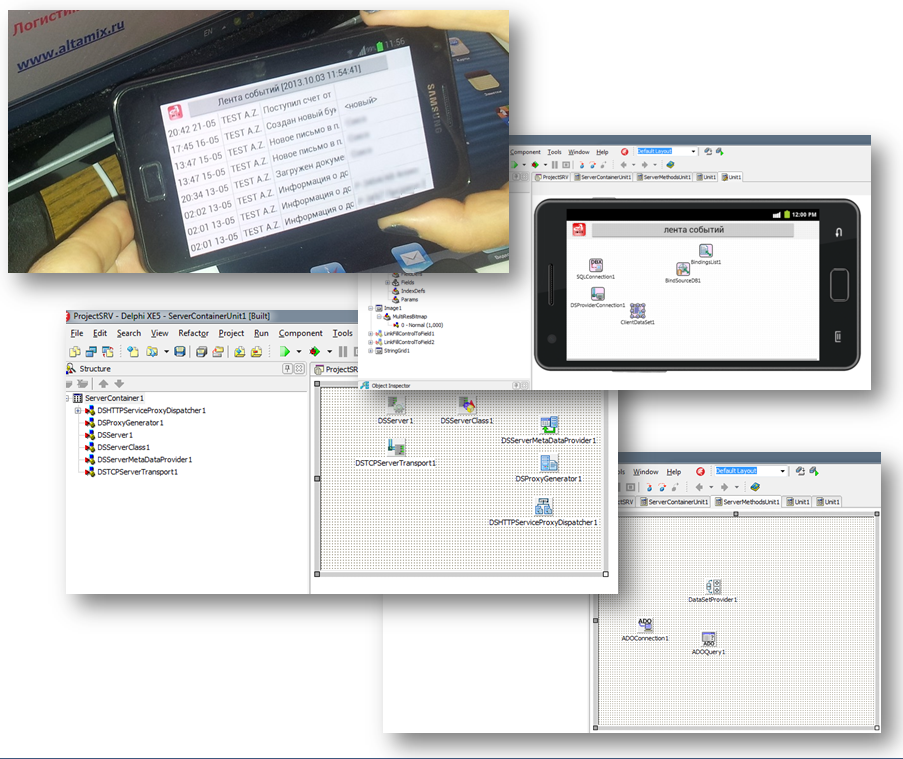
The development of the application interface turned out to be a rather time-consuming task precisely in terms of ergonomics, while the actual functionality of the application did not cause any problems, but we work in the usual programming environment - Delphi XE5.
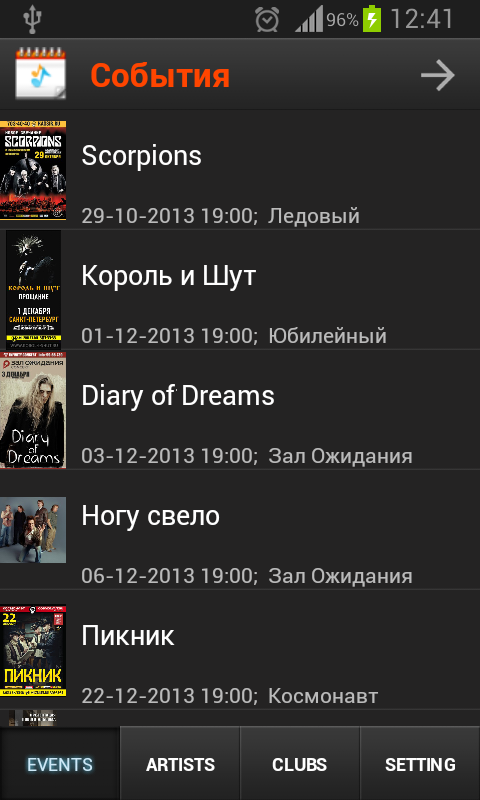
By the way, like most developers, I “sculpt” something for myself. I can show it:
What is the component basis of the application? What is used like?
In developing our applications, we always try to minimize the set of third-party components, as much as possible, so as to have as little dependence on other developers when transferring projects to new versions of Embarcadero products, especially since they come out with such frequency.
In the case of developing our mobile applications, even the standard set of components included in the Delphi XE5 Enterprise version is still enough, since there is the possibility of mobile development, Data Snap and FireDAC.
In addition, the use of “styles” for Android is quite capable of “animating” the application interface.
Outwardly and functionally attractive, the solution that TMS offers, but so far I have used these components only in developing applications for Mac OS. It would be great if Embarcadero included them in the standard package, at least from the Enterprise version. After all, the same thing happened with Fast Report and Fire DAC.
How and where does the data come from?
Work with data is organized as follows - there is a database server (MS SQL Server), there is a Data Snap server, through it the client on Android works with data.
How are user actions recorded in the "database" (if there is a connection with it)?
Naturally, there is a connection with the database, everything that the user makes is immediately reflected in the database.
How did managers manage without this application?
Naturally, both managers and workers at remote sites used to do without mobile applications. Previously, ordinary people did without mobile mail and a phone. They used laptops, called, wrote letters, sent couriers with packages, prepared reports with such a delay that the data was no longer relevant.
How much do you think business processes have accelerated?
Generally speaking, in the automation of production, the use of mobile solutions (here I mean not only mobile applications, but also web solutions) increase the production efficiency so significantly that this is expressed as a result by pretty solid figures. Because there are processes that, in the non-mobile version, are not technically implemented at all, or are implemented very costly.
The main advantage that the mobile solution gives is the operational interaction with feedback, this is exactly what is the basis of client-server solutions - all processes occur in real time.
Do you see the further development of the application functionality?
Yes, at least for the mobile manager there are already ideas for development, and these ideas already come not only from us, but also from the users themselves. You can develop endlessly, if you have the time and funding, you can bring functionality to the “desktop” system, there are no special technical problems - this allows the Embarcadero Delphi XE5 Enterprise. If the system was originally designed as a three-link, then the translation speed is determined by the technical speed of writing the code. The main thing is not to rush and solve problems in stages.
The main problem is the screen size of the mobile device and ergonomics (the size of the control element should be significantly larger for the finger than for the mouse).
How do you think this solution is typical within the framework of “corporate mobility”?
I believe that our mobile solutions are typical for those industries for which we have developed them, since the main business processes for different customers in the same industry often differ only in managers' preferences and historical rules (even taking into account the geographical location).
For example, the users of our mobile solutions are a sales manager, a warehouse worker, a forwarding driver, an order picker, a remote site logistician, a procurement / sales manager, a raw materials / production master, a document approver, an equipment repairman (yes, our systems monitor equipment), production technologist. That is, typical production problems are solved.
Take this opportunity to give us sugar-free wishes for Embarcadero
I think that I will not be original in this matter, but unlike other "stone throwers" I will try to throw them less, understanding those complex and new tasks that are solved by the products of the line of development tools. By the way, in parallel, I am considering developing mobile applications on other (I’ll not mention which) development tools, so I can compare two worlds — two systems, and make some suggestions
All of the above does not greatly interfere with the development process, but solving these problems would significantly increase the attractiveness of Embarcadero as a means of developing competitive mobile applications not only in the corporate sector.
Thank you Valentine!
The first mobile application written in Delphi for Android was for me a kind of trial pebble towards the ability to develop certain parts of the enterprise’s information structure on mobile platforms.
In many enterprises (which are our customers), you can immediately find tasks that can be carried out on a mobile platform. This is, first and foremost, tasks related to personnel who do not have the ability to access information system information from a regular computer or laptop, there is no local network and WiFi, only a mobile network. These are employees of remote sites where it is not possible to organize a stationary workplace due to a specific nature, for example, couriers or managers on the road.
For such tasks, an Android tablet with a 3G module is a good solution. We are required to provide communication with the database, a convenient interface, and compact data exchange traffic.
Regarding the tasks being solved - I can describe the tasks that we are solving now, using mobile development for Android briefly, but without specificity (observing the interests of our customers).
One of the tasks: there is a specialist located on a remote site who must transmit a small amount of operational information on the order - the current state of the problem that he solves, and some output. Data must be transferred to the information system promptly, since the further passage of the order in the chain depends on this. In addition, to solve his problems, he must receive additional relevant information that is entered into the system by other specialists, possibly also from a mobile device. The use of a mobile device, rather than a Windows PC, is determined mainly by the weight characteristics of the tablet. "7 inches" easily fit in a large pocket or small handbag and are not felt by the person as extra weight, which allows you to wear these devices anytime, anywhere. Yes, and they can work more than 6 hours.
How this problem was solved before: either the specialist carried a laptop with him with the ability to connect to a 3G network, or called or sent an SMS to the dispatcher. Working with a laptop is not always possible, and working through a dispatcher is a loss of efficiency and relevance of data and, naturally, a human factor.
The removal of such a task to a mobile platform in the option - MS SQL Server database (only for our tasks) - Data Snap - Android application lacks the above disadvantages.
Another typical task that is very in demand is the collection of operational data from remote sites on which there is no, and there will be no possibility of deploying stationary workplaces, due to some features - for example, an unguarded unheated room without electricity (it happens sometimes).
For such a task, an inexpensive Android tablet is a very suitable solution, even the operating time is not very critical, since only a session connection to the database is required.
In our production tasks, the solutions for iOS, alas, remain on the sidelines, due to Apple’s policy regarding updating applications, I'm not talking about the cost of devices, and in the near future there are no changes for the better. For mass use, for example, in production, the cost of ownership and the speed of updating specialized software are essential, for example, when deploying 100 or more mobile workstations.
There is also the task of promptly entering data from points distributed throughout the enterprise where the employee has a workplace with a stationary computer connected to the network, but due to the specifics of the work, it must enter some data at a distance from the workplace, for example, verify the order picking. The order collector should see the order items, and he only enters “OK” or “Problem”. For such tasks, the use of a Wi-Fi network, and an Android tablet with a Wi-Fi module makes the cost of the solution even lower.
It is customary to lay a certain “scenario” of use for the design of a mobile application. Can you share?
When developing the interface and ideology of the mobile application, both the features of the mobile device itself are taken into account - touch input, estimated screen resolution, and the “features” of the user. In other words, the same functionality implemented for the on-site manager and for the operator at the remote site may differ due to the “perception features” of the mobile device user.
First of all, it is the comfort of work without compromising the functionality of the application. Users of our client-server applications are used to working with a functionally rich screen, in fact a remote control, in which all the necessary information is always at hand, or in the field of view, or is available in one click, or is delivered by pop-up notifications. Therefore, for the interface of a mobile application, it is very important that when working, the user does not feel constrained in their actions and in access to the necessary information.
The apotheosis of user discomfort is very well expressed by the phrase “You force me to move the mouse!” Therefore, we ideally would like the user of the mobile application to perceive it almost like a game, well, or at least it would be nice to work with him.
And suddenly, during development, it turns out that the use of "grids" to display information on mobile devices is not always justified - they are inconvenient to scroll, and in most cases using ListBox and ListView provides much more intuitive capabilities for mobile users.
The most unpleasant thing is that in the mobile version of the application the user is deprived of the desktop “multi-window”, and here it is necessary to decide which information will have to be sacrificed altogether to “mobilize” the solution, and which should be hidden under bookmarks or put in separate forms or pop-up menus. Therefore, the interfaces of the task “desktop” and its “mobile brother” with similar functionality are completely different.
Since the mobile application is developed for a specific customer and task, there are no problems with compatibility with devices, since we know exactly which devices and with what characteristics the customer will use.
Can I ask for some screen shots - preferably during the development of the script?
There are no technical problems, but there are other considerations. Our customers regard the presence of mobile solutions in their assets as an additional competitive advantage, so I decided to refuse to upload pictures. By the way, this is a big problem not only for mobile applications, but for client-server systems. I can only show the most-most pilot project, and even then - I had to “gloss over”. The interface of the full-scale current project would have to be glossed over, excuse me, "over the ears", there would remain only a "strip with charging." I can, without prejudice to customers, show only the very first prototype, and even that - with blurry data. There will be another kind of project in the IDE for the thin mobile client and DataSnap server.
The development of the application interface turned out to be a rather time-consuming task precisely in terms of ergonomics, while the actual functionality of the application did not cause any problems, but we work in the usual programming environment - Delphi XE5.
By the way, like most developers, I “sculpt” something for myself. I can show it:
What is the component basis of the application? What is used like?
In developing our applications, we always try to minimize the set of third-party components, as much as possible, so as to have as little dependence on other developers when transferring projects to new versions of Embarcadero products, especially since they come out with such frequency.
In the case of developing our mobile applications, even the standard set of components included in the Delphi XE5 Enterprise version is still enough, since there is the possibility of mobile development, Data Snap and FireDAC.
In addition, the use of “styles” for Android is quite capable of “animating” the application interface.
Outwardly and functionally attractive, the solution that TMS offers, but so far I have used these components only in developing applications for Mac OS. It would be great if Embarcadero included them in the standard package, at least from the Enterprise version. After all, the same thing happened with Fast Report and Fire DAC.
How and where does the data come from?
Work with data is organized as follows - there is a database server (MS SQL Server), there is a Data Snap server, through it the client on Android works with data.
How are user actions recorded in the "database" (if there is a connection with it)?
Naturally, there is a connection with the database, everything that the user makes is immediately reflected in the database.
How did managers manage without this application?
Naturally, both managers and workers at remote sites used to do without mobile applications. Previously, ordinary people did without mobile mail and a phone. They used laptops, called, wrote letters, sent couriers with packages, prepared reports with such a delay that the data was no longer relevant.
How much do you think business processes have accelerated?
Generally speaking, in the automation of production, the use of mobile solutions (here I mean not only mobile applications, but also web solutions) increase the production efficiency so significantly that this is expressed as a result by pretty solid figures. Because there are processes that, in the non-mobile version, are not technically implemented at all, or are implemented very costly.
The main advantage that the mobile solution gives is the operational interaction with feedback, this is exactly what is the basis of client-server solutions - all processes occur in real time.
Do you see the further development of the application functionality?
Yes, at least for the mobile manager there are already ideas for development, and these ideas already come not only from us, but also from the users themselves. You can develop endlessly, if you have the time and funding, you can bring functionality to the “desktop” system, there are no special technical problems - this allows the Embarcadero Delphi XE5 Enterprise. If the system was originally designed as a three-link, then the translation speed is determined by the technical speed of writing the code. The main thing is not to rush and solve problems in stages.
The main problem is the screen size of the mobile device and ergonomics (the size of the control element should be significantly larger for the finger than for the mouse).
How do you think this solution is typical within the framework of “corporate mobility”?
I believe that our mobile solutions are typical for those industries for which we have developed them, since the main business processes for different customers in the same industry often differ only in managers' preferences and historical rules (even taking into account the geographical location).
For example, the users of our mobile solutions are a sales manager, a warehouse worker, a forwarding driver, an order picker, a remote site logistician, a procurement / sales manager, a raw materials / production master, a document approver, an equipment repairman (yes, our systems monitor equipment), production technologist. That is, typical production problems are solved.
Take this opportunity to give us sugar-free wishes for Embarcadero
I think that I will not be original in this matter, but unlike other "stone throwers" I will try to throw them less, understanding those complex and new tasks that are solved by the products of the line of development tools. By the way, in parallel, I am considering developing mobile applications on other (I’ll not mention which) development tools, so I can compare two worlds — two systems, and make some suggestions
- I know that for corporate mobile applications its size is not critical, especially since installing a new version on a tablet by a user is not difficult. However, I would still like to see a smaller volume of applications.
- I understand that this is the normal desire of the application - to occupy all the RAM at work. Live Binding's appetites are especially good - I would like some progress here too.
- An unpleasant feature of the “slowdown” of the interface was noticed when using Live Binding, as when working with a terminal server via a bad channel. I want to accelerate.
- When the application starts ... I don’t have time to drink coffee, but I can make time)) 5-7 seconds is a minimum.
All of the above does not greatly interfere with the development process, but solving these problems would significantly increase the attractiveness of Embarcadero as a means of developing competitive mobile applications not only in the corporate sector.
Thank you Valentine!