
 November 11, 2013 at 04:07
Unite extension overview and configuration
I was surprised that there is no description of the Unite extension on the hub, which allows you to replace just a huge number of plugins for Vim. Unite combines the functionality of such extensions as: CtrlP, FuzzyFinder, ack, yankring, LustyJuggler, buffer explorer, etc.

Before you begin to configure the extension, you must install the dependencies. I use Vundle, so we will install through it. To access some Unite features, the vimproc plugin is required. To do this, add the following lines to our .vimrc file:
We restart the editor and enter the command: BundleInstall. Compile vimproc:
The installation of all the dependencies is completed, go to the configuration of Unite. Let's add the following lines to vimrc:
Check out some Unite commands:
The Unite team also supports options, for example, launching Unite with the -auto-preview option, we will launch Unite with a file preview function (as in Sublime).
If you need to go through files recursively, that is, search the current project simply by entering the initial letters of the file as in CtrlP and Command-T, for this it is enough to run Unite with the file_rec / async flag, I want to warn that this option will not work without vimproc assembly :
In order for the search to occur according to the first letters entered, you need to add the -start-insert option:
And finally, the end result of the command that I attached to the leader + f combination
Screenshot of the editor running Unite
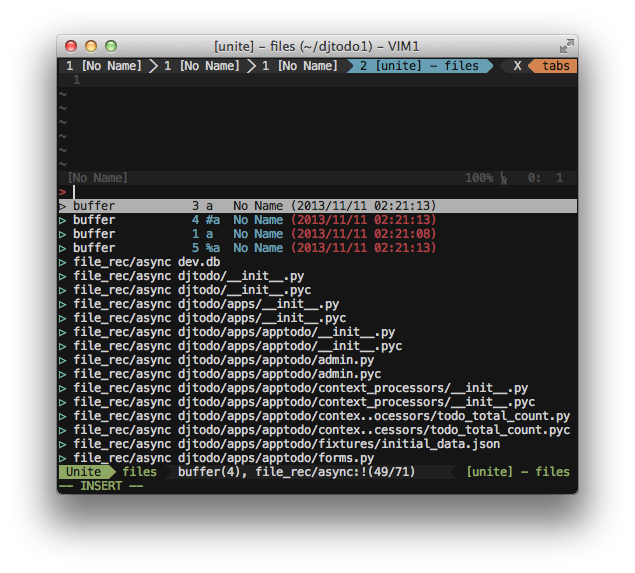
Unite also has a command mode, which is launched by pressing Ctrl + i in the open Unite buffer. The command mode allows you to create and compare files, directories, create bookmarks, execute grep, etc. By the way, you can view the list of bookmarks with the command: Unite bookmark, and you can add a file to bookmarks from command mode.
Unite has the ability to create your own menu (thanks to the gab user gmist for the help ). Usage example:
You can run the menu with the command
Search a file as in CtrlP
Search as in ack.vim
Search history like in yankring / yankstack
Switch buffers as in LustyJuggler
Project page
Unite Installation
Before you begin to configure the extension, you must install the dependencies. I use Vundle, so we will install through it. To access some Unite features, the vimproc plugin is required. To do this, add the following lines to our .vimrc file:
Bundle 'Shougo/vimproc.vim'
Bundle 'Shougo/unite.vim'
We restart the editor and enter the command: BundleInstall. Compile vimproc:
cd ~
cd .vim/bundle/vimproc.vim
make -f make_mac.mak # тут зависит от платформы, для Linux: make_unix.mak
The installation of all the dependencies is completed, go to the configuration of Unite. Let's add the following lines to vimrc:
" Автоматический insert mode
let g:unite_enable_start_insert = 1
" Отображаем Unite в нижней части экрана
let g:unite_split_rule = "botright"
" Отключаем замену статус строки
let g:unite_force_overwrite_statusline = 0
" Размер окна Unite
let g:unite_winheight = 10
" Красивые стрелочки
let g:unite_candidate_icon="▷"
Check out some Unite commands:
| Command | Description |
|---|---|
| Unite file | open the list of files and directories in the current project |
| Unite buffer | show open buffers |
| Unite file buffer | show files and open buffers |
The Unite team also supports options, for example, launching Unite with the -auto-preview option, we will launch Unite with a file preview function (as in Sublime).
If you need to go through files recursively, that is, search the current project simply by entering the initial letters of the file as in CtrlP and Command-T, for this it is enough to run Unite with the file_rec / async flag, I want to warn that this option will not work without vimproc assembly :
Unite file_rec/asyncIn order for the search to occur according to the first letters entered, you need to add the -start-insert option:
Unite file_rec/async -start-insertAnd finally, the end result of the command that I attached to the leader + f combination
nnoremap f :Unite -buffer-name=files -start-insert buffer file_rec/async:! Screenshot of the editor running Unite
Unite also has a command mode, which is launched by pressing Ctrl + i in the open Unite buffer. The command mode allows you to create and compare files, directories, create bookmarks, execute grep, etc. By the way, you can view the list of bookmarks with the command: Unite bookmark, and you can add a file to bookmarks from command mode.
Create your own menu in Unite
Unite has the ability to create your own menu (thanks to the gab user gmist for the help ). Usage example:
let g:unite_source_menu_menus = {}
let g:unite_source_menu_menus.mymenu = {
            \     'description' : 'My Unite menu',
            \ }
let g:unite_source_menu_menus.mymenu.candidates = {
            \   'mru&buffer'      : 'Unite buffer file_mru',
            \   'tag'      : 'Unite tag',
            \   'file'      : 'Unite file',
            \   'file_rec'      : 'Unite file_rec',
            \   'file_rec/async'      : 'Unite file_rec/async',
            \   'find'      : 'Unite find',
            \   'grep'      : 'Unite grep',
            \   'register'      : 'Unite register',
            \   'bookmark'      : 'Unite bookmark',
            \   'output'      : 'Unite output',
            \ }
function g:unite_source_menu_menus.mymenu.map(key, value)
    return {
            \       'word' : a:key, 'kind' : 'command',
            \       'action__command' : a:value,
            \ }
endfunction
You can run the menu with the command
:Unite menu:mymenuA few more examples of Unite
Search a file as in CtrlP
:Unite file_rec/async
Work example
Search as in ack.vim
:Unite grep:.
Work example
Search history like in yankring / yankstack
let g:unite_source_history_yank_enable = 1
:Unite history/yank
Work example
Switch buffers as in LustyJuggler
:Unite -quick-match buffer
Work example
Project page