
 October 21, 2013 at 10:46
Listening to music from Google Play Music
Not so long ago, the Google Play Music service became available in Russia. For 169 rubles a month you can get full access. The problem is that Google provides the ability to listen to music only either from mobile devices or through a browser.
However, this does not suit many, for example, to me. Therefore, in this article we will consider possible “unofficial” ways to listen to music from Google Play Music.
So, we have Raspberry Pi with an installed MPD server. We want to be able to remotely play any music from our library in Google Play Music on this Raspberry Pi.
We are not considering the option of starting a vnc server with a browser running. I tried to run chromium and midori without an X server and a window manager, anyway this thing is very slow. The music.google.com web application is still quite heavy.
There is no official API for Google Play Music, but github has an excellent Unofficial-Google-Music-API written in Python. The author of this API, Simon Weber, advises several projects using its API. Consider those interested in me:
In addition to these projects, you can also find:
It is worth noting that all projects are written in Python. Below I will describe my experience with each of these projects.
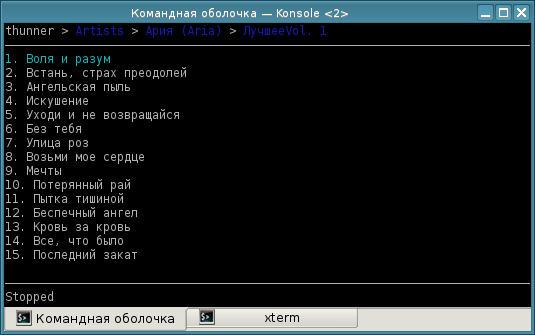
Curses client. Launches music through mplayer. Sounds great but doesn't work. To begin with, I had to switch to a branch that was modified to work with the latest version of the API; the version from master is inoperative. But the music still plays only a second, then switches to the next song. Actually, we can observe the following unresolved issue of All-Access Songs Not Playing , which means it's not just me.
FUSE file system. When mounting, we get a hierarchy of directories for our music library from Google Play Music in the format
According to the author, this solution is only suitable for copying files to your computer or for playback with a simple player such as mplayer. If you try to play in more advanced players, you may experience problems. And indeed, when you try to open the collection even in simple mocp, it starts to hang very much, it is impossible to listen to music. When trying to specify the directory as a library for MPD, we get the opportunity to listen to music, however, the tags did not load, and listening to songs with the same name “Unknown” is certainly not an option. The author also notes the lack of the ability to play the song from a specific position.
You can install GMusicFS using pip, pre-installing the dependencies:
Then you need to create the ~ / .gmusicfs configuration file with the following contents:
And you can mount:
To unmount:
When copying music to your computer, all tags are loaded correctly. Playback with mplayer also works fine. After updating the music library, you must remount the file system.
The project description says: “Let's stream Google Play Music using any media-player.”
This script allows you to receive m3u playlists or mp3 files by sending specially formed GET requests.
You can install the following command:
To work, you need the device-id of one of the registered devices. You can get a list of these devices as follows:
Create the ~ / .config / gmusicproxy.cfg config:
We launch:
A variety of queries are supported: receiving songs, radio stations, playlists, ...
Of the minuses, it is worth noting that all these queries must be made up by yourself, and also that tags are loaded only when playing a specific song.
Django web frontend for accessing the music library with MPD integration. I can only say that I had the same problem as with thunner - only a second is reproduced.
Mopidy is a music server that can “pretend” to be MPD. But the most interesting - for him there is an extension Mopidy-GMusic .
You can install Mopidy using the package manager, and the extension with the following command:
To work, you will again need device-id, which can be obtained either by dialing * # * # 8255 # * # * or installing the application .
In the Mopidy config you need to add:
After further configuration (documentation here ) we get an MPD-compatible server with music from Google Play Music, as well as with a local collection. Of the MPD clients, GMPC , Ario, and pympd earned no problem . My favorite Cantata unfortunately does not connect.
GMusicFS is great for copying music from Google Play Music in mp3 format . For playback, you can use Mopidy with the plugin.
I settled on running MPD and Mopidy on different ports at the same time and connecting with different clients (Cantata and GMPC). MPD for local collection, Mopidy for Google Play Music.
Do not forget that when using two-factor authentication, you must create application passwords in the settings of your Google account.
However, this does not suit many, for example, to me. Therefore, in this article we will consider possible “unofficial” ways to listen to music from Google Play Music.
So, we have Raspberry Pi with an installed MPD server. We want to be able to remotely play any music from our library in Google Play Music on this Raspberry Pi.
We are not considering the option of starting a vnc server with a browser running. I tried to run chromium and midori without an X server and a window manager, anyway this thing is very slow. The music.google.com web application is still quite heavy.
There is no official API for Google Play Music, but github has an excellent Unofficial-Google-Music-API written in Python. The author of this API, Simon Weber, advises several projects using its API. Consider those interested in me:
In addition to these projects, you can also find:
It is worth noting that all projects are written in Python. Below I will describe my experience with each of these projects.
thunner
Curses client. Launches music through mplayer. Sounds great but doesn't work. To begin with, I had to switch to a branch that was modified to work with the latest version of the API; the version from master is inoperative. But the music still plays only a second, then switches to the next song. Actually, we can observe the following unresolved issue of All-Access Songs Not Playing , which means it's not just me.
GMusicFS
FUSE file system. When mounting, we get a hierarchy of directories for our music library from Google Play Music in the format
artists /plus loading cover.jpg. Well, the ability to have an entire music library in mp3 format in a directory is just fine, but there are a number of sad limitations./ /
According to the author, this solution is only suitable for copying files to your computer or for playback with a simple player such as mplayer. If you try to play in more advanced players, you may experience problems. And indeed, when you try to open the collection even in simple mocp, it starts to hang very much, it is impossible to listen to music. When trying to specify the directory as a library for MPD, we get the opportunity to listen to music, however, the tags did not load, and listening to songs with the same name “Unknown” is certainly not an option. The author also notes the lack of the ability to play the song from a specific position.
You can install GMusicFS using pip, pre-installing the dependencies:
pip install github.com/terencehonles/fusepy/tarball/masterpip install github.com/simon-weber/Unofficial-Google-Music-API/tarball/developpip install github.com/EnigmaCurry/GMusicFS/tarball/master
Then you need to create the ~ / .gmusicfs configuration file with the following contents:
[credentials]username = your_username@gmail.compassword = your_password
And you can mount:
mkdir -p $HOME/google_musicgmusicfs $HOME/google_music
To unmount:
fusermount -u $HOME/google_musicWhen copying music to your computer, all tags are loaded correctly. Playback with mplayer also works fine. After updating the music library, you must remount the file system.
GMusicProxy
The project description says: “Let's stream Google Play Music using any media-player.”
This script allows you to receive m3u playlists or mp3 files by sending specially formed GET requests.
You can install the following command:
pip install github.com/diraimondo/gmusicproxy/tarball/masterTo work, you need the device-id of one of the registered devices. You can get a list of these devices as follows:
GMusicProxy --email <адрес> --password <пароль> --list-devicesCreate the ~ / .config / gmusicproxy.cfg config:
email = my.email@gmail.compassword = my-secret-passworddevice-id = 54bbd32a309a34ef
We launch:
GMusicProxyUsage examples using the mpc console client
curl -s 'http://localhost:9999/get_by_search?type=album&artist=Queen&title=Greatest%20Hits' >

 /var/lib/mpd/playlists/queen.m3u
mpc load queenmpc plaympc clearcurl -s 'http://localhost:9999/get_new_station_by_search?type=artist&artist=Queen&num_tracks=100' | grep -v ^# | while read url; do mpc add "$url"; donempc playCase Studies Using VLC
vlc 'http://localhost:9999/get_by_search?type=album&artist=Rolling%20Stones&title=tattoo&exact=no'curl -s 'http://localhost:9999/get_all_stations?format=text&only_url=yes' | sort -R | head -n1 | vlc -A variety of queries are supported: receiving songs, radio stations, playlists, ...
Of the minuses, it is worth noting that all these queries must be made up by yourself, and also that tags are loaded only when playing a specific song.
play-pi
Django web frontend for accessing the music library with MPD integration. I can only say that I had the same problem as with thunner - only a second is reproduced.
Mopidy
Mopidy is a music server that can “pretend” to be MPD. But the most interesting - for him there is an extension Mopidy-GMusic .
You can install Mopidy using the package manager, and the extension with the following command:
pip install mopidy-gmusicTo work, you will again need device-id, which can be obtained either by dialing * # * # 8255 # * # * or installing the application .
In the Mopidy config you need to add:
[gmusic]username = alicepassword = secretdeviceid = 0123456789abcdef
After further configuration (documentation here ) we get an MPD-compatible server with music from Google Play Music, as well as with a local collection. Of the MPD clients, GMPC , Ario, and pympd earned no problem . My favorite Cantata unfortunately does not connect.
conclusions
GMusicFS is great for copying music from Google Play Music in mp3 format . For playback, you can use Mopidy with the plugin.
I settled on running MPD and Mopidy on different ports at the same time and connecting with different clients (Cantata and GMPC). MPD for local collection, Mopidy for Google Play Music.
Do not forget that when using two-factor authentication, you must create application passwords in the settings of your Google account.