 September 20, 2013 at 20:58
Configuring e-mu 0204 usb in ubuntu GNU / linux
- Tutorial
A couple of days ago I bought myself an external sound card e-mu 0204. I bought it with my hands, for 2 tr. The owner was happy, I am the same. Both thought they had fooled each other. There is a piece of iron in the store 4,5 tr He brought it home, the sound is fabulous. But, there was a jamb. At unpredictable times, quiet clicks and interruptions were heard. I have great ATH-SJ55 headphones. They correspond to the card in terms of level, it is not clear why it suddenly started. We figure out how to fix it. Yes, I’ll immediately note that all these problems are described in the instructions !!! So the whole open circle around the card only says that the screamers simply did not open it. I did not have instructions in the kit, I later found it on the Internet. All the settings in the article will still be needed.
Of course, I heard about problems with the card and tried to use the method described in the heap of places to play the sound file with silence in order to occupy the channel and it seems like the clicks should disappear as "the card will cease to switch to power saving mode." What I just did not read, even that she lacks power and you need to buy an external usb hub with a separate power supply. All this did not help (the hub did not try, and they are directly contraindicated in the later read instructions).
I climbed into the pulseaudio settings. In the piece of hardware there is a hardware buffer where the data is put after digitization. The sound system of the computer needs to put sound into it, in general, through it there is communication of the sound and the computer so that the sound does not interrupt (you should look there).
If the settings for working with the buffer on the computer are incorrectly configured, there will be clicks. I found this out by picking the settings and reading the forums with the calculation of the value of these parameters. The second of the configuration options described here is probably suitable for Windows, since there is a jackd assembly for it, it seems. Although in Windows you can probably configure it differently. On Linux, everything is simpler. First, add yourself to the audio group:
It is necessary to add theusername to the audio group, because without this the jackd and pulsaudio server will not be able to allocate memory and start in real time if configured with it. Further settings may vary.
I broke my head off before I managed to configure all this in Linux and in general to understand what was the matter, at first I started to get upset. By the way, first, try choosing a simpler resampler and nothing more. All problems with artifacts in the sound are limited by computer performance and have absolutely nothing to do with sound. The easiest way to make the computer keep up with the sound is to change the resampler to a simpler one. Although, what did the manufacturer include in the kit instructions? Maybe it was, I took the interface from my hands. For those who want to customize, see /etc/pulse/daemon.conf
You may also need to climb into: /etc/pulse/default.pa
And put there:
instead
After installing a simpler resampler method, I did not need these settings. First, you should try without this parameter, since it will most likely work without it, but without it, the processor load, even on the best resampler, will be low. Actually low load on the processor and this configuration option as a whole is good. Together with tsched = 0, everything works more stable, but you should understand that with this parameter the processor load from pulseaudio will increase. This, by the way, will kill all the benefits of heartbeat over alsa, but I’m too lazy to configure alsa, and the same clicks without a heartbeat.
Clicks will remain only at the start of the computer (when the card is turned on), small, and even when connecting another client to zvukovuha. I won’t begin to describe pulseaudio settings for a weak computer, the bottom line is that the resampler should be put easier and priority should be raised for pulseaudio. It should be noted that this tuning method is highly dependent on the performance of the computer. If you have a frequency floating on the processor (ondemand scheduler) then sometimes the performance may not be enough and there will be artifacts in the sound. There is a more interesting way to configure, according to my observations, it is much more stable and better.
In /etc/pulse/daemon.conf
The rest is by default. We don’t even set tsched = 0! Skype users who wheeze at startup, I think the same solution will do. The problem with skype is that the sampling rate of the file that it plays at the start does not match the resampler frequency, and that's wheezing on many cards. Our card claims to be an entry-level professional, so it’s generally logical that it is designed for professional software. In general, we move on.
Put jackd, in it you configure the number of samples in the buffer 1024 and the number of periods on buffer 2 (you can spin other options for these values if you click, since the buffer is configured depending on the particular computer and its capabilities). The minimum number of samples is 128 for a given map, and the number of periods per buffer 2 can be experimented with.
Depending on whether you run jackd in real time or not, the buffer may be different. In fact, these are the same buffer parameters as in pulseaudio, only in their original form, and not calculated. You can focus on fidelity to messages about desync, they need to be 0, although in real time you can’t navigate this already not very reliable indicator, it just remains by ear. You will find it in qjackctl in the message window, the status tab, you must set it the same way, these numbers are also in the status window in the main panel.
Also pay attention to the jackd launch mode, in real time or not, it is worth trying both and see how the sound will behave under the load of the computer. If you set the real-time mode, do not forget to set the same real-time mode for pulseaudio (in the same daemon.conf):
Only the priority of the pulses should be less than that of jackd. By default, jackd starts with priority 10.
In general, my settings window looks like this:
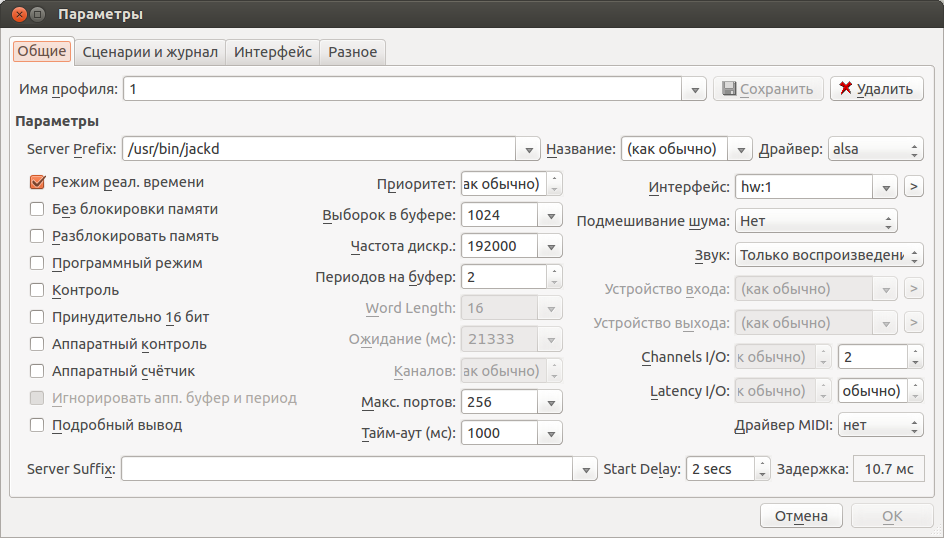
Pay attention to the “Timeout” parameter, if you are annoyed by small artifacts when reconnecting clients (for example, if there was no sound for a long time, and then you turned on the music), you can set the time there while jackd will keep the channel. For example, a minute. This will lead to constant processor load, but it will have the same effect as playing a file with silence. But, this is if the artifacts generally remain after tuning. I compared, the built-in card on my laptop works exactly the same, twitching a bit when switching tunes in the player, which is logical, it just sounds like a sudden sound stop or the beginning of a new one with a non-zero volume (without fade in / out). So do not make incredible demands where it is not needed.
Then pulseaudio is forced to output sound through jackd by adding a command that is executed after jackd starts.
Command
In the end, I just took qjackctl and put it in autoload, setting up all the parameters in it. Unlike pulseaudio, the parameters for working with the buffer are clear and do not require calculations, as well as obviously affect the operation.
The clicks will disappear, the sound will be clear, silky. And always, in any case, I have not heard more clicks under load, anywhere, even when playing several audio sources from different places and connecting different clients to the sound recorder.
UPD No. 1:I also played latency I / O, but I didn’t get any intelligible results, besides pointing out specifically that I need two output channels. I didn’t go into detail, it seems that the latency I / O sets some accounting for the delays inside the sound itself, and much larger values can be driven there. But, this is just picking the settings out of curiosity. It turned out that good sound and headphones have their drawbacks, now I can hear even very small jambs in the sound, and the sound paranoia earned during the day of the proceedings with the settings leads to the fact that it is not clear whether it is a jamb in the original recording, then whether to tighten the buffer. Although the sound quality is excellent all the time.
UPD # 2: Found a great reviewcards. It has parameters for buffers and delays for it. Which can serve as the basis for more fine-tuning.
For comparison
Pay attention to the size of the buffer! That's why 0202, 0404 has no problems, but 0204 has it! In the case of 0404, the buffer is the same as that of 0204, but it reports “Preferred buffer size: 22000”, that is, it says itself, according to the protocol, that the buffer must be used to the full extent immediately, so no configuration is required. That's why setting 0204 is required, in my amateur opinion, since it says software on the computer "Preferred buffer size: 440". But, again, take a look at latancy, it depends on the parameters of the buffer, so 0404 has such a delay because the buffer 22000 offers it, and it offers it for reinsurance, since the pros will reconfigure in their own way if necessary. The setting completely brings the card to excellent condition. Manufacturers of other cards (including this series as well) probably had such a calculation: “set the buffer to the maximum, if the user doesn’t notice the delay, it’s fine, but the buffer is enough, if he does, he knows where to configure it himself, since he noticed it. ” The calculation, as it turns out, is correct.
UPD No. 3: A great article was found with laying out everything on the shelves, which is associated with buffers. Yes, and do not forget, the resampler spends processor resources, which means the type of resampler you choose will determine the maximum percentage load, if you overdo it, then when resampling several sources, there will not be enough processor and there will be desync, which means clicks. In general, you need to know the measure.
UPD No. 4: ATTENTION !!! I found a simple solution! Read the instructions :) It says about these buffers and about the buzz that occurs for some (there are special switches on the bottom to remove the buzz). In general, you do not know what to do, read the instructions! :) I didn’t have it in the kit, so I was busy, otherwise I would have read it right away. And those who scream about the flaws just did not read it !!! :) True, I must admit, the software for Windows for the card is probably so-so, judging by the reviews, I myself have not seen it.
UPD No. 5: For Linux users, I will also inform you that you can configure everything in a clean als and another link. Since 0404 and 0204 are very similar, most likely the instruction will work in this case too, but I didn’t check, as I said, I'm too lazy to mess around. Plus, I'm not special so I can make a mistake, judging by the fact that the processor load at my settings changes depending on what sampling rate the original sound file means, oversampling the recording to 192000 does not pass and the sound is output in this form on a map. This means that the instructions for the above links and the output via pure alsa are not perfect compared to the output using pulseaudio + jackd + alsa. Imperfect with the points of view, the simplicity of the settings of course. But, you decide. True, it should be noted that since the writing of the instructions for these links, alsa has improved and my device in general automatically worked just automatically, only with clicks.
UPD No. 6:
Found the easiest way to configure all of the above. It is enough to set the sampling rate to 88200 and everything plows with ordinary pulseaudio. The frequency is set in the above settings ... unless of course you are comfortable with this. I was happy with it, the simpler the better.
UPD No. 7:
There are simply no more problems in ubunt 14.04. But. I use sound normalization, maybe this is the case. Therefore, I will leave here the method of sound normalization in Pulseaudio:
Install packages with ladspa plug-ins. Which one I don’t know, I just put everything in search, they are small and put in one folder.
Add a few lines to the end of /etc/pulse/default.pa
1. load-module module-ladspa-sink sink_name = ladspa_output.dysonCompress master = 0 sink_properties = device.description = "Compress" plugin = dyson_compress_1403 label = dysonCompress control = -9.0,1,0.5,0.7
This line loads the sound normalization module. Normalization does not allow the sound volume to jump abruptly and as a result infuriates me :)
2. set-default-sink 2 I have
number 2 because I need to turn on the desired sound system by default so that I don’t do it with my hands.
3. set-sink-volume 2 40000
Set the volume to the middle, again so as not to bounce when the first sound in the headphones sounds.
As a result, it can therefore, maybe because the software has grown, there are no jambs in the sound operation even without other settings, and normalization is most likely not needed, but it is convenient for me with it.
Of course, I heard about problems with the card and tried to use the method described in the heap of places to play the sound file with silence in order to occupy the channel and it seems like the clicks should disappear as "the card will cease to switch to power saving mode." What I just did not read, even that she lacks power and you need to buy an external usb hub with a separate power supply. All this did not help (the hub did not try, and they are directly contraindicated in the later read instructions).
I climbed into the pulseaudio settings. In the piece of hardware there is a hardware buffer where the data is put after digitization. The sound system of the computer needs to put sound into it, in general, through it there is communication of the sound and the computer so that the sound does not interrupt (you should look there).
If the settings for working with the buffer on the computer are incorrectly configured, there will be clicks. I found this out by picking the settings and reading the forums with the calculation of the value of these parameters. The second of the configuration options described here is probably suitable for Windows, since there is a jackd assembly for it, it seems. Although in Windows you can probably configure it differently. On Linux, everything is simpler. First, add yourself to the audio group:
usermod -a -G audio theusername
It is necessary to add theusername to the audio group, because without this the jackd and pulsaudio server will not be able to allocate memory and start in real time if configured with it. Further settings may vary.
Option one, simple:
I broke my head off before I managed to configure all this in Linux and in general to understand what was the matter, at first I started to get upset. By the way, first, try choosing a simpler resampler and nothing more. All problems with artifacts in the sound are limited by computer performance and have absolutely nothing to do with sound. The easiest way to make the computer keep up with the sound is to change the resampler to a simpler one. Although, what did the manufacturer include in the kit instructions? Maybe it was, I took the interface from my hands. For those who want to customize, see /etc/pulse/daemon.conf
#будет работать только если вы в группу audio себя добавили.Причем сначала стоит просто попробовать только этот параметр, высока #вероятность, что все просто заработает.
realtime-scheduling = yes
#можно и другие значения попробовать
realtime-priority = 10
#запрещаем закрывать демон, если он не используется
allow-exit = no
exit-idle-time = -1
#тут можно и что то поменьше или получше, зависит от машины, у меня i7 четырех ядерный, он не заметит, а слабая машина ляжет
#причем если я ставил src-sinc-best-quality то требовались долгие манипуляции с настройками и все равно ничего толком не помогало
#то есть это главный параметр!
resample-method = src-sinc-medium-quality
#битность общения с звуковухой
default-sample-format = s24le
#в пульсе ресамплинг проходит весь звук, так как источники имеют зачастую разную частоту дискретизации и по другому никак микшер не сделать
#я поставил максимум частоты
default-sample-rate = 192000
alternate-sample-rate = 192000
#Эти параметры можно крутить именно о их настройки написано на вышеприведенном форуме, но поставив более простой метод ресемплинга, мне это не понадобилось (в начале все же крутил, потом закомментировал)
;default-fragments = 4
;default-fragment-size-msec = 3
You may also need to climb into: /etc/pulse/default.pa
And put there:
load-module module-udev-detect use_ucm=0 tsched=0instead
load-module module-udev-detect use_ucm=0After installing a simpler resampler method, I did not need these settings. First, you should try without this parameter, since it will most likely work without it, but without it, the processor load, even on the best resampler, will be low. Actually low load on the processor and this configuration option as a whole is good. Together with tsched = 0, everything works more stable, but you should understand that with this parameter the processor load from pulseaudio will increase. This, by the way, will kill all the benefits of heartbeat over alsa, but I’m too lazy to configure alsa, and the same clicks without a heartbeat.
Clicks will remain only at the start of the computer (when the card is turned on), small, and even when connecting another client to zvukovuha. I won’t begin to describe pulseaudio settings for a weak computer, the bottom line is that the resampler should be put easier and priority should be raised for pulseaudio. It should be noted that this tuning method is highly dependent on the performance of the computer. If you have a frequency floating on the processor (ondemand scheduler) then sometimes the performance may not be enough and there will be artifacts in the sound. There is a more interesting way to configure, according to my observations, it is much more stable and better.
Option two, kosher:
In /etc/pulse/daemon.conf
#с этим методом спокойно и без косяков работает самый классный ресемплер
resample-method = src-sinc-best-quality
default-sample-format = s24le
#в пульсе ресамплинг проходит весь звук, так как источники имеют зачастую разную частоту дискретизации и по другому никак микшер не сделать
#но я поставил максимум частоты
default-sample-rate = 192000
alternate-sample-rate = 192000
The rest is by default. We don’t even set tsched = 0! Skype users who wheeze at startup, I think the same solution will do. The problem with skype is that the sampling rate of the file that it plays at the start does not match the resampler frequency, and that's wheezing on many cards. Our card claims to be an entry-level professional, so it’s generally logical that it is designed for professional software. In general, we move on.
Put jackd, in it you configure the number of samples in the buffer 1024 and the number of periods on buffer 2 (you can spin other options for these values if you click, since the buffer is configured depending on the particular computer and its capabilities). The minimum number of samples is 128 for a given map, and the number of periods per buffer 2 can be experimented with.
Depending on whether you run jackd in real time or not, the buffer may be different. In fact, these are the same buffer parameters as in pulseaudio, only in their original form, and not calculated. You can focus on fidelity to messages about desync, they need to be 0, although in real time you can’t navigate this already not very reliable indicator, it just remains by ear. You will find it in qjackctl in the message window, the status tab, you must set it the same way, these numbers are also in the status window in the main panel.
Also pay attention to the jackd launch mode, in real time or not, it is worth trying both and see how the sound will behave under the load of the computer. If you set the real-time mode, do not forget to set the same real-time mode for pulseaudio (in the same daemon.conf):
realtime-scheduling = yes
realtime-priority = 5
Only the priority of the pulses should be less than that of jackd. By default, jackd starts with priority 10.
In general, my settings window looks like this:
Pay attention to the “Timeout” parameter, if you are annoyed by small artifacts when reconnecting clients (for example, if there was no sound for a long time, and then you turned on the music), you can set the time there while jackd will keep the channel. For example, a minute. This will lead to constant processor load, but it will have the same effect as playing a file with silence. But, this is if the artifacts generally remain after tuning. I compared, the built-in card on my laptop works exactly the same, twitching a bit when switching tunes in the player, which is logical, it just sounds like a sudden sound stop or the beginning of a new one with a non-zero volume (without fade in / out). So do not make incredible demands where it is not needed.
Then pulseaudio is forced to output sound through jackd by adding a command that is executed after jackd starts.
Command
pacmd set-default-sink jack_outIn the end, I just took qjackctl and put it in autoload, setting up all the parameters in it. Unlike pulseaudio, the parameters for working with the buffer are clear and do not require calculations, as well as obviously affect the operation.
The clicks will disappear, the sound will be clear, silky. And always, in any case, I have not heard more clicks under load, anywhere, even when playing several audio sources from different places and connecting different clients to the sound recorder.
UPD No. 1:I also played latency I / O, but I didn’t get any intelligible results, besides pointing out specifically that I need two output channels. I didn’t go into detail, it seems that the latency I / O sets some accounting for the delays inside the sound itself, and much larger values can be driven there. But, this is just picking the settings out of curiosity. It turned out that good sound and headphones have their drawbacks, now I can hear even very small jambs in the sound, and the sound paranoia earned during the day of the proceedings with the settings leads to the fact that it is not clear whether it is a jamb in the original recording, then whether to tighten the buffer. Although the sound quality is excellent all the time.
UPD # 2: Found a great reviewcards. It has parameters for buffers and delays for it. Which can serve as the basis for more fine-tuning.
RightMark Audio Analyzer 6.2.3 PRO
Device: ASIO E-MU 0204 | USB
Features:
Input channels: 2
Output channels: 4
Input latency: 440
Output latency: 440
Min buffer size: 88
Max buffer size: 22000
Preferred buffer size: 440
Granularity: 44
For comparison
Device: ASIO E-MU 0202 | USB
Features:
Input channels: 2
Output channels: 2
Input latency: 2138
Output latency: 2714
Min buffer size: 384
Max buffer size: 96000
Preferred buffer size: 1920
Granularity: 192
Device: ASIO E-MU 0404 | USB
Features:
Input channels: 4
Output channels: 4
Input latency: 22083
Output latency: 22216
Min buffer size: 88
Max buffer size: 22000
Preferred buffer size: 22000
Granularity: 44
Pay attention to the size of the buffer! That's why 0202, 0404 has no problems, but 0204 has it! In the case of 0404, the buffer is the same as that of 0204, but it reports “Preferred buffer size: 22000”, that is, it says itself, according to the protocol, that the buffer must be used to the full extent immediately, so no configuration is required. That's why setting 0204 is required, in my amateur opinion, since it says software on the computer "Preferred buffer size: 440". But, again, take a look at latancy, it depends on the parameters of the buffer, so 0404 has such a delay because the buffer 22000 offers it, and it offers it for reinsurance, since the pros will reconfigure in their own way if necessary. The setting completely brings the card to excellent condition. Manufacturers of other cards (including this series as well) probably had such a calculation: “set the buffer to the maximum, if the user doesn’t notice the delay, it’s fine, but the buffer is enough, if he does, he knows where to configure it himself, since he noticed it. ” The calculation, as it turns out, is correct.
UPD No. 3: A great article was found with laying out everything on the shelves, which is associated with buffers. Yes, and do not forget, the resampler spends processor resources, which means the type of resampler you choose will determine the maximum percentage load, if you overdo it, then when resampling several sources, there will not be enough processor and there will be desync, which means clicks. In general, you need to know the measure.
UPD No. 4: ATTENTION !!! I found a simple solution! Read the instructions :) It says about these buffers and about the buzz that occurs for some (there are special switches on the bottom to remove the buzz). In general, you do not know what to do, read the instructions! :) I didn’t have it in the kit, so I was busy, otherwise I would have read it right away. And those who scream about the flaws just did not read it !!! :) True, I must admit, the software for Windows for the card is probably so-so, judging by the reviews, I myself have not seen it.
UPD No. 5: For Linux users, I will also inform you that you can configure everything in a clean als and another link. Since 0404 and 0204 are very similar, most likely the instruction will work in this case too, but I didn’t check, as I said, I'm too lazy to mess around. Plus, I'm not special so I can make a mistake, judging by the fact that the processor load at my settings changes depending on what sampling rate the original sound file means, oversampling the recording to 192000 does not pass and the sound is output in this form on a map. This means that the instructions for the above links and the output via pure alsa are not perfect compared to the output using pulseaudio + jackd + alsa. Imperfect with the points of view, the simplicity of the settings of course. But, you decide. True, it should be noted that since the writing of the instructions for these links, alsa has improved and my device in general automatically worked just automatically, only with clicks.
UPD No. 6:
Found the easiest way to configure all of the above. It is enough to set the sampling rate to 88200 and everything plows with ordinary pulseaudio. The frequency is set in the above settings ... unless of course you are comfortable with this. I was happy with it, the simpler the better.
UPD No. 7:
There are simply no more problems in ubunt 14.04. But. I use sound normalization, maybe this is the case. Therefore, I will leave here the method of sound normalization in Pulseaudio:
Install packages with ladspa plug-ins. Which one I don’t know, I just put everything in search, they are small and put in one folder.
Add a few lines to the end of /etc/pulse/default.pa
1. load-module module-ladspa-sink sink_name = ladspa_output.dysonCompress master = 0 sink_properties = device.description = "Compress" plugin = dyson_compress_1403 label = dysonCompress control = -9.0,1,0.5,0.7
This line loads the sound normalization module. Normalization does not allow the sound volume to jump abruptly and as a result infuriates me :)
2. set-default-sink 2 I have
number 2 because I need to turn on the desired sound system by default so that I don’t do it with my hands.
3. set-sink-volume 2 40000
Set the volume to the middle, again so as not to bounce when the first sound in the headphones sounds.
As a result, it can therefore, maybe because the software has grown, there are no jambs in the sound operation even without other settings, and normalization is most likely not needed, but it is convenient for me with it.









