September 2, 2013 at 20:01
GWT-Platform basics of working with presenters
All habrazhitel good day!
I am a beginner Java programmer and it just so happens that I start my career with developing a serious application on GWT. There are quite a lot of articles on the GWT topic on the hub, but for some reason there is absolutely no information about the wonderful GWT-Platform framework. You can get acquainted with this framework in detail here , and I will tell you briefly about the basics of working with an example of a simple application.
Our application will contain a navigation panel on which buttons are located to switch the current view. As well as two columns in which we will insert the desired content depending on the situation. I made two columns for clarity. In real life, one of course would be needed.
If you click on the button in the navbar, either the left side of the application will open, or the right one with meaningless text.
By default, the left column opens, on which there is a button for opening a dialog box for entering a name and surname. After pressing the confirmation button, this data is transferred to the right column and displayed.


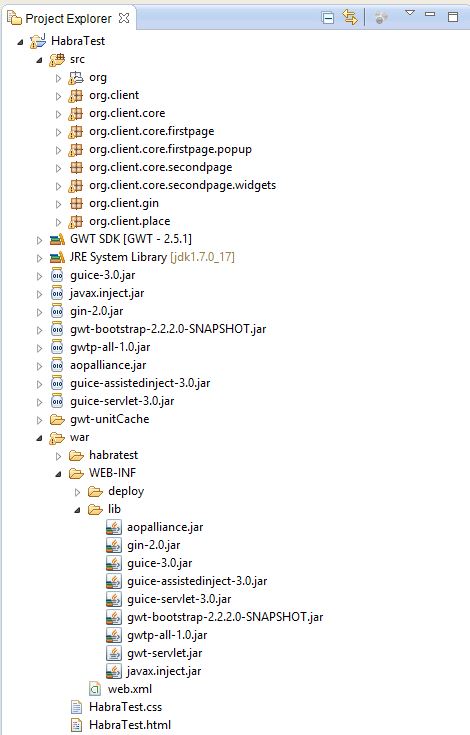
So, for starters, we need to create a GWT project in the IDE. To work with GWTP, we need to add the libraries to the project: guice-2.0.jar, guice-3.0.jar, gwtp-all-1.0.jar, aopalliance.jar, guice-assistedinject-3.0.jar. I also added gwt-bootstrap-2.2.2.0-SNAPSHOT.jar to add “beauty” to the application.
You can install the gwt-platform plugin in Eclipse. It greatly facilitates life. With its help, you can create both new projects and presentation-presentation bundles. Download from this link:plugin.gwt-platform.googlecode.com/hg/update
Let's get started:
We need to create a client module and Ginjector. If you create an application using a plugin, they will be created automatically:
In the configure () method, we will bind our presenters with interfaces and I will implement them.
Next is our entry point: Here we tell our placemanager to go to the current page (place). That is, if we have entered some token in the address bar of the browser that determines the necessary place, then we will get there. Of course, provided that we have access. (For example, GateKeeper may be responsible for this).
I will not focus on working with place. On a habr already there were many remarkable articles on GWT. For example this .
I’ll show how you can create small GWT applications without using place (more precisely, with one place).
First, create the main presenter of our application:
Notice that we injected in the constructor of FirstPagePresenter firstPagePresenter, SecondPagePresenter secondPagePresenter.
These will be presenter - widgets representing the left and right parts of the application (that is, in theory, separate pages);
There are three main types of presenters in GWTP:
Presenter-place are used to create separate pages of the application, to navigate through which you can use the so-called tokens added in the address bar of the browser.
Each such presenter must contain an annotation that indicates which token is attached to the presenter.
In our case, we use only one such presenter.
To change the "pages" we will use a system of slots and presenter widgets placed in slots.
A presenter widget is a presenter that is not necessarily a singleton. It can have many independent instances.
Thanks to the system of slots, we can endlessly invest presenters inside other presenters. To place the presenter widget in another presenter, we need to define the slots in the parent presenter and override the setInSlot () method in the view of the parent presenter.
The MainPagePresenter class shows that the slot is just an Object:
In the corresponding view, we define the rules for inserting presenters into the slot:
Everything is quite simple: setInSlot () accepts the presenter and its corresponding slot.
We simply indicate in which widget to place this presenter. In this case, these are two bootstrap columns leftColumn and rightColumn.
Although I repeat in this case, it would be more appropriate to put everything in one column in order to simulate the passage through the pages.
Further, our presenter widgets and their views:
Please note that I injected a certain FirstPagePopupPresenter firstPagePopupPresenter. (The code will be below). This is our form popup. Similarly, you can inject any presenter widgets in any quantity and with any nesting. The main thing is not to break the hierarchy.
The view is nothing special, except that it inherits the typed ViewWithUiHandlers class.
Since we don’t want to violate the principles of MVP, we can’t access the presenter directly from the view (on the contrary, we can). For this we use interfaces. We inform about button clicks using getUiHandlers (). OnShowFormBtnClicked ();
getUiHandlers () returns the FirstPageUiHandlers interface in which we specify the methods that should be implemented in the corresponding presenter. Naturally, the presenter must implement this interface, and the MyView interface embedded in it should inherit the HasUiHandlers typed interface. And the main thing is not to forget in the presenter to assign yourself as a handler for view events - getView (). SetUiHandlers (this);
Next, the presenter and the corresponding view of the second page:
There is nothing particularly interesting and new for the developer on the GWT. Communication between presenters occurs through standard events (GwtEvent).
And finally popup with the form:
As you can see, popup is also a presenter widget, but its view interface should inherit PopupView. And the main view panel must be PopupPanel, well, or the heir of this class. Another difference from conventional presenter widgets is that you do not need a slot and an insert panel to show pop-ups on a page. It is enough to use the addToPopupSlot () method;
Also, in all the bundles, presentation presentation used uibinder. I do not upload the corresponding * ui.xml files. There, in principle, there is nothing interesting for GWT developers.
The project itself will be available for some time at this address.
And so now we’ll go over the project to describe what is happening and how the presenters are related:
When loading MainPagePresenter in the overridden onBind () method, we immediately put the first page present on the slot:
(I would like to talk about the life cycle of presenters and the methods onBind (), onUnbind, onReveal (), onReset (), onHide () in the next article.)
Accordingly, the FirstPagePresenter view appears on the left side of the screen. When we click on the button, we invoke the implementation of the onShowFormBtnClicked () method in FirstPagePresenter described in the FirstPageUiHandlers interface
Call:
in FirstPagePresenter 'e the following happens:
We set the popup presenter in the slot. As I already mentioned, for popups, the slot does not need to be defined. The only condition is that the presenter from which the popup is called must itself be in the parent's slot and so on in the chain. The second parameter in the addToPopupSlot () method indicates whether to center the popup in the application window (the method has several overloads and this parameter is generally optional).
After the popup appears in the window, we can enter some data there and press the confirmation button. Further, according to a similar scheme, I see the popup through getUiHandlers () calls the handler in its presenter, and that in turn throws an event through which the FirstPagePresenter is subscribed via EventBus (if anyone is interested, I could tell about events in GWT in the next note) :
First, in the showForm () method, we remove the popup from the slot:
Then we throw a new event (now it is FirstPageEvent) further. Our MainPagePresenter is subscribed to it:
Having received it, MainPagePresenter removes the first page from the slot and inserts the second:
Further he already MainPageEvent flies further. Not only the name and surname, but also Action, are complaining about it.
Our SecondPagePresenter, having received an event in the onMainPageEvent () method, decides what to show on the page. In this case, these are ordinary widgets without presenters.
That's all. It may seem to some that there is too much code for such simple actions, but:
Also, some will probably be outraged - why such a long chain of transmission of events? However, you may notice that after receiving the event, the presenter, before sending the next one, does some kind of operation. For example, it removes unnecessary presenters or processes the data received somehow.
In general, I hope this article will be useful to someone and he will turn his eyes towards the GWT-Platform.
PS: I apologize for some confusion of the narrative and possible errors. This is my first IT post. Reasoned criticism and advice are very welcome.
I am a beginner Java programmer and it just so happens that I start my career with developing a serious application on GWT. There are quite a lot of articles on the GWT topic on the hub, but for some reason there is absolutely no information about the wonderful GWT-Platform framework. You can get acquainted with this framework in detail here , and I will tell you briefly about the basics of working with an example of a simple application.
Our application will contain a navigation panel on which buttons are located to switch the current view. As well as two columns in which we will insert the desired content depending on the situation. I made two columns for clarity. In real life, one of course would be needed.
If you click on the button in the navbar, either the left side of the application will open, or the right one with meaningless text.
By default, the left column opens, on which there is a button for opening a dialog box for entering a name and surname. After pressing the confirmation button, this data is transferred to the right column and displayed.
So, for starters, we need to create a GWT project in the IDE. To work with GWTP, we need to add the libraries to the project: guice-2.0.jar, guice-3.0.jar, gwtp-all-1.0.jar, aopalliance.jar, guice-assistedinject-3.0.jar. I also added gwt-bootstrap-2.2.2.0-SNAPSHOT.jar to add “beauty” to the application.
You can install the gwt-platform plugin in Eclipse. It greatly facilitates life. With its help, you can create both new projects and presentation-presentation bundles. Download from this link:plugin.gwt-platform.googlecode.com/hg/update
Let's get started:
We need to create a client module and Ginjector. If you create an application using a plugin, they will be created automatically:
In the configure () method, we will bind our presenters with interfaces and I will implement them.
public class ClientModule extends AbstractPresenterModule {
	@Override
	protected void configure() {
		install(new DefaultModule(ClientPlaceManager.class));
                          bindPresenter(MainPagePresenter.class, MainPagePresenter.MyView.class,
				MainPageView.class, MainPagePresenter.MyProxy.class);
		bindConstant().annotatedWith(DefaultPlace.class).to(NameTokens.main);
	}
}
         @GinModules({ DispatchAsyncModule.class, ClientModule.class })
         public interface ClientGinjector extends Ginjector {
	EventBus getEventBus();
	PlaceManager getPlaceManager();
	Provider getMainPagePresenter();
}
Next is our entry point: Here we tell our placemanager to go to the current page (place). That is, if we have entered some token in the address bar of the browser that determines the necessary place, then we will get there. Of course, provided that we have access. (For example, GateKeeper may be responsible for this).
public class HabraTest implements EntryPoint {
	private final ClientGinjector ginjector = GWT.create(ClientGinjector.class);
	@Override
	public void onModuleLoad() {
		DelayedBindRegistry.bind(ginjector);
		ginjector.getPlaceManager().revealCurrentPlace();
	}
}
I will not focus on working with place. On a habr already there were many remarkable articles on GWT. For example this .
I’ll show how you can create small GWT applications without using place (more precisely, with one place).
First, create the main presenter of our application:
public class MainPagePresenter extends
	Presenter implements MainPageUiHandlers, FirstPageEvent.Handler{
	public interface MyView extends View, HasUiHandlers {
	}
	// идентификаторы слотов для вставки соответствующего презентера
	public final static Object SLOT_FIRST_PAGE =  new Object();
	public final static Object SLOT_SECOND_PAGE =  new Object();
	//вложенные  презентеры
	private FirstPagePresenter firstPagePresenter;
	private SecondPagePresenter secondPagePresenter;
	@ProxyStandard
	@NameToken(NameTokens.main)
	public interface MyProxy extends ProxyPlace {
	}
	private EventBus eventBus;
	private final PlaceManager placeManager;
	// инжектим вложенные презентеры
	@Inject
	public MainPagePresenter(final EventBus eventBus, final MyView view,
			FirstPagePresenter firstPagePresenter,
			SecondPagePresenter secondPagePresenter,
			final MyProxy proxy, final PlaceManager placeManager) {
		super(eventBus, view, proxy);
		this.placeManager = placeManager;
		this.firstPagePresenter =  firstPagePresenter;
		this.secondPagePresenter =  secondPagePresenter;
		this.eventBus =  eventBus;
		// назначаем себя обработчиком событий  вью
		getView().setUiHandlers(this);
		eventBus.addHandler(FirstPageEvent.getType(), this);
	}
	// внедряем себя в главный презентер приложения
	@Override
	protected void revealInParent() {
		RevealRootContentEvent.fire(this, this);
	}
	@Override
	protected void onBind() {
		super.onBind();
		// по умолчанию  будет загружена первая страница
		getView().setInSlot(SLOT_FIRST_PAGE, firstPagePresenter);
	}
	// вызывается при нажатии левой кнопки в MainPageView
	@Override
	public void onRightBtnClicked() {
		showRightContent();
		MainPageEvent mainPageEvent =  new MainPageEvent( MainPageEvent.Action.SHOW_LOREM_IPSUM);
		eventBus.fireEvent(mainPageEvent);
	}
	// аналогично при нажатии правой
	@Override
	public void onLeftBtnClicked() {
		showLeftContent();
	}
	public void showLeftContent() {
		removeFromSlot(SLOT_SECOND_PAGE, secondPagePresenter);
		getView().setInSlot(SLOT_FIRST_PAGE, firstPagePresenter);
	}
	public void showRightContent() {
		removeFromSlot(SLOT_FIRST_PAGE, firstPagePresenter);
		getView().setInSlot(SLOT_SECOND_PAGE, secondPagePresenter);
	}
	@Override
	public void onFirstPageEvent(FirstPageEvent event) {
		// закрываем левый контент и открываем правый, в который через эвент передаем имя и фамилию
		showRightContent();
		MainPageEvent mainPageEvent =  new MainPageEvent( MainPageEvent.Action.SHOW_FORM_RESULT, event.getFirstName(),                          event.getLastName());
		eventBus.fireEvent(mainPageEvent);
	}
}
Notice that we injected in the constructor of FirstPagePresenter firstPagePresenter, SecondPagePresenter secondPagePresenter.
These will be presenter - widgets representing the left and right parts of the application (that is, in theory, separate pages);
There are three main types of presenters in GWTP:
- Transponders that are also place
- Transponder widgets (PresenterWidget)
- Presenter widgets representing a popup window
Presenter-place are used to create separate pages of the application, to navigate through which you can use the so-called tokens added in the address bar of the browser.
Each such presenter must contain an annotation that indicates which token is attached to the presenter.
In our case, we use only one such presenter.
To change the "pages" we will use a system of slots and presenter widgets placed in slots.
A presenter widget is a presenter that is not necessarily a singleton. It can have many independent instances.
Thanks to the system of slots, we can endlessly invest presenters inside other presenters. To place the presenter widget in another presenter, we need to define the slots in the parent presenter and override the setInSlot () method in the view of the parent presenter.
The MainPagePresenter class shows that the slot is just an Object:
	public final static Object SLOT_FIRST_PAGE =  new Object();
	public final static Object SLOT_SECOND_PAGE =  new Object();
In the corresponding view, we define the rules for inserting presenters into the slot:
public class MainPageView extends ViewWithUiHandlers implements MainPagePresenter.MyView {
	// главная панель приложения
	@UiField HTMLPanel main;
	// навигационная панель
	@UiField ResponsiveNavbar navbar;
	// кнопки навигации
	@UiField Button firstPageBtn, secondPageBtn;
	private static MainPageViewUiBinder uiBinder = GWT
			.create(MainPageViewUiBinder.class);
	interface MainPageViewUiBinder extends UiBinder {
	}
	// колонки для вставки контента
	@UiField Column leftColumn, rightColumn;
	@Inject
	public MainPageView() {
		uiBinder.createAndBindUi(this);
		navbar.setInverse(true);
		//обработчики для кнопок
		firstPageBtn.addClickHandler(new  ClickHandler() {
			@Override
			public void onClick(ClickEvent event) {
				getUiHandlers().onLeftBtnClicked();
			}
		});
		secondPageBtn.addClickHandler(new  ClickHandler() {
			@Override
			public void onClick(ClickEvent event) {
				getUiHandlers().onRightBtnClicked();
			}
		});
	}
	@Override
	public Widget asWidget() {
		return main;
	}
	// переопределяем метод вставки презентеров в слот
	@Override
	public void setInSlot(Object slot, IsWidget content) {
		if(slot == MainPagePresenter.SLOT_FIRST_PAGE ) {
			leftColumn.add(content);
		}
		else if(slot == MainPagePresenter.SLOT_SECOND_PAGE ){
			rightColumn.add(content);
		}
		else {
			super.setInSlot(slot, content);
		}
	}
	// аналогично переопределяем метод удаления из слота
	@Override
	public void removeFromSlot(Object slot, IsWidget content) {
		if(slot == MainPagePresenter.SLOT_FIRST_PAGE ) {
			leftColumn.remove(content);
		}
		else if(slot == MainPagePresenter.SLOT_SECOND_PAGE ){
			rightColumn.remove(content);
		}
		else {
			super.removeFromSlot(slot, content);
		}
	}
}
Everything is quite simple: setInSlot () accepts the presenter and its corresponding slot.
We simply indicate in which widget to place this presenter. In this case, these are two bootstrap columns leftColumn and rightColumn.
Although I repeat in this case, it would be more appropriate to put everything in one column in order to simulate the passage through the pages.
Further, our presenter widgets and their views:
public class FirstPagePresenter extends
		PresenterWidget implements FirstPageUiHandlers, PopupEvent.Handler{
	public interface MyView extends View, HasUiHandlers {
	}
	// попап с формой
	FirstPagePopupPresenter firstPagePopupPresenter;
	EventBus eventBus;
	@Inject
	public FirstPagePresenter(final EventBus eventBus, final MyView view,
			FirstPagePopupPresenter firstPagePopupPresenter ) {
		super(eventBus, view);
		this.firstPagePopupPresenter =  firstPagePopupPresenter;
		this.eventBus =  eventBus;
		getView().setUiHandlers(this);
		// назначаем себя хендлером PopupEvent
		eventBus.addHandler(PopupEvent.getType(), this);
	}
	@Override
	public void onShowFormBtnClicked() {
		// показываем всплывающее окно с формой
		showForm(true);
	}
	private void showForm(boolean show) {
		if(show){
		addToPopupSlot(firstPagePopupPresenter, true);
		firstPagePopupPresenter.getView().show();
		}
		else {
			removeFromPopupSlot(firstPagePopupPresenter);
		}
	}
	@Override
	public void onPopupEvent(PopupEvent event) {
		showForm(false);
		eventBus.fireEvent(new FirstPageEvent(event.getFirstName(), event.getLastName()));
	}
}
Please note that I injected a certain FirstPagePopupPresenter firstPagePopupPresenter. (The code will be below). This is our form popup. Similarly, you can inject any presenter widgets in any quantity and with any nesting. The main thing is not to break the hierarchy.
public class FirstPageView extends ViewWithUiHandlers implements
		FirstPagePresenter.MyView {
	private final Widget widget;
	@UiField Button showFormBtn;
	public interface Binder extends UiBinder {
	}
	@Inject
	public FirstPageView(final Binder binder) {
		widget = binder.createAndBindUi(this);
		showFormBtn.addClickHandler(new ClickHandler() {
			@Override
			public void onClick(ClickEvent event) {
				getUiHandlers().onShowFormBtnClicked();
			}
		});
	}
	@Override
	public Widget asWidget() {
		return widget;
	}
}
The view is nothing special, except that it inherits the typed ViewWithUiHandlers class.
Since we don’t want to violate the principles of MVP, we can’t access the presenter directly from the view (on the contrary, we can). For this we use interfaces. We inform about button clicks using getUiHandlers (). OnShowFormBtnClicked ();
public interface FirstPageUiHandlers extends UiHandlers{
	void onShowFormBtnClicked();
}
getUiHandlers () returns the FirstPageUiHandlers interface in which we specify the methods that should be implemented in the corresponding presenter. Naturally, the presenter must implement this interface, and the MyView interface embedded in it should inherit the HasUiHandlers typed interface. And the main thing is not to forget in the presenter to assign yourself as a handler for view events - getView (). SetUiHandlers (this);
Next, the presenter and the corresponding view of the second page:
public class SecondPagePresenter extends
		PresenterWidget implements MainPageEvent.Handler {
	public interface MyView extends View {
		void showLoremIpsum();
		void showFormInfo(String firstName, String lastName);
	}
	EventBus eventBus;
	@Inject
	public SecondPagePresenter(final EventBus eventBus, final MyView view) {
		super(eventBus, view);
		this.eventBus =  eventBus;
		eventBus.addHandler(MainPageEvent.getType(), this);
	}
	@Override
	public void onMainPageEvent(MainPageEvent event) {
		switch(event.getAction()) {
		case SHOW_FORM_RESULT:
			showFormInfoWidget(event.getFirstName(), event.getLastName());
			break;
		case SHOW_LOREM_IPSUM:
			showLoremIpsumWidget();
			break;
		default:
			break;
		}
	}
	private void showLoremIpsumWidget() {
		getView().showLoremIpsum();
	}
	private void showFormInfoWidget(String firstName, String lastName) {
		getView().showFormInfo( firstName, lastName);
	}
public class SecondPageView extends ViewImpl implements
		SecondPagePresenter.MyView {
	private final Widget widget;
	@UiField FlowPanel contentPanel;
	public interface Binder extends UiBinder {
	}
	@Inject
	public SecondPageView(final Binder binder) {
		widget = binder.createAndBindUi(this);
	}
	@Override
	public Widget asWidget() {
		return widget;
	}
	@Override
	public void showLoremIpsum() {
		contentPanel.clear();
		contentPanel.add(new LoremIpsumWidget());
	}
	@Override
	public void showFormInfo(String firstName, String lastName) {
		contentPanel.clear();
		contentPanel.add(new FormInfoWidget(firstName, lastName));
	}
}
There is nothing particularly interesting and new for the developer on the GWT. Communication between presenters occurs through standard events (GwtEvent).
And finally popup with the form:
public class FirstPagePopupPresenter extends
		PresenterWidget implements PopupUiHandlers {
	public interface MyView extends PopupView , HasUiHandlers{
	}
	EventBus eventBus;
	@Inject
	public FirstPagePopupPresenter(final EventBus eventBus, final MyView view) {
		super(eventBus, view);
		this.eventBus =  eventBus;
		getView().setUiHandlers(this);
	}
	@Override
	public void onSubmitBtnClicked(String firstName, String lastName) {
		eventBus.fireEvent(new PopupEvent(firstName, lastName));
	}
}
public class FirstPagePopupView extends PopupViewWithUiHandlers implements
		FirstPagePopupPresenter.MyView {
	@UiField PopupPanel main;
	@UiField Button submitBtn;
	@UiField TextBox firstName, lastName;
	public interface Binder extends UiBinder {
	}
	@Inject
	public FirstPagePopupView(final EventBus eventBus, final Binder binder) {
		super(eventBus);
		binder.createAndBindUi(this);
                           main.setAnimationEnabled(true);
                           main.setModal(true);
                           main.setGlassEnabled(true);
                           submitBtn.addClickHandler(new ClickHandler() {
			@Override
			public void onClick(ClickEvent event) {
				getUiHandlers().onSubmitBtnClicked(firstName.getValue(), lastName.getValue());
			}
		});
	}
	@Override
	public Widget asWidget() {
		return main;
	}
}
As you can see, popup is also a presenter widget, but its view interface should inherit PopupView. And the main view panel must be PopupPanel, well, or the heir of this class. Another difference from conventional presenter widgets is that you do not need a slot and an insert panel to show pop-ups on a page. It is enough to use the addToPopupSlot () method;
Also, in all the bundles, presentation presentation used uibinder. I do not upload the corresponding * ui.xml files. There, in principle, there is nothing interesting for GWT developers.
The project itself will be available for some time at this address.
And so now we’ll go over the project to describe what is happening and how the presenters are related:
When loading MainPagePresenter in the overridden onBind () method, we immediately put the first page present on the slot:
	@Override
	protected void onBind() {
		super.onBind();
		getView().setInSlot(SLOT_FIRST_PAGE, firstPagePresenter);
	}
(I would like to talk about the life cycle of presenters and the methods onBind (), onUnbind, onReveal (), onReset (), onHide () in the next article.)
Accordingly, the FirstPagePresenter view appears on the left side of the screen. When we click on the button, we invoke the implementation of the onShowFormBtnClicked () method in FirstPagePresenter described in the FirstPageUiHandlers interface
Call:
		showFormBtn.addClickHandler(new ClickHandler() {
			@Override
			public void onClick(ClickEvent event) {
				getUiHandlers().onShowFormBtnClicked();
			}
		});
in FirstPagePresenter 'e the following happens:
addToPopupSlot(firstPagePopupPresenter, true);
We set the popup presenter in the slot. As I already mentioned, for popups, the slot does not need to be defined. The only condition is that the presenter from which the popup is called must itself be in the parent's slot and so on in the chain. The second parameter in the addToPopupSlot () method indicates whether to center the popup in the application window (the method has several overloads and this parameter is generally optional).
After the popup appears in the window, we can enter some data there and press the confirmation button. Further, according to a similar scheme, I see the popup through getUiHandlers () calls the handler in its presenter, and that in turn throws an event through which the FirstPagePresenter is subscribed via EventBus (if anyone is interested, I could tell about events in GWT in the next note) :
	@Override
	public void onPopupEvent(PopupEvent event) {
		showForm(false);
		eventBus.fireEvent(new FirstPageEvent(event.getFirstName(), event.getLastName()));
	}
First, in the showForm () method, we remove the popup from the slot:
removeFromPopupSlot(firstPagePopupPresenter);
Then we throw a new event (now it is FirstPageEvent) further. Our MainPagePresenter is subscribed to it:
	@Override
	public void onFirstPageEvent(FirstPageEvent event) {
		// закрываем левый контент и открываем правый , в который  через эвент передаем имя и фамилию
		showRightContent();
		MainPageEvent mainPageEvent =  new MainPageEvent( MainPageEvent.Action.SHOW_FORM_RESULT, event.getFirstName(),     event.getLastName());
		eventBus.fireEvent(mainPageEvent);
	}
Having received it, MainPagePresenter removes the first page from the slot and inserts the second:
	public void showRightContent() {
		removeFromSlot(SLOT_FIRST_PAGE, firstPagePresenter);
		getView().setInSlot(SLOT_SECOND_PAGE, secondPagePresenter);
	}
Further he already MainPageEvent flies further. Not only the name and surname, but also Action, are complaining about it.
Our SecondPagePresenter, having received an event in the onMainPageEvent () method, decides what to show on the page. In this case, these are ordinary widgets without presenters.
	@Override
	public void onMainPageEvent(MainPageEvent event) {
		switch(event.getAction()) {
		case SHOW_FORM_RESULT:
			showFormInfoWidget(event.getFirstName(), event.getLastName());
			break;
		case SHOW_LOREM_IPSUM:
			showLoremIpsumWidget();
			break;
		default:
			break;
		}
	}
That's all. It may seem to some that there is too much code for such simple actions, but:
- We do not violate the principles of MVP - view should not know anything about its presenter
- By dividing the application into modules, the code becomes reusable and more flexible.
Also, some will probably be outraged - why such a long chain of transmission of events? However, you may notice that after receiving the event, the presenter, before sending the next one, does some kind of operation. For example, it removes unnecessary presenters or processes the data received somehow.
In general, I hope this article will be useful to someone and he will turn his eyes towards the GWT-Platform.
PS: I apologize for some confusion of the narrative and possible errors. This is my first IT post. Reasoned criticism and advice are very welcome.