OpenGL ES 3.0 in Android 4.3 - ETC2 texture compression
- Tutorial
Most recently, a new version of Android - 4.3. Long before its release, there were leaks first for the Galaxy S4, and then for Nexus 4. In these firmwares, I immediately found libraries for working with OpenGL ES 3.0, which was incredibly pleasing - the rumors that the demos of OpenGL ES 3.0 demonstrated back in March on HTC One they work on native Android libraries, they were confirmed (as well as rumors about Bluetooth Low Energy support).
And on Friday night OTA updates came simultaneously to two of our devices - Nexus 4 and Nexus 10. Nexus 7 did not receive the update yet on 4.3, but this does not upset us at all (why - I will explain later). Of course, hands combed this good to try.
The new version of OpenGL ES 3.0 has a number of new features that I won’t list, you can learn about them from the documentation here: www.khronos.org/opengles/3_X
and in a short press release here: www.khronos.org/news/ press / khronos-releases-opengl-es-3.0-specification
In this article, we’ll touch upon the simplest and fastest application feature of OpenGL ES 3.0 - the new standard texture compression format ETC2.
The ETC2 compression format was developed based on ETC1 and its operating principle is based on the bit sequences not used in ETC1. In order to understand the genius of how you managed to expand ETC1 to ETC2, you should read these documents:
description of the compression algorithm: www.jacobstrom.com/publications/StromPetterssonGH07.pdf
and description of the ETC2 format: www.graphicshardware.org/previous/www_2007/presentations /strom-etc2-gh07.pdf
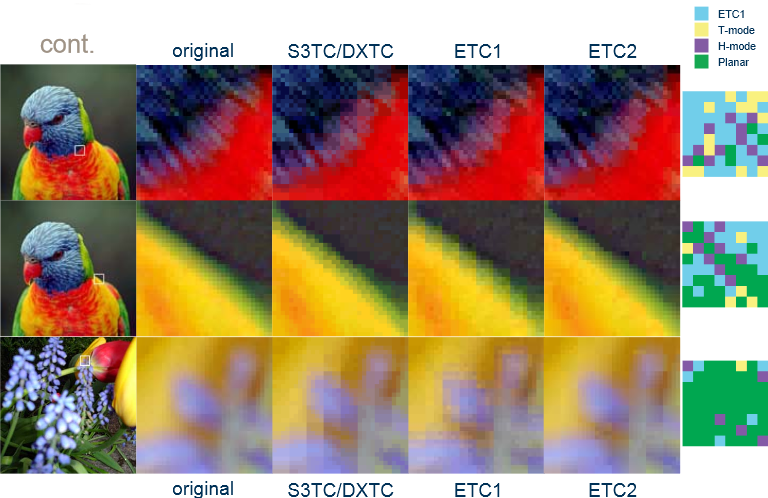
ETC2, like ETC1, works with 4x4 pixel blocks, but a specific compression algorithm is selected for each block - regular ETC1 or one of three additional algorithms.
As a result, ETC2 turned out to be a very balanced compression algorithm, which allows both to preserve the sharpness of the borders in some blocks, and not distort the smooth gradients in others.
Here is an example of compressing various images from documents:
Initialization of OpenGL ES 3.0 in Android 4.3 does not require any additional manipulations. You should create a normal OpenGL ES 2.0 context. If the GPU supports OpenGL ES 3.0, then Android will automatically create an OpenGL ES 3.0 context that is fully backward compatible with OpenGL ES 2.0. That is, on Android 4.3, all applications using OpenGL ES 2.0 actually work with OpenGL ES 3.0. In order to make sure that the resulting context is 3.0, you should check the GL_VERSION line. Sample code from Android 4.3 source: android.googlesource.com/platform/frameworks/base/+/android-4.3_r0.9/libs/hwui/Extensions.cpp
Thanks Romain Guy for this and other explanations about using OpenGL ES 3.0 per day Release 4.3: plus.google.com/u/0/+RomainGuy/posts/iJmTjpUfR5E
Example Java code:
Here, perhaps, it makes sense to explain why we do not care about the delay in updating the Nexus 7 to Android 4.3. The fact is that nVidia Tegra 2/3 chips do not support OpenGL ES 3.0. Unfortunately, even Tegra 4 does not support it. nVidia simply continues to push its desktop solutions into mobile chips, and their marketing department successfully pushes this lagging solution. What is the rather ridiculous excuse for this in Tegra 4 Whitepaper, page 11: www.nvidia.com/docs/IO/116757/Tegra_4_GPU_Whitepaper_FINALv2.pdf They admit that the chip does not support the full specification of ES 3.0, and openly say that anyway “we we don't expect apps / games to use ES 3.0 anytime soon. ” Surprise - Android 4.3 itself uses OpenGL ES 3.0.
Although nVidia is not going to expand the current chips to support ES 3.0, Tegra 5 will already support it: www.ubergizmo.com/2013/07/nvidia-tegra-5-release-date-specs-news
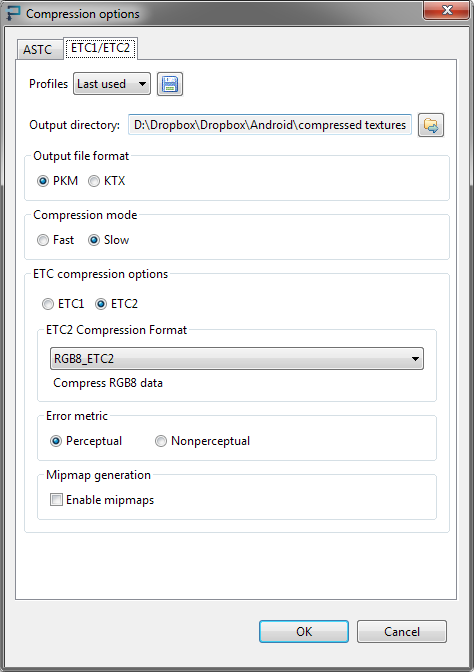
To create ETC2 textures, the Mali Texture Compression Tool was used: malideveloper.arm.com/develop-for-mali/mali-gpu-texture-compression-tool . To obtain the best quality of textures, the compression method “Slow” and Error Metric “Perceptual” were used.
Below are images for comparing the compression quality of ETC1 and ETC2, as well as the difference between the original and compressed image, reinforced 4 times for clarity.
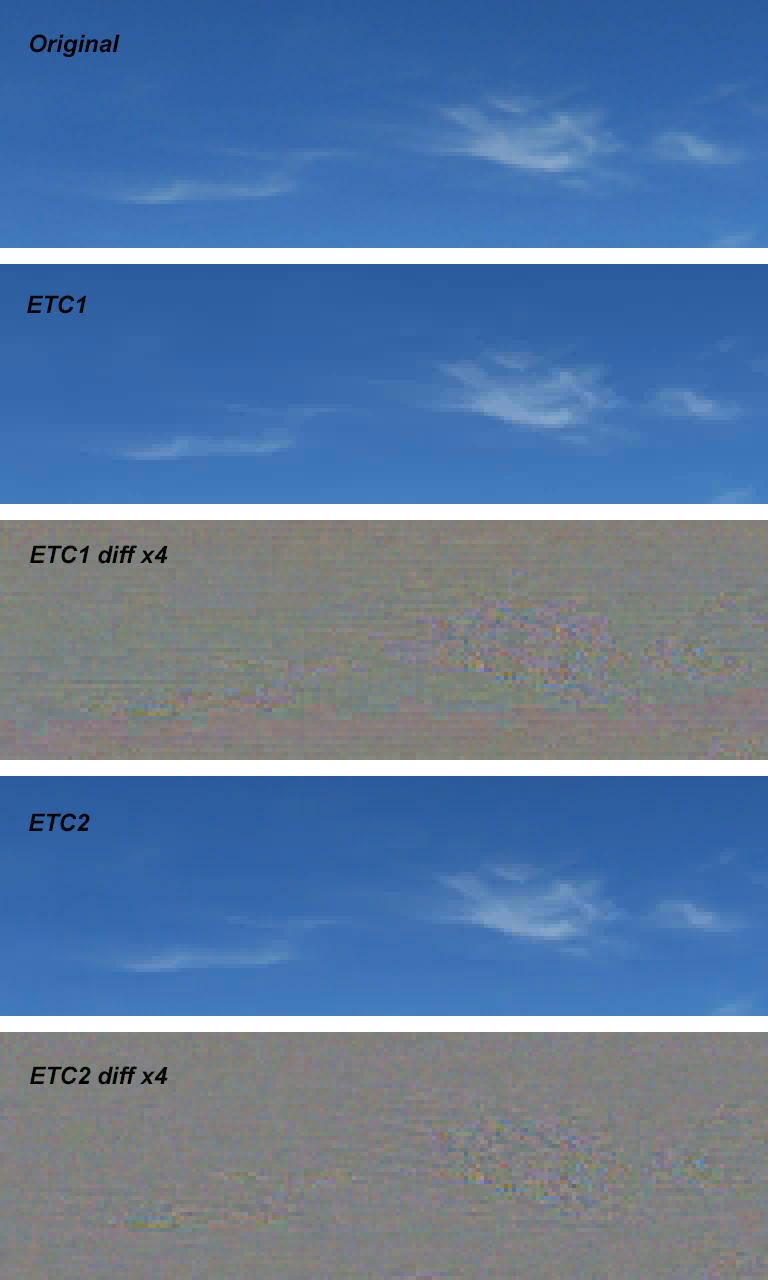
When texture is compressed in ETC1, artifacts are visible in the form of horizontal (especially clearly visible) and vertical stripes. When ETC2 is compressed, these artifacts are practically absent.
In our live wallpapers on sections of scenes for which texture quality is critical, uncompressed textures are used. As you can see in the comparative image, ETC1 introduces the most noticeable distortions in textures with smooth gradients - compression artifacts caused by the compression feature of 4x4 pixel squares become clearly visible. Therefore, for the sky we apply textures without compression, and they take up a lot of space - because their size is 2048x512. Compression in the PVRTC format also gives a fairly good quality of textures, but is only available on PowerVR chips. Application of the standard ETC2 format for ES 3.0 made it possible to achieve acceptable texture quality while reducing the amount of video memory allocated for the texture by 4 times:
For texture 2048x512:
Uncompressed (565 16-bit color - 2 bytes per pixel): 2 * 2048 * 512 = 2097152 // 2 MB of data
Compressed (16 bytes - PKM header): 524304-16 = 524288 // 512 kB of data.
The texture is loaded from the .pkm file. The same format is used to store ETC1 textures. The format of the header is described here: forums.arm.com/index.php?/topic/15835-pkm-header-format
Decided not to try to load the ETC2 textures using ETC1Util, as it has a validation header.
Code for loading textures:
Thus, with the context of ES 3.0, the ETC2 texture will load, and in ES 2.0 mode, the usual uncompressed texture will be loaded.
Of course, to access the GLES30 class, you need to set android: targetSdkVersion = "18" in the application manifest and target = android-18 in project.properties.
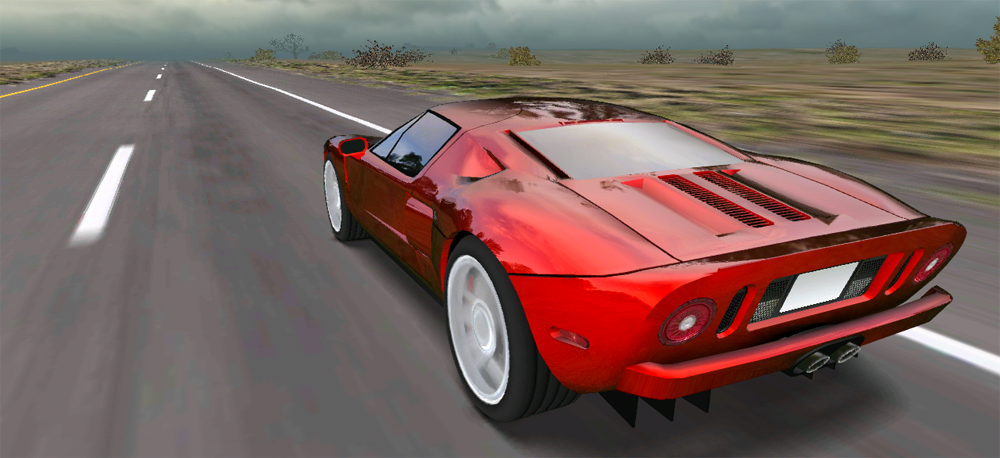
In the application, the difference between the uncompressed texture (without distortion) and ETC2 is not noticeable: The application is available at: play.google.com/store/apps/details?id=org.androidworks.livewallpapercarfree
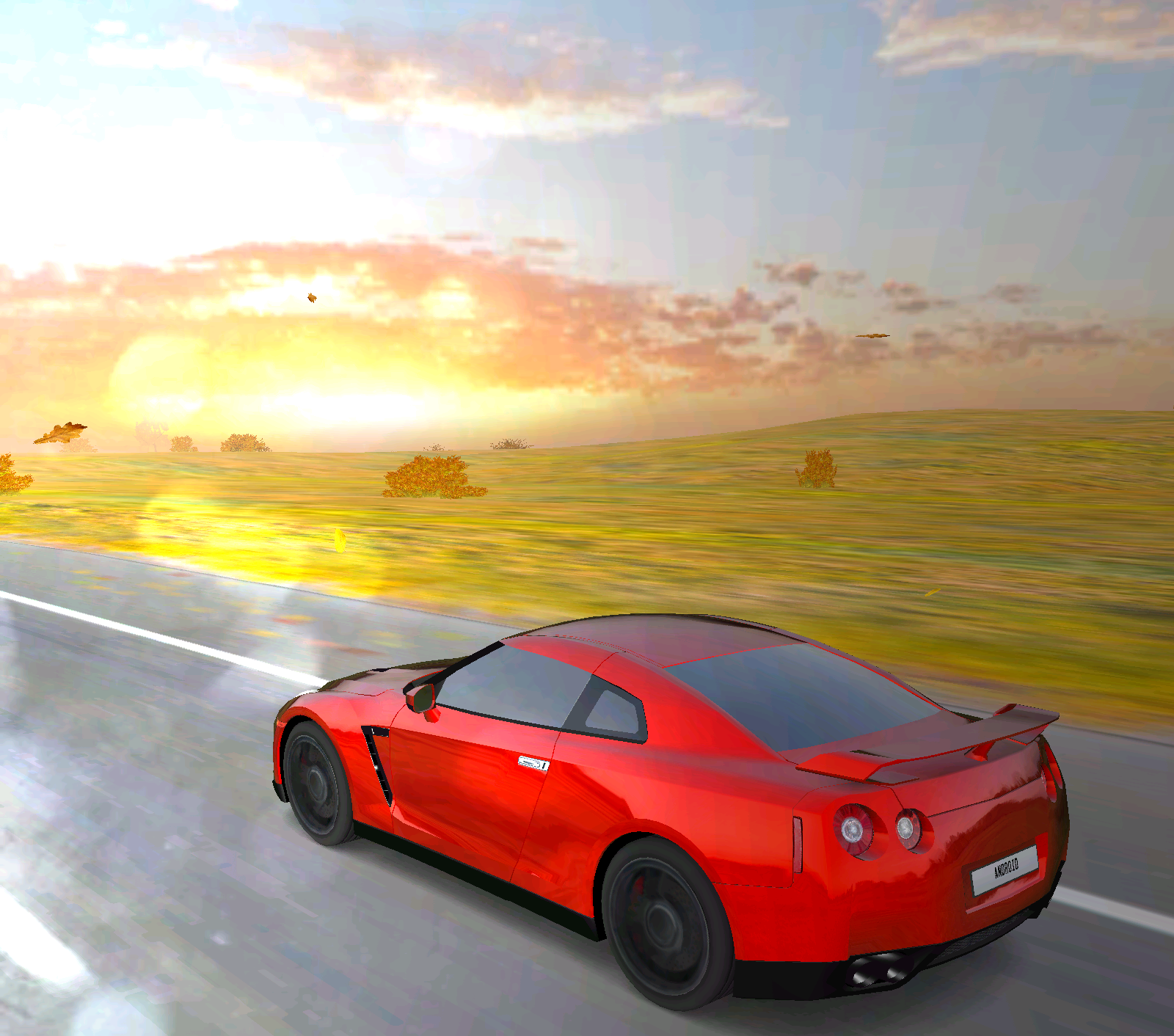
We always try to use the new features of each new version of Android to optimize performance and expand capabilities. In particular, the wallpaper also supports work in the screen saver mode - daydream. Although the article turned out to be not large enough, I hope that our modest experience in using ETC2 can be useful to someone to optimize their applications.
If someone installed a leaked firmware 4.3 for Samsung Galaxy S4, please check the operation of this application on this device.
And on Friday night OTA updates came simultaneously to two of our devices - Nexus 4 and Nexus 10. Nexus 7 did not receive the update yet on 4.3, but this does not upset us at all (why - I will explain later). Of course, hands combed this good to try.
Introduction - what's new in OpenGL ES 3.0
The new version of OpenGL ES 3.0 has a number of new features that I won’t list, you can learn about them from the documentation here: www.khronos.org/opengles/3_X
and in a short press release here: www.khronos.org/news/ press / khronos-releases-opengl-es-3.0-specification
In this article, we’ll touch upon the simplest and fastest application feature of OpenGL ES 3.0 - the new standard texture compression format ETC2.
ETC2
The ETC2 compression format was developed based on ETC1 and its operating principle is based on the bit sequences not used in ETC1. In order to understand the genius of how you managed to expand ETC1 to ETC2, you should read these documents:
description of the compression algorithm: www.jacobstrom.com/publications/StromPetterssonGH07.pdf
and description of the ETC2 format: www.graphicshardware.org/previous/www_2007/presentations /strom-etc2-gh07.pdf
ETC2, like ETC1, works with 4x4 pixel blocks, but a specific compression algorithm is selected for each block - regular ETC1 or one of three additional algorithms.
As a result, ETC2 turned out to be a very balanced compression algorithm, which allows both to preserve the sharpness of the borders in some blocks, and not distort the smooth gradients in others.
Here is an example of compressing various images from documents:
Initialization of OpenGL ES 3.0
Initialization of OpenGL ES 3.0 in Android 4.3 does not require any additional manipulations. You should create a normal OpenGL ES 2.0 context. If the GPU supports OpenGL ES 3.0, then Android will automatically create an OpenGL ES 3.0 context that is fully backward compatible with OpenGL ES 2.0. That is, on Android 4.3, all applications using OpenGL ES 2.0 actually work with OpenGL ES 3.0. In order to make sure that the resulting context is 3.0, you should check the GL_VERSION line. Sample code from Android 4.3 source: android.googlesource.com/platform/frameworks/base/+/android-4.3_r0.9/libs/hwui/Extensions.cpp
Thanks Romain Guy for this and other explanations about using OpenGL ES 3.0 per day Release 4.3: plus.google.com/u/0/+RomainGuy/posts/iJmTjpUfR5E
Example Java code:
        protected int mOpenGLVersionMajor;
        protected int mOpenGLVersionMinor;
    String strGLVersion = GLES20.glGetString(GLES20.GL_VERSION);
        if (strGLVersion != null) {
         Scanner scanner = new Scanner(strGLVersion);
            scanner.useDelimiter("[^\\w']+");
            int i = 0;
            while (scanner.hasNext()) {
                if (scanner.hasNextInt()) {
                    if (i == 0) {
                        mOpenGLVersionMajor = scanner.nextInt();
                        i++;
                    }
                    if (i == 1) {
                        mOpenGLVersionMinor = scanner.nextInt();
                        i++;
                    }
                }
                if (scanner.hasNext()) {
                    scanner.next();
                }
            }
        }
    protected Boolean isES2() {
        return mOpenGLVersionMajor == 2;
    }
    protected Boolean isES3() {
        return mOpenGLVersionMajor == 3;
    }
nVidia
Here, perhaps, it makes sense to explain why we do not care about the delay in updating the Nexus 7 to Android 4.3. The fact is that nVidia Tegra 2/3 chips do not support OpenGL ES 3.0. Unfortunately, even Tegra 4 does not support it. nVidia simply continues to push its desktop solutions into mobile chips, and their marketing department successfully pushes this lagging solution. What is the rather ridiculous excuse for this in Tegra 4 Whitepaper, page 11: www.nvidia.com/docs/IO/116757/Tegra_4_GPU_Whitepaper_FINALv2.pdf They admit that the chip does not support the full specification of ES 3.0, and openly say that anyway “we we don't expect apps / games to use ES 3.0 anytime soon. ” Surprise - Android 4.3 itself uses OpenGL ES 3.0.
Although nVidia is not going to expand the current chips to support ES 3.0, Tegra 5 will already support it: www.ubergizmo.com/2013/07/nvidia-tegra-5-release-date-specs-news
Create Compressed Textures
To create ETC2 textures, the Mali Texture Compression Tool was used: malideveloper.arm.com/develop-for-mali/mali-gpu-texture-compression-tool . To obtain the best quality of textures, the compression method “Slow” and Error Metric “Perceptual” were used.
Below are images for comparing the compression quality of ETC1 and ETC2, as well as the difference between the original and compressed image, reinforced 4 times for clarity.
When texture is compressed in ETC1, artifacts are visible in the form of horizontal (especially clearly visible) and vertical stripes. When ETC2 is compressed, these artifacts are practically absent.
In our live wallpapers on sections of scenes for which texture quality is critical, uncompressed textures are used. As you can see in the comparative image, ETC1 introduces the most noticeable distortions in textures with smooth gradients - compression artifacts caused by the compression feature of 4x4 pixel squares become clearly visible. Therefore, for the sky we apply textures without compression, and they take up a lot of space - because their size is 2048x512. Compression in the PVRTC format also gives a fairly good quality of textures, but is only available on PowerVR chips. Application of the standard ETC2 format for ES 3.0 made it possible to achieve acceptable texture quality while reducing the amount of video memory allocated for the texture by 4 times:
For texture 2048x512:
Uncompressed (565 16-bit color - 2 bytes per pixel): 2 * 2048 * 512 = 2097152 // 2 MB of data
Compressed (16 bytes - PKM header): 524304-16 = 524288 // 512 kB of data.
Loading ETC2 Textures
The texture is loaded from the .pkm file. The same format is used to store ETC1 textures. The format of the header is described here: forums.arm.com/index.php?/topic/15835-pkm-header-format
Decided not to try to load the ETC2 textures using ETC1Util, as it has a validation header.
Code for loading textures:
    protected int loadETC2Texture(String filename, int compression, Boolean bClamp, Boolean bHighQuality) {
        int[] textures = new int[1];
        GLES20.glGenTextures(1, textures, 0);
        int textureID = textures[0];
        GLES20.glBindTexture(GLES20.GL_TEXTURE_2D, textureID);
        if (bHighQuality) {
            GLES20.glTexParameterf(GLES20.GL_TEXTURE_2D, GLES20.GL_TEXTURE_MIN_FILTER, GLES20.GL_LINEAR);
            GLES20.glTexParameterf(GLES20.GL_TEXTURE_2D, GLES20.GL_TEXTURE_MAG_FILTER, GLES20.GL_LINEAR);
        } else {
            GLES20.glTexParameterf(GLES20.GL_TEXTURE_2D, GLES20.GL_TEXTURE_MIN_FILTER, GLES20.GL_NEAREST);
            GLES20.glTexParameterf(GLES20.GL_TEXTURE_2D, GLES20.GL_TEXTURE_MAG_FILTER, GLES20.GL_LINEAR);
        }
        if (bClamp) {
            GLES20.glTexParameteri(GLES20.GL_TEXTURE_2D, GLES20.GL_TEXTURE_WRAP_S, GLES20.GL_CLAMP_TO_EDGE);
            GLES20.glTexParameteri(GLES20.GL_TEXTURE_2D, GLES20.GL_TEXTURE_WRAP_T, GLES20.GL_CLAMP_TO_EDGE);
        } else {
            GLES20.glTexParameteri(GLES20.GL_TEXTURE_2D, GLES20.GL_TEXTURE_WRAP_S, GLES20.GL_REPEAT);
            GLES20.glTexParameteri(GLES20.GL_TEXTURE_2D, GLES20.GL_TEXTURE_WRAP_T, GLES20.GL_REPEAT);
        }
        InputStream is = null;
        try {
            is = mWallpaper.getContext().getAssets().open(filename);
        } catch (IOException e1) {
            e1.printStackTrace();
        }
        try {
            byte[] data = readFile(is);
            ByteBuffer buffer = ByteBuffer.allocateDirect(data.length).order(ByteOrder.LITTLE_ENDIAN);
            buffer.put(data).position(PKM_HEADER_SIZE);
            ByteBuffer header = ByteBuffer.allocateDirect(PKM_HEADER_SIZE).order(ByteOrder.BIG_ENDIAN);
            header.put(data, 0, PKM_HEADER_SIZE).position(0);
            int width = header.getShort(PKM_HEADER_WIDTH_OFFSET);
            int height = header.getShort(PKM_HEADER_HEIGHT_OFFSET);
            GLES20.glCompressedTexImage2D(GLES20.GL_TEXTURE_2D, 0, compression, width, height, 0, data.length - PKM_HEADER_SIZE, buffer);
            checkGlError("Loading of ETC2 texture; call to glCompressedTexImage2D()");
        } catch (Exception e) {
            Log.w(TAG, "Could not load ETC2 texture: " + e);
        } finally {
            try {
                is.close();
            } catch (IOException e) {
                // ignore exception thrown from close.
            }
        }
        return textureID;
    }
...
if (isES3()) {
    textureID = loadETC2Texture("textures/etc2/sky1.pkm", GLES30.GL_COMPRESSED_RGB8_ETC2, false, false);
} else {
    textureID = loadTexture("textures/sky1.png");
}
...
Thus, with the context of ES 3.0, the ETC2 texture will load, and in ES 2.0 mode, the usual uncompressed texture will be loaded.
Of course, to access the GLES30 class, you need to set android: targetSdkVersion = "18" in the application manifest and target = android-18 in project.properties.
Result
In the application, the difference between the uncompressed texture (without distortion) and ETC2 is not noticeable: The application is available at: play.google.com/store/apps/details?id=org.androidworks.livewallpapercarfree

Conclusion
We always try to use the new features of each new version of Android to optimize performance and expand capabilities. In particular, the wallpaper also supports work in the screen saver mode - daydream. Although the article turned out to be not large enough, I hope that our modest experience in using ETC2 can be useful to someone to optimize their applications.
PS
If someone installed a leaked firmware 4.3 for Samsung Galaxy S4, please check the operation of this application on this device.