
 June 13, 2013 at 15:54
Using tablets and smartphones to work with Dell

The rapid development of mobile technologies, which we have been observing over the past few years, has led to the fact that many modern tablets are no longer inferior to the average laptops bought 3-4 years ago, often even ahead of the latter in many respects. The performance of smartphone phones is also growing every year, and most devices of this class have long been transformed from simple dialers to multifunctional combines that can solve a huge number of different tasks that are relevant to the user.
A few years ago, Intel proposed an interesting approach to corporate policy, in which employees of enterprises were given the opportunity to use their personal devices for work. Almost immediately, this idea was picked up by other major players, the policy was called BYOD (“Bring your own device”). The introduction of the BYOD concept required close attention to security issues, but this approach provided more mobility for employees, allowing them to use working and free time much more efficiently.
In this article, we will talk about some of Dell's solutions that will help implement BYOD policy, as well as talk about the features of the concept itself.
A bit about BYOD policy
Nowadays, almost every high school student has an advanced smartphone with a powerful, at least dual-core processor, built-in camera and a bunch of applications on board. After leaving school and entering a higher educational institution, “personal animals” like a tablet and a smartphone remain nearby, and, at the time of graduation, young people get so used to using their gadgets (not only for entertainment but also for studying) that it’s possible to use the same devices and at work looks very attractive to them. Modern youth, whether they are high school students or students, glide through life so quickly that mobility when working in a new workplace seems quite natural to them.
More mobility and freedom is precisely what the BYOD policy provides, which we will discuss below. According to the results of statistical studies by Gartner in 2013, Russia, Brazil, India and a number of other actively developing countries are now at the peak of the development of the BYOD trend. You can verify this by viewing the infographics below (some of the pictures are hidden under spoilers, the language of infographics is English).

More infographics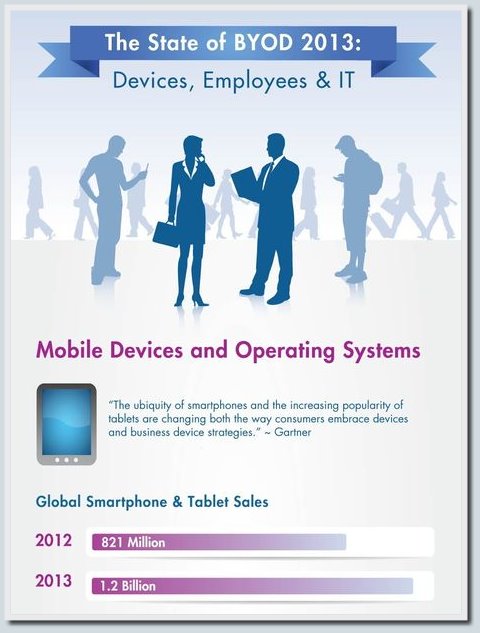


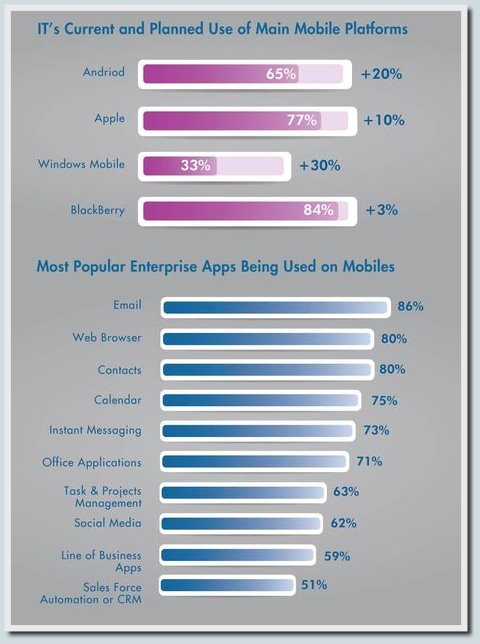
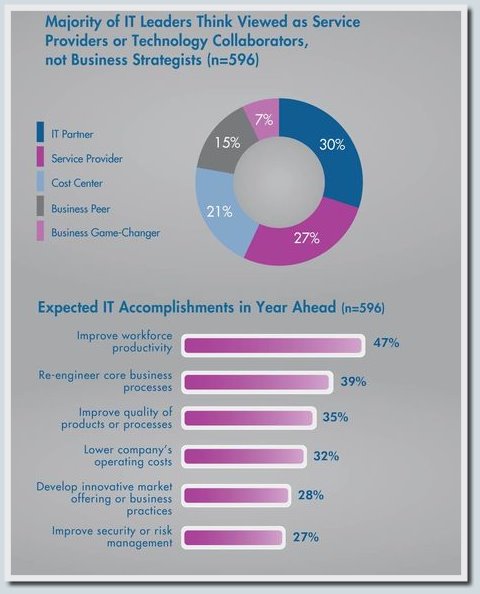
Sources of information: Gartner, Ovum, Yankee Group, ISACA, Cisco IBSG, Vodafone and IDG


Sources of information: Gartner, Ovum, Yankee Group, ISACA, Cisco IBSG, Vodafone and IDG
Dell infographics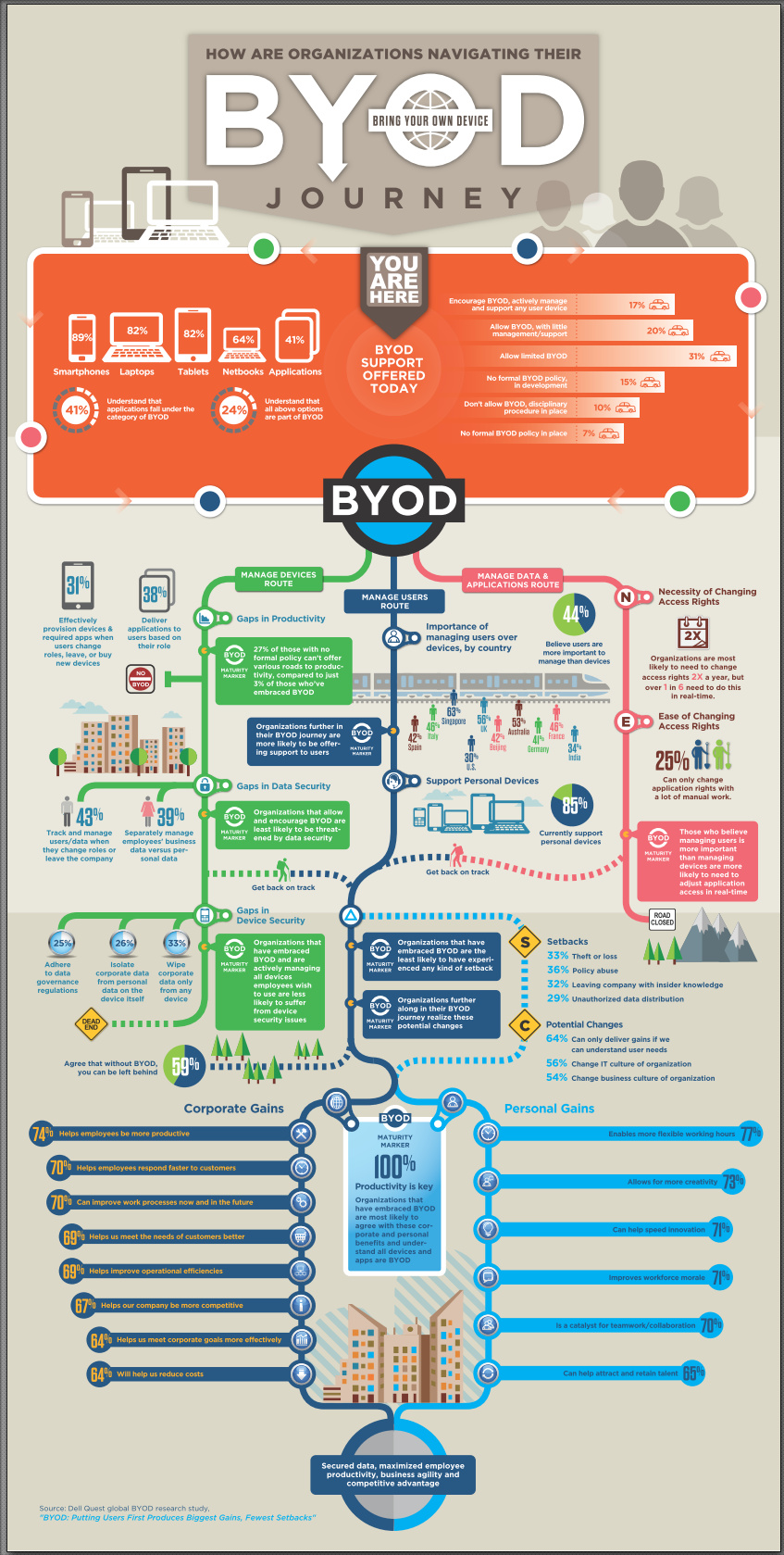

Now let's talk a little about the BYOD concept itself. Implementation of this approach requires careful planning and a lot of attention to security issues, but the bonuses that individual employees and the entire company receive in this way more than pay for the time, money and other resources spent on this task.
Here is a short list of issues that you should pay attention to when planning activities related to the implementation of BYOD:
- The number of mobile devices that will be connected to the enterprise network;
- Maintaining a balance between the security of business information and maintaining the confidentiality of personal user data;
- Using encryption and cloud solutions;
- Preferential terms for the purchase of gadgets, partial payment for the cost of the device, as well as phone calls and Internet access at the expense of the company;
- The list of supported devices, supplemented by information on the minimum requirements for software and hardware, should be available to employees;
- It is necessary to provide a procedure in case of loss of the device or dismissal of an employee.
The main gain in the case of using BYOD policy is a comfortable working environment for employees and the ability to work remotely. The company can also save a significant amount of money by reducing the cost of buying gadgets and their maintenance (however, in case of loss or breakdown of the device, a number of devices should be available for "hot swap"). The experience of a large number of enterprises shows that the implementation of the proposed concept also makes it possible to offload the support service due to the active assistance of employees to each other in setting up similar devices. Of the additional costs, the development of the BYOD strategy, the introduction of additional elements of the IT infrastructure, as well as the maintenance of the reserve of mobile devices can be noted.
One of the options for introducing BYOD corporate policy is to enable employees to select from the list of supported devices those devices that are suitable specifically for them. Dell offers a wide range of devices that fit perfectly into the new concept, in particular, laptops, ultrabooks and tablets from the Latitude and XPS series . In our blog, Sergey Villanov already talked about ultrabooks XPS 12 , XPS 13 , as well as the Dell Latitude 10 tablet . These devices integrate very well with other solutions from Dell and, in addition, allow you to fully utilize all the advantages of the Bring your own device strategy.
You can read more about BYOD policy in an article by Karen Ferris published in the Official Magazine of the IT Service Management Forum. Read the Russian version of the article “BYOD - four letters from which CIOs flee in a panic” by the same author at this link .
Wyse PocketCloud - secure data exchange between devices of different classes with the ability to store files in the cloud

Dell offers several elegant solutions that enable you to remotely access your computer or laptop with Windows and Mac OS X on board from your mobile gadgets. One such solution is PocketCloud Remote Desktop Pro . Thanks to this application, you can get remote access to both your files and images, as well as to the programs installed on your computer.
Available versions of the program for iOS and Android (at least version 2.1), it is possible to connect to computers and laptops with Windows 8, Windows 7, Windows Vista, Windows XP, Windows Server 2003, Windows Server 2008, as well as Mac OS X 10.6 and Mac OS X 10.7 on board.
The application is optimized for use on smartphones and tablets, has full multitasking support, an advanced accurate and responsive touchpad for mouse and keyboard. The on-screen keyboard activates automatically when it is needed. RDP specifications are automatically updated to the latest versions. Application security is ensured by 128-bit data encryption.
The strengths of PocketCloud Remote Desktop, as well as features of the application settings are actively discussed on the w3bsit3-dns.com forum, additional information about the intricacies of this program can be found in the official wiki .
We also recommend that you pay attention to the PocketCloud Explore and PocketCloud Web applications .also developed by Dell's Wyse division. The first application makes it possible to copy information from mobile devices to computers and vice versa, use the cloud, and, in addition to the burden of supporting gadgets on Android and iOS, it can also work with tablets on Windows 8. The second application is a web-based management interface, with which you can copy the necessary files and folders from your computer to the cloud and vice versa.
Enterproid divide - share personal and workspace
Another useful solution within the BYOD concept makes it possible to use a mobile device both for work and leisure, protecting the employer from the private information of employees and at the same time maintaining a high level of security for corporate data.
Divide creates two isolated profiles on devices based on Android and iOS, separating the necessary for work from personal applications. This platform was already mentioned on Habré , we will try to slightly supplement what was written. Enterproid's solution supports tablets and smartphones with Android older than version 2.2 on board, as well as Apple devices with an operating system version no lower than iOS6.
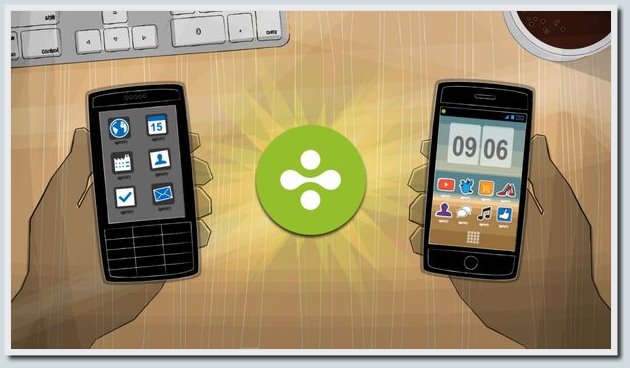
All information inside the corporate profile of the gadget is encrypted using the symmetric AES block encryption algorithm with a 256-bit key.
In this solution, the system administrator via the web interface can remotely install business applications, manage security policies, determine the coordinates of the device, and also “clean” the corporate profile of the device in case of loss of the device. The corporate profile of the device is connected to the cloud via a VPN; user applications from the personal profile connect directly to the Internet. The system administrator does not have access to the personal profile of the device.
Among the strengths of Divide, I would like to note a quick switch between applications from a personal and corporate profile, as well as good prospects for further improving the platform security already at the hardware level thanks to the close cooperation between Enterproid and Qualcomm. In particular, the teams of both companies are actively working on using the capabilities of TrustZone technology for even more secure separation of Divide profiles in Android tablets and smartphones. Last year's news that AMD is also adopting TrustZone technology , gradually expanding its sphere of interests in the direction of mobile devices, also gives reason to rejoice.
Read more about the Divide platform below under the spoiler:
Interview with the creators of Enterproid divide - Andrew Toy and Alexander Trewby
In order to better understand the technology, it will be useful to watch a video interview with Enterproid CEO - Andrew Toy :
and also read a text version of an interview with one of the creators of Divide for Computer Business Review: Q&A: Enterproid's CCO & co-founder Alexander Trewby
In addition to the approach proposed by Enterproid for secure access to corporate data from mobile devices, some large companies also use the so-called MDM- solutions ( Mobile device management ). However, in applications of this type, the ability to install applications for personal use is severely limited, in this case only programs for business are available. In addition, all user actions are actively monitored by a team of IT administrators, without leaving even a small piece of personal space, and this contradicts the BYOD policy.
Another possible solution that could help ensure the security of business information on mobile devices is virtualization. But the need for a hypervisor, as well as high requirements for the hardware of the devices make it impossible to use it for most devices at this stage of technology development. On Habré already wrote about the achievements of students of the Academic University of St. Petersburg in the field of virtualization of devices based on Android ( part 1 , part 2 ), but there is still far from the final stage of development.
Enterproid’s Divide is currently the best solution in the BYOD concept for Android and iOS mobile devices. Read more about the features of this platform in the article."Implementing Your BYOD Mobility Strategy . " For more information about the nuances of running iOS gadgets with WiFi, see the habrasti “Wi-Fi features in Apple iOS and the implications for corporate networks . ”
and also read a text version of an interview with one of the creators of Divide for Computer Business Review: Q&A: Enterproid's CCO & co-founder Alexander Trewby
In addition to the approach proposed by Enterproid for secure access to corporate data from mobile devices, some large companies also use the so-called MDM- solutions ( Mobile device management ). However, in applications of this type, the ability to install applications for personal use is severely limited, in this case only programs for business are available. In addition, all user actions are actively monitored by a team of IT administrators, without leaving even a small piece of personal space, and this contradicts the BYOD policy.
Another possible solution that could help ensure the security of business information on mobile devices is virtualization. But the need for a hypervisor, as well as high requirements for the hardware of the devices make it impossible to use it for most devices at this stage of technology development. On Habré already wrote about the achievements of students of the Academic University of St. Petersburg in the field of virtualization of devices based on Android ( part 1 , part 2 ), but there is still far from the final stage of development.
Enterproid’s Divide is currently the best solution in the BYOD concept for Android and iOS mobile devices. Read more about the features of this platform in the article."Implementing Your BYOD Mobility Strategy . " For more information about the nuances of running iOS gadgets with WiFi, see the habrasti “Wi-Fi features in Apple iOS and the implications for corporate networks . ”
PowerConnect ClearPass W Series - Dell's Complete Hardware and Software Solution

Dell, in addition to software solutions that help implement the BYOD concept, as well as high-quality gadgets that fit into this corporate policy, offers several integrated solutions that provide secure access to business information from mobile devices. One such solution is the PowerConnect ClearPass W-Series , which we'll talk about below.
This comprehensive product provides a high level of protection and scalability, and also makes it possible to integrate a wide variety of devices with Windows, Mac OS X, Android and iOS on board into the corporate network.
The intuitive and user-friendly interface of the PowerConnect W ClearPass100 and PowerConnect W ClearPass2500 allows employees without technical training to easily provide guest access or access for personal devices, as well as manage without affecting the integrity of the network and without overloading the IT technical support service.
Technical specifications of servers, as well as detailed information on the capabilities of this integrated solution from Dell, read below under the spoiler:
PowerConnect W ClearPass100 and PowerConnect W ClearPass2500 - specifications and functionality
Security and scalability:
Functionality related to guest access:
In addition to this, for devices connected within BYOD, you can fine-tune user group profiles depending on the devices used, running applications and their location. It is possible to remotely clean corporate information from the gadgets used to work if they are lost.
The technical characteristics of the two configurations of the considered solution are given below in table form.
Read more about the PowerConnect ClearPass W-Series on the official website .
- Each user is given a unique username and password. The solution provides easy integration with existing Active Directory directories.
- For guest and device accounts, the built-in Remote Authentication Dial-In User Service ( RADIUS ) database is used .
- The integration of the short message service (SMS) allows you to send security keys for wireless communication on an additional channel out of range, so you get scalable guest access with encryption.
- High scalability in the range from 50 to several thousand users provides great opportunities for the development of the company. By purchasing the necessary license for the end user, you can use it as a basis for building functionality.
- The PowerConnect ClearPass W-Series supports backing up all or individual configuration components and reports in real time or on a scheduled schedule, including when using file sharing based on FTP, FTP-over-SSL and SMB protocols.
- It is possible to delete or automatically expire temporary accounts.
- The activity of guest accounts, as well as employees providing all cases of guest access, can be monitored by creating reports.
Functionality related to guest access:
- Easy-to-use portal for self-registration.
- Support for various popular devices with guest client access, as well as personal devices: from multimedia phones to laptops, tablets and desktop computers.
- The ability to assign different access privileges for different types of users.
- Customizable login pages allowing you to use your brand and create a unique user experience.
In addition to this, for devices connected within BYOD, you can fine-tune user group profiles depending on the devices used, running applications and their location. It is possible to remotely clean corporate information from the gadgets used to work if they are lost.
The technical characteristics of the two configurations of the considered solution are given below in table form.
| PowerConnect W ClearPass100 | PowerConnect W ClearPass2500 | |
|---|---|---|
| PERFORMANCE | ||
| Maximum number of concurrently connected visitors | 5,000 | 25,000 |
| CPU | Two Quad-Core Intel Xeon 2.66 GHz X3450 | Two Quad-Core Intel Xeon 2.66 GHz X5650 |
| Memory | 8 GB | 48 GB |
| Hard disks | Two 3.5-inch SATA hard drives with a capacity of 250 GB (7,200 rpm) | Four hot-swappable 2.5-inch 300 GB SAS drives (10,000 rpm) |
| PERC RAID ( info ) | RAID-1 controller PERC H200 | PERC 6 / I SAS RAID Controller |
| Ports | Four USB 2.0 ports, one serial port, two video connectors | Four USB 2.0 ports, one serial port, two video connectors |
| HOUSING | ||
| Rack mount: Rack mount housing with 1U form factor, slide rails included | + | + |
| Dimensions (Depth x Width x Height) | 39.37 x 43.1 x 4.26 cm | 77.2 x 48.24 x 4.26 cm |
| Weight (unpacked) | 21.4 lbs / 9.73 kg | 39 lbs / 17.73 kg |
| It meets the requirements of RoHS | + | + |
| OPERATING CONDITIONS | ||
| Working temperature | 10 to 35 ° C (50 to 95 ° F) | 10 to 35 ° C (50 to 95 ° F) |
| Storage temperature | –40 to 65 ° C (–40 to 149 ° F) | –40 to 65 ° C (–40 to 149 ° F) |
| NUTRITION | ||
| Power Supply | One | Two |
| AC Input Voltage / Frequency | 110/220 V ~, 50/60 Hz with automatic selection | 110/220 V ~, 50/60 Hz with automatic selection |
| Maximum power consumption | 250 watts | 717 watts |
| Two Gigabit Ethernet Ports | + | + |
Read more about the PowerConnect ClearPass W-Series on the official website .
Dell KACE is another Dell end -to-end solution that enables users to incorporate gadgets into their corporate IT infrastructure. The hardware component of KACE is represented by two configurations - the Dell KACE K1000 and the Dell KACE K2000 . You can get acquainted with the software part in detail by watching videos from the Dell KACE Systems Management channel on Youtube, there you will also find reviews of the heads of IT departments of companies that already use this solution (all videos are in English).
We will tell you more about Dell KACE in our blog. And we will end our short review article about the modern concept of “Bring your own device”.
Dell still has many interesting solutions that allow you to maximize the benefits of BYOD policy, but read about them in the following articles.